tires NISSAN TEANA 2008 Service Manual
[x] Cancel search | Manufacturer: NISSAN, Model Year: 2008, Model line: TEANA, Model: NISSAN TEANA 2008Pages: 5121, PDF Size: 69.03 MB
Page 1 of 5121
MODEL J32 SERIES
© 2008 NISSAN INTERNATIONAL SA
Allrightsreserved.NopartofthisElectronicServiceManualmaybereproducedorstoredinaretrievalsystem,ortransmittedinanyform,or by any means, electronic, mechanical, photocopying, recording or otherwise, without the prior written permission of Nissan InternationalSA, Switzerland.
AGENERALINFORMATION
BENGINE
DTRANSMISSION&DRIVELINE
ESUSPENSION
FBRAKES
GSTEERING
HRESTRAINTS
IVENTILATION,HEATER&AIRCONDITIONER
JBODYINTERIOR
KBODYEXTERIOR,DOOR,ROOF&VEHICLESECURITY
LDRIVERCONTROLS
MELECTRICAL&POWERCONTROL
NDRIVERINFORMATION&MULTIMEDIA
PMAINTENANCE
GIGeneralInformation
EMEngineMechanical
LUEngineLubricationSystem
COEngineCoolingSystem
ECEngineControlSystem
FLFuelSystem
EXExhaustSystem
STRStartingSystem
ACCAcceleratorControlSystem
TMTransaxle &Transmission
FAXFrontAxle
RAXRearAxle
FSUFrontSuspension
RSURearSuspension
WTRoadWheels &Tires
BRBrakeSystem
PBParkingBrakeSystem
BRCBrakeControlSystem
STSteeringSystem
STCSteeringControlSystem
SBSeatBelt
SRSRSAirbag
SRCSRSAirbagControlSystem
VTLVentilationSystem
HAHeater &AirConditioningSystem
HACHeater &AirConditioningControlSystem
INTInterior
IPInstrumentPanel
SESeat
ADPAutomaticDrivePositioner
DLKDoor &Lock
SECSecurityControlSystem
GWGlass &WindowSystem
PWCPowerWindowControlSystem
RFRoof
EXTExterior
MIRMirrors
EXLExteriorLightingSystem
INLInteriorLightingSystem
WWWiper &Washer
DEFDefogger
HRNHorn
PWOPowerOutlet
BCSBodyControlSystem
LANLANSystem
PCSPowerControlSystem
CHGChargingSystem
PGPowerSupply,Ground&CircuitElements
MWIMeter,WarningLamp&Indicator
WCSWarningChimeSystem
AVAudio,Visual&NavigationSystem
MAMaintenance
QUICKREFERENCEINDEX
A
B
C
D
E
F
G
H
I
J
K
L
M
N
O
P
M
Publication Number:
SM8E00-1J32E0E
Page 555 of 5121
![NISSAN TEANA 2008 Service Manual AV
NAVIGATION SYSTEM
AV-411
< FUNCTION DIAGNOSIS >[BOSE AUDIO WITH NAVIGATION]
C
D
E
F
G
H
I
J
K
L
MB A
O
P
The current vehicle position will be calculated by detecting the dis-
tance the vehicle move](/img/5/57391/w960_57391-554.png "NISSAN TEANA 2008 Service Manual AV
NAVIGATION SYSTEM
AV-411
< FUNCTION DIAGNOSIS >[BOSE AUDIO WITH NAVIGATION]
C
D
E
F
G
H
I
J
K
L
MB A
O
P
The current vehicle position will be calculated by detecting the dis-
tance the vehicle move")
AV
NAVIGATION SYSTEM
AV-411
< FUNCTION DIAGNOSIS >[BOSE AUDIO WITH NAVIGATION]
C
D
E
F
G
H
I
J
K
L
MB A
O
P
The current vehicle position will be calculated by detecting the dis-
tance the vehicle moved from the previous calculation point and its
direction.
Travel distance
Travel distance calculations are based on the vehicle speed sen-
sor input signal. Therefore, the calculation may become incorrect
as the tires wear down. To prevent this, an automatic distance cor-
rection function has been adopted.
Travel direction
Change in the travel direction of the vehicle is calculated by a gyro-
scope (angular velocity sensor) and a GPS antenna (GPS informa-
tion). They have both advantages and disadvantages.
More accurate traveling direction is detected because priorities are set for the signals from these two
devices according to the situation.
MAP-MATCHING
Map-matching compares a current location detected by the method
in the “Location Detection Principle” with a road map data from Map
DVD-ROM stored in DVD-ROM drive.
NOTE:
The road map data is based on data stored in the map DVD-ROM.
The vehicle position may not be corrected under the following circumstances and after driving for a certain
time when GPS information is difficult to receive. In this case, the vehicle mark on the display must be cor-
rected manually.
In map-matching, alternative routes to reach the destination will be
shown and prioritized, after the road on which the vehicle is cur-
rently driven has been judged and the vehicle mark has been repo-
sitioned.
Alternative routes will be shown in different order of priority, and
the incorrect road can be avoided if there is an error in distance
and/or direction.
They are of the same priority if two roads are running in parallel.
Therefore, the vehicle mark may appear on either of them alter-
nately, depending on maneuvering of the steering wheel and con-
figuration of the road.
SEL684V
Type Advantage Disadvantage
Gyroscope
(angular velocity sensor)Can detect the vehicle's turning angle quite
accurately.Direction errors may accumulate when vehicle is
driven for long distances without stopping.
GPS antenna
(GPS information)Can detect the vehicle's travel direction
(North/South/East/West).Correct direction cannot be detected when vehicle
speed is low.
SEL685V
SEL686V
Page 917 of 5121
BRAKE PIPINGBR-21
< ON-VEHICLE REPAIR >
C
DE
G H
I
J
K L
M A
B
BR
N
O P
FRONT : Removal and InstallationINFOID:0000000003811188
REMOVAL
CAUTION:
Never spill or splash brake fluid on painted surfaces. Brake fluid may seriously damage paint. Wipe it
off immediately and wash with wate r if it gets on a painted surface.
1. Remove tires.
2. Drain brake fluid. Refer to BR-9, "
Draining".
3. Loosen the flare nut with a flare nut wrenc h and separate the brake tube from the hose.
CAUTION:
Never scratch the flare nut and the brake tube.
Never bend sharply, twist or strong ly pull out the brake hoses and tubes.
Cover open end of brake tub es and hoses when disconnecting to prevent entrance of dirt.
4. Remove the union bolt and copper washers, and remove the brake hose from the brake caliper assembly.
5. Remove the lock plate and remove the brake hose.
INSTALLATION
CAUTION:
Never spill or splash brake fluid on painted surfaces. Brake fluid may seriously damage paint. Wipe it
off immediately and wash with wate r if it gets on a painted surface.
1. Assemble the union bolt and the copper washers to the brake hose. CAUTION:
Never reuse the copper washer.
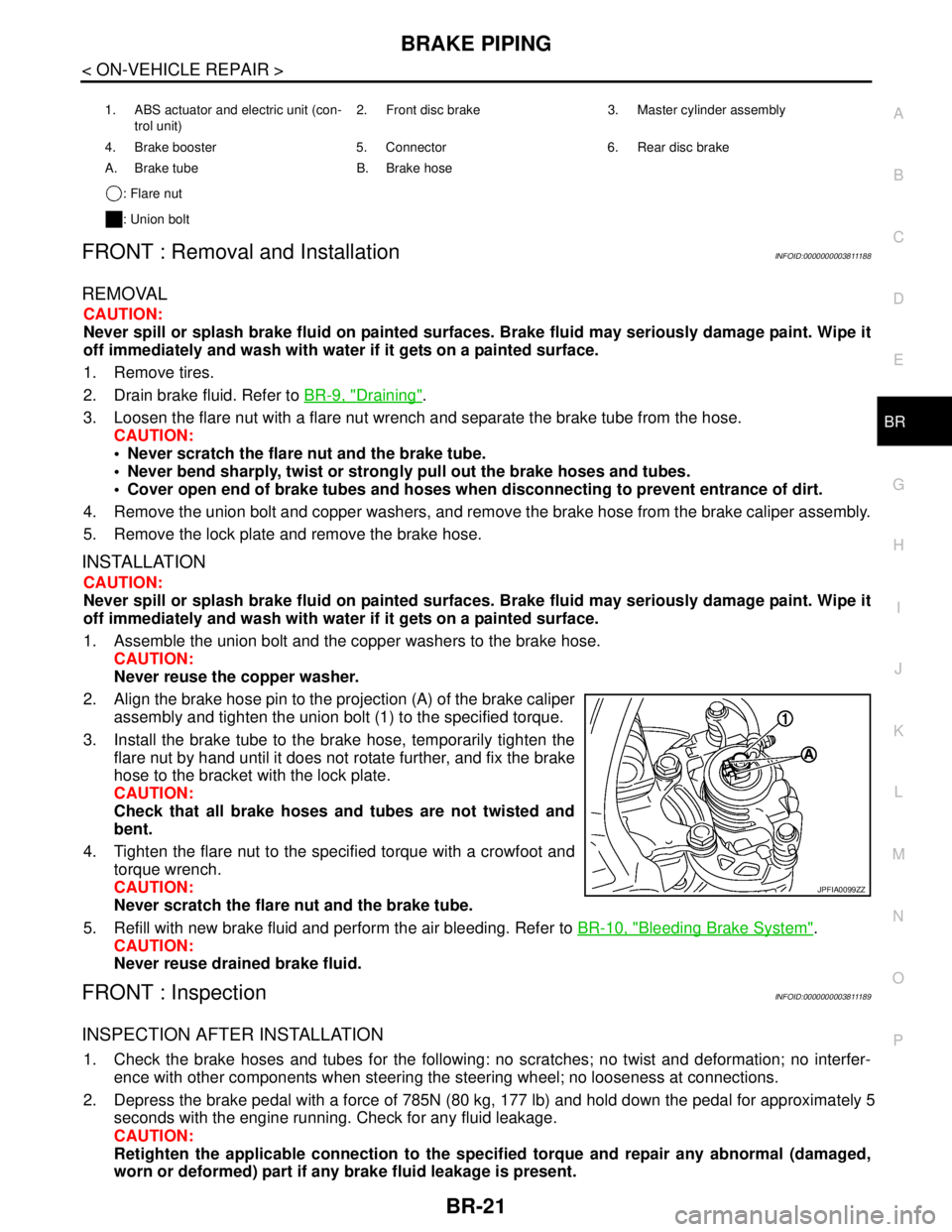
2. Align the brake hose pin to the projection (A) of the brake caliper assembly and tighten the union bolt (1) to the specified torque.
3. Install the brake tube to the brake hose, temporarily tighten the flare nut by hand until it does not rotate further, and fix the brake
hose to the bracket with the lock plate.
CAUTION:
Check that all brake hoses and tubes are not twisted and
bent.
4. Tighten the flare nut to the specified torque with a crowfoot and torque wrench.
CAUTION:
Never scratch the flare nut and the brake tube.
5. Refill with new brake fluid and perform the air bleeding. Refer to BR-10, "
Bleeding Brake System".
CAUTION:
Never reuse drained brake fluid.
FRONT : InspectionINFOID:0000000003811189
INSPECTION AFTER INSTALLATION
1. Check the brake hoses and tubes for the following: no scratches; no twist and deformation; no interfer-
ence with other components when steering the steering wheel; no looseness at connections.
2. Depress the brake pedal with a force of 785N (80 kg, 177 lb) and hold down the pedal for approximately 5
seconds with the engine running. Check for any fluid leakage.
CAUTION:
Retighten the applicable connect ion to the specified torque and repair any abnormal (damaged,
worn or deformed) part if any brake fluid leakage is present.
1. ABS actuator and electric unit (con-
trol unit) 2. Front disc brake 3. Master cylinder assembly
4. Brake booster 5. Connector 6. Rear disc brake
A. Brake tube B. Brake hose : Flare nut
: Union bolt
JPFIA0099ZZ
Page 919 of 5121

BRAKE PIPINGBR-23
< ON-VEHICLE REPAIR >
C
DE
G H
I
J
K L
M A
B
BR
N
O P
REAR : Removal and InstallationINFOID:0000000003811192
REMOVAL
CAUTION:
Never spill or splash brake fluid on painted surfaces. Brake fluid may seriously damage paint. Wipe it
off immediately and wash with wate r if it gets on a painted surface.
1. Remove tires.
2. Drain brake fluid. Refer to BR-9, "
Draining".
3. Loosen the flare nut with a flare nut wrenc h and separate the brake tube from the hose.
CAUTION:
Never scratch the flare nut and the brake tube.
Never sharply bend, twist or strongly pull the brake hoses and tubes.
Cover the open end of brake tubes and hoses wh en disconnecting to prevent entrance of dirt.
4. Remove the union bolt and copper washers, and remove the brake hose from the brake caliper assembly.
5. Remove the lock plate and remove the brake hose from the vehicle.
INSTALLATION
CAUTION:
Never spill or splash brake fluid on painted surfaces. Brake fluid may seriously damage paint. Wipe it
off immediately and wash with wate r if it gets on a painted surface.
1. Assemble the union bolt and the copper washers to the brake hose. CAUTION:
Never reuse copper washer.
2. Install the brake hose L-pin by aligning it with the brake caliper assembly positioning hole, and tighten the union bolt (1) to the
specified torque.
3. Connect the hose to the brake tube, temporarily tighten the flare nut by hand until it does not rotate further, and fix the brake hose
to the bracket with the lock plate.
CAUTION:
Check that the brake hoses and tubes are not twisted and
bent.
4. Tighten the flare nut to the specified torque with a crowfoot and torque wrench.
CAUTION:
Never scratch the flare nut and the brake tube.
5. Refill with new brake fluid and perform the air bleeding. Refer to BR-10, "
Bleeding Brake System".
CAUTION:
Never reuse drained brake fluid.
REAR : InspectionINFOID:0000000003811193
INSPECTION AFTER INSTALLATION
1. Check the brake hoses and tubes for the following: no scratches; no twist and deformation; no interfer-
ence with other components when steering the steering wheel; no looseness at connections.
2. Depress the brake pedal with a force of 785N (80
kg, 177 lb) and hold down the pedal for approximately 5
seconds with the engine running. Check for any fluid leakage.
CAUTION:
1. ABS actuator and electric unit (con- trol unit) 2. Front disc brake 3. Master cylinder assembly
4. Brake booster 5. Connector 6. Rear disc brake
A. Brake tube B. Brake hose : Flare nut
: Union bolt
JPFIA0012ZZ
Page 929 of 5121
FRONT DISC BRAKE
BR-33
< ON-VEHICLE REPAIR >
C
D
E
G
H
I
J
K
L
MA
B
BR
N
O
P
FRONT DISC BRAKE
BRAKE PAD
BRAKE PAD : Exploded ViewINFOID:0000000003811204
BRAKE PAD : Removal and InstallationINFOID:0000000003811205
REMOVAL
WARNING:
Clean any dust from the brake caliper and brake pads with a vacuum dust collector. Never blow with
compressed air.
CAUTION:
Never depress the brake pedal while removing the brake pads because the piston may pop out.
Never spill or splash brake fluid on the disc rotor.
1. Remove tires.
2. Remove lower sliding pin bolt.
3. Suspend the cylinder body with suitable wire so that the brake hose will not stretch. Then remove the
brake pads, shims and shim cover from the torque member.
CAUTION:
Never deform the pad retainer when removing the pad retainer from the torque member.
Never damage the piston boot.
Never drop the brake pads, shims, and the shim cover.
INSTALLATION
WARNING:
Clean any dust from the brake caliper and brake pads with a vacuum dust collector. Never blow with
compressed air.
CAUTION:
Never depress the brake pedal while removing the brake pads or the cylinder body because the pis-
ton may pop out.
Never spill or splash brake fluid on the disc rotor.
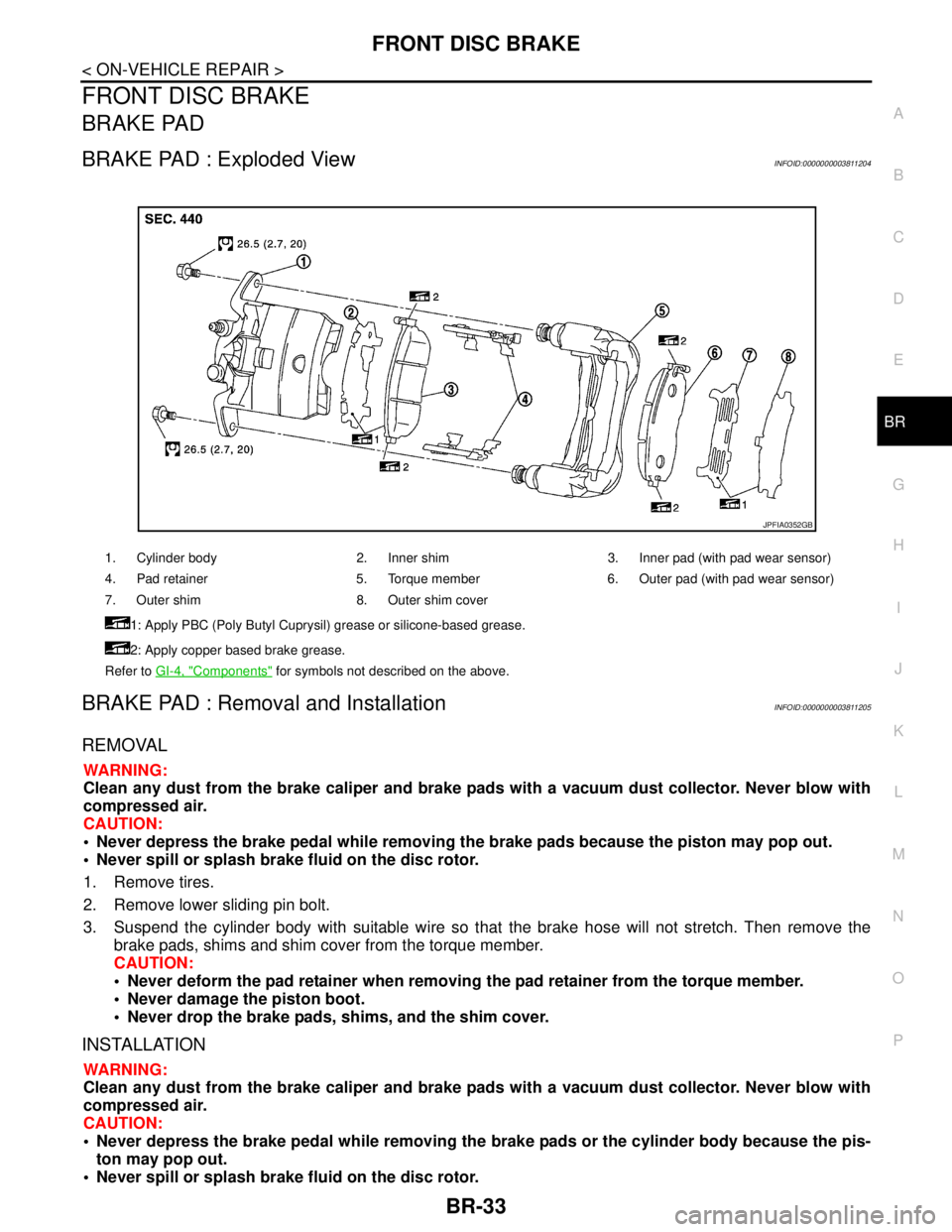
1. Cylinder body 2. Inner shim 3. Inner pad (with pad wear sensor)
4. Pad retainer 5. Torque member 6. Outer pad (with pad wear sensor)
7. Outer shim 8. Outer shim cover
1: Apply PBC (Poly Butyl Cuprysil) grease or silicone-based grease.
2: Apply copper based brake grease.
Refer to GI-4, "
Components" for symbols not described on the above.
JPFIA0352GB
Page 932 of 5121
BR-36
< ON-VEHICLE REPAIR >
FRONT DISC BRAKE
CAUTION:
Never depress the brake pedal. Brake fluid may splash while removing the brake hose.
1. Remove tires.
2. Fix the disc rotor using wheel nuts.
3. Drain brake fluid. Refer to BR-9, "
Draining".
CAUTION:
Never spill or splash brake fluid on the disc rotor.
4. Remove union bolt and copper washers, and then disconnect brake hose from caliper assembly. Refer to
BR-19, "
FRONT : Exploded View".
5. Remove torque member mounting bolts, and remove brake caliper assembly.
CAUTION:
Never drop brake pads and caliper assembly.
6. Remove disc rotor.
CAUTION:
Put matching marks on the wheel hub and bearing assembly and the disc rotor before removing
the disc rotor.
Never drop disc rotor.
INSTALLATION
WARNING:
Clean any dust from the brake caliper and brake pads with a vacuum dust collector. Never blow with
compressed air.
CAUTION:
Never depress the brake pedal. Brake fluid may splash while removing the brake hose.
1. Install disc rotor.
CAUTION:
Align the matching marks put during removal when reusing the disc rotor.
2. Install the brake caliper assembly to the vehicle and tighten the torque member mounting bolts to the
specified torque.
CAUTION:
Never spill or splash any grease and moisture on the brake caliper assembly mounting face,
threads, mounting bolts and washers. Wipe out any grease and moisture.
3. Install brake hose and copper washers to brake caliper assembly, and tighten union bolts to the specified
torque. Refer to BR-19, "
FRONT : Exploded View".
CAUTION:
Never reuse copper washer.
4. Refill with new brake fluid and perform the air bleeding. Refer to BR-10, "
Bleeding Brake System".
CAUTION:
Never reuse drained brake fluid.
Never spill or splash brake fluid on the disc rotor.
5. Check a drag of front disc brake. If any drag is found, refer to BR-38, "
BRAKE CALIPER ASSEMBLY :
Inspection".
BRAKE CALIPER ASSEMBLY : Disassembly and AssemblyINFOID:0000000003811209
DISASSEMBLY
NOTE:
Never remove the torque member and pad retainers when disassembling and assembling the cylinder body.
1. Remove the sliding pin bolts, and remove the cylinder body from the torque member.
CAUTION:
Never drop brake pads, shims, shim cover and pad retainers from torque member.
2. Remove brake pads, shims and shim cover. Refer to BR-33, "
BRAKE PAD : Exploded View".
3. Remove sliding pins and sliding pin boots from torque member.
4. Remove bushing from sliding pin.
Page 935 of 5121
REAR DISC BRAKE
BR-39
< ON-VEHICLE REPAIR >
C
D
E
G
H
I
J
K
L
MA
B
BR
N
O
P
REAR DISC BRAKE
BRAKE PAD
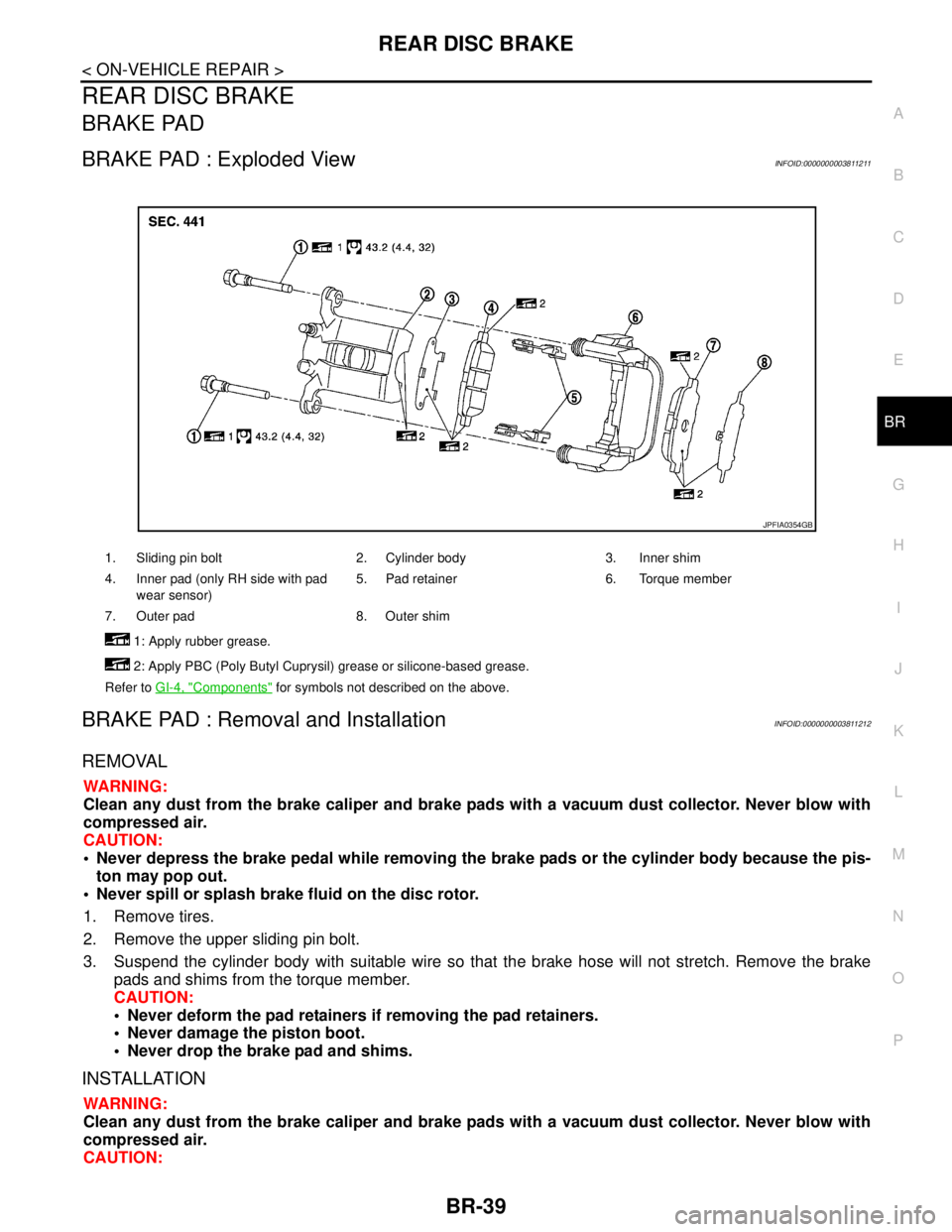
BRAKE PAD : Exploded ViewINFOID:0000000003811211
BRAKE PAD : Removal and InstallationINFOID:0000000003811212
REMOVAL
WARNING:
Clean any dust from the brake caliper and brake pads with a vacuum dust collector. Never blow with
compressed air.
CAUTION:
Never depress the brake pedal while removing the brake pads or the cylinder body because the pis-
ton may pop out.
Never spill or splash brake fluid on the disc rotor.
1. Remove tires.
2. Remove the upper sliding pin bolt.
3. Suspend the cylinder body with suitable wire so that the brake hose will not stretch. Remove the brake
pads and shims from the torque member.
CAUTION:
Never deform the pad retainers if removing the pad retainers.
Never damage the piston boot.
Never drop the brake pad and shims.
INSTALLATION
WARNING:
Clean any dust from the brake caliper and brake pads with a vacuum dust collector. Never blow with
compressed air.
CAUTION:
1. Sliding pin bolt 2. Cylinder body 3. Inner shim
4. Inner pad (only RH side with pad
wear sensor)5. Pad retainer 6. Torque member
7. Outer pad 8. Outer shim
1: Apply rubber grease.
2: Apply PBC (Poly Butyl Cuprysil) grease or silicone-based grease.
Refer to GI-4, "
Components" for symbols not described on the above.
JPFIA0354GB
Page 938 of 5121
BR-42
< ON-VEHICLE REPAIR >
REAR DISC BRAKE
Clean any dust from the brake caliper and brake pads with a vacuum dust collector. Never blow with
compressed air.
CAUTION:
Never depress the brake pedal. Brake fluid may splash while removing the brake hose.
1. Remove tires.
2. Fix the disc rotor using wheel nuts.
3. Drain brake fluid. Refer to BR-9, "
Draining".
CAUTION:
Never spill or splash brake fluid on the disc rotor.
4. Remove union bolt and copper washers then disconnect brake hose from caliper assembly.
5. Remove torque member mounting bolts, and remove brake caliper assembly.
CAUTION:
Never drop brake pads and caliper assembly.
6. Remove disc rotor.
CAUTION:
Put matching marks on the wheel hub and bearing assembly and the disc rotor before removing
the disc rotor.
Never drop disc rotor.
INSTALLATION
WARNING:
Clean any dust from the brake caliper and brake pads with a vacuum dust collector. Never blow with
compressed air.
CAUTION:
Never depress the brake pedal. Brake fluid may splash while removing the brake hose.
1. Install disc rotor.
CAUTION:
Align the matching marks put during removal when reusing the disc rotor.
2. Install the brake caliper assembly to the vehicle and tighten the torque member mounting bolts to the
specified torque.
CAUTION:
Never spill or splash any grease and moisture on the brake caliper assembly mounting face,
threads, mounting bolts, and washers. Wipe out any grease and moisture.
3. Install brake hose and copper washers to brake caliper assembly, and tighten union bolts to the specified
torque. Refer to BR-22, "
REAR : Exploded View".
CAUTION:
Never reuse copper washer.
4. Refill with new brake fluid and perform the air bleeding. Refer to BR-10, "
Bleeding Brake System".
CAUTION:
Never reuse drained brake fluid.
Never spill or splash brake fluid on the disc rotor.
5. Check that no drag feel is present for the rear disc brake. Refer to BR-44, "
BRAKE CALIPER ASSEMBLY
: Inspection".
BRAKE CALIPER ASSEMBLY : Disassembly and AssemblyINFOID:0000000003811216
DISASSEMBLY
NOTE:
Never remove the torque member and pad retainers when disassembling and assembling the cylinder body.
1. Remove the sliding pin bolts and remove the cylinder body from the torque member.
2. Remove brake pads and shims. Refer to BR-39, "
BRAKE PAD : Exploded View".
3. Remove sliding pin boots from torque member.
4. Remove bushing from sliding pin bolt.
Page 957 of 5121
![NISSAN TEANA 2008 Service Manual BRC-16
< COMPONENT DIAGNOSIS >[ABS]
C1101, C1102, C1103, C1104 WHEEL SENSOR
COMPONENT DIAGNOSIS
C1101, C1102, C1103, C1104 WHEEL SENSOR
DescriptionINFOID:0000000003766731
When the sensor rotor rotates](/img/5/57391/w960_57391-956.png "NISSAN TEANA 2008 Service Manual BRC-16
< COMPONENT DIAGNOSIS >[ABS]
C1101, C1102, C1103, C1104 WHEEL SENSOR
COMPONENT DIAGNOSIS
C1101, C1102, C1103, C1104 WHEEL SENSOR
DescriptionINFOID:0000000003766731
When the sensor rotor rotates")
BRC-16
< COMPONENT DIAGNOSIS >[ABS]
C1101, C1102, C1103, C1104 WHEEL SENSOR
COMPONENT DIAGNOSIS
C1101, C1102, C1103, C1104 WHEEL SENSOR
DescriptionINFOID:0000000003766731
When the sensor rotor rotates, the magnetic field changes. Wheel sensor converts the magnetic field changes
to current signals (rectangular wave) and transmits them to the ABS actuator and electric unit (control unit).
DTC LogicINFOID:0000000003766732
DTC DETECTION LOGIC
DTC CONFIRMATION PROCEDURE
1.DTC REPRODUCTION PROCEDURE
1. Start the engine and drive the vehicle at 30 km/h (19 MPH) or more for approximately 1 minute.
2. Perform ABS actuator and electric unit (control unit) self-diagnosis.
Is DTC
“C1101”, “C1102”, “C1103” or “C1104” detected?
YES >> Proceed to diagnosis. Refer to BRC-16, "Diagnosis Procedure".
NO >> INSPECTION END
Diagnosis ProcedureINFOID:0000000003766733
CAUTION:
Do not check between wheel sensor terminals.
1.CHECK TIRES
Check air pressure, wear and size. Refer to WT-5, "
Tire Air Pressure".
Is the inspection result normal?
YES >> GO TO 2.
NO >> Repair or replace damaged parts.
2.CHECK SENSOR AND SENSOR ROTOR
Check sensor rotor for damage.
Check wheel sensor for damage, disconnection or looseness.
Is the inspection result normal?
YES >> GO TO 3.
NO >> Repair wheel sensor mount or replace sensor rotor. Then perform the self-diagnosis.
3.CHECK CONNECTOR
1. Turn the ignition switch OFF.
2. Disconnect ABS actuator and electric unit (control unit) connector.
3. Disconnect malfunctioning wheel sensor connector.
4. Check terminal to see if it is deformed, disconnected, looseness, etc.
Is the inspection result normal?
YES >> GO TO 4.
NO >> Repair or replace damaged parts.
DTC Display item Malfunction detected condition Possible cause
C1101 RR RH SENSOR-1Circuit of rear RH wheel sensor is open. Or when the sen-
sor power voltage is outside the standard.
Harness or connector
Wheel sensor
ABS actuator and electric unit
(control unit) C1102 RR LH SENSOR-1Circuit of rear LH wheel sensor is open. Or when the sen-
sor power voltage is outside the standard.
C1103 FR RH SENSOR-1Circuit of front RH wheel sensor is open. Or when the
sensor power voltage is outside the standard.
C1104 FR LH SENSOR-1Circuit of front LH wheel sensor is open. Or when the
sensor power voltage is outside the standard.
Page 960 of 5121
![NISSAN TEANA 2008 Service Manual C1105, C1106, C1107, C1108 WHEEL SENSOR
BRC-19
< COMPONENT DIAGNOSIS >[ABS]
C
D
E
G
H
I
J
K
L
MA
B
BRC
N
O
P
C1105, C1106, C1107, C1108 WHEEL SENSOR
DescriptionINFOID:0000000003767288
When the sensor](/img/5/57391/w960_57391-959.png "NISSAN TEANA 2008 Service Manual C1105, C1106, C1107, C1108 WHEEL SENSOR
BRC-19
< COMPONENT DIAGNOSIS >[ABS]
C
D
E
G
H
I
J
K
L
MA
B
BRC
N
O
P
C1105, C1106, C1107, C1108 WHEEL SENSOR
DescriptionINFOID:0000000003767288
When the sensor")
C1105, C1106, C1107, C1108 WHEEL SENSOR
BRC-19
< COMPONENT DIAGNOSIS >[ABS]
C
D
E
G
H
I
J
K
L
MA
B
BRC
N
O
P
C1105, C1106, C1107, C1108 WHEEL SENSOR
DescriptionINFOID:0000000003767288
When the sensor rotor rotates, the magnetic field changes. Wheel sensor converts the magnetic field changes
to current signals (rectangular wave) and transmits them to the ABS actuator and electric unit (control unit).
DTC LogicINFOID:0000000003766737
DTC DETECTION LOGIC
DTC CONFIRMATION PROCEDURE
1.DTC REPRODUCTION PROCEDURE
1. Start the engine and drive the vehicle at 30 km/h (19 MPH) or more for approximately 1 minute.
2. Perform ABS actuator and electric unit (control unit) self-diagnosis.
Is DTC
“C1105”, “C1106”, “C1107” or “C1108” detected?
YES >> Proceed to diagnosis. Refer to BRC-19, "Diagnosis Procedure".
NO >> INSPECTION END
Diagnosis ProcedureINFOID:0000000003767289
CAUTION:
Do not check between wheel sensor terminals.
1.CHECK TIRES
Check air pressure, wear and size. Refer to WT-5, "
Tire Air Pressure".
Is the inspection result normal?
YES >> GO TO 2.
NO >> Repair or replace damaged parts.
2.CHECK SENSOR AND SENSOR ROTOR
Check sensor rotor for damage.
Check wheel sensor for damage, disconnection or looseness.
Is the inspection result normal?
YES >> GO TO 3.
NO >> Repair wheel sensor mount or replace sensor rotor. Then perform the self-diagnosis.
3.CHECK CONNECTOR
1. Turn the ignition switch OFF.
2. Disconnect ABS actuator and electric unit (control unit) connector.
3. Disconnect malfunctioning wheel sensor connector.
DTC Display item Malfunction detected condition Possible cause
C1105 RR RH SENSOR-2When the circuit in the rear RH wheel sensor is short-cir-
cuited. Or when the distance between the wheel sensor
and sensor rotor is too large and the sensor pulse cannot
be recognized by the control unit.
Harness or connector
Wheel sensor
ABS actuator and electric unit
(control unit) C1106 RR LH SENSOR-2When the circuit in the rear LH wheel sensor is short-cir-
cuited. Or when the distance between the wheel sensor
and sensor rotor is too large and the sensor pulse cannot
be recognized by the control unit.
C1107 FR RH SENSOR-2When the circuit in the front RH wheel sensor is short-cir-
cuited. Or when the distance between the wheel sensor
and sensor rotor is too large and the sensor pulse cannot
be recognized by the control unit.
C1108 FR LH SENSOR-2When the circuit in the front LH wheel sensor is short-cir-
cuited. Or when the distance between the wheel sensor
and sensor rotor is too large and the sensor pulse cannot
be recognized by the control unit.