seat memory NISSAN TEANA 2008 Workshop Manual
[x] Cancel search | Manufacturer: NISSAN, Model Year: 2008, Model line: TEANA, Model: NISSAN TEANA 2008Pages: 5121, PDF Size: 69.03 MB
Page 143 of 5121
SEAT MEMORY SWITCH
ADP-137
< ON-VEHICLE REPAIR >
C
D
E
F
G
H
I
K
L
MA
B
ADP
N
O
P
SEAT MEMORY SWITCH
Exploded ViewINFOID:0000000003759242
Refer to INT-30, "DRIVER SIDE : Exploded View".
Removal and InstallationINFOID:0000000003759243
REMOVAL
CAUTION:
When removing and installing, use shop cloths to protect parts from damage.
1. Remove the seat memory finisher (1). Refer to INT-30, "
DRIVER
SIDE : Removal and Installation".
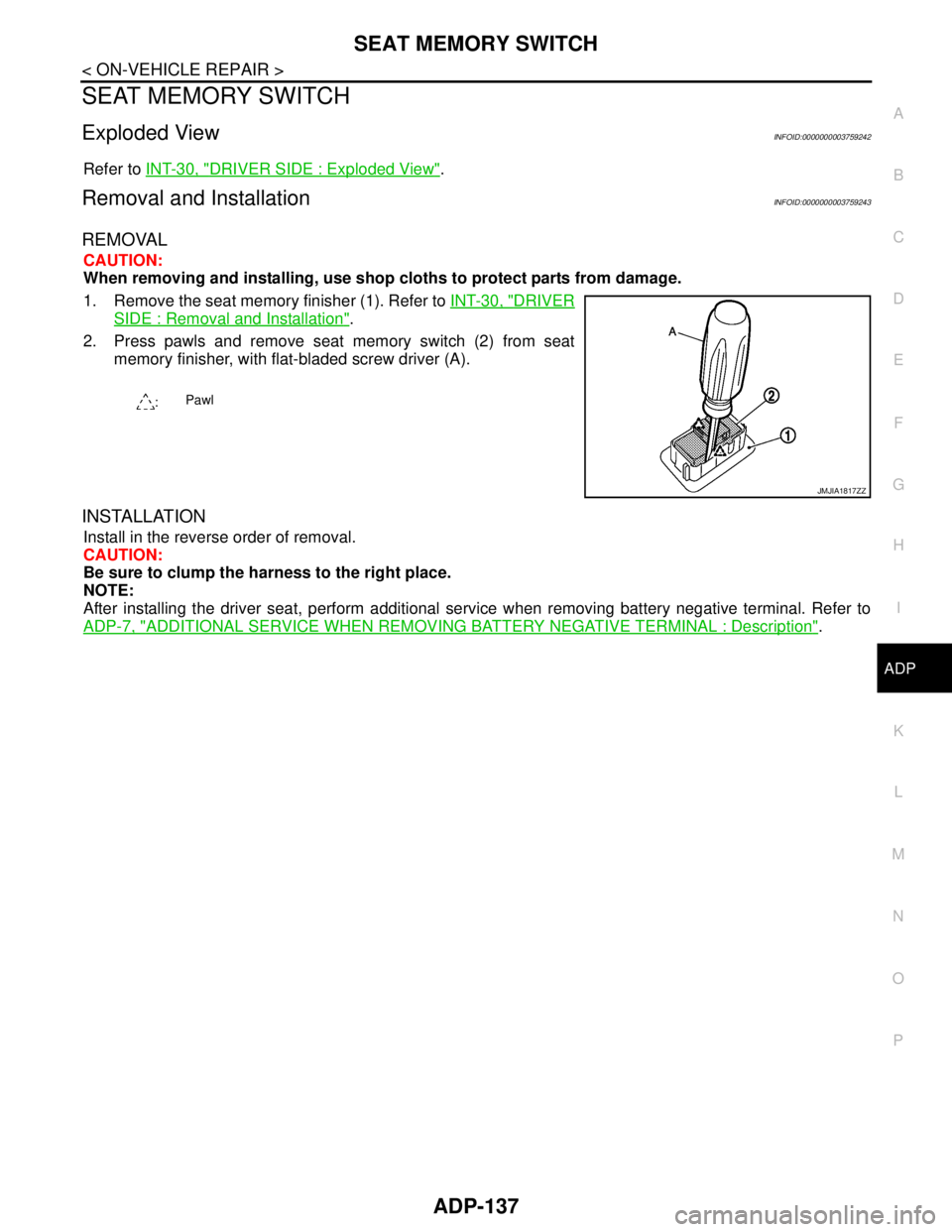
2. Press pawls and remove seat memory switch (2) from seat
memory finisher, with flat-bladed screw driver (A).
INSTALLATION
Install in the reverse order of removal.
CAUTION:
Be sure to clump the harness to the right place.
NOTE:
After installing the driver seat, perform additional service when removing battery negative terminal. Refer to
ADP-7, "
ADDITIONAL SERVICE WHEN REMOVING BATTERY NEGATIVE TERMINAL : Description".
:Pawl
JMJIA1817ZZ
Page 212 of 5121
![NISSAN TEANA 2008 Workshop Manual AV-68
< FUNCTION DIAGNOSIS >[BASE AUDIO AND DISPLAY SYSTEM]
DIAGNOSIS SYSTEM (AV CONTROL UNIT)
Displays the communication status between AV control unit (mas-
ter unit) and each unit.
The error co](/img/5/57391/w960_57391-211.png "NISSAN TEANA 2008 Workshop Manual AV-68
< FUNCTION DIAGNOSIS >[BASE AUDIO AND DISPLAY SYSTEM]
DIAGNOSIS SYSTEM (AV CONTROL UNIT)
Displays the communication status between AV control unit (mas-
ter unit) and each unit.
The error co")
AV-68
< FUNCTION DIAGNOSIS >[BASE AUDIO AND DISPLAY SYSTEM]
DIAGNOSIS SYSTEM (AV CONTROL UNIT)
Displays the communication status between AV control unit (mas-
ter unit) and each unit.
The error counter displays “OK” if any malfunction was not
detected in the past and displays “0” if a malfunction is detected. It
increases by 1 if the condition is normal at the next ignition switch
ON cycle. The upper limit of the counter is 39.
If it resets, the error counter is erased.
Delete Unit Connection Log
Deletes any unit connection records and error records from the AV
control unit memory. (Clear the records of the unit that has been
removed)
CONSULT-III Function (MULTI AV)INFOID:0000000003882712
CONSULT-III FUNCTIONS
CONSULT-III performs the following functions via the communication with the AV control unit.
AV COMMUNICATION
When “AV communication” of “CAN Diag Support Monitor” is selected, the following function will be performed.
SELF-DIAGNOSIS RESULTS
In CONSULT-III self-diagnosis, self-diagnosis results and error history are displayed collectively.
The timing is displayed as “0” if any of the error codes [U1000], [U1010], [U1300] and [U1310] is detected.
The counter increases by 1 if the condition is normal at the next ignition switch ON cycle.
Self-diagnosis Results Display Item
ItemsStatus
(Current)Counter
(Past)
C Tx(ITM–SW) OK / UNKWN OK / 0 – 39
C Rx(PrimarySW–ITM) OK / UNKWN OK / 0 – 39
C Rx(RrSeatSW–ITM) OK / UNKWN OK / 0 – 39
C Rx(RearCamera–ITM) OK / UNKWN OK / 0 – 39
JSNIA1439GB
JSNIA0154GB
Diagnosis mode Description
Ecu Identification The part number of AV control unit can be checked.
Self Diagnostic ResultPerforms a diagnosis on the AV control unit and a connection diagnosis for the communication
circuit of the Multi AV system, and displays the current and past malfunctions collectively.
Data Monitor The diagnosis of vehicle signal that is input to the AV control unit can be performed.
AV communicationAV&NAVI C/UDisplays the communication status from AV control unit to each unit as well as the error
counter.
AUDIO Displays the AV control unit communication status and the error counter.
Error item Detection logic Possible malfunction factor/Action to take
CAN COMM CIRCUIT [U1000]CAN communication malfunction is detect-
ed.Refer to AV- 7 2 , "
DiagnosisProcedure".
Page 355 of 5121
![NISSAN TEANA 2008 Workshop Manual AV
DIAGNOSIS SYSTEM (AV CONTROL UNIT)
AV-211
< FUNCTION DIAGNOSIS >[BOSE AUDIO WITHOUT NAVIGATION]
C
D
E
F
G
H
I
J
K
L
MB A
O
P Delete Unit Connection Log
Deletes any unit connection records and error](/img/5/57391/w960_57391-354.png "NISSAN TEANA 2008 Workshop Manual AV
DIAGNOSIS SYSTEM (AV CONTROL UNIT)
AV-211
< FUNCTION DIAGNOSIS >[BOSE AUDIO WITHOUT NAVIGATION]
C
D
E
F
G
H
I
J
K
L
MB A
O
P Delete Unit Connection Log
Deletes any unit connection records and error")
AV
DIAGNOSIS SYSTEM (AV CONTROL UNIT)
AV-211
< FUNCTION DIAGNOSIS >[BOSE AUDIO WITHOUT NAVIGATION]
C
D
E
F
G
H
I
J
K
L
MB A
O
P Delete Unit Connection Log
Deletes any unit connection records and error records from the AV
control unit memory. (Clear the records of the unit that has been
removed)
CONSULT-III Function (MULTI AV)INFOID:0000000003765658
CONSULT-III FUNCTIONS
CONSULT-III performs the following functions via the communication with the AV control unit.
AV COMMUNICATION
When “AV communication” of “CAN Diag Support Monitor” is selected, the following function will be performed.
SELF-DIAGNOSIS RESULTS
In CONSULT-III self-diagnosis, self-diagnosis results and error history are displayed collectively.
The timing is displayed as “0” if any of the error codes [U1000], [U1010], [U1300] and [U1310] is detected.
The counter increases by 1 if the condition is normal at the next ignition switch ON cycle.
Self-diagnosis Results Display Item
C Rx(RrSeatSW–ITM) OK / UNKWN OK / 0 – 39
C Rx(Amp–ITM) OK / UNKWN OK / 0 – 39
C Rx(RearCamera–ITM) OK / UNKWN OK / 0 – 39
C Rx(DVD–ITM) OK / UNKWN OK / 0 – 39
C Rx(AmpAudio–ITM) OK / UNKWN OK / 0 – 39
C Rx(DVDAudio–ITM) OK / UNKWN OK / 0 – 39ItemsStatu s
(Current)Counter
(Past)
JSNIA0154GB
Diagnosis mode Description
Ecu Identification The part number of AV control unit can be checked.
Self Diagnostic ResultPerforms a diagnosis on the AV control unit and a connection diagnosis for the communication
circuit of the Multi AV system, and displays the current and past malfunctions collectively.
Data Monitor The diagnosis of vehicle signal that is input to the AV control unit can be performed.
AV communicationAV&NAVI C/UDisplays the communication status from AV control unit to each unit as well as the error
counter.
AUDIO Displays the AV control unit communication status and the error counter.
Error item Detection logic Possible malfunction factor/Action to take
CAN COMM CIRCUIT [U1000]CAN communication malfunction is detect-
ed.Refer to AV- 2 1 6 , "
DiagnosisProcedure".
CONTROL UNIT (CAN) [U1010]CAN initial diagnosis malfunction is detect-
ed.
Replace the AV control unit.
Refer toAV- 3 7 8 , "
Removal and Installation"
AV- 3 7 8 , "
Removal and Installation". CONTROL UNIT (AV) [U1310]AV communication circuit initial diagnosis
malfunction is detected.
Control Unit FLASH-ROM [U1200]
AV control unit malfunction is detected.
CAN CONT [U1216]
Page 577 of 5121
![NISSAN TEANA 2008 Workshop Manual AV
DIAGNOSIS SYSTEM (AV CONTROL UNIT)
AV-433
< FUNCTION DIAGNOSIS >[BOSE AUDIO WITH NAVIGATION]
C
D
E
F
G
H
I
J
K
L
MB A
O
P Vehicle CAN Diagnosis
CAN communication status and error counter is displ](/img/5/57391/w960_57391-576.png "NISSAN TEANA 2008 Workshop Manual AV
DIAGNOSIS SYSTEM (AV CONTROL UNIT)
AV-433
< FUNCTION DIAGNOSIS >[BOSE AUDIO WITH NAVIGATION]
C
D
E
F
G
H
I
J
K
L
MB A
O
P Vehicle CAN Diagnosis
CAN communication status and error counter is displ")
AV
DIAGNOSIS SYSTEM (AV CONTROL UNIT)
AV-433
< FUNCTION DIAGNOSIS >[BOSE AUDIO WITH NAVIGATION]
C
D
E
F
G
H
I
J
K
L
MB A
O
P Vehicle CAN Diagnosis
CAN communication status and error counter is displayed.
The error counter displays “OK” if any malfunction was not
detected in the past and displays “0” if a malfunction is detected. It
increases by 1 if the condition is normal at the next ignition switch
ON cycle. The upper limit of the counter is 39.
The error counter is erased if reset.
AV COMM Diagnosis
Displays the communication status between AV control unit (mas-
ter unit) and each unit.
The error counter displays “OK” if any malfunction was not
detected in the past and displays “0” if a malfunction is detected. It
increases by 1 if the condition is normal at the next ignition switch
ON cycle. The upper limit of the counter is 39.
If it resets, the error counter is erased.
Delete Unit Connection Log
Deletes any unit connection records and error records from the AV
control unit memory. (Clear the records of the unit that has been
removed)
Initialize Settings
Items Display (Current)Malfunction counter
(Past)
Tx (HVAC) OK / UNKWN OK / 0 – 39
Rx (ECM) OK / UNKWN OK / 0 – 39
Rx (Cluster) OK / UNKWN OK / 0 – 39
Rx (BCM) OK / UNKWN OK / 0 – 39
Rx (HVAC) OK / UNKWN OK / 0 – 39
Rx (USM) OK / UNKWN OK / 0 – 39
JSNIA1287GB
ItemsStatu s
(Current)Counter
(Past)
C Tx(ITM–SW) OK / UNKWN OK / 0 – 39
C Rx(PrimarySW–ITM) OK / UNKWN OK / 0 – 39
C Rx(RrSeatSW–ITM) OK / UNKWN OK / 0 – 39
C Rx(Amp–ITM) OK / UNKWN OK / 0 – 39
C Rx(RearCamera–ITM) OK / UNKWN OK / 0 – 39
C Rx(DVD–ITM) OK / UNKWN OK / 0 – 39
C Rx(DVDNavi–ITM) OK / UNKWN OK / 0 – 39
C Rx(AmpAudio–ITM) OK / UNKWN OK / 0 – 39
C Rx(DVDAudio–ITM) OK / UNKWN OK / 0 – 39
JSNIA1292GB
JSNIA0522GB
Page 2630 of 5121

HAC-2
DTC Logic ...............................................................53
Diagnosis Procedure ..............................................54
Component Inspection ............................................55
B2632, B2633 AIR MIX DOOR MOTOR
(DRIVER SIDE) ..................................................
56
Description ..............................................................56
DTC Logic ...............................................................56
Diagnosis Procedure ..............................................57
B2634, B2635 AIR MIX DOOR MOTOR (PAS-
SENGER SIDE) ..................................................
58
Description ..............................................................58
DTC Logic ...............................................................58
Diagnosis Procedure ..............................................59
B2636, B2637, B2638, B2639, B2654, B2655
MODE DOOR MOTOR ......................................
60
Description ..............................................................60
DTC Logic ...............................................................60
Diagnosis Procedure ..............................................61
B263D B263E, B263F, B2656 INTAKE DOOR
MOTOR ..............................................................
63
Description ..............................................................63
DTC Logic ...............................................................63
Diagnosis Procedure ..............................................64
POWER SUPPLY AND GROUND CIRCUIT .....65
A/C AUTO AMP. .......................................................65
A/C AUTO AMP. : Diagnosis Procedure ................65
A/C CONTROL ..........................................................65
A/C CONTROL : Diagnosis Procedure ...................65
A/C DISPLAY ............................................................66
A/C DISPLAY : Diagnosis Procedure .....................66
A/C AUTO AMP. ................................................67
Description ..............................................................67
Component Function Check ...................................67
Diagnosis Procedure ..............................................67
BLOWER MOTOR .............................................68
Description ..............................................................68
Component Function Check .................................68
Diagnosis Procedure ..............................................68
Component Inspection ............................................71
MAGNET CLUTCH ............................................72
Description ..............................................................72
Component Function Check ...................................72
Diagnosis Procedure ..............................................72
A/C CONTROL SIGNAL CIRCUIT ....................74
Diagnosis Procedure ..............................................74
ECU DIAGNOSIS ........................................75
A/C AUTO AMP. ................................................75
Reference Value .....................................................75
Wiring Diagram - AIR CONDITIONER CONTROL
SYSTEM - ...............................................................
77
Fail-Safe ..................................................................84
DTC Inspection Priority Chart ...............................85
DTC Index ...............................................................85
SYMPTOM DIAGNOSIS ............................87
AIR CONDITIONER CONTROL ........................87
Diagnosis Chart By Symptom .................................87
INSUFFICIENT COOLING .................................88
Description ..............................................................88
Inspection procedure ..............................................88
INSUFFICIENT HEATING .................................91
Description ..............................................................91
Inspection procedure ..............................................91
NOISE ................................................................94
Description ..............................................................94
Inspection procedure ..............................................94
MEMORY FUNCTION DOES NOT OPERATE ...96
Description ..............................................................96
Inspection procedure ..............................................96
PRECAUTION ............................................97
PRECAUTIONS .................................................97
Precaution for Supplemental Restraint System
(SRS) "AIR BAG" and "SEAT BELT PRE-TEN-
SIONER" .................................................................
97
Precaution Necessary for Steering Wheel Rota-
tion after Battery Disconnect ...................................
97
Precaution for Procedure without Cowl Top Cover ...98
Precautions For Xenon Headlamp Service .............98
Working with HFC-134a (R-134a) ...........................98
General Refrigerant Precaution ..............................99
Refrigerant Connection ...........................................99
Service Equipment ................................................101
COMPRESSOR ................................................104
General Precautions .............................................104
FLUORESCENT LEAK DETECTOR ................105
General Precautions .............................................105
WITH 7 INCH DISPLAY
BASIC INSPECTION .................................
106
DIAGNOSIS AND REPAIR WORKFLOW ........106
Work Flow .............................................................106
INSPECTION AND ADJUSTMENT ..................108
WITHOUT INTELLIGENT AIR CONDITIONER
SYSTEM ..................................................................
108
WITHOUT INTELLIGENT AIR CONDITIONER
SYSTEM : Description & Inspection .....................
108
WITHOUT INTELLIGENT AIR CONDITIONER
SYSTEM : Temperature Setting Trimmer .............
110
Page 2633 of 5121

HAC-5
C
D
E
F
G
H
J
K
L
MA
B
HAC
N
O
P WITH INTELLIGENT AIR CONDITIONER SYS-
TEM : Wiring Diagram - AIR CONDITIONER
CONTROL SYSTEM - ...........................................
215
WITH INTELLIGENT AIR CONDITIONER SYS-
TEM : Fail-Safe .....................................................
223
WITH INTELLIGENT AIR CONDITIONER SYS-
TEM : DTC Inspection Priority Chart ..................
224
WITH INTELLIGENT AIR CONDITIONER SYS-
TEM : DTC Index ..................................................
224
SYMPTOM DIAGNOSIS ............................226
AIR CONDITIONER CONTROL .......................226
Diagnosis Chart By Symptom ...............................226
PLASMACLUSTER SYSTEM DOES NOT OP-
ERATE ..............................................................
227
WITH INTELLIGENT AIR CONDITIONER SYS-
TEM ..........................................................................
227
WITH INTELLIGENT AIR CONDITIONER SYS-
TEM : Description ..................................................
227
WITH INTELLIGENT AIR CONDITIONER SYS-
TEM : Inspection procedure ..................................
227
INSUFFICIENT COOLING ...............................228
Description ............................................................228
Inspection procedure .............................................228
INSUFFICIENT HEATING ................................231
Description ............................................................231
Inspection procedure .............................................231
NOISE ..............................................................234
Description .............................................................234
Inspection procedure .............................................234
MEMORY FUNCTION DOES NOT OPERATE .236
Description .............................................................236
Inspection procedure .............................................236
PRECAUTION ............................................237
PRECAUTIONS ...............................................237
Precaution for Supplemental Restraint System
(SRS) "AIR BAG" and "SEAT BELT PRE-TEN-
SIONER" ...............................................................
237
Precaution Necessary for Steering Wheel Rota-
tion after Battery Disconnect .................................
237
Precaution for Procedure without Cowl Top Cover ..238
Precautions For Xenon Headlamp Service ...........238
Working with HFC-134a (R-134a) .........................238
General Refrigerant Precaution .............................239
Refrigerant Connection ..........................................239
Service Equipment ................................................241
COMPRESSOR ...............................................244
General Precautions ..............................................244
FLUORESCENT LEAK DETECTOR ..............245
General Precautions ..............................................245
Page 3007 of 5121
INT-30
< ON-VEHICLE REPAIR >
FRONT DOOR FINISHER
ON-VEHICLE REPAIR
FRONT DOOR FINISHER
DRIVER SIDE
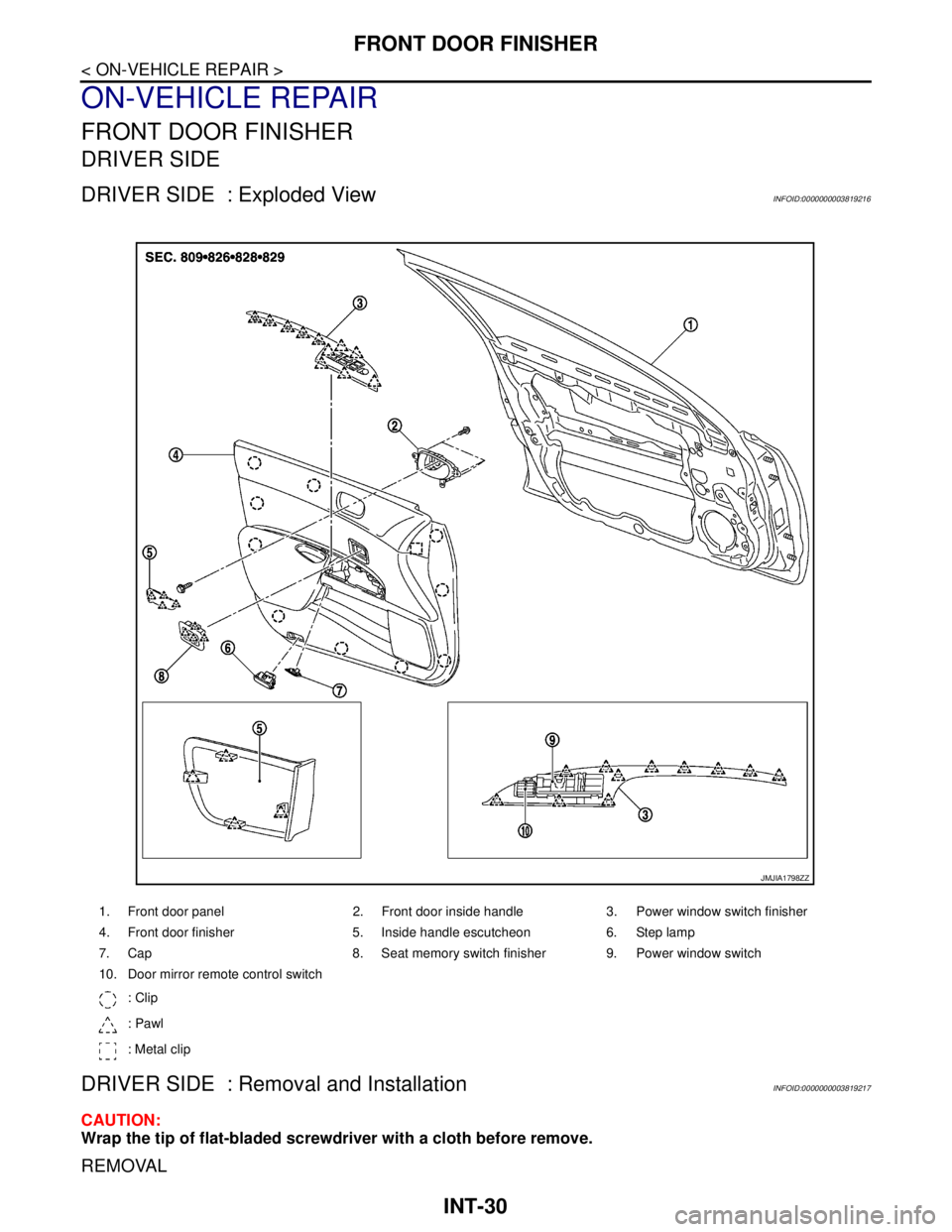
DRIVER SIDE : Exploded ViewINFOID:0000000003819216
DRIVER SIDE : Removal and InstallationINFOID:0000000003819217
CAUTION:
Wrap the tip of flat-bladed screwdriver with a cloth before remove.
REMOVAL
1. Front door panel 2. Front door inside handle 3. Power window switch finisher
4. Front door finisher 5. Inside handle escutcheon 6. Step lamp
7. Cap 8. Seat memory switch finisher 9. Power window switch
10. Door mirror remote control switch
: Clip
: Pawl
: Metal clip
JMJIA1798ZZ
Page 3009 of 5121
INT-32
< ON-VEHICLE REPAIR >
FRONT DOOR FINISHER
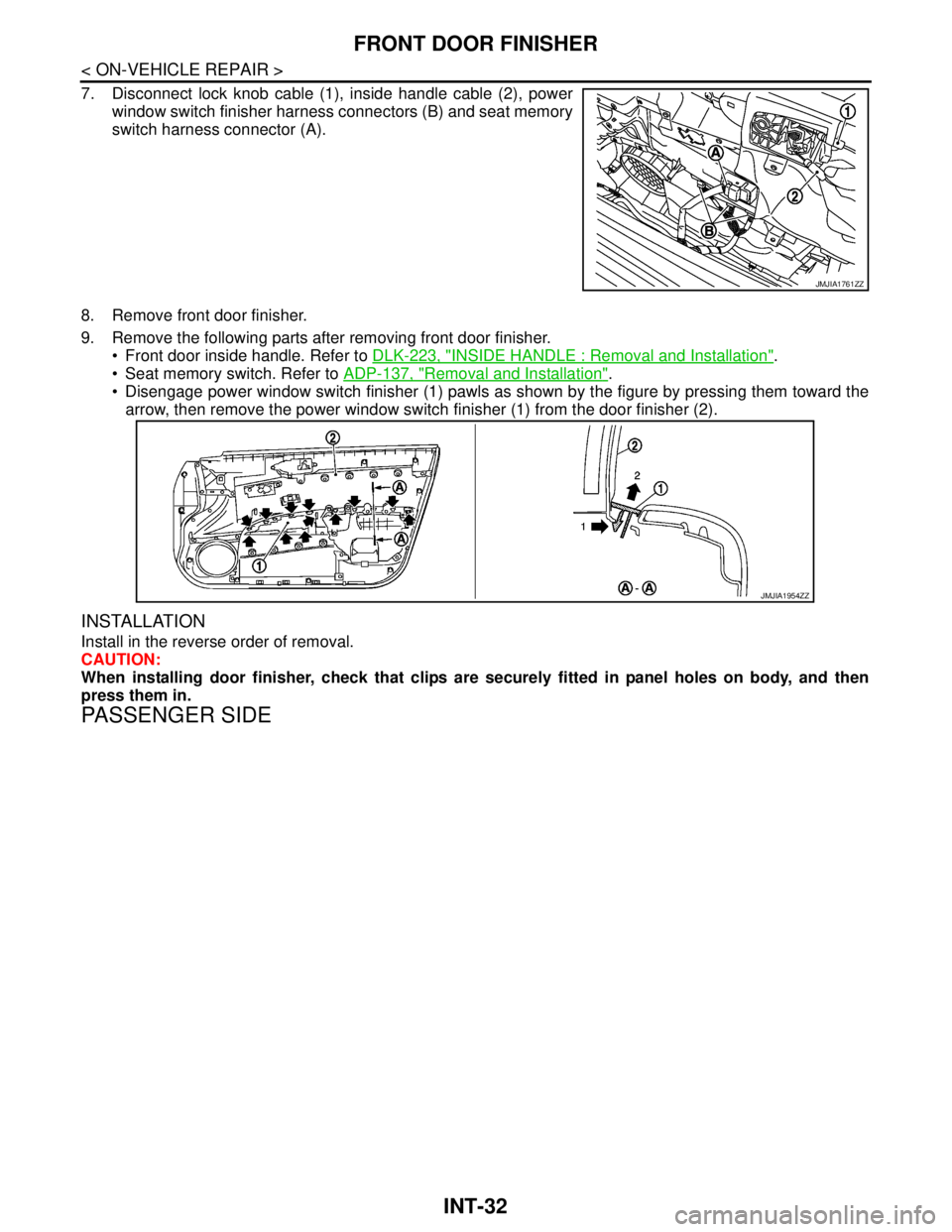
7. Disconnect lock knob cable (1), inside handle cable (2), power
window switch finisher harness connectors (B) and seat memory
switch harness connector (A).
8. Remove front door finisher.
9. Remove the following parts after removing front door finisher.
Front door inside handle. Refer to DLK-223, "
INSIDE HANDLE : Removal and Installation".
Seat memory switch. Refer to ADP-137, "
Removal and Installation".
Disengage power window switch finisher (1) pawls as shown by the figure by pressing them toward the
arrow, then remove the power window switch finisher (1) from the door finisher (2).
INSTALLATION
Install in the reverse order of removal.
CAUTION:
When installing door finisher, check that clips are securely fitted in panel holes on body, and then
press them in.
PASSENGER SIDE
JMJIA1761ZZ
JMJIA1954ZZ
Page 3872 of 5121
![NISSAN TEANA 2008 Workshop Manual SE-8
< FUNCTION DIAGNOSIS >[WITH VENTILATION SEAT]
HEATED SEAT
HEATED SEAT
System DiagramINFOID:0000000003820817
System DescriptionINFOID:0000000003820814
The heated seat system is controlled by the](/img/5/57391/w960_57391-3871.png "NISSAN TEANA 2008 Workshop Manual SE-8
< FUNCTION DIAGNOSIS >[WITH VENTILATION SEAT]
HEATED SEAT
HEATED SEAT
System DiagramINFOID:0000000003820817
System DescriptionINFOID:0000000003820814
The heated seat system is controlled by the")
SE-8
< FUNCTION DIAGNOSIS >[WITH VENTILATION SEAT]
HEATED SEAT
HEATED SEAT
System DiagramINFOID:0000000003820817
System DescriptionINFOID:0000000003820814
The heated seat system is controlled by the ventilation seat control unit.
The heated seat system consists of the heated seat switch, the heater unit and the ventilation seat control
unit.
The function of the heated seat system is to warm the seat surface.
The heated seat system has a LO and HI mode that can be switched back and forth. The LO mode warms
the seat surface slowly and the HI mode warms it quickly.
The indicator on the heated seat switch indicates the operating status of each mode.
NOTE:
The memory function is adopted for the front seat. When the ignition switch turns ON again after turning
OFF, while the heated seat is being operated, the heated seat system restarts at the same warmness as
the previous operation.
For the rear seat, when the ignition switch turns ON again after turning OFF, while the heated seat is being
operated, the heated seat system does not restart and stays in the OFF position.
While the heated seat system is being operated, the ventilation seat system becomes invalid.
LO MODE OPERATION
When the LO button of the heated seat switch is pressed, while the ignition switch is ON, the ventilation seat
control unit supplies the seat heater with the LO mode power supply and simultaneously illuminates the LO
mode indicator in the heated seat switch.
The seat heater warms the seat cushion and seatback to a low temperature by the LO mode power supply.
When the LO button is pressed again, while the heated seat switch is in the LO mode position, the indicator
and the heated seat switch turn OFF.
HI MODE OPERATION
When the HI button of the heated seat switch is pressed, while the ignition switch is ON, the Ventilation and
Heated seat control unit supplies the seat heater with the HI mode power supply and simultaneously illumi-
nates the HI mode indicator in the heated seat switch.
The seat heater warms the seat cushion and seatback to a high temperature by the HI mode power supply.
When the HI button is pressed again, while the heated seat switch is in the HI mode position, the indicator
and the heated seat switch turn OFF.
FA I L - S A F E
The fail-safe function is adopted for the ventilation seat control unit. Refer to SE-59, "FRONT SEAT : Fail-
safe".
JMJIA1932GB
Page 3874 of 5121
![NISSAN TEANA 2008 Workshop Manual SE-10
< FUNCTION DIAGNOSIS >[WITH VENTILATION SEAT]
VENTILATION SEAT SYSTEM
VENTILATION SEAT SYSTEM
System DiagramINFOID:0000000003820819
System DescriptionINFOID:0000000003809309
The ventilation se](/img/5/57391/w960_57391-3873.png "NISSAN TEANA 2008 Workshop Manual SE-10
< FUNCTION DIAGNOSIS >[WITH VENTILATION SEAT]
VENTILATION SEAT SYSTEM
VENTILATION SEAT SYSTEM
System DiagramINFOID:0000000003820819
System DescriptionINFOID:0000000003809309
The ventilation se")
SE-10
< FUNCTION DIAGNOSIS >[WITH VENTILATION SEAT]
VENTILATION SEAT SYSTEM
VENTILATION SEAT SYSTEM
System DiagramINFOID:0000000003820819
System DescriptionINFOID:0000000003809309
The ventilation seat system consists of the ventilation seat switch, the ventilation motor and the ventilation
seat control unit.
The ventilation seat system blows air from the seat surface and reduces heat and humidity.
The ventilation seat system has a LO and HI mode that can be switched back and forth. The LO mode blows
air moderately from the seat surface and the HI mode blows air strongly.
The indicator on the heated seat switch indicates the operation status of each mode.
NOTE:
The memory function is adopted for the front seat. When the ignition switch turns ON again after turning
OFF, while the ventilation seat is being operated, the ventilation seat system restarts at the same air flow
setting as the previous operation.
For the rear seat, when the ignition switch turns ON again after turning OFF, while the ventilation seat is
being operated, the heated ventilation seat system does not restart and stays in the OFF position.
While the ventilation seat system is being operated, the heated seat system becomes invalid.
LO MODE OPERATION
When the LO button of the ventilation seat switch is pressed while the ignition switch is ON, the ventilation
seat control unit outputs the power supply to the ventilation motor and simultaneously illuminates the LO
mode indicator in the ventilation seat switch.
The ventilation motor is controlled in LO mode by the LO mode ventilation motor speed control signal from
the ventilation control unit. The ventilation motor sends moderate air flow to the seat cushion and seat back.
When the LO button is pressed again while the ventilation seat switch is in the LO mode position, the indica-
tor and the ventilation seat switch turn OFF.
HI MODE OPERATION
When the HI button of the ventilation seat switch is pressed while the ignition switch is ON, the ventilation
seat control unit outputs the power supply to the ventilation motor and simultaneously illuminates the HI
mode indicator in the ventilation seat switch.
The ventilation motor is controlled in HI mode by the HI mode ventilation motor speed control signal from the
ventilation control unit. The ventilation motor sends strong air flow to the seat cushion and seat back.
When the HI button is pressed again while the ventilation seat switch is in the HI mode position, the indicator
and the ventilation seat switch turn OFF.
FA I L - S A F E
The fail-safe function is adopted for the ventilation seat control unit. Refer to SE-59, "FRONT SEAT : Fail-
safe".
JMJIA1933GB