instrument panel NISSAN TEANA 2008 Manual PDF
[x] Cancel search | Manufacturer: NISSAN, Model Year: 2008, Model line: TEANA, Model: NISSAN TEANA 2008Pages: 5121, PDF Size: 69.03 MB
Page 3240 of 5121
SQUEAK AND RATTLE TROUBLE DIAGNOSES
MIR-7
< SYMPTOM DIAGNOSIS >
C
D
E
F
G
H
I
J
K
MA
B
MIR
N
O
P
If possible, drive the vehicle with the customer until the noise is duplicated. Note any additional information on
the Diagnostic Worksheet regarding the conditions or location of the noise. This information can be used to
duplicate the same conditions when the repair is reconfirmed.
If the noise can be duplicated easily during the test drive, to help identify the source of the noise, try to dupli-
cate the noise with the vehicle stopped by doing one or all of the following:
1) Close a door.
2) Tap or push/pull around the area where the noise appears to be coming from.
3) Rev the engine.
4) Use a floor jack to recreate vehicle “twist”.
5) At idle, apply engine load (electrical load, half-clutch on M/T model, drive position on A/T model).
6) Raise the vehicle on a hoist and hit a tire with a rubber hammer.
Drive the vehicle and attempt to duplicate the conditions the customer states exist when the noise occurs.
If it is difficult to duplicate the noise, drive the vehicle slowly on an undulating or rough road to stress the
vehicle body.
LOCATE THE NOISE AND IDENTIFY THE ROOT CAUSE
1. Narrow down the noise to a general area. To help pinpoint the source of the noise, use a listening tool
(Engine Ear or mechanics stethoscope).
2. Narrow down the noise to a more specific area and identify the cause of the noise by:
Removing the components in the area that is are suspected to be the cause of the noise.
Do not use too much force when removing clips and fasteners, otherwise clips and fastener can be broken
or lost during the repair, resulting in the creation of new noise.
Tapping or pushing/pulling the component that is are suspected to be the cause of the noise.
Do not tap or push/pull the component with excessive force, otherwise the noise will be eliminated only tem-
porarily.
Feeling for a vibration by hand by touching the component(s) that is are suspected to be the cause of the
noise.
Placing a piece of paper between components that is are suspected to be the cause of the noise.
Looking for loose components and contact marks.
Refer to MIR-8, "
Inspection Procedure".
REPAIR THE CAUSE
If the cause is a loose component, tighten the component securely.
If the cause is insufficient clearance between components:
- Separate components by repositioning or loosening and retightening the component, if possible.
- Insulate components with a suitable insulator such as urethane pads, foam blocks, felt cloth tape or ure-
thane tape. These insulators are available through the authorized Nissan Parts Department.
CAUTION:
Never use excessive force as many components are constructed of plastic and may be damaged.
NOTE:
URETHANE PADS
Insulates connectors, harness, etc.
INSULATOR (Foam blocks)
Insulates components from contact. Can be used to fill space behind a panel.
INSULATOR (Light foam block)
FELT CLOTHTAPE
Used to insulate where movement does not occur. Ideal for instrument panel applications.
The following materials, not available through NISSAN Parts Department, can also be used to repair
squeaks and rattles.
UHMW(TEFLON) TAPE
Insulates where slight movement is present. Ideal for instrument panel applications.
SILICONE GREASE
Used in place of UHMW tape that is be visible or does not fit.
Note: Will only last a few months.
SILICONE SPRAY
Used when grease cannot be applied.
DUCT TAPE
Used to eliminate movement.
CONFIRM THE REPAIR
Page 3241 of 5121

MIR-8
< SYMPTOM DIAGNOSIS >
SQUEAK AND RATTLE TROUBLE DIAGNOSES
Confirm that the cause of a noise is repaired by test driving the vehicle. Operate the vehicle under the same
conditions as when the noise originally occurred. Refer to the notes on the Diagnostic Worksheet.
Inspection ProcedureINFOID:0000000003941383
Refer to Table of Contents for specific component removal and installation information.
INSTRUMENT PANEL
Most incidents are caused by contact and movement between:
1. Cluster lid A and instrument panel
2. Acrylic lens and combination meter housing
3. Instrument panel to front pillar garnish
4. Instrument panel to windshield
5. Instrument panel mounting pins
6. Wiring harnesses behind the combination meter
7. A/C defroster duct and duct joint
These incidents can usually be located by tapping or moving the components to duplicate the noise or by
pressing on the components while driving to stop the noise. Most of these incidents can be repaired by apply-
ing felt cloth tape or silicon spray (in hard to reach areas). Urethane pads can be used to insulate wiring har-
ness.
CAUTION:
Never use silicone spray to isolate a squeak or rattle. If the area is saturated with silicone, the recheck
of repair becomes impossible.
CENTER CONSOLE
Components to pay attention to include:
1. Shifter assembly cover to finisher
2. A/C control unit and cluster lid C
3. Wiring harnesses behind audio and A/C control unit
The instrument panel repair and isolation procedures also apply to the center console.
DOORS
Pay attention to the following:
1. Finisher and inner panel making a slapping noise
2. Inside handle escutcheon to door finisher
3. Wiring harnesses tapping
4. Door striker out of alignment causing a popping noise on starts and stops
Tapping or moving the components or pressing on them while driving to duplicate the conditions can isolate
many of these incidents. The areas can usually be insulated with felt cloth tape or insulator foam blocks to
repair the noise.
TRUNK
Trunk noises are often caused by a loose jack or loose items put into the trunk by the customer.
In addition look for the following:
1. Trunk lid dumpers out of adjustment
2. Trunk lid striker out of adjustment
3. Trunk lid torsion bars knocking together
4. A loose license plate or bracket
Most of these incidents can be repaired by adjusting, securing or insulating the item(s) or component(s) caus-
ing the noise.
SUNROOF/HEADLINING
Noises in the sunroof/headlining area can often be traced to one of the following:
1. Sunroof lid, rail, linkage or seals making a rattle or light knocking noise
2. Sunvisor shaft shaking in the holder
3. Front or rear windshield touching headlining and squeaking
Page 3333 of 5121
MWI
BCM (BODY CONTROL MODULE)
MWI-79
< ECU DIAGNOSIS >
C
D
E
F
G
H
I
J
K
L
MB A
O
P
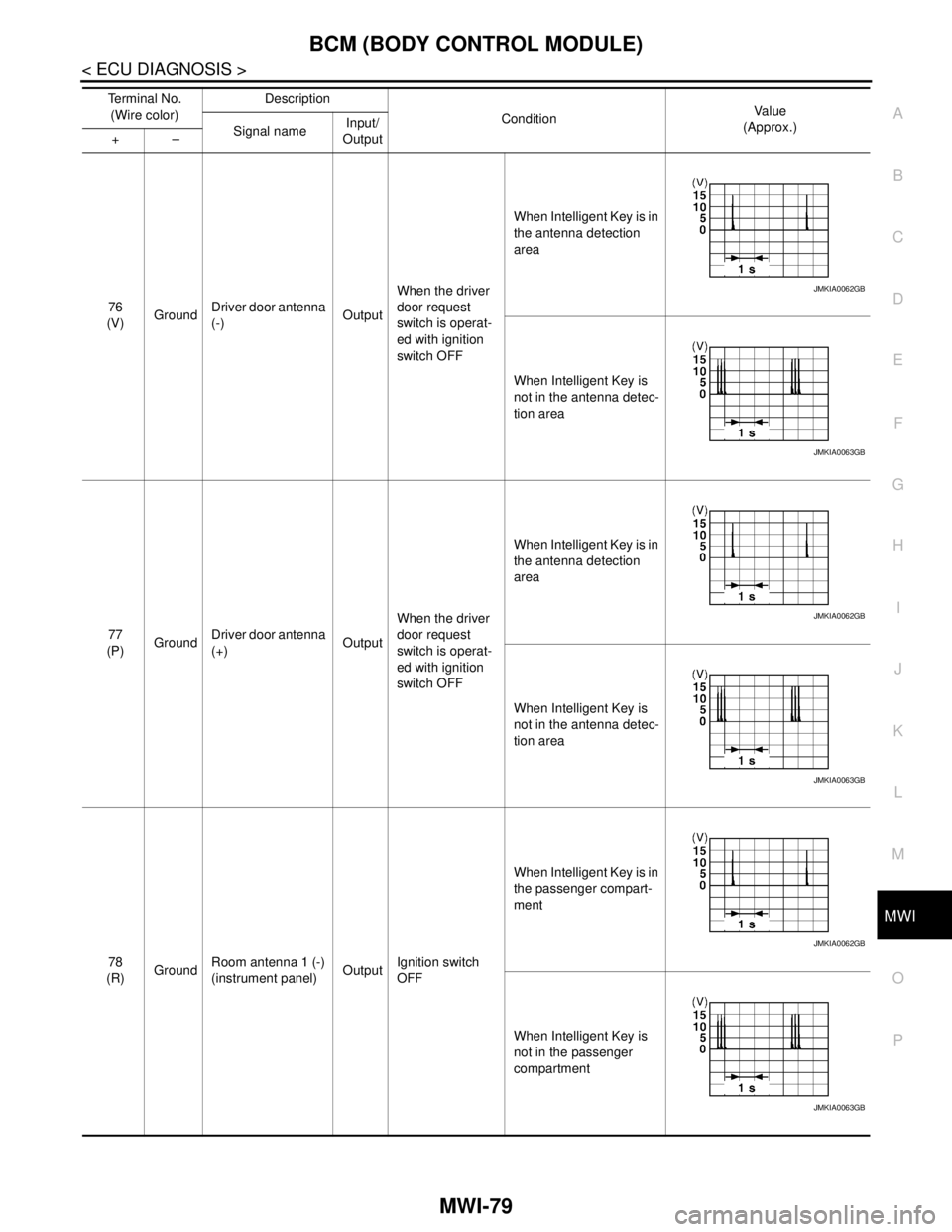
76
(V)GroundDriver door antenna
(-)OutputWhen the driver
door request
switch is operat-
ed with ignition
switch OFFWhen Intelligent Key is in
the antenna detection
area
When Intelligent Key is
not in the antenna detec-
tion area
77
(P)GroundDriver door antenna
(+)OutputWhen the driver
door request
switch is operat-
ed with ignition
switch OFFWhen Intelligent Key is in
the antenna detection
area
When Intelligent Key is
not in the antenna detec-
tion area
78
(R)GroundRoom antenna 1 (-)
(instrument panel)OutputIgnition switch
OFFWhen Intelligent Key is in
the passenger compart-
ment
When Intelligent Key is
not in the passenger
compartment Te r m i n a l N o .
(Wire color)Description
ConditionVa l u e
(Approx.)
Signal nameInput/
Output +–
JMKIA0062GB
JMKIA0063GB
JMKIA0062GB
JMKIA0063GB
JMKIA0062GB
JMKIA0063GB
Page 3334 of 5121
MWI-80
< ECU DIAGNOSIS >
BCM (BODY CONTROL MODULE)
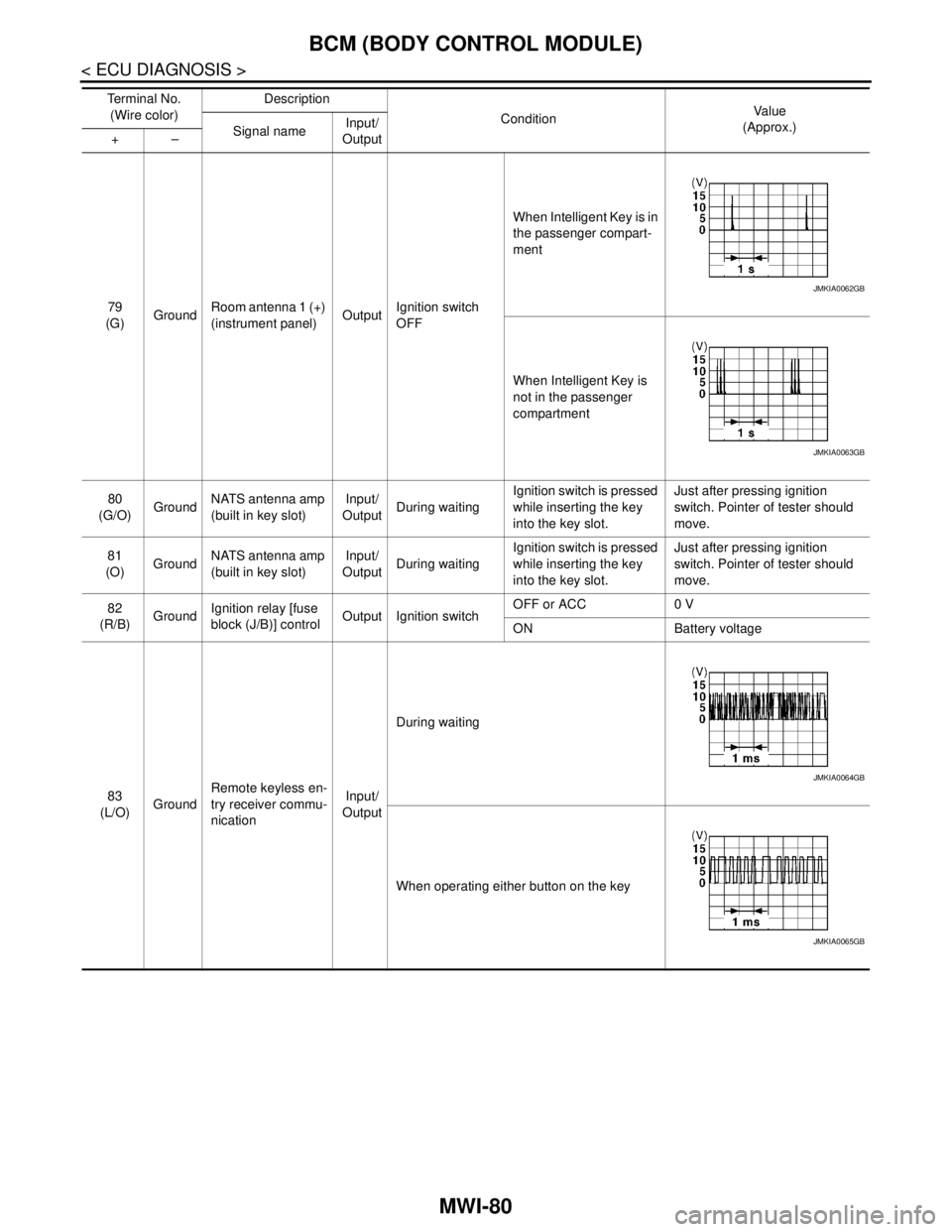
79
(G)GroundRoom antenna 1 (+)
(instrument panel)OutputIgnition switch
OFFWhen Intelligent Key is in
the passenger compart-
ment
When Intelligent Key is
not in the passenger
compartment
80
(G/O)GroundNATS antenna amp
(built in key slot)Input/
OutputDuring waitingIgnition switch is pressed
while inserting the key
into the key slot.Just after pressing ignition
switch. Pointer of tester should
move.
81
(O)GroundNATS antenna amp
(built in key slot)Input/
OutputDuring waitingIgnition switch is pressed
while inserting the key
into the key slot.Just after pressing ignition
switch. Pointer of tester should
move.
82
(R/B)GroundIgnition relay [fuse
block (J/B)] controlOutput Ignition switchOFF or ACC 0 V
ON Battery voltage
83
(L/O)GroundRemote keyless en-
try receiver commu-
nicationInput/
OutputDuring waiting
When operating either button on the key Te r m i n a l N o .
(Wire color)Description
ConditionVa l u e
(Approx.)
Signal nameInput/
Output +–
JMKIA0062GB
JMKIA0063GB
JMKIA0064GB
JMKIA0065GB
Page 3386 of 5121
PARKING BRAKE CONTROL
PB-5
< ON-VEHICLE REPAIR >
C
D
E
G
H
I
J
K
L
MA
B
PB
N
O
P
ON-VEHICLE REPAIR
PARKING BRAKE CONTROL
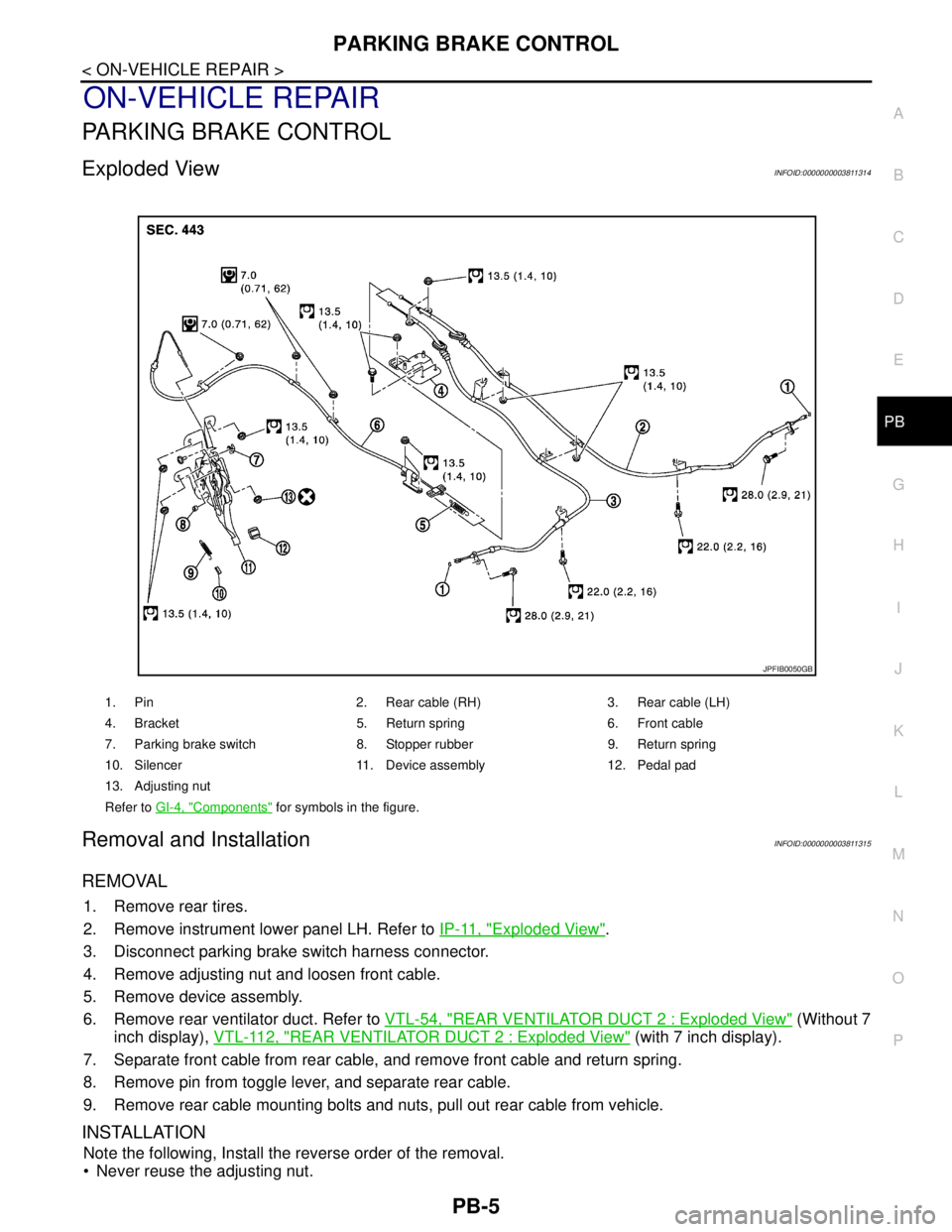
Exploded ViewINFOID:0000000003811314
Removal and InstallationINFOID:0000000003811315
REMOVAL
1. Remove rear tires.
2. Remove instrument lower panel LH. Refer to IP-11, "
Exploded View".
3. Disconnect parking brake switch harness connector.
4. Remove adjusting nut and loosen front cable.
5. Remove device assembly.
6. Remove rear ventilator duct. Refer to VTL-54, "
REAR VENTILATOR DUCT 2 : Exploded View" (Without 7
inch display), VTL-112, "
REAR VENTILATOR DUCT 2 : Exploded View" (with 7 inch display).
7. Separate front cable from rear cable, and remove front cable and return spring.
8. Remove pin from toggle lever, and separate rear cable.
9. Remove rear cable mounting bolts and nuts, pull out rear cable from vehicle.
INSTALLATION
Note the following, Install the reverse order of the removal.
Never reuse the adjusting nut.
1. Pin 2. Rear cable (RH) 3. Rear cable (LH)
4. Bracket 5. Return spring 6. Front cable
7. Parking brake switch 8. Stopper rubber 9. Return spring
10. Silencer 11. Device assembly 12. Pedal pad
13. Adjusting nut
Refer to GI-4, "
Components" for symbols in the figure.
JPFIB0050GB
Page 3431 of 5121
![NISSAN TEANA 2008 Manual PDF PCS-40
< FUNCTION DIAGNOSIS >[POWER DISTRIBUTION SYSTEM]
POWER DISTRIBUTION SYSTEM
Component Parts Location
INFOID:0000000003805721
Component DescriptionINFOID:0000000003805722
JMMIA0017ZZ
1. BCM M118](/img/5/57391/w960_57391-3430.png "NISSAN TEANA 2008 Manual PDF PCS-40
< FUNCTION DIAGNOSIS >[POWER DISTRIBUTION SYSTEM]
POWER DISTRIBUTION SYSTEM
Component Parts Location
INFOID:0000000003805721
Component DescriptionINFOID:0000000003805722
JMMIA0017ZZ
1. BCM M118")
PCS-40
< FUNCTION DIAGNOSIS >[POWER DISTRIBUTION SYSTEM]
POWER DISTRIBUTION SYSTEM
Component Parts Location
INFOID:0000000003805721
Component DescriptionINFOID:0000000003805722
JMMIA0017ZZ
1. BCM M118, M119, M121, M122, M123 2. TCM F23 3. IPDM E/R E10, E11, F12
4. Push button ignition switch M101 5. Combination meter (Key warning
lamp) M346. Stop lamp switch E115
A. Behind the combination meter B. Engine room dash panel (LH) C. Behind the instrument lower panel LH
Component Reference
IPDM E/RPCS-7
Ignition relay (built into IPDM E/R)PCS-18
Ignition relay (inserted into fuse block)PCS-49
Accessory relayPCS-53
Blower relayPCS-55
Stop lamp switchSEC-50
Park/neutral position switchSEC-56
Push-button ignition switchPCS-63
Page 3475 of 5121
![NISSAN TEANA 2008 Manual PDF PCS-84
< ECU DIAGNOSIS >[POWER DISTRIBUTION SYSTEM]
BCM (BODY CONTROL MODULE)
76
(V)GroundDriver door antenna
(-)OutputWhen the driver
door request
switch is operat-
ed with ignition
switch OFFWhe](/img/5/57391/w960_57391-3474.png "NISSAN TEANA 2008 Manual PDF PCS-84
< ECU DIAGNOSIS >[POWER DISTRIBUTION SYSTEM]
BCM (BODY CONTROL MODULE)
76
(V)GroundDriver door antenna
(-)OutputWhen the driver
door request
switch is operat-
ed with ignition
switch OFFWhe")
PCS-84
< ECU DIAGNOSIS >[POWER DISTRIBUTION SYSTEM]
BCM (BODY CONTROL MODULE)
76
(V)GroundDriver door antenna
(-)OutputWhen the driver
door request
switch is operat-
ed with ignition
switch OFFWhen Intelligent Key is in
the antenna detection
area
When Intelligent Key is
not in the antenna detec-
tion area
77
(P)GroundDriver door antenna
(+)OutputWhen the driver
door request
switch is operat-
ed with ignition
switch OFFWhen Intelligent Key is in
the antenna detection
area
When Intelligent Key is
not in the antenna detec-
tion area
78
(R)GroundRoom antenna 1 (-)
(instrument panel)OutputIgnition switch
OFFWhen Intelligent Key is in
the passenger compart-
ment
When Intelligent Key is
not in the passenger
compartment Te r m i n a l N o .
(Wire color)Description
ConditionVa l u e
(Approx.)
Signal nameInput/
Output +–
JMKIA0062GB
JMKIA0063GB
JMKIA0062GB
JMKIA0063GB
JMKIA0062GB
JMKIA0063GB
Page 3476 of 5121
![NISSAN TEANA 2008 Manual PDF PCS
BCM (BODY CONTROL MODULE)
PCS-85
< ECU DIAGNOSIS >[POWER DISTRIBUTION SYSTEM]
C
D
E
F
G
H
I
J
K
L B A
O
P N
79
(G)GroundRoom antenna 1 (+)
(instrument panel)OutputIgnition switch
OFFWhen Intelli](/img/5/57391/w960_57391-3475.png "NISSAN TEANA 2008 Manual PDF PCS
BCM (BODY CONTROL MODULE)
PCS-85
< ECU DIAGNOSIS >[POWER DISTRIBUTION SYSTEM]
C
D
E
F
G
H
I
J
K
L B A
O
P N
79
(G)GroundRoom antenna 1 (+)
(instrument panel)OutputIgnition switch
OFFWhen Intelli")
PCS
BCM (BODY CONTROL MODULE)
PCS-85
< ECU DIAGNOSIS >[POWER DISTRIBUTION SYSTEM]
C
D
E
F
G
H
I
J
K
L B A
O
P N
79
(G)GroundRoom antenna 1 (+)
(instrument panel)OutputIgnition switch
OFFWhen Intelligent Key is in
the passenger compart-
ment
When Intelligent Key is
not in the passenger
compartment
80
(G/O)GroundNATS antenna amp
(built in key slot)Input/
OutputDuring waitingIgnition switch is pressed
while inserting the key
into the key slot.Just after pressing ignition
switch. Pointer of tester should
move.
81
(O)GroundNATS antenna amp
(built in key slot)Input/
OutputDuring waitingIgnition switch is pressed
while inserting the key
into the key slot.Just after pressing ignition
switch. Pointer of tester should
move.
82
(R/B)GroundIgnition relay [fuse
block (J/B)] controlOutput Ignition switchOFF or ACC 0 V
ON Battery voltage
83
(L/O)GroundRemote keyless en-
try receiver commu-
nicationInput/
OutputDuring waiting
When operating either button on the key Te r m i n a l N o .
(Wire color)Description
ConditionVa l u e
(Approx.)
Signal nameInput/
Output +–
JMKIA0062GB
JMKIA0063GB
JMKIA0064GB
JMKIA0065GB
Page 3673 of 5121
BCM (BODY CONTROL MODULE)
PWC-43
< ECU DIAGNOSIS >
C
D
E
F
G
H
I
J
L
MA
B
PWC
N
O
P
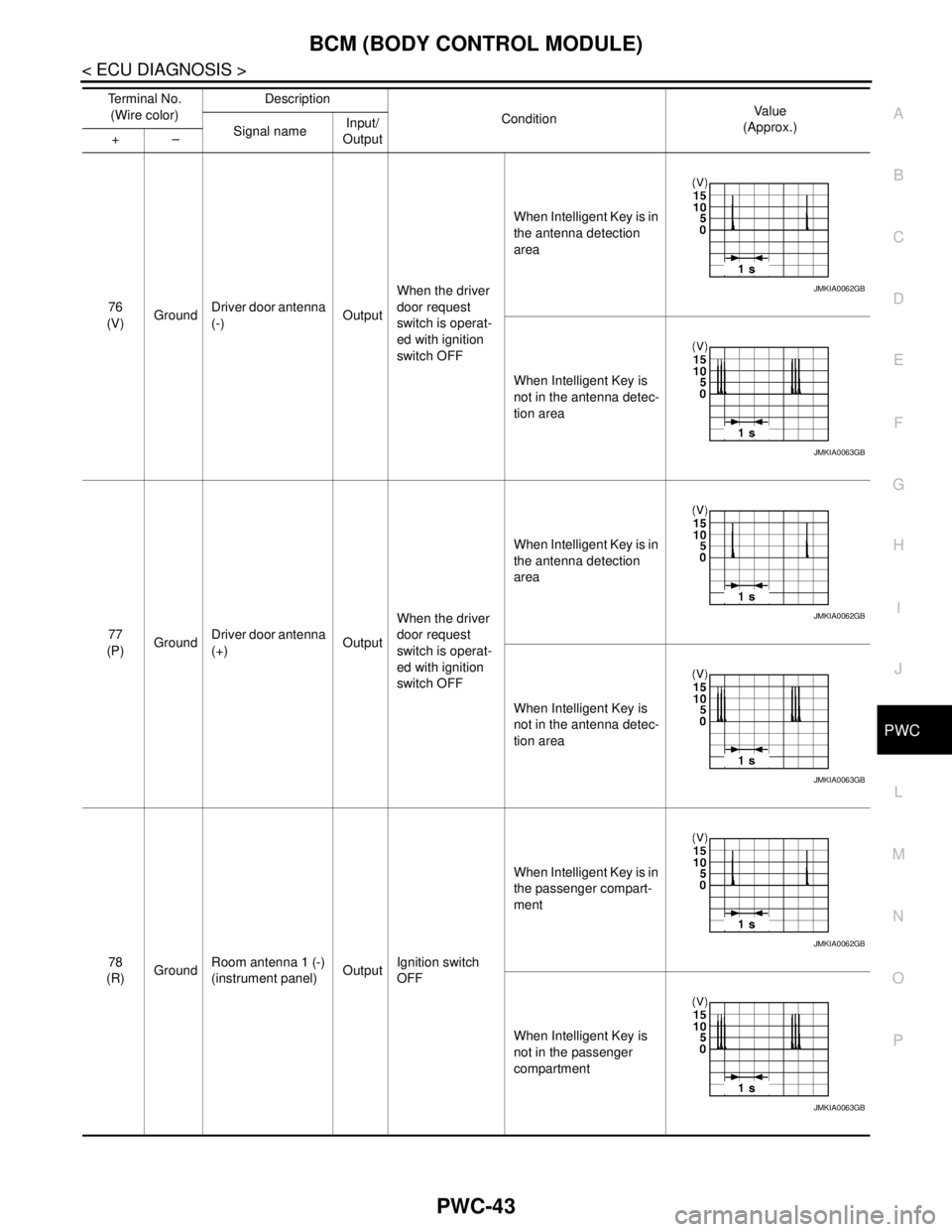
76
(V)GroundDriver door antenna
(-)OutputWhen the driver
door request
switch is operat-
ed with ignition
switch OFFWhen Intelligent Key is in
the antenna detection
area
When Intelligent Key is
not in the antenna detec-
tion area
77
(P)GroundDriver door antenna
(+)OutputWhen the driver
door request
switch is operat-
ed with ignition
switch OFFWhen Intelligent Key is in
the antenna detection
area
When Intelligent Key is
not in the antenna detec-
tion area
78
(R)GroundRoom antenna 1 (-)
(instrument panel)OutputIgnition switch
OFFWhen Intelligent Key is in
the passenger compart-
ment
When Intelligent Key is
not in the passenger
compartment Te r m i n a l N o .
(Wire color)Description
ConditionVa l u e
(Approx.)
Signal nameInput/
Output +–
JMKIA0062GB
JMKIA0063GB
JMKIA0062GB
JMKIA0063GB
JMKIA0062GB
JMKIA0063GB
Page 3674 of 5121
PWC-44
< ECU DIAGNOSIS >
BCM (BODY CONTROL MODULE)
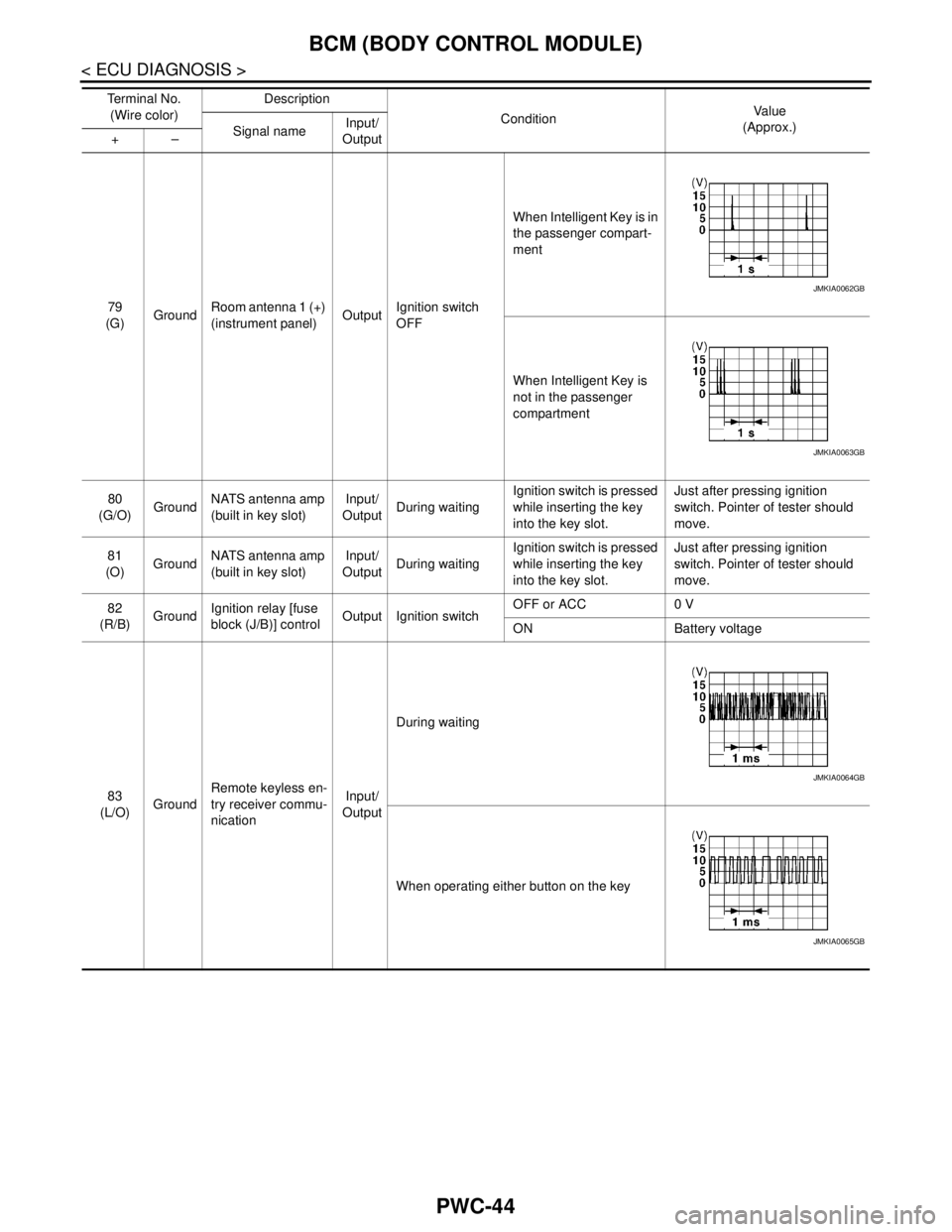
79
(G)GroundRoom antenna 1 (+)
(instrument panel)OutputIgnition switch
OFFWhen Intelligent Key is in
the passenger compart-
ment
When Intelligent Key is
not in the passenger
compartment
80
(G/O)GroundNATS antenna amp
(built in key slot)Input/
OutputDuring waitingIgnition switch is pressed
while inserting the key
into the key slot.Just after pressing ignition
switch. Pointer of tester should
move.
81
(O)GroundNATS antenna amp
(built in key slot)Input/
OutputDuring waitingIgnition switch is pressed
while inserting the key
into the key slot.Just after pressing ignition
switch. Pointer of tester should
move.
82
(R/B)GroundIgnition relay [fuse
block (J/B)] controlOutput Ignition switchOFF or ACC 0 V
ON Battery voltage
83
(L/O)GroundRemote keyless en-
try receiver commu-
nicationInput/
OutputDuring waiting
When operating either button on the key Te r m i n a l N o .
(Wire color)Description
ConditionVa l u e
(Approx.)
Signal nameInput/
Output +–
JMKIA0062GB
JMKIA0063GB
JMKIA0064GB
JMKIA0065GB