display NISSAN TEANA 2014 Service Manual
[x] Cancel search | Manufacturer: NISSAN, Model Year: 2014, Model line: TEANA, Model: NISSAN TEANA 2014Pages: 4801, PDF Size: 51.2 MB
Page 672 of 4801
![NISSAN TEANA 2014 Service Manual
DAS
ITS CONTROL UNITDAS-239
< ECU DIAGNOSIS INFORMATION > [MOD]
C
D E
F
G H
I
J
K L
M B
N P
A
DTC IndexINFOID:0000000009951662
NOTE:
• The details of time display are as follows:
- CRNT: A malf](/img/5/57390/w960_57390-671.png "NISSAN TEANA 2014 Service Manual
DAS
ITS CONTROL UNITDAS-239
< ECU DIAGNOSIS INFORMATION > [MOD]
C
D E
F
G H
I
J
K L
M B
N P
A
DTC IndexINFOID:0000000009951662
NOTE:
• The details of time display are as follows:
- CRNT: A malf")
DAS
ITS CONTROL UNITDAS-239
< ECU DIAGNOSIS INFORMATION > [MOD]
C
D E
F
G H
I
J
K L
M B
N P
A
DTC IndexINFOID:0000000009951662
NOTE:
• The details of time display are as follows:
- CRNT: A malfunction is detected now
- PAST: A malfunction was detected in the past
• IGN counter is displayed on FFD (Freeze Frame Data).
- 0: The malfunctions that are detected now
CAN communication system (U1000, U1010)
- 1 - 39: It increases like 0 → 1 → 2 ··· 38 → 39 after returning to the normal condition whenever the ignition
switch OFF → ON. It returns to 0 when a malfunc tion is detected again in the process.
- If it is over 39, it is fixed to 39 unt il the self-diagnosis results are erased.
Other than CAN communication s ystem (Other than U1000, U1010)
- 1 - 49: It increases like 0 → 1 → 2 ··· 38 → 49 after returning to the normal condition whenever the ignition
switch OFF → ON. It returns to 0 when a malfunc tion is detected again in the process.
- If it is over 49, it is fixed to 49 unt il the self-diagnosis results are erased.
NOTE:
With the detection of “U1000” some syst ems do not perform the fail-safe operation.
Systems for fail-safe
• A: Lane Departure Warning (LDW)
• B: Blind Spot Warning (BSW)
• C: Moving Object Detection (MOD)
DTC
CONSULT display Warning lamp Fail-safe
Reference
CONSULT
Lane Departure Warning
Blind Spot Warning
Moving Object Detection
System
C1A03 VHCL SPEED SE CIRC ON ON ON A, B, C DAS-260
C1A04 VDC FAIL ON ON ON A, B, CDAS-261
C1A39 STRG SEN CIR ON ON ON A, B, CDAS-262
NO DTC IS
DETECTED. FURTHER
TESTING
MAY BE RE- QUIRED NO DTC IS DETECTED.
FURTHER TESTING MAY BE REQUIRED ——— — —
U0122 VDC P-RUN DIAG ON ON ON A, B, C DAS-263
U0416 VDC CHECKSUM DIAG ON ON ON A, B, CDAS-264
U0428 STRG SEN CAN CIR 2 ON ON ON A, B, CDAS-265
U1000NOTECAN COMM CIRCUIT ON ON ON A, B, CDAS-266
U1010 CONTROL UNIT (CAN) ON ON ON A, B, C DAS-267
U 111 AREAR CAMERA IMAGE
SIGNAL ON ON ON A, B, C
DAS-268
U1232 ST ANGLE SEN CALIB ON ON ON A, B, C DAS-270
U1305 CAMERA IMAGE CALIB ON ON ON A, B, CDAS-271
U1308 CAMERA CONFIG ON ON ON A, B, CDAS-272
U1309 PUMP UNIT CURRENT ON ON ON A, B, CDAS-273
U130BREAR CAMERA COMM
ERROR ON ON ON A, B, C
DAS-276
U1310 PUMP UNIT CIRCUIT ON ON ON A, B, C DAS-277
Revision: November 20132014 Altima NAMRevision: November 20132014 Altima NAM
Page 687 of 4801
![NISSAN TEANA 2014 Service Manual
DAS-254
< BASIC INSPECTION >[MOD]
ACTION TEST
ACTION TEST
DescriptionINFOID:0000000009464902
• Perform action test to verify the customers concern.
• Perform action test and check the syst em o](/img/5/57390/w960_57390-686.png "NISSAN TEANA 2014 Service Manual
DAS-254
< BASIC INSPECTION >[MOD]
ACTION TEST
ACTION TEST
DescriptionINFOID:0000000009464902
• Perform action test to verify the customers concern.
• Perform action test and check the syst em o")
DAS-254
< BASIC INSPECTION >[MOD]
ACTION TEST
ACTION TEST
DescriptionINFOID:0000000009464902
• Perform action test to verify the customer's concern.
• Perform action test and check the syst em operation after system diagnosis.
WARNING:
Be careful of traffic conditions and safety ar ound the vehicle when performing road test.
CAUTION:
• Fully understand the following it ems well before the road test;
- Precautions: Refer to DAS-73, "Precaution for LDW System Service"
.
- System description for LDW: Refer to DAS-77, "System Description"
.
- System description for BSW: Refer to DAS-152, "System Description"
.
- System description for MOD: Refer to DAS-228, "System Description"
.
- Handling precaution: Refer to DAS-82, "Precautions for Lane Departure Warning"
.
Inspection ProcedureINFOID:0000000009464903
WARNING:
Be careful of traffic conditions and safety ar ound the vehicle when performing road test.
CAUTION:
• Fully understand the following it ems well before the road test;
- Precautions: Refer to DAS-73, "Precaution for LDW System Service"
.
- System description for LDW: Refer to DAS-77, "System Description"
.
- System description for BSW: Refer to DAS-152, "System Description"
.
- System description for MOD: Refer to DAS-228, "System Description"
.
- Handling precaution: Refer to DAS-232, "Precautions for Moving Objects Detection"
.
1.CHECK MOD SYSTEM SETTING
1. Start the engine.
2. Check that the MOD system setting can be enabl ed/disabled on the vehicle information display.
3. Turn OFF the ignition switch and wait for 30 seconds or more.
4. Check that the previous setting is saved when the engine starts again.
>> GO TO 2.
2.ACTION TEST FOR MOD
1. Enable the setting of the MOD system on the vehicle information display.
2. Turn warning systems switch ON (w arning systems ON indicator is ON).
3. Check the MOD operation according to the following table.
NOTE:
After the operating conditions of warning are satisfi ed, the warning continues until the vehicle reaches a
higher speed. Refer to DAS-228, "System Description"
.
>> Inspection End.
Vehicle condition/ Driver's operation Vehicle response
Moving Object De-
tection ON indicator Vehicle speed
(Approx.)
[km/h (MPH)] Status of vehicle detection
within detection area Indication on the Moving Object Detection
indicator Buzzer
OFF — — OFF OFF
Blue Less than approx.
8 km/h (5 MPH) Vehicle is detected ON ON
Approx. 8 km/h (5
MPH) or more Vehicle is absent ON OFF
Vehicle is detected ON OFF
Vehicle is not detected ON OFF
Revision: November 20132014 Altima NAMRevision: November 20132014 Altima NAM
Page 691 of 4801
![NISSAN TEANA 2014 Service Manual
DAS-258
< BASIC INSPECTION >[MOD]
REAR VIEW CAMERA CALIBRATION
CAUTION:
Make sure that the black/white pattern of the center target is rotated as compared with the left and
right targets.
>> Go to](/img/5/57390/w960_57390-690.png "NISSAN TEANA 2014 Service Manual
DAS-258
< BASIC INSPECTION >[MOD]
REAR VIEW CAMERA CALIBRATION
CAUTION:
Make sure that the black/white pattern of the center target is rotated as compared with the left and
right targets.
>> Go to")
DAS-258
< BASIC INSPECTION >[MOD]
REAR VIEW CAMERA CALIBRATION
CAUTION:
Make sure that the black/white pattern of the center target is rotated as compared with the left and
right targets.
>> Go to DAS-258, "Work Procedure (Rear View Camera Calibration)"
.
Work Procedure (Rear View Camera Calibration)INFOID:0000000009464909
CAUTION:
Perform the calibration under the sp ecified vehicle condition (fuel full, no-load, specified tire pressure,
etc.). Refer to DAS-256, "Work Procedure (Preparation)"
.
1.CHECK REAR VIEW CAMERA HEIGHT
Measure the rear view camera height “H”.
>> GO TO 2.
2.REAR VIEW CAMERA CALIBRATION
1. Select “Work Support” on “AVM” with CONSULT.
2. Select “REAR CAMERA ITS”.
3. Select "OK". CAUTION:
• Perform the calibration after the ignition or engine has been kept on for at least 10 minutes to
stabilize camera.
• Operate CONSULT outside the vehicle, and close al l doors to retain appropriate vehicle altitude.
4. Input the rear view camera height "H", and then touch "APPLY".
5. Confirm that the same value is displayed on the center display.
6. Confirm the following items:
- The target should be accurately placed.
- The vehicle should be stopped.
- The vehicle should be under the specified vehicle condition.
7. Select “Start” to perform calibration.
8. Confirm the displayed item.
- “Completed”: Select “Completion”.
- Otherwise, perform the following services:
ALOIA0192GB
ALOIA0188ZZ
Revision: November 20132014 Altima NAMRevision: November 20132014 Altima NAM
Page 692 of 4801
![NISSAN TEANA 2014 Service Manual
DAS
REAR VIEW CAMERA CALIBRATIONDAS-259
< BASIC INSPECTION > [MOD]
C
D E
F
G H
I
J
K L
M B
N P
A
NOTE:
Replace camera unit if “00H Routine not activated” or “10H Writing error” are repeat](/img/5/57390/w960_57390-691.png "NISSAN TEANA 2014 Service Manual
DAS
REAR VIEW CAMERA CALIBRATIONDAS-259
< BASIC INSPECTION > [MOD]
C
D E
F
G H
I
J
K L
M B
N P
A
NOTE:
Replace camera unit if “00H Routine not activated” or “10H Writing error” are repeat")
DAS
REAR VIEW CAMERA CALIBRATIONDAS-259
< BASIC INSPECTION > [MOD]
C
D E
F
G H
I
J
K L
M B
N P
A
NOTE:
Replace camera unit if “00H Routine not activated” or “10H Writing error” are repeatedly indicated during the
above two services are performed.
9. Confirm that “Completed” is displayed and then select “End” to close the calibration procedure.
>> GO TO 3.
3.PERFORM SELF-DIAGNOSIS
Perform self-diagnosis of IT S control unit with CONSULT.
Is any DTC detected?
YES >> Perform diagnosis on the detected DTC and repa ir or replace the applicable item. Refer to DAS-
239, "DTC Index".
NO >> GO TO 4.
4.ACTION TEST
Test the system operation by action test. Refer to DAS-254, "Description"
.
>> Work End.
Displayed item Possible cause Service procedure
SUSPENSION —
Temporary malfunction in internal processing of the rear
view camera. Go back to Step 1
00H Routine not ac-
tivated Rear view camera unit malfunction.
Position the target appro-
priately again. Perform
the aiming again. Refer
to DAS-257, "Work Pro-
cedure (Target Setting)".
10H Writing error • Temporary malfunction in internal processing of the
rear view camera.
• Rear view camera malfunction.
X AIMING NG Y
(X: 0 - 7, Y: 1 - 8) —• A target is not-yet-placed.
(The rear view camera cannot detect a target.)
• The position of the rear view camera is not correct.
• Inappropriate work environment.
• Inappropriate vehicle condition. Position the target appro-
priately again. Perform
the aiming again. Refer
to DAS-256, "Work Pro-
cedure (Preparation)".
ABNORMALLY COM-
PLETED —
Revision: November 20132014 Altima NAMRevision: November 20132014 Altima NAM
Page 698 of 4801
![NISSAN TEANA 2014 Service Manual
DAS
U0428 STEERING ANGLE SENSORDAS-265
< DTC/CIRCUIT DIAGNOSIS > [MOD]
C
D E
F
G H
I
J
K L
M B
N P
A
U0428 STEERING ANGLE SENSOR
DTC LogicINFOID:0000000009464920
Diagnosis ProcedureINFOID:000000000](/img/5/57390/w960_57390-697.png "NISSAN TEANA 2014 Service Manual
DAS
U0428 STEERING ANGLE SENSORDAS-265
< DTC/CIRCUIT DIAGNOSIS > [MOD]
C
D E
F
G H
I
J
K L
M B
N P
A
U0428 STEERING ANGLE SENSOR
DTC LogicINFOID:0000000009464920
Diagnosis ProcedureINFOID:000000000")
DAS
U0428 STEERING ANGLE SENSORDAS-265
< DTC/CIRCUIT DIAGNOSIS > [MOD]
C
D E
F
G H
I
J
K L
M B
N P
A
U0428 STEERING ANGLE SENSOR
DTC LogicINFOID:0000000009464920
Diagnosis ProcedureINFOID:0000000009464921
1.ADJUST THE NEUTRAL POSITION OF THE STEERING ANGLE SENSOR
When U1232 is detected, adjust the neutral position of the steering angle sensor.
>> Perform adjustment of the neutral position of the steering angle sensor. Refer to BRC-33, "CON-
SULT Function (ABS)".
DTCDisplay contents of
CONSULT DTC detection condition Possible malfunction factor
U0428 ST ANGLE SENSOR
CALIBRATION [U0428] The neutral position adjustment of the steering angle sen-
sor is incomplete. Adjust neutral position of the steering
angle sensor.
Revision: November 20132014 Altima NAMRevision: November 20132014 Altima NAM
Page 703 of 4801
![NISSAN TEANA 2014 Service Manual
DAS-270
< DTC/CIRCUIT DIAGNOSIS >[MOD]
U1232 STEERING ANGLE SENSOR
U1232 STEERING ANGLE SENSOR
DTC LogicINFOID:0000000009464930
Diagnosis ProcedureINFOID:0000000009464931
1.REGISTER THE NEUTRAL POSIT](/img/5/57390/w960_57390-702.png "NISSAN TEANA 2014 Service Manual
DAS-270
< DTC/CIRCUIT DIAGNOSIS >[MOD]
U1232 STEERING ANGLE SENSOR
U1232 STEERING ANGLE SENSOR
DTC LogicINFOID:0000000009464930
Diagnosis ProcedureINFOID:0000000009464931
1.REGISTER THE NEUTRAL POSIT")
DAS-270
< DTC/CIRCUIT DIAGNOSIS >[MOD]
U1232 STEERING ANGLE SENSOR
U1232 STEERING ANGLE SENSOR
DTC LogicINFOID:0000000009464930
Diagnosis ProcedureINFOID:0000000009464931
1.REGISTER THE NEUTRAL POSITION
OF THE STEERING ANGLE SENSOR
1. Turn the ignition switch ON.
2. Perform registration of the neutral positi on of the steering angle sensor. Refer to DAS-233, "CONSULT
Function (AVM)".
3. Check “Self Diagnostic Result” of “AVM” with CONSULT. Refer to DAS-233, "CONSULT Function (AVM)"
.
Is
“ST ANGLE SEN CALIB” detected?
YES >> GO TO 2.
NO >> Inspection End.
2.CHECK STEERING ANGLE SENSOR
Check steering angle sensor.
Is the inspection result normal?
YES >> Replace ITS control unit. Refer to DAS-68, "Removal and Installation".
NO >> Repair or replace malfunctioning parts.
DTC Display contents of
CONSULT DTC detection condition Possible malfunction factor
U1232 ST ANGLE SEN CALIB The neutral position registration of the steering angle sen-
sor cannot finish. • Steering angle sensor
•ITS control unit
Revision: November 20132014 Altima NAMRevision: November 20132014 Altima NAM
Page 722 of 4801
![NISSAN TEANA 2014 Service Manual
DAS
MOD SYSTEM SETTINGS CANNOT BE TURNED ON/OFF IN VEHICLE INFOR-
MATION DISPLAY
DAS-289
< SYMPTOM DIAGNOSIS > [MOD]
C
D E
F
G H
I
J
K L
M B
N P
A
MOD SYSTEM SETTINGS CANNOT BE TURNED ON/OFF IN VEH](/img/5/57390/w960_57390-721.png "NISSAN TEANA 2014 Service Manual
DAS
MOD SYSTEM SETTINGS CANNOT BE TURNED ON/OFF IN VEHICLE INFOR-
MATION DISPLAY
DAS-289
< SYMPTOM DIAGNOSIS > [MOD]
C
D E
F
G H
I
J
K L
M B
N P
A
MOD SYSTEM SETTINGS CANNOT BE TURNED ON/OFF IN VEH")
DAS
MOD SYSTEM SETTINGS CANNOT BE TURNED ON/OFF IN VEHICLE INFOR-
MATION DISPLAY
DAS-289
< SYMPTOM DIAGNOSIS > [MOD]
C
D E
F
G H
I
J
K L
M B
N P
A
MOD SYSTEM SETTINGS CANNOT BE TURNED ON/OFF IN VEHICLE IN-
FORMATION DISPLAY
DescriptionINFOID:0000000009464954
• Moving Object Detection system setting is not selectable on the vehicle information display screen.
NOTE:
When the ignition switch is in ACC position, Movi ng Object Detection system settings cannot be changed.
- “Moving Object Detection” is not indica ted on the vehicle information display screen.
- The switching between ON and OFF cannot be performed by operating the vehicle information display set-
ting system selection.
- The item “Moving Object Detection” on the vehi cle information display screen is not active.
• The Moving Object Detection system setting diff ers from the one set at the previous driving.
NOTE:
Turn OFF the ignition switch and wait for 5 seconds or more.
Diagnosis ProcedureINFOID:0000000009464955
1.CHECK MOVING OBJECT DE TECTION SYSTEM SETTING
1. Start the engine.
2. Check that the Moving Object Detection system sett ings is selectable on the vehicle information display
screen.
Is the inspection result normal?
YES >> GO TO 3.
NO >> GO TO 2.
2.PERFORM THE SELF-DIAGNOSIS
1. Perform self-diagnosis with CONSULT.
2. Check if the DTC is detected in self-diagnosis re sults of “AVM”, “MULTI AV” and “METER/M&A”. Refer to
the following.
-AVM: DAS-239, "DTC Index"
- MULTI AV (with BOSE): AV-328, "DTC Index"
- MULTI AV (without BOSE): AV-231, "DTC Index"
- METER/M&A: MWI-27, "DTC Index"
Is any DTC detected?
YES >> Repair or replace malfunctioning parts.
NO >> Inspection End.
3.CHECK DATA MONITOR OF ITS CONTROL UNIT
Check that “MOD SELECT” operates normally in “DATA MONITOR” of “AVM” with CONSULT.
Is the inspection result normal?
YES >> Refer to DAS-233, "CONSULT Function (AVM)".
NO >> GO TO 4.
4.CHECK MULTIFUNCTION SWITCH
Operate the multifunction switch to check that the audio, navigation system, and air conditioner operate prop-
erly.
Is the inspection result normal?
YES >> Replace the ITS control unit. Refer to DAS-68, "Removal and Installation".
NO >> Repair or replace malfunctioning parts.
Revision: November 20132014 Altima NAMRevision: November 20132014 Altima NAM
Page 731 of 4801

DEF-6
< SYSTEM DESCRIPTION >
COMPONENT PARTS
Component Description
INFOID:0000000009463023
1: With auto A/C
2: With manual A/C
3: With heated mirrors Component Description
BCM • Operates the rear window defogger with the operation of rear window defogger switch.
• Performs the timer control of rear window defogger.
Rear window defogger relay • Operates the rear window defogger and the door mirror defogger with the control signal from
BCM.
A/C auto amp
1• Displays the rear window defogger ON to the display when detecting the operation of the rear window defogger.
A/C switch assembly
1 (rear
window defogger switch) • The rear window defogger switch is turned ON.
Front air control
2 (rear window
defogger switch) • The rear window defogger switch is turned ON.
• Turns the indicator lamp ON when detecting the operation of rear window defogger.
Rear window defogger • Heats the heating wire with the power supply from the rear window defogger relay to prevent
the rear window from fogging up.
Door mirror defogger
3• Heats the heating wire with the power supply from the rear window defogger relay to prevent the door mirror from fogging up.
Revision: November 20132014 Altima NAMRevision: November 20132014 Altima NAM
Page 732 of 4801
SYSTEMDEF-7
< SYSTEM DESCRIPTION >
C
D E
F
G H
I
J
K
M A
B
DEF
N
O P
SYSTEM
System DiagramINFOID:0000000009463024
System DescriptionINFOID:0000000009463025
Operation Description
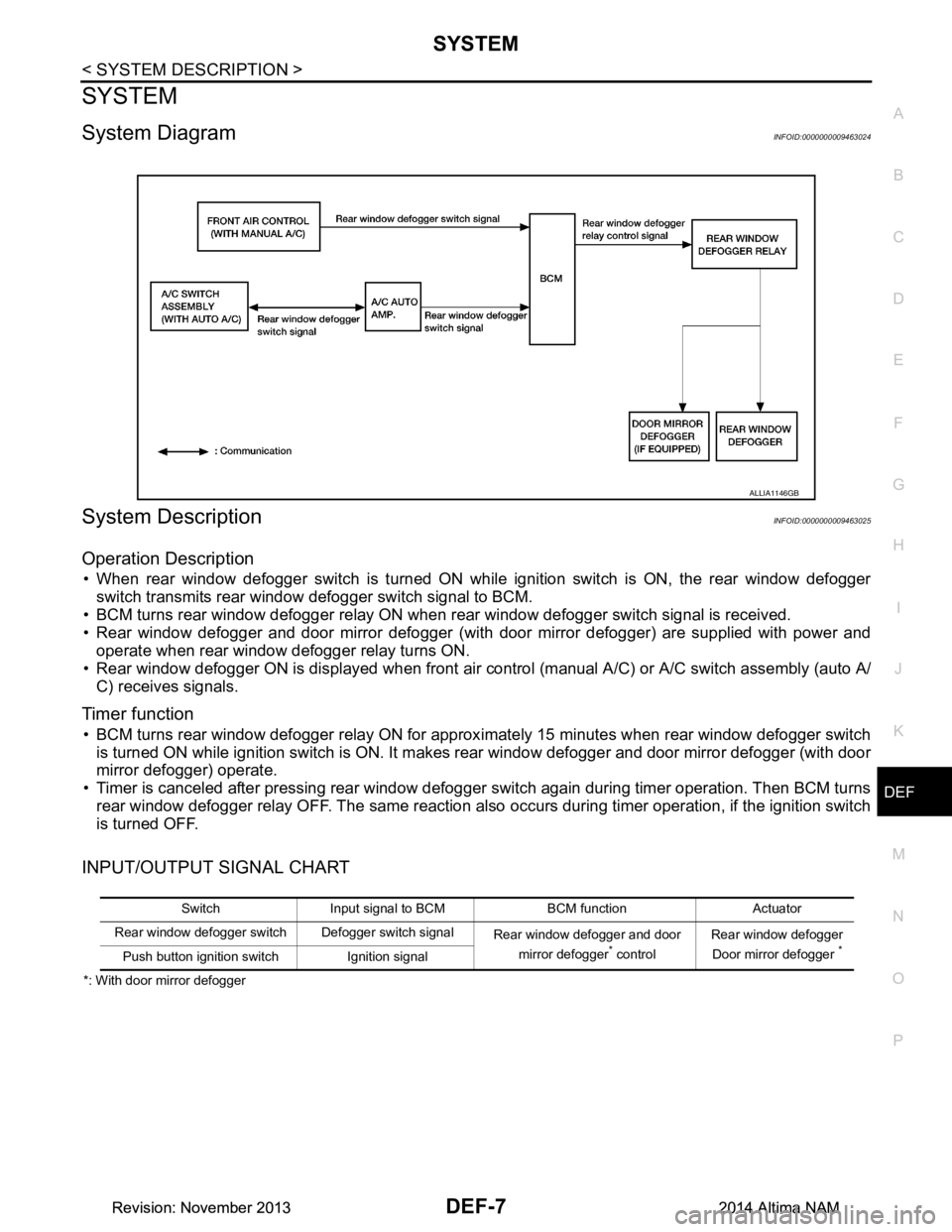
• When rear window defogger switch is turned ON while ignition switch is ON, the rear window defogger switch transmits rear window defogger switch signal to BCM.
• BCM turns rear window defogger relay ON when rear window defogger switch signal is received.
• Rear window defogger and door mirror defogger (with door mirror defogger) are supplied with power and
operate when rear window defogger relay turns ON.
• Rear window defogger ON is displayed when front air c ontrol (manual A/C) or A/C switch assembly (auto A/
C) receives signals.
Timer function
• BCM turns rear window defogger relay ON for approx imately 15 minutes when rear window defogger switch
is turned ON while ignition switch is ON. It makes rear window defogger and door mirror defogger (with door
mirror defogger) operate.
• Timer is canceled after pressing rear window defogger switch again during timer operation. Then BCM turns
rear window defogger relay OFF. The same reaction also occurs during timer operation, if the ignition switch
is turned OFF.
INPUT/OUTPUT SIGNAL CHART
*: With door mirror defogger
ALLIA1146GB
Switch Input signal to BCM BCM function Actuator
Rear window defogger switch Defogger switch signal Rear window defogger and door
mirror defogger
* control Rear window defogger
Door mirror defogger *Push button ignition switch Ignition signal
Revision: November 20132014 Altima NAMRevision: November 20132014 Altima NAM
Page 733 of 4801

DEF-8
< SYSTEM DESCRIPTION >
DIAGNOSIS SYSTEM (BCM)
DIAGNOSIS SYSTEM (BCM)
COMMON ITEM
COMMON ITEM : CONSULT Function (BCM - COMMON ITEM)INFOID:0000000009956271
CAUTION:
After disconnecting the CONSULT vehicle interface (VI) from the data link connector, the ignition must
be cycled OFF → ON (for at least 5 seconds) → OFF. If this step is not performed, the BCM may not go
to ”sleep mode”, potentially causing a di scharged battery and a no-start condition.
APPLICATION ITEM
CONSULT performs the following functions via CAN communication with BCM.
SYSTEM APPLICATION
BCM can perform the following functions.
Direct Diagnostic Mode Description
Ecu Identification The BCM part number is displayed.
Self Diagnostic Result The BCM self diagnostic results are displayed.
Data Monitor The BCM input/output data is displayed in real time.
Active Test The BCM activates outputs to test components.
Work support The settings for BCM functions can be changed.
Configuration • The vehicle specification can be read and saved.
• The vehicle specification can be written when replacing BCM.
CAN Diag Support Mntr The result of transmit/receive diagnosis of CAN communication is displayed.
System Sub System Direct Diagnostic Mode
Ecu Identification
Self Diagnostic Result
Data Monitor
Active Test
Work support
Configuration
CAN Diag Su pport Mntr
Door lock DOOR LOCK ××××
Rear window defogger REAR DEFOGGER ×××
Warning chime BUZZER ××
Interior room lamp timer INT LAMP ×××
Remote keyless entry system MULTI REMOTE ENT ×××
Exterior lamp HEADLAMP ×××
Wiper and washer WIPER ×××
Turn signal and hazard warning lamps FLASHER ××
Air conditioner AIR CONDITIONER ×
Intelligent Key system INTELLIGENT KEY ××××
Combination switch COMB SW ×
BCM BCM × × ×××
Immobilizer IMMU ×××
Interior room lamp battery saver BATTERY SAVER ××
Trunk open TRUNK ×
Vehicle security system THEFT ALM ×××
Revision: November 20132014 Altima NAMRevision: November 20132014 Altima NAM