lock NISSAN TEANA 2014 Service Manual
[x] Cancel search | Manufacturer: NISSAN, Model Year: 2014, Model line: TEANA, Model: NISSAN TEANA 2014Pages: 4801, PDF Size: 51.2 MB
Page 918 of 4801
DLK-150
< DTC/CIRCUIT DIAGNOSIS >
HOMELINK UNIVERSAL TRANSCEIVER
HOMELINK UNIVERSAL TRANSCEIVER
DescriptionINFOID:0000000009461904
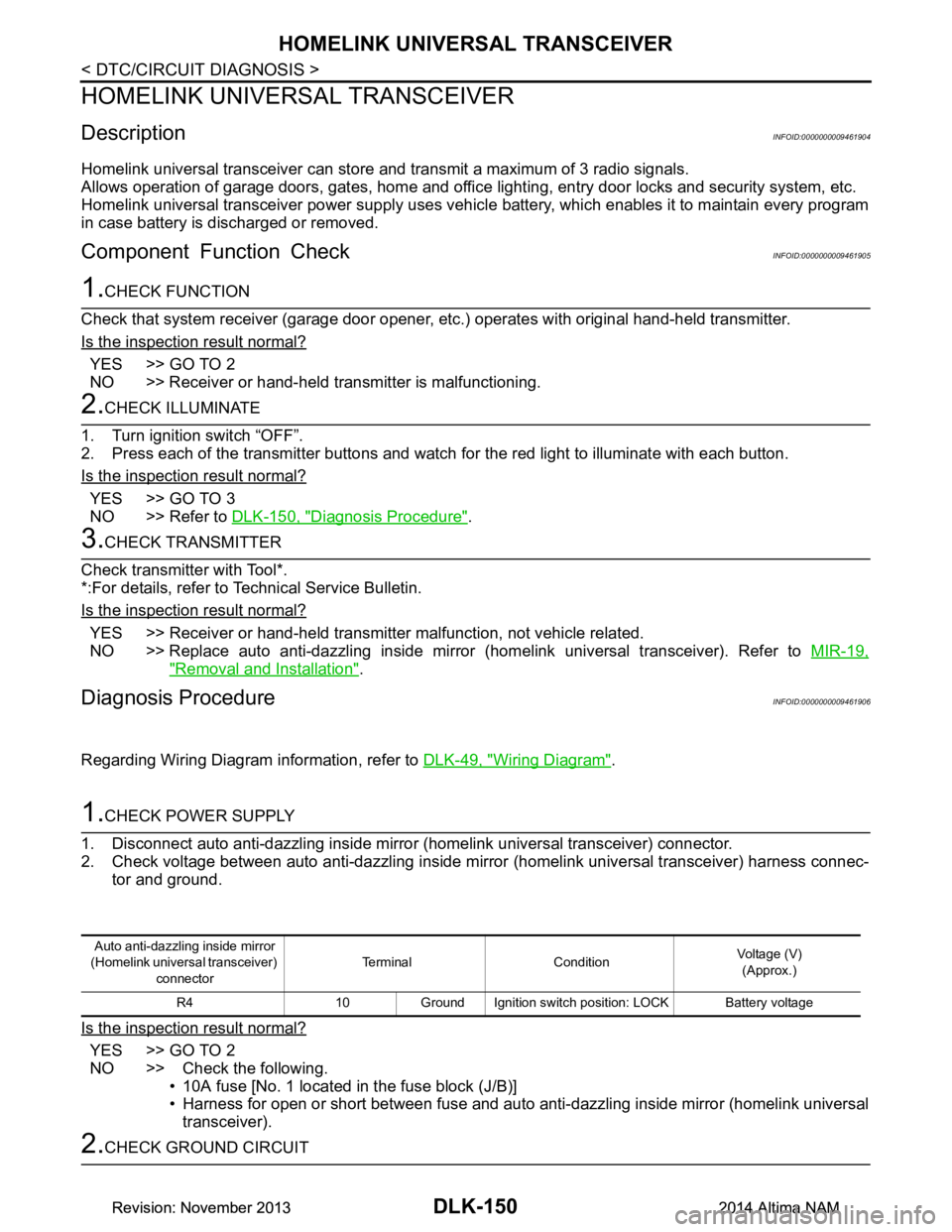
Homelink universal transceiver can store and transmit a maximum of 3 radio signals.
Allows operation of garage doors, gates, home and office lighting, entry door locks and security system, etc.
Homelink universal transceiver power supply uses vehicl e battery, which enables it to maintain every program
in case battery is discharged or removed.
Component Function CheckINFOID:0000000009461905
1.CHECK FUNCTION
Check that system receiver (garage door opener, et c.) operates with original hand-held transmitter.
Is the inspection result normal?
YES >> GO TO 2
NO >> Receiver or hand-held transmitter is malfunctioning.
2.CHECK ILLUMINATE
1. Turn ignition switch “OFF”.
2. Press each of the transmitter buttons and watch for the red light to illuminate with each button.
Is the inspection result normal?
YES >> GO TO 3
NO >> Refer to DLK-150, "Diagnosis Procedure"
.
3.CHECK TRANSMITTER
Check transmitter with Tool*.
*:For details, refer to Technical Service Bulletin.
Is the inspection result normal?
YES >> Receiver or hand-held transmitter malfunction, not vehicle related.
NO >> Replace auto anti-dazzling inside mirror (homelink universal transceiver). Refer to MIR-19,
"Removal and Installation".
Diagnosis ProcedureINFOID:0000000009461906
Regarding Wiring Diagram information, refer to DLK-49, "Wiring Diagram".
1.CHECK POWER SUPPLY
1. Disconnect auto anti-dazzling inside mirror (homelink universal transceiver) connector.
2. Check voltage between auto anti-dazzling inside mirror (homelink universal transceiver) harness connec-
tor and ground.
Is the inspection result normal?
YES >> GO TO 2
NO >> Check the following. • 10A fuse [No. 1 located in the fuse block (J/B)]
• Harness for open or short between fuse and auto anti-dazzling inside mirror (homelink universal
transceiver).
2.CHECK GROUND CIRCUIT
Auto anti-dazzling inside mirror
(Homelink universal transceiver) connector Terminal Condition
Voltage (V)
(Approx.)
R4 10 Ground Ignition switch position: LOCK Battery voltage
Revision: November 20132014 Altima NAMRevision: November 20132014 Altima NAM
Page 920 of 4801
DLK-152
< SYMPTOM DIAGNOSIS >
INTELLIGENT KEY SYSTEM SYMPTOMS
SYMPTOM DIAGNOSIS
INTELLIGENT KEY SYSTEM SYMPTOMS
Symptom TableINFOID:0000000009461907
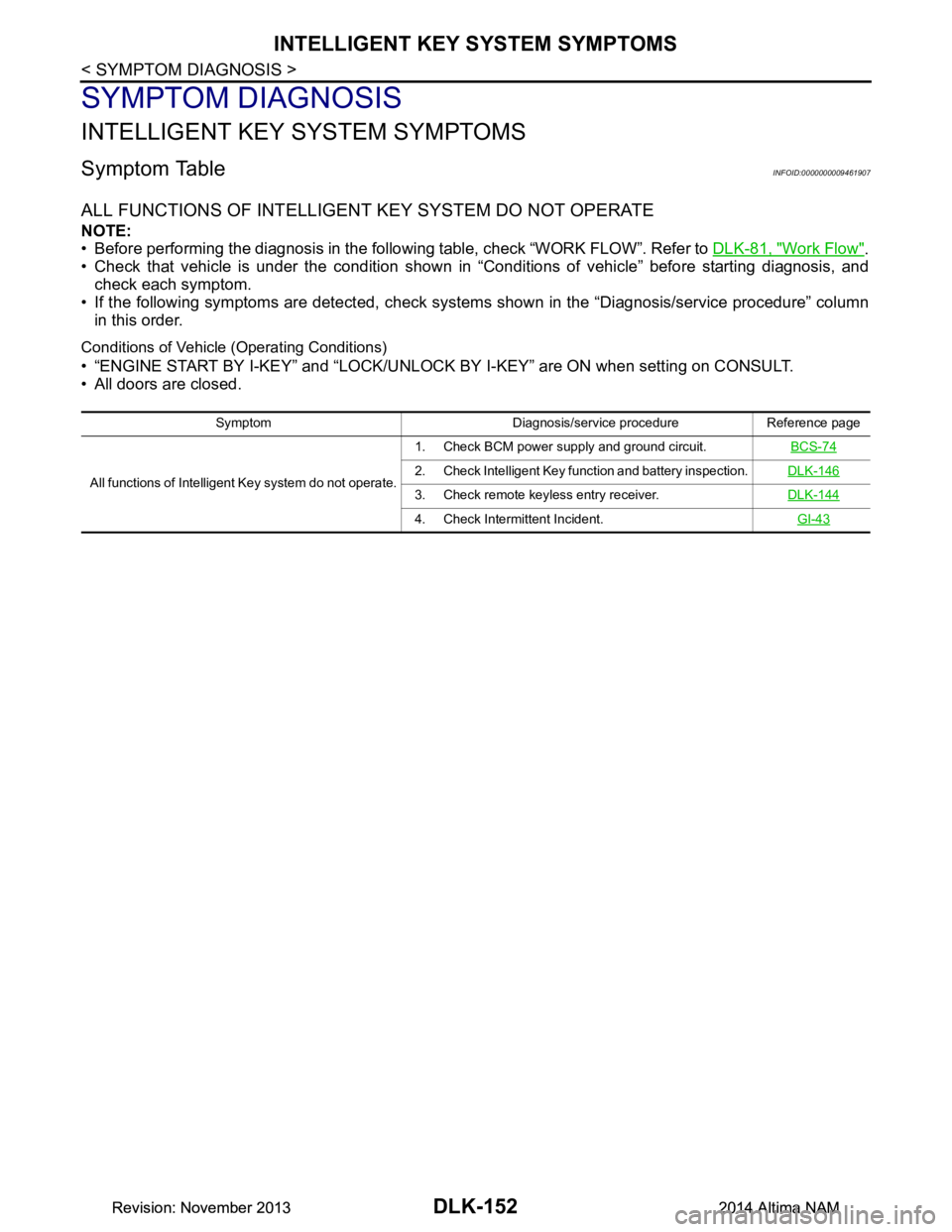
ALL FUNCTIONS OF INTELLIGENT KEY SYSTEM DO NOT OPERATE
NOTE:
• Before performing the diagnosis in the following table, check “WORK FLOW”. Refer to DLK-81, "Work Flow"
.
• Check that vehicle is under the condition shown in “Conditions of vehicle” before starting diagnosis, and
check each symptom.
• If the following symptoms are detected, check syst ems shown in the “Diagnosis/service procedure” column
in this order.
Conditions of Vehicle (Operating Conditions)
• “ENGINE START BY I-KEY” and “LOCK/UNLOCK BY I-KEY” are ON when setting on CONSULT.
• All doors are closed.
Symptom Diagnosis/service procedure Reference page
All functions of Intelligent Key system do not operate. 1. Check BCM power supply and ground circuit.
BCS-74
2. Check Intelligent Key function and battery inspection.DLK-146
3. Check remote keyless entry receiver.DLK-144
4. Check Intermittent Incident. GI-43
Revision: November 20132014 Altima NAMRevision: November 20132014 Altima NAM
Page 921 of 4801
DOOR LOCK FUNCTION SYMPTOMSDLK-153
< SYMPTOM DIAGNOSIS >
C
D E
F
G H
I
J
L
M A
B
DLK
N
O P
DOOR LOCK FUNCTION SYMPTOMS
DOOR LOCK AND UNLOCK SWITCH
DOOR LOCK AND UNLOCK SWITCH : Symptom TableINFOID:0000000009461908
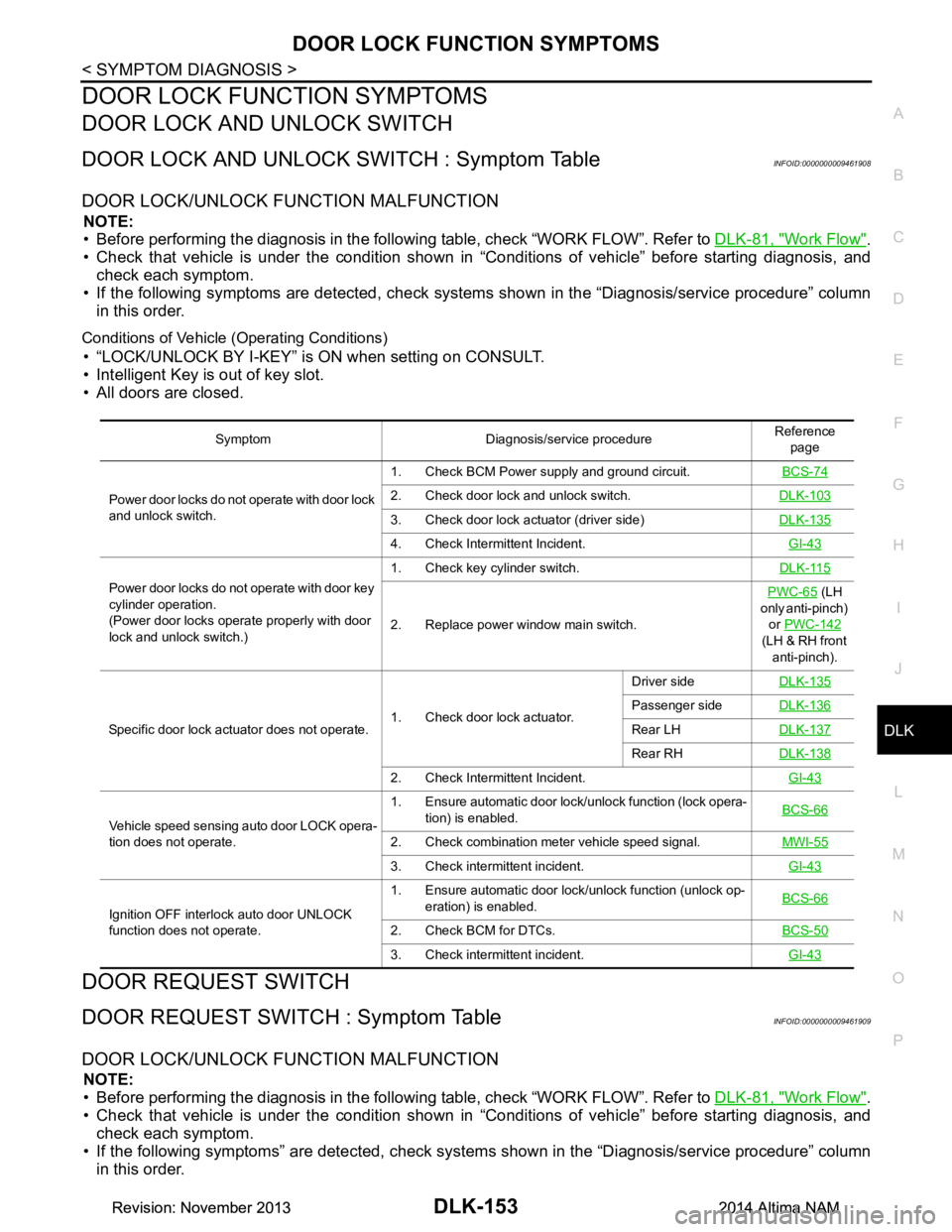
DOOR LOCK/UNLOCK FUNCTION MALFUNCTION
NOTE:
• Before performing the diagnosis in the follo wing table, check “WORK FLOW”. Refer to DLK-81, "Work Flow"
.
• Check that vehicle is under the condition shown in “Conditions of vehicle” before starting diagnosis, and
check each symptom.
• If the following symptoms are detec ted, check systems shown in the “Diagnosis/service procedure” column
in this order.
Conditions of Vehicle (Operating Conditions)
• “LOCK/UNLOCK BY I-KEY” is ON when setting on CONSULT.
• Intelligent Key is out of key slot.
• All doors are closed.
DOOR REQUEST SWITCH
DOOR REQUEST SWITCH : Symptom TableINFOID:0000000009461909
DOOR LOCK/UNLOCK FUNCTION MALFUNCTION
NOTE:
• Before performing the diagnosis in the follo wing table, check “WORK FLOW”. Refer to DLK-81, "Work Flow"
.
• Check that vehicle is under the condition shown in “Conditions of vehicle” before starting diagnosis, and
check each symptom.
• If the following symptoms” are detected, check syst ems shown in the “Diagnosis/service procedure” column
in this order.
Symptom Diagnosis/service procedure Reference
page
Power door locks do not operate with door lock
and unlock switch. 1. Check BCM Power supply and ground circuit.
BCS-74
2. Check door lock and unlock switch.DLK-103
3. Check door lock actuator (driver side)DLK-135
4. Check Intermittent Incident. GI-43
Power door locks do not operate with door key
cylinder operation.
(Power door locks operate properly with door
lock and unlock switch.) 1. Check key cylinder switch.
DLK-115
2. Replace power window main switch.PWC-65
(LH
only anti-pinch) or PWC-142
(LH & RH front anti-pinch).
Specific door lock actuator does not operate. 1. Check door lock actuator.Driver side
DLK-135
Passenger sideDLK-136
Rear LHDLK-137
Rear RHDLK-138
2. Check Intermittent Incident. GI-43
Vehicle speed sensing auto door LOCK opera-
tion does not operate. 1. Ensure automatic door lock/unlock function (lock opera-
tion) is enabled. BCS-66
2. Check combination meter vehicle speed signal.
MWI-55
3. Check intermittent incident. GI-43
Ignition OFF interlock auto door UNLOCK
function does not operate. 1. Ensure automatic door lock/unlock function (unlock op-
eration) is enabled. BCS-66
2. Check BCM for DTCs.
BCS-50
3. Check intermittent incident. GI-43
Revision: November 20132014 Altima NAMRevision: November 20132014 Altima NAM
Page 922 of 4801
DLK-154
< SYMPTOM DIAGNOSIS >
DOOR LOCK FUNCTION SYMPTOMS
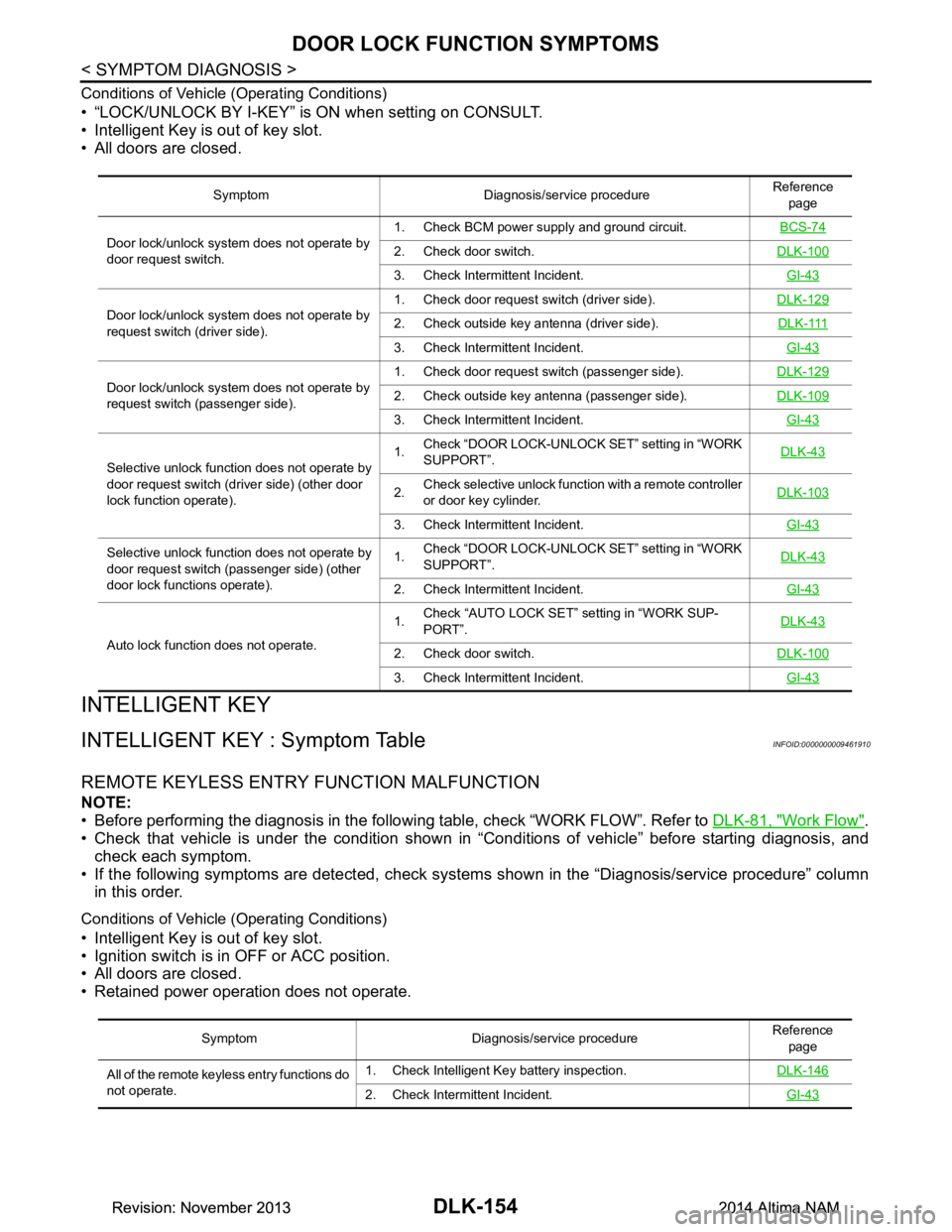
Conditions of Vehicle (Operating Conditions)
• “LOCK/UNLOCK BY I-KEY” is ON when setting on CONSULT.
• Intelligent Key is out of key slot.
• All doors are closed.
INTELLIGENT KEY
INTELLIGENT KEY : Symptom TableINFOID:0000000009461910
REMOTE KEYLESS ENTRY FUNCTION MALFUNCTION
NOTE:
• Before performing the diagnosis in the following table, check “WORK FLOW”. Refer to DLK-81, "Work Flow"
.
• Check that vehicle is under the condition shown in “Conditions of vehicle” before starting diagnosis, and
check each symptom.
• If the following symptoms are detected, check syst ems shown in the “Diagnosis/service procedure” column
in this order.
Conditions of Vehicle (Operating Conditions)
• Intelligent Key is out of key slot.
• Ignition switch is in OFF or ACC position.
• All doors are closed.
• Retained power operation does not operate.
Symptom Diagnosis/service procedure Reference
page
Door lock/unlock system does not operate by
door request switch. 1. Check BCM power supply and ground circuit.
BCS-74
2. Check door switch.DLK-100
3. Check Intermittent Incident. GI-43
Door lock/unlock system does not operate by
request switch (driver side). 1. Check door request
switch (driver side). DLK-1292. Check outside key antenna (driver side). D L K - 111
3. Check Intermittent Incident. GI-43
Door lock/unlock system does not operate by
request switch (passenger side). 1. Check door request switch (passenger side).
DLK-1292. Check outside key antenna (passenger side).DLK-109
3. Check Intermittent Incident. GI-43
Selective unlock function does not operate by
door request switch (dri ver side) (other door
lock function operate). 1.
Check “DOOR LOCK-UNLOCK
SET” setting in “WORK
SUPPORT”. DLK-43
2.
Check selective unlock function with a remote controller
or door key cylinder. DLK-103
3. Check Intermittent Incident.
GI-43
Selective unlock function does not operate by
door request switch (passenger side) (other
door lock functions operate). 1.
Check “DOOR LOCK-UNLOCK
SET” setting in “WORK
SUPPORT”. DLK-43
2. Check Intermittent Incident.
GI-43
Auto lock function does not operate.1.
Check “AUTO LOCK SET” setting in “WORK SUP-
PORT”. DLK-432. Check door switch.
DLK-100
3. Check Intermittent Incident. GI-43
Symptom Diagnosis/service procedure Reference
page
All of the remote keyless entry functions do
not operate. 1. Check Intelligent Key battery inspection.
DLK-146
2. Check Intermittent Incident. GI-43
Revision: November 20132014 Altima NAMRevision: November 20132014 Altima NAM
Page 923 of 4801
DOOR LOCK FUNCTION SYMPTOMSDLK-155
< SYMPTOM DIAGNOSIS >
C
D E
F
G H
I
J
L
M A
B
DLK
N
O P
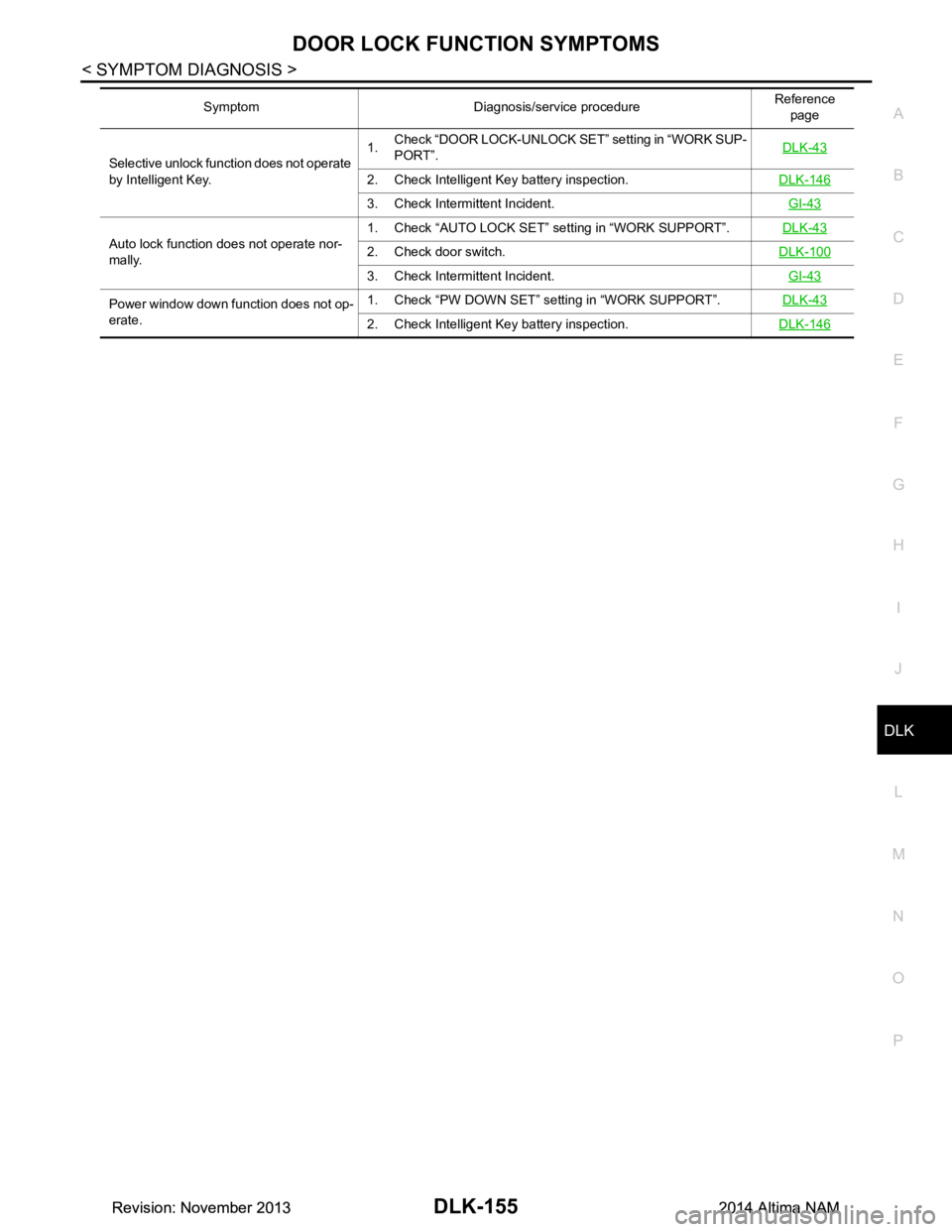
Selective unlock function does not operate
by Intelligent Key. 1.
Check “DOOR LOCK-UNLOCK SET” setting in “WORK SUP-
PORT”. DLK-43
2. Check Intelligent Key battery inspection.
DLK-146
3. Check Intermittent Incident. GI-43
Auto lock function does not operate nor-
mally. 1. Check “AUTO LOCK SET” setting in “WORK SUPPORT”.
DLK-432. Check door switch.DLK-100
3. Check Intermittent Incident. GI-43
Power window down function does not op-
erate. 1. Check “PW DOWN SET” se
tting in “WORK SUPPORT”. DLK-43
2. Check Intelligent Key battery inspection. DLK-146
Symptom Diagnosis/service procedure Reference
page
Revision: November 20132014 Altima NAMRevision: November 20132014 Altima NAM
Page 927 of 4801
WARNING FUNCTION SYMPTOMSDLK-159
< SYMPTOM DIAGNOSIS >
C
D E
F
G H
I
J
L
M A
B
DLK
N
O P
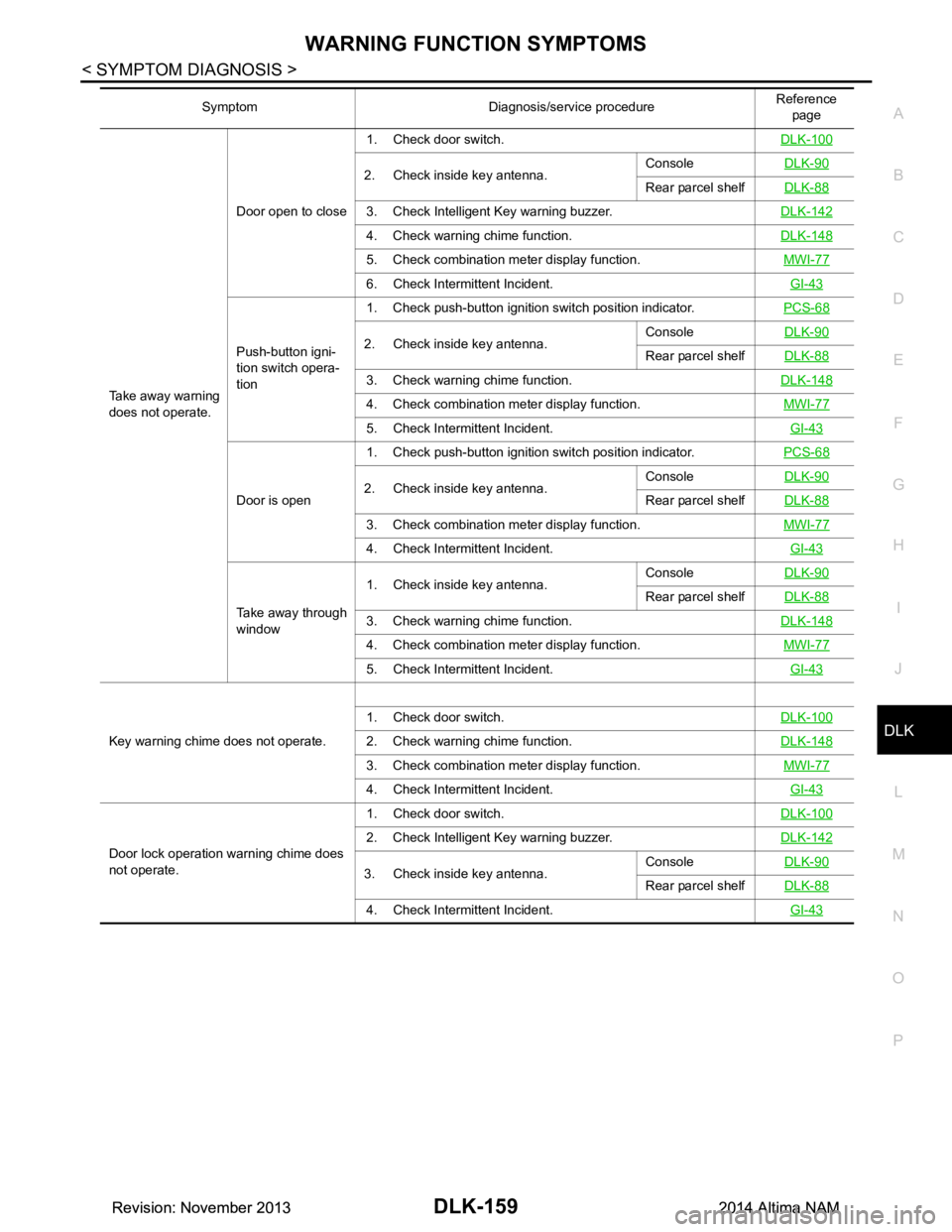
Take away warning
does not operate. Door open to close
1. Check door switch.
DLK-100
2. Check inside key antenna.Console
DLK-90Rear parcel shelfDLK-88
3. Check Intelligent Key warning buzzer. DLK-142
4. Check warning chime function.DLK-148
5. Check combination meter display function. MWI-77
6. Check Intermittent Incident. GI-43
Push-button igni-
tion switch opera-
tion 1. Check push-button ignition switch position indicator.
PCS-682. Check inside key antenna.Console
DLK-90Rear parcel shelfDLK-88
3. Check warning chime function. DLK-148
4. Check combination meter display function. MWI-77
5. Check Intermittent Incident. GI-43
Door is open1. Check push-button ignition switch position indicator.
PCS-682. Check inside key antenna.Console
DLK-90Rear parcel shelfDLK-88
3. Check combination meter display function. MWI-77
4. Check Intermittent Incident. GI-43
Take away through
window 1. Check inside key antenna.
Console
DLK-90
Rear parcel shelfDLK-88
3. Check warning chime function. DLK-148
4. Check combination meter display function. MWI-77
5. Check Intermittent Incident. GI-43
Key warning chime does not operate.1. Check door switch.
DLK-1002. Check warning chime function.DLK-148
3. Check combination meter display function. MWI-77
4. Check Intermittent Incident. GI-43
Door lock operation warning chime does
not operate. 1. Check door switch.
DLK-100
2. Check Intelligent Key warning buzzer.DLK-142
3. Check inside key antenna.Console
DLK-90Rear parcel shelfDLK-88
4. Check Intermittent Incident. GI-43
Symptom Diagnosis/service procedure Reference
page
Revision: November 20132014 Altima NAMRevision: November 20132014 Altima NAM
Page 928 of 4801
DLK-160
< SYMPTOM DIAGNOSIS >
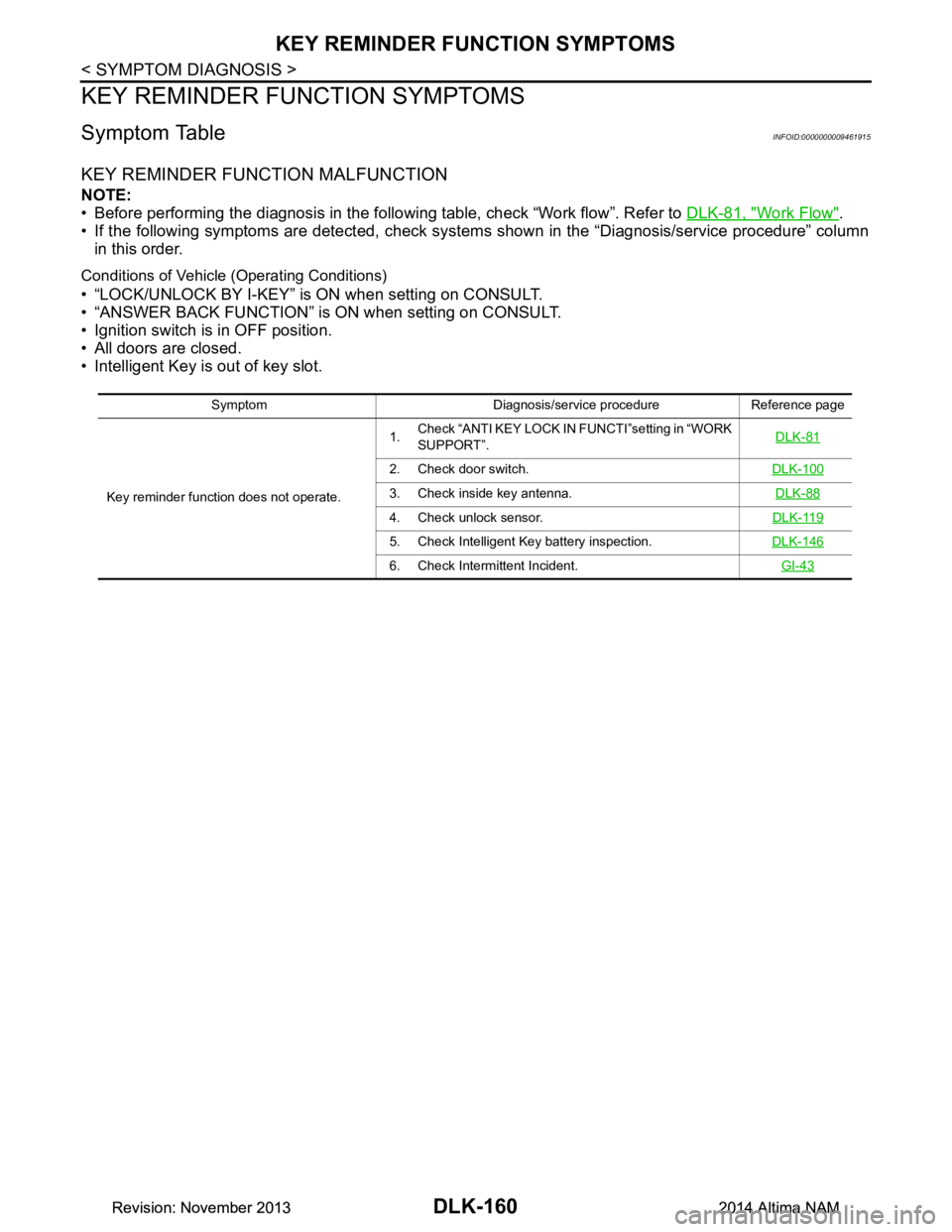
KEY REMINDER FUNCTION SYMPTOMS
KEY REMINDER FUNCTION SYMPTOMS
Symptom TableINFOID:0000000009461915
KEY REMINDER FUNCTION MALFUNCTION
NOTE:
• Before performing the diagnosis in the follo wing table, check “Work flow”. Refer to DLK-81, "Work Flow"
.
• If the following symptoms are detected, check syst ems shown in the “Diagnosis/service procedure” column
in this order.
Conditions of Vehicle (Operating Conditions)
• “LOCK/UNLOCK BY I-KEY” is ON when setting on CONSULT.
• “ANSWER BACK FUNCTION” is ON when setting on CONSULT.
• Ignition switch is in OFF position.
• All doors are closed.
• Intelligent Key is out of key slot.
Symptom Diagnosis/service procedure Reference page
Key reminder function does not operate. 1.
Check “ANTI KEY LOCK IN FUNCTI”setting in “WORK
SUPPORT”. DLK-81
2. Check door switch.
DLK-100
3. Check inside key antenna. DLK-88
4. Check unlock sensor.DLK-119
5. Check Intelligent Key battery inspection.DLK-146
6. Check Intermittent Incident. GI-43
Revision: November 20132014 Altima NAMRevision: November 20132014 Altima NAM
Page 929 of 4801
HAZARD FUNCTIONDLK-161
< SYMPTOM DIAGNOSIS >
C
D E
F
G H
I
J
L
M A
B
DLK
N
O P
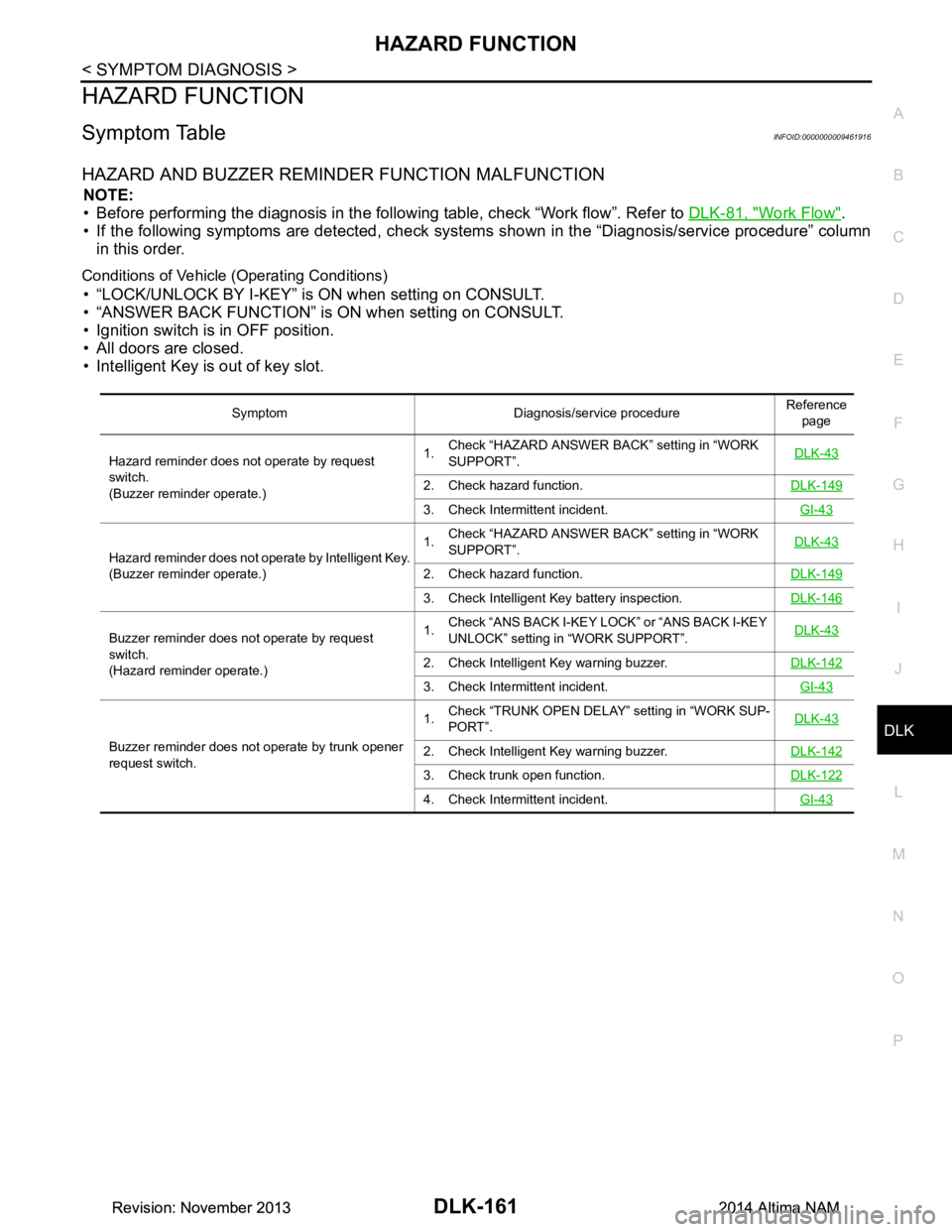
HAZARD FUNCTION
Symptom TableINFOID:0000000009461916
HAZARD AND BUZZER REMINDER FUNCTION MALFUNCTION
NOTE:
• Before performing the diagnosis in the following table, check “Work flow”. Refer to DLK-81, "Work Flow"
.
• If the following symptoms are detec ted, check systems shown in the “Diagnosis/service procedure” column
in this order.
Conditions of Vehicle (Operating Conditions)
• “LOCK/UNLOCK BY I-KEY” is ON when setting on CONSULT.
• “ANSWER BACK FUNCTION” is ON when setting on CONSULT.
• Ignition switch is in OFF position.
• All doors are closed.
• Intelligent Key is out of key slot.
Symptom Diagnosis/service procedure Reference
page
Hazard reminder does not operate by request
switch.
(Buzzer reminder operate.) 1.
Check “HAZARD ANSWER BACK” setting in “WORK
SUPPORT”. DLK-43
2. Check hazard function.
DLK-149
3. Check Intermittent incident. GI-43
Hazard reminder does not operate by Intelligent Key.
(Buzzer reminder operate.) 1.
Check “HAZARD ANSWER BACK” setting in “WORK
SUPPORT”. DLK-43
2. Check hazard function.
DLK-149
3. Check Intelligent Key battery inspection.DLK-146
Buzzer reminder does not operate by request
switch.
(Hazard reminder operate.) 1.
Check “ANS BACK I-KEY LOCK” or “ANS BACK I-KEY
UNLOCK” setting in “WORK SUPPORT”. DLK-43
2. Check Intelligent Key warning buzzer.
DLK-142
3. Check Intermittent incident. GI-43
Buzzer reminder does not operate by trunk opener
request switch. 1.
Check “TRUNK OPEN DELAY” setting in “WORK SUP-
PORT”. DLK-432. Check Intelligent Key warning buzzer.
DLK-142
3. Check trunk open function.DLK-122
4. Check Intermittent incident. GI-43
Revision: November 20132014 Altima NAMRevision: November 20132014 Altima NAM
Page 930 of 4801
DLK-162
< SYMPTOM DIAGNOSIS >
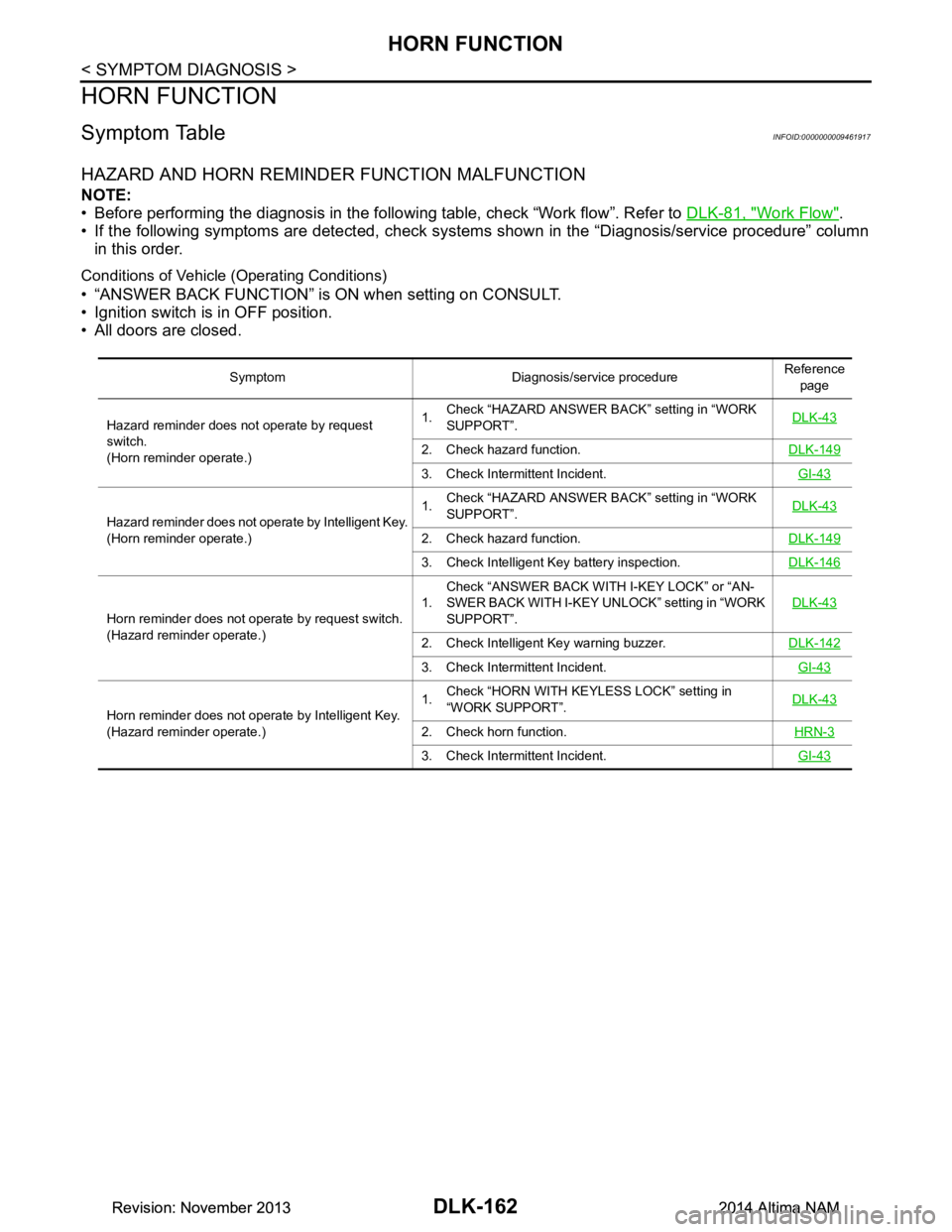
HORN FUNCTION
HORN FUNCTION
Symptom TableINFOID:0000000009461917
HAZARD AND HORN REMINDER FUNCTION MALFUNCTION
NOTE:
• Before performing the diagnosis in the follo wing table, check “Work flow”. Refer to DLK-81, "Work Flow"
.
• If the following symptoms are detected, check syst ems shown in the “Diagnosis/service procedure” column
in this order.
Conditions of Vehicle (Operating Conditions)
• “ANSWER BACK FUNCTION” is ON when setting on CONSULT.
• Ignition switch is in OFF position.
• All doors are closed.
Symptom Diagnosis/service procedure Reference
page
Hazard reminder does not operate by request
switch.
(Horn reminder operate.) 1.
Check “HAZARD ANSWER BACK” setting in “WORK
SUPPORT”. DLK-43
2. Check hazard function.
DLK-149
3. Check Intermittent Incident. GI-43
Hazard reminder does not operate by Intelligent Key.
(Horn reminder operate.) 1.
Check “HAZARD ANSWER BACK” setting in “WORK
SUPPORT”. DLK-43
2. Check hazard function.
DLK-149
3. Check Intelligent Key battery inspection.DLK-146
Horn reminder does not operate by request switch.
(Hazard reminder operate.) 1.
Check “ANSWER BACK WITH I-KEY LOCK” or “AN-
SWER BACK WITH I-KEY UNLOCK” setting in “WORK
SUPPORT”. DLK-43
2. Check Intelligent Key warning buzzer.
DLK-142
3. Check Intermittent Incident. GI-43
Horn reminder does not operate by Intelligent Key.
(Hazard reminder operate.) 1.
Check “HORN WITH KEYLESS LOCK” setting in
“WORK SUPPORT”. DLK-43
2. Check horn function.
HRN-3
3. Check Intermittent Incident. GI-43
Revision: November 20132014 Altima NAMRevision: November 20132014 Altima NAM
Page 932 of 4801
DLK-164
< SYMPTOM DIAGNOSIS >
SQUEAK AND RATTLE TROUBLE DIAGNOSES
SQUEAK AND RATTLE TROUBLE DIAGNOSES
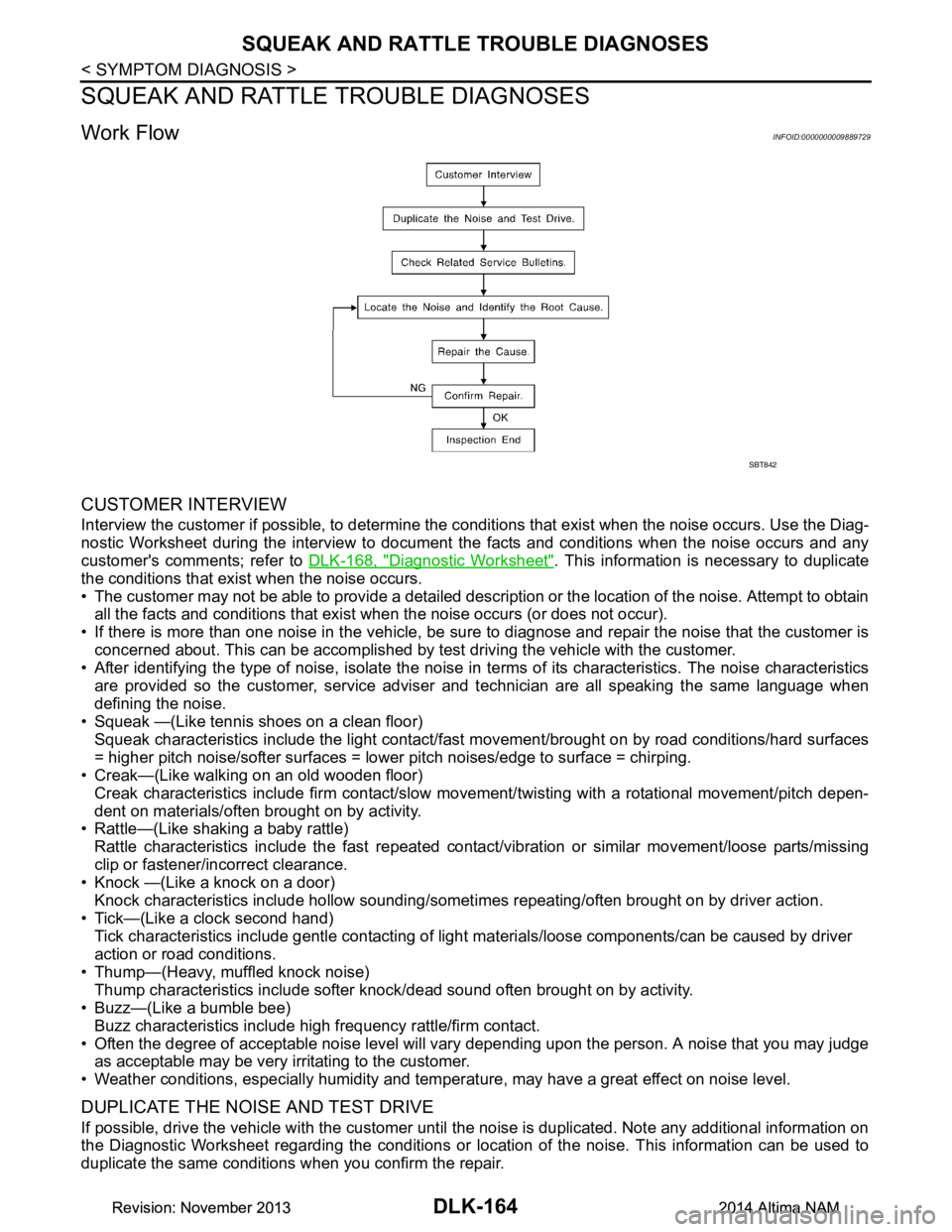
Work FlowINFOID:0000000009889729
CUSTOMER INTERVIEW
Interview the customer if possible, to determine the conditions that exist when the noise occurs. Use the Diag-
nostic Worksheet during the interview to document the facts and conditions when the noise occurs and any
customer's comments; refer to DLK-168, "Diagnostic Worksheet"
. This information is necessary to duplicate
the conditions that exist when the noise occurs.
• The customer may not be able to provide a detailed description or the location of the noise. Attempt to obtain all the facts and conditions that exist w hen the noise occurs (or does not occur).
• If there is more than one noise in the vehicle, be sure to diagnose and repair the noise that the customer is
concerned about. This can be accomplished by test driving the vehicle with the customer.
• After identifying the type of noise, isolate the noise in terms of its characteristics. The noise characteristics
are provided so the customer, service adviser and technician are all speaking the same language when
defining the noise.
• Squeak —(Like tennis shoes on a clean floor)
Squeak characteristics include the light contact/fast movement/brought on by road conditions/hard surfaces
= higher pitch noise/softer surfaces = lower pitch noises/edge to surface = chirping.
• Creak—(Like walking on an old wooden floor)
Creak characteristics include firm contact/slow mo vement/twisting with a rotational movement/pitch depen-
dent on materials/often brought on by activity.
• Rattle—(Like shaking a baby rattle)
Rattle characteristics include the fast repeated contac t/vibration or similar movement/loose parts/missing
clip or fastener/incorrect clearance.
• Knock —(Like a knock on a door)
Knock characteristics include hollow sounding/someti mes repeating/often brought on by driver action.
• Tick—(Like a clock second hand) Tick characteristics include gentle contacting of light materials/loose components/can be caused by driver
action or road conditions.
• Thump—(Heavy, muffled knock noise) Thump characteristics include softer k nock/dead sound often brought on by activity.
• Buzz—(Like a bumble bee)
Buzz characteristics include hi gh frequency rattle/firm contact.
• Often the degree of acceptable noise level will vary depending upon the person. A noise that you may judge as acceptable may be very irritating to the customer.
• Weather conditions, especially humidity and temperat ure, may have a great effect on noise level.
DUPLICATE THE NOISE AND TEST DRIVE
If possible, drive the vehicle with the customer until the noise is duplicated. Note any additional information on
the Diagnostic Worksheet regarding the conditions or lo cation of the noise. This information can be used to
duplicate the same conditions when you confirm the repair.
SBT842
Revision: November 20132014 Altima NAMRevision: November 20132014 Altima NAM