lock NISSAN TEANA 2014 Service Manual
[x] Cancel search | Manufacturer: NISSAN, Model Year: 2014, Model line: TEANA, Model: NISSAN TEANA 2014Pages: 4801, PDF Size: 51.2 MB
Page 862 of 4801

DLK-94
< DTC/CIRCUIT DIAGNOSIS >
B26FD SHIFT LOCK SOLENOID
Is the inspection result normal?
YES >> GO TO 9.
NO >> Repair or replace damaged parts.
9.CHECK HARNESS BETWEEN BCM AND CVT SHIFT SELECTOR FOR SHORT CIRCUIT
Check continuity between BCM connector M20 terminal 108 and ground.
Is the inspection result normal?
YES >> GO TO 10.
NO >> Repair or replace damaged parts.
10.CHECK GROUND CIRCUIT (CVT SHIFT SELECTOR)
Check continuity between CVT shift sele ctor connector M23 terminal 4 and ground.
Is the inspection result normal?
YES >> Replace shift lock solenoid. Refer to TM-179, "Exploded View".
NO >> Repair or replace damaged parts.
BCM CVT shift selector Continuity
Connector Terminal Connector Terminal
M20 108 M23 3 Yes
BCM GroundContinuity
Connector Terminal
M20 108 No
CVT shift selector GroundContinuity
Connector Terminal
M23 4 Yes
Revision: November 20132014 Altima NAMRevision: November 20132014 Altima NAM
Page 864 of 4801
DLK-96
< DTC/CIRCUIT DIAGNOSIS >
B26FE HOOD SWITCH
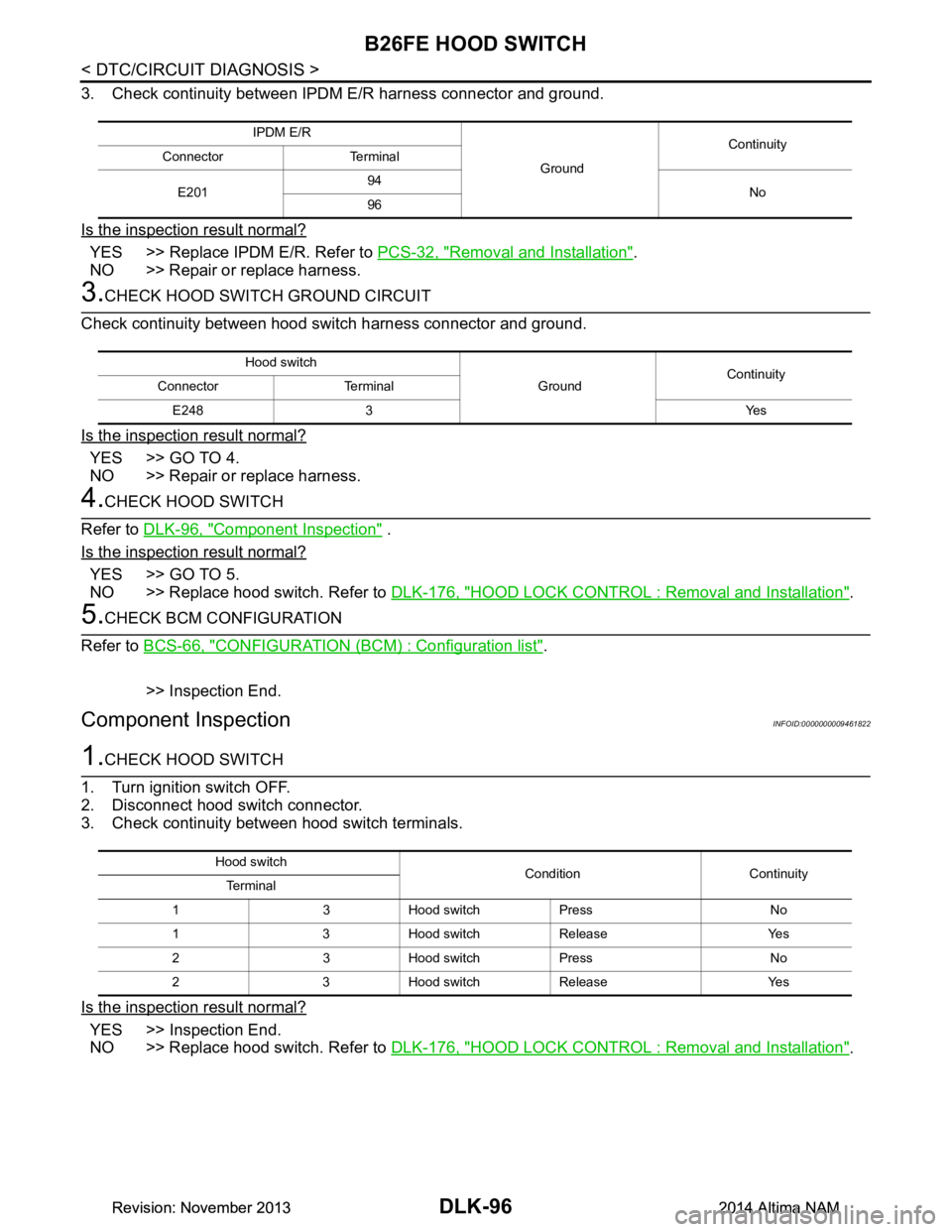
3. Check continuity between IPDM E/R harness connector and ground.
Is the inspection result normal?
YES >> Replace IPDM E/R. Refer to PCS-32, "Removal and Installation".
NO >> Repair or replace harness.
3.CHECK HOOD SWITCH GROUND CIRCUIT
Check continuity between hood switch harness connector and ground.
Is the inspection result normal?
YES >> GO TO 4.
NO >> Repair or replace harness.
4.CHECK HOOD SWITCH
Refer to DLK-96, "Component Inspection"
.
Is the inspection result normal?
YES >> GO TO 5.
NO >> Replace hood switch. Refer to DLK-176, "HOOD LOCK CONTROL : Removal and Installation"
.
5.CHECK BCM CONFIGURATION
Refer to BCS-66, "CONFIGURATION (BCM) : Configuration list"
.
>> Inspection End.
Component InspectionINFOID:0000000009461822
1.CHECK HOOD SWITCH
1. Turn ignition switch OFF.
2. Disconnect hood switch connector.
3. Check continuity between hood switch terminals.
Is the inspection result normal?
YES >> Inspection End.
NO >> Replace hood switch. Refer to DLK-176, "HOOD LOCK CONTROL : Removal and Installation"
.
IPDM E/R
GroundContinuity
Connector Terminal
E201 94
No
96
Hood switch
GroundContinuity
Connector Terminal
E248 3 Yes
Hood switch Condition Continuity
Te r m i n a l
1 3 Hood switch Press No
1 3 Hood switch Release Yes
2 3 Hood switch Press No
2 3 Hood switch Release Yes
Revision: November 20132014 Altima NAMRevision: November 20132014 Altima NAM
Page 865 of 4801
B26FF REMOTE KEYLESS ENTRY RECEIVERDLK-97
< DTC/CIRCUIT DIAGNOSIS >
C
D E
F
G H
I
J
L
M A
B
DLK
N
O P
B26FF REMOTE KEYLESS ENTRY RECEIVER
DTC LogicINFOID:0000000009461823
DTC DETECTION LOGIC
DTC CONFIRMATION PROCEDURE
1.PERFORM DTC CONFIRMATION PROCEDURE
1. Turn ignition switch ON.
2. Check DTC in “Self-Diagnostic Result” mode of “BCM” using CONSULT.
Is DTC detected?
YES >> Refer to DLK-97, "Diagnosis Procedure".
NO >> Inspection End.
Diagnosis ProcedureINFOID:0000000009461824
Regarding Wiring Diagram information, refer to DLK-51, "Wiring Diagram".
1.CHECK REMOTE KEYLESS ENTRY RECEIVER OUTPUT SIGNAL
1. Turn ignition switch OFF.
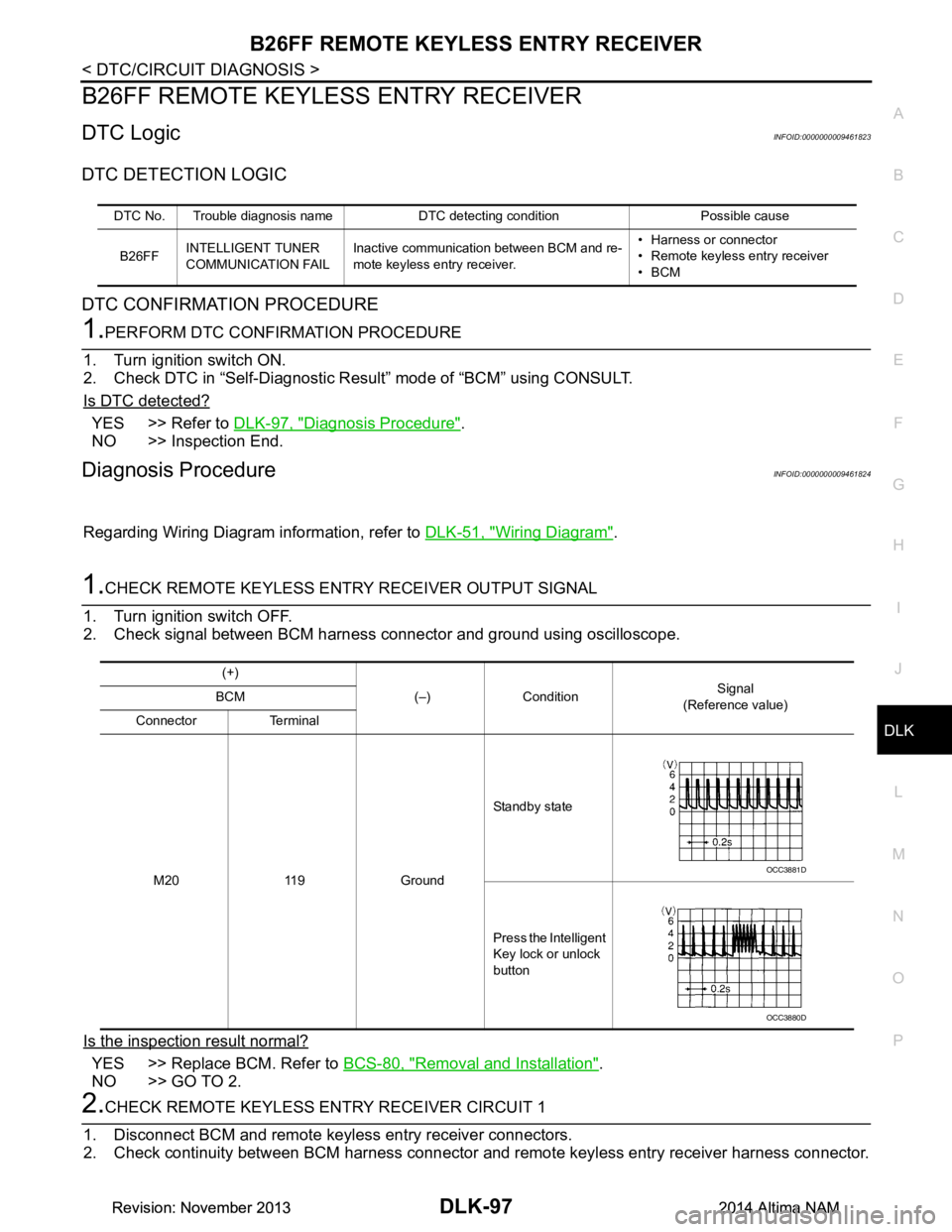
2. Check signal between BCM harness connector and ground using oscilloscope.
Is the inspection result normal?
YES >> Replace BCM. Refer to BCS-80, "Removal and Installation".
NO >> GO TO 2.
2.CHECK REMOTE KEYLESS EN TRY RECEIVER CIRCUIT 1
1. Disconnect BCM and remote keyless entry receiver connectors.
2. Check continuity between BCM harness connector and remote keyless entry receiver harness connector.
DTC No. Trouble diagnosis name DTC detecting condition Possible cause
B26FF INTELLIGENT TUNER
COMMUNICATION FAIL Inactive communication between BCM and re-
mote keyless entry receiver. • Harness or connector
• Remote keyless entry receiver
•BCM
(+)
(–) Condition Signal
(Reference value)
BCM
Connector Terminal
M20 119 Ground Standby state
Press the Intelligent
Key lock or unlock
button
OCC3881D
OCC3880D
Revision: November 20132014 Altima NAMRevision: November 20132014 Altima NAM
Page 866 of 4801

DLK-98
< DTC/CIRCUIT DIAGNOSIS >
B26FF REMOTE KEYLESS ENTRY RECEIVER
3. Check continuity between BCM harness connector and ground.
Is the inspection result normal?
YES >> GO TO 3.
NO >> Repair or replace harness.
3.CHECK REMOTE KEYLESS ENTRY RECEIVER POWER SUPPLY
Check voltage between remote keyless entry receiver harness connector and ground.
Is the inspection result normal?
YES >> GO TO 4.
NO-1 >> Check 5A fuse No. 9 [located in fuse block J/B].
NO-2 >> Repair or replace harness between remote keyless entry receiver and 5A fuse No. 9.
4.CHECK REMOTE KEYLESS ENTRY RECEIVER GROUND CIRCUIT
Check continuity between remote keyles s entry receiver harness connector and ground.
Is the inspection result normal?
YES >> Replace remote keyless entry receiver. Refer to DLK-224, "Removal and Installation".
NO >> Repair or replace harness.
BCM Remote keyless entry receiver Continuity
Connector Terminal Connector Terminal
M20 119 M27 2 Yes
(+) (–) Continuity
BCM
Connector Terminal M20 119 Ground No
(+) (–)Vo l ta g e
(Approx)
Remote keyless entry receiver
Connector Terminal M27 1 Ground Battery voltage
Remote keyless entry receiver GroundContinuity
Connector Terminal
M27 3 Yes
Revision: November 20132014 Altima NAMRevision: November 20132014 Altima NAM
Page 871 of 4801
DOOR LOCK AND UNLOCK SWITCHDLK-103
< DTC/CIRCUIT DIAGNOSIS >
C
D E
F
G H
I
J
L
M A
B
DLK
N
O P
DOOR LOCK AND UNLOCK SWITCH
DRIVER SIDE
DRIVER SIDE : DescriptionINFOID:0000000009461830
Transmits door lock/unlock operation to BCM.
DRIVER SIDE : Comp onent Function CheckINFOID:0000000009461831
1.CHECK FUNCTION
With CONSULT
Check CDL LOCK SW, CDL UNLOCK SW in Data Monitor mode with CONSULT.
Is the inspection result normal?
YES >> Door lock and unlock switch is OK.
NO >> With LH and RH anti-pinch, refer to DLK-103, "DRIVER SIDE : Diagnosis Procedure (With LH and
RH Anti-Pinch)".
NO >> With LH anti-pinch only, refer to DLK-104, "DRIVER SIDE : Diagnosis Procedure (With LH Anti-
Pinch Only)".
DRIVER SIDE : Diagnosis Procedure (With LH and RH Anti-Pinch)INFOID:0000000009461832
Regarding Wiring Diagram information, refer to DLK-51, "Wiring Diagram".
1.CHECK POWER WINDOW SWITCH OUTPUT SIGNAL
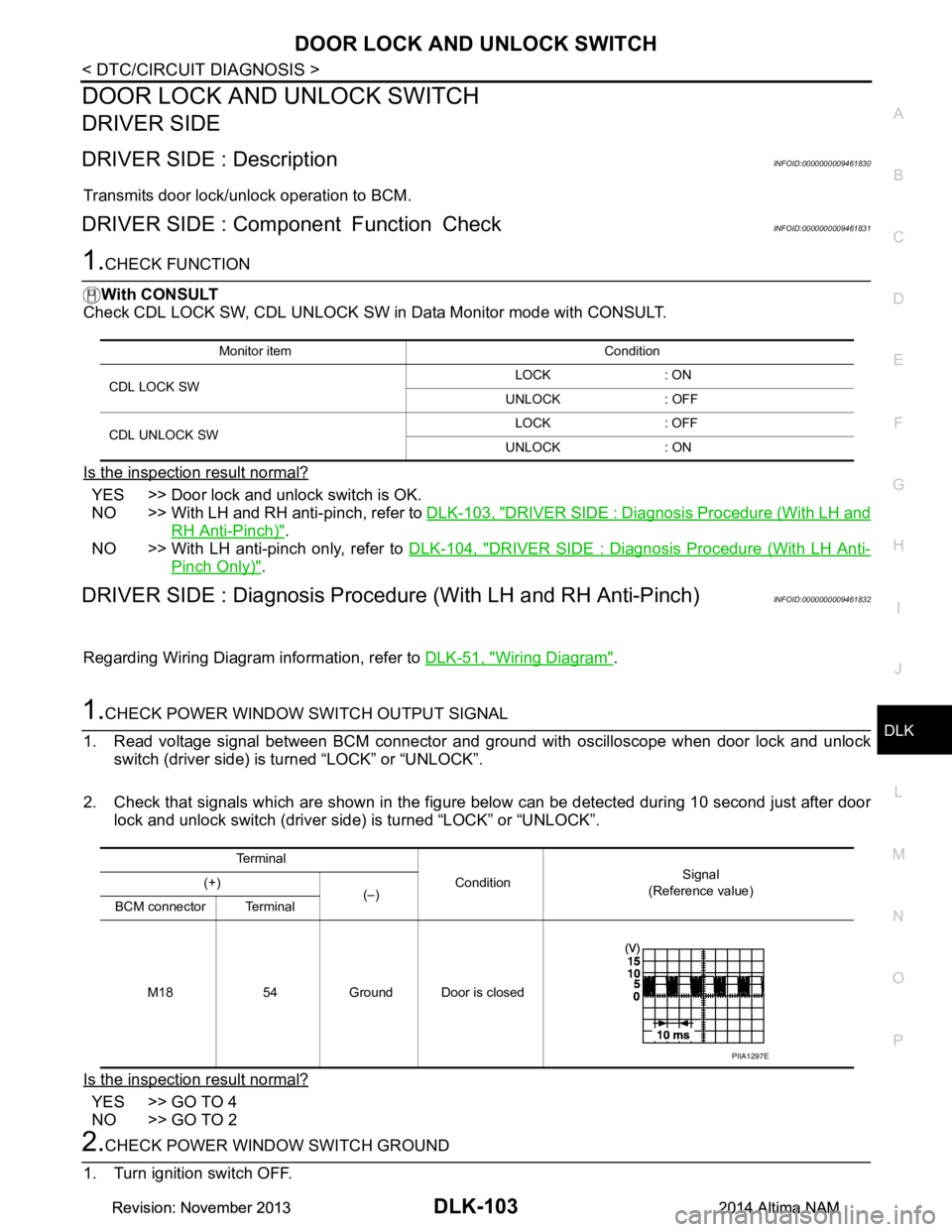
1. Read voltage signal between BCM connector and ground with oscilloscope when door lock and unlock switch (driver side) is turned “LOCK” or “UNLOCK”.
2. Check that signals which are shown in the figure below can be detected during 10 second just after door lock and unlock switch (driver side) is turned “LOCK” or “UNLOCK”.
Is the inspection result normal?
YES >> GO TO 4
NO >> GO TO 2
2.CHECK POWER WINDOW SWITCH GROUND
1. Turn ignition switch OFF.
Monitor item Condition
CDL LOCK SW LOCK : ON
UNLOCK : OFF
CDL UNLOCK SW LOCK : OFF
UNLOCK : ON
Te r m i n a l Condition Signal
(Reference value)
(+)
(–)
BCM connector Terminal
M18 54 Ground Door is closed
PIIA1297E
Revision: November 20132014 Altima NAMRevision: November 20132014 Altima NAM
Page 872 of 4801
DLK-104
< DTC/CIRCUIT DIAGNOSIS >
DOOR LOCK AND UNLOCK SWITCH
2. Disconnect main power window and door lock/unlock switch connector.
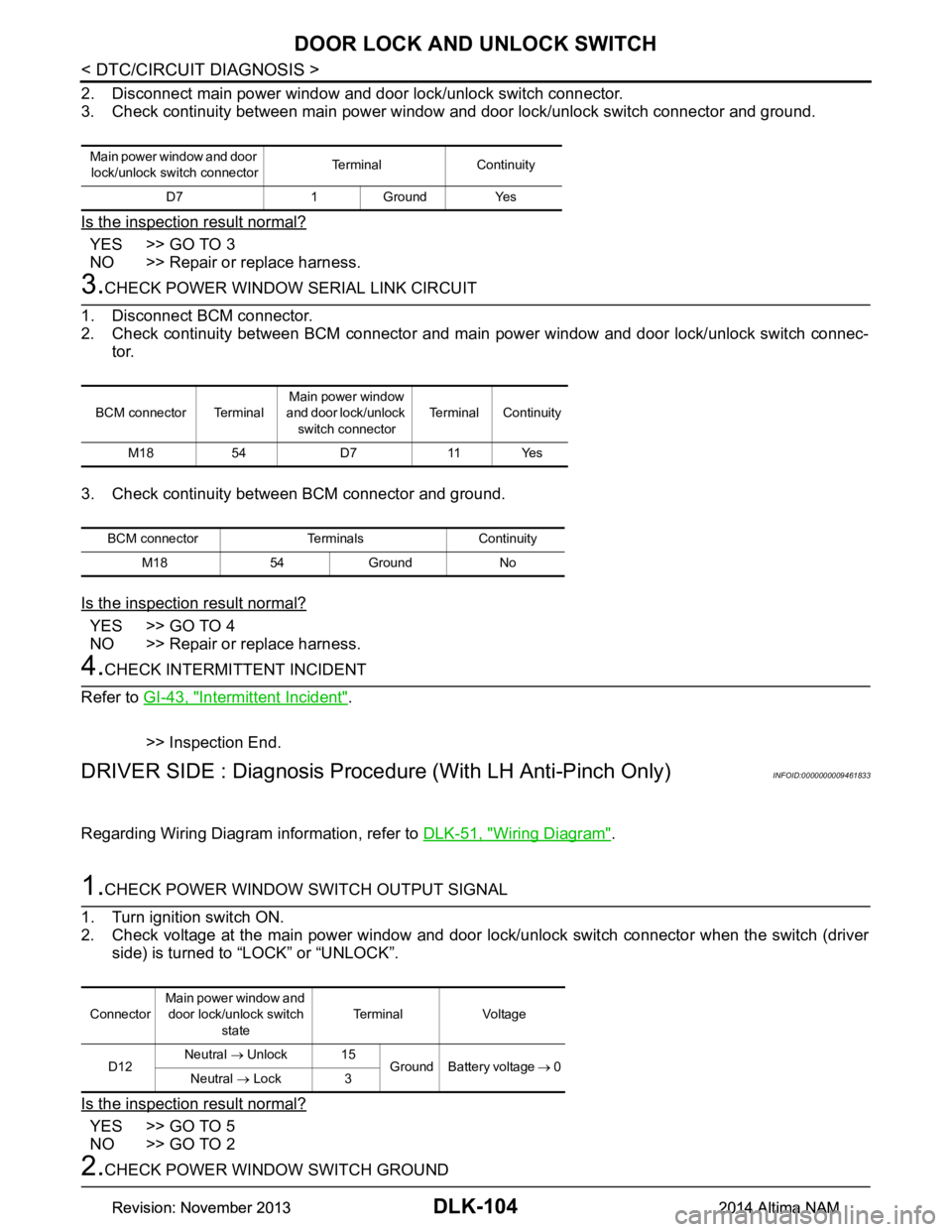
3. Check continuity between main power window and door lock/unlock switch connector and ground.
Is the inspection result normal?
YES >> GO TO 3
NO >> Repair or replace harness.
3.CHECK POWER WINDOW SERIAL LINK CIRCUIT
1. Disconnect BCM connector.
2. Check continuity between BCM connector and main power window and door lock/unlock switch connec-
tor.
3. Check continuity between BCM connector and ground.
Is the inspection result normal?
YES >> GO TO 4
NO >> Repair or replace harness.
4.CHECK INTERMITTENT INCIDENT
Refer to GI-43, "Intermittent Incident"
.
>> Inspection End.
DRIVER SIDE : Diagnosis Procedur e (With LH Anti-Pinch Only)INFOID:0000000009461833
Regarding Wiring Diagram information, refer to DLK-51, "Wiring Diagram".
1.CHECK POWER WINDOW SWITCH OUTPUT SIGNAL
1. Turn ignition switch ON.
2. Check voltage at the main power window and door lock/unlock switch connector when the switch (driver side) is turned to “LOCK” or “UNLOCK”.
Is the inspection result normal?
YES >> GO TO 5
NO >> GO TO 2
2.CHECK POWER WINDOW SWITCH GROUND
Main power window and door
lock/unlock switch connector Terminal Continuity
D7 1 Ground Yes
BCM connector Terminal Main power window
and door lock/unlock
switch connector Terminal Continuity
M18 54 D7 11 Yes
BCM connector Terminals Continuity M18 54 Ground No
Connector Main power window and
door lock/unlock switch state Terminal Voltage
D12 Neutral
→ Unlock 15
Ground Battery voltage → 0
Neutral → Lock 3
Revision: November 20132014 Altima NAMRevision: November 20132014 Altima NAM
Page 873 of 4801
DOOR LOCK AND UNLOCK SWITCHDLK-105
< DTC/CIRCUIT DIAGNOSIS >
C
D E
F
G H
I
J
L
M A
B
DLK
N
O P
1. Turn ignition switch OFF.
2. Disconnect main power window and door lock/unlock switch connector.
3. Check continuity between main power window and door lock/unlock switch connector and ground.
Is the inspection result normal?
YES >> GO TO 3
NO >> Repair or replace harness.
3.CHECK POWER WINDOW SWITCH
Check continuity between main power wi ndow and door lock/unlock switch terminals.
Is the inspection result normal?
YES >> GO TO 4
NO >> Replace main power window and door lock/unlock switch. Refer to PWC-65, "Removal and Instal-
lation".
4.CHECK POWER WINDOW SWITCH CIRCUITS
1. Disconnect BCM connector.
2. Check continuity between BCM connector and main power window and door lock/unlock switch connec-
tor.
3. Check continuity between BCM connector and ground.
Is the inspection result normal?
YES >> GO TO 5
NO >> Repair or replace harness.
5.CHECK INTERMITTENT INCIDENT
Refer to GI-43, "Intermittent Incident"
.
>> Inspection End.
PASSENGER SIDE
PASSENGER SIDE : DescriptionINFOID:0000000009461834
Transmits door lock/unlock operation to BCM.
Main power window and door lock/unlock switch connector Terminal Continuity
D12 1 Ground Yes
Main power window and door lock/unlock switch state Terminals Continuity Lock 1 - 3 Ye s
Unlock 1 - 15
Neutral/Lock 1 - 15 No
Neutral/Unlock 1 - 3
BCM connector Terminal Main power window and
door lock/unlock switch connector Terminal Continuity
M17 34
D12 15
Ye s
19 3
BCM connector Terminal Continuity
M17 34
Ground No
19
Revision: November 20132014 Altima NAMRevision: November 20132014 Altima NAM
Page 874 of 4801
DLK-106
< DTC/CIRCUIT DIAGNOSIS >
DOOR LOCK AND UNLOCK SWITCH
PASSENGER SIDE : Component Function Check
INFOID:0000000009461835
1.CHECK FUNCTION
With CONSULT
Check CDL LOCK SW, CDL UNLOCK SW in Data Monitor mode with CONSULT.
Is the inspection result normal?
YES >> Door lock and unlock switch is OK.
NO >> With LH and RH anti-pinch, refer to DLK-106, "PASSENGER SIDE : Diagnosis Procedure (With
LH and RH Anti-Pinch)".
NO >> With LH anti-pinch only, refer to DLK-107, "PASSENGER SIDE : Diagnosis Procedure (With LH
Anti-Pinch Only)".
PASSENGER SIDE : Diagnosis Procedure (With LH and RH Anti-Pinch)INFOID:0000000009461836
Regarding Wiring Diagram information, refer to DLK-51, "Wiring Diagram".
1.CHECK POWER WINDOW SWITCH OUTPUT SIGNAL
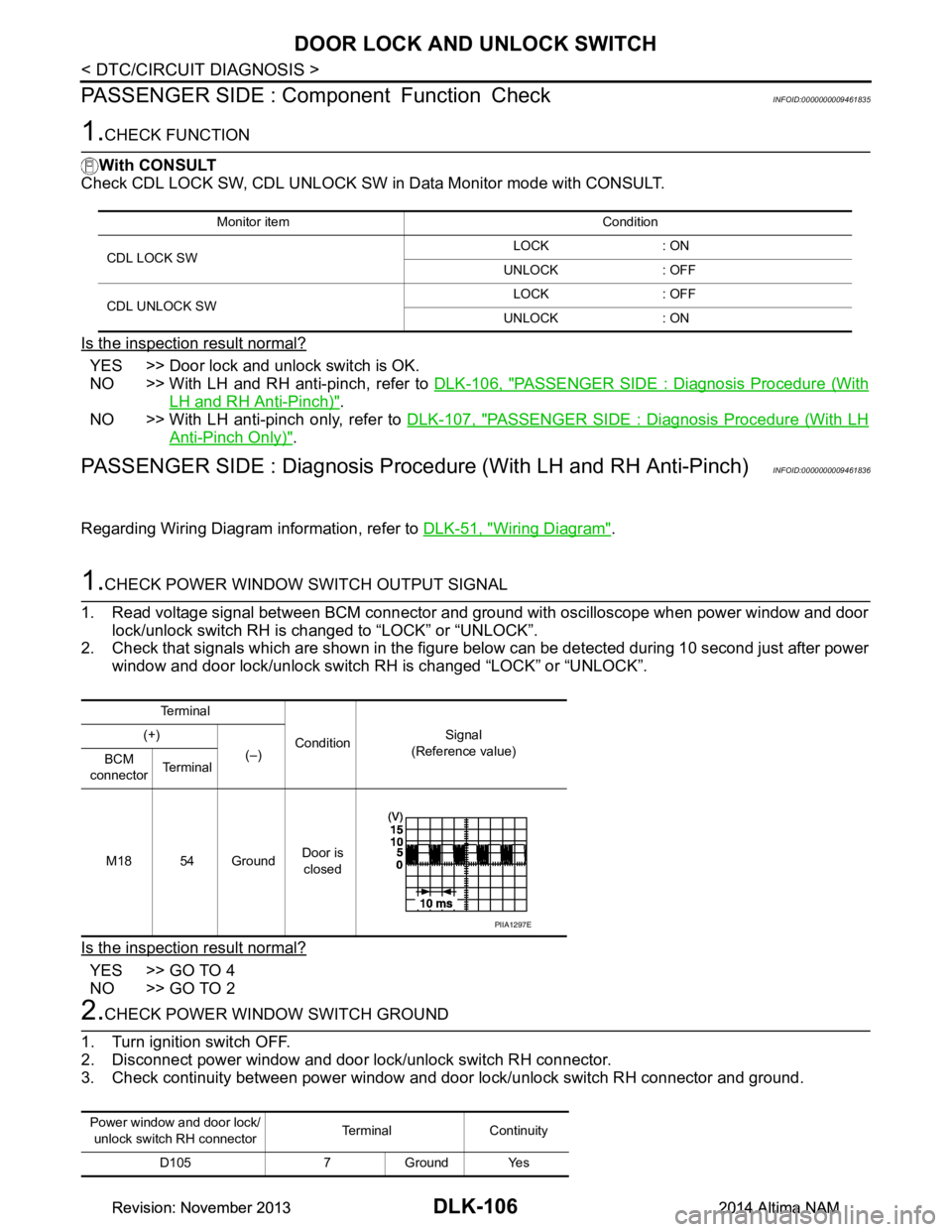
1. Read voltage signal between BCM connector and ground with oscilloscope when power window and door lock/unlock switch RH is changed to “LOCK” or “UNLOCK”.
2. Check that signals which are shown in the figure below can be detected during 10 second just after power
window and door lock/unlock switch RH is changed “LOCK” or “UNLOCK”.
Is the inspection result normal?
YES >> GO TO 4
NO >> GO TO 2
2.CHECK POWER WINDOW SWITCH GROUND
1. Turn ignition switch OFF.
2. Disconnect power window and door lock/unlock switch RH connector.
3. Check continuity between power window and door lock/unlock switch RH connector and ground.
Monitor item Condition
CDL LOCK SW LOCK : ON
UNLOCK : OFF
CDL UNLOCK SW LOCK : OFF
UNLOCK : ON
Te r m i n a l
Condition Signal
(Reference value)
(+)
(–)
BCM
connector Te r m i n a l
M18 54 Ground Door is
closed
PIIA1297E
Power window and door lock/ unlock switch RH connector Terminal Continuity
D105 7 Ground Yes
Revision: November 20132014 Altima NAMRevision: November 20132014 Altima NAM
Page 875 of 4801
DOOR LOCK AND UNLOCK SWITCHDLK-107
< DTC/CIRCUIT DIAGNOSIS >
C
D E
F
G H
I
J
L
M A
B
DLK
N
O P
Is the inspection result normal?
YES >> GO TO 3
NO >> Repair or replace harness.
3.CHECK POWER WINDOW SERIAL LINK CIRCUIT
1. Disconnect BCM connector.
2. Check continuity between BCM connector and power window and door lock/unlock switch RH connector.
3. Check continuity between BCM connector and ground.
Is the inspection result normal?
YES >> GO TO 4
NO >> Repair or replace harness.
4.CHECK INTERMITTENT INCIDENT
Refer to GI-43, "Intermittent Incident"
.
YES >> Inspection End.
PASSENGER SIDE : Diagnosis Proce dure (With LH Anti-Pinch Only)INFOID:0000000009461837
Regarding Wiring Diagram information, refer to DLK-51, "Wiring Diagram".
1.CHECK POWER WINDOW SWITCH OUTPUT SIGNAL
1. Turn ignition switch ON.
2. Check voltage at the power window and door lock/unl ock switch RH connector when the switch (passen-
ger side) is changed to “LOCK” or “UNLOCK”.
Is the inspection result normal?
YES >> GO TO 5
NO >> GO TO 2
2.CHECK POWER WINDOW SWITCH GROUND
1. Turn ignition switch OFF.
2. Disconnect power window and door lock/unlock switch RH connector.
3. Check continuity between power window and door lock/unlock switch RH connector and ground.
Is the inspection result normal?
BCM connector Terminal Power window and door
lock/unlock switch RH con- nector Terminal Continuity
M18 54 D105 3 Yes
BCM connector Terminals Continuity M18 54 Ground No
Connector Power window and
door lock/unlock switch RH state Terminal Voltage
D110 Neutral
→ Lock 1
Ground Battery voltage → 0
Neutral → Unlock 2
Power window and door lock/
unlock switch RH connector Terminal Continuity
D110 3 Ground Yes
Revision: November 20132014 Altima NAMRevision: November 20132014 Altima NAM
Page 876 of 4801

DLK-108
< DTC/CIRCUIT DIAGNOSIS >
DOOR LOCK AND UNLOCK SWITCH
YES >> GO TO 3
NO >> Repair or replace harness.
3.CHECK POWER WINDOW SWITCH
Check continuity between power window and door lock/unlock switch RH terminals.
Is the inspection result normal?
YES >> GO TO 4
NO >> Replace power window and door lock/unlock switch RH.
4.CHECK POWER WINDO W SWITCH CIRCUITS
1. Disconnect BCM connector.
2. Check continuity between BCM connector and power window and door lock/unlock switch RH connector.
3. Check continuity between BCM connector and ground.
Is the inspection result normal?
YES >> GO TO 5
NO >> Repair or replace harness.
5.CHECK INTERMITTENT INCIDENT
Refer to GI-43, "Intermittent Incident"
.
>> Inspection End.
Power window and door lock/unlock switch RH state Terminals Continuity Lock 1 - 3 Ye s
Unlock 2 - 3
Neutral/Unlock 1 - 3 No
Neutral/Lock 2 - 3
BCM connector Terminal Power window and door
lock/unlock switch RH
connector Terminal Continuity
M17 19
D110 1
Ye s
34 2
BCM connector Terminal Continuity
M17 19
Ground No
34
Revision: November 20132014 Altima NAMRevision: November 20132014 Altima NAM