stall speed NISSAN TEANA 2014 Service Manual
[x] Cancel search | Manufacturer: NISSAN, Model Year: 2014, Model line: TEANA, Model: NISSAN TEANA 2014Pages: 4801, PDF Size: 51.2 MB
Page 4684 of 4801
SYSTEMWT-9
< SYSTEM DESCRIPTION >
C
D
F
G H
I
J
K L
M A
B
WT
N
O P
System DescriptionINFOID:0000000009464484
When the vehicle has reached a speed of 40 km/h (25 MPH) or greater, the BCM receives a signal transmitted
from the tire pressure sensors/transmitters installed in each wheel. If the BCM detects low inflation pressure or
a system malfunction, it sends a signal to the combi nation meter via CAN communication to illuminate the low
tire pressure warning lamp. In addition, a warning message will be displayed in the vehicle information display.
Refer to the Owner’s Manual for additional information.
The tire pressure monitoring system (TPMS) has Easy fill ti re alert function to aid in tire inflation. Refer to WT-
9, "Easy Fill Tire Alert Function".
Low Tire Pressure Warning Lamp and Display Indications
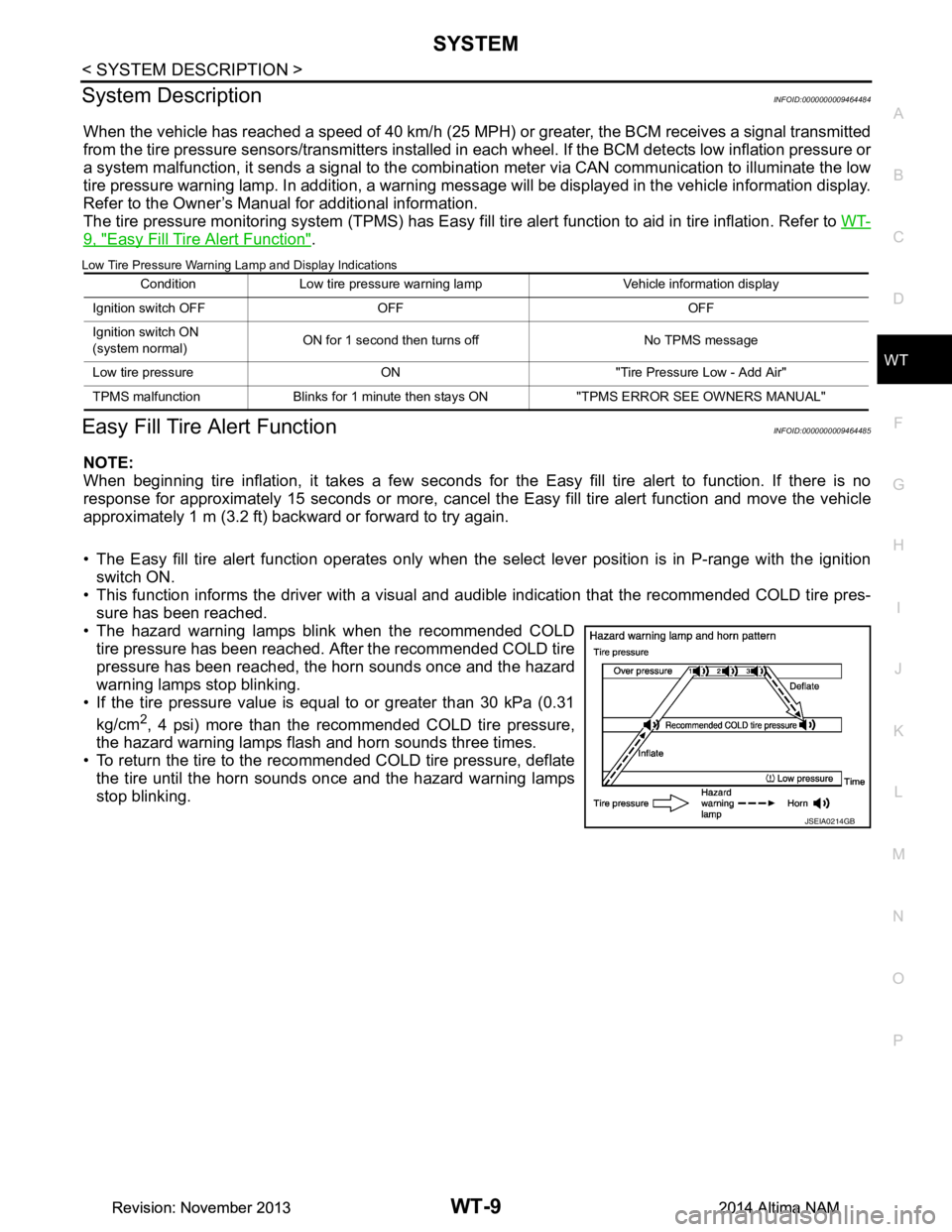
Easy Fill Tire Alert FunctionINFOID:0000000009464485
NOTE:
When beginning tire inflation, it takes a few seconds for t he Easy fill tire alert to function. If there is no
response for approximately 15 seconds or more, cancel t he Easy fill tire alert function and move the vehicle
approximately 1 m (3.2 ft) backward or forward to try again.
• The Easy fill tire alert function operates only when t he select lever position is in P-range with the ignition
switch ON.
• This function informs the driver with a visual and audible indication that the recommended COLD tire pres-
sure has been reached.
• The hazard warning lamps blink when the recommended COLD tire pressure has been reached. After the recommended COLD tire
pressure has been reached, the horn sounds once and the hazard
warning lamps stop blinking.
• If the tire pressure value is equal to or greater than 30 kPa (0.31
kg/cm
2, 4 psi) more than the recommended COLD tire pressure,
the hazard warning lamps flash and horn sounds three times.
• To return the tire to the recommended COLD tire pressure, deflate
the tire until the horn sounds once and the hazard warning lamps
stop blinking.
Condition Low tire pressure warning lamp Vehicle information display
Ignition switch OFF OFF OFF
Ignition switch ON
(system normal) ON for 1 second then turns off No TPMS message
Low tire pressure ON "Tire Pressure Low - Add Air"
TPMS malfunction Blinks for 1 minute th en stays ON "TPMS ERROR SEE OWNERS MANUAL"
JSEIA0214GB
Revision: November 20132014 Altima NAMRevision: November 20132014 Altima NAM
Page 4703 of 4801

WT-28
< DTC/CIRCUIT DIAGNOSIS >
C1704, C1705, C1706, C1707 LOW TIRE PRESSURE
DTC/CIRCUIT DIAGNOSIS
C1704, C1705, C1706, C1707 LOW TIRE PRESSURE
DTC LogicINFOID:0000000009464494
NOTE:
The Signal Tech II Tool (J-50190) can be used to perform the following functions. Refer to the Signal Tech II
User Guide for additional information.
• Activate and display TPMS transmitter IDs
• Display tire pressure reported by the TPMS transmitter
• Read TPMS DTCs
• Register TPMS transmitter IDs
DTC DETECTION LOGIC
DTC CONFIRMATION PROCEDURE
1.PERFORM SELF DIAGNOSTIC RESULT
With CONSULT
1. Check tire pressure for all wheels and adjust to the specified value. Refer to WT-60, "Tire"
.
2. Drive at a speed of 40 km/h (25 MPH) or more fo r 3 minutes, and then drive the vehicle at any speed for
10 minutes.
3. Perform Self Diagnostic Result.
Is DTC C1704, C1705, C1706, or C1707 detected?
YES >> Proceed to WT-28, "Diagnosis Procedure".
NO >> Inspection End.
Diagnosis ProcedureINFOID:0000000009464495
NOTE:
The Signal Tech II Tool (J-50190) can be used to perform the following functions. Refer to the Signal Tech II
User Guide for additional information.
• Activate and display TPMS transmitter IDs
• Display tire pressure reported by the TPMS transmitter
• Read TPMS DTCs
• Register TPMS transmitter IDs
1.TIRE PRESSURE SENSOR ID REGISTRATION
Perform tire pressure sensor ID registration. Refer to WT-25, "Work Procedure"
.
Can the tire pressure sensor ID registration be completed?
YES >> GO TO 2.
NO >> Replace applicable tire pressure sensor. Refer to WT-57, "Removal and Installation"
.
2.CHECK TIRE PRESSURE
Check the air pressure of all wheels. Refer to WT-60, "Tire"
.
Is the inspection result normal?
CONSULT Display DTC Detectio n Condition Possible Cause
LOW PRESSURE FL
[C1704] Front LH tire pressure drops to 189.6 kPa (1.9 kg/cm
2,
27 psi) or less.
• Low tire pressure
• Tire pressure sensor
LOW PRESSURE FR
[C1705] Front RH tire pressure drops to 189.6 kPa (1.9 kg/cm
2,
27 psi) or less.
LOW PRESSURE RR
[C1706] Rear RH tire pressure drops to 189.6 kPa (1.9 kg/cm
2,
27 psi) or less.
LOW PRESSURE RL
[C1707] Rear LH tire pressure drops to 189.6 kPa (1.9 kg/cm
2,
27 psi) or less.
Revision: November 20132014 Altima NAMRevision: November 20132014 Altima NAM
Page 4707 of 4801

WT-32
< DTC/CIRCUIT DIAGNOSIS >
C1708, C1709, C1710, C1711 TRANSMITTER (NO DATA)
4. Check continuity between BCM connector M20 terminal 119 and ground.
Is the inspection result normal?
YES >> GO TO 5.
NO >> Repair or replace harness or connectors.
5.CHECK REMOTE KEYL ESS ENTRY RECEIVER GROUND CIRCUIT
Check continuity between remote keyless entry receiver connector M27 terminal 3 and ground.
Is the inspection result normal?
YES >> Replace the remote keyless entry receiver. Refer to DLK-224, "Removal and Installation".
NO >> Repair or replace harness or connectors.
6.TIRE PRESSURE SENSOR ID REGISTRATION
Perform tire pressure sensor ID registration. Refer to WT-25, "Work Procedure"
.
Can the tire pressure sensor ID registration be completed?
YES >> GO TO 7.
NO >> Replace applicable tire pressure sensor. Refer to WT-57, "Removal and Installation"
.
7.RECHECK TIRE PRESSURE SIGNAL
With CONSULT
1. Drive at a speed of 40 km/h (25 MPH) or more fo r 3 minutes, and then drive the vehicle at any speed for
10 minutes.
2. Select Data Monitor from AIR PRESSURE MONITOR of BCM.
3. Check that the air pressures match the specified value.
Does Data Monitor display specified value without turning tire pressure warning lamp ON?
YES >> Inspection End.
NO >> Replace BCM. Refer to BCS-80, "Removal and Installation"
.
BCM Remote keyless entry receiver
Continuity
Connector Terminal Connector Terminal
M20 119 M27 2 Yes
BCM Ground Continuity
Connector Terminal
M20 119 — No
Remote keyless entry receiver Ground Continuity
Connector Terminal
M27 3 — Yes
Monitor item Displayed value
AIR PRESS FL
Approximately equal to specified value. Refer to WT-60, "Tire"
.
AIR PRESS FR
AIR PRESS RR AIR PRESS RL
Revision: November 20132014 Altima NAMRevision: November 20132014 Altima NAM
Page 4708 of 4801

C1712, C1713, C1714, C1715 TRANSMITTER (CHECKSUM)
WT-33
< DTC/CIRCUIT DIAGNOSIS >
C
D
F
G H
I
J
K L
M A
B
WT
N
O P
C1712, C1713, C1714, C1715 TRANSMITTER (CHECKSUM)
DTC LogicINFOID:0000000009464498
NOTE:
The Signal Tech II Tool (J-50190) can be used to perform the following functions. Refer to the Signal Tech II
User Guide for additional information.
• Activate and display TPMS transmitter IDs
• Display tire pressure repor ted by the TPMS transmitter
• Read TPMS DTCs
• Register TPMS transmitter IDs
DTC DETECTION LOGIC
DTC CONFIRMATION PROCEDURE
1.PERFORM SELF DIAGNOSTIC RESULT
With CONSULT
1. Drive at a speed of 40 km/h (25 MPH) or more fo r 3 minutes, and then drive the vehicle at any speed for
10 minutes.
2. Perform Self Diagnostic Result.
Is DTC C1712, C1713, C1714, or C1715 detected?
YES >> Proceed to WT-33, "Diagnosis Procedure".
NO >> Inspection End.
Diagnosis ProcedureINFOID:0000000009464499
NOTE:
The Signal Tech II Tool (J-50190) can be used to perform the following functions. Refer to the Signal Tech II
User Guide for additional information.
• Activate and display TPMS transmitter IDs
• Display tire pressure repor ted by the TPMS transmitter
• Read TPMS DTCs
• Register TPMS transmitter IDs
1.TIRE PRESSURE SENS OR ID REGISTRATION
Perform tire pressure sensor ID registration. Refer to WT-25, "Work Procedure"
.
Can the tire pressure sensor ID registration be completed?
YES >> GO TO 2.
NO >> Replace applicable tire pressure sensor. Refer to WT-57, "Removal and Installation"
.
2.PERFORM SELF DIAGNOSTIC RESULT
With CONSULT
1. Drive at a speed of 40 km/h (25 MPH) or more fo r 3 minutes, and then drive the vehicle at any speed for
10 minutes.
2. Perform Self Diagnostic Result.
Is DTC C1712, C1713, C1714, or C1715 detected?
CONSULT Display DTC Detection Condition Possible Cause
[CHECKSUM - ERR] - FL
[C1712] Checksum data signal from front LH wheel sensor
is malfunctioning.
• ID registration incomplete
• Tire pressure sensor
•BCM
[CHECKSUM - ERR] - FR
[C1713] Checksum data signal from front RH wheel sensor
is malfunctioning.
[CHECKSUM - ERR] - RR
[C1714] Checksum data signal from rear RH wheel sensor
is malfunctioning.
[CHECKSUM - ERR] - RL
[C1715] Checksum data signal from rear LH wheel sensor
is malfunctioning.
Revision: November 20132014 Altima NAMRevision: November 20132014 Altima NAM
Page 4710 of 4801
C1716, C1717, C1718, C1719 TRANSMITTER (PRESSURE DATA)
WT-35
< DTC/CIRCUIT DIAGNOSIS >
C
D
F
G H
I
J
K L
M A
B
WT
N
O P
C1716, C1717, C1718, C1719 TRAN SMITTER (PRESSURE DATA)
DTC LogicINFOID:0000000009464500
NOTE:
The Signal Tech II Tool (J-50190) can be used to perform the following functions. Refer to the Signal Tech II
User Guide for additional information.
• Activate and display TPMS transmitter IDs
• Display tire pressure repor ted by the TPMS transmitter
• Read TPMS DTCs
• Register TPMS transmitter IDs
DTC DETECTION LOGIC
DTC CONFIRMATION PROCEDURE
1.PERFORM SELF DIAGNOSTIC RESULT
With CONSULT
1. Check tire pressure for all wheels and adjust to the specified value. Refer to WT-60, "Tire"
.
2. Drive at a speed of 40 km/h (25 MPH) or more fo r 3 minutes, and then drive the vehicle at any speed for
10 minutes.
3. Perform Self Diagnostic Result.
Is DTC C1716, C1717, C1718, or C1719 detected?
YES >> Proceed to WT-35, "Diagnosis Procedure".
NO >> Inspection End.
Diagnosis ProcedureINFOID:0000000009464501
NOTE:
The Signal Tech II Tool (J-50190) can be used to perform the following functions. Refer to the Signal Tech II
User Guide for additional information.
• Activate and display TPMS transmitter IDs
• Display tire pressure repor ted by the TPMS transmitter
• Read TPMS DTCs
• Register TPMS transmitter IDs
1.TIRE PRESSURE SENS OR ID REGISTRATION
Perform tire pressure sensor ID registration. Refer to WT-25, "Work Procedure"
.
Can the tire pressure sensor ID registration be completed?
YES >> GO TO 2.
NO >> Replace applicable tire pressure sensor. Refer to WT-57, "Removal and Installation"
.
2.CHECK TIRE PRESSURE SIGNAL
With CONSULT
1. Adjust tire pressure for all wheels to the specified value. Refer to WT-60, "Tire"
.
2. Select Data Monitor from AIR PRESSURE MONITOR of BCM.
3. Check that the air pressures match the specified value.
CONSULT Display DTC Detectio n Condition Possible Cause
[PRESSDATA ERR] FL
[C1716] Malfunction in the tire pressure data from the front
LH wheel tire pressure sensor.
• Excessive tire pressure
• ID registration incomplete
• Tire pressure sensor
•BCM
[PRESSDATA ERR] FR
[C1717] Malfunction in the tire pressure data from the front
RH wheel tire pressure sensor.
[PRESSDATA ERR] RR
[C1718] Malfunction in the tire pressure data from the rear
RH wheel tire pressure sensor.
[PRESSDATA ERR] RL
[C1719] Malfunction in the tire pressure data from the rear
LH wheel tire pressure sensor.
Revision: November 20132014 Altima NAMRevision: November 20132014 Altima NAM
Page 4712 of 4801

C1720, C1721, C1722, C1723 TRANSMITTER
WT-37
< DTC/CIRCUIT DIAGNOSIS >
C
D
F
G H
I
J
K L
M A
B
WT
N
O P
C1720, C1721, C1722, C1723 TRANSMITTER
DTC LogicINFOID:0000000009464502
NOTE:
The Signal Tech II Tool (J-50190) can be used to perform the following functions. Refer to the Signal Tech II
User Guide for additional information.
• Activate and display TPMS transmitter IDs
• Display tire pressure repor ted by the TPMS transmitter
• Read TPMS DTCs
• Register TPMS transmitter IDs
DTC DETECTION LOGIC
DTC CONFIRMATION PROCEDURE
1.PERFORM SELF DIAGNOSTIC RESULT
With CONSULT
1. Drive at a speed of 40 km/h (25 MPH) or more fo r 3 minutes, and then drive the vehicle at any speed for
10 minutes.
2. Perform Self Diagnostic Result.
Is DTC C1720, C1721, C1722, or C1723 detected?
YES >> Proceed to WT-37, "Diagnosis Procedure".
NO >> Inspection End.
Diagnosis ProcedureINFOID:0000000009464503
NOTE:
The Signal Tech II Tool (J-50190) can be used to perform the following functions. Refer to the Signal Tech II
User Guide for additional information.
• Activate and display TPMS transmitter IDs
• Display tire pressure repor ted by the TPMS transmitter
• Read TPMS DTCs
• Register TPMS transmitter IDs
1.TIRE PRESSURE SENS OR ID REGISTRATION
Perform tire pressure sensor ID registration. Refer to WT-25, "Work Procedure"
.
Can the tire pressure sensor ID registration be completed?
YES >> GO TO 2.
NO >> Replace applicable tire pressure sensor. Refer to WT-57, "Removal and Installation"
.
2.PERFORM SELF DIAGNOSTIC RESULT
With CONSULT
1. Drive at a speed of 40 km/h (25 MPH) or more fo r 3 minutes, and then drive the vehicle at any speed for
10 minutes.
2. Perform Self Diagnostic Result.
Is DTC C1720, C1721, C1722, or C1723 detected?
CONSULT Display DTC Detection Condition Possible Cause
[CODE - ERR] - FL
[C1720] Function code data from front LH wheel sensor is
malfunctioning.
• ID registration incomplete
• Tire pressure sensor
•BCM
[CODE - ERR] - FR
[C1721] Function code data from front RH wheel sensor is
malfunctioning.
[CODE - ERR] - RR
[C1722] Function code data from rear RH wheel sensor is
malfunctioning.
[CODE - ERR] - RL
[C1723] Function code data from rear LH wheel sensor is
malfunctioning.
Revision: November 20132014 Altima NAMRevision: November 20132014 Altima NAM
Page 4714 of 4801

C1724, C1725, C1726, C1727 TRANSMI TTER (BATT VOLT)
WT-39
< DTC/CIRCUIT DIAGNOSIS >
C
D
F
G H
I
J
K L
M A
B
WT
N
O P
C1724, C1725, C1726, C1727 TR ANSMITTER (BATT VOLT)
DTC LogicINFOID:0000000009464504
NOTE:
The Signal Tech II Tool (J-50190) can be used to perform the following functions. Refer to the Signal Tech II
User Guide for additional information.
• Activate and display TPMS transmitter IDs
• Display tire pressure repor ted by the TPMS transmitter
• Read TPMS DTCs
• Register TPMS transmitter IDs
DTC DETECTION LOGIC
DTC CONFIRMATION PROCEDURE
1.PERFORM SELF DIAGNOSTIC RESULT
With CONSULT
1. Drive at a speed of 40 km/h (25 MPH) or more fo r 3 minutes, and then drive the vehicle at any speed for
10 minutes.
2. Perform Self Diagnostic Result.
Is DTC C1724, C1725, C1726, or C1727 detected?
YES >> Proceed to WT-39, "Diagnosis Procedure".
NO >> Inspection End.
Diagnosis ProcedureINFOID:0000000009464505
NOTE:
The Signal Tech II Tool (J-50190) can be used to perform the following functions. Refer to the Signal Tech II
User Guide for additional information.
• Activate and display TPMS transmitter IDs
• Display tire pressure repor ted by the TPMS transmitter
• Read TPMS DTCs
• Register TPMS transmitter IDs
1.TIRE PRESSURE SENS OR ID REGISTRATION
Perform tire pressure sensor ID registration. Refer to WT-25, "Work Procedure"
.
Can the tire pressure sensor ID registration be completed?
YES >> GO TO 2.
NO >> Replace applicable tire pressure sensor. Refer to WT-57, "Removal and Installation"
.
2.PERFORM SELF DIAGNOSTIC RESULT
With CONSULT
1. Drive at a speed of 40 km/h (25 MPH) or more fo r 3 minutes, and then drive the vehicle at any speed for
10 minutes.
2. Perform Self Diagnostic Result.
Is DTC C1724, C1725, C1726, or C1727 detected?
CONSULT Display DTC Detection Condition Possible Cause
[BATT - VOLT - LOW] - FL
[C1724] Battery voltage of front LH wheel sensor drops.
• Tire pressure sensor
•BCM
[BATT - VOLT - LOW] - FR
[C1725] Battery voltage of front RH wheel sensor drops.
[BATT - VOLT - LOW] - RR
[C1726] Battery voltage of rear RH wheel sensor drops.
[BATT - VOLT - LOW] - RL
[C1727] Battery voltage of rear LH wheel sensor drops.
Revision: November 20132014 Altima NAMRevision: November 20132014 Altima NAM
Page 4716 of 4801
C1729 VEHICLE SPEED SIGNALWT-41
< DTC/CIRCUIT DIAGNOSIS >
C
D
F
G H
I
J
K L
M A
B
WT
N
O P
C1729 VEHICLE SPEED SIGNAL
DTC LogicINFOID:0000000009464506
NOTE:
The Signal Tech II Tool (J-50190) can be used to perform the following functions. Refer to the Signal Tech II
User Guide for additional information.
• Activate and display TPMS transmitter IDs
• Display tire pressure repor ted by the TPMS transmitter
• Read TPMS DTCs
• Register TPMS transmitter IDs
DTC DETECTION LOGIC
DTC CONFIRMATION PROCEDURE
1.PERFORM SELF DIAGNOSTIC RESULT
With CONSULT
1. Drive at a speed of 40 km/h (25 MPH) or more fo r 3 minutes, and then drive the vehicle at any speed for
10 minutes.
2. Perform Self Diagnostic Result.
Is DTC C1729 detected?
YES >> Proceed to WT-41, "Diagnosis Procedure".
NO >> Inspection End.
Diagnosis ProcedureINFOID:0000000009464507
NOTE:
The Signal Tech II Tool (J-50190) can be used to perform the following functions. Refer to the Signal Tech II
User Guide for additional information.
• Activate and display TPMS transmitter IDs
• Display tire pressure repor ted by the TPMS transmitter
• Read TPMS DTCs
• Register TPMS transmitter IDs
1.PERFORM SELF DIAGNOSTIC RESULT FOR COMBINATION METER
With CONSULT
Perform Self Diagnostic Result for METER M&A. Refer to MWI-18, "CONSULT Function (METER/M&A)"
.
Are any DTCs detected?
YES >> Refer to BCS-52, "DTC Index".
NO >> Replace the BCM. Refer to BCS-80, "Removal and Installation"
.
CONSULT Display DTC Detection Condition Possible Cause
VHCL SPEED SIG ERR
[C1729] Vehicle speed signal not detected. • CAN communication
•BCM
• Combination meter
Revision: November 20132014 Altima NAMRevision: November 20132014 Altima NAM
Page 4717 of 4801

WT-42
< DTC/CIRCUIT DIAGNOSIS >
C1730, C1731, C1732, C1733 FLAT TIRE
C1730, C1731, C1732, C1733 FLAT TIRE
DTC LogicINFOID:0000000009464508
NOTE:
The Signal Tech II Tool (J-50190) can be used to perform the following functions. Refer to the Signal Tech II
User Guide for additional information.
• Activate and display TPMS transmitter IDs
• Display tire pressure reported by the TPMS transmitter
• Read TPMS DTCs
• Register TPMS transmitter IDs
DTC DETECTION LOGIC
DTC CONFIRMATION PROCEDURE
1.PERFORM SELF DIAGNOSTIC RESULT
With CONSULT
1. Drive at a speed of 40 km/h (25 MPH) or more fo r 3 minutes, and then drive the vehicle at any speed for
10 minutes.
2. Perform Self Diagnostic Result.
Is DTC C1730, C1731, C1732, or C1733 detected?
YES >> Proceed to WT-42, "Diagnosis Procedure".
NO >> Inspection End.
Diagnosis ProcedureINFOID:0000000009464509
NOTE:
The Signal Tech II Tool (J-50190) can be used to perform the following functions. Refer to the Signal Tech II
User Guide for additional information.
• Activate and display TPMS transmitter IDs
• Display tire pressure reported by the TPMS transmitter
• Read TPMS DTCs
• Register TPMS transmitter IDs
1.TIRE PRESSURE SENSOR ID REGISTRATION
Perform tire pressure sensor ID registration. Refer to WT-25, "Work Procedure"
.
Can the tire pressure sensor ID registration be completed?
YES >> GO TO 2.
NO >> Replace applicable tire pressure sensor. Refer to WT-57, "Removal and Installation"
.
2.CHECK TIRE PRESSURE
Check the air pressure of all wheels. Refer to WT-60, "Tire"
.
Is the inspection result normal?
YES >> Perform DTC CONFIRMATION PROCEDURE again. Refer to WT-42, "DTC Logic".
NO >> GO TO 3.
CONSULT Display DTC Detectio n Condition Possible Cause
FLAT TIRE FL
[C1730] Front LH tire pressure is 70 kPa (0.7 kg/cm
2, 10
psi) or less.
• Low tire pressure
• Tire pressure sensor
FLAT TIRE FR
[C1731] Front RH tire pressure is 70 kPa (0.7 kg/cm
2, 10
psi) or less.
FLAT TIRE RR
[C1732] Rear RH tire pressure is 70 kPa (0.7 kg/cm
2, 10
psi) or less.
FLAT TIRE RL
[C1733] Rear LH tire pressure is 70 kPa (0.7 kg/cm
2, 10
psi) or less.
Revision: November 20132014 Altima NAMRevision: November 20132014 Altima NAM
Page 4726 of 4801
EASY FILL TIRE ALERT DOES NOT ACTIVATEWT-51
< SYMPTOM DIAGNOSIS >
C
D
F
G H
I
J
K L
M A
B
WT
N
O P
EASY FILL TIRE ALERT DOES NOT ACTIVATE
DescriptionINFOID:0000000009464517
The Easy Fill tire alert does not function while inflating a tire when the select lever position is in P-range with
the ignition switch ON. Refer to WT-9, "Easy Fill Tire Alert Function"
.
Diagnosis ProcedureINFOID:0000000009464518
1. LOCATION CHANGE
Move the vehicle to another area and repeat the procedure of the Easy Fill tire alert function. Refer to WT-9,
"Easy Fill Tire Alert Function".
Is the function normal?
YES >> Inspection End.
NO >> GO TO 2.
2.PERFORM SELF DIAGNOSTIC RESULT
With CONSULT
Perform Self Diagnostic Result.
Are any DTCs detected?
YES >> Refer to BCS-52, "DTC Index".
NO >> GO TO 3.
3.CHECK HAZARD WARNING LAMP OPERATION
Check hazard warning lamp operation with hazard switch.
Do the hazard warning lamps operate?
YES >> GO TO 4.
NO >> Refer to EXL-106, "Diagnosis Procedure"
.
4.PERFORM SELF DIAGNOSTIC RESULT FOR TCM
With CONSULT
Perform Self Diagnostic Result for TRANSMISSION.
Are any DTCs detected?
YES >> Refer to TM-43, "CONSULT Function" (with RE0F10D) or TM-245, "CONSULT Function" (with
RE0F10E).
NO >> GO TO 5.
5.CHECK HORN OPERATION
Check horn operation.
Is the inspection result normal?
YES >> GO TO 6.
NO >> Repair or replace malfunctioning components.
6.PERFORM SELF DIAGNOSTIC RESULT
With CONSULT
1. Drive at a speed of 40 km/h (25 MPH) or more fo r 3 minutes, and then drive the vehicle at any speed for
10 minutes.
2. Perform Self Diagnostic Result.
Are any DTCs detected?
YES >> Refer to BCS-52, "DTC Index".
NO >> Replace BCM. Refer to BCS-80, "Removal and Installation"
.
Revision: November 20132014 Altima NAMRevision: November 20132014 Altima NAM