ECO mode NISSAN TEANA 2014 User Guide
[x] Cancel search | Manufacturer: NISSAN, Model Year: 2014, Model line: TEANA, Model: NISSAN TEANA 2014Pages: 4801, PDF Size: 51.2 MB
Page 37 of 4801
![NISSAN TEANA 2014 User Guide
BCS-22
< SYSTEM DESCRIPTION >[BCM]
DIAGNOSIS SYSTEM (BCM)
After disconnecting the CONSULT vehicle interface (VI)
from the data link connector, the ignition must
be cycled OFF → ON (for at least 5](/img/5/57390/w960_57390-36.png "NISSAN TEANA 2014 User Guide
BCS-22
< SYSTEM DESCRIPTION >[BCM]
DIAGNOSIS SYSTEM (BCM)
After disconnecting the CONSULT vehicle interface (VI)
from the data link connector, the ignition must
be cycled OFF → ON (for at least 5")
BCS-22
< SYSTEM DESCRIPTION >[BCM]
DIAGNOSIS SYSTEM (BCM)
After disconnecting the CONSULT vehicle interface (VI)
from the data link connector, the ignition must
be cycled OFF → ON (for at least 5 seconds) → OFF. If this step is not performed, the BCM may not go
to ”sleep mode”, potentially causing a di scharged battery and a no-start condition.
DATA MONITOR
INTELLIGENT KEY
INTELLIGENT KEY : CONSULT Function (BCM - INTELLIGENT KEY)INFOID:0000000009462006
CAUTION:
After disconnecting the CONSULT vehicle interface (VI) from the data link connector, the ignition must
be cycled OFF → ON (for at least 5 seconds) → OFF. If this step is not performed, the BCM may not go
to ”sleep mode”, potentially causing a di scharged battery and a no-start condition.
SELF DIAGNOSTIC RESULT
Refer to BCS-52, "DTC Index".
DATA MONITOR
Monitor Item [Unit] Description
FAN ON SIG [On/Off] Indicates condition of fan switch.
AIR COND SW [On/Off] Indicates condition of A/C switch.
Monitor Item [Unit] Main Description
REQ SW -DR [On/Off] ×Indicates condition of door request switch LH.
REQ SW -AS [On/Off] ×Indicates condition of door request switch RH.
REQ SW -BD/TR [On/Off] ×Indicates condition of trunk opener request switch.
PUSH SW [On/Off] Indicates condition of push-button ignition switch.
SHFTLCK SLNID PER SPLY [On/Off] ×Indicates condition of power supply to shiftlock solenoid.
BRAKE SW 1 [On/Off] ×Indicates condition of brake switch.
BRAKE SW 2 [On/Off] Indicates condition of brake switch.
DETE/CANCL SW [On/Off] ×Indicates condition of P (park) position.
SFT PN/N SW [On/Off] ×Indicates condition of P (park) or N (neutral) position.
UNLK SEN -DR [On/Off] ×Indicates condition of door unlock sensor.
PUSH SW -IPDM [On/Off] Indicates condition of push-button ignition switch received from IPDM E/R
on CAN communication line.
IGN RLY1 -F/B [On/Off] Indicates condition of ignition relay 1 received from IPDM E/R on CAN
communication line.
DETE SW -IPDM [On/Off] Indicates condition of detent switch received from TCM on CAN communi-
cation line.
SFT PN -IPDM [On/Off] Indicates condition of P (park) or N (neutral) position from TCM on CAN
communication line.
SFT P -MET [On/Off] Indicates condition of P (park) position from TCM on CAN communication
line.
SFT N -MET [On/Off] Indicates condition of N (neutral) position from IPDM E/R on CAN commu-
nication line.
ENGINE STATE [STOP/START/CRANK/RUN] ×Indicates condition of engine state from ECM on CAN communication line.
VEH SPEED 1 [mph/km/h] ×Indicates condition of vehicle speed signal received from ABS on CAN
communication line.
VEH SPEED 2 [mph/km/h] ×Indicates condition of vehicle speed signal received from combination
meter on CAN communication line.
DOOR STAT -DR [LOCK/READY/UNLK] ×Indicates condition of driver side door status.
Revision: November 20132014 Altima NAMRevision: November 20132014 Altima NAM
Page 40 of 4801
![NISSAN TEANA 2014 User Guide
BCS
DIAGNOSIS SYSTEM (BCM)BCS-25
< SYSTEM DESCRIPTION > [BCM]
C
D E
F
G H
I
J
K L
B
A
O P
N
*: Initial Setting
COMB SW
COMB SW : CONSULT Func
tion (BCM - COMB SW)INFOID:0000000009462007
CAUTION:
A](/img/5/57390/w960_57390-39.png "NISSAN TEANA 2014 User Guide
BCS
DIAGNOSIS SYSTEM (BCM)BCS-25
< SYSTEM DESCRIPTION > [BCM]
C
D E
F
G H
I
J
K L
B
A
O P
N
*: Initial Setting
COMB SW
COMB SW : CONSULT Func
tion (BCM - COMB SW)INFOID:0000000009462007
CAUTION:
A")
BCS
DIAGNOSIS SYSTEM (BCM)BCS-25
< SYSTEM DESCRIPTION > [BCM]
C
D E
F
G H
I
J
K L
B
A
O P
N
*: Initial Setting
COMB SW
COMB SW : CONSULT Func
tion (BCM - COMB SW)INFOID:0000000009462007
CAUTION:
After disconnecting the CONSULT vehicle interface (VI) from the data link connector, the ignition must
be cycled OFF → ON (for at least 5 seconds) → OFF. If this step is not performed, the BCM may not go
to ”sleep mode”, potentiall y causing a discharged battery and a no-start condition.
DATA MONITOR
BCM
BCM : CONSULT Function (BCM - BCM)INFOID:0000000009462008
CAUTION:
After disconnecting the CONSULT vehicle interface (VI) from the data link connector, the ignition must
be cycled OFF → ON (for at least 5 seconds) → OFF. If this step is not performed, the BCM may not go
to ”sleep mode”, potentiall y causing a discharged battery and a no-start condition.
ECU IDENTIFICATION
The BCM part number is displayed.
SELF DIAGNOSTIC RESULT
Refer to BCS-52, "DTC Index".
WORK SUPPORT
AUTO LOCK SET MODE7 5 min
Auto door lock time can be set in this mode.
MODE6 4 min
MODE5 3 min
MODE4 2 min
MODE3* 1 min
MODE2 30 sec
MODE1 Off
Support Item Setting Description
Monitor Item [Unit] Description
FR WIPER HI [On/Off]
Indicates condition of wiper operation of combination switch.
FR WIPER LOW [On/Off]
FR WASHER SW [On/Off]
FR WIPER INT [On/Off]
INT VOLUME [1 - 7] Indicates condition of intermittent wiper operation of combination switch.
TURN SIGNAL R [On/Off] Indicates co ndition of right turn signal operation of combination switch.
TURN SIGNAL L [On/Off] Indicates co ndition of left turn signal operation of combination switch.
TAIL LAMP SW [On/Off] Indicates condition of tail lamp switch operation of combination switch.
HI BEAM SW [On/Off] Indicates condition of Hi beam switch operation of combination switch.
HEAD LAMP SW 1 [On/Off] Indicates condition of head lamp switch 1 operation of combination switch.
HEAD LAMP SW 2 [On/Off] Indicates condition of head lamp switch 2 operation of combination switch.
PASSING SW [On/Off] Indicates condition of pass ing switch operation of combination switch.
AUTO LIGHT SW [On/Off] Indicates condition of auto light switch operation of combination switch.
FR FOG SW [On/Off] Indicates condition of front fog lamp switch operation of combination switch.
Revision: November 20132014 Altima NAMRevision: November 20132014 Altima NAM
Page 41 of 4801
![NISSAN TEANA 2014 User Guide
BCS-26
< SYSTEM DESCRIPTION >[BCM]
DIAGNOSIS SYSTEM (BCM)
CONFIGURATION
Refer to
BCS-65, "CONFIGURATION (BCM) : Description".
CAN DIAG SUPPORT MNTR
Refer to LAN-15, "CAN Diagnostic Support Monitor".](/img/5/57390/w960_57390-40.png "NISSAN TEANA 2014 User Guide
BCS-26
< SYSTEM DESCRIPTION >[BCM]
DIAGNOSIS SYSTEM (BCM)
CONFIGURATION
Refer to
BCS-65, \"CONFIGURATION (BCM) : Description\".
CAN DIAG SUPPORT MNTR
Refer to LAN-15, \"CAN Diagnostic Support Monitor\".")
BCS-26
< SYSTEM DESCRIPTION >[BCM]
DIAGNOSIS SYSTEM (BCM)
CONFIGURATION
Refer to
BCS-65, "CONFIGURATION (BCM) : Description".
CAN DIAG SUPPORT MNTR
Refer to LAN-15, "CAN Diagnostic Support Monitor".
IMMU
IMMU : CONSULT Function (BCM - IMMU)INFOID:0000000009462009
CAUTION:
After disconnecting the CONSULT vehicle interface (VI) from the data link connector, the ignition must
be cycled OFF → ON (for at least 5 seconds) → OFF. If this step is not performed, the BCM may not go
to ”sleep mode”, potentially causing a di scharged battery and a no-start condition.
SELF DIAGNOSTIC RESULT
Refer to BCS-52, "DTC Index".
DATA MONITOR
ACTIVE TEST
BATTERY SAVER
BATTERY SAVER : CONSULT Func tion (BCM - BATTERY SAVER)INFOID:0000000009462010
CAUTION:
After disconnecting the CONSULT vehicle interface (VI) from the data link connector, the ignition must
be cycled OFF → ON (for at least 5 seconds) → OFF. If this step is not performed, the BCM may not go
to ”sleep mode”, potentially causing a di scharged battery and a no-start condition.
DATA MONITOR
Support Item Setting Description
RESET SETTING VALUE Reset Returns BCM to initial value in factory shipment.
Cancel Cancels the reset function.
Monitor Item [Unit] Description
CONFRM ID ALL [Yet/DONE]
Switches to DONE when an Intelligent Key is registered.
CONFIRM ID4 [Yet/DONE]
CONFIRM ID3 [Yet/DONE]
CONFIRM ID2 [Yet/DONE]
CONFIRM ID1 [Yet/DONE]
TP 4 [Yet/DONE]
DONE indicates the number of Intelligent Key ID which has been registered.
TP 3 [Yet/DONE]
TP 2 [Yet/DONE]
TP 1 [Yet/DONE]
PUSH SW [On/Off] Indicates condition of push-button ignition switch.
Test Item Description
THEFT IND This test is able to check security indicator operation [On/Off].
Monitor Item [Unit] Description
REQ SW -DR [On/Off] Indicates condition of door request switch LH.
REQ SW -AS [On/Off] Indicates condition of door request switch RH.
Revision: November 20132014 Altima NAMRevision: November 20132014 Altima NAM
Page 42 of 4801
![NISSAN TEANA 2014 User Guide
BCS
DIAGNOSIS SYSTEM (BCM)BCS-27
< SYSTEM DESCRIPTION > [BCM]
C
D E
F
G H
I
J
K L
B
A
O P
N
ACTIVE TEST
TRUNK
TRUNK : CONSULT Function (BCM - TRUNK)INFOID:0000000009462011
CAUTION:
After disconnec](/img/5/57390/w960_57390-41.png "NISSAN TEANA 2014 User Guide
BCS
DIAGNOSIS SYSTEM (BCM)BCS-27
< SYSTEM DESCRIPTION > [BCM]
C
D E
F
G H
I
J
K L
B
A
O P
N
ACTIVE TEST
TRUNK
TRUNK : CONSULT Function (BCM - TRUNK)INFOID:0000000009462011
CAUTION:
After disconnec")
BCS
DIAGNOSIS SYSTEM (BCM)BCS-27
< SYSTEM DESCRIPTION > [BCM]
C
D E
F
G H
I
J
K L
B
A
O P
N
ACTIVE TEST
TRUNK
TRUNK : CONSULT Function (BCM - TRUNK)INFOID:0000000009462011
CAUTION:
After disconnecting the CONSULT vehicle interface (VI) from the data link connector, the ignition must
be cycled OFF → ON (for at least 5 seconds) → OFF. If this step is not performed, the BCM may not go
to ”sleep mode”, potentiall y causing a discharged battery and a no-start condition.
DATA MONITOR
THEFT ALM
THEFT ALM : CONSULT Function (BCM - THEFT ALM)INFOID:0000000009462012
CAUTION:
After disconnecting the CONSULT vehicle interface (VI) from the data link connector, the ignition must
be cycled OFF → ON (for at least 5 seconds) → OFF. If this step is not performed, the BCM may not go
to ”sleep mode”, potentiall y causing a discharged battery and a no-start condition.
DATA MONITOR
PUSH SW [On/Off] Indicates condition push-button ignition switch.
UNLK SEN -DR [On/Off] Indicates condition of door unlock sensor.
DOOR SW-DR [On/Off] Indicates condition of front door switch LH.
DOOR SW-AS [On/Off] Indicates condition of front door switch RH.
DOOR SW-RR [On/Off] Indicates condition of rear door switch RH.
DOOR SW-RL [On/Off] Indicates condition of rear door switch LH.
DOOR SW-BK [On/Off] Indicates condition of trunk switch.
CDL LOCK SW [On/Off] Indicates condition of lock signal from door lock and unlock switch.
CDL UNLOCK SW [On/Off] Indicates condition of unlock signal from door lock and unlock switch.
KEY CYL LK-SW [On/Off] Indicates condition of lo ck signal from door key cylinder switch.
KEY CYL UN-SW [On/Off] Indicates condition of unl ock signal from door key cylinder switch.
TRNK/HAT MNTR [On/Off] Indicates condition of trunk room lamp switch.
RKE-LOCK [On/Off] Indicates condition of lock signal from Intelligent Key.
RKE-UNLOCK [On/Off] Indicates condition of unlock signal from Intelligent Key. Monitor Item [Unit] Description
Test item Description
BATTERY SAVER This test is able to check battery saver operation [On/Off].
Monitor Item [Unit] Description
PUSH SW [On/Off] Indicates condition of push-button ignition switch.
UNLK SEN -DR [On/Off] Indicates condition of door unlock sensor.
VEH SPEED 1 [km/h] Indicates vehicle speed signal received from ABS on CAN communication line.
TR CANCEL SW [On/Off] Indicates condition of trunk cancel switch.
TR/BD OPEN SW [On/Off] Indicates condition of trunk opener switch.
TRNK/HAT MNTR [On/Off] Indicates condition of trunk room lamp switch.
RKE-TR/BD [On/Off] Indicates condition of trunk open signal from Intelligent Key.
Revision: November 20132014 Altima NAMRevision: November 20132014 Altima NAM
Page 43 of 4801
![NISSAN TEANA 2014 User Guide
BCS-28
< SYSTEM DESCRIPTION >[BCM]
DIAGNOSIS SYSTEM (BCM)
ACTIVE TEST
WORK SUPPORT
RETAINED PWR
RETAINED PWR : CONSULT Function (BCM - RETAINED PWR)INFOID:0000000009462013
CAUTION:
After disconnect](/img/5/57390/w960_57390-42.png "NISSAN TEANA 2014 User Guide
BCS-28
< SYSTEM DESCRIPTION >[BCM]
DIAGNOSIS SYSTEM (BCM)
ACTIVE TEST
WORK SUPPORT
RETAINED PWR
RETAINED PWR : CONSULT Function (BCM - RETAINED PWR)INFOID:0000000009462013
CAUTION:
After disconnect")
BCS-28
< SYSTEM DESCRIPTION >[BCM]
DIAGNOSIS SYSTEM (BCM)
ACTIVE TEST
WORK SUPPORT
RETAINED PWR
RETAINED PWR : CONSULT Function (BCM - RETAINED PWR)INFOID:0000000009462013
CAUTION:
After disconnecting the CONSULT vehicle interface (VI) from the data link connector, the ignition must
be cycled OFF → ON (for at least 5 seconds) → OFF. If this step is not performed, the BCM may not go
to ”sleep mode”, potentially causing a di scharged battery and a no-start condition.
DATA MONITOR
SIGNAL BUFFER
Monitored Item Description
REQ SW -DR [On/Off] Indicates condition of door request switch LH.
REQ SW -AS [On/Off] Indicates condition of door request switch RH.
REQ SW -BD/TR [ON/OFF] Indicates condition of trunk opener request switch.
PUSH SW [On/Off] Indicates condition of push-button ignition switch.
UNLK SEN -DR [On/Off] Indicates condition of door unlock sensor.
DOOR SW-DR [On/Off] Indicates condition of front door switch LH.
DOOR SW-AS [On/Off] Indicates condition of front door switch RH.
DOOR SW-RR [On/Off] Indicates condition of rear door switch RH.
DOOR SW-RL [On/Off] Indicates condition of rear door switch LH.
DOOR SW-BK [On/Off] Indicates condition of trunk switch.
CDL LOCK SW [On/Off] Indicates condition of lock signal from door lock and unlock switch.
CDL UNLOCK SW [On/Off] Indicates condition of unlock signal from door lock and unlock switch.
KEY CYL LK-SW [On/Off] Indicates condition of lock signal from door key cylinder switch.
KEY CYL UN-SW [On/Off] Indicates condition of unlock signal from door key cylinder switch.
TR/BD OPEN SW [On/Off] Indicates condition of trunk opener switch.
TRNK/HAT MNTR [On/Off] Indicates condition of trunk room lamp switch.
RKE-LOCK [On/Off] Indicates condition of lock signal from Intelligent Key.
RKE-UNLOCK [On/Off] Indicates condition of unlock signal from Intelligent Key.
RKE-TR/BD [On/Off] Indicates condition of trunk open signal from Intelligent Key.
Test Item Description
FLASHER This test is able to check turn signal lamp operation [LH/RH/Off].
THEFT IND This test is able to check se curity indicator lamp operation [On/Off].
VEHICLE SECURITY HORN This test is able to check vehicle security horn operation [On].
HEADLAMP(HI) This test is able to check vehicle security lamp operation [On].
Support Item Setting Description
SECURITY ALARM SET On Security alarm ON.
Off Security alarm OFF.
Monitor Item [Unit] Description
DOOR SW-DR [On/Off] Indicates condition of front door switch LH.
DOOR SW-AS [On/Off] Indicates condition of front door switch RH.
Revision: November 20132014 Altima NAMRevision: November 20132014 Altima NAM
Page 44 of 4801
![NISSAN TEANA 2014 User Guide
BCS
DIAGNOSIS SYSTEM (BCM)BCS-29
< SYSTEM DESCRIPTION > [BCM]
C
D E
F
G H
I
J
K L
B
A
O P
N
SIGNAL BUFFER : CONSULT Func
tion (BCM - SIGNAL BUFFER)INFOID:0000000009462014
CAUTION:
After disconnect](/img/5/57390/w960_57390-43.png "NISSAN TEANA 2014 User Guide
BCS
DIAGNOSIS SYSTEM (BCM)BCS-29
< SYSTEM DESCRIPTION > [BCM]
C
D E
F
G H
I
J
K L
B
A
O P
N
SIGNAL BUFFER : CONSULT Func
tion (BCM - SIGNAL BUFFER)INFOID:0000000009462014
CAUTION:
After disconnect")
BCS
DIAGNOSIS SYSTEM (BCM)BCS-29
< SYSTEM DESCRIPTION > [BCM]
C
D E
F
G H
I
J
K L
B
A
O P
N
SIGNAL BUFFER : CONSULT Func
tion (BCM - SIGNAL BUFFER)INFOID:0000000009462014
CAUTION:
After disconnecting the CONSULT vehicle interface (VI) from the data link connector, the ignition must
be cycled OFF → ON (for at least 5 seconds) → OFF. If this step is not performed, the BCM may not go
to ”sleep mode”, potentiall y causing a discharged battery and a no-start condition.
DATA MONITOR
AIR PRESSURE MONITOR
AIR PRESSURE MONITOR : CONSULT Fu nction (BCM-AIR PRESSURE MONITOR)
INFOID:0000000009462015
CAUTION:
After disconnecting the CONSULT vehicle interface (VI) from the data link connector, the ignition must
be cycled OFF → ON (for at least 5 seconds) → OFF. If this step is not performed, the BCM may not go
to ”sleep mode”, potentiall y causing a discharged battery and a no-start condition.
NOTE:
The Signal Tech II Tool (J-50190) can be used to perform the following functions. Refer to the Signal Tech II
User Guide for additional information.
• Activate and display TPMS transmitter IDs
• Display tire pressure repor ted by the TPMS transmitter
• Read TPMS DTCs
• Register TPMS transmitter IDs
SELF DIAGNOSTIC RESULT
NOTE:
Before performing Self Diagnostic Result, be sure to regi ster the transmitter ID or the actual malfunction may
be different from that displayed on CONSULT.
Refer to BCS-52, "DTC Index"
.
DATA MONITOR
ACTIVE TEST
Monitor Item [Unit] Description
PUSH SW [On/Off] Indicates condition of the push-button ignition switch.
Monitor Item [Unit] Description
AIR PRESS FL [kPa, kg/cm
2 or Psi] Indicates air pressure of front LH tire.
AIR PRESS FR [kPa, kg/cm
2 or Psi] Indicates air pressure of front RH tire.
AIR PRESS RR [kPa, kg/cm
2 or Psi] Indicates air pressure of rear RH tire.
AIR PRESS RL [kPa, kg/cm
2 or Psi] Indicates air pressure of rear LH tire.
ID REGST FL1 [Done/Yet] Indicates ID registration status of front LH transmitter.
ID REGST FR1 [Done/Yet] Indicates ID registration status of front RH transmitter.
ID REGST RR1 [Done/Yet] Indicates ID registration status of rear RH transmitter.
ID REGST RL1 [Done/Yet] Indicates ID registration status of rear LH transmitter.
WARNING LAMP [Off/On] Indicates condition of low tire pressure warning lamp in combination meter.
BUZZER [Off/On] Indicates condition of buzzer in combination meter.
Test Item Description
FLASHER This test is able to check turn signal lamp operation [Off/LH/RH].
HORN This test is able to check horn operation [On].
Revision: November 20132014 Altima NAMRevision: November 20132014 Altima NAM
Page 144 of 4801
BR-48
< SERVICE DATA AND SPECIFICATIONS (SDS)
SERVICE DATA AND SPECIFICATIONS (SDS)
SERVICE DATA AND SPECIFICATIONS (SDS)
SERVICE DATA AND SPECIFICATIONS (SDS)
General SpecificationsINFOID:0000000009463728
Unit: mm (in)
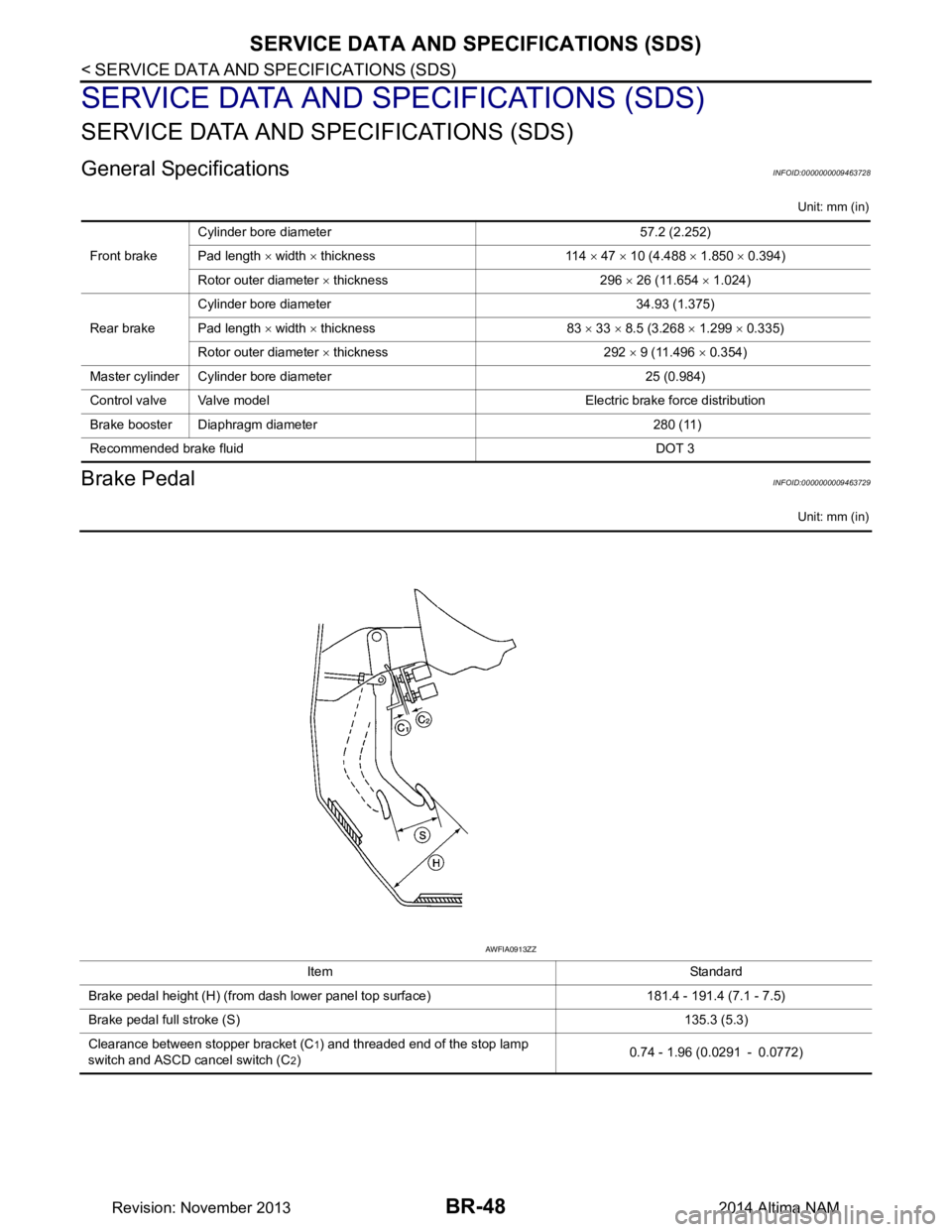
Brake PedalINFOID:0000000009463729
Unit: mm (in)
Front brakeCylinder bore diameter 57.2 (2.252)
Pad length × width × thickness 114 × 47 × 10 (4.488 × 1.850 × 0.394)
Rotor outer diameter × thickness 296 × 26 (11.654 × 1.024)
Rear brake Cylinder bore diameter 34.93 (1.375)
Pad length × width × thickness 83 × 33 × 8.5 (3.268 × 1.299 × 0.335)
Rotor outer diameter × thickness 292 × 9 (11.496 × 0.354)
Master cylinder Cylinder bore diameter 25 (0.984)
Control valve Valve model Electric brake force distribution
Brake booster Diaphragm diameter 280 (11)
Recommended brake fluid DOT 3
Item Standard
Brake pedal height (H) (from dash lower panel top surface) 181.4 - 191.4 (7.1 - 7.5)
Brake pedal full stroke (S) 135.3 (5.3)
Clearance between stopper bracket (C
1) and threaded end of the stop lamp
switch and ASCD cancel switch (C
2) 0.74 - 1.96 (0.0291 - 0.0772)
AWFIA0913ZZ
Revision: November 20132014 Altima NAM
Page 179 of 4801
![NISSAN TEANA 2014 User Guide
DIAGNOSIS SYSTEM [ABS ACTUATOR AND ELECTRIC UNIT (CONTROL
UNIT)]
BRC-33
< SYSTEM DESCRIPTION > [VDC/TCS/ABS]
C
D E
G H
I
J
K L
M A
B
BRC
N
O P
DIAGNOSIS SYSTEM [ABS ACTUATOR AND ELECTRIC UNIT (CO](/img/5/57390/w960_57390-178.png "NISSAN TEANA 2014 User Guide
DIAGNOSIS SYSTEM [ABS ACTUATOR AND ELECTRIC UNIT (CONTROL
UNIT)]
BRC-33
< SYSTEM DESCRIPTION > [VDC/TCS/ABS]
C
D E
G H
I
J
K L
M A
B
BRC
N
O P
DIAGNOSIS SYSTEM [ABS ACTUATOR AND ELECTRIC UNIT (CO")
DIAGNOSIS SYSTEM [ABS ACTUATOR AND ELECTRIC UNIT (CONTROL
UNIT)]
BRC-33
< SYSTEM DESCRIPTION > [VDC/TCS/ABS]
C
D E
G H
I
J
K L
M A
B
BRC
N
O P
DIAGNOSIS SYSTEM [ABS ACTUATOR AND ELECTRIC UNIT (CONTROL
UNIT)]
CONSULT Function (ABS)INFOID:0000000009463758
CAUTION:
After disconnecting the CONSULT vehicle interface (VI) from the data link connector, the ignition must
be cycled OFF → ON (for at least 5 seconds) → OFF. If this step is not performed, the BCM may not go
to ”sleep mode”, potentiall y causing a discharged battery and a no-start condition.
FUNCTION
CONSULT can display each diagnostic item us ing the following direct diagnostic modes.
ECU IDENTIFICATION
ABS actuator and electric unit (control unit) part number is displayed.
SELF DIAGNOSTIC RESULT
Operation Procedure
1. Before performing the self-diagnosis, start engine and drive vehicle at 30 km/h (19 MPH) or more for
approximately 1 minute.
How To Erase Self Diagnostic Result
1. After erasing DTC memory, start engine and drive vehicle at 30 km/h (19 MPH) or more for approximately 1 minute as the final inspection, and make sure t hat the ABS warning lamp, VDC OFF indicator lamp,
SLIP indicator lamp and brake warning lamp turn OFF.
CAUTION:
If memory cannot be erased, perform applicable diagnosis.
NOTE:
• When the wheel sensor malfunctions, after inspecting the wheel sensor system, the ABS warning lamp,
SLIP indicator lamp and brake warning lamp will not turn OFF even when the system is normal, unless
the vehicle is driven at approximately 30 km/h (19 MPH) or more for approximately 1 minute.
• Brake warning lamp will turn ON in case of parking brake operation (when switch is ON) or of brake fluid
level switch operation (when brake fluid is insufficient).
• VDC OFF switch should not stay in ON position.
Display Item List
Refer to BRC-45, "DTC Index".
DATA MONITOR
Direct Diagnostic Mode Description
ECU identification The ABS actuator and electric un it (control unit) part number is displayed.
Self Diagnostic Result The ABS actuator and electric unit (control unit) self diagnostic results are displayed.
Data Monitor The ABS actuator and elec tric unit (control unit) input/output data is displayed in real time.
Active Test The ABS actuator and elec tric unit (control unit) activates outputs to test components.
Work support The settings for ABS actuator and electric unit (control unit) functions can be changed.
CAN DIAG SUPPORT MNTR The result of transmit/receive diagnosis of CAN communication is displayed.
Configuration • Read and save the vehicle specification (TYPE ID).
• Write the vehicle specification (TYPE ID) when replacing ABS actu ator and electric unit (con-
trol unit).
Revision: November 20132014 Altima NAMRevision: November 20132014 Altima NAM
Page 308 of 4801

BRM-30
< REMOVAL AND INSTALLATION >
REPLACEMENT OPERATIONS
FRONT PILLAR OUTER - LATE PRODUCTION MODELS
Late Production Models
Work after hoodledge and hoodledge reinforcement rear has been removed.
Change parts
z Front pillar section of body side outer
A. Recommended sectioning location Front
Manufacturing Plant Smyrna: built on 10/25/2012 or later
Canton: built on 11/07/2012 or later
Revision: November 20132014 Altima NAM
Page 309 of 4801
REPLACEMENT OPERATIONSBRM-31
< REMOVAL AND INSTALLATION >
C
D E
F
G H
I
J
L
M A
B
BRM
N
O P
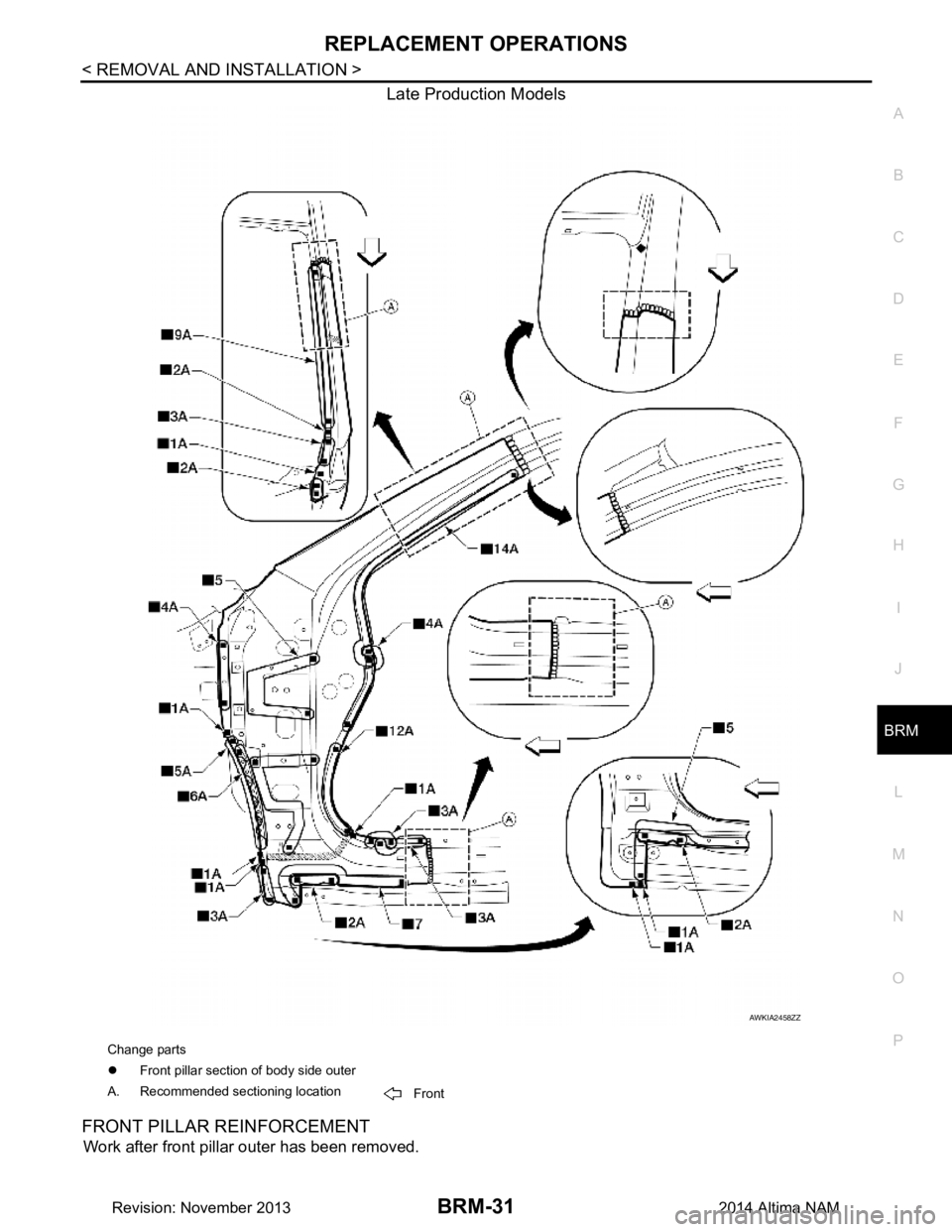
Late Production Models
FRONT PILLAR REINFORCEMENT
Work after front pillar outer has been removed.
AWKIA2458ZZ
Change parts
z Front pillar section of body side outer
A. Recommended sectioning location Front
Revision: November 20132014 Altima NAM