ECO mode NISSAN TEANA 2014 Owner's Guide
[x] Cancel search | Manufacturer: NISSAN, Model Year: 2014, Model line: TEANA, Model: NISSAN TEANA 2014Pages: 4801, PDF Size: 51.2 MB
Page 625 of 4801
![NISSAN TEANA 2014 Owners Guide
DAS-192
< DTC/CIRCUIT DIAGNOSIS >[BSW]
U1000 CAN COMM CIRCUIT
U1000 CAN COMM CIRCUIT
DescriptionINFOID:0000000009464841
CAN COMMUNICATION
CAN (Controller Area Network) is a serial communication
line](/img/5/57390/w960_57390-624.png "NISSAN TEANA 2014 Owners Guide
DAS-192
< DTC/CIRCUIT DIAGNOSIS >[BSW]
U1000 CAN COMM CIRCUIT
U1000 CAN COMM CIRCUIT
DescriptionINFOID:0000000009464841
CAN COMMUNICATION
CAN (Controller Area Network) is a serial communication
line")
DAS-192
< DTC/CIRCUIT DIAGNOSIS >[BSW]
U1000 CAN COMM CIRCUIT
U1000 CAN COMM CIRCUIT
DescriptionINFOID:0000000009464841
CAN COMMUNICATION
CAN (Controller Area Network) is a serial communication
line for real time applications. It is an on-vehicle mul-
tiplex communication line with high data communication speed and excellent error detection ability. Modern
vehicle is equipped with many electronic control units , and each control unit shares information and links with
other control units during operation (not independent). In CAN communication, control units are connected
with 2 communication lines (CAN-H, CAN-L) allowing a hi gh rate of information transmission with less wiring.
Each control unit transmits/receives data but selectively reads the required data only.
CAN communication signal chart. Refer to LAN-32, "CAN COMMUNICATION SYSTEM : CAN Communica-
tion Signal Chart".
ITS COMMUNICATION
• ITS communication is a multiplex communication system . This enables the system to transmit and receive
large quantities of data at high speed by connecting control units with 2 communication lines.
• ITS communication lines adopt twisted-pair line st yle (two lines twisted) for noise immunity.
DTC LogicINFOID:0000000009464842
DTC DETECTION LOGIC
NOTE:
If “U1000” is detected, first di agnose the CAN communication system.
Diagnosis ProcedureINFOID:0000000009464843
1.PERFORM THE SELF-DIAGNOSIS
1. Turn the ignition switch ON.
2. Turn the MAIN switch of ITS system ON, and then wait for 30 seconds or more.
3. Perform “All DTC Reading” with CONSULT.
4. Check if the “U1000” is detected as the current malfunction in “Self Diagnostic Result” of “AVM”.
Is
“U1000” detected as the current malfunction?
YES >> Refer to DAS-192, "Description".
NO >> Refer to GI-43, "Intermittent Incident"
.
DTC Trouble diagnosis name DTC detecting condition Possible causes
U1000 CAN COMM CIRCUIT If ITS control unit is not transmitting or receiving
CAN communication signal or ITS communica-
tion signal for 2 seconds or more • CAN communication system
• ITS communication system
Revision: November 20132014 Altima NAMRevision: November 20132014 Altima NAM
Page 666 of 4801
![NISSAN TEANA 2014 Owners Guide
DAS
DIAGNOSIS SYSTEM (ITS CONTROL UNIT)DAS-233
< SYSTEM DESCRIPTION > [MOD]
C
D E
F
G H
I
J
K L
M B
N P
A
DIAGNOSIS SYSTEM (ITS CONTROL UNIT)
CONSULT Function (AVM)INFOID:0000000009951658
CAUTION:](/img/5/57390/w960_57390-665.png "NISSAN TEANA 2014 Owners Guide
DAS
DIAGNOSIS SYSTEM (ITS CONTROL UNIT)DAS-233
< SYSTEM DESCRIPTION > [MOD]
C
D E
F
G H
I
J
K L
M B
N P
A
DIAGNOSIS SYSTEM (ITS CONTROL UNIT)
CONSULT Function (AVM)INFOID:0000000009951658
CAUTION:")
DAS
DIAGNOSIS SYSTEM (ITS CONTROL UNIT)DAS-233
< SYSTEM DESCRIPTION > [MOD]
C
D E
F
G H
I
J
K L
M B
N P
A
DIAGNOSIS SYSTEM (ITS CONTROL UNIT)
CONSULT Function (AVM)INFOID:0000000009951658
CAUTION:
After disconnecting the CONSULT vehicle interface (VI) from the data link connector, the ignition must
be cycled OFF → ON (for at least 5 seconds) → OFF. If this step is not performed, the BCM may not go
to ”sleep mode”, potentiall y causing a discharged battery and no-start condition.
APPLICATION ITEMS
CONSULT performs the following functions via CAN communication using ITS control unit.
SELF DIAGNOSTIC RESULT
Refer to DAS-239, "DTC Index".
DATA MONITOR
Diagnosis mode Description
Self Diagnostic Result Displays the name of a malfunctioning system stored in the ITS control unit
Data Monitor Displays ITS control unit input/output data in real time
Work support Displays causes of automatic system cancellation occurred during system control
Active Test Enables an operational check of a load by transmitting a driving signal from the ITS control unit to
the load
ECU identification Displays ITS control unit part number
Configuration The vehicle specification can be written when replacing the ITS control unit
Monitored item [Unit] Description
ST ANGLE SENSOR SIGNAL
[On/Off] Indicates [On/Off] status as judged from ITS control unit (Angle sensor transmits angle signal
through CAN communication)
REVERSE SIGNAL
[On/Off] Indicates [On/Off] status as judged from ITS control unit (TCM transmits reverse signal
through CAN communication)
VEHICLE SPEED SIGNAL
[On/Off] Indicates vehicle speed calculated from ITS control unit through CAN communication [ABS ac-
tuator and electric unit (control unit) transmits vehicle speed signal (wheel speed) through
CAN communication]
CAMERA SWITCH SIGNAL
[On/Off] Indicates [On/Off] status of camera switch signal as judged from ITS control unit
CAMERA OFF SIGNAL
[On/Off] Indicates [On/Off] status of camera OFF signal as judged from ITS control unit
ST ANGLE SENSOR TYPE
[Absolute/Not] Indicates whether steering angle sensor type is absolute or not (ON means “controlling”)
STEERING GEAR RATIO TYPE
[Type 0/1] Indicates the type of the steering gear ratio (type 1 or 2)
STEERING POSITION
[LHD/RHD] Indicates the steering
position (LHD or RHD)
REAR CAMERA IMAGE SIGNAL
[OK/Not] Indicates the status of the rear camera image as read from ITS control unit through dedicated
ITS communication lines
WASH SW
[ON/OFF] Indicates the state of the wash switch indicator output
R-CAMERA COMM STATUS
[OK/Not] Indicates the status of the rear camera communication status as read from ITS control unit
through dedicated ITS communication lines
R-CAMERA COMM LINE
[OK/Not] Indicates the condition of the rear camera communication line whether transmitting properly
through dedicated ITS communication lines
PUMP COMM STATUS
[OK/NG] Indicates the state of the communication signal from pump control unit
Revision: November 20132014 Altima NAMRevision: November 20132014 Altima NAM
Page 699 of 4801
![NISSAN TEANA 2014 Owners Guide
DAS-266
< DTC/CIRCUIT DIAGNOSIS >[MOD]
U1000 CAN COMM CIRCUIT
U1000 CAN COMM CIRCUIT
DescriptionINFOID:0000000009464922
CAN COMMUNICATION
CAN (Controller Area Network) is a serial communication
line](/img/5/57390/w960_57390-698.png "NISSAN TEANA 2014 Owners Guide
DAS-266
< DTC/CIRCUIT DIAGNOSIS >[MOD]
U1000 CAN COMM CIRCUIT
U1000 CAN COMM CIRCUIT
DescriptionINFOID:0000000009464922
CAN COMMUNICATION
CAN (Controller Area Network) is a serial communication
line")
DAS-266
< DTC/CIRCUIT DIAGNOSIS >[MOD]
U1000 CAN COMM CIRCUIT
U1000 CAN COMM CIRCUIT
DescriptionINFOID:0000000009464922
CAN COMMUNICATION
CAN (Controller Area Network) is a serial communication
line for real time applications. It is an on-vehicle mul-
tiplex communication line with high data communication speed and excellent error detection ability. Modern
vehicle is equipped with many electronic control units , and each control unit shares information and links with
other control units during operation (not independent). In CAN communication, control units are connected
with 2 communication lines (CAN-H, CAN-L) allowing a hi gh rate of information transmission with less wiring.
Each control unit transmits/receives data but selectively reads the required data only.
CAN communication signal chart. Refer to LAN-32, "CAN COMMUNICATION SYSTEM : CAN Communica-
tion Signal Chart".
ITS COMMUNICATION
• ITS communication is a multiplex communication system . This enables the system to transmit and receive
large quantities of data at high speed by connecting control units with 2 communication lines.
• ITS communication lines adopt twisted-pair line st yle (two lines twisted) for noise immunity.
DTC LogicINFOID:0000000009464923
DTC DETECTION LOGIC
NOTE:
If “U1000” is detected, first di agnose the CAN communication system.
Diagnosis ProcedureINFOID:0000000009464924
1.PERFORM THE SELF-DIAGNOSIS
1. Turn the ignition switch ON.
2. Turn the MAIN switch of ITS system ON, and then wait for 30 seconds or more.
3. Perform “All DTC Reading” with CONSULT.
4. Check if the “U1000” is detected as the current malfunction in “Self Diagnostic Result” of “AVM”.
Is
“U1000” detected as the current malfunction?
YES >> Refer to DAS-266, "Description".
NO >> Refer to GI-43, "Intermittent Incident"
.
DTC Trouble diagnosis name DTC detecting condition Possible causes
U1000 CAN COMM CIRCUIT If ITS control unit is not transmitting or receiving
CAN communication signal or ITS communica-
tion signal for 2 seconds or more • CAN communication system
• ITS communication system
Revision: November 20132014 Altima NAMRevision: November 20132014 Altima NAM
Page 733 of 4801

DEF-8
< SYSTEM DESCRIPTION >
DIAGNOSIS SYSTEM (BCM)
DIAGNOSIS SYSTEM (BCM)
COMMON ITEM
COMMON ITEM : CONSULT Function (BCM - COMMON ITEM)INFOID:0000000009956271
CAUTION:
After disconnecting the CONSULT vehicle interface (VI) from the data link connector, the ignition must
be cycled OFF → ON (for at least 5 seconds) → OFF. If this step is not performed, the BCM may not go
to ”sleep mode”, potentially causing a di scharged battery and a no-start condition.
APPLICATION ITEM
CONSULT performs the following functions via CAN communication with BCM.
SYSTEM APPLICATION
BCM can perform the following functions.
Direct Diagnostic Mode Description
Ecu Identification The BCM part number is displayed.
Self Diagnostic Result The BCM self diagnostic results are displayed.
Data Monitor The BCM input/output data is displayed in real time.
Active Test The BCM activates outputs to test components.
Work support The settings for BCM functions can be changed.
Configuration • The vehicle specification can be read and saved.
• The vehicle specification can be written when replacing BCM.
CAN Diag Support Mntr The result of transmit/receive diagnosis of CAN communication is displayed.
System Sub System Direct Diagnostic Mode
Ecu Identification
Self Diagnostic Result
Data Monitor
Active Test
Work support
Configuration
CAN Diag Su pport Mntr
Door lock DOOR LOCK ××××
Rear window defogger REAR DEFOGGER ×××
Warning chime BUZZER ××
Interior room lamp timer INT LAMP ×××
Remote keyless entry system MULTI REMOTE ENT ×××
Exterior lamp HEADLAMP ×××
Wiper and washer WIPER ×××
Turn signal and hazard warning lamps FLASHER ××
Air conditioner AIR CONDITIONER ×
Intelligent Key system INTELLIGENT KEY ××××
Combination switch COMB SW ×
BCM BCM × × ×××
Immobilizer IMMU ×××
Interior room lamp battery saver BATTERY SAVER ××
Trunk open TRUNK ×
Vehicle security system THEFT ALM ×××
Revision: November 20132014 Altima NAMRevision: November 20132014 Altima NAM
Page 734 of 4801

DIAGNOSIS SYSTEM (BCM)DEF-9
< SYSTEM DESCRIPTION >
C
D E
F
G H
I
J
K
M A
B
DEF
N
O P
REAR DEFOGGER
REAR DEFOGGER : CONSULT Func tion (BCM - REAR DEFOGGER)INFOID:0000000009956272
CAUTION:
After disconnecting the CONSULT vehicle interface (VI) from the data link connector, the ignition must
be cycled OFF → ON (for at least 5 seconds) → OFF. If this step is not performed, the BCM may not go
to ”sleep mode”, potentiall y causing a discharged battery and a no-start condition.
DATA MONITOR
ACTIVE TEST
WORK SUPPORT
* : Initial setting RAP system RETAINED PWR
×
Signal buffer system SIGNAL BUFFER ×
TPMS AIR PRESSURE MONITOR ××××
System Sub System
Direct Diagnostic Mode
Ecu Identification
Self Diagnostic Result
Data Monitor
Active Test
Work support
Configuration
CAN Diag Support Mntr
Monitor Item [Unit] Description
PUSH SW [On/Off] Indicates condition of push-button ignition switch.
REAR DEF SW [On/Off] Indicates condition of rear window defogger switch.
Test Item Description
REAR DEFOGGER This test is able to check rear window defogger operation [Off/On].
Support Item Setting Description
SET R-DEF TIMER MODE3 Rear defogger turns OFF after 1 minute.
MODE2 Rear defogger remains ON until turned OFF.
MODE1* Rear defogger turns OFF after 15 minutes.
Revision: November 20132014 Altima NAMRevision: November 20132014 Altima NAM
Page 742 of 4801
DIAGNOSIS AND REPAIR WORKFLOWDEF-17
< BASIC INSPECTION >
C
D E
F
G H
I
J
K
M A
B
DEF
N
O P
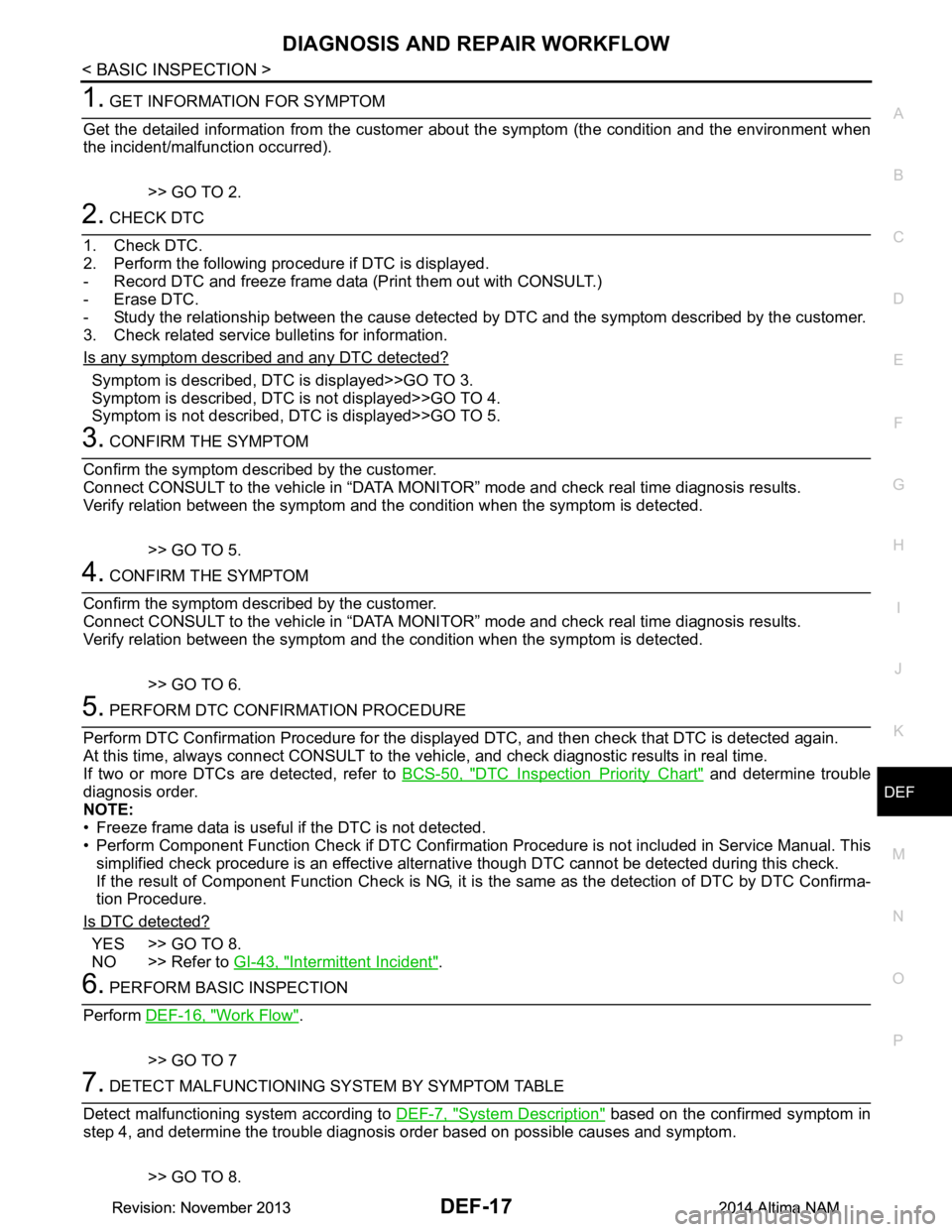
1. GET INFORMATION FOR SYMPTOM
Get the detailed information from the customer about the symptom (the condition and the environment when
the incident/malfunction occurred).
>> GO TO 2.
2. CHECK DTC
1. Check DTC.
2. Perform the following procedure if DTC is displayed.
- Record DTC and freeze frame data (Print them out with CONSULT.)
- Erase DTC.
- Study the relationship between the cause detected by DTC and the symptom described by the customer.
3. Check related service bulletins for information.
Is any symptom described and any DTC detected?
Symptom is described, DTC is displayed>>GO TO 3.
Symptom is described, DTC is not displayed>>GO TO 4.
Symptom is not described, DTC is displayed>>GO TO 5.
3. CONFIRM THE SYMPTOM
Confirm the symptom described by the customer.
Connect CONSULT to the vehicle in “DATA MONITO R” mode and check real time diagnosis results.
Verify relation between the symptom and t he condition when the symptom is detected.
>> GO TO 5.
4. CONFIRM THE SYMPTOM
Confirm the symptom described by the customer.
Connect CONSULT to the vehicle in “DATA MONITO R” mode and check real time diagnosis results.
Verify relation between the symptom and t he condition when the symptom is detected.
>> GO TO 6.
5. PERFORM DTC CONFIRMATION PROCEDURE
Perform DTC Confirmation Procedure for the display ed DTC, and then check that DTC is detected again.
At this time, always connect CONSULT to the v ehicle, and check diagnostic results in real time.
If two or more DTCs are detected, refer to BCS-50, "DTC Inspection Priority Chart"
and determine trouble
diagnosis order.
NOTE:
• Freeze frame data is useful if the DTC is not detected.
• Perform Component Function Check if DTC Confirma tion Procedure is not included in Service Manual. This
simplified check procedure is an effective alternat ive though DTC cannot be detected during this check.
If the result of Component Function Check is NG, it is the same as the detection of DTC by DTC Confirma-
tion Procedure.
Is DTC detected?
YES >> GO TO 8.
NO >> Refer to GI-43, "Intermittent Incident"
.
6. PERFORM BASIC INSPECTION
Perform DEF-16, "Work Flow"
.
>> GO TO 7
7. DETECT MALFUNCTIONING SY STEM BY SYMPTOM TABLE
Detect malfunctioning system according to DEF-7, "System Description"
based on the confirmed symptom in
step 4, and determine the trouble diagnosis or der based on possible causes and symptom.
>> GO TO 8.
Revision: November 20132014 Altima NAMRevision: November 20132014 Altima NAM
Page 789 of 4801
SYSTEM (POWER DOOR LOCK SYSTEM)DLK-21
< SYSTEM DESCRIPTION >
C
D E
F
G H
I
J
L
M A
B
DLK
N
O P
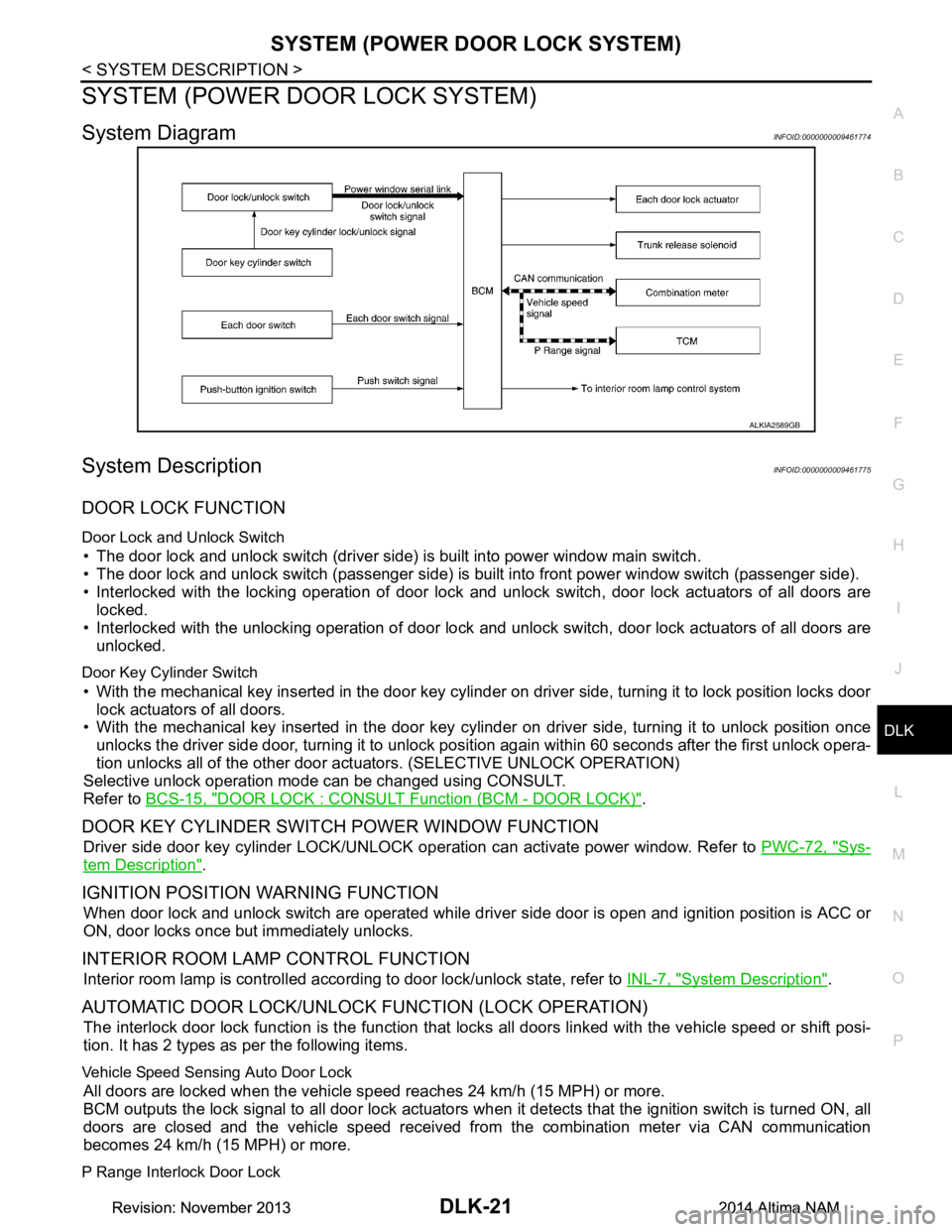
SYSTEM (POWER DOOR LOCK SYSTEM)
System DiagramINFOID:0000000009461774
System DescriptionINFOID:0000000009461775
DOOR LOCK FUNCTION
Door Lock and Unlock Switch
• The door lock and unlock switch (driver side) is built into power window main switch.
• The door lock and unlock switch (passenger side) is built into front power window switch (passenger side).
• Interlocked with the locking operation of door lock and unlock switch, door lock actuators of all doors are
locked.
• Interlocked with the unlocking operation of door lock and unlock switch, door lock actuators of all doors are
unlocked.
Door Key Cylinder Switch
• With the mechanical key inserted in the door key cylinder on driver side, turning it to lock position locks door
lock actuators of all doors.
• With the mechanical key inserted in the door key cylinder on driver side, turning it to unlock position once
unlocks the driver side door, turning it to unlock pos ition again within 60 seconds after the first unlock opera-
tion unlocks all of the other door act uators. (SELECTIVE UNLOCK OPERATION)
Selective unlock operation mode can be changed using CONSULT.
Refer to BCS-15, "DOOR LOCK : CONSULT Function (BCM - DOOR LOCK)"
.
DOOR KEY CYLINDER SWIT CH POWER WINDOW FUNCTION
Driver side door key cylinder LOCK/UNLOCK operat ion can activate power window. Refer to PWC-72, "Sys-
tem Description".
IGNITION POSITION WARNING FUNCTION
When door lock and unlock switch are operated while driv er side door is open and ignition position is ACC or
ON, door locks once but immediately unlocks.
INTERIOR ROOM LAMP CONTROL FUNCTION
Interior room lamp is controlled according to door lock/unlock state, refer to INL-7, "System Description".
AUTOMATIC DOOR LOCK/UNLOCK FUNCTION (LOCK OPERATION)
The interlock door lock function is the function that locks all doors linked with the vehicle speed or shift posi-
tion. It has 2 types as per the following items.
Vehicle Speed Sensing Auto Door Lock
All doors are locked when the vehicle speed reaches 24 km/h (15 MPH) or more.
BCM outputs the lock signal to all door lock actuators when it detects that the ignition switch is turned ON, all
doors are closed and the vehicle speed received from the combination meter via CAN communication
becomes 24 km/h (15 MPH) or more.
P Range Interlock Door Lock
ALKIA2589GB
Revision: November 20132014 Altima NAMRevision: November 20132014 Altima NAM
Page 793 of 4801
SYSTEM (INTELLIGENT KEY SYSTEM)DLK-25
< SYSTEM DESCRIPTION >
C
D E
F
G H
I
J
L
M A
B
DLK
N
O P
OPERATION DESCRIPTION
• When the BCM detects that each door request switch (if equipped) is pressed, it activates the outside key
antenna and inside key antenna corresponding to the pres sed door request switch (if equipped) and trans-
mits the request signal to the Intelligent Key. T hen check that the Intelligent Key is near the door.
• If the Intelligent Key is within the outside key ant enna detection area, it receives the request signal and
transmits the key ID signal to the BCM via remote keyless entry receiver.
• BCM receives the key ID signal and compares it with the registered key ID.
• BCM locks/unlocks each door.
• BCM sounds Intelligent Key warning buzzer (lock: 2 ti mes, unlock: 1 time) and blinks hazard warning lamps
(lock: 2 times, unlock: 1 time) at the same time as a reminder.
OPERATION CONDITION
If the following conditions are satisfied, door lock/unl ock operation is performed if the door request switch (if
equipped) is operated.
*: Even with a registered Intelligent Key remaining inside the vehicle, door locks can be locked/unlocked from outside of the v ehicle with
a spare Intelligent Key as long as key IDs are different.
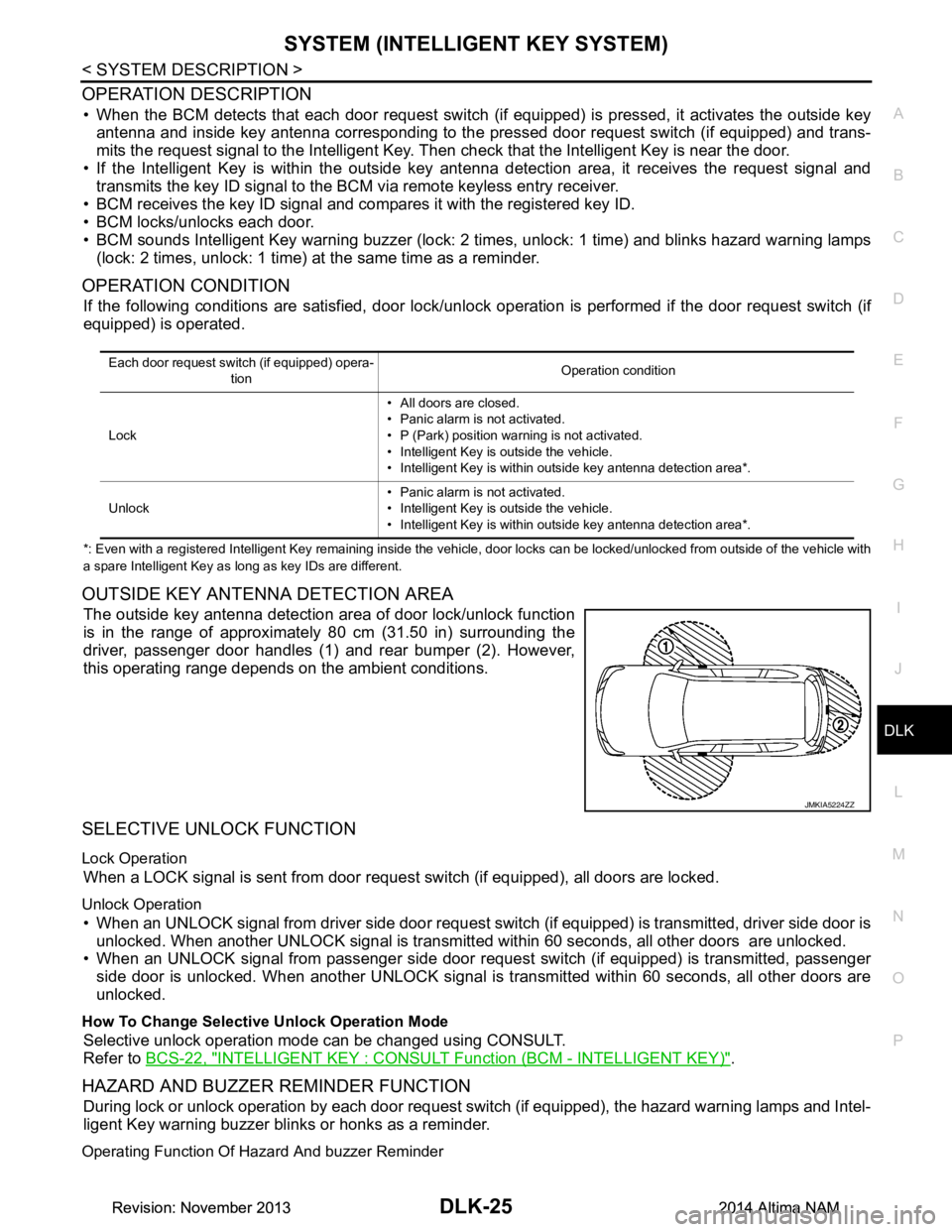
OUTSIDE KEY ANTENNA DETECTION AREA
The outside key antenna detection area of door lock/unlock function
is in the range of approximately 80 cm (31.50 in) surrounding the
driver, passenger door handles (1) and rear bumper (2). However,
this operating range depends on the ambient conditions.
SELECTIVE UNLOCK FUNCTION
Lock Operation
When a LOCK signal is sent from door r equest switch (if equipped), all doors are locked.
Unlock Operation
• When an UNLOCK signal from driver side door request swit ch (if equipped) is transmitted, driver side door is
unlocked. When another UNLOCK signal is transmitted within 60 seconds, all other doors are unlocked.
• When an UNLOCK signal from passenger side door reques t switch (if equipped) is transmitted, passenger
side door is unlocked. When another UNLOCK signal is transmitted within 60 seconds, all other doors are
unlocked.
How To Change Selective Unlock Operation Mode
Selective unlock operation mode can be changed using CONSULT.
Refer to BCS-22, "INTELLIGENT KEY : CONSUL T Function (BCM - INTELLIGENT KEY)"
.
HAZARD AND BUZZER REMINDER FUNCTION
During lock or unlock operation by each door request switch (if equipped), the hazard warning lamps and Intel-
ligent Key warning buzzer blinks or honks as a reminder.
Operating Function Of Hazard And buzzer Reminder
Each door request switch (if equipped) opera-
tion Operation condition
Lock • All doors are closed.
• Panic alarm is not activated.
• P (Park) position warning is not activated.
• Intelligent Key is outside the vehicle.
• Intelligent Key is within outside key antenna detection area*.
Unlock • Panic alarm is not activated.
• Intelligent Key is outside the vehicle.
• Intelligent Key is within outside key antenna detection area*.
JMKIA5224ZZ
Revision: November 20132014 Altima NAMRevision: November 20132014 Altima NAM
Page 794 of 4801
DLK-26
< SYSTEM DESCRIPTION >
SYSTEM (INTELLIGENT KEY SYSTEM)
Hazard and buzzer reminder does not operate in the following conditions.
• Ignition switch position is ON.
• Door is open (only lock operation).
How To Change Hazard And Buzzer Reminder Mode
Hazard and buzzer reminder mode can be changed using CONSULT.
Refer to BCS-22, "INTELLIGENT KEY : CONSULT Function (BCM - INTELLIGENT KEY)"
.
AUTO DOOR LOCK FUNCTION
After door is unlocked by door request switch (if equipped) operation and if 60 seconds or more passes with-
out performing the following operation, all doors are autom atically locked. However, operation check function
does not activate.
How To Change Auto Door Lock Operation Mode
Auto door lock operation mode can be changed using CONSULT.
Refer to BCS-22, "INTELLIGENT KEY : CONSULT Function (BCM - INTELLIGENT KEY)"
.
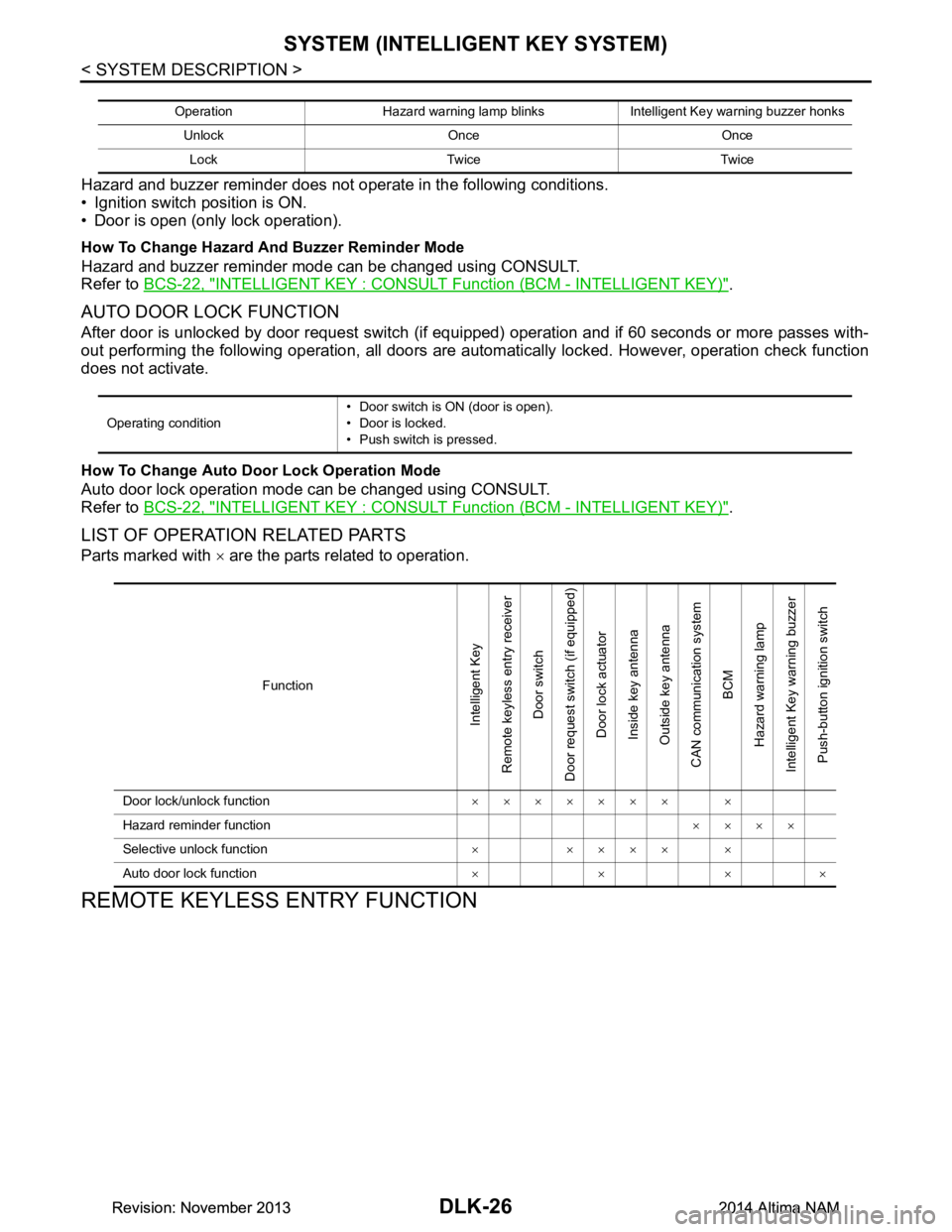
LIST OF OPERATION RELATED PARTS
Parts marked with × are the parts related to operation.
REMOTE KEYLESS ENTRY FUNCTION
Operation Hazard warning lamp blinks Intelligent Key warning buzzer honks
Unlock Once OnceLock Twice Twice
Operating condition • Door switch is ON (door is open).
• Door is locked.
• Push switch is pressed.
Function
Intelligent Key
Remote keyless entry receiver
Door switch
Door request switch (if equipped) Door lock actuator
Inside key antenna
Outside key antenna
CAN communication system BCM
Hazard warning lamp
Intelligent Key warning buzzer Push-button ignition switch
Door lock/unlock function ××××××× ×
Hazard reminder function ××××
Selective unlock function ××××××
Auto door lock function ××××
Revision: November 20132014 Altima NAMRevision: November 20132014 Altima NAM
Page 795 of 4801
SYSTEM (INTELLIGENT KEY SYSTEM)DLK-27
< SYSTEM DESCRIPTION >
C
D E
F
G H
I
J
L
M A
B
DLK
N
O P
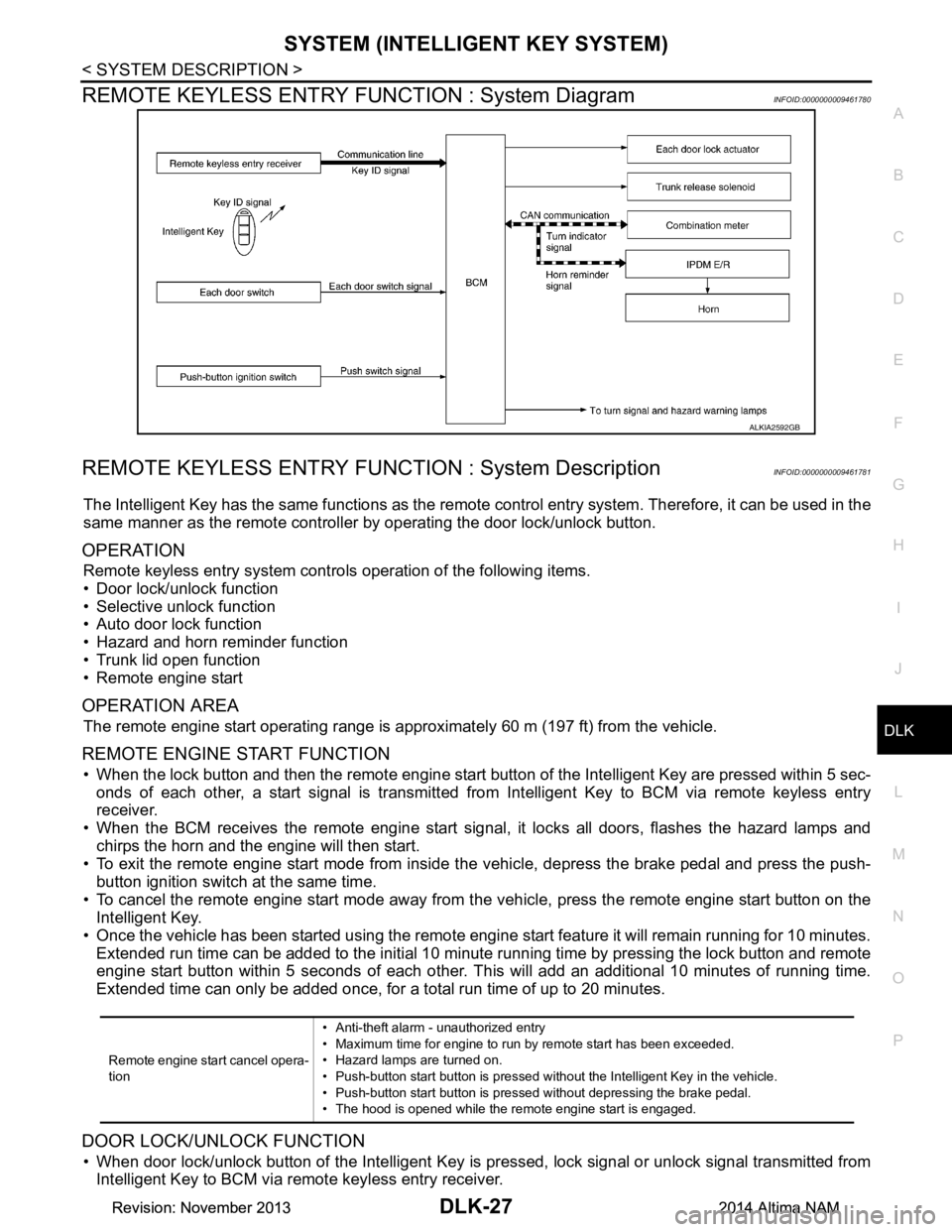
REMOTE KEYLESS ENTRY F UNCTION : System DiagramINFOID:0000000009461780
REMOTE KEYLESS ENTRY FUNCT ION : System DescriptionINFOID:0000000009461781
The Intelligent Key has the same functions as the remote control entry system. Therefore, it can be used in the
same manner as the remote controller by operating the door lock/unlock button.
OPERATION
Remote keyless entry system controls operation of the following items.
• Door lock/unlock function
• Selective unlock function
• Auto door lock function
• Hazard and horn reminder function
• Trunk lid open function
• Remote engine start
OPERATION AREA
The remote engine start operating range is appr oximately 60 m (197 ft) from the vehicle.
REMOTE ENGINE START FUNCTION
• When the lock button and then the remote engine start butt on of the Intelligent Key are pressed within 5 sec-
onds of each other, a start signal is transmitted from Intelligent Key to BCM via remote keyless entry
receiver.
• When the BCM receives the remote engine start signal , it locks all doors, flashes the hazard lamps and
chirps the horn and the engine will then start.
• To exit the remote engine start mode from inside t he vehicle, depress the brake pedal and press the push-
button ignition switch at the same time.
• To cancel the remote engine start mode away from t he vehicle, press the remote engine start button on the
Intelligent Key.
• Once the vehicle has been started using the remote engi ne start feature it will remain running for 10 minutes.
Extended run time can be added to the initial 10 minute running time by pressing the lock button and remote
engine start button within 5 seconds of each other. Th is will add an additional 10 minutes of running time.
Extended time can only be added once, for a total run time of up to 20 minutes.
DOOR LOCK/UNLOCK FUNCTION
• When door lock/unlock button of the Intelligent Key is pr essed, lock signal or unlock signal transmitted from
Intelligent Key to BCM via remote keyless entry receiver.
ALKIA2592GB
Remote engine start cancel opera-
tion • Anti-theft alarm - unauthorized entry
• Maximum time for engine to run by remote start has been exceeded.
• Hazard lamps are turned on.
• Push-button start button is pressed without the Intelligent Key in the vehicle.
• Push-button start button is pressed without depressing the brake pedal.
• The hood is opened while the remote engine start is engaged.
Revision: November 20132014 Altima NAMRevision: November 20132014 Altima NAM