service NISSAN TEANA 2014 User Guide
[x] Cancel search | Manufacturer: NISSAN, Model Year: 2014, Model line: TEANA, Model: NISSAN TEANA 2014Pages: 4801, PDF Size: 51.2 MB
Page 17 of 4801

BCS-2
INTELLIGENT KEY : CONSULT Function (BCM -
INTELLIGENT KEY) ........ .......................................
22
COMB SW .............................................................. ...25
COMB SW : CONSULT Function (BCM - COMB
SW) ...................................................................... ...
25
BCM ........................................................................ ...25
BCM : CONSULT Function (BCM - BCM) ..............25
IMMU ...................................................................... ...26
IMMU : CONSULT Function (BCM - IMMU) ...........26
BATTERY SAVER ................................................. ...26
BATTERY SAVER : CONSULT Function (BCM -
BATTERY SAVER) .......... .......................................
26
TRUNK ................................................................... ...27
TRUNK : CONSULT Function (BCM - TRUNK) .....27
THEFT ALM ........................................................... ...27
THEFT ALM : CONSULT Function (BCM - THEFT
ALM) .................................................................... ...
27
RETAINED PWR .................................................... ...28
RETAINED PWR : CONSULT Function (BCM -
RETAINED PWR) ................................................ ...
28
SIGNAL BUFFER ................................................... ...28
SIGNAL BUFFER : CONSULT Function (BCM -
SIGNAL BUFFER) ............................................... ...
29
AIR PRESSURE MONITOR ................................... ...29
AIR PRESSURE MONITOR : CONSULT Function
(BCM-AIR PRESSURE MONITOR) .................... ...
29
ECU DIAGNOSIS INFORMATION ..............31
BCM (BODY CONTROL MODULE) ............... ...31
Reference Value .................................................. ...31
Fail Safe .................................................................50
DTC Inspection Priority Chart ..............................50
DTC Index ........................................................... ...52
WIRING DIAGRAM .....................................55
BCM ................................................................ ...55
Wiring Diagram .................................................... ...55
BASIC INSPECTION ...................................64
INSPECTION AND ADJUSTMENT ................ ...64
ADDITIONAL SERVICE WHEN REPLACING
CONTROL UNIT ..................................................... ...
64
ADDITIONAL SERVICE WHEN REPLACING
CONTROL UNIT : Description ............................. ...
64
ADDITIONAL SERVICE WHEN REPLACING
CONTROL UNIT : Work Pr ocedure ........................
64
CONFIGURATION (BCM) ...................................... ...64
CONFIGURATION (BCM) : Description .................65
CONFIGURATION (BCM) : Work Procedure .........65
CONFIGURATION (BCM) : Configuration list .........66
TRANSIT MODE CANCEL OPERATION ...... ...67
Description ........................................................... ...67
Work Procedure ......................................................67
DTC/CIRCUIT DIAGNOSIS ........................68
U1000 CAN COMM CIRCUIT ......................... ...68
Description ........................................................... ...68
DTC Logic ...............................................................68
Diagnosis Procedure ...............................................68
U1010 CONTROL UNIT (CAN) .........................69
DTC Logic ............................................................ ...69
Diagnosis Procedure ...............................................69
U0415 VEHICLE SPEED SIG ............................70
Description ........................................................... ...70
DTC Logic ...............................................................70
Diagnosis Procedure ...............................................70
B2562 LOW VOLTAGE .....................................71
DTC Logic ............................................................ ...71
Diagnosis Procedure ...............................................71
B259A ROOM LAMP FUSE ..............................72
DTC Logic ............................................................ ...72
Diagnosis Procedure ...............................................72
POWER SUPPLY AND GROUND CIRCUIT .....74
Diagnosis Procedure ............................................ ...74
COMBINATION SWITCH INPUT CIRCUIT .......75
Diagnosis Procedure ............................................ ...75
COMBINATION SWITCH OUTPUT CIRCUIT ...77
Diagnosis Procedure ...............................................77
SYMPTOM DIAGNOSIS ............................79
COMBINATION SWITCH SYSTEM SYMP-
TOMS .............................................................. ...
79
Symptom Table .................................................... ...79
REMOVAL AND INSTALLATION ..............80
BCM (BODY CONTROL MODULE) ............... ...80
Removal and Installation .........................................80
COMBINATION SWITCH ............................... ...81
Exploded View ..................................................... ...81
Removal and Installation .........................................81
Revision: November 20132014 Altima NAMRevision: November 20132014 Altima NAM
Page 18 of 4801
![NISSAN TEANA 2014 User Guide
BCS
PRECAUTIONSBCS-3
< PRECAUTION > [BCM]
C
D E
F
G H
I
J
K L
B
A
O P
N
PRECAUTION
PRECAUTIONS
Precaution for Supplemental
Restraint System (SRS) "AIR BAG" and "SEAT BELT
PRE-TENSIONER"
INFOID:00](/img/5/57390/w960_57390-17.png "NISSAN TEANA 2014 User Guide
BCS
PRECAUTIONSBCS-3
< PRECAUTION > [BCM]
C
D E
F
G H
I
J
K L
B
A
O P
N
PRECAUTION
PRECAUTIONS
Precaution for Supplemental
Restraint System (SRS) \"AIR BAG\" and \"SEAT BELT
PRE-TENSIONER\"
INFOID:00")
BCS
PRECAUTIONSBCS-3
< PRECAUTION > [BCM]
C
D E
F
G H
I
J
K L
B
A
O P
N
PRECAUTION
PRECAUTIONS
Precaution for Supplemental
Restraint System (SRS) "AIR BAG" and "SEAT BELT
PRE-TENSIONER"
INFOID:0000000009951595
The Supplemental Restraint System such as “A IR BAG” and “SEAT BELT PRE-TENSIONER”, used along
with a front seat belt, helps to reduce the risk or severi ty of injury to the driver and front passenger for certain
types of collision. Information necessary to service t he system safely is included in the SR and SB section of
this Service Manual.
WARNING:
• To avoid rendering the SRS inoper ative, which could increase the risk of personal injury or death in
the event of a collision which would result in air bag inflation, all maintenance must be performed by
an authorized NISSAN/INFINITI dealer.
• Improper maintenance, including in correct removal and installation of the SRS, can lead to personal
injury caused by unintentional act ivation of the system. For removal of Spiral Cable and Air Bag
Module, see the SR section.
• Do not use electrical test equipm ent on any circuit related to the SRS unless instructed to in this
Service Manual. SRS wiring harnesses can be identi fied by yellow and/or orange harnesses or har-
ness connectors.
PRECAUTIONS WHEN USING POWER TOOLS (AIR OR ELECTRIC) AND HAMMERS
WARNING:
• When working near the Airbag Diagnosis Sensor Un it or other Airbag System sensors with the Igni-
tion ON or engine running, DO NOT use air or el ectric power tools or strike near the sensor(s) with a
hammer. Heavy vibration could activate the sensor( s) and deploy the air bag(s), possibly causing
serious injury.
• When using air or electric power tools or hammers , always switch the Ignition OFF, disconnect the
battery and wait at least three mi nutes before performing any service.
Revision: November 20132014 Altima NAMRevision: November 20132014 Altima NAM
Page 79 of 4801
![NISSAN TEANA 2014 User Guide
BCS-64
< BASIC INSPECTION >[BCM]
INSPECTION AND ADJUSTMENT
BASIC INSPECTION
INSPECTION AND ADJUSTMENT
ADDITIONAL SERVICE WHEN
REPLACING CONTROL UNIT
ADDITIONAL SERVICE WHEN REPL ACING CONTROL UNIT :](/img/5/57390/w960_57390-78.png "NISSAN TEANA 2014 User Guide
BCS-64
< BASIC INSPECTION >[BCM]
INSPECTION AND ADJUSTMENT
BASIC INSPECTION
INSPECTION AND ADJUSTMENT
ADDITIONAL SERVICE WHEN
REPLACING CONTROL UNIT
ADDITIONAL SERVICE WHEN REPL ACING CONTROL UNIT :")
BCS-64
< BASIC INSPECTION >[BCM]
INSPECTION AND ADJUSTMENT
BASIC INSPECTION
INSPECTION AND ADJUSTMENT
ADDITIONAL SERVICE WHEN
REPLACING CONTROL UNIT
ADDITIONAL SERVICE WHEN REPL ACING CONTROL UNIT : Description
INFOID:0000000009462021
BEFORE REPLACEMENT
When replacing BCM, save or print current vehicle s pecification with CONSULT configuration before replace-
ment.
NOTE:
If “Before Replace ECU” cannot be used, use the “After Replace ECU” or “Manual Configuration” after replac-
ing BCM.
AFTER REPLACEMENT
CAUTION:
• When replacing BCM, you must perfo rm “After Replace ECU” with CONSULT.
- Complete the procedure of “After Replace ECU” in order.
- If you set incorrect “After Replace ECU”, incidents might occur.
- Configuration is different for each vehicle mode l. Confirm configuration of each vehicle model.
• When replacing BCM, perform the system initialization (NATS).
ADDITIONAL SERVICE WHEN REPLAC ING CONTROL UNIT : Work Procedure
INFOID:0000000009462022
1.SAVING VEHICLE SPECIFICATION
CONSULT
Enter "Re/Programming, Configuration" and perform “Before Replace ECU” to save or print current vehicle
specification.
NOTE:
If “Before Replace ECU” cannot be used, use the "After Replace ECU" or "Manual Configuration" after replac-
ing BCM.
>> GO TO 2.
2.REPLACE BCM
Replace BCM. Refer to BCS-80, "Removal and Installation"
.
>> GO TO 3.
3.WRITING VEHICLE SPECIFICATION
CONSULT
1. Enter "Re/Programming, Configuration".
2. If “Before Replace ECU” operation was performed, automatically an "Operation Log Selection" screen will
be displayed. Select the applicable file from the "S aved Data List" and press “Confirm” to write vehicle
specification. Refer to BCS-65, "CONFIGURATION (BCM) : Work Procedure"
.
3. If “Before Replace ECU” operation was not performed, select "After Replace ECU" or "Manual Configura-
tion" to write vehicle specification. Refer to BCS-65, "CONFIGURATION (BCM) : Work Procedure"
.
>> GO TO 4.
4.INITIALIZE BCM (NATS)
Perform BCM initialization. (NATS)
>> Work End.
CONFIGURATION (BCM)
Revision: November 20132014 Altima NAMRevision: November 20132014 Altima NAM
Page 95 of 4801
![NISSAN TEANA 2014 User Guide
BCS-80
< REMOVAL AND INSTALLATION >[BCM]
BCM (BODY CONTROL MODULE)
REMOVAL AND INSTALLATION
BCM (BODY CONTROL MODULE)
Removal and InstallationINFOID:0000000009462044
REMOVAL
CAUTION:
Before replacin](/img/5/57390/w960_57390-94.png "NISSAN TEANA 2014 User Guide
BCS-80
< REMOVAL AND INSTALLATION >[BCM]
BCM (BODY CONTROL MODULE)
REMOVAL AND INSTALLATION
BCM (BODY CONTROL MODULE)
Removal and InstallationINFOID:0000000009462044
REMOVAL
CAUTION:
Before replacin")
BCS-80
< REMOVAL AND INSTALLATION >[BCM]
BCM (BODY CONTROL MODULE)
REMOVAL AND INSTALLATION
BCM (BODY CONTROL MODULE)
Removal and InstallationINFOID:0000000009462044
REMOVAL
CAUTION:
Before replacing BCM, perform "READ CONFIGURATI ON" to save or print current vehicle specifica-
tion. Refer to BCS-64, "ADDITIONAL SERVICE WHEN R EPLACING CONTROL UNIT : Description"
.
1. Disconnect the negative battery terminal. Refer to PG-73, "Removal and Installation (Battery)"
.
2. Remove the combination meter. Refer to MWI-82, "Removal and Installation"
.
3. Remove the BCM screws (A) and pull out the BCM (1).
4. Disconnect the harness connectors from the BCM (1) and remove.
INSTALLATION
Installation is in the reverse order of removal.
CAUTION:
• Be sure to perform "WRITE CONFIGURA TION" when replacing BCM. Refer to BCS-65, "CONFIGURA-
TION (BCM) : Description".
• Be sure to perform the system initializati on (NATS) when replacing BCM. Refer to BCS-64, "ADDI-
TIONAL SERVICE WHEN REPLACING CONTROL UNIT : Description".
• When replacing BCM, if new BCM does not come wi th keyfobs attached, all existing keyfobs must be
re-registered.
ALMIA0580ZZ
Revision: November 20132014 Altima NAMRevision: November 20132014 Altima NAM
Page 96 of 4801
![NISSAN TEANA 2014 User Guide
BCS
COMBINATION SWITCHBCS-81
< REMOVAL AND INSTALLATION > [BCM]
C
D E
F
G H
I
J
K L
B
A
O P
N
COMBINATION SWITCH
Exploded ViewINFOID:0000000009462045
NOTE:
Shown with the steering wheel removed fo](/img/5/57390/w960_57390-95.png "NISSAN TEANA 2014 User Guide
BCS
COMBINATION SWITCHBCS-81
< REMOVAL AND INSTALLATION > [BCM]
C
D E
F
G H
I
J
K L
B
A
O P
N
COMBINATION SWITCH
Exploded ViewINFOID:0000000009462045
NOTE:
Shown with the steering wheel removed fo")
BCS
COMBINATION SWITCHBCS-81
< REMOVAL AND INSTALLATION > [BCM]
C
D E
F
G H
I
J
K L
B
A
O P
N
COMBINATION SWITCH
Exploded ViewINFOID:0000000009462045
NOTE:
Shown with the steering wheel removed for clarity only.
Removal and InstallationINFOID:0000000009462046
REMOVAL
CAUTION:
• Before servicing, turn the ignition switch OFF, disconnect both battery terminals and wait at least
three minutes.
• Do not use air tools or electric tools for servicing.
1. Disconnect both the negative and positive battery terminal s, then wait at least three minutes. Refer to PG-
73, "Removal and Installation (Battery)".
2. Remove the steering column covers. Refer to IP-17, "Removal and Installation"
.
3. Rotate steering wheel clockwise to access first combination switch bolt and remove.
4. Rotate steering wheel counter-clockwise to access second combination switch bolt and remove.
5. Disconnect the harness connector from the combination switch and remove.
INSTALLATION
Installation is in the reverse order of removal.
CAUTION:
• After the work is completed, make sure no system malfunction is detected by air bag warning lamp.
• In case a malfunction is detected by the air bag wa rning lamp, reset with the self-diagnosis function
and delete the memory with CONSULT.
• If a malfunction is still detected after the above operation, perform self-diagnosis to repair malfunc-
tions. Refer to SRC-42, "ADDITIONAL SERVICE WHEN RE PLACING CONTROL UNIT : Special Repair
Requirement".
AWMIA1293ZZ
1. Combination switch 2. Combination switch harness connector Front
Revision: November 20132014 Altima NAMRevision: November 20132014 Altima NAM
Page 97 of 4801

BR-1
BRAKES
C
D E
G H
I
J
K L
M
SECTION BR
A
B
BR
N
O P
CONTENTS
BRAKE SYSTEM
PRECAUTION ................ ...............................3
PRECAUTIONS .............................................. .....3
Precaution for Supplemental Restraint System
(SRS) "AIR BAG" and "SEAT BELT PRE-TEN-
SIONER" ............................................................. ......
3
Precaution for Procedure without Cowl Top Cover ......3
Precaution for Brake System ....................................3
PREPARATION ............................................5
PREPARATION .............................................. .....5
Special Service Tool ........................................... ......5
Commercial Service Tool ..........................................5
SYSTEM DESCRIPTION ..............................6
NOISE, VIBRATION AND HARSHNESS
(NVH) TROUBLESHOOTING ........................ .....
6
NVH Troubleshooting Chart ................................ ......6
BASIC INSPECTION ....................................7
BRAKE PEDAL .............................................. .....7
Inspection ............................................................ ......7
BRAKE FLUID .....................................................8
Inspection ............................................................ ......8
BRAKE MASTER CYLINDER ........................ .....9
Inspection ............................................................ ......9
On Board Inspection .................................................9
BRAKE BOOSTER ............................................10
Inspection ............................................................ ....10
FRONT DISC BRAKE .................................... ....11
BRAKE PAD .......................................................... ....11
BRAKE PAD : Inspection ........................................11
DISC ROTOR ......................................................... ....11
DISC ROTOR : Inspection ......................................11
REAR DISC BRAKE .........................................12
BRAKE PAD .......................................................... ....12
BRAKE PAD : Inspection .........................................12
DISC ROTOR ......................................................... ....12
DISC ROTOR : Inspection .......................................12
PERIODIC MAINTENANCE ........................13
BRAKE PEDAL ................................ .................13
Inspection and Adjustment .................................. ....13
BRAKE FLUID ................................. .................14
Drain and Refill .................................................... ....14
Bleeding Brake System ...........................................14
FRONT DISC BRAKE .......................................16
Brake Burnishing ................................................. ....16
REAR DISC BRAKE .........................................17
Brake Burnishing ................................................. ....17
REMOVAL AND INSTALLATION ...............18
BRAKE PEDAL ................................ .................18
Exploded View ..................................................... ....18
Removal and Installation .........................................18
BRAKE PIPING ................................ .................20
FRONT ................................................................... ....20
FRONT : Exploded View .........................................20
FRONT : Hydraulic Piping .......................................21
FRONT : Removal and Installation ..........................21
REAR ..................................................................... ....23
REAR : Exploded View ............................................23
REAR : Hydraulic Piping ..........................................24
REAR : Removal and Installation ............................24
BRAKE MASTER CYLINDER ..........................26
Exploded View .........................................................26
Removal and Installation .........................................26
Revision: November 20132014 Altima NAM
Page 98 of 4801

BR-2
BRAKE BOOSTER ............................................28
Exploded View ..................................................... ...28
Removal and Installation - QR25DE .......................28
Removal and Installation - VQ35DE .................... ...29
VACUUM LINES ................................................31
Exploded View ..................................................... ...31
Removal and Installation ........................................32
Inspection After Removal .......................................33
FRONT DISC BRAKE ..................................... ...34
BRAKE PAD .......................................................... ...34
BRAKE PAD : Exploded View ................................34
BRAKE PAD : Removal and Installation .................34
BRAKE CALIPER ASSEMBLY ............................. ...35
BRAKE CALIPER ASSEMBLY : Exploded View ....36
BRAKE CALIPER ASSEMBLY : Removal and In-
stallation .............................................................. ...
36
REAR DISC BRAKE ..........................................38
BRAKE PAD .......................................................... ...38
BRAKE PAD : Exploded View ................................38
BRAKE PAD : Removal and Installation .................38
BRAKE CALIPER ASSEMBLY ............................. ...39
BRAKE CALIPER ASSEMBLY : Exploded View ....39
BRAKE CALIPER ASSEMBLY : Removal and In-
stallation .............................................................. ...
40
UNIT DISASSEMBLY AND ASSEMBLY ...42
FRONT DISC BRAKE .......................................42
BRAKE CALIPER ASSEMBLY ................................42
BRAKE CALIPER ASSEMBLY : Exploded View . ...42
BRAKE CALIPER ASSEMBLY : Disassembly ........42
BRAKE CALIPER ASSEMBLY : Inspection After
Disassembly ......................................................... ...
43
BRAKE CALIPER ASSEMBLY : Assembly ............43
REAR DISC BRAKE ....................................... ...45
BRAKE CALIPER ASSEMBLY ................................45
BRAKE CALIPER ASSEMBLY : Exploded View . ...45
BRAKE CALIPER ASSEMBLY : Disassembly ........45
BRAKE CALIPER ASSEMBLY : Inspection After
Disassembly ......................................................... ...
46
BRAKE CALIPER ASSEMBLY : Assembly ............46
SERVICE DATA A ND SPECIFICATIONS
(SDS) ............... ...........................................
48
SERVICE DATA AND SPECIFICATIONS
(SDS) .............................................................. ...
48
General Specifications ......................................... ...48
Brake Pedal ............................................................48
Check Valve ............................................................49
Brake Booster .........................................................49
Front Disc Brake .....................................................49
Rear Disc Brake ......................................................49
Revision: November 20132014 Altima NAM
Page 99 of 4801

PRECAUTIONSBR-3
< PRECAUTION >
C
D E
G H
I
J
K L
M A
B
BR
N
O P
PRECAUTION
PRECAUTIONS
Precaution for Supplemental Restraint System (SRS) "AIR BAG" and "SEAT BELT
PRE-TENSIONER"
INFOID:0000000009951709
The Supplemental Restraint System such as “A IR BAG” and “SEAT BELT PRE-TENSIONER”, used along
with a front seat belt, helps to reduce the risk or severi ty of injury to the driver and front passenger for certain
types of collision. Information necessary to service t he system safely is included in the SR and SB section of
this Service Manual.
WARNING:
• To avoid rendering the SRS inoper ative, which could increase the risk of personal injury or death in
the event of a collision which would result in air bag inflation, all maintenance must be performed by
an authorized NISSAN/INFINITI dealer.
• Improper maintenance, including in correct removal and installation of the SRS, can lead to personal
injury caused by unintentional act ivation of the system. For removal of Spiral Cable and Air Bag
Module, see the SR section.
• Do not use electrical test equipm ent on any circuit related to the SRS unless instructed to in this
Service Manual. SRS wiring harnesses can be identi fied by yellow and/or orange harnesses or har-
ness connectors.
PRECAUTIONS WHEN USING POWER TOOLS (AIR OR ELECTRIC) AND HAMMERS
WARNING:
• When working near the Airbag Diagnosis Sensor Un it or other Airbag System sensors with the Igni-
tion ON or engine running, DO NOT use air or el ectric power tools or strike near the sensor(s) with a
hammer. Heavy vibration could activate the sensor( s) and deploy the air bag(s), possibly causing
serious injury.
• When using air or electric power tools or hammers , always switch the Ignition OFF, disconnect the
battery and wait at least three mi nutes before performing any service.
Precaution for Procedure without Cowl Top CoverINFOID:0000000009463677
When performing the procedure after removing cowl top cover, cover
the lower end of windshield with urethane, etc.
Precaution for Brake SystemINFOID:0000000009463678
WARNING:
Clean any dust from the front brake and rear brake wi th a vacuum dust collector. Never blow with com-
pressed air.
CAUTION:
• Brake fluid use. Refer to MA-11, "FOR USA AND CANADA : Fluids and Lubricants"
.
• Do not reuse drained brake fluid.
• Do not spill or splash brake fluid on painted su rfaces. Brake fluid may seriously damage paint. Wipe
it off immediately and wash with wa ter if it gets on a painted surface.
• Always clean with new brake fluid when cleaning th e master cylinder, brake caliper and other com-
ponents.
• Do not use mineral oils such as gasoline or light oil to clean. They may damage rubber parts and
cause improper operation.
• Always loosen the brake tube flar e nut with a flare nut wrench.
PIIB3706J
Revision: November 20132014 Altima NAM
Page 101 of 4801

PREPARATIONBR-5
< PREPARATION >
C
D E
G H
I
J
K L
M A
B
BR
N
O P
PREPARATION
PREPARATION
Special Service ToolINFOID:0000000009463679
The actual shape of the tools may di ffer from those illustrated here.
Commercial Service ToolINFOID:0000000009463680
Tool number
(TechMate No.)
Tool name Description
—
(J-46532)
Brake height tool Measuring brake pedal height
38-PFM92
(—)
Pro-Cut 9.2 Lathe Refinishing rotors
LFIA0227E
ALFIA0092ZZ
Tool name
Description
1. Flare nut crowfoot
2. Torque wrench Removing and installing brake piping
a: 10mm (0.39 in)/12mm (0.47 in)
Power tool Loosening nuts, screws and bolts
NT360
PIIB1407E
Revision: November 20132014 Altima NAM
Page 124 of 4801
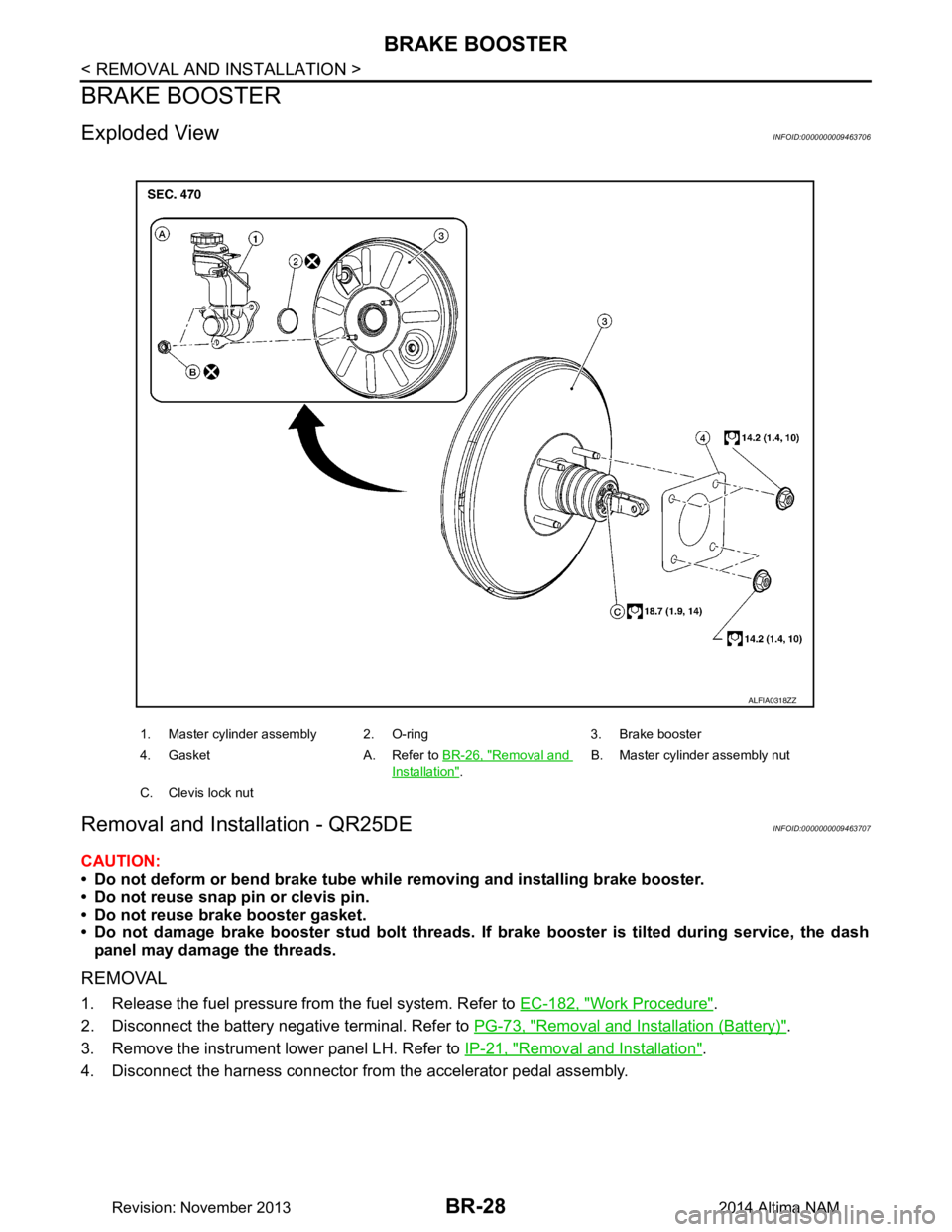
BR-28
< REMOVAL AND INSTALLATION >
BRAKE BOOSTER
BRAKE BOOSTER
Exploded ViewINFOID:0000000009463706
Removal and Installation - QR25DEINFOID:0000000009463707
CAUTION:
• Do not deform or bend brake tube whil e removing and installing brake booster.
• Do not reuse snap pin or clevis pin.
• Do not reuse brake booster gasket.
• Do not damage brake booster stud bolt threads. If brake booster is tilted during service, the dash
panel may damage the threads.
REMOVAL
1. Release the fuel pressure from the fuel system. Refer to EC-182, "Work Procedure".
2. Disconnect the battery negative terminal. Refer to PG-73, "Removal and Installation (Battery)"
.
3. Remove the instrument lower panel LH. Refer to IP-21, "Removal and Installation"
.
4. Disconnect the harness connector from the accelerator pedal assembly.
1. Master cylinder assembly 2. O-ring 3. Brake booster
4. Gasket A. Refer to BR-26, "Removal and
Installation".B. Master cylinder assembly nut
C. Clevis lock nut
ALFIA0318ZZ
Revision: November 20132014 Altima NAM