warning light NISSAN TEANA 2014 Owner's Manual
[x] Cancel search | Manufacturer: NISSAN, Model Year: 2014, Model line: TEANA, Model: NISSAN TEANA 2014Pages: 4801, PDF Size: 51.2 MB
Page 587 of 4801
![NISSAN TEANA 2014 Owners Manual
DAS-154
< SYSTEM DESCRIPTION >[BSW]
SYSTEM
control unit performs the control when the following conditions are satisfied:
• When the warning systems switch is turned ON
*.
• When the vehicle dr](/img/5/57390/w960_57390-586.png "NISSAN TEANA 2014 Owners Manual
DAS-154
< SYSTEM DESCRIPTION >[BSW]
SYSTEM
control unit performs the control when the following conditions are satisfied:
• When the warning systems switch is turned ON
*.
• When the vehicle dr")
DAS-154
< SYSTEM DESCRIPTION >[BSW]
SYSTEM
control unit performs the control when the following conditions are satisfied:
• When the warning systems switch is turned ON
*.
• When the vehicle drives at 32 km/h (20 MPH) or more in the forward direction.
NOTE:
*: When the BSW system setting on the v ehicle information display screen is ON.
• After the operating conditions of warning are satisf ied, the warning continues until the vehicle speed is
reduced below approximately 29 km/h (18 MPH)
• The BSW system may not function properly, depending on the situation.
BULB CHECK ACTION AND FAIL-SAFE INDICATION
*: Blinking cycle when there is a rear view camera blockage condition or lane camera unit high tempera-
ture condition
NOTE:
Time shown in the figure is approximate.
Fail-safe (ITS Control Unit)INFOID:0000000009464808
If a malfunction occurs in each system, ITS control uni t cancels each control, and turns ON the warning lamp
or indicator lamp.
Vehicle condition/Driver ′s operation Blind Spot Warning/
Blind Spot Intervention indicator Warning systems
ON indicator Indication on the combination meter
When DTC is detected OFF ON OFF
→ Orange
Temporary disabled status OFF ON BSW light (white) will blink
When rear view camera needs cleaning OFF ON Unavailable: Clean Rear Camera
When the warning systems switch is
pressed
(When the settings of LDW system and
BSW system on the vehicle information
screen are “OFF”) OFF Blink —
ALOIA0172GB
JSOIA0358GB
System Warning lamp/Indicator lamp Description
Blind Spot Warning (BSW) Blind Spot Warning lamp Cancel
Lane Departure Warning (LDW) Lane Departure Warning indicator Cancel
Revision: November 20132014 Altima NAMRevision: November 20132014 Altima NAM
Page 590 of 4801
![NISSAN TEANA 2014 Owners Manual
DAS
HANDLING PRECAUTIONDAS-157
< SYSTEM DESCRIPTION > [BSW]
C
D E
F
G H
I
J
K L
M B
N P
A
HANDLING PRECAUTION
Precautions for Blind Spot WarningINFOID:0000000009464811
REAR VIEW CAMERA HANDLING
The](/img/5/57390/w960_57390-589.png "NISSAN TEANA 2014 Owners Manual
DAS
HANDLING PRECAUTIONDAS-157
< SYSTEM DESCRIPTION > [BSW]
C
D E
F
G H
I
J
K L
M B
N P
A
HANDLING PRECAUTION
Precautions for Blind Spot WarningINFOID:0000000009464811
REAR VIEW CAMERA HANDLING
The")
DAS
HANDLING PRECAUTIONDAS-157
< SYSTEM DESCRIPTION > [BSW]
C
D E
F
G H
I
J
K L
M B
N P
A
HANDLING PRECAUTION
Precautions for Blind Spot WarningINFOID:0000000009464811
REAR VIEW CAMERA HANDLING
The rear camera unit “1” for the LDW/BSW sy stems is located above the rear license plate.
To keep the proper operation of the LDW systems and prev ent a system malfunction, be sure to observe the
following:
• Always keep the camera lens clean. Be careful not to damage the nozzle of the automatic washer and
blower.
• Do not attach ”license plate accessories” that reflect light.
• Do not strike or damage the areas around the camera unit.
BLIND SPOT WARNING (BSW)
• BSW system is not a replacement for proper drivi ng procedure and is not designed to prevent contact with
vehicles or objects. When changing lanes, always use the side and rear mirrors and turn and look in the
direction you will move to ensure it is safe to change lanes. Never rely solely on the BSW system.
• The camera unit may not detect properly under the following conditions:
- When towing a trailer.
- When strong light enters the camera unit. (For exampl e, direct sunlight or headlight from the rear.)
- When ambient light changes instantly. (For example, when the vehicle enters or exits a tunnel or passes
under a bridge.)
• Automatic washer and blower may not be able to secu re detection capability when excessive dirt adheres on
the camera lens.
• Excessive noise (e.g. audio system volume, open vehicle window) will interfere with the chime sound, and it
may not be heard.
• The camera unit may not be able to detect when certain objects are present such as:
- Pedestrians, bicycles, animals.
- Several types of vehicles such as motorcycles.
- Oncoming vehicles.
- A vehicle approaching rapidly from behind
- A vehicle which your vehicle overtakes rapidly.
• The camera unit may not be able to detect properly when your vehicle travels beside the middle section of a
vehicle with a long wheelbase (e.g., trailer truck, semi-trailer, tractor).
• The camera unit is designed to ignore most stationary objects, however objects such as guardrails, walls,
foliage and parked vehicles may occasionally be det ected. This is a normal operating condition.
• The camera unit may detect reflection image of vehicles or roadside objects that are not actually in the
detection zone, especially when the road is wet.
ALOIA0181ZZ
Revision: November 20132014 Altima NAMRevision: November 20132014 Altima NAM
Page 592 of 4801
![NISSAN TEANA 2014 Owners Manual
DAS
DIAGNOSIS SYSTEM (ITS CONTROL UNIT)DAS-159
< SYSTEM DESCRIPTION > [BSW]
C
D E
F
G H
I
J
K L
M B
N P
A
WORK SUPPORT
ACTIVE TEST
CAUTION:
• Never perform “Active Test” while driving the v](/img/5/57390/w960_57390-591.png "NISSAN TEANA 2014 Owners Manual
DAS
DIAGNOSIS SYSTEM (ITS CONTROL UNIT)DAS-159
< SYSTEM DESCRIPTION > [BSW]
C
D E
F
G H
I
J
K L
M B
N P
A
WORK SUPPORT
ACTIVE TEST
CAUTION:
• Never perform “Active Test” while driving the v")
DAS
DIAGNOSIS SYSTEM (ITS CONTROL UNIT)DAS-159
< SYSTEM DESCRIPTION > [BSW]
C
D E
F
G H
I
J
K L
M B
N P
A
WORK SUPPORT
ACTIVE TEST
CAUTION:
• Never perform “Active Test” while driving the vehicle.
• The “Active Test” cannot be performed when th e following systems warning indicators are illumi-
nated:
- Lane Departure Warning indicator
- Blind Spot Warning indicator
• Place the shift selector to P (park) position, and then perform the test.
BSW ON INDICATOR
ILL
[On/Off] Indicates [On/Off] status of the illumination signal
ITS SW 1
[On/Off] Indicates the state of the warning system switch as seen by the ITS control unit
ITS SW 1 IND
[On/Off] Indicates the state of the warning system switch indicator output
TURN SIGNAL
[Left/N/Right] Indicates [Left/N/Right] status of the turn signal output
ITS SW 2
[ON/OFF/No setting] Indicates the state of the warning system secondary switch as seen by the ITS control unit
ITS SW 2 IND
[ON/OFF/No setting] Indicates the state of the warning system secondary switch indicator output
Monitored item
[Unit] Description
Work support items Description
PREDICTIVE COURSE LINE
DISPLAY Setting whether predictive guide line displays or not
INITIALIZE CAMERA IMAGE
CALIBRATION Start the initialization process of the rear camera
STEERING ANGLE SENSOR
ADJUSTMENT Execute register neutral point of steering angle sensor
CALIBRATING CAMERA IM-
AGE (REAR CAMERA) Displays the various values of the rear camera during the calibration process
REAR WIDE-VIEW FIXED
GUIDE LINE CORRECTION Adjustment the position of fixed guide line on rear wide view
REAR CAMERA ITS Displays and sets camera image calibration values
CAUSE OF LDW CANCEL Displays the information about reason of LDW cancellation
CAUSE OF BSW CANCEL Displays the information about reason of BSW cancellation
Te s t i t e m D e s c r i p t i o n
WASH ACTIVE ON
Activates the washer to clean the lens of rear camera
OFF
LED LH INDICATOR ON
Flashes the left side LED light for ITS system
OFF
LED RH INDICATOR ON
Flashes the right side LED light for ITS system
OFF
AIR ACTIVE ON
Activates the air pump to clean the lens of rear camera
OFF
AIR & WASH ACTIVE ON
Activates the air pump and washer to clean the lens of rear camera
OFF
Revision: November 20132014 Altima NAMRevision: November 20132014 Altima NAM
Page 667 of 4801
![NISSAN TEANA 2014 Owners Manual
DAS-234
< SYSTEM DESCRIPTION >[MOD]
DIAGNOSIS SYSTEM (ITS CONTROL UNIT)
WORK SUPPORT
ACTIVE TEST
CAUTION:
• Never perform “Active Test” while driving the vehicle.
• The “Active Test” c](/img/5/57390/w960_57390-666.png "NISSAN TEANA 2014 Owners Manual
DAS-234
< SYSTEM DESCRIPTION >[MOD]
DIAGNOSIS SYSTEM (ITS CONTROL UNIT)
WORK SUPPORT
ACTIVE TEST
CAUTION:
• Never perform “Active Test” while driving the vehicle.
• The “Active Test” c")
DAS-234
< SYSTEM DESCRIPTION >[MOD]
DIAGNOSIS SYSTEM (ITS CONTROL UNIT)
WORK SUPPORT
ACTIVE TEST
CAUTION:
• Never perform “Active Test” while driving the vehicle.
• The “Active Test” cannot be performed when th e following systems warning indicators are illumi-
nated:
- Lane Departure Warning indicator
- Blind Spot Warning indicator
• Place the shift selector to P (park) position, and then perform the test.
BSW ON INDICATOR
ILL
[On/Off] Indicates [On/Off] status of the illumination signal
ITS SW 1
[On/Off] Indicates the state of the warning system switch as seen by the ITS control unit
ITS SW 1 IND
[On/Off] Indicates the state of the warning system switch indicator output
TURN SIGNAL
[Left/N/Right] Indicates [Left/N/Right] status of the turn signal output
ITS SW 2
[ON/OFF/No setting] Indicates the state of the warning system secondary switch as seen by the ITS control unit
ITS SW 2 IND
[ON/OFF/No setting] Indicates the state of the warning system secondary switch indicator output
Monitored item
[Unit] Description
Work support items Description
PREDICTIVE COURSE LINE
DISPLAY Setting whether predictive guide line displays or not
INITIALIZE CAMERA IMAGE
CALIBRATION Start the initialization process of the rear camera
STEERING ANGLE SENSOR
ADJUSTMENT Execute register neutral point of steering angle sensor
CALIBRATING CAMERA IM-
AGE (REAR CAMERA) Displays the various values of the rear camera during the calibration process
REAR WIDE-VIEW FIXED
GUIDE LINE CORRECTION Adjustment the position of fixed guide line on rear wide view
REAR CAMERA ITS Displays and sets camera image calibration values
CAUSE OF LDW CANCEL Displays the information about reason of LDW cancellation
CAUSE OF BSW CANCEL Displays the information about reason of BSW cancellation
Te s t i t e m D e s c r i p t i o n
WASH ACTIVE ON
Activates the washer to clean the lens of rear camera
OFF
LED LH INDICATOR ON
Flashes the left side LED light for ITS system
OFF
LED RH INDICATOR ON
Flashes the right side LED light for ITS system
OFF
AIR ACTIVE ON
Activates the air pump to clean the lens of rear camera
OFF
AIR & WASH ACTIVE ON
Activates the air pump and washer to clean the lens of rear camera
OFF
Revision: November 20132014 Altima NAMRevision: November 20132014 Altima NAM
Page 769 of 4801

DLK-1
BODY EXTERIOR, DOORS, ROOF & VEHICLE SECURITY
C
D E
F
G H
I
J
L
M
SECTION DLK
A
B
DLK
N
O P
CONTENTS
DOOR & LOCK
PRECAUTION ................ ...............................6
PRECAUTIONS .............................................. .....6
Precaution for Supplemental Restraint System
(SRS) "AIR BAG" and "SEAT BELT PRE-TEN-
SIONER" ............................................................. ......
6
Precaution for Procedure without Cowl Top Cover ......6
Precaution for Servicing Doors and Locks .......... ......6
PREPARATION ............................................8
PREPARATION .............................................. .....8
Special Service Tools .......................................... ......8
Commercial Service Tools ........................................9
CLIP LIST ...........................................................10
Descriptions for Clips .......................................... ....10
SYSTEM DESCRIPTION .............................14
COMPONENT PARTS ................................... ....14
POWER DOOR LOCK SYSTEM ........................... ....14
POWER DOOR LOCK SYSTEM :
Component Parts Location ................................ ....
14
POWER DOOR LOCK SYSTEM :
Component Description ...................................... ....
15
INTELLIGENT KEY SYSTEM ...................................15
INTELLIGENT KEY SYSTEM : Component Parts
Location ............................................................... ....
16
INTELLIGENT KEY SYSTEM :
Component Description ...................................... ....
19
INTEGRATED HOMELINK TRANSMITTER ......... ....19
INTEGRATED HOMELINK TRANSMITTER :
Component Parts Location .................................. ....
19
INTEGRATED HOMELINK TRANSMITTER :
Component Description ....................................... ....
19
TRUNK LID OPENER SYSTEM ............................ ....19
TRUNK LID OPENER SYSTEM :
Component Parts Location ................................ ....
20
TRUNK LID OPENER SYSTEM :
Component Description ...................................... ....
20
SYSTEM (POWER DOOR LOCK SYSTEM) ....21
System Diagram .................................................. ....21
System Description ..................................................21
SYSTEM (INTELLIGENT KEY SYSTEM) .........23
INTELLIGENT KEY SYSTEM ......................... ...........23
INTELLIGENT KEY SYSTEM : System Diagram ....23
INTELLIGENT KEY SYSTEM : System Descrip-
tion ....................................................................... ....
23
DOOR LOCK FUNCTION ...................................... ....24
DOOR LOCK FUNCTION : System Diagram ..........24
DOOR LOCK FUNCTION : System Description . ....24
REMOTE KEYLESS ENTRY FUNCTION ..................26
REMOTE KEYLESS ENTRY FUNCTION : Sys-
tem Diagram ........................................................ ....
27
REMOTE KEYLESS ENTRY FUNCTION : Sys-
tem Description .................................................... ....
27
KEY REMINDER FUNCTION ................................ ....29
KEY REMINDER FUNCTION : System Diagram ....29
KEY REMINDER FUNCTION : System Descrip-
tion ....................................................................... ....
29
REMOTE ENGINE START FUNCTION ................. ....30
REMOTE ENGINE START FUNCTION : System
Diagram ............................................................... ....
30
REMOTE ENGINE START FUNCTION : System
Description ........................................................... ....
30
WELCOME LIGHT FUNCTION ............................. ....32
WELCOME LIGHT FUNCTION : System Diagram
....
32
WELCOME LIGHT FUNCTION : System Descrip-
tion ....................................................................... ....
32
WARNING FUNCTION .......................................... ....33
WARNING FUNCTION : System Description ..........33
Revision: November 20132014 Altima NAMRevision: November 20132014 Altima NAM
Page 792 of 4801
DLK-24
< SYSTEM DESCRIPTION >
SYSTEM (INTELLIGENT KEY SYSTEM)
DOOR LOCK FUNCTION
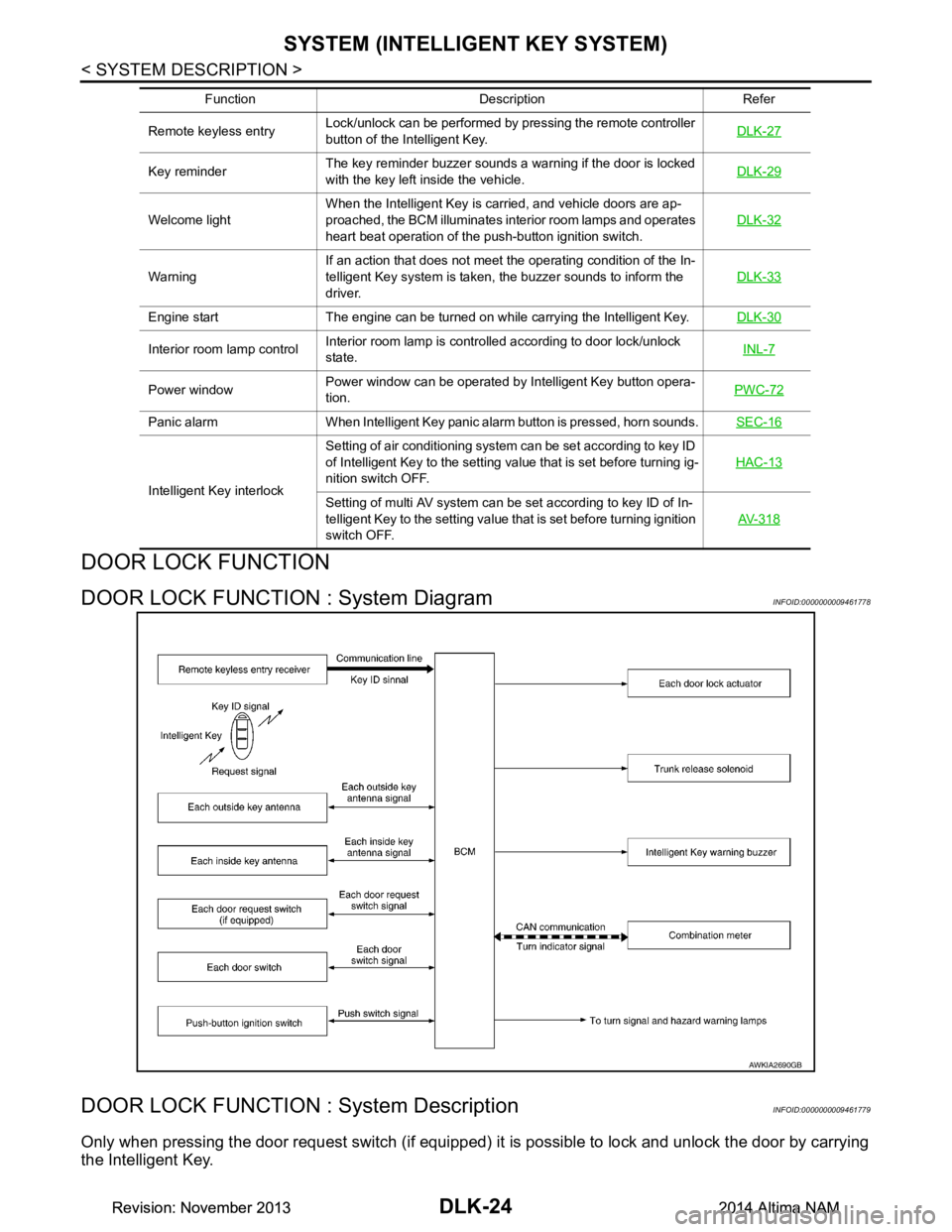
DOOR LOCK FUNCTION : System DiagramINFOID:0000000009461778
DOOR LOCK FUNCTION : System DescriptionINFOID:0000000009461779
Only when pressing the door request switch (if equipped) it is possible to lock and unlock the door by carrying
the Intelligent Key.
Remote keyless entry Lock/unlock can be performed by pressing the remote controller
button of the Intelligent Key. DLK-27
Key reminderThe key reminder buzzer sounds a warning if the door is locked
with the key left inside the vehicle. DLK-29
Welcome lightWhen the Intelligent Key is carried, and vehicle doors are ap-
proached, the BCM illuminates interior room lamps and operates
heart beat operation of the push-button ignition switch. DLK-32
WarningIf an action that does not meet the operating condition of the In-
telligent Key system is taken, the buzzer sounds to inform the
driver. DLK-33
Engine start The engine can be turned on while carrying the Intelligent Key.
DLK-30
Interior room lamp controlInterior room lamp is controlled according to door lock/unlock
state. INL-7
Power windowPower window can be operated by Intelligent Key button opera-
tion. PWC-72
Panic alarm When Intelligent Key panic alarm button is pressed, horn sounds.
SEC-16
Intelligent Key interlockSetting of air conditioning system can be set according to key ID
of Intelligent Key to the setting value that is set before turning ig-
nition switch OFF. HAC-13Setting of multi AV system can be set according to key ID of In-
telligent Key to the setting value that is set before turning ignition
switch OFF. AV- 3 1 8
Function Description Refer
AWKIA2690GB
Revision: November 20132014 Altima NAMRevision: November 20132014 Altima NAM
Page 800 of 4801
DLK-32
< SYSTEM DESCRIPTION >
SYSTEM (INTELLIGENT KEY SYSTEM)
WELCOME LIGHT FUNCTION
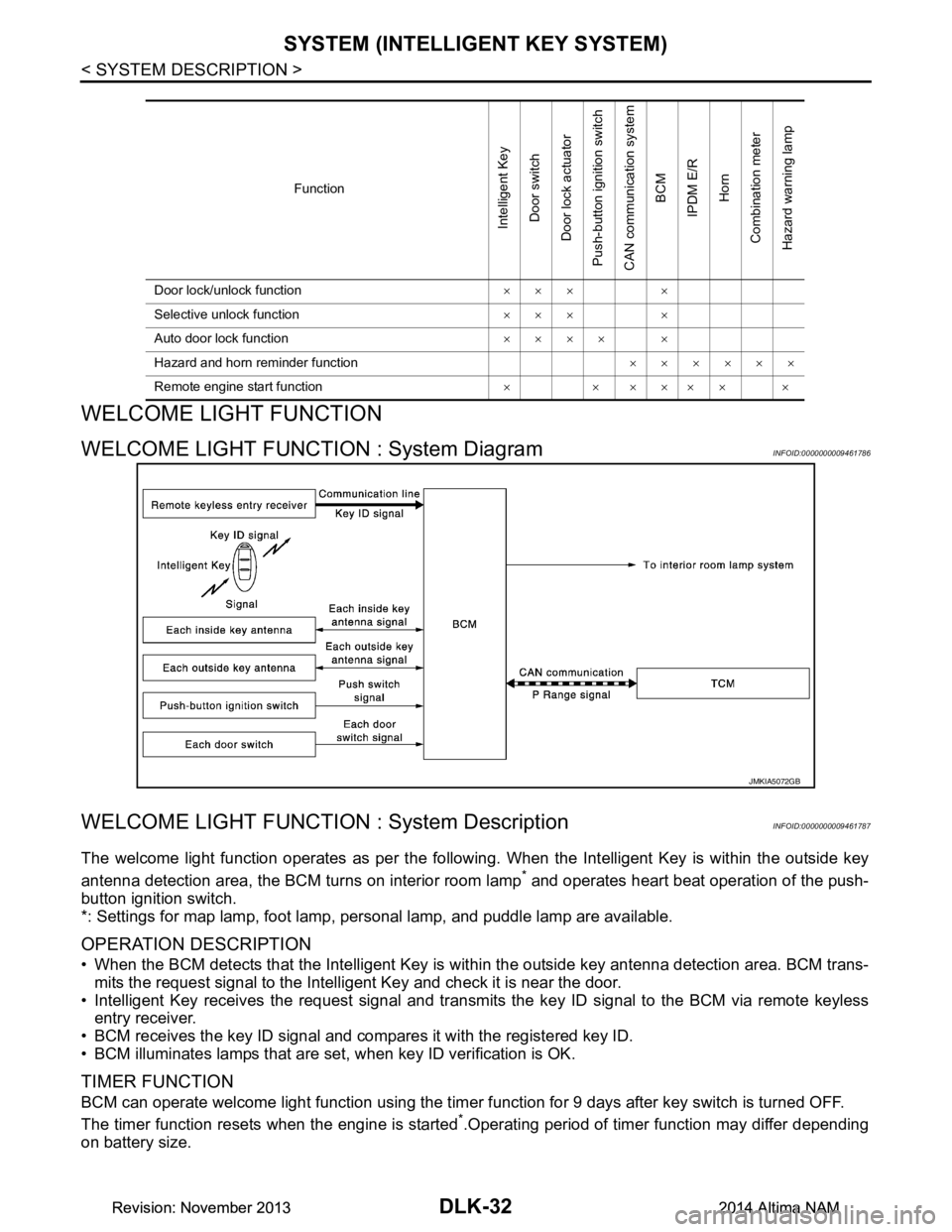
WELCOME LIGHT FUNCTION : System DiagramINFOID:0000000009461786
WELCOME LIGHT FUNCTION : System DescriptionINFOID:0000000009461787
The welcome light function operates as per the following. When the Intelligent Key is within the outside key
antenna detection area, the BCM turns on interior room lamp
* and operates heart beat operation of the push-
button ignition switch.
*: Settings for map lamp, foot lamp, personal lamp, and puddle lamp are available.
OPERATION DESCRIPTION
• When the BCM detects that the Intelligent Key is within the outside key antenna detection area. BCM trans-
mits the request signal to the Intelli gent Key and check it is near the door.
• Intelligent Key receives the request signal and transmits the key ID signal to the BCM via remote keyless entry receiver.
• BCM receives the key ID signal and compares it with the registered key ID.
• BCM illuminates lamps that are set, when key ID verification is OK.
TIMER FUNCTION
BCM can operate welcome light function using the timer function for 9 days after key switch is turned OFF.
The timer function resets when the engine is started
*.Operating period of timer function may differ depending
on battery size.
Function
Intelligent Key
Door switch
Door lock actuator
Push-button ignition switch
CAN communication system
BCM
IPDM E/R
Horn
Combination meter
Hazard warning lamp
Door lock/unlock function ××× ×
Selective unlock function ××× ×
Auto door lock function ×××× ×
Hazard and horn reminder function ××××××
Remote engine start function ×××××××
JMKIA5072GB
Revision: November 20132014 Altima NAMRevision: November 20132014 Altima NAM
Page 801 of 4801
SYSTEM (INTELLIGENT KEY SYSTEM)DLK-33
< SYSTEM DESCRIPTION >
C
D E
F
G H
I
J
L
M A
B
DLK
N
O P
*: Timer function does not stop if another Intelligent Key that has a different key ID is detected within the inte-
rior antenna detection area when starting the engine.
OPERATION CONDITION
If the following condition are satisfi ed, welcome light function is operated.
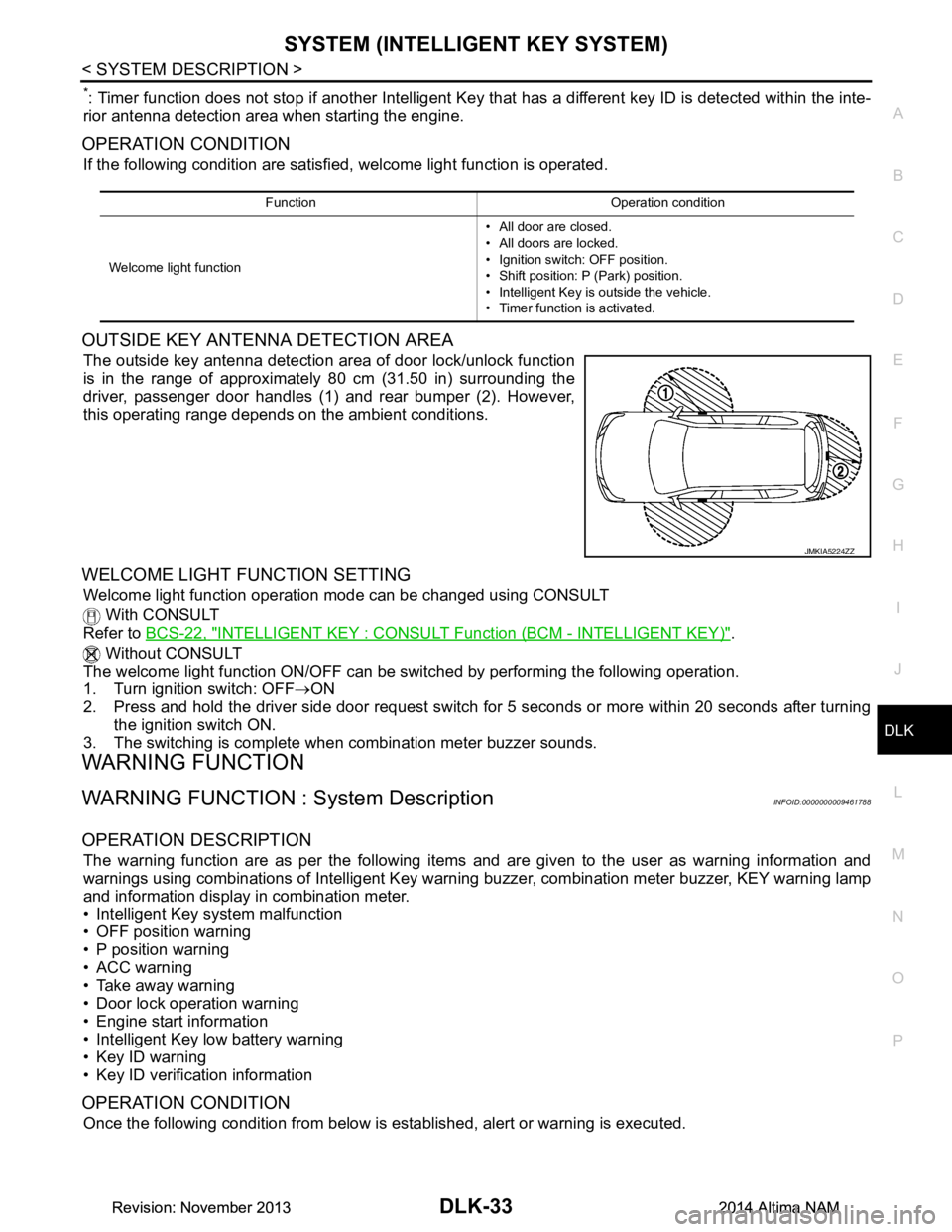
OUTSIDE KEY ANTENNA DETECTION AREA
The outside key antenna detection area of door lock/unlock function
is in the range of approximately 80 cm (31.50 in) surrounding the
driver, passenger door handles (1) and rear bumper (2). However,
this operating range depends on the ambient conditions.
WELCOME LIGHT FUNCTION SETTING
Welcome light function operation mode can be changed using CONSULT
With CONSULT
Refer to BCS-22, "INTELLIGENT KEY : CONSUL T Function (BCM - INTELLIGENT KEY)"
.
Without CONSULT
The welcome light function ON/OFF can be s witched by performing the following operation.
1. Turn ignition switch: OFF →ON
2. Press and hold the driver side door request switch for 5 seconds or more within 20 seconds after turning
the ignition switch ON.
3. The switching is complete when combination meter buzzer sounds.
WARNING FUNCTION
WARNING FUNCTION : System DescriptionINFOID:0000000009461788
OPERATION DESCRIPTION
The warning function are as per the following items and are given to the user as warning information and
warnings using combinations of Intelligent Key warning buzzer, combination meter buzzer, KEY warning lamp
and information display in combination meter.
• Intelligent Key system malfunction
• OFF position warning
• P position warning
• ACC warning
• Take away warning
• Door lock operation warning
• Engine start information
• Intelligent Key low battery warning
• Key ID warning
• Key ID verification information
OPERATION CONDITION
Once the following condition from below is established, alert or warning is executed.
Function Operation condition
Welcome light function • All door are closed.
• All doors are locked.
• Ignition switch: OFF position.
• Shift position: P (Park) position.
• Intelligent Key is outside the vehicle.
• Timer function is activated.
JMKIA5224ZZ
Revision: November 20132014 Altima NAMRevision: November 20132014 Altima NAM
Page 916 of 4801

DLK-148
< DTC/CIRCUIT DIAGNOSIS >
WARNING CHIME FUNCTION
WARNING CHIME FUNCTION
DescriptionINFOID:0000000009461898
Performs operation method guide and warning with buzzer.
Component Function CheckINFOID:0000000009461899
1.CHECK FUNCTION
With CONSULT
1. Check the operation with “INSIDE BUZZER” in the Active Test.
2. Touch “TAKE OUT”, “KNOB”or “KEY”on screen.
Is the inspection result normal?
YES >> Warning buzzer into combination meter is OK.
NO >> Refer to DLK-148, "Diagnosis Procedure"
.
Diagnosis ProcedureINFOID:0000000009461900
1.CHECK METER BUZZER CIRCUIT
Operate the hazard lights by turni ng ON the hazard warning switch.
Is the inspection result normal?
YES >> GO TO 2
NO >> Replace combination meter. Refer to MWI-82, "Removal and Installation"
.
2.CHECK INTERMITTENT INCIDENT
Refer to GI-43, "Intermittent Incident"
.
>> Inspection End.
Revision: November 20132014 Altima NAMRevision: November 20132014 Altima NAM
Page 917 of 4801
HAZARD FUNCTIONDLK-149
< DTC/CIRCUIT DIAGNOSIS >
C
D E
F
G H
I
J
L
M A
B
DLK
N
O P
HAZARD FUNCTION
DescriptionINFOID:0000000009461901
Perform answer-back for each oper ation with number of blinks.
Component Function CheckINFOID:0000000009461902
1.CHECK FUNCTION
Check hazard warning lamp (“FLASHER”) in Active Test.
Is the inspection result normal?
YES >> Hazard warning lamp circuit is OK.
NO >> Refer to EXL-60, "Wiring Diagram"
.
Diagnosis ProcedureINFOID:0000000009461903
1.CHECK HAZARD SWITCH CIRCUIT
Operate the hazard lights by turni ng ON the hazard warning switch.
Is the inspection result normal?
YES >> GO TO 2
NO >> Repair or replace hazard warning switch circuit. Refer to EXL-86, "Work Flow"
.
2.CHECK INTERMITTENT INCIDENT
Refer to GI-43, "Intermittent Incident"
.
>> Inspection End.
Revision: November 20132014 Altima NAMRevision: November 20132014 Altima NAM