ECO mode NISSAN TEANA 2014 Service Manual
[x] Cancel search | Manufacturer: NISSAN, Model Year: 2014, Model line: TEANA, Model: NISSAN TEANA 2014Pages: 4801, PDF Size: 51.2 MB
Page 4469 of 4801
![NISSAN TEANA 2014 Service Manual
TM-254
< ECU DIAGNOSIS INFORMATION >[CVT: RE0F10E]
TCM
NONMMODEDriving with manual mode Off
Other than the above On
MMODE Driving with manual mode On
Other than the above Off
TOW MODE SW Always Off](/img/5/57390/w960_57390-4468.png "NISSAN TEANA 2014 Service Manual
TM-254
< ECU DIAGNOSIS INFORMATION >[CVT: RE0F10E]
TCM
NONMMODEDriving with manual mode Off
Other than the above On
MMODE Driving with manual mode On
Other than the above Off
TOW MODE SW Always Off")
TM-254
< ECU DIAGNOSIS INFORMATION >[CVT: RE0F10E]
TCM
NONMMODEDriving with manual mode Off
Other than the above On
MMODE Driving with manual mode On
Other than the above Off
TOW MODE SW Always Off
SHIFT IND SIGNAL When the selector lever is positioned in be-
tween each position. OFF
Selector lever: P position P
Selector lever: R position R
Selector lever: N position N
Selector lever: D position D
Manual mode: 1st 1st
Manual mode: 2nd 2nd
Manual mode: 3rd 3rd
Manual mode: 4th 4th
Manual mode: 5th 5th
Manual mode: 6th 6th
Manual mode: 7th 7th
Manual mode: 8th 8th
CVT LAMP Approx. 2 seconds after ignition switch ON On
Other than the above Off
SPORT MODE IND Always Off
MANU MODE SIGNAL Driving with manual mode On
Other than the above Off
DS RANGE SIGNAL Selector lever in DS position On
Other than the above Off
ECO MODE SIGNAL Always Off
VDC ON Always Off
TCS ON Always Off
ABS FAIL SIGNAL When ABS malfunction signal is received On
Other than the above Off
ABS ON ABS is activated On
Other than the above Off
RANGE Selector lever: P and N positions N/P
Selector lever: R position R
Selector lever: D position D
Selector lever: DS position S
M GEAR POS Manual mode: 1st – 7th 1 to 7
G SEN SLOPE Flat road 0%
Uphill gradient The value changes to the positive side
along with uphill gradient. (Maximum
40.45%)
Downhill gradient The value changes to the negative side
along with downhill gradient. (Minimum
40.45%)
Monitor item Condition Value/Status (Approx.)
Revision: November 20132014 Altima NAMRevision: November 20132014 Altima NAM
Page 4470 of 4801
![NISSAN TEANA 2014 Service Manual
TCM
TM-255
< ECU DIAGNOSIS INFORMATION > [CVT: RE0F10E]
C
EF
G H
I
J
K L
M A
B
TM
N
O P
*: These monitor items do not use.
TERMINAL LAYOUT
INPUT/OUTPUT SIGNAL STANDARD
G SEN CALIBRATION When G sens](/img/5/57390/w960_57390-4469.png "NISSAN TEANA 2014 Service Manual
TCM
TM-255
< ECU DIAGNOSIS INFORMATION > [CVT: RE0F10E]
C
EF
G H
I
J
K L
M A
B
TM
N
O P
*: These monitor items do not use.
TERMINAL LAYOUT
INPUT/OUTPUT SIGNAL STANDARD
G SEN CALIBRATION When G sens")
TCM
TM-255
< ECU DIAGNOSIS INFORMATION > [CVT: RE0F10E]
C
EF
G H
I
J
K L
M A
B
TM
N
O P
*: These monitor items do not use.
TERMINAL LAYOUT
INPUT/OUTPUT SIGNAL STANDARD
G SEN CALIBRATION When G sensor calibration is completed DONE
When G sensor calibration is not completed YET
N IDLE STATUS Always Off
ENGBRKLVL When the engine brake level of “ENGINE
BRAKE ADJ”. in “Work Support” is ON On
When the engine brake level of “ENGINE
BRAKE ADJ”. in “Work Support” is OFF Off
DRIVE MODE STATS While driving in D position AUTO
SNOW MODE Always Off
ECO MODE Always Off
NORMAL MODE Always Off
SPORT MODE Always Off
AIR BLDING STATE Always COMP
ELECTRIC OP DUTY Always 0%
E-OP DUTY MON Always 0%
ELECTRIC OP RELAY Always Off
E-OP RELAY MON Always Off
CVT-B* — —
CVT-A* — — Monitor item Condition Value/Status (Approx.)
JSDIA2713ZZ
Revision: November 20132014 Altima NAMRevision: November 20132014 Altima NAM
Page 4473 of 4801
![NISSAN TEANA 2014 Service Manual
TM-258
< ECU DIAGNOSIS INFORMATION >[CVT: RE0F10E]
TCM
Fail-safe
INFOID:0000000009464219
TCM has a fail-safe mode. The mode functions so that operation can be continued even if the signal circuit of](/img/5/57390/w960_57390-4472.png "NISSAN TEANA 2014 Service Manual
TM-258
< ECU DIAGNOSIS INFORMATION >[CVT: RE0F10E]
TCM
Fail-safe
INFOID:0000000009464219
TCM has a fail-safe mode. The mode functions so that operation can be continued even if the signal circuit of")
TM-258
< ECU DIAGNOSIS INFORMATION >[CVT: RE0F10E]
TCM
Fail-safe
INFOID:0000000009464219
TCM has a fail-safe mode. The mode functions so that operation can be continued even if the signal circuit of
the main electronically contro lled input/output parts is damaged.
If the vehicle shows following behaviors including “poor acceleration”, a malfunction of the applicable system
is detected by TCM and the vehicle may be in a fail-sa fe mode. At this time, check the DTC code and perform
inspection and repair according to the malfunction diagnosis procedures.
38
(BR) Ground Torque converter
clutch solenoid
valve Output• Selector lever:
“D” position
• Accelerator pedal position: 1/8 or
less
• Vehicle speed: 20 km/h (12 MPH) or more
• Engine started
• Vehicle is stopped
39
(L) Ground Secondary pres-
sure solenoid valve Output• Selector lever:
“DS” position
• Vehicle speed: 20 km/h (12 MPH)
40
(LG) Ground
Primary pressure
solenoid valve Output
• Selector lever:
“DS” position
• Vehicle speed: 20 km/h (12 MPH)
41
(B) Ground Ground Output Always 0 V
42
(B) Ground Ground Output Always 0 V
45
(P) Ground Battery power sup-
ply (memory back-
up) Input Always 10
− 16 V
46
(P) Ground Battery power sup-
ply (memory back-
up) Input Always 10
− 16 V
47
(Y) Ground Ignition power sup-
ply InputIgnition switch: ON 10
− 16 V
Ignition switch: OFF 0 V
48
(Y) Ground Ignition power sup-
ply InputIgnition switch: ON 10
− 16 V
Ignition switch: OFF 0 V
Te r m i n a l N o .
(Wire color) Description
Condition Value (Approx.)
+ − Signal Input/
OutputJSDIA1902GB
JSDIA1903GB
JSDIA1897GB
JSDIA1897GB
Revision: November 20132014 Altima NAMRevision: November 20132014 Altima NAM
Page 4628 of 4801
![NISSAN TEANA 2014 Service Manual
SERVICE DATA AND SPECIFICATIONS (SDS)TM-413
< SERVICE DATA AND SPECIFICATIONS (SDS) [CVT: RE0F10E]
C
EF
G H
I
J
K L
M A
B
TM
N
O P
SERVICE DATA AND SPECIFICATIONS (SDS)
SERVICE DATA AND SPECIFICATI](/img/5/57390/w960_57390-4627.png "NISSAN TEANA 2014 Service Manual
SERVICE DATA AND SPECIFICATIONS (SDS)TM-413
< SERVICE DATA AND SPECIFICATIONS (SDS) [CVT: RE0F10E]
C
EF
G H
I
J
K L
M A
B
TM
N
O P
SERVICE DATA AND SPECIFICATIONS (SDS)
SERVICE DATA AND SPECIFICATI")
SERVICE DATA AND SPECIFICATIONS (SDS)TM-413
< SERVICE DATA AND SPECIFICATIONS (SDS) [CVT: RE0F10E]
C
EF
G H
I
J
K L
M A
B
TM
N
O P
SERVICE DATA AND SPECIFICATIONS (SDS)
SERVICE DATA AND SPECIFICATIONS (SDS)
General SpecificationINFOID:0000000009464379
*1: Refer to MA-11, "FOR USA AND CANADA : Fluids and Lubricants".
*2: The CVT fluid capacity is the reference value.
Shift CharacteristicsINFOID:0000000009464380
Unit: rpm
CAUTION:
Lock-up is engaged at the vehicle speed of approximately 18 km/h (12 MPH) to 40 km/h (24 MPH).
Stall SpeedINFOID:0000000009464381
Torque ConverterINFOID:0000000009464382
Unit: mm (in)
Heater ThermostatINFOID:0000000009464383
Standard
Reference value
Applied model Engine VQ35DE
Axle 2WD
Transaxle model RE0F10E
Transaxle gear ratio D position 2.436 – 0.384
R position 0.745
Final drive 4.677
Recommended fluid Genuine NISSAN CVT Fluid NS-3
*1
Fluid capacity liter (US qt, Imp qt) Approx. 8.2 (8-5/8, 7-1/4)*2
CAUTION:
• Use only Genuine NISSAN CVT Fluid NS-3. Never mix with other fluid.
• Using CVT fluid other than Genuine NISSAN CVT Fluid NS-3 will deteriorate in driveability and CVT durability, and may dam-
age the CVT, which is not covered by the NISSAN new vehicle limited warranty.
Throttle position Shift pattern Engine speed
At 40 km/h (25 MPH) At 60 km/h (37 MPH)
2/8 “D” position 1,410 – 1,550 1,550 – 1,710
8/8 “D” position 3,610 – 3,990 4,560 – 5,040
Stall speed 2,400 – 2,700 rpm
Distance “A” between the converter housing and torque converter 14.0 (0.55)
Va l v e l i f tMore than 5.0 mm (0.197 in)
Valve opening temperature 71 °C (160 °F)
Minimum valve lift 5.0 mm/85 °C (0.197 in/203 °F)
Revision: November 20132014 Altima NAMRevision: November 20132014 Altima NAM
Page 4651 of 4801
WCS
DIAGNOSIS SYSTEM (METER)WCS-9
< SYSTEM DESCRIPTION >
C
D E
F
G H
I
J
K L
M B
A
O P
DIAGNOSIS SYSTEM (METER)
DescriptionINFOID:0000000009941189
COMBINATION METER SE LF-DIAGNOSIS MODE
The following meter functions can be checked during Combination Meter Self-Diagnosis Mode:
• Pointer sweep of speedometer, tachometer and gauges.
• Illumination of all LCD segments and color patterns for meter displays.
• Illumination of all lamps/LEDs that are controlled by the combination meter (regardless of switch status).
STARTING COMBINATION METER SELF-DIAGNOSIS MODE
NOTE:
• Check combination meter power supply and ground circuits if self-diagnosis mode does not start. Refer to
MWI-58, "COMBINATION METER : Diagnosis Procedure"
. Replace combination meter if power supply and
ground circuits are found to be normal and self-diagnosis mode does not start. Refer to MWI-82, "Removal
and Installation".
• Combination meter self-diagnosis mode will function with the ignition switch in ON. Combination meter self-
diagnosis mode will exit upon turning the ignition switch to OFF.
How to Initiate Se lf-Diagnosis Mode
1. Press and hold the trip reset switch while turning the ignition switch ON. After 2 seconds release trip reset
switch, then press the trip reset switch 3 times withi n 7 seconds after the ignition switch is turned ON.
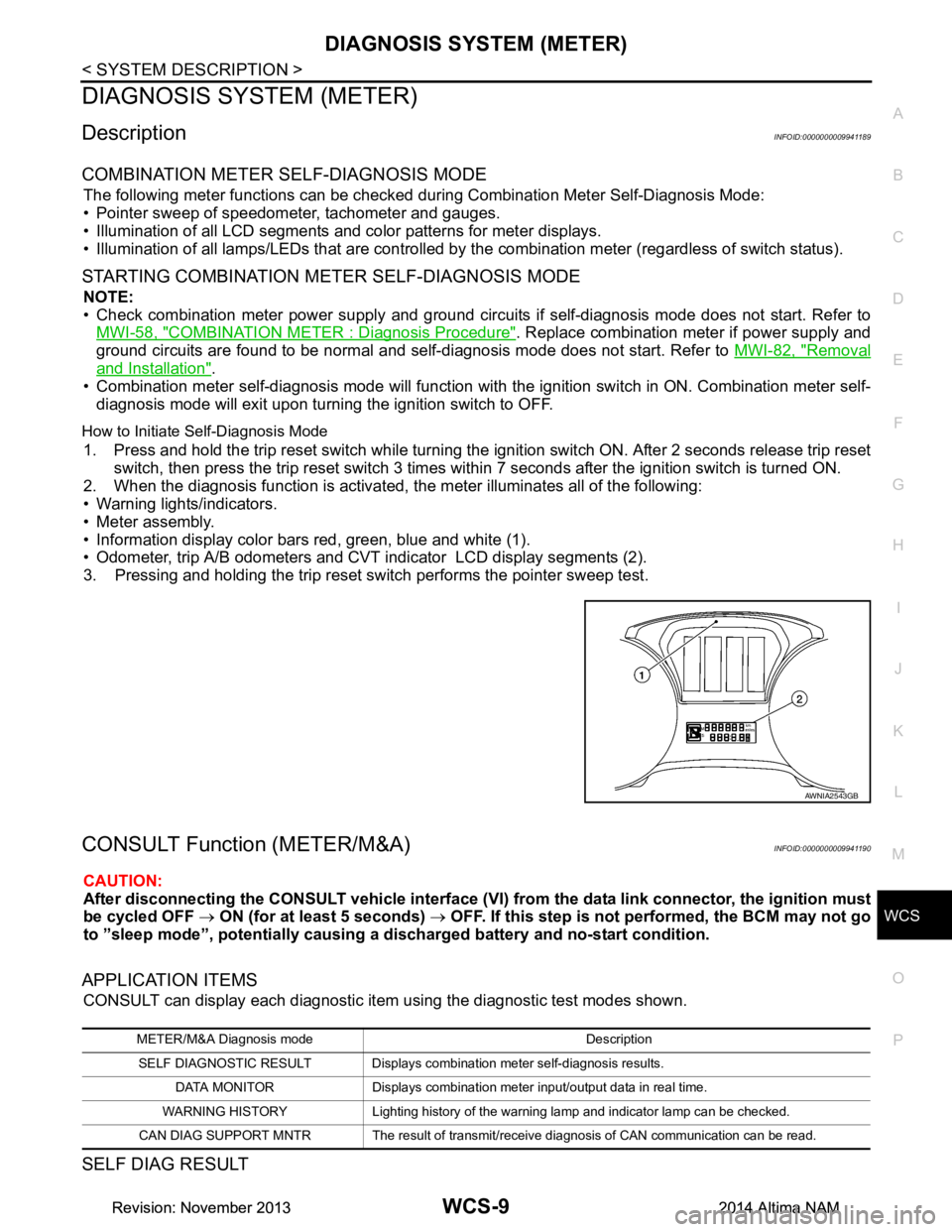
2. When the diagnosis function is activated, the meter illuminates all of the following:
• Warning lights/indicators.
• Meter assembly.
• Information display color bars red, green, blue and white (1).
• Odometer, trip A/B odometers and CVT indicator LCD display segments (2).
3. Pressing and holding the trip reset switch performs the pointer sweep test.
CONSULT Function (METER/M&A)INFOID:0000000009941190
CAUTION:
After disconnecting the CONSULT vehicle interface (VI) from the data link connector, the ignition must
be cycled OFF → ON (for at least 5 seconds) → OFF. If this step is not performed, the BCM may not go
to ”sleep mode”, potentiall y causing a discharged battery and no-start condition.
APPLICATION ITEMS
CONSULT can display each diagnostic item using the diagnostic test modes shown.
SELF DIAG RESULT
AWNIA2543GB
METER/M&A Diagnosis mode Description
SELF DIAGNOSTIC RESULT Displays combination meter self-diagnosis results. DATA MONITOR Displays combination meter input/output data in real time.
WARNING HISTORY Lighting history of the warning lamp and indicator lamp can be checked.
CAN DIAG SUPPORT MNTR The result of transmit/receive diagnosis of CAN communication can be read.
Revision: November 20132014 Altima NAMRevision: November 20132014 Altima NAM
Page 4655 of 4801

WCS
DIAGNOSIS SYSTEM (BCM)WCS-13
< SYSTEM DESCRIPTION >
C
D E
F
G H
I
J
K L
M B
A
O P
DIAGNOSIS SYSTEM (BCM)
COMMON ITEM
COMMON ITEM : CONSULT Function (BCM - COMMON ITEM)INFOID:0000000009941192
CAUTION:
After disconnecting the CONSULT vehicle interface (VI) from the data link connector, the ignition must
be cycled OFF → ON (for at least 5 seconds) → OFF. If this step is not performed, the BCM may not go
to ”sleep mode”, potentiall y causing a discharged battery and a no-start condition.
APPLICATION ITEM
CONSULT performs the following functions via CAN communication with BCM.
SYSTEM APPLICATION
BCM can perform the following functions.
Direct Diagnostic Mode Description
Ecu Identification The BCM part number is displayed.
Self Diagnostic Result The BCM self diagnostic results are displayed.
Data Monitor The BCM input/output data is displayed in real time.
Active Test The BCM activates outputs to test components.
Work support The settings for BCM functions can be changed.
Configuration • The vehicle specification can be read and saved.
• The vehicle specification can be written when replacing BCM.
CAN Diag Support Mntr The result of transmit/receive diagnosis of CAN communication is displayed.
System Sub System Direct Diagnostic Mode
Ecu Identification
Self Diagnostic Result
Data Monitor
Active Test
Work support
Configuration
CAN Diag Su pport Mntr
Door lock DOOR LOCK ××××
Rear window defogger REAR DEFOGGER ×××
Warning chime BUZZER ××
Interior room lamp timer INT LAMP ×××
Remote keyless entry system MULTI REMOTE ENT ×××
Exterior lamp HEADLAMP ×××
Wiper and washer WIPER ×××
Turn signal and hazard warning lamps FLASHER ××
Air conditioner AIR CONDITIONER ×
Intelligent Key system INTELLIGENT KEY ××××
Combination switch COMB SW ×
BCM BCM × × ×××
Immobilizer IMMU ×××
Interior room lamp battery saver BATTERY SAVER ××
Trunk open TRUNK ×
Vehicle security system THEFT ALM ×××
Revision: November 20132014 Altima NAMRevision: November 20132014 Altima NAM
Page 4656 of 4801

WCS-14
< SYSTEM DESCRIPTION >
DIAGNOSIS SYSTEM (BCM)
BUZZER
BUZZER : CONSULT Function (BCM - BUZZER)INFOID:0000000009941193
CAUTION:
After disconnecting the CONSULT vehicle interface (VI) from the data link connector, the ignition must
be cycled OFF → ON (for at least 5 seconds) → OFF. If this step is not performed, the BCM may not go
to ”sleep mode”, potentially causing a di scharged battery and a no-start condition.
DATA MONITOR
ACTIVE TEST
RAP system RETAINED PWR ×
Signal buffer system SIGNAL BUFFER ×
TPMS AIR PRESSURE MONITOR ××××
System Sub System
Direct Diagnostic Mode
Ecu Identification
Self Diagnostic Result
Data Monitor
Active Test
Work support
Configuration
CAN Diag Support Mntr
Monitor Item [Unit] Description
PUSH -SW [On/Off] Indicates condition of push-button ignition switch.
UNLK SEN -DR [On/Off] Indicates condition of door unlock sensor.
VEH SPEED 1 [km/h] Indicates vehicle speed signal received from ABS on CAN communication line.
TAIL LAMP SW [On/Off] Indicates condition of combination switch.
FR FOG SW [On/Off] Indicates condition of front fog lamp switch.
DOOR SW-DR [On/Off] Indicates condition of front door switch LH.
CDL LOCK SW [On/Off] Indicates condition of lock signal from door lock and unlock switch.
Test Item Description
SEAT BELT WARN TEST This test is able to check seat belt warning chime operation [On/Off].
LIGHT WARN ALM This test is able to check light warning chime operation [On/Off].
REVERSE WARNING This test is able to check reverse warning chime operation [On/Off].
ID REGIST WARNING This test is able to check TPMS transmitter ID regist warning chime operation [On/Off].
Revision: November 20132014 Altima NAMRevision: November 20132014 Altima NAM
Page 4685 of 4801

WT-10
< SYSTEM DESCRIPTION >
DIAGNOSIS SYSTEM (BCM)
DIAGNOSIS SYSTEM (BCM)
COMMON ITEM
COMMON ITEM : CONSULT Function (BCM - COMMON ITEM)INFOID:0000000009955585
CAUTION:
After disconnecting the CONSULT vehicle interface (VI) from the data link connector, the ignition must
be cycled OFF → ON (for at least 5 seconds) → OFF. If this step is not performed, the BCM may not go
to ”sleep mode”, potentially causing a di scharged battery and a no-start condition.
APPLICATION ITEM
CONSULT performs the following functions via CAN communication with BCM.
SYSTEM APPLICATION
BCM can perform the following functions.
Direct Diagnostic Mode Description
Ecu Identification The BCM part number is displayed.
Self Diagnostic Result The BCM self diagnostic results are displayed.
Data Monitor The BCM input/output data is displayed in real time.
Active Test The BCM activates outputs to test components.
Work support The settings for BCM functions can be changed.
Configuration • The vehicle specification can be read and saved.
• The vehicle specification can be written when replacing BCM.
CAN Diag Support Mntr The result of transmit/receive diagnosis of CAN communication is displayed.
System Sub System Direct Diagnostic Mode
Ecu Identification
Self Diagnostic Result
Data Monitor
Active Test
Work support
Configuration
CAN Diag Su pport Mntr
Door lock DOOR LOCK ××××
Rear window defogger REAR DEFOGGER ×××
Warning chime BUZZER ××
Interior room lamp timer INT LAMP ×××
Remote keyless entry system MULTI REMOTE ENT ×××
Exterior lamp HEADLAMP ×××
Wiper and washer WIPER ×××
Turn signal and hazard warning lamps FLASHER ××
Air conditioner AIR CONDITIONER ×
Intelligent Key system INTELLIGENT KEY ××××
Combination switch COMB SW ×
BCM BCM × × ×××
Immobilizer IMMU ×××
Interior room lamp battery saver BATTERY SAVER ××
Trunk open TRUNK ×
Vehicle security system THEFT ALM ×××
Revision: November 20132014 Altima NAMRevision: November 20132014 Altima NAM
Page 4686 of 4801
DIAGNOSIS SYSTEM (BCM)WT-11
< SYSTEM DESCRIPTION >
C
D
F
G H
I
J
K L
M A
B
WT
N
O PAIR PRESSURE MONITOR
AIR PRESSURE MONITOR : CONSULT Fu nction (BCM-AIR PRESSURE MONITOR)
INFOID:0000000009955586
CAUTION:
After disconnecting the CONSULT vehicle interface (VI) from the data link connector, the ignition must
be cycled OFF → ON (for at least 5 seconds) → OFF. If this step is not performed, the BCM may not go
to ”sleep mode”, potentiall y causing a discharged battery and a no-start condition.
NOTE:
The Signal Tech II Tool (J-50190) can be used to perform the following functions. Refer to the Signal Tech II
User Guide for additional information.
• Activate and display TPMS transmitter IDs
• Display tire pressure repor ted by the TPMS transmitter
• Read TPMS DTCs
• Register TPMS transmitter IDs
SELF DIAGNOSTIC RESULT
NOTE:
Before performing Self Diagnostic Result, be sure to regi ster the transmitter ID or the actual malfunction may
be different from that displayed on CONSULT.
Refer to BCS-52, "DTC Index"
.
DATA MONITOR
ACTIVE TEST
RAP system RETAINED PWR ×
Signal buffer system SIGNAL BUFFER ×
TPMS AIR PRESSURE MONITOR ××××
System Sub System
Direct Diagnostic Mode
Ecu Identification
Self Diagnostic Result
Data Monitor
Active Test
Work support
Configuration
CAN Diag Support Mntr
Monitor Item [Unit] Description
AIR PRESS FL [kPa, kg/cm
2 or Psi] Indicates air pressure of front LH tire.
AIR PRESS FR [kPa, kg/cm
2 or Psi] Indicates air pressure of front RH tire.
AIR PRESS RR [kPa, kg/cm
2 or Psi] Indicates air pressure of rear RH tire.
AIR PRESS RL [kPa, kg/cm
2 or Psi] Indicates air pressure of rear LH tire.
ID REGST FL1 [Done/Yet] Indicates ID registration status of front LH transmitter.
ID REGST FR1 [Done/Yet] Indicates ID registration status of front RH transmitter.
ID REGST RR1 [Done/Yet] Indicates ID registration status of rear RH transmitter.
ID REGST RL1 [Done/Yet] Indicates ID registration status of rear LH transmitter.
WARNING LAMP [Off/On] Indicates condition of low tire pressure warning lamp in combination meter.
BUZZER [Off/On] Indicates condition of buzzer in combination meter.
Test Item Description
FLASHER This test is able to check turn signal lamp operation [Off/LH/RH].
HORN This test is able to check horn operation [On].
Revision: November 20132014 Altima NAMRevision: November 20132014 Altima NAM
Page 4701 of 4801
WT-26
< BASIC INSPECTION >
ID REGISTRATION PROCEDURE
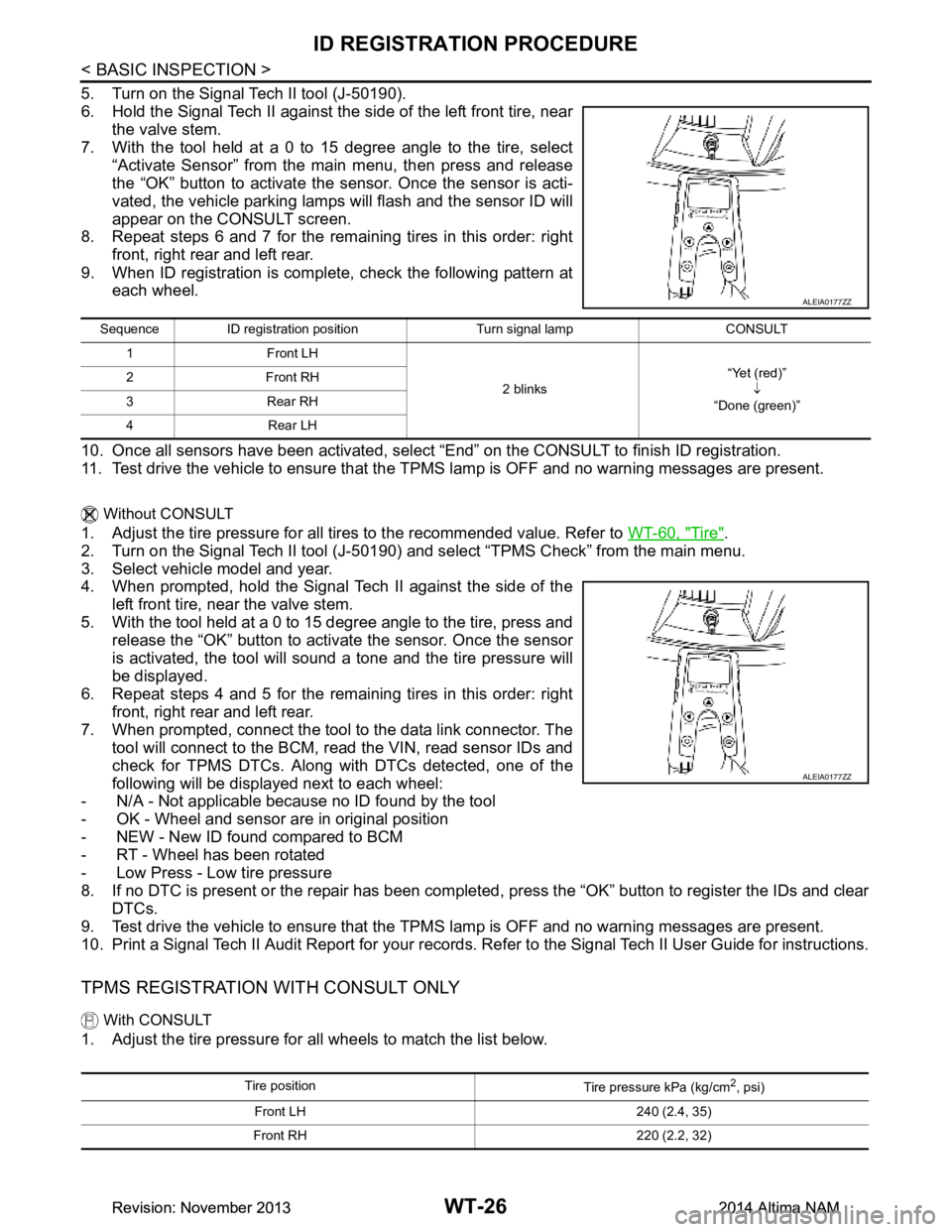
5. Turn on the Signal Tech II tool (J-50190).
6. Hold the Signal Tech II against the side of the left front tire, near the valve stem.
7. With the tool held at a 0 to 15 degree angle to the tire, select
“Activate Sensor” from the main menu, then press and release
the “OK” button to activate the s ensor. Once the sensor is acti-
vated, the vehicle parking lamps will flash and the sensor ID will
appear on the CONSULT screen.
8. Repeat steps 6 and 7 for the remaining tires in this order: right
front, right rear and left rear.
9. When ID registration is complete, check the following pattern at each wheel.
10. Once all sensors have been activated, select “End” on the CONSULT to finish ID registration.
11. Test drive the vehicle to ensure that the TPMS lamp is OFF and no warning messages are present.
Without CONSULT
1. Adjust the tire pressure for all tires to the recommended value. Refer to WT-60, "Tire".
2. Turn on the Signal Tech II tool (J-50190) and select “TPMS Check” from the main menu.
3. Select vehicle model and year.
4. When prompted, hold the Signal Tech II against the side of the
left front tire, near the valve stem.
5. With the tool held at a 0 to 15 degree angle to the tire, press and release the “OK” button to activate the sensor. Once the sensor
is activated, the tool will sound a tone and the tire pressure will
be displayed.
6. Repeat steps 4 and 5 for the remaining tires in this order: right
front, right rear and left rear.
7. When prompted, connect the tool to the data link connector. The tool will connect to the BCM, read the VIN, read sensor IDs and
check for TPMS DTCs. Along wit h DTCs detected, one of the
following will be displayed next to each wheel:
- N/A - Not applicable because no ID found by the tool
- OK - Wheel and sensor are in original position
- NEW - New ID found compared to BCM
- RT - Wheel has been rotated
- Low Press - Low tire pressure
8. If no DTC is present or the repair has been complet ed, press the “OK” button to register the IDs and clear
DTCs.
9. Test drive the vehicle to ensure that the TPMS lamp is OFF and no warning messages are present.
10. Print a Signal Tech II Audit Report for your records. Re fer to the Signal Tech II User Guide for instructions.
TPMS REGISTRATION WITH CONSULT ONLY
With CONSULT
1. Adjust the tire pressure for all wheels to match the list below.
ALEIA0177ZZ
Sequence ID registration position Turn signal lamp CONSULT
1Front LH
2 blinks“Yet (red)”
↓
“Done (green)”
2Front RH
3Rear RH
4Rear LH
ALEIA0177ZZ
Tire position Tire pressure kPa (kg/cm2, psi)
Front LH 240 (2.4, 35)
Front RH 220 (2.2, 32)
Revision: November 20132014 Altima NAMRevision: November 20132014 Altima NAM