service NISSAN TEANA 2014 Service Manual
[x] Cancel search | Manufacturer: NISSAN, Model Year: 2014, Model line: TEANA, Model: NISSAN TEANA 2014Pages: 4801, PDF Size: 51.2 MB
Page 2816 of 4801

HRN-2
< PRECAUTION >
PRECAUTIONS
PRECAUTION
PRECAUTIONS
Precaution for Supplemental Restraint System (SRS) "AIR BAG" and "SEAT BELT
PRE-TENSIONER"
INFOID:0000000009951592
The Supplemental Restraint System such as “A IR BAG” and “SEAT BELT PRE-TENSIONER”, used along
with a front seat belt, helps to reduce the risk or severi ty of injury to the driver and front passenger for certain
types of collision. Information necessary to service the system safely is included in the SR and SB section of
this Service Manual.
WARNING:
• To avoid rendering the SRS inopera tive, which could increase the risk of personal injury or death in
the event of a collision which would result in air bag inflation, all maintenance must be performed by
an authorized NISS AN/INFINITI dealer.
• Improper maintenance, including in correct removal and installation of the SRS, can lead to personal
injury caused by unintent ional activation of the system. For re moval of Spiral Cable and Air Bag
Module, see the SR section.
• Do not use electrical test equipmen t on any circuit related to the SRS unless instructed to in this
Service Manual. SRS wiring harn esses can be identified by yellow and/or orange harnesses or har-
ness connectors.
PRECAUTIONS WHEN USING POWER TOOLS (AIR OR ELECTRIC) AND HAMMERS
WARNING:
• When working near the Airbag Diagnosis Sensor Unit or other Airbag System sensors with the Igni-
tion ON or engine running, DO NOT use air or electri c power tools or strike near the sensor(s) with a
hammer. Heavy vibration could activate the sensor( s) and deploy the air bag(s), possibly causing
serious injury.
• When using air or electric power tools or hammers , always switch the Ignition OFF, disconnect the
battery and wait at least three minutes before performing any service.
Revision: November 20132014 Altima NAMRevision: November 20132014 Altima NAM
Page 2822 of 4801

INL-1
DRIVER CONTROLS
C
D E
F
G H
I
J
K
M
SECTION INL
A
B
INL
N
O P
CONTENTS
INTERIOR LIGHTING SYSTEM
PRECAUTION ................ ...............................3
PRECAUTIONS .............................................. .....3
Precaution for Supplemental Restraint System
(SRS) "AIR BAG" and "SEAT BELT PRE-TEN-
SIONER" ............................................................. ......
3
Precaution for Work ..................................................3
PREPARATION ............................................4
PREPARATION .............................................. .....4
Special Service Tool ........................................... ......4
SYSTEM DESCRIPTION ..............................5
COMPONENT PARTS ................................... .....5
Component Parts Location .................................. ......5
Component Description .............................................5
INTERIOR ROOM LAMP CONTROL SYSTEM
.....
7
System Diagram .................................................. ......7
System Description ...................................................7
ILLUMINATION CONTROL SYSTEM .................9
System Diagram .................................................. ......9
System Description ...................................................9
DIAGNOSIS SYSTEM (BCM) ............................11
COMMON ITEM ..................................................... ....11
COMMON ITEM : CONSULT Function (BCM -
COMMON ITEM) ................................................. ....
11
INT LAMP .............................................................. ....12
INT LAMP : CONSULT Function (BCM - INT
LAMP) ................................................................. ....
12
BATTERY SAVER ................................................. ....13
BATTERY SAVER : CONSULT Function (BCM -
BATTERY SAVER) ............ .....................................
13
INTELLIGENT KEY ............................................... ....13
INTELLIGENT KEY : CONSULT Function (BCM -
INTELLIGENT KEY) ........... .....................................
13
DIAGNOSIS SYSTEM (IPDM E/R) ...................17
Diagnosis Description .......................................... ....17
CONSULT Function (IPDM E/R) .............................18
ECU DIAGNOSIS INFORMATION ..............21
BCM, IPDM E/R .................................................21
List of ECU Reference ......................................... ....21
WIRING DIAGRAM ......................................22
INTERIOR ROOM LAMP ..................................22
Wiring Diagram .................................................... ....22
ILLUMINATION .................................................33
Wiring Diagram ........................................................33
BASIC INSPECTION ...................................47
DIAGNOSIS AND REPAIR WORKFLOW ........47
Work Flow ............................................................ ....47
DTC/CIRCUIT DIAGNOSIS .........................50
POWER SUPPLY AND GROUND CIRCUIT ....50
BCM ....................................................................... ....50
BCM : Diagnosis Procedure ....................................50
IPDM E/R ................................................................ ....50
IPDM E/R : Diagnosis Procedure ............................50
BATTERY SAVER OUTPUT/POWER SUP-
PLY CIRCUIT ....................................................
52
Description ........................................................... ....52
Component Function Check ....................................52
Diagnosis Procedure ...............................................52
INTERIOR ROOM LAMP CONTROL CIRCUIT
...
54
Description ........................................................... ....54
Revision: November 20132014 Altima NAMRevision: November 20132014 Altima NAM
Page 2823 of 4801

INL-2
Component Function Check ...................................54
Diagnosis Procedure ..............................................54
STEP LAMP CIRCUIT .......................................56
Description ........................................................... ...56
Component Function Check ...................................56
Diagnosis Procedure ..............................................56
TRUNK ROOM LAMP CIRCUIT ........................58
Description ........................................................... ...58
Component Function Check ...................................58
Diagnosis Procedure ..............................................58
PUSH-BUTTON IGNITION SWITCH ILLUMI-
NATION CIRCUIT ........................................... ...
60
Description ........................................................... ...60
Component Function Check ...................................60
Diagnosis Procedure ..............................................60
SYMPTOM DIAGNOSIS .............................62
INTERIOR LIGHTING SYSTEM SYMPTOMS ...62
Symptom Table ................................................... ...62
REMOVAL AND INSTALLATION ...............63
FRONT ROOM/MAP LAMP ............................ ...63
Removal and Installation ..................................... ...63
Bulb Replacement ..................................................63
VANITY MIRROR LAMP ...................................64
Removal and Installation .........................................64
Bulb or Lens Replacement ................................... ...64
GLOVE BOX LAMP ...........................................65
Removal and Installation .........................................65
Bulb Replacement ................................................ ...65
STEP LAMP .......................................................66
Bulb or Lens Replacement ................................... ...66
PERSONAL LAMP ............................................67
Removal and Installation .........................................67
Bulb or Lens Replacement ................................... ...67
TRUNK ROOM LAMP .......................................68
Removal and Installation .........................................68
Bulb Replacement ................................................ ...68
ILLUMINATION CONTROL SWITCH ...............69
Removal and Installation .........................................69
SERVICE DATA AND SPECIFICATIONS
(SDS) ............... ...........................................
70
SERVICE DATA AND SPECIFICATIONS
(SDS) .............................................................. ...
70
Bulb Specifications ............................................... ...70
Revision: November 20132014 Altima NAMRevision: November 20132014 Altima NAM
Page 2824 of 4801
PRECAUTIONSINL-3
< PRECAUTION >
C
D E
F
G H
I
J
K
M A
B
INL
N
O P
PRECAUTION
PRECAUTIONS
Precaution for Supplemental Restraint System (SRS) "AIR BAG" and "SEAT BELT
PRE-TENSIONER"
INFOID:0000000009951586
The Supplemental Restraint System such as “A IR BAG” and “SEAT BELT PRE-TENSIONER”, used along
with a front seat belt, helps to reduce the risk or severi ty of injury to the driver and front passenger for certain
types of collision. Information necessary to service t he system safely is included in the SR and SB section of
this Service Manual.
WARNING:
• To avoid rendering the SRS inoper ative, which could increase the risk of personal injury or death in
the event of a collision which would result in air bag inflation, all maintenance must be performed by
an authorized NISSAN/INFINITI dealer.
• Improper maintenance, including in correct removal and installation of the SRS, can lead to personal
injury caused by unintentional act ivation of the system. For removal of Spiral Cable and Air Bag
Module, see the SR section.
• Do not use electrical test equipm ent on any circuit related to the SRS unless instructed to in this
Service Manual. SRS wiring harnesses can be identi fied by yellow and/or orange harnesses or har-
ness connectors.
PRECAUTIONS WHEN USING POWER TOOLS (AIR OR ELECTRIC) AND HAMMERS
WARNING:
• When working near the Airbag Diagnosis Sensor Un it or other Airbag System sensors with the Igni-
tion ON or engine running, DO NOT use air or el ectric power tools or strike near the sensor(s) with a
hammer. Heavy vibration could activate the sensor( s) and deploy the air bag(s), possibly causing
serious injury.
• When using air or electric power tools or hammers , always switch the Ignition OFF, disconnect the
battery and wait at least three mi nutes before performing any service.
Precaution for WorkINFOID:0000000009463859
• When removing or disassembling each component, be ca reful not to damage or deform it. If a component
may be subject to interference, be sure to protect it with a shop cloth.
• When removing (disengaging) components with a screwdriver or similar tool, be sure to wrap the component with a shop cloth or vinyl tape to protect it.
• Protect the removed parts with a shop cloth and prevent them from being dropped.
• Replace a deformed or damaged clip.
• If a part is specified as a non-reusabl e part, always replace it with a new one.
• Be sure to tighten bolts and nuts securely to the specified torque.
• After installation is complete, be sure to check that each part works properly.
• Follow the steps below to clean components:
- Water soluble dirt:
• Dip a soft cloth into lukewarm water, wring the water out of the cloth and wipe the dirty area.
• Then rub with a soft, dry cloth.
-Oily dirt:
• Dip a soft cloth into lukewarm water with mild detergent (concentration: within 2 to 3%) and wipe the dirty area.
• Then dip a cloth into fresh water, wring the water out of the cloth and wipe the detergent off.
• Then rub with a soft, dry cloth.
- Do not use organic solvent such as thinner, benzene, alcohol or gasoline.
- For genuine leather seats, use a genuine leather seat cleaner.
Revision: November 20132014 Altima NAMRevision: November 20132014 Altima NAM
Page 2825 of 4801
INL-4
< PREPARATION >
PREPARATION
PREPARATION
PREPARATION
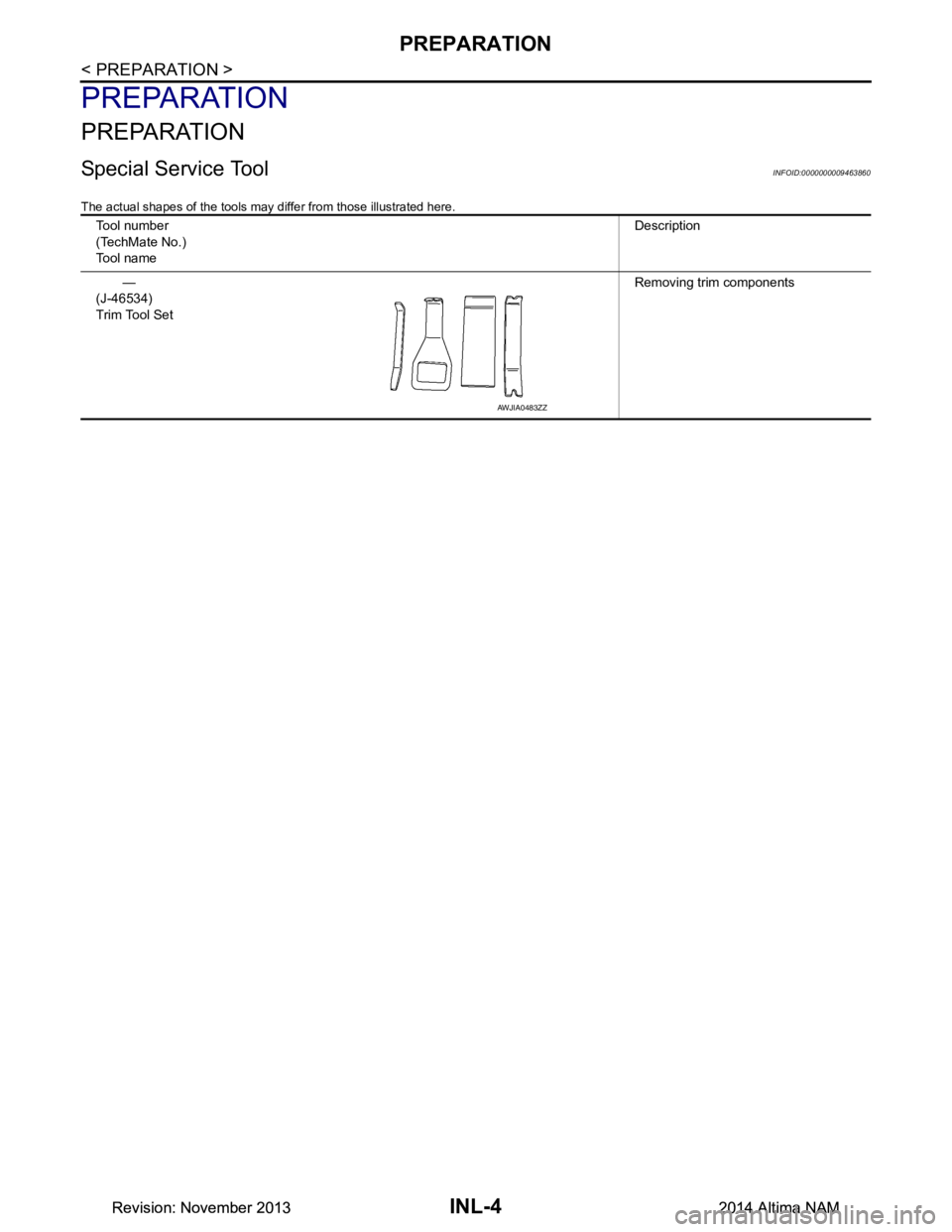
Special Service ToolINFOID:0000000009463860
The actual shapes of the tools may differ from those illustrated here.
Tool number
(TechMate No.)
Tool name Description
—
(J-46534)
Trim Tool Set Removing trim components
AWJIA0483ZZ
Revision: November 20132014 Altima NAMRevision: November 20132014 Altima NAM
Page 2884 of 4801
FRONT ROOM/MAP LAMPINL-63
< REMOVAL AND INSTALLATION >
C
D E
F
G H
I
J
K
M A
B
INL
N
O P
REMOVAL AND INSTALLATION
FRONT ROOM/MAP LAMP
Removal and InstallationINFOID:0000000009463895
REMOVAL
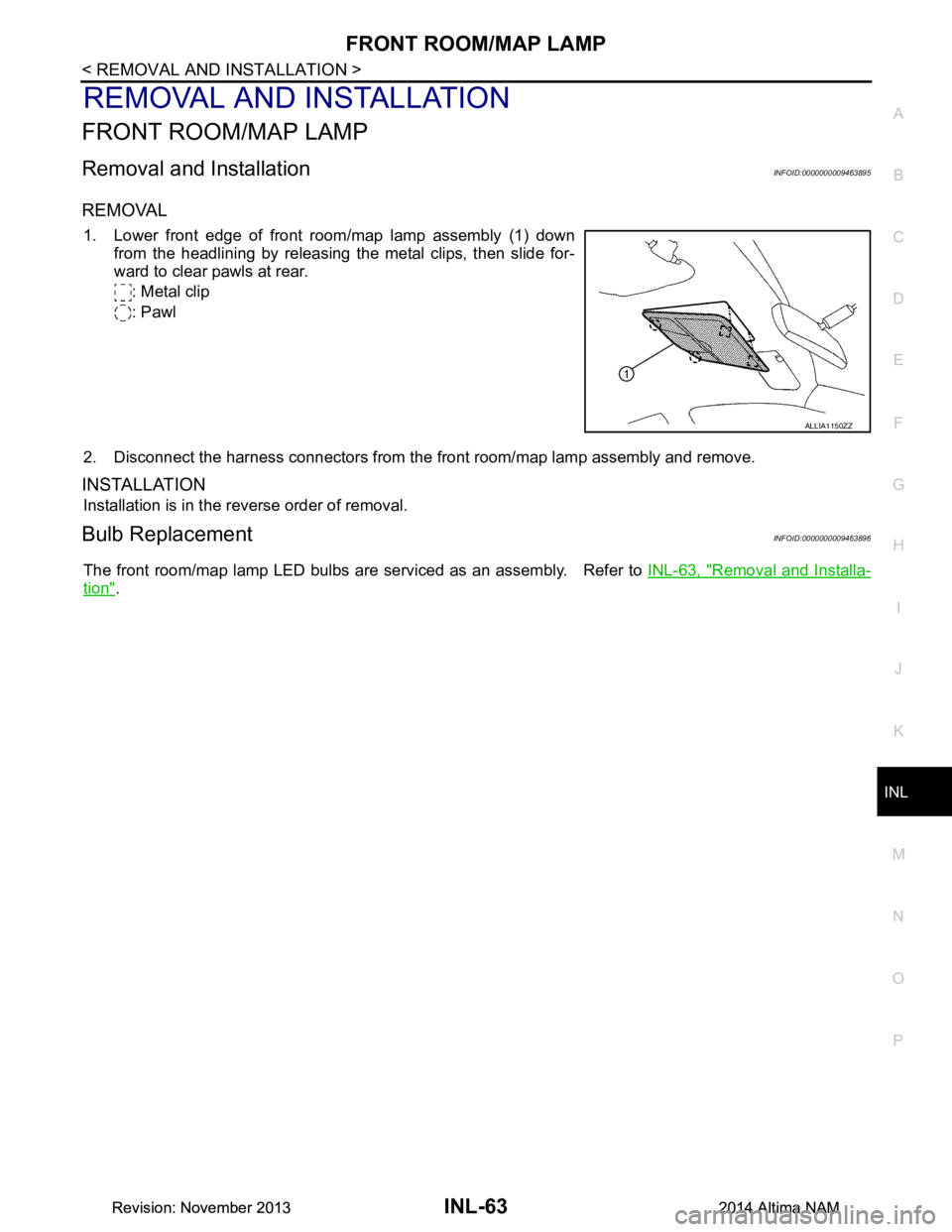
1. Lower front edge of front room/map lamp assembly (1) down from the headlining by releasing the metal clips, then slide for-
ward to clear pawls at rear.
: Metal clip
: Pawl
2. Disconnect the harness connectors from the front room/map lamp assembly and remove.
INSTALLATION
Installation is in the reverse order of removal.
Bulb ReplacementINFOID:0000000009463896
The front room/map lamp LED bulbs are serviced as an assembly. Refer to INL-63, "Removal and Installa-
tion".
ALLIA1150ZZ
Revision: November 20132014 Altima NAMRevision: November 20132014 Altima NAM
Page 2886 of 4801
GLOVE BOX LAMPINL-65
< REMOVAL AND INSTALLATION >
C
D E
F
G H
I
J
K
M A
B
INL
N
O P
GLOVE BOX LAMP
Removal and InstallationINFOID:0000000009463899
WARNING:
Do not touch bulb while it is lit or right after being turned OFF. Burning may result.
CAUTION:
Do not touch glass surface of the bulb with bare hands or allow oil or grease to get on it to prevent
damage to bulb.
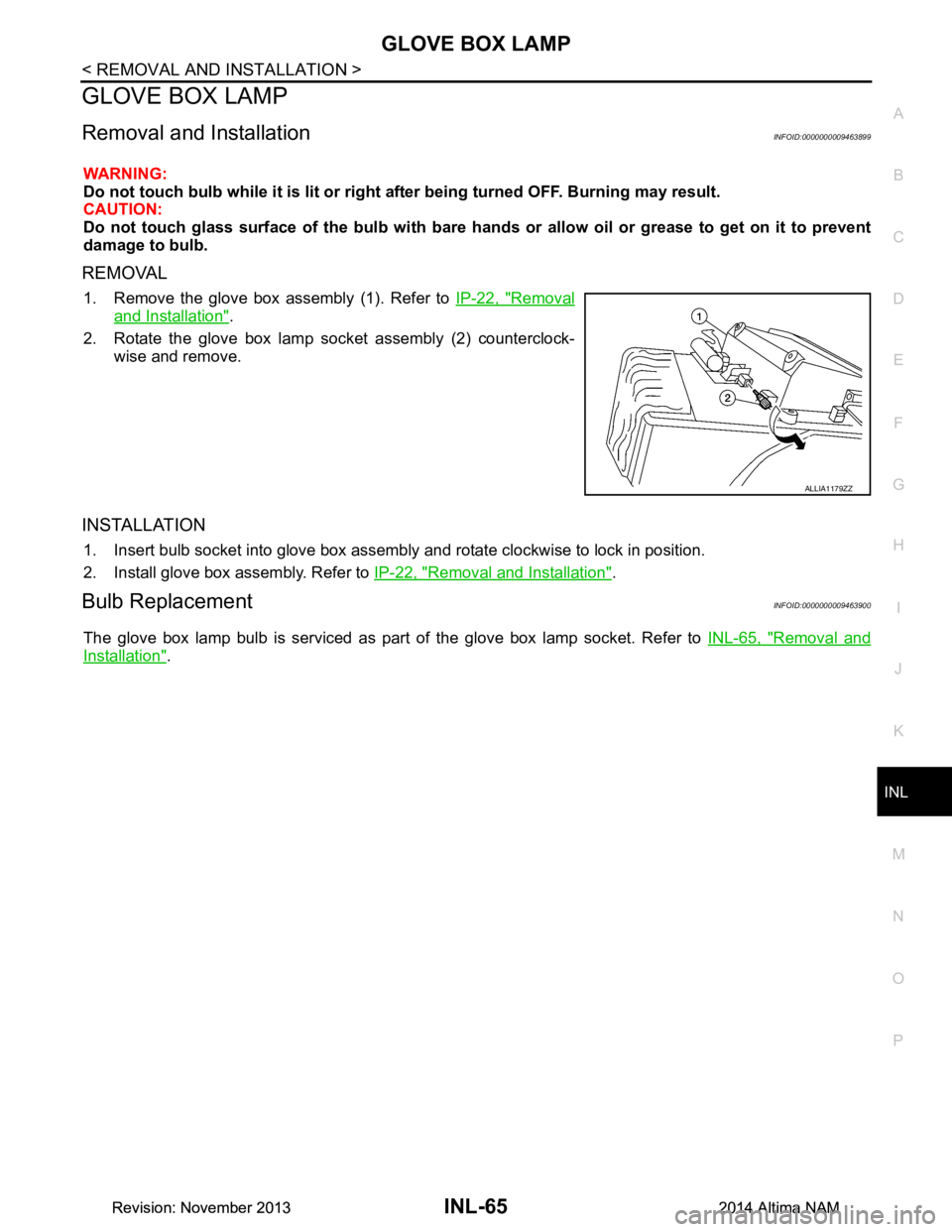
REMOVAL
1. Remove the glove box assembly (1). Refer to IP-22, "Removal
and Installation".
2. Rotate the glove box lamp socket assembly (2) counterclock- wise and remove.
INSTALLATION
1. Insert bulb socket into glove box assembly and rotate clockwise to lock in position.
2. Install glove box assembly. Refer to IP-22, "Removal and Installation"
.
Bulb ReplacementINFOID:0000000009463900
The glove box lamp bulb is serviced as part of the glove box lamp socket. Refer to INL-65, "Removal and
Installation".
ALLIA1179ZZ
Revision: November 20132014 Altima NAMRevision: November 20132014 Altima NAM
Page 2891 of 4801

INL-70
< SERVICE DATA AND SPECIFICATIONS (SDS)
SERVICE DATA AND SPECIFICATIONS (SDS)
SERVICE DATA AND SPECIFICATIONS (SDS)
SERVICE DATA AND SPECIFICATIONS (SDS)
Bulb SpecificationsINFOID:0000000009463907
* Always check with the Parts Department for the latest parts information.Item Wattage (W)*
Front room/map lamp LED
Vanity mirror lamp -
Glove box lamp -
Front step lamp 3.8
Personal lamp rear 8
Trunk room lamp 3.4
Revision: November 20132014 Altima NAMRevision: November 20132014 Altima NAM
Page 2892 of 4801

INT-1
BODY INTERIOR
C
D E
F
G H
I
K L
M
SECTION INT
A
B
INT
N
O P
CONTENTS
INTERIOR
PRECAUTION ................ ...............................3
PRECAUTIONS .............................................. .....3
Precaution for Supplemental Restraint System
(SRS) "AIR BAG" and "SEAT BELT PRE-TEN-
SIONER" ............................................................. ......
3
Precaution for Work ..................................................3
PREPARATION ............................................4
PREPARATION .............................................. .....4
Special Service Tools .......................................... ......4
Commercial Service Tools ........................................4
CLIP LIST ............................................................5
Descriptions for Clips .......................................... ......5
SYMPTOM DIAGNOSIS ...............................9
SQUEAK AND RATTLE TROUBLE DIAG-
NOSES ........................................................... .....
9
Work Flow ........................................................... ......9
Generic Squeak and Rattle Troubleshooting ..........10
Diagnostic Worksheet .............................................13
REMOVAL AND INSTALLATION ...............15
FRONT DOOR FINISHER .............................. ....15
Exploded View .................................................... ....15
Removal and Installation .........................................15
REAR DOOR FINISHER ................................ ....18
Exploded View .................................................... ....18
Removal and Installation .........................................18
BODY SIDE TRIM .......................................... ....20
Exploded View .................................................... ....20
DASH SIDE FINISHER .......................................... ....20
DASH SIDE FINISHER : Removal and Installation
....
20
FRONT PILLAR FINISHER ................................... ....20
FRONT PILLAR FINISHER : Removal and Instal-
lation .................................................................... ....
21
FRONT KICKING PLATE ...................................... ....21
FRONT KICKING PLATE : Removal and Installa-
tion - Inner ........................................................... ....
21
FRONT KICKING PLATE : Removal and Installa-
tion - Outer ........................................................... ....
22
REAR KICKING PLATE ........................................ ....22
REAR KICKING PLATE : Removal and Installa-
tion - Inner ........................................................... ....
22
REAR KICKING PLATE : Removal and Installa-
tion - Outer ........................................................... ....
22
BODY SIDE WELT ................................................. ....23
BODY SIDE WELT : Removal and Installation -
Front Body Side Welt ........................................... ....
23
BODY SIDE WELT : Removal and Installation -
Rear Body Side Welt ........................................... ....
23
CENTER PILLAR LOWER FINISHER ................... ....23
CENTER PILLAR LOWER FINISHER : Removal
and Installation .................................................... ....
23
CENTER PILLAR UPPER FINISHER ........................24
CENTER PILLAR UPPER FINISHER : Removal
and Installation .................................................... ....
24
REAR PILLAR FINISHER ...................................... ....25
REAR PILLAR FINISHER : Removal and Installa-
tion ....................................................................... ....
25
REAR PARCEL SHELF FINISHER ..................26
Exploded View .........................................................26
Removal and Installation .........................................26
FLOOR TRIM ....................................................27
Exploded View .........................................................27
Removal and Installation .........................................27
HEADLINING ....................................................29
Exploded View .........................................................29
Revision: November 20132014 Altima NAM
Page 2894 of 4801
PRECAUTIONSINT-3
< PRECAUTION >
C
D E
F
G H
I
K L
M A
B
INT
N
O P
PRECAUTION
PRECAUTIONS
Precaution for Supplemental Restraint System (SRS) "AIR BAG" and "SEAT BELT
PRE-TENSIONER"
INFOID:0000000009951557
The Supplemental Restraint System such as “A IR BAG” and “SEAT BELT PRE-TENSIONER”, used along
with a front seat belt, helps to reduce the risk or severi ty of injury to the driver and front passenger for certain
types of collision. Information necessary to service t he system safely is included in the SR and SB section of
this Service Manual.
WARNING:
• To avoid rendering the SRS inoper ative, which could increase the risk of personal injury or death in
the event of a collision which would result in air bag inflation, all maintenance must be performed by
an authorized NISSAN/INFINITI dealer.
• Improper maintenance, including in correct removal and installation of the SRS, can lead to personal
injury caused by unintentional act ivation of the system. For removal of Spiral Cable and Air Bag
Module, see the SR section.
• Do not use electrical test equipm ent on any circuit related to the SRS unless instructed to in this
Service Manual. SRS wiring harnesses can be identi fied by yellow and/or orange harnesses or har-
ness connectors.
PRECAUTIONS WHEN USING POWER TOOLS (AIR OR ELECTRIC) AND HAMMERS
WARNING:
• When working near the Airbag Diagnosis Sensor Un it or other Airbag System sensors with the Igni-
tion ON or engine running, DO NOT use air or el ectric power tools or strike near the sensor(s) with a
hammer. Heavy vibration could activate the sensor( s) and deploy the air bag(s), possibly causing
serious injury.
• When using air or electric power tools or hammers , always switch the Ignition OFF, disconnect the
battery and wait at least three mi nutes before performing any service.
Precaution for WorkINFOID:0000000009461335
• When removing or disassembling each component, be ca reful not to damage or deform it. If a component
may be subject to interference, be sure to protect it with a shop cloth.
• When removing (disengaging) components with a screwdriver or similar tool, be sure to wrap the component with a shop cloth or vinyl tape to protect it.
• Protect the removed parts with a shop cloth and prevent them from being dropped.
• Replace a deformed or damaged clip.
• If a part is specified as a non-reusabl e part, always replace it with a new one.
• Be sure to tighten bolts and nuts securely to the specified torque.
• After installation is complete, be sure to check that each part works properly.
• Follow the steps below to clean components:
- Water soluble dirt:
• Dip a soft cloth into lukewarm water, wring the water out of the cloth and wipe the dirty area.
• Then rub with a soft, dry cloth.
-Oily dirt:
• Dip a soft cloth into lukewarm water with mild detergent (concentration: within 2 to 3%) and wipe the dirty area.
• Then dip a cloth into fresh water, wring the water out of the cloth and wipe the detergent off.
• Then rub with a soft, dry cloth.
- Do not use organic solvent such as thinner, benzene, alcohol or gasoline.
- For genuine leather seats, use a genuine leather seat cleaner.
Revision: November 20132014 Altima NAM