light NISSAN TEANA 2014 Workshop Manual
[x] Cancel search | Manufacturer: NISSAN, Model Year: 2014, Model line: TEANA, Model: NISSAN TEANA 2014Pages: 4801, PDF Size: 51.2 MB
Page 727 of 4801

DEF-2
Component Function Check ...................................32
Diagnosis Procedure ..............................................32
Component Inspection ............................................33
SYMPTOM DIAGNOSIS .............................34
DEFOGGER SYSTEM SYMPTOMS .............. ...34
Symptom Table ................................................... ...34
REAR WINDOW DEFOGGER AND DOOR
MIRROR DEFOGGER DO NOT OPERATE. .. ...
35
Diagnosis Procedure ........................................... ...35
REAR WINDOW DEFOGGER DOES NOT
OPERATE BUT BOTH OF DOOR MIRROR
DEFOGGER OPERATE. ................................ ...
36
Diagnosis Procedure ........................................... ...36
BOTH DOORS MIRROR DEFOGGER DON’T
OPERATE BUT REAR WINDOW DEFOG-
GER OPERATES ............................................ ...
37
Diagnosis Procedure ........................................... ...37
DRIVER SIDE DOOR MIRROR DEFOGGER
DOES NOT OPERATE. .................................. ...
38
Diagnosis Procedure ............................................ ...38
PASSENGER SIDE DOOR MIRROR DEFOG-
GER DOES NOT OPERATE. ......................... ...
39
Diagnosis Procedure ............................................ ...39
REAR WINDOW DEFOGGER SWITCH DOES
NOT LIGHT, BUT REAR WINDOW DEFOG-
GER OPERATES ............................................ ...
40
Diagnosis Procedure ............................................ ...40
REMOVAL AND INSTALLATION ..............41
FILAMENT ...................................................... ...41
Inspection and Repair .......................................... ...41
CONDENSER ....................................................43
Removal and Installation .........................................43
Revision: November 20132014 Altima NAMRevision: November 20132014 Altima NAM
Page 759 of 4801
DEF-34
< SYMPTOM DIAGNOSIS >
DEFOGGER SYSTEM SYMPTOMS
SYMPTOM DIAGNOSIS
DEFOGGER SYSTEM SYMPTOMS
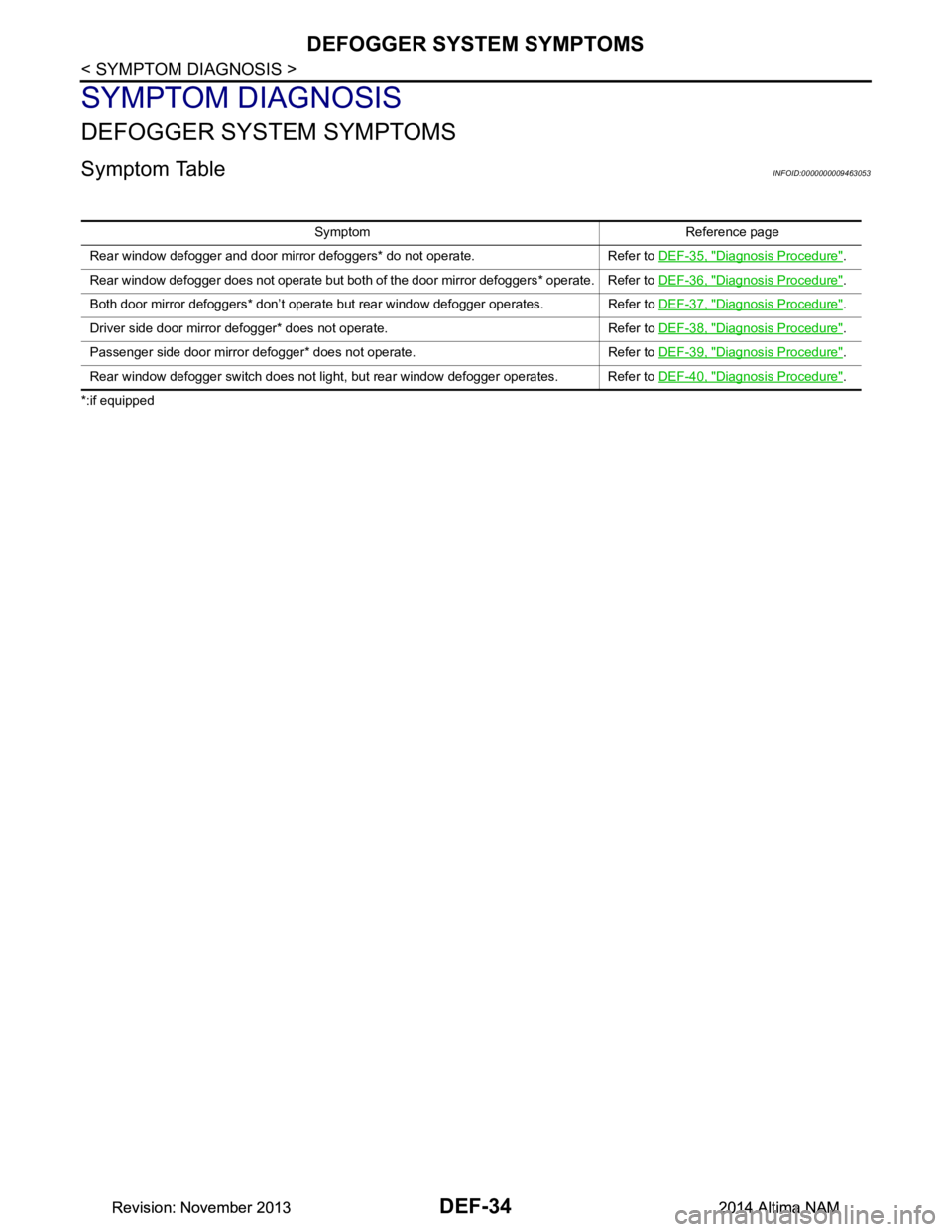
Symptom TableINFOID:0000000009463053
*:if equippedSymptom Reference page
Rear window defogger and door mirror defoggers* do not operate. Refer to DEF-35, "Diagnosis Procedure"
.
Rear window defogger does not operate but both of the door mirror defoggers* operate. Refer to DEF-36, "Diagnosis Procedure"
.
Both door mirror defoggers* don’t operate but rear window defogger operates. Refer to DEF-37, "Diagnosis Procedure"
.
Driver side door mirror defogger* does not operate. Refer to DEF-38, "Diagnosis Procedure"
.
Passenger side door mirror defogger* does not operate. Refer to DEF-39, "Diagnosis Procedure"
.
Rear window defogger switch does not light, but rear window defogger operates. Refer to DEF-40, "Diagnosis Procedure"
.
Revision: November 20132014 Altima NAMRevision: November 20132014 Altima NAM
Page 765 of 4801
DEF-40
< SYMPTOM DIAGNOSIS >
REAR WINDOW DEFOGGER SWITCH DOES NOT LIGHT, BUT REAR WINDOW
DEFOGGER OPERATES
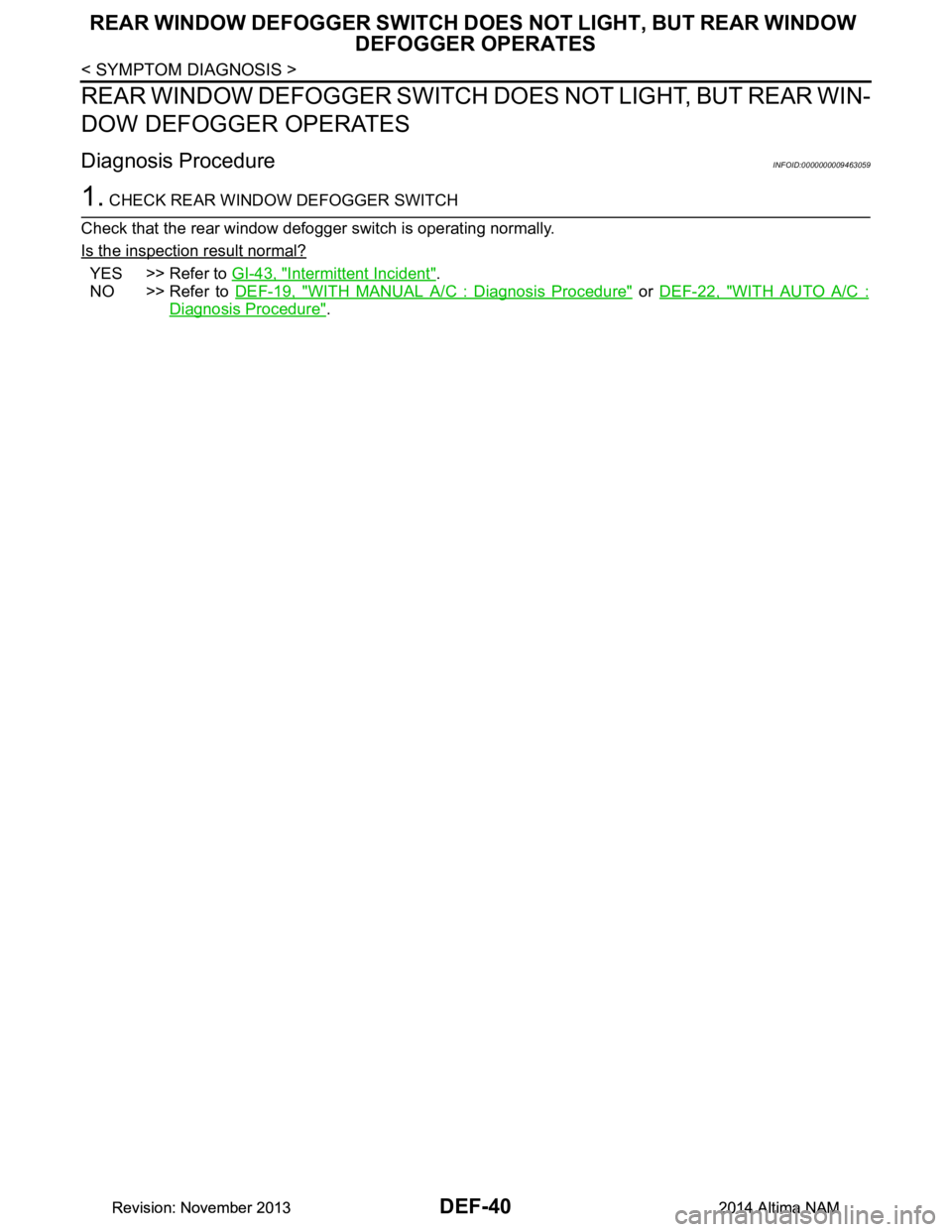
REAR WINDOW DEFOGGER SWITCH DOES NOT LIGHT, BUT REAR WIN-
DOW DEFOGGER OPERATES
Diagnosis ProcedureINFOID:0000000009463059
1. CHECK REAR WINDOW DEFOGGER SWITCH
Check that the rear window defogger switch is operating normally.
Is the inspection result normal?
YES >> Refer to GI-43, "Intermittent Incident".
NO >> Refer to DEF-19, "WITH MANUAL A/C : Diagnosis Procedure"
or DEF-22, "WITH AUTO A/C :
Diagnosis Procedure".
Revision: November 20132014 Altima NAMRevision: November 20132014 Altima NAM
Page 767 of 4801
DEF-42
< REMOVAL AND INSTALLATION >
FILAMENT
• Ruler 30 cm (11.8 in) long
• Drawing pen
• Heat gun
• Alcohol
• Cloth
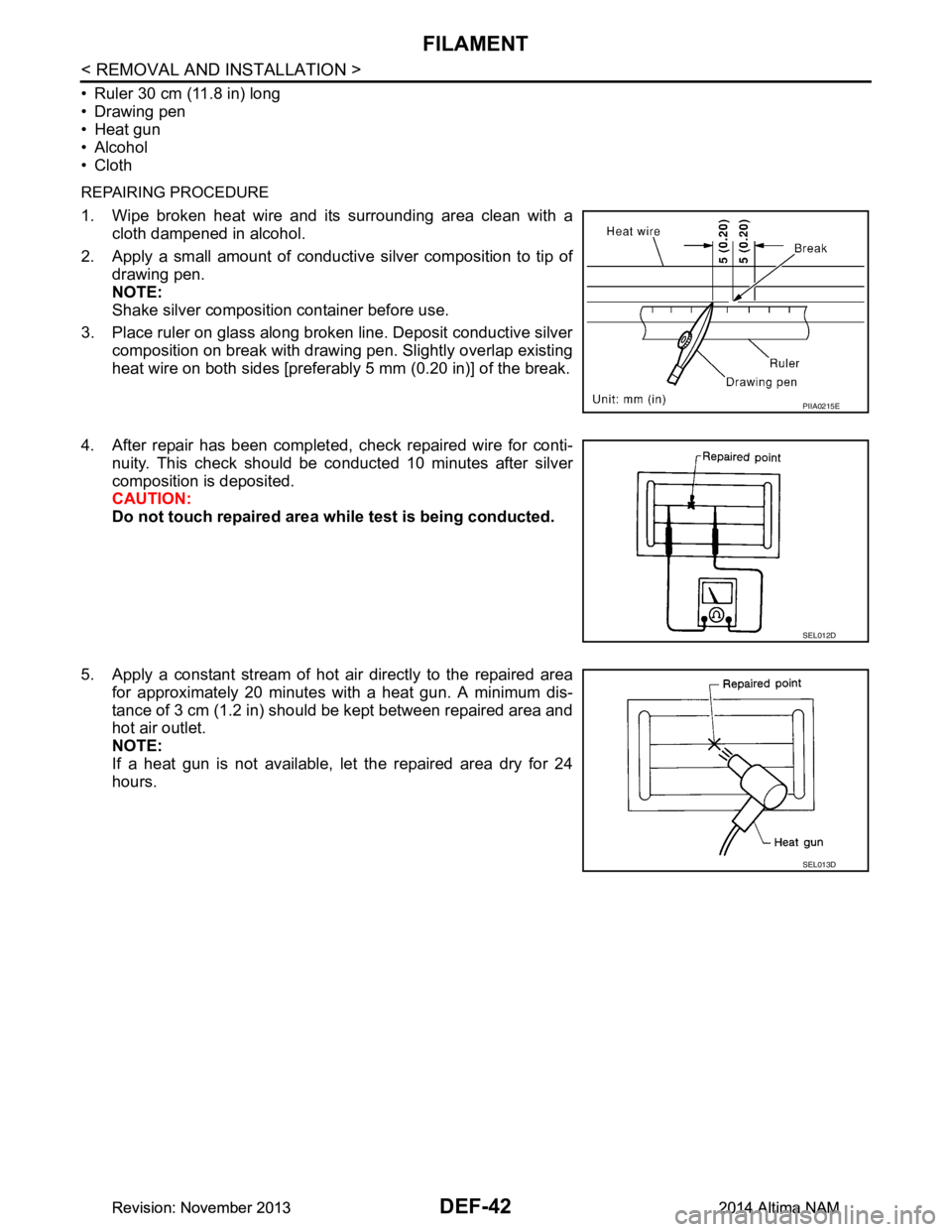
REPAIRING PROCEDURE
1. Wipe broken heat wire and its surrounding area clean with a
cloth dampened in alcohol.
2. Apply a small amount of conductive silver composition to tip of drawing pen.
NOTE:
Shake silver composition container before use.
3. Place ruler on glass along broken line. Deposit conductive silver composition on break with drawing pen. Slightly overlap existing
heat wire on both sides [preferably 5 mm (0.20 in)] of the break.
4. After repair has been completed, check repaired wire for conti- nuity. This check should be conducted 10 minutes after silver
composition is deposited.
CAUTION:
Do not touch repaired area wh ile test is being conducted.
5. Apply a constant stream of hot air directly to the repaired area for approximately 20 minutes with a heat gun. A minimum dis-
tance of 3 cm (1.2 in) should be kept between repaired area and
hot air outlet.
NOTE:
If a heat gun is not available, let the repaired area dry for 24
hours.
PIIA0215E
SEL012D
SEL013D
Revision: November 20132014 Altima NAMRevision: November 20132014 Altima NAM
Page 769 of 4801

DLK-1
BODY EXTERIOR, DOORS, ROOF & VEHICLE SECURITY
C
D E
F
G H
I
J
L
M
SECTION DLK
A
B
DLK
N
O P
CONTENTS
DOOR & LOCK
PRECAUTION ................ ...............................6
PRECAUTIONS .............................................. .....6
Precaution for Supplemental Restraint System
(SRS) "AIR BAG" and "SEAT BELT PRE-TEN-
SIONER" ............................................................. ......
6
Precaution for Procedure without Cowl Top Cover ......6
Precaution for Servicing Doors and Locks .......... ......6
PREPARATION ............................................8
PREPARATION .............................................. .....8
Special Service Tools .......................................... ......8
Commercial Service Tools ........................................9
CLIP LIST ...........................................................10
Descriptions for Clips .......................................... ....10
SYSTEM DESCRIPTION .............................14
COMPONENT PARTS ................................... ....14
POWER DOOR LOCK SYSTEM ........................... ....14
POWER DOOR LOCK SYSTEM :
Component Parts Location ................................ ....
14
POWER DOOR LOCK SYSTEM :
Component Description ...................................... ....
15
INTELLIGENT KEY SYSTEM ...................................15
INTELLIGENT KEY SYSTEM : Component Parts
Location ............................................................... ....
16
INTELLIGENT KEY SYSTEM :
Component Description ...................................... ....
19
INTEGRATED HOMELINK TRANSMITTER ......... ....19
INTEGRATED HOMELINK TRANSMITTER :
Component Parts Location .................................. ....
19
INTEGRATED HOMELINK TRANSMITTER :
Component Description ....................................... ....
19
TRUNK LID OPENER SYSTEM ............................ ....19
TRUNK LID OPENER SYSTEM :
Component Parts Location ................................ ....
20
TRUNK LID OPENER SYSTEM :
Component Description ...................................... ....
20
SYSTEM (POWER DOOR LOCK SYSTEM) ....21
System Diagram .................................................. ....21
System Description ..................................................21
SYSTEM (INTELLIGENT KEY SYSTEM) .........23
INTELLIGENT KEY SYSTEM ......................... ...........23
INTELLIGENT KEY SYSTEM : System Diagram ....23
INTELLIGENT KEY SYSTEM : System Descrip-
tion ....................................................................... ....
23
DOOR LOCK FUNCTION ...................................... ....24
DOOR LOCK FUNCTION : System Diagram ..........24
DOOR LOCK FUNCTION : System Description . ....24
REMOTE KEYLESS ENTRY FUNCTION ..................26
REMOTE KEYLESS ENTRY FUNCTION : Sys-
tem Diagram ........................................................ ....
27
REMOTE KEYLESS ENTRY FUNCTION : Sys-
tem Description .................................................... ....
27
KEY REMINDER FUNCTION ................................ ....29
KEY REMINDER FUNCTION : System Diagram ....29
KEY REMINDER FUNCTION : System Descrip-
tion ....................................................................... ....
29
REMOTE ENGINE START FUNCTION ................. ....30
REMOTE ENGINE START FUNCTION : System
Diagram ............................................................... ....
30
REMOTE ENGINE START FUNCTION : System
Description ........................................................... ....
30
WELCOME LIGHT FUNCTION ............................. ....32
WELCOME LIGHT FUNCTION : System Diagram
....
32
WELCOME LIGHT FUNCTION : System Descrip-
tion ....................................................................... ....
32
WARNING FUNCTION .......................................... ....33
WARNING FUNCTION : System Description ..........33
Revision: November 20132014 Altima NAMRevision: November 20132014 Altima NAM
Page 792 of 4801
DLK-24
< SYSTEM DESCRIPTION >
SYSTEM (INTELLIGENT KEY SYSTEM)
DOOR LOCK FUNCTION
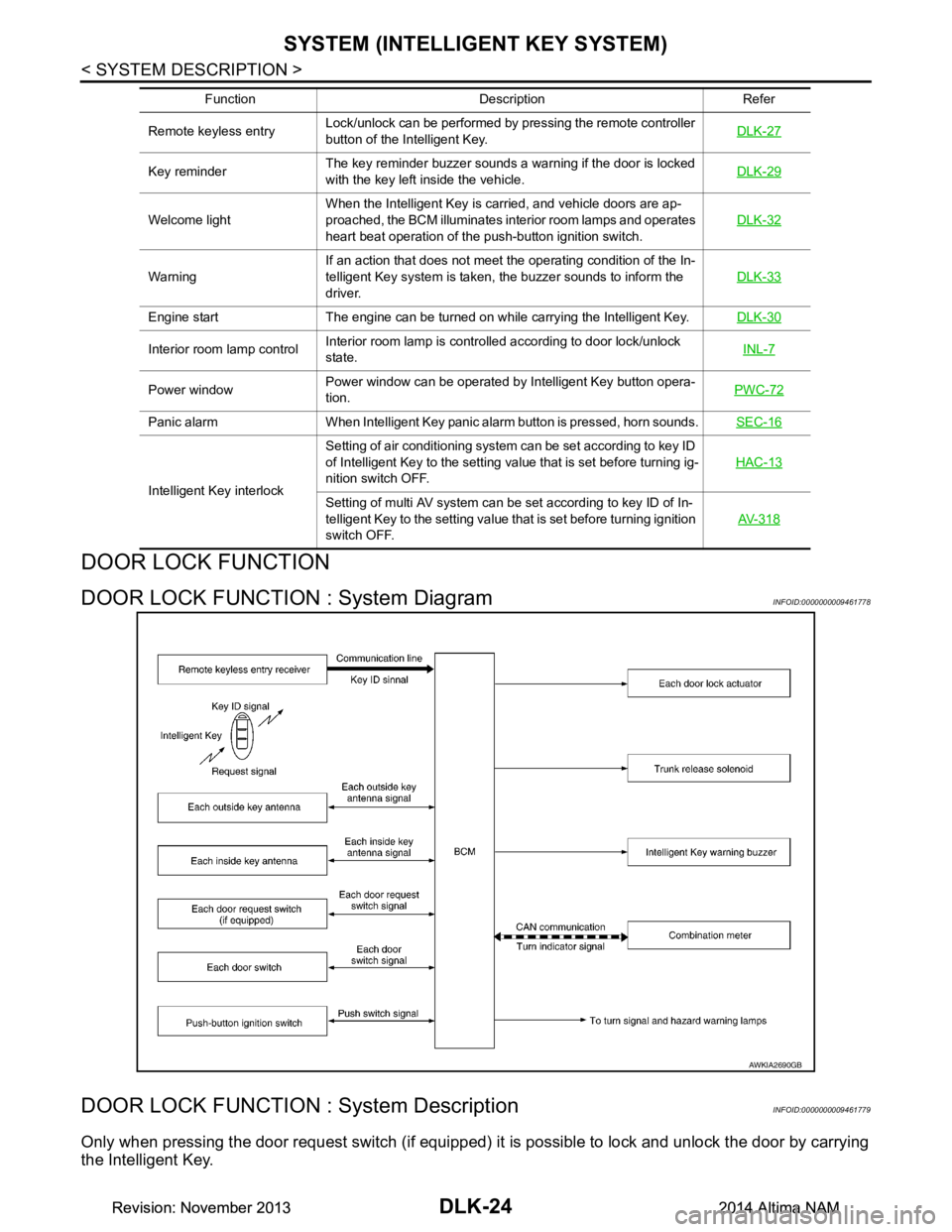
DOOR LOCK FUNCTION : System DiagramINFOID:0000000009461778
DOOR LOCK FUNCTION : System DescriptionINFOID:0000000009461779
Only when pressing the door request switch (if equipped) it is possible to lock and unlock the door by carrying
the Intelligent Key.
Remote keyless entry Lock/unlock can be performed by pressing the remote controller
button of the Intelligent Key. DLK-27
Key reminderThe key reminder buzzer sounds a warning if the door is locked
with the key left inside the vehicle. DLK-29
Welcome lightWhen the Intelligent Key is carried, and vehicle doors are ap-
proached, the BCM illuminates interior room lamps and operates
heart beat operation of the push-button ignition switch. DLK-32
WarningIf an action that does not meet the operating condition of the In-
telligent Key system is taken, the buzzer sounds to inform the
driver. DLK-33
Engine start The engine can be turned on while carrying the Intelligent Key.
DLK-30
Interior room lamp controlInterior room lamp is controlled according to door lock/unlock
state. INL-7
Power windowPower window can be operated by Intelligent Key button opera-
tion. PWC-72
Panic alarm When Intelligent Key panic alarm button is pressed, horn sounds.
SEC-16
Intelligent Key interlockSetting of air conditioning system can be set according to key ID
of Intelligent Key to the setting value that is set before turning ig-
nition switch OFF. HAC-13Setting of multi AV system can be set according to key ID of In-
telligent Key to the setting value that is set before turning ignition
switch OFF. AV- 3 1 8
Function Description Refer
AWKIA2690GB
Revision: November 20132014 Altima NAMRevision: November 20132014 Altima NAM
Page 800 of 4801
DLK-32
< SYSTEM DESCRIPTION >
SYSTEM (INTELLIGENT KEY SYSTEM)
WELCOME LIGHT FUNCTION
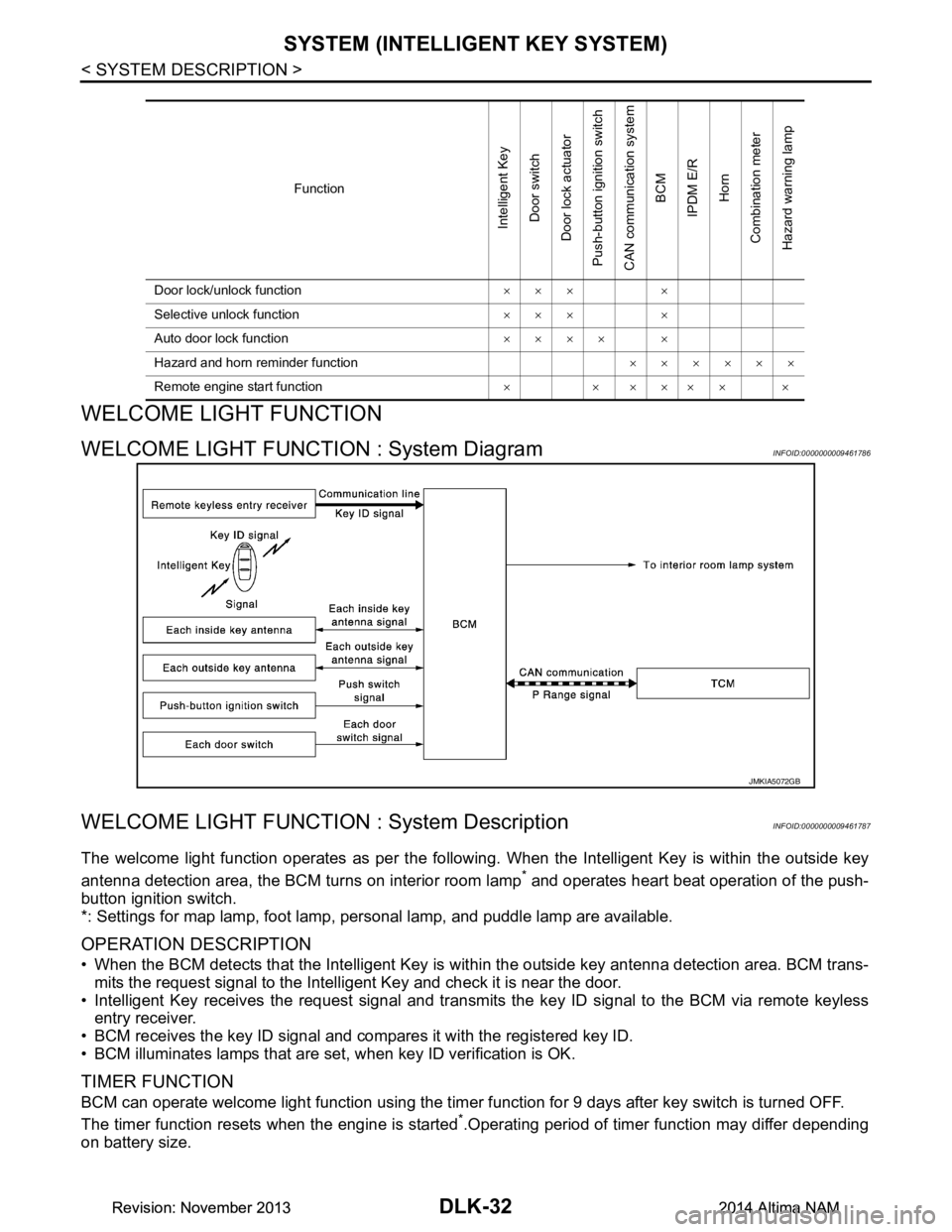
WELCOME LIGHT FUNCTION : System DiagramINFOID:0000000009461786
WELCOME LIGHT FUNCTION : System DescriptionINFOID:0000000009461787
The welcome light function operates as per the following. When the Intelligent Key is within the outside key
antenna detection area, the BCM turns on interior room lamp
* and operates heart beat operation of the push-
button ignition switch.
*: Settings for map lamp, foot lamp, personal lamp, and puddle lamp are available.
OPERATION DESCRIPTION
• When the BCM detects that the Intelligent Key is within the outside key antenna detection area. BCM trans-
mits the request signal to the Intelli gent Key and check it is near the door.
• Intelligent Key receives the request signal and transmits the key ID signal to the BCM via remote keyless entry receiver.
• BCM receives the key ID signal and compares it with the registered key ID.
• BCM illuminates lamps that are set, when key ID verification is OK.
TIMER FUNCTION
BCM can operate welcome light function using the timer function for 9 days after key switch is turned OFF.
The timer function resets when the engine is started
*.Operating period of timer function may differ depending
on battery size.
Function
Intelligent Key
Door switch
Door lock actuator
Push-button ignition switch
CAN communication system
BCM
IPDM E/R
Horn
Combination meter
Hazard warning lamp
Door lock/unlock function ××× ×
Selective unlock function ××× ×
Auto door lock function ×××× ×
Hazard and horn reminder function ××××××
Remote engine start function ×××××××
JMKIA5072GB
Revision: November 20132014 Altima NAMRevision: November 20132014 Altima NAM
Page 801 of 4801
SYSTEM (INTELLIGENT KEY SYSTEM)DLK-33
< SYSTEM DESCRIPTION >
C
D E
F
G H
I
J
L
M A
B
DLK
N
O P
*: Timer function does not stop if another Intelligent Key that has a different key ID is detected within the inte-
rior antenna detection area when starting the engine.
OPERATION CONDITION
If the following condition are satisfi ed, welcome light function is operated.
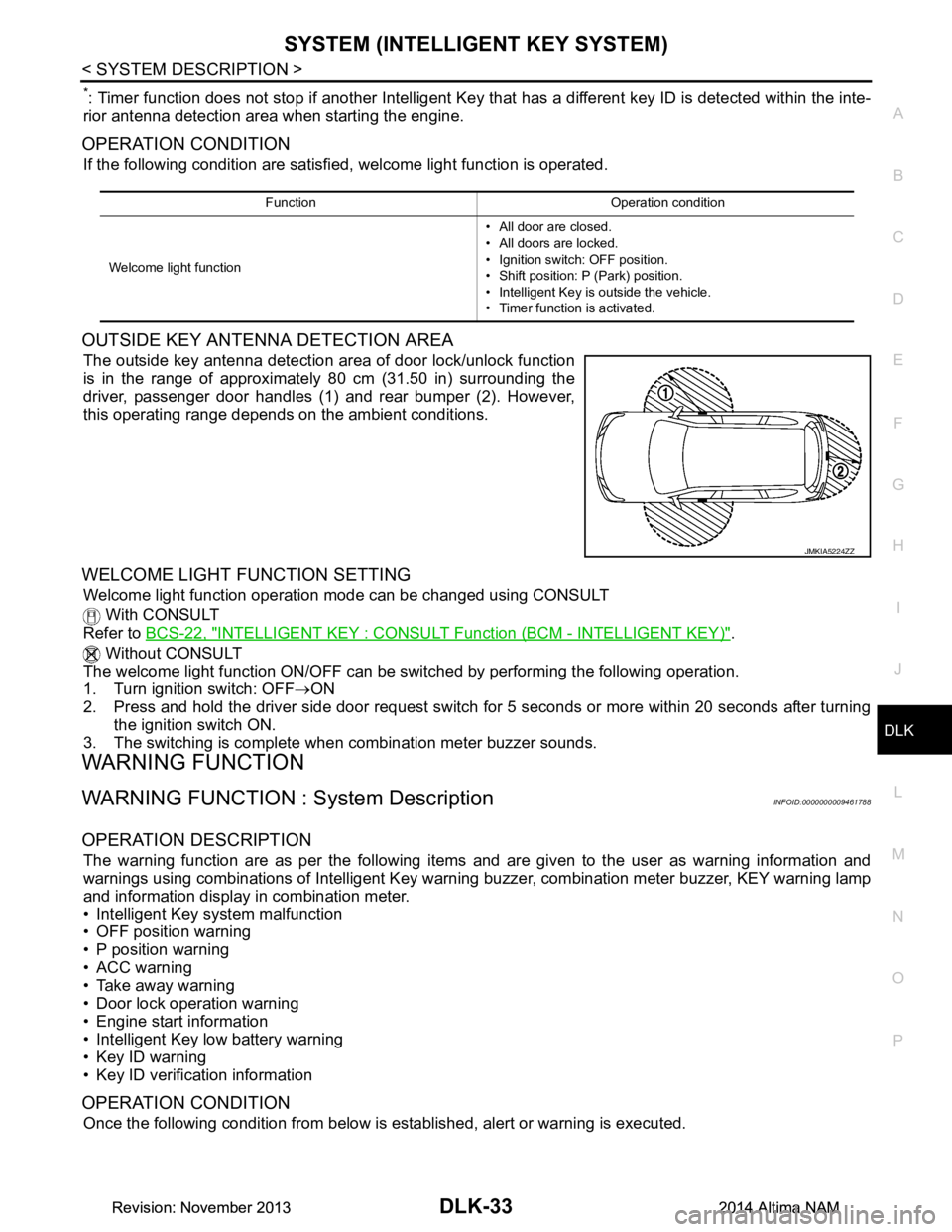
OUTSIDE KEY ANTENNA DETECTION AREA
The outside key antenna detection area of door lock/unlock function
is in the range of approximately 80 cm (31.50 in) surrounding the
driver, passenger door handles (1) and rear bumper (2). However,
this operating range depends on the ambient conditions.
WELCOME LIGHT FUNCTION SETTING
Welcome light function operation mode can be changed using CONSULT
With CONSULT
Refer to BCS-22, "INTELLIGENT KEY : CONSUL T Function (BCM - INTELLIGENT KEY)"
.
Without CONSULT
The welcome light function ON/OFF can be s witched by performing the following operation.
1. Turn ignition switch: OFF →ON
2. Press and hold the driver side door request switch for 5 seconds or more within 20 seconds after turning
the ignition switch ON.
3. The switching is complete when combination meter buzzer sounds.
WARNING FUNCTION
WARNING FUNCTION : System DescriptionINFOID:0000000009461788
OPERATION DESCRIPTION
The warning function are as per the following items and are given to the user as warning information and
warnings using combinations of Intelligent Key warning buzzer, combination meter buzzer, KEY warning lamp
and information display in combination meter.
• Intelligent Key system malfunction
• OFF position warning
• P position warning
• ACC warning
• Take away warning
• Door lock operation warning
• Engine start information
• Intelligent Key low battery warning
• Key ID warning
• Key ID verification information
OPERATION CONDITION
Once the following condition from below is established, alert or warning is executed.
Function Operation condition
Welcome light function • All door are closed.
• All doors are locked.
• Ignition switch: OFF position.
• Shift position: P (Park) position.
• Intelligent Key is outside the vehicle.
• Timer function is activated.
JMKIA5224ZZ
Revision: November 20132014 Altima NAMRevision: November 20132014 Altima NAM
Page 916 of 4801
DLK-148
< DTC/CIRCUIT DIAGNOSIS >
WARNING CHIME FUNCTION
WARNING CHIME FUNCTION
DescriptionINFOID:0000000009461898
Performs operation method guide and warning with buzzer.
Component Function CheckINFOID:0000000009461899
1.CHECK FUNCTION
With CONSULT
1. Check the operation with “INSIDE BUZZER” in the Active Test.
2. Touch “TAKE OUT”, “KNOB”or “KEY”on screen.
Is the inspection result normal?
YES >> Warning buzzer into combination meter is OK.
NO >> Refer to DLK-148, "Diagnosis Procedure"
.
Diagnosis ProcedureINFOID:0000000009461900
1.CHECK METER BUZZER CIRCUIT
Operate the hazard lights by turni ng ON the hazard warning switch.
Is the inspection result normal?
YES >> GO TO 2
NO >> Replace combination meter. Refer to MWI-82, "Removal and Installation"
.
2.CHECK INTERMITTENT INCIDENT
Refer to GI-43, "Intermittent Incident"
.
>> Inspection End.
Revision: November 20132014 Altima NAMRevision: November 20132014 Altima NAM
Page 917 of 4801
HAZARD FUNCTIONDLK-149
< DTC/CIRCUIT DIAGNOSIS >
C
D E
F
G H
I
J
L
M A
B
DLK
N
O P
HAZARD FUNCTION
DescriptionINFOID:0000000009461901
Perform answer-back for each oper ation with number of blinks.
Component Function CheckINFOID:0000000009461902
1.CHECK FUNCTION
Check hazard warning lamp (“FLASHER”) in Active Test.
Is the inspection result normal?
YES >> Hazard warning lamp circuit is OK.
NO >> Refer to EXL-60, "Wiring Diagram"
.
Diagnosis ProcedureINFOID:0000000009461903
1.CHECK HAZARD SWITCH CIRCUIT
Operate the hazard lights by turni ng ON the hazard warning switch.
Is the inspection result normal?
YES >> GO TO 2
NO >> Repair or replace hazard warning switch circuit. Refer to EXL-86, "Work Flow"
.
2.CHECK INTERMITTENT INCIDENT
Refer to GI-43, "Intermittent Incident"
.
>> Inspection End.
Revision: November 20132014 Altima NAMRevision: November 20132014 Altima NAM