ignition NISSAN TEANA 2014 Service Manual
[x] Cancel search | Manufacturer: NISSAN, Model Year: 2014, Model line: TEANA, Model: NISSAN TEANA 2014Pages: 4801, PDF Size: 51.2 MB
Page 2368 of 4801

EXL-102
< DTC/CIRCUIT DIAGNOSIS >
FRONT FOG LAMP CIRCUIT
NO >> GO TO 3.
3.CHECK FRONT FOG LAMP OPEN CIRCUIT
1. Turn the ignition switch OFF.
2. Disconnect IPDM E/R connector E200.
3. Check continuity between the IPDM E/R harness connector and the front fog lamp harness connector.
Is the inspection result normal?
YES >> Replace IPDM E/R. Refer to PCS-32, "Removal and Installation".
NO >> Repair or replace the harness or connector.
4.CHECK FRONT FOG LAMP GROUND CIRCUIT
Check continuity between the front fog lamp harness connector terminal 2 and ground.
Is the inspection result normal?
YES >> Inspect the fog lamp bulb.
NO >> Repair or replace the harness or connector.
IPDM E/R Front fog lamp Continuity
Connector Terminal Connector Terminal
RH E20078 E227
1Yes
LH 79 E214
Connector Terminal — Continuity
RH E227 2 Ground Yes
LH E214
Revision: November 20132014 Altima NAMRevision: November 20132014 Altima NAM
Page 2369 of 4801
PARKING LAMP CIRCUITEXL-103
< DTC/CIRCUIT DIAGNOSIS >
C
D E
F
G H
I
J
K
M A
B
EXL
N
O P
PARKING LAMP CIRCUIT
DescriptionINFOID:0000000009463594
The IPDM E/R (intelligent power distribution module engi ne room) controls the tail lamp relay based on inputs
from the BCM over the CAN communication lines. When t he tail lamp relay is energized, power flows through
fuses 51 and 52, located in the IPDM E/R. Power then fl ows to the front and rear combination lamps, license
plate lamps.
Component Function CheckINFOID:0000000009463595
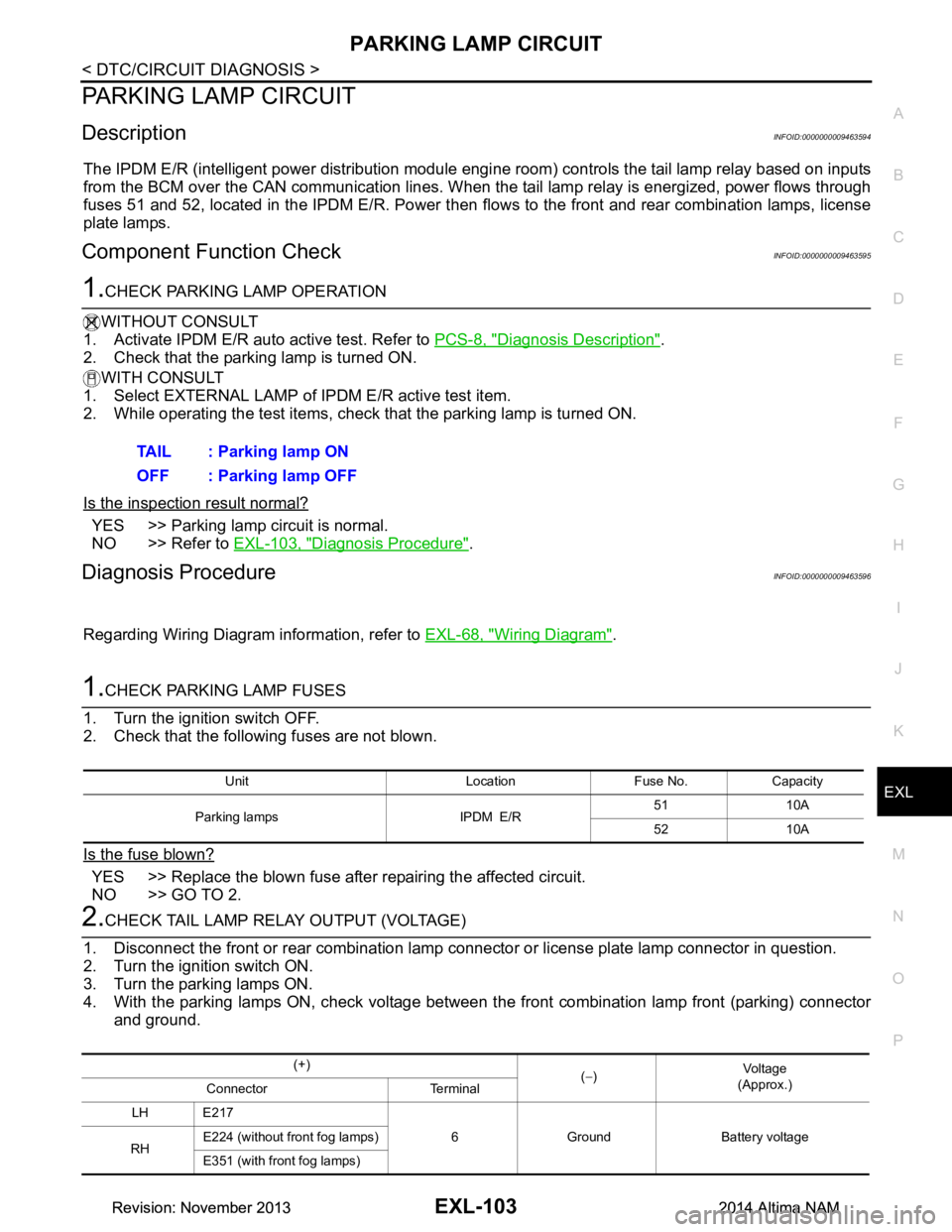
1.CHECK PARKING LAMP OPERATION
WITHOUT CONSULT
1. Activate IPDM E/R auto active test. Refer to PCS-8, "Diagnosis Description"
.
2. Check that the parking lamp is turned ON.
WITH CONSULT
1. Select EXTERNAL LAMP of IP DM E/R active test item.
2. While operating the test items, check that the parking lamp is turned ON.
Is the inspection result normal?
YES >> Parking lamp circuit is normal.
NO >> Refer to EXL-103, "Diagnosis Procedure"
.
Diagnosis ProcedureINFOID:0000000009463596
Regarding Wiring Diagram information, refer to EXL-68, "Wiring Diagram".
1.CHECK PARKING LAMP FUSES
1. Turn the ignition switch OFF.
2. Check that the following fuses are not blown.
Is the fuse blown?
YES >> Replace the blown fuse after repairing the affected circuit.
NO >> GO TO 2.
2.CHECK TAIL LAMP RELAY OUTPUT (VOLTAGE)
1. Disconnect the front or rear combination lamp connector or license plate lamp connector in question.
2. Turn the ignition switch ON.
3. Turn the parking lamps ON.
4. With the parking lamps ON, check voltage between t he front combination lamp front (parking) connector
and ground. TAIL : Parking lamp ON
OFF : Parking lamp OFF
Unit Location Fuse No. Capacity
Parking lamps IPDM E/R 51 10A
52 10A
(+) (− ) Vo l ta g e
(Approx.)
Connector Terminal
LH E217 6 Ground Battery voltage
RH E224 (without front fog lamps)
E351 (with front fog lamps)
Revision: November 20132014 Altima NAMRevision: November 20132014 Altima NAM
Page 2370 of 4801

EXL-104
< DTC/CIRCUIT DIAGNOSIS >
PARKING LAMP CIRCUIT
5. With the parking lamps ON, check voltage between the front combination lamp (side marker) connector
and ground.
6. With the parking lamps ON, check voltage betw een the rear combination lamp connector and ground.
7. With the parking lamps ON, check voltage between the license plate lamp connector and ground.
Are the inspection results normal?
YES >> GO TO 4.
NO >> GO TO 3.
3.CHECK PARKING LAMP CIRCUIT (OPEN)
1. Turn the ignition switch OFF.
2. Disconnect IPDM E/R connector.
3. Check continuity between the IPDM E/R harness connector and the front combination lamp (parking) har-
ness connector.
4. Check continuity between the IPDM E/R harness connec tor and the front combination lamp (side marker)
harness connector.
5. Check continuity between the IPDM E/R harness c onnector and the rear combination lamp harness con-
nector.
(+) (− ) Vol tag e
(Approx.)
Connector Terminal
LH E235 8 Ground Battery voltage
RH E236
(+) (− ) Vo l ta g e
(Approx.)
Connector Terminal
LH B30 2 Ground Battery voltage
RH B45
(+) (− ) Vo l ta g e
(Approx.)
Connector Terminal
LH B34 1 Ground Battery voltage
RH B32
IPDM E/R Front combination lamp (parking) Continuity
Connector Terminal Connector Terminal
LH E201 90 E217
6Yes
RH E224 (without front fog lamps)
E351 (with front fog lamps)
IPDM E/R Front combination lamp (side marker) Continuity
Connector Terminal Connector Terminal
LH E201 90 E235
8Yes
RH E236
IPDM E/R Rear combination lamp Continuity
Connector Terminal Connector Terminal
Revision: November 20132014 Altima NAMRevision: November 20132014 Altima NAM
Page 2372 of 4801
EXL-106
< DTC/CIRCUIT DIAGNOSIS >
TURN SIGNAL LAMP CIRCUIT
TURN SIGNAL LAMP CIRCUIT
DescriptionINFOID:0000000009463597
The BCM monitors inputs from the combination switch to determine when to activate the turn signals. The
BCM outputs voltage direction to the left and right turn signals during turn signal operation or both during haz-
ard warning operation. The BCM sends a turn signal indicator request to the combination meter via the CAN
communication lines.
The BCM performs the fast flasher operation (fail-safe) if any bulb or harness of the turn signal lamp circuit is
open.
NOTE:
Turn signal lamp blinks at normal speed when using the hazard warning lamp.
Component Function CheckINFOID:0000000009463598
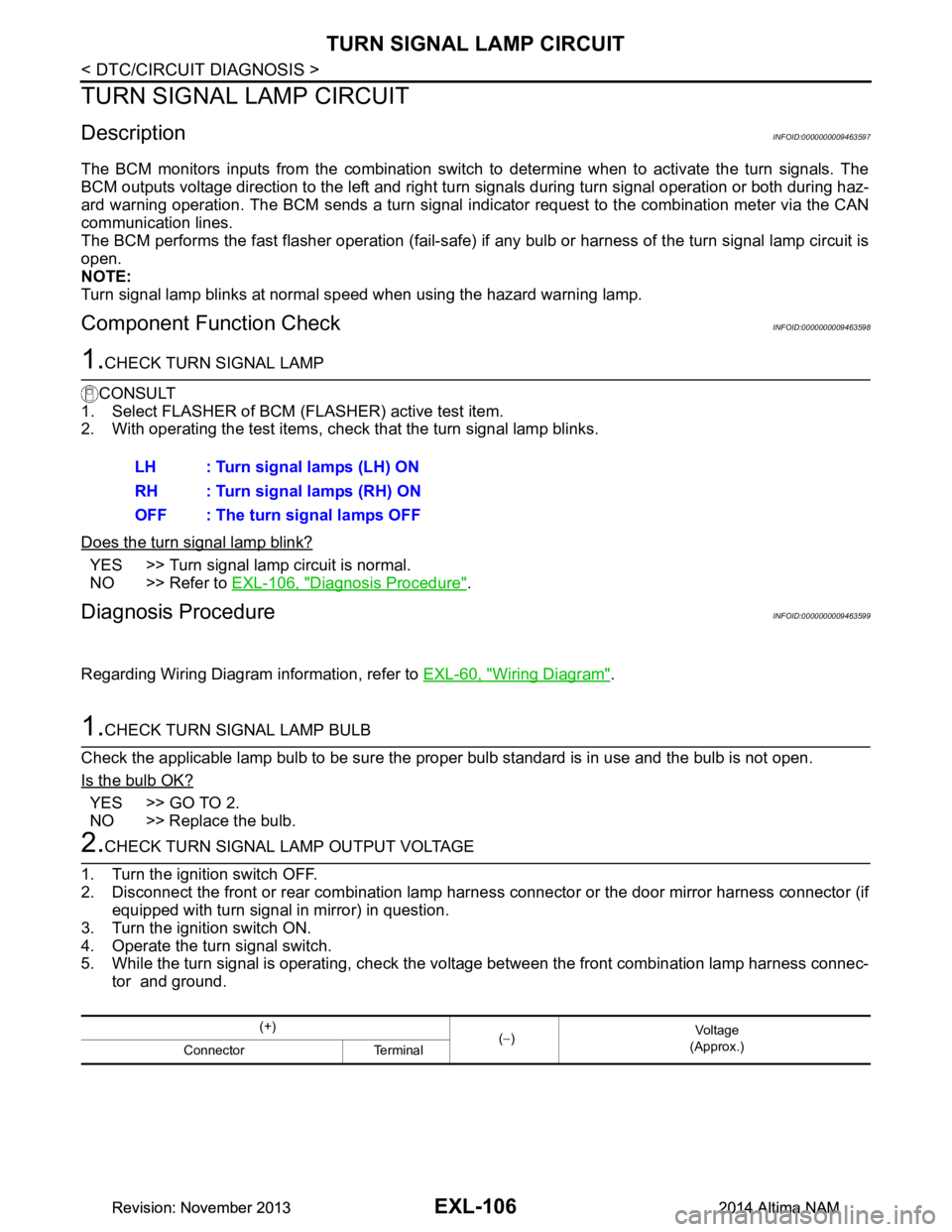
1.CHECK TURN SIGNAL LAMP
CONSULT
1. Select FLASHER of BCM (FLASHER) active test item.
2. With operating the test items, check that the turn signal lamp blinks.
Does the turn signal lamp blink?
YES >> Turn signal lamp circuit is normal.
NO >> Refer to EXL-106, "Diagnosis Procedure"
.
Diagnosis ProcedureINFOID:0000000009463599
Regarding Wiring Diagram information, refer to EXL-60, "Wiring Diagram".
1.CHECK TURN SIGNAL LAMP BULB
Check the applicable lamp bulb to be sure the proper bulb standard is in use and the bulb is not open.
Is the bulb OK?
YES >> GO TO 2.
NO >> Replace the bulb.
2.CHECK TURN SIGNAL LAMP OUTPUT VOLTAGE
1. Turn the ignition switch OFF.
2. Disconnect the front or rear combination lamp har ness connector or the door mirror harness connector (if
equipped with turn signal in mirror) in question.
3. Turn the ignition switch ON.
4. Operate the turn signal switch.
5. While the turn signal is operating, check the vo ltage between the front combination lamp harness connec-
tor and ground. LH : Turn signal lamps (LH) ON
RH : Turn signal lamps (RH) ON
OFF : The turn signal lamps OFF
(+) (− ) Vo l ta g e
(Approx.)
Connector Terminal
Revision: November 20132014 Altima NAMRevision: November 20132014 Altima NAM
Page 2373 of 4801
TURN SIGNAL LAMP CIRCUITEXL-107
< DTC/CIRCUIT DIAGNOSIS >
C
D E
F
G H
I
J
K
M A
B
EXL
N
O P
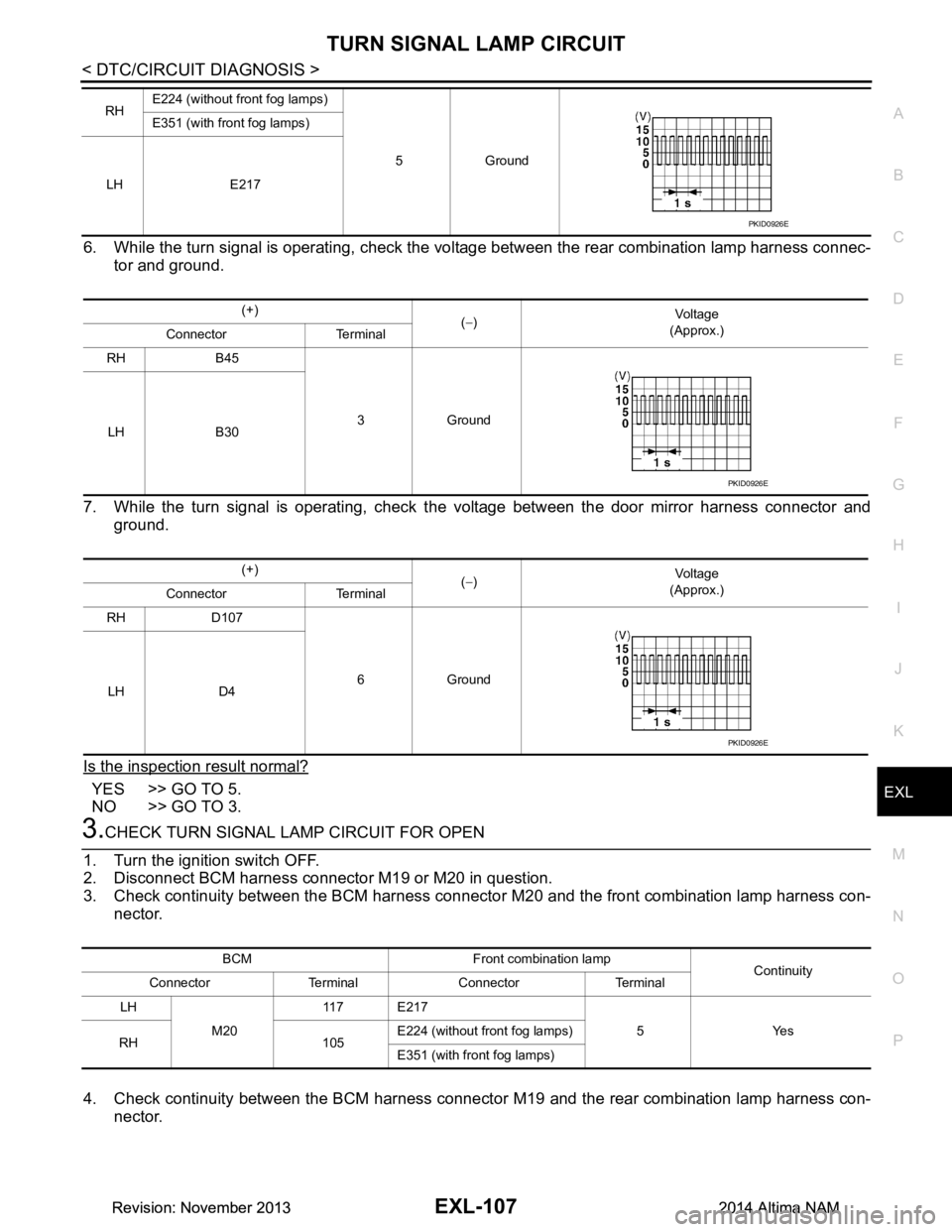
6. While the turn signal is operating, check the vo ltage between the rear combination lamp harness connec-
tor and ground.
7. While the turn signal is operating, check t he voltage between the door mirror harness connector and
ground.
Is the inspection result normal?
YES >> GO TO 5.
NO >> GO TO 3.
3.CHECK TURN SIGNAL LAMP CIRCUIT FOR OPEN
1. Turn the ignition switch OFF.
2. Disconnect BCM harness connector M19 or M20 in question.
3. Check continuity between the BCM harness connecto r M20 and the front combination lamp harness con-
nector.
4. Check continuity between the BCM harness connecto r M19 and the rear combination lamp harness con-
nector.
RH E224 (without front fog lamps)
5Ground
E351 (with front fog lamps)
LH E217
PKID0926E
(+) (− ) Vol tag e
(Approx.)
Connector Terminal
RH B45
3Ground
LH B30
(+) (− ) Vol tag e
(Approx.)
Connector Terminal
RH D107
6Ground
LH D4
PKID0926E
PKID0926E
BCM Front combination lamp Continuity
Connector Terminal Connector Terminal
LH M20 11 7 E 2 1 7
5Yes
RH 105 E224 (without front fog lamps)
E351 (with front fog lamps)
Revision: November 20132014 Altima NAMRevision: November 20132014 Altima NAM
Page 2376 of 4801
EXL-110
< DTC/CIRCUIT DIAGNOSIS >
OPTICAL SENSOR
OPTICAL SENSOR
DescriptionINFOID:0000000009463600
The optical sensor measures ambient light and transmits the optical sensor signal to the BCM.
Component Function CheckINFOID:0000000009463601
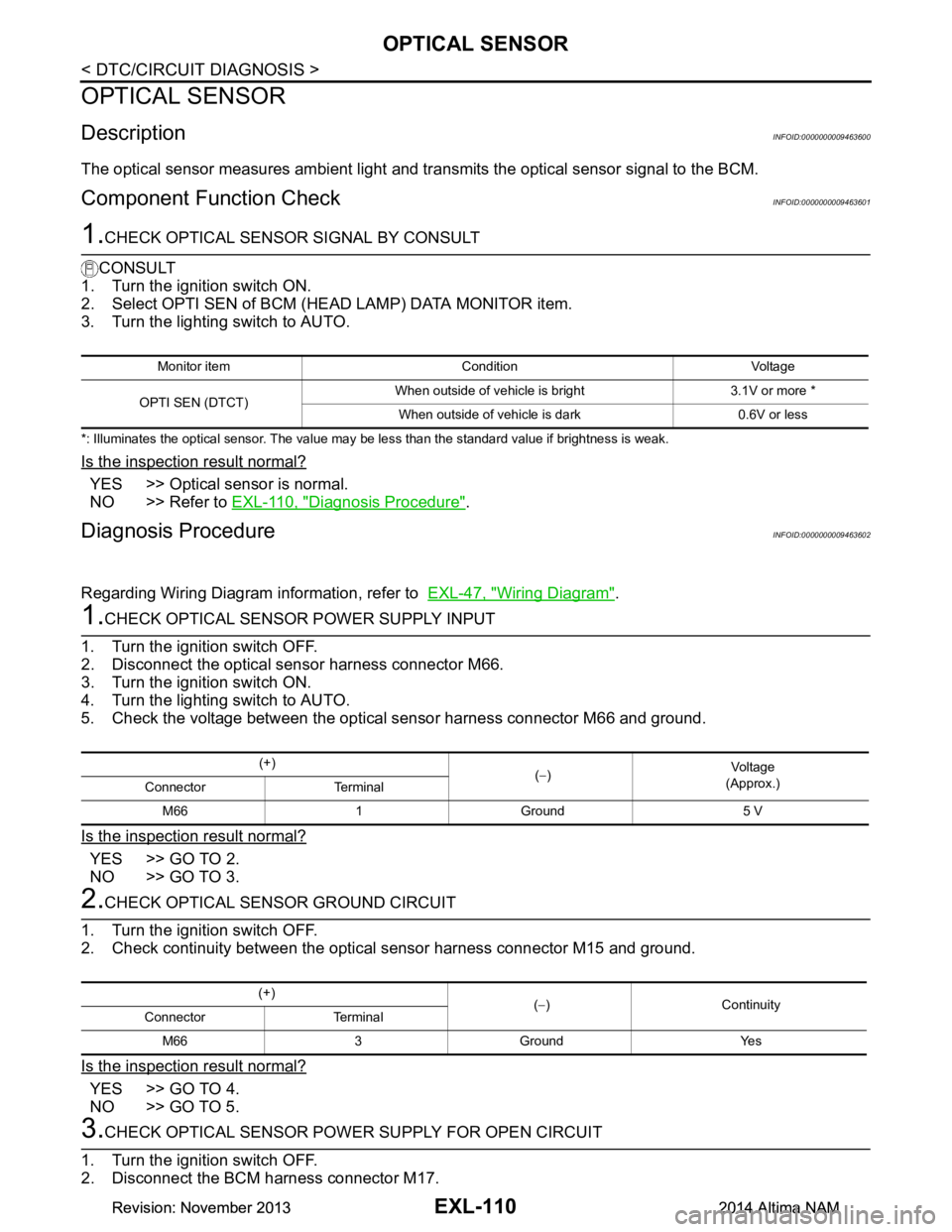
1.CHECK OPTICAL SENSOR SIGNAL BY CONSULT
CONSULT
1. Turn the ignition switch ON.
2. Select OPTI SEN of BCM (HEAD LAMP) DATA MONITOR item.
3. Turn the lighting switch to AUTO.
*: Illuminates the optical sensor. The value may be less than the standard value if brightness is weak.
Is the inspection result normal?
YES >> Optical sensor is normal.
NO >> Refer to EXL-110, "Diagnosis Procedure"
.
Diagnosis ProcedureINFOID:0000000009463602
Regarding Wiring Diagram information, refer to EXL-47, "Wiring Diagram".
1.CHECK OPTICAL SENSOR POWER SUPPLY INPUT
1. Turn the ignition switch OFF.
2. Disconnect the optical sensor harness connector M66.
3. Turn the ignition switch ON.
4. Turn the lighting switch to AUTO.
5. Check the voltage between the optical sensor harness connector M66 and ground.
Is the inspection result normal?
YES >> GO TO 2.
NO >> GO TO 3.
2.CHECK OPTICAL SENSOR GROUND CIRCUIT
1. Turn the ignition switch OFF.
2. Check continuity between the optical sensor harness connector M15 and ground.
Is the inspection result normal?
YES >> GO TO 4.
NO >> GO TO 5.
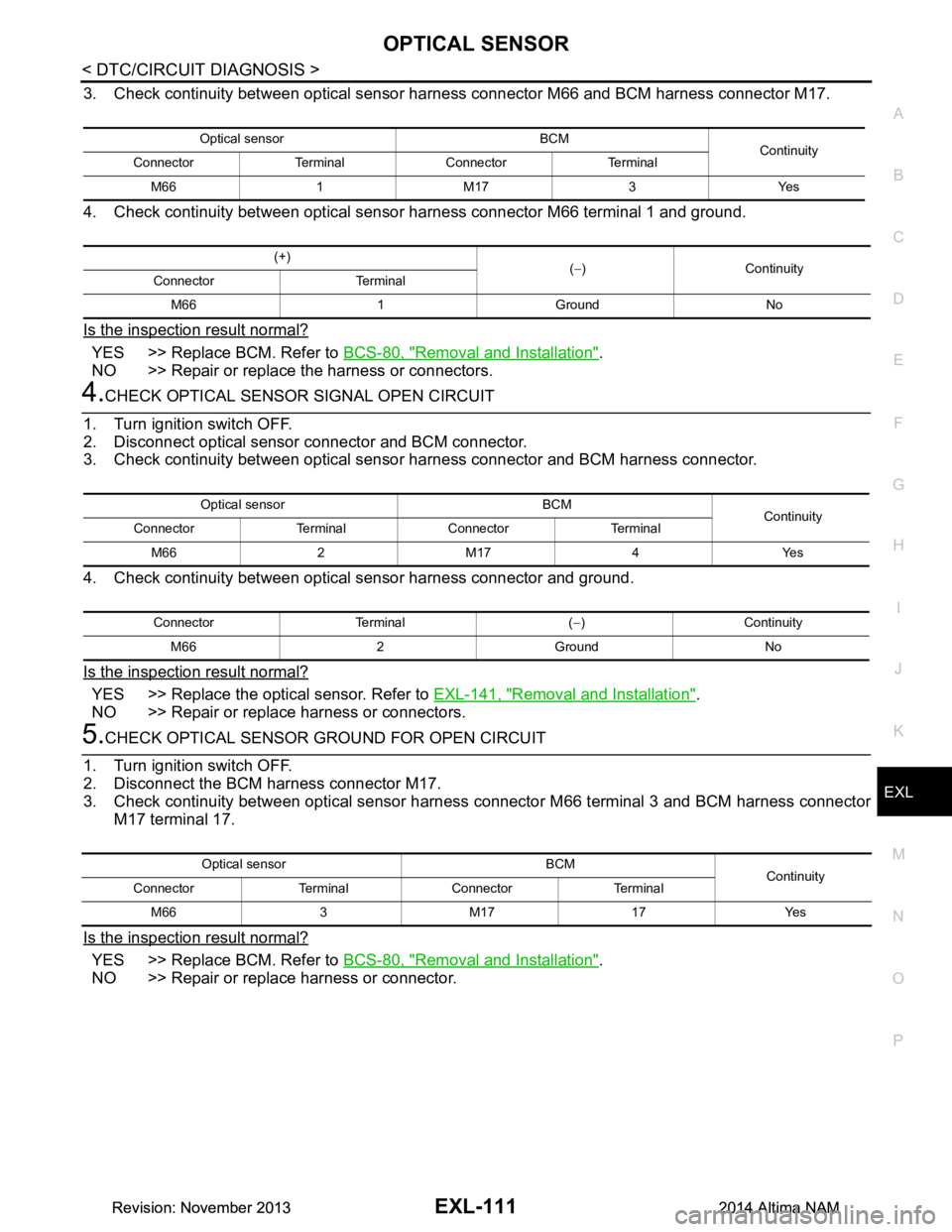
3.CHECK OPTICAL SENSOR POWER SUPPLY FOR OPEN CIRCUIT
1. Turn the ignition switch OFF.
2. Disconnect the BCM harness connector M17.
Monitor item Condition Voltage
OPTI SEN (DTCT) When outside of vehicle is bright 3.1V or more *
When outside of vehicle is dark 0.6V or less
(+) (− ) Vo l ta g e
(Approx.)
Connector Terminal
M66 1 Ground 5 V
(+) (− )Continuity
Connector Terminal
M66 3 Ground Yes
Revision: November 20132014 Altima NAMRevision: November 20132014 Altima NAM
Page 2377 of 4801
OPTICAL SENSOREXL-111
< DTC/CIRCUIT DIAGNOSIS >
C
D E
F
G H
I
J
K
M A
B
EXL
N
O P
3. Check continuity between optical sensor harness connector M66 and BCM harness connector M17.
4. Check continuity between optical sensor harness connector M66 terminal 1 and ground.
Is the inspection result normal?
YES >> Replace BCM. Refer to BCS-80, "Removal and Installation".
NO >> Repair or replace the harness or connectors.
4.CHECK OPTICAL SENSOR SIGNAL OPEN CIRCUIT
1. Turn ignition switch OFF.
2. Disconnect optical sensor connector and BCM connector.
3. Check continuity between optical sensor harness connector and BCM harness connector.
4. Check continuity between optical sensor harness connector and ground.
Is the inspection result normal?
YES >> Replace the optical sensor. Refer to EXL-141, "Removal and Installation".
NO >> Repair or replace harness or connectors.
5.CHECK OPTICAL SENSOR GROUND FOR OPEN CIRCUIT
1. Turn ignition switch OFF.
2. Disconnect the BCM harness connector M17.
3. Check continuity between optical sensor harnes s connector M66 terminal 3 and BCM harness connector
M17 terminal 17.
Is the inspection result normal?
YES >> Replace BCM. Refer to BCS-80, "Removal and Installation".
NO >> Repair or replace harness or connector.
Optical sensor BCM Continuity
Connector Terminal Connector Terminal
M66 1 M17 3 Yes
(+) (− )Continuity
Connector Terminal
M66 1 Ground No
Optical sensor BCM Continuity
Connector Terminal Connector Terminal
M66 2 M17 4 Yes
Connector Terminal ( −)Continuity
M66 2 Ground No
Optical sensor BCM Continuity
Connector Terminal Connector Terminal
M66 3 M17 17 Yes
Revision: November 20132014 Altima NAMRevision: November 20132014 Altima NAM
Page 2378 of 4801
EXL-112
< DTC/CIRCUIT DIAGNOSIS >
HAZARD SWITCH
HAZARD SWITCH
Component Function CheckINFOID:0000000009463603
1.CHECK HAZARD SWITCH SIGNAL BY CONSULT
CONSULT DATA MONITOR
1. Turn ignition switch ON.
2. Select HAZARD SW of BCM (F LASHER) Data Monitor item.
3. While operating the hazard switch, check the monitor status.
Is the inspection result normal?
YES >> Hazard switch circuit is normal.
NO >> Refer to EXL-112, "Diagnosis Procedure"
.
Diagnosis ProcedureINFOID:0000000009463604
Regarding Wiring Diagram information, refer to EXL-60, "Wiring Diagram".
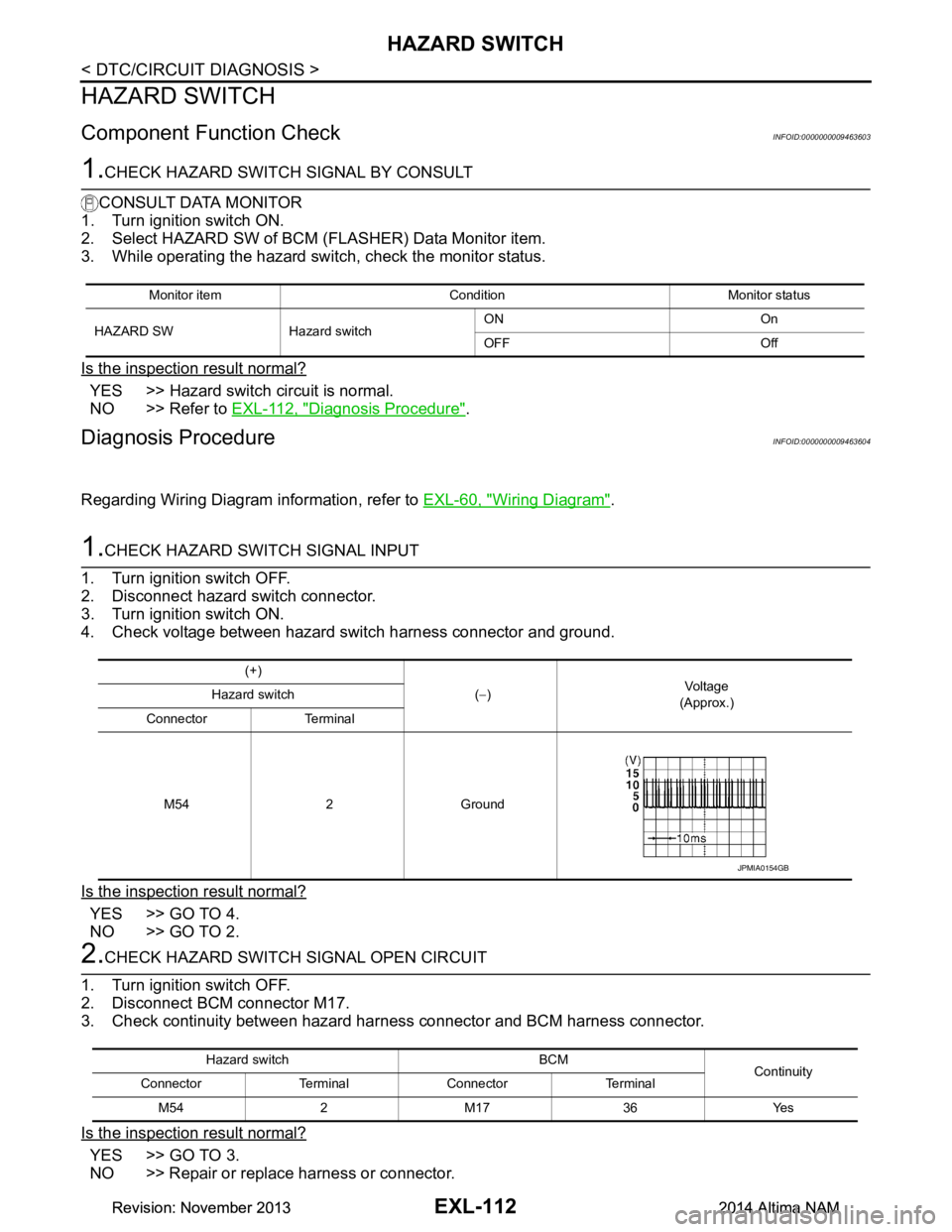
1.CHECK HAZARD SWITCH SIGNAL INPUT
1. Turn ignition switch OFF.
2. Disconnect hazard switch connector.
3. Turn ignition switch ON.
4. Check voltage between hazard s witch harness connector and ground.
Is the inspection result normal?
YES >> GO TO 4.
NO >> GO TO 2.
2.CHECK HAZARD SWITCH SIGNAL OPEN CIRCUIT
1. Turn ignition switch OFF.
2. Disconnect BCM connector M17.
3. Check continuity between hazard har ness connector and BCM harness connector.
Is the inspection result normal?
YES >> GO TO 3.
NO >> Repair or replace harness or connector.
Monitor item Condition Monitor status
HAZARD SW Hazard switch ON On
OFF Off
(+) (− ) Vol tag e
(Approx.)
Hazard switch
Connector Terminal
M54 2 Ground
JPMIA0154GB
Hazard switch BCM Continuity
Connector Terminal Connector Terminal
M54 2 M17 36 Yes
Revision: November 20132014 Altima NAMRevision: November 20132014 Altima NAM
Page 2380 of 4801
EXL-114
< SYMPTOM DIAGNOSIS >
EXTERIOR LIGHTING SYSTEM SYMPTOMS
SYMPTOM DIAGNOSIS
EXTERIOR LIGHTING SYSTEM SYMPTOMS
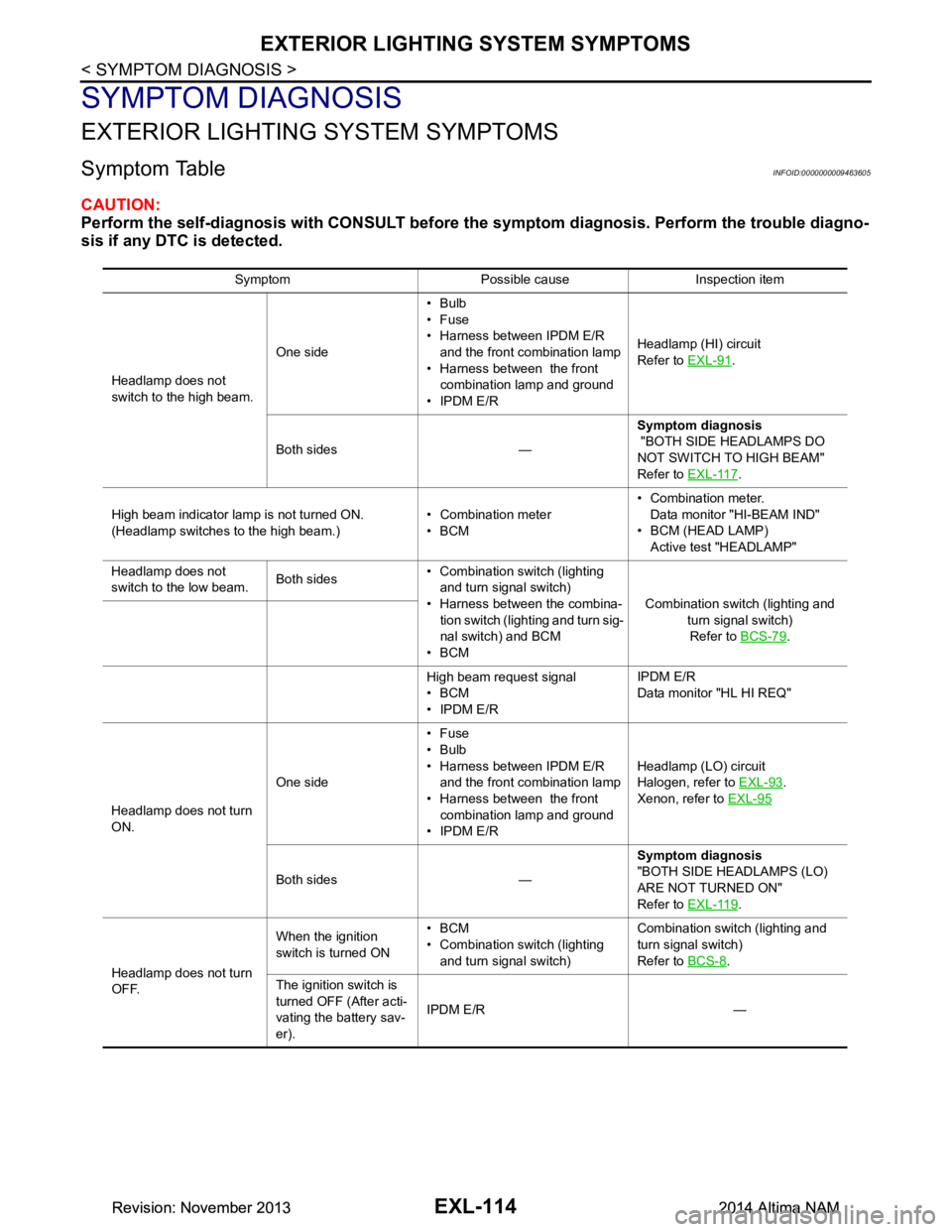
Symptom TableINFOID:0000000009463605
CAUTION:
Perform the self-diagnosis with CONSULT before th e symptom diagnosis. Perform the trouble diagno-
sis if any DTC is detected.
Symptom Possible cause Inspection item
Headlamp does not
switch to the high beam. One side•Bulb
•Fuse
• Harness between IPDM E/R and the front combination lamp
• Harness between the front combination lamp and ground
• IPDM E/R Headlamp (HI) circuit
Refer to EXL-91
.
Both sides — Symptom diagnosis
"BOTH SIDE HEADLAMPS DO
NOT SWITCH TO HIGH BEAM"
Refer to EXL-117
.
High beam indicator lamp is not turned ON.
(Headlamp switches to the high beam.) • Combination meter
•BCM • Combination meter.
Data monitor "HI-BEAM IND"
• BCM (HEAD LAMP) Active test "HEADLAMP"
Headlamp does not
switch to the low beam. Both sides• Combination switch (lighting
and turn signal switch)
• Harness between the combina- tion switch (lighting and turn sig-
nal switch) and BCM
•BCM Combination switch (lighting and
turn signal switch)Refer to BCS-79
.
High beam request signal
•BCM
• IPDM E/R IPDM E/R
Data monitor "HL HI REQ"
Headlamp does not turn
ON. One side•Fuse
•Bulb
• Harness between IPDM E/R and the front combination lamp
• Harness between the front combination lamp and ground
• IPDM E/R Headlamp (L
O) circuit
Halogen, refer to EXL-93
.
Xenon, refer to EXL-95
Both sides — Symptom diagnosis
"BOTH SIDE HEADLAMPS (LO)
ARE NOT TURNED ON"
Refer to EXL-119
.
Headlamp does not turn
OFF. When the ignition
switch is turned ON •BCM
• Combination switch (lighting and turn signal switch) Combination switch (lighting and
turn signal switch)
Refer to BCS-8
.
The ignition switch is
turned OFF (After acti-
vating the battery sav-
er). IPDM E/R —
Revision: November 20132014 Altima NAMRevision: November 20132014 Altima NAM
Page 2381 of 4801
EXTERIOR LIGHTING SYSTEM SYMPTOMSEXL-115
< SYMPTOM DIAGNOSIS >
C
D E
F
G H
I
J
K
M A
B
EXL
N
O P
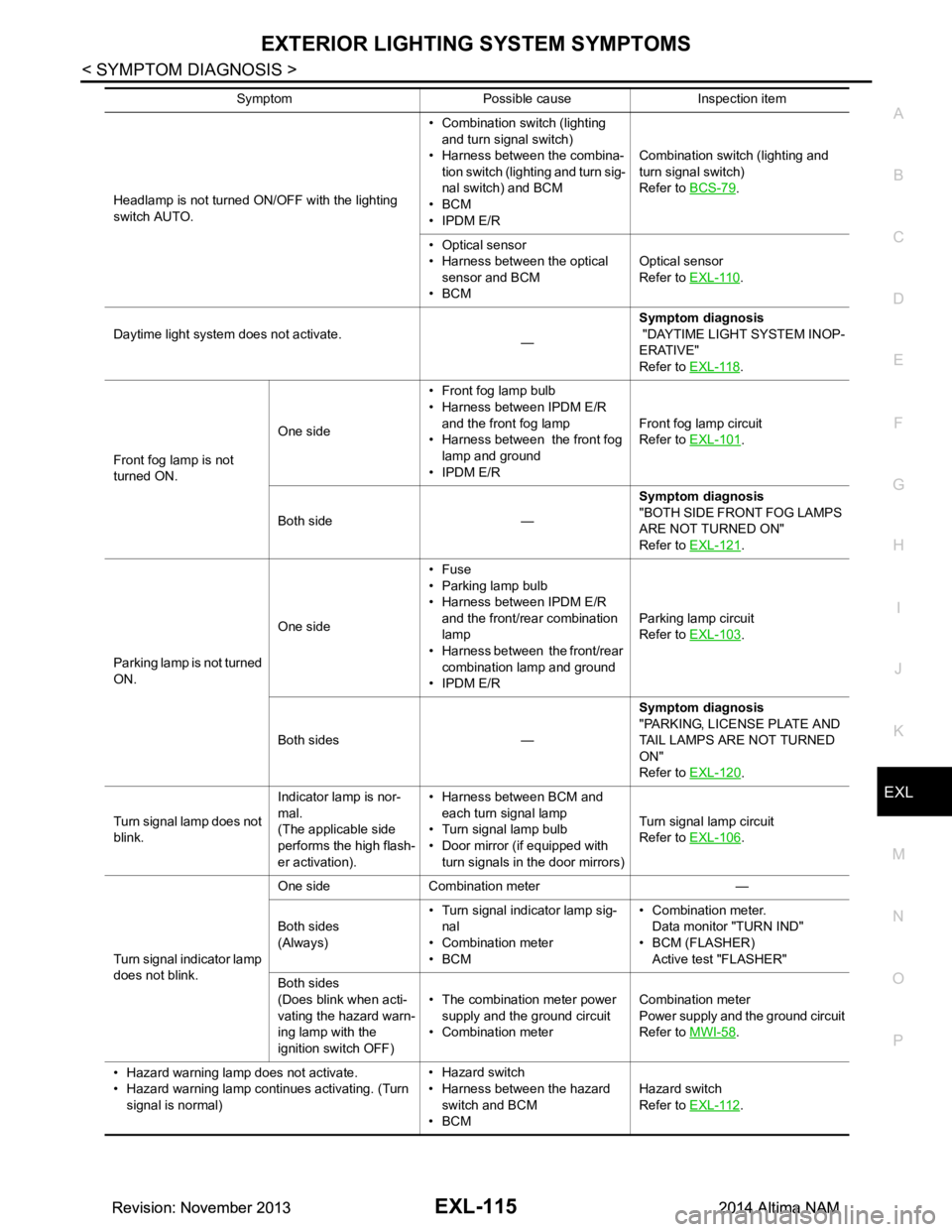
Headlamp is not turned ON/OFF with the lighting
switch AUTO. • Combination switch (lighting
and turn signal switch)
• Harness between the combina- tion switch (lighting and turn sig-
nal switch) and BCM
•BCM
• IPDM E/R Combination switch (lighting and
turn signal switch)
Refer to BCS-79.
• Optical sensor
• Harness between the optical
sensor and BCM
•BCM Optical sensor
Refer to EXL-110
.
Daytime light system does not activate. —Symptom diagnosis
"DAYTIME LIGHT SYSTEM INOP-
ERATIVE"
Refer to EXL-118
.
Front fog lamp is not
turned ON. One side
• Front fog lamp bulb
• Harness between IPDM E/R
and the front fog lamp
• Harness between the front fog lamp and ground
• IPDM E/R Front fog lamp circuit
Refer to EXL-101
.
Both side — Symptom diagnosis
"BOTH SIDE FRONT FOG LAMPS
ARE NOT TURNED ON"
Refer to EXL-121
.
Parking lamp is not turned
ON. One side•Fuse
• Parking lamp bulb
• Harness between IPDM E/R
and the front/rear combination
lamp
• Harness between the front/rear
combination lamp and ground
• IPDM E/R Parking lamp circuit
Refer to EXL-103
.
Both sides — Symptom diagnosis
"PARKING, LICENSE PLATE AND
TAIL LAMPS ARE NOT TURNED
ON"
Refer to EXL-120
.
Turn signal lamp does not
blink. Indicator lamp is nor-
mal.
(The applicable side
performs the high flash-
er activation). • Harness between BCM and
each turn signal lamp
• Turn signal lamp bulb
• Door mirror (if equipped with
turn signals in the door mirrors) Turn signal lamp circuit
Refer to EXL-106
.
Turn signal indicator lamp
does not blink. One side Combination meter —
Both sides
(Always) • Turn signal indicator lamp sig-
nal
• Combination meter
•BCM • Combination meter.
Data monitor "TURN IND"
• BCM (FLASHER) Active test "FLASHER"
Both sides
(Does blink when acti-
vating the hazard warn-
ing lamp with the
ignition switch OFF) • The combination meter power
supply and the ground circuit
• Combination meter Combination meter
Power supply and the ground circuit
Refer to MWI-58
.
• Hazard warning lamp does not activate.
• Hazard warning lamp continues activating. (Turn signal is normal) • Hazard switch
• Harness between the hazard switch and BCM
•BCM Hazard switch
Refer to EXL-112
.
Symptom Possible cause Inspection item
Revision: November 20132014 Altima NAMRevision: November 20132014 Altima NAM