key NISSAN TERRANO 2002 Service Service Manual
[x] Cancel search | Manufacturer: NISSAN, Model Year: 2002, Model line: TERRANO, Model: NISSAN TERRANO 2002Pages: 1767, PDF Size: 41.51 MB
Page 1048 of 1767
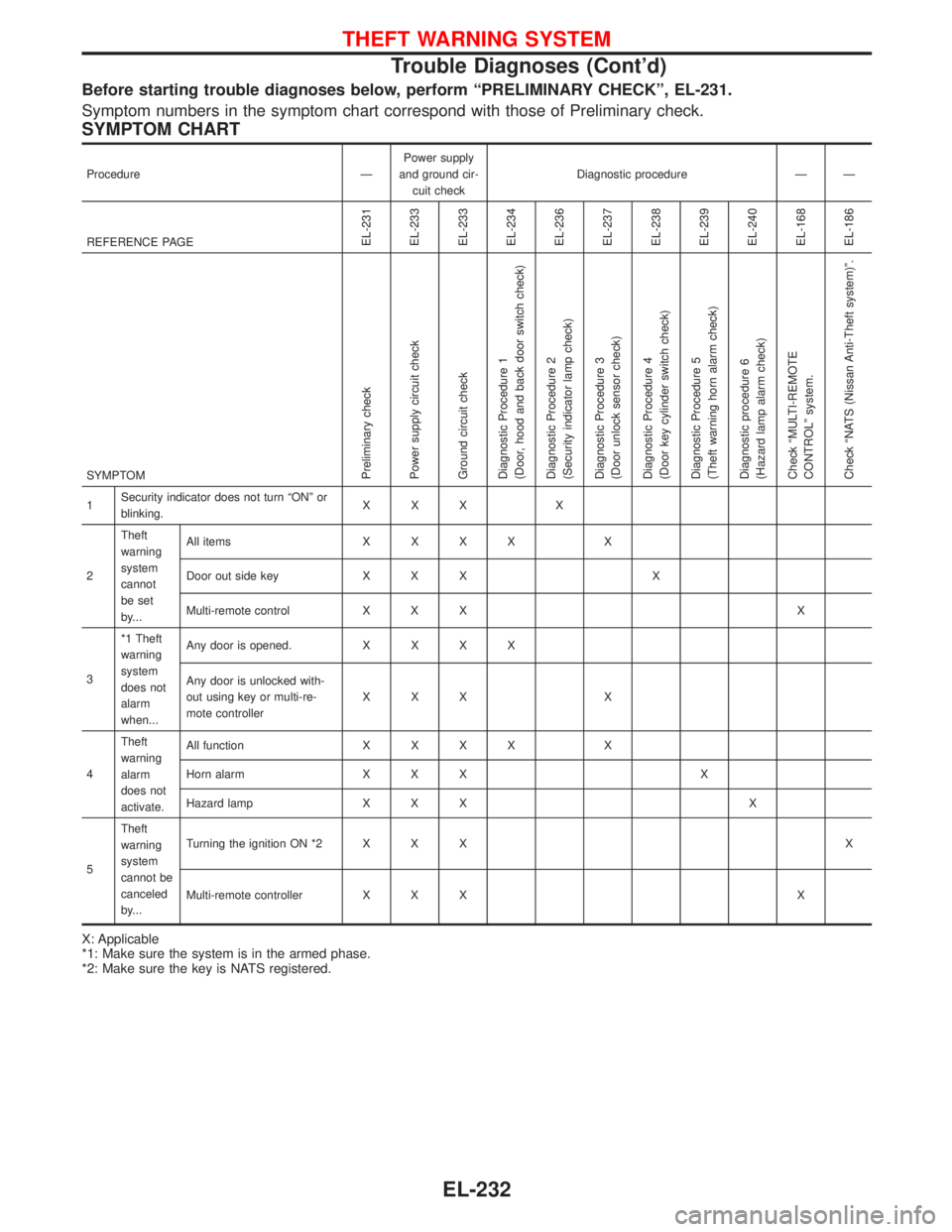
Before starting trouble diagnoses below, perform ªPRELIMINARY CHECKº, EL-231.
Symptom numbers in the symptom chart correspond with those of Preliminary check.
SYMPTOM CHART
Procedure ÐPower supply
and ground cir-
cuit checkDiagnostic procedure Ð Ð
REFERENCE PAGE
EL-231
EL-233
EL-233
EL-234
EL-236
EL-237
EL-238
EL-239
EL-240
EL-168
EL-186
SYMPTOMPreliminary check
Power supply circuit check
Ground circuit check
Diagnostic Procedure 1
(Door, hood and back door switch check)
Diagnostic Procedure 2
(Security indicator lamp check)
Diagnostic Procedure 3
(Door unlock sensor check)
Diagnostic Procedure 4
(Door key cylinder switch check)
Diagnostic Procedure 5
(Theft warning horn alarm check)
Diagnostic procedure 6
(Hazard lamp alarm check)
Check ªMULTI-REMOTE
CONTROLº system.
Check ªNATS (Nissan Anti-Theft system)º.
1Security indicator does not turn ªONº or
blinking.XXX X
2Theft
warning
system
cannot
be set
by...All itemsXXXX X
Door out side key X X X X
Multi-remote control X X X X
3*1 Theft
warning
system
does not
alarm
when...Any door is opened.XXXX
Any door is unlocked with-
out using key or multi-re-
mote controllerXXX X
4Theft
warning
alarm
does not
activate.All functionXXXX X
Horn alarm X X X X
Hazard lamp X X X X
5Theft
warning
system
cannot be
canceled
by...Turning the ignition ON *2 X X XX
Multi-remote controller X X X X
X: Applicable
*1: Make sure the system is in the armed phase.
*2: Make sure the key is NATS registered.
THEFT WARNING SYSTEM
Trouble Diagnoses (Cont'd)
EL-232
Page 1054 of 1767
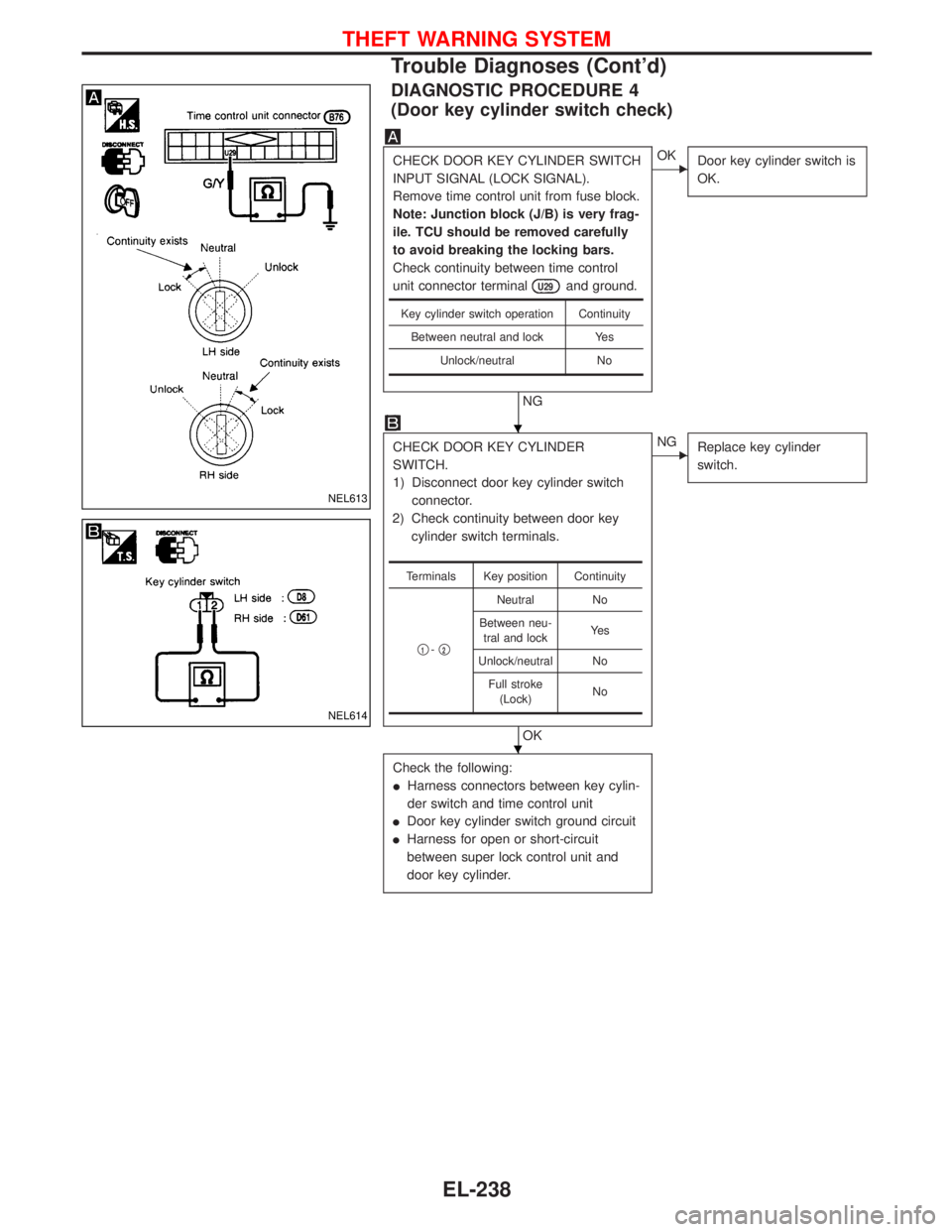
DIAGNOSTIC PROCEDURE 4
(Door key cylinder switch check)
CHECK DOOR KEY CYLINDER SWITCH
INPUT SIGNAL (LOCK SIGNAL).
Remove time control unit from fuse block.
Note: Junction block (J/B) is very frag-
ile. TCU should be removed carefully
to avoid breaking the locking bars.
Check continuity between time control
unit connector terminal
U29and ground.
NG
EOK
Door key cylinder switch is
OK.
CHECK DOOR KEY CYLINDER
SWITCH.
1) Disconnect door key cylinder switch
connector.
2) Check continuity between door key
cylinder switch terminals.
OK
ENG
Replace key cylinder
switch.
Check the following:
IHarness connectors between key cylin-
der switch and time control unit
IDoor key cylinder switch ground circuit
IHarness for open or short-circuit
between super lock control unit and
door key cylinder.
Key cylinder switch operation Continuity
Between neutral and lock Yes
Unlock/neutral No
Terminals Key position Continuity
q
1-q2
Neutral No
Between neu-
tral and lockYe s
Unlock/neutral No
Full stroke
(Lock)No
NEL613
NEL614
H
H
THEFT WARNING SYSTEM
Trouble Diagnoses (Cont'd)
EL-238
Page 1107 of 1767
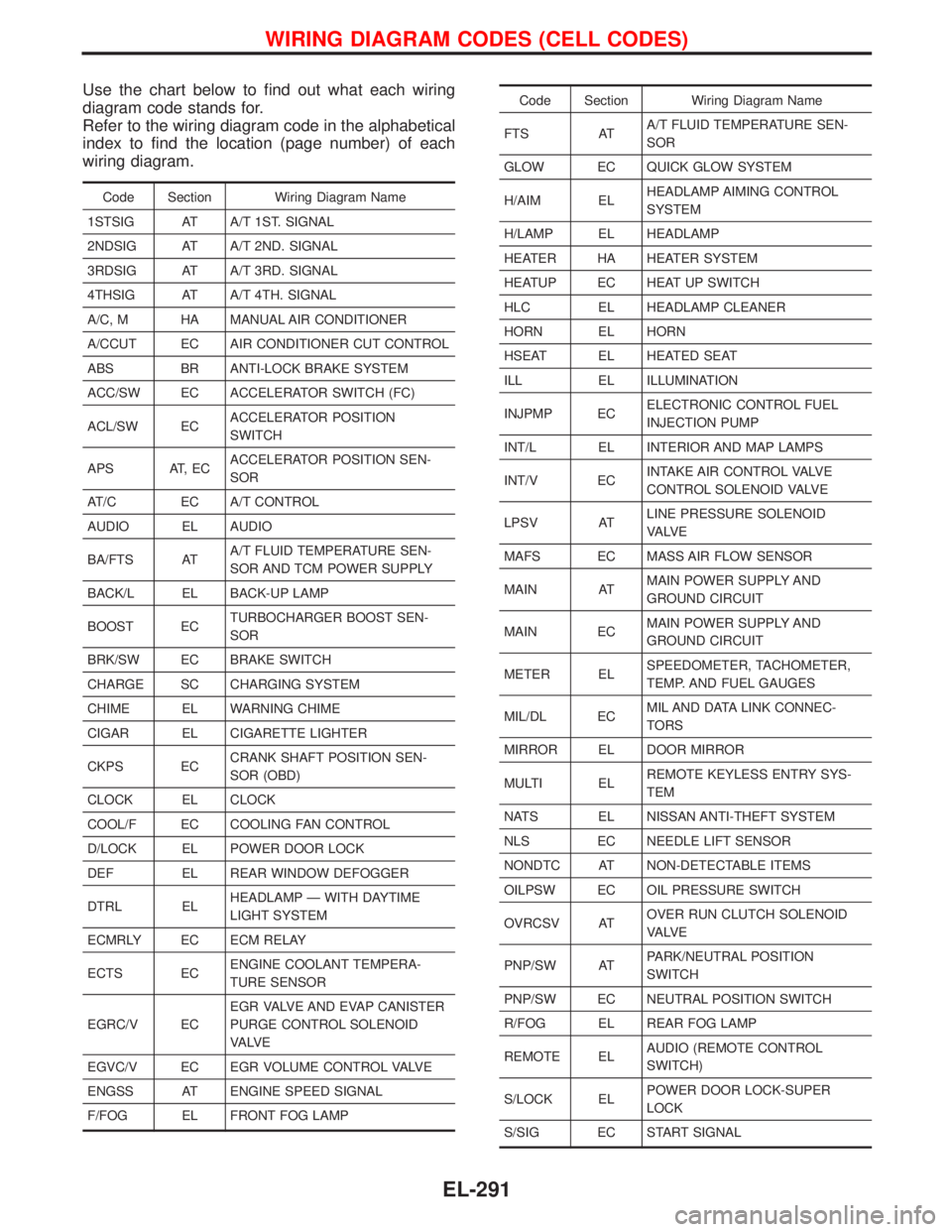
Use the chart below to find out what each wiring
diagram code stands for.
Refer to the wiring diagram code in the alphabetical
index to find the location (page number) of each
wiring diagram.
Code Section Wiring Diagram Name
1STSIG AT A/T 1ST. SIGNAL
2NDSIG AT A/T 2ND. SIGNAL
3RDSIG AT A/T 3RD. SIGNAL
4THSIG AT A/T 4TH. SIGNAL
A/C, M HA MANUAL AIR CONDITIONER
A/CCUT EC AIR CONDITIONER CUT CONTROL
ABS BR ANTI-LOCK BRAKE SYSTEM
ACC/SW EC ACCELERATOR SWITCH (FC)
ACL/SW ECACCELERATOR POSITION
SWITCH
APS AT, ECACCELERATOR POSITION SEN-
SOR
AT/C EC A/T CONTROL
AUDIO EL AUDIO
BA/FTS ATA/T FLUID TEMPERATURE SEN-
SOR AND TCM POWER SUPPLY
BACK/L EL BACK-UP LAMP
BOOST ECTURBOCHARGER BOOST SEN-
SOR
BRK/SW EC BRAKE SWITCH
CHARGE SC CHARGING SYSTEM
CHIME EL WARNING CHIME
CIGAR EL CIGARETTE LIGHTER
CKPS ECCRANK SHAFT POSITION SEN-
SOR (OBD)
CLOCK EL CLOCK
COOL/F EC COOLING FAN CONTROL
D/LOCK EL POWER DOOR LOCK
DEF EL REAR WINDOW DEFOGGER
DTRL ELHEADLAMP Ð WITH DAYTIME
LIGHT SYSTEM
ECMRLY EC ECM RELAY
ECTS ECENGINE COOLANT TEMPERA-
TURE SENSOR
EGRC/V ECEGR VALVE AND EVAP CANISTER
PURGE CONTROL SOLENOID
VA LV E
EGVC/V EC EGR VOLUME CONTROL VALVE
ENGSS AT ENGINE SPEED SIGNAL
F/FOG EL FRONT FOG LAMP
Code Section Wiring Diagram Name
FTS ATA/T FLUID TEMPERATURE SEN-
SOR
GLOW EC QUICK GLOW SYSTEM
H/AIM ELHEADLAMP AIMING CONTROL
SYSTEM
H/LAMP EL HEADLAMP
HEATER HA HEATER SYSTEM
HEATUP EC HEAT UP SWITCH
HLC EL HEADLAMP CLEANER
HORN EL HORN
HSEAT EL HEATED SEAT
ILL EL ILLUMINATION
INJPMP ECELECTRONIC CONTROL FUEL
INJECTION PUMP
INT/L EL INTERIOR AND MAP LAMPS
INT/V ECINTAKE AIR CONTROL VALVE
CONTROL SOLENOID VALVE
LPSV ATLINE PRESSURE SOLENOID
VA LV E
MAFS EC MASS AIR FLOW SENSOR
MAIN ATMAIN POWER SUPPLY AND
GROUND CIRCUIT
MAIN ECMAIN POWER SUPPLY AND
GROUND CIRCUIT
METER ELSPEEDOMETER, TACHOMETER,
TEMP. AND FUEL GAUGES
MIL/DL ECMIL AND DATA LINK CONNEC-
TORS
MIRROR EL DOOR MIRROR
MULTI ELREMOTE KEYLESS ENTRY SYS-
TEM
NATS EL NISSAN ANTI-THEFT SYSTEM
NLS EC NEEDLE LIFT SENSOR
NONDTC AT NON-DETECTABLE ITEMS
OILPSW EC OIL PRESSURE SWITCH
OVRCSV ATOVER RUN CLUTCH SOLENOID
VA LV E
PNP/SW ATPARK/NEUTRAL POSITION
SWITCH
PNP/SW EC NEUTRAL POSITION SWITCH
R/FOG EL REAR FOG LAMP
REMOTE ELAUDIO (REMOTE CONTROL
SWITCH)
S/LOCK ELPOWER DOOR LOCK-SUPER
LOCK
S/SIG EC START SIGNAL
WIRING DIAGRAM CODES (CELL CODES)
EL-291
Page 1141 of 1767
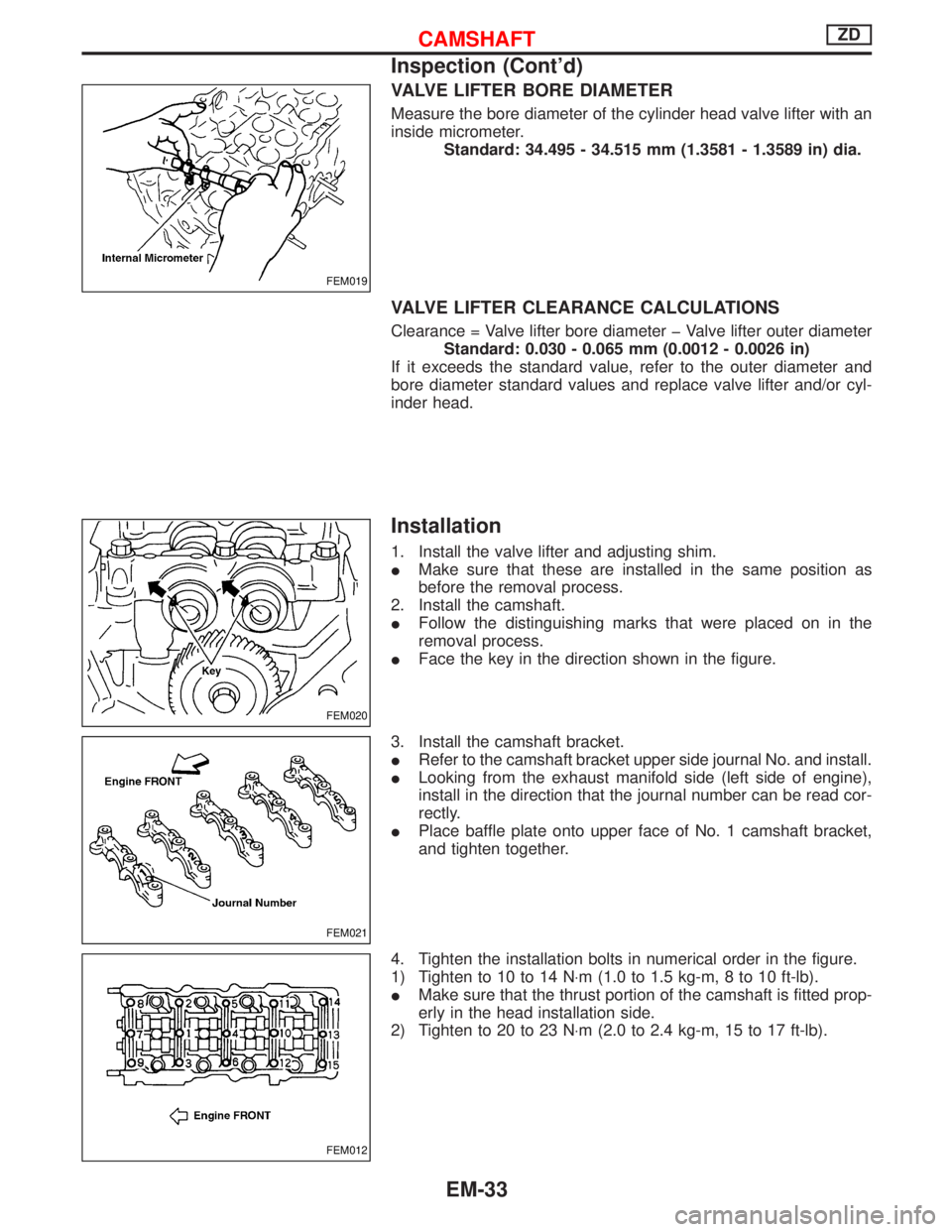
VALVE LIFTER BORE DIAMETER
Measure the bore diameter of the cylinder head valve lifter with an
inside micrometer.
Standard: 34.495 - 34.515 mm (1.3581 - 1.3589 in) dia.
VALVE LIFTER CLEARANCE CALCULATIONS
Clearance = Valve lifter bore diameter þ Valve lifter outer diameter
Standard: 0.030 - 0.065 mm (0.0012 - 0.0026 in)
If it exceeds the standard value, refer to the outer diameter and
bore diameter standard values and replace valve lifter and/or cyl-
inder head.
Installation
1. Install the valve lifter and adjusting shim.
IMake sure that these are installed in the same position as
before the removal process.
2. Install the camshaft.
IFollow the distinguishing marks that were placed on in the
removal process.
IFace the key in the direction shown in the figure.
3. Install the camshaft bracket.
IRefer to the camshaft bracket upper side journal No. and install.
ILooking from the exhaust manifold side (left side of engine),
install in the direction that the journal number can be read cor-
rectly.
IPlace baffle plate onto upper face of No. 1 camshaft bracket,
and tighten together.
4. Tighten the installation bolts in numerical order in the figure.
1) Tighten to 10 to 14 N×m (1.0 to 1.5 kg-m, 8 to 10 ft-lb).
IMake sure that the thrust portion of the camshaft is fitted prop-
erly in the head installation side.
2) Tighten to 20 to 23 N×m (2.0 to 2.4 kg-m, 15 to 17 ft-lb).
FEM019
FEM020
FEM021
FEM012
CAMSHAFTZD
Inspection (Cont'd)
EM-33
Page 1240 of 1767
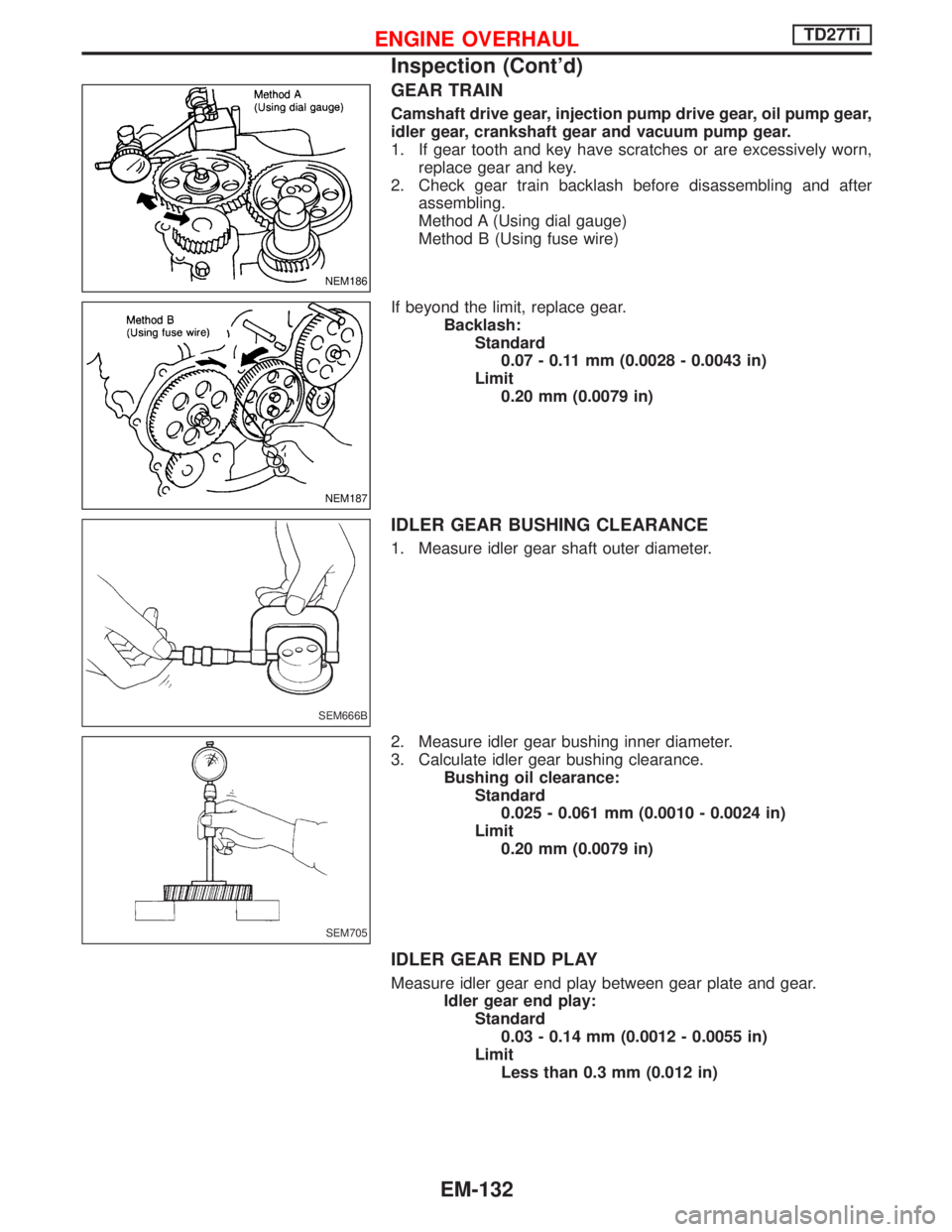
GEAR TRAIN
Camshaft drive gear, injection pump drive gear, oil pump gear,
idler gear, crankshaft gear and vacuum pump gear.
1. If gear tooth and key have scratches or are excessively worn,
replace gear and key.
2. Check gear train backlash before disassembling and after
assembling.
Method A (Using dial gauge)
Method B (Using fuse wire)
If beyond the limit, replace gear.
Backlash:
Standard
0.07 - 0.11 mm (0.0028 - 0.0043 in)
Limit
0.20 mm (0.0079 in)
IDLER GEAR BUSHING CLEARANCE
1. Measure idler gear shaft outer diameter.
2. Measure idler gear bushing inner diameter.
3. Calculate idler gear bushing clearance.
Bushing oil clearance:
Standard
0.025 - 0.061 mm (0.0010 - 0.0024 in)
Limit
0.20 mm (0.0079 in)
IDLER GEAR END PLAY
Measure idler gear end play between gear plate and gear.
Idler gear end play:
Standard
0.03 - 0.14 mm (0.0012 - 0.0055 in)
Limit
Less than 0.3 mm (0.012 in)
NEM186
NEM187
SEM666B
SEM705
ENGINE OVERHAULTD27Ti
Inspection (Cont'd)
EM-132
Page 1318 of 1767
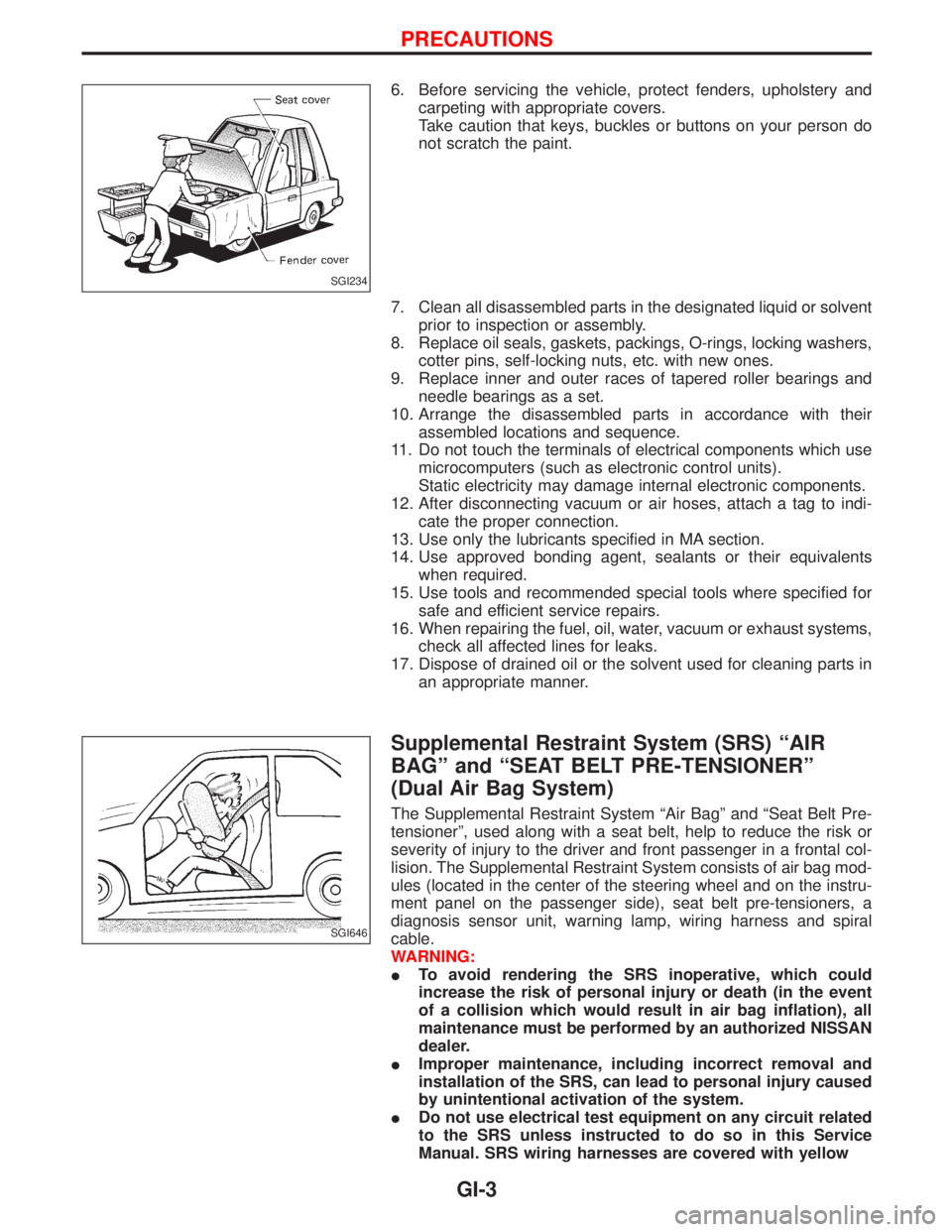
6. Before servicing the vehicle, protect fenders, upholstery and
carpeting with appropriate covers.
Take caution that keys, buckles or buttons on your person do
not scratch the paint.
7. Clean all disassembled parts in the designated liquid or solvent
prior to inspection or assembly.
8. Replace oil seals, gaskets, packings, O-rings, locking washers,
cotter pins, self-locking nuts, etc. with new ones.
9. Replace inner and outer races of tapered roller bearings and
needle bearings as a set.
10. Arrange the disassembled parts in accordance with their
assembled locations and sequence.
11. Do not touch the terminals of electrical components which use
microcomputers (such as electronic control units).
Static electricity may damage internal electronic components.
12. After disconnecting vacuum or air hoses, attach a tag to indi-
cate the proper connection.
13. Use only the lubricants specified in MA section.
14. Use approved bonding agent, sealants or their equivalents
when required.
15. Use tools and recommended special tools where specified for
safe and efficient service repairs.
16. When repairing the fuel, oil, water, vacuum or exhaust systems,
check all affected lines for leaks.
17. Dispose of drained oil or the solvent used for cleaning parts in
an appropriate manner.
Supplemental Restraint System (SRS) ªAIR
BAGº and ªSEAT BELT PRE-TENSIONERº
(Dual Air Bag System)
The Supplemental Restraint System ªAir Bagº and ªSeat Belt Pre-
tensionerº, used along with a seat belt, help to reduce the risk or
severity of injury to the driver and front passenger in a frontal col-
lision. The Supplemental Restraint System consists of air bag mod-
ules (located in the center of the steering wheel and on the instru-
ment panel on the passenger side), seat belt pre-tensioners, a
diagnosis sensor unit, warning lamp, wiring harness and spiral
cable.
WARNING:
ITo avoid rendering the SRS inoperative, which could
increase the risk of personal injury or death (in the event
of a collision which would result in air bag inflation), all
maintenance must be performed by an authorized NISSAN
dealer.
IImproper maintenance, including incorrect removal and
installation of the SRS, can lead to personal injury caused
by unintentional activation of the system.
IDo not use electrical test equipment on any circuit related
to the SRS unless instructed to do so in this Service
Manual. SRS wiring harnesses are covered with yellow
SGI234
SGI646
PRECAUTIONS
GI-3
Page 1319 of 1767
insulation (either just before the harness connectors or for
the complete harness), for easy identification.
Precautions for NATS
NATS (Nissan Anti-Theft System)
NATS will immobilize the engine if someone tries to start it without
the registered key of NATS.
Both of the originally supplied ignition key IDs have been NATS
registered.
The NATS security indicator is located on the instrument panel. The
indicator blinks when the ignition switch is in ªOFFº or ªACCº posi-
tion. Therefore, NATS warns outsiders that the vehicle is equipped
with the anti-theft system.
IWhen NATS detects trouble, the malfunction indicator lamp
(MIL) blinks.
This blinking indicates that the anti-theft is not functioning, so
prompt service is required.
IIf the malfunction indicator lamp comes on while the engine is
running, return the vehicle to the workshop before turning the
ignition switch ªOFFº.
Once the ignition switch is turned ªOFFº, the engine can not be
started.
IWhen servicing NATS (trouble diagnoses, system initialization
and additional registration of other NATS ignition key IDs) CON-
SULT-II hardware and CONSULT-II NATS software is neces-
sary.
Regarding the procedures of NATS initialization and NATS igni-
tion key ID registration, refer to CONSULT-II operation manual,
NATS.
Therefore, CONSULT-II NATS software (program card and
operation manual) must be kept strictly confidential to main-
tain the integrity of the anti-theft function.
IWhen servicing NATS (trouble diagnoses, system initialization
and additional registration of other NATS ignition key IDs), it
may be necessary to re-register original key identification.
Therefore, be sure to receive all keys from vehicle owner.
A maximum of five key IDs can be registered into NATS.
IWhen failing to start the engine first-time using the key of
NATS, starts as follows:
(1) Turn ignition key to ªOFFº.
(2) Wait approx. 5 seconds.
(3) Turn ignition key to ªSTARTº again while keeping the key
apart from any others on key-chain.
SGI916
PRECAUTIONS
Supplemental Restraint System (SRS) ªAIR
BAGº and ªSEAT BELT PRE-TENSIONERº
(Dual Air Bag System) (Cont'd)
GI-4
Page 1337 of 1767
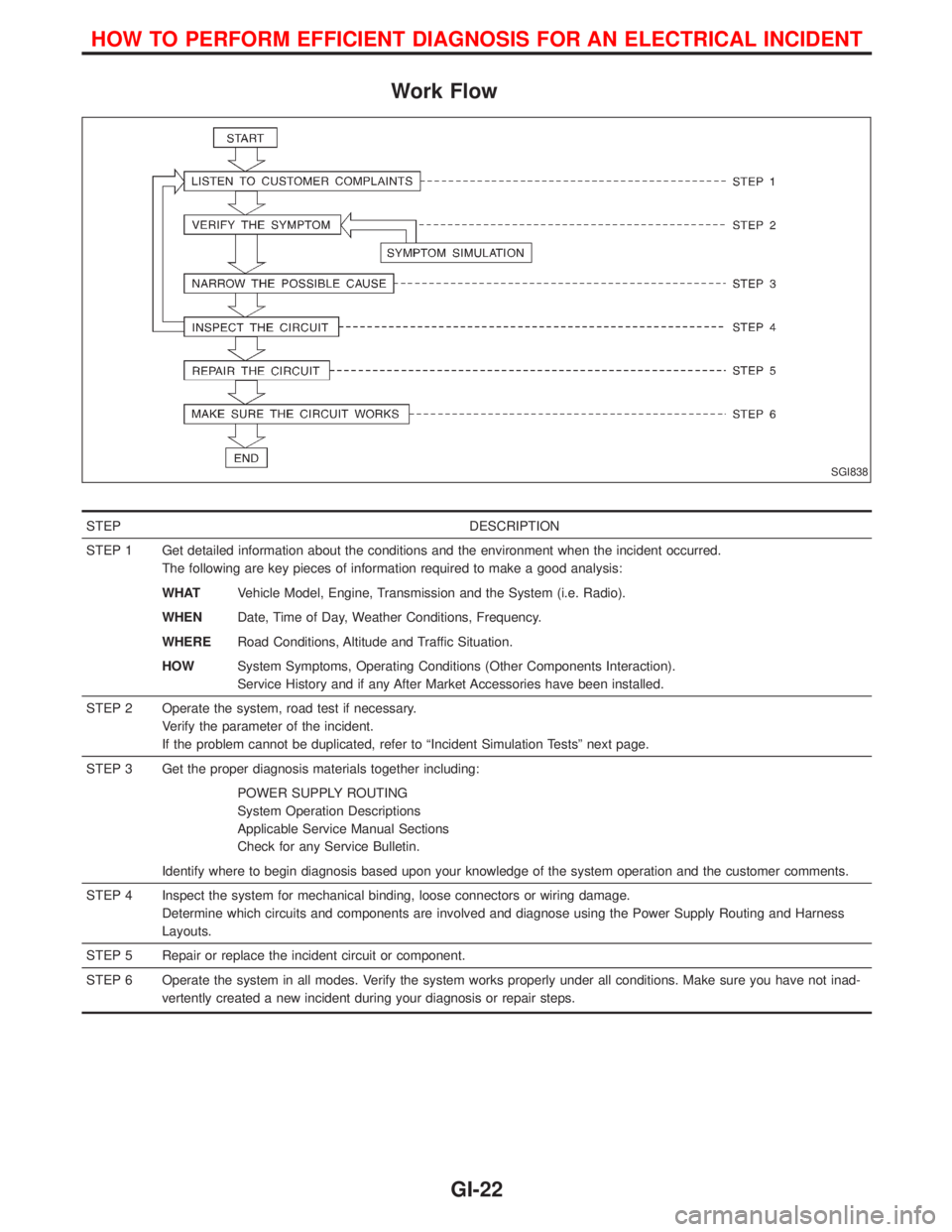
Work Flow
STEP DESCRIPTION
STEP 1 Get detailed information about the conditions and the environment when the incident occurred.
The following are key pieces of information required to make a good analysis:
WHATVehicle Model, Engine, Transmission and the System (i.e. Radio).
WHENDate, Time of Day, Weather Conditions, Frequency.
WHERERoad Conditions, Altitude and Traffic Situation.
HOWSystem Symptoms, Operating Conditions (Other Components Interaction).
Service History and if any After Market Accessories have been installed.
STEP 2 Operate the system, road test if necessary.
Verify the parameter of the incident.
If the problem cannot be duplicated, refer to ªIncident Simulation Testsº next page.
STEP 3 Get the proper diagnosis materials together including:
POWER SUPPLY ROUTING
System Operation Descriptions
Applicable Service Manual Sections
Check for any Service Bulletin.
Identify where to begin diagnosis based upon your knowledge of the system operation and the customer comments.
STEP 4 Inspect the system for mechanical binding, loose connectors or wiring damage.
Determine which circuits and components are involved and diagnose using the Power Supply Routing and Harness
Layouts.
STEP 5 Repair or replace the incident circuit or component.
STEP 6 Operate the system in all modes. Verify the system works properly under all conditions. Make sure you have not inad-
vertently created a new incident during your diagnosis or repair steps.
SGI838
HOW TO PERFORM EFFICIENT DIAGNOSIS FOR AN ELECTRICAL INCIDENT
GI-22
Page 1340 of 1767
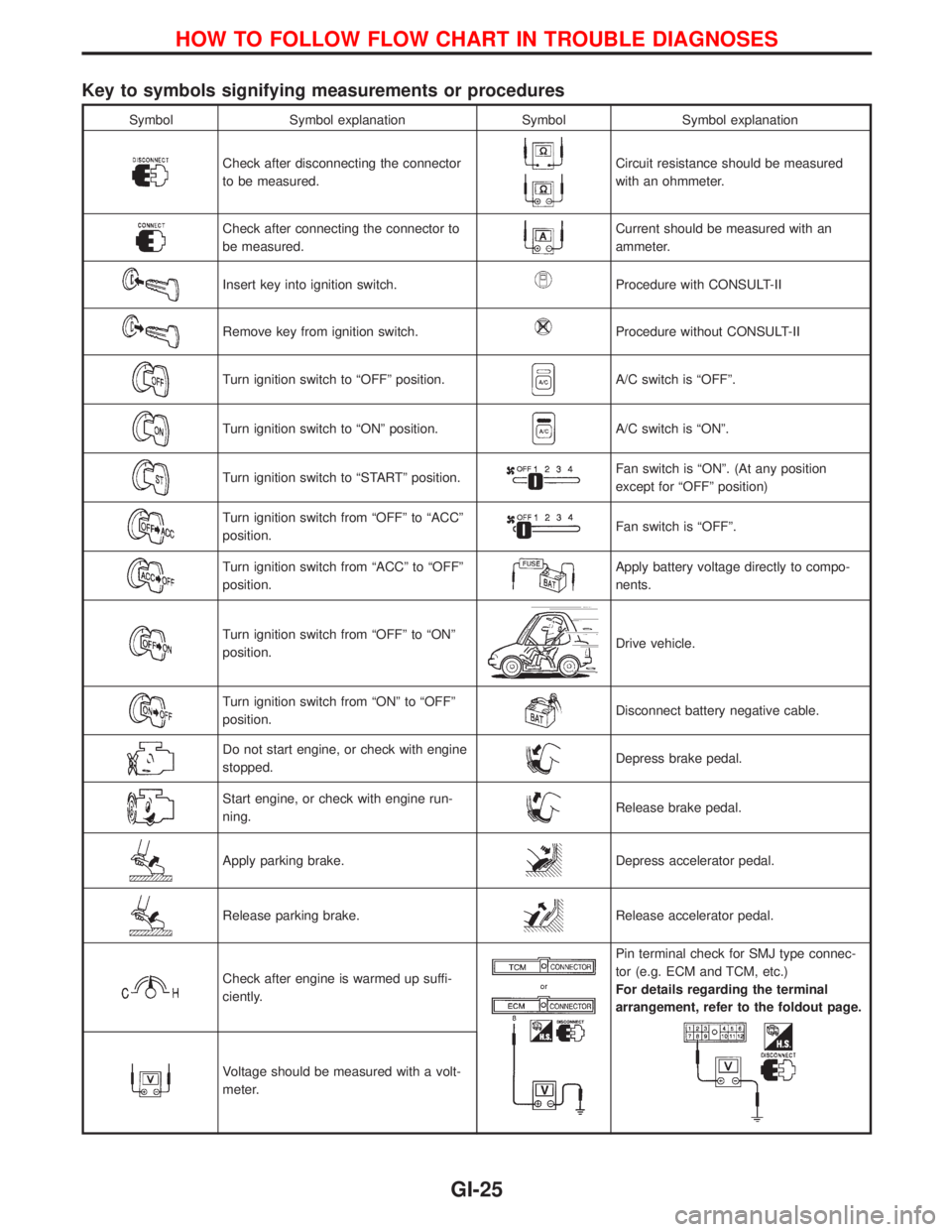
Key to symbols signifying measurements or procedures
Symbol Symbol explanation Symbol Symbol explanation
Check after disconnecting the connector
to be measured.Circuit resistance should be measured
with an ohmmeter.
Check after connecting the connector to
be measured.Current should be measured with an
ammeter.
Insert key into ignition switch.Procedure with CONSULT-II
Remove key from ignition switch.Procedure without CONSULT-II
Turn ignition switch to ªOFFº position.A/C switch is ªOFFº.
Turn ignition switch to ªONº position.A/C switch is ªONº.
Turn ignition switch to ªSTARTº position.Fan switch is ªONº. (At any position
except for ªOFFº position)
Turn ignition switch from ªOFFº to ªACCº
position.Fan switch is ªOFFº.
Turn ignition switch from ªACCº to ªOFFº
position.Apply battery voltage directly to compo-
nents.
Turn ignition switch from ªOFFº to ªONº
position.Drive vehicle.
Turn ignition switch from ªONº to ªOFFº
position.Disconnect battery negative cable.
Do not start engine, or check with engine
stopped.Depress brake pedal.
Start engine, or check with engine run-
ning.Release brake pedal.
Apply parking brake.Depress accelerator pedal.
Release parking brake.Release accelerator pedal.
Check after engine is warmed up suffi-
ciently.
Pin terminal check for SMJ type connec-
tor (e.g. ECM and TCM, etc.)
For details regarding the terminal
arrangement, refer to the foldout page.
Voltage should be measured with a volt-
meter.
HOW TO FOLLOW FLOW CHART IN TROUBLE DIAGNOSES
GI-25
Page 1341 of 1767
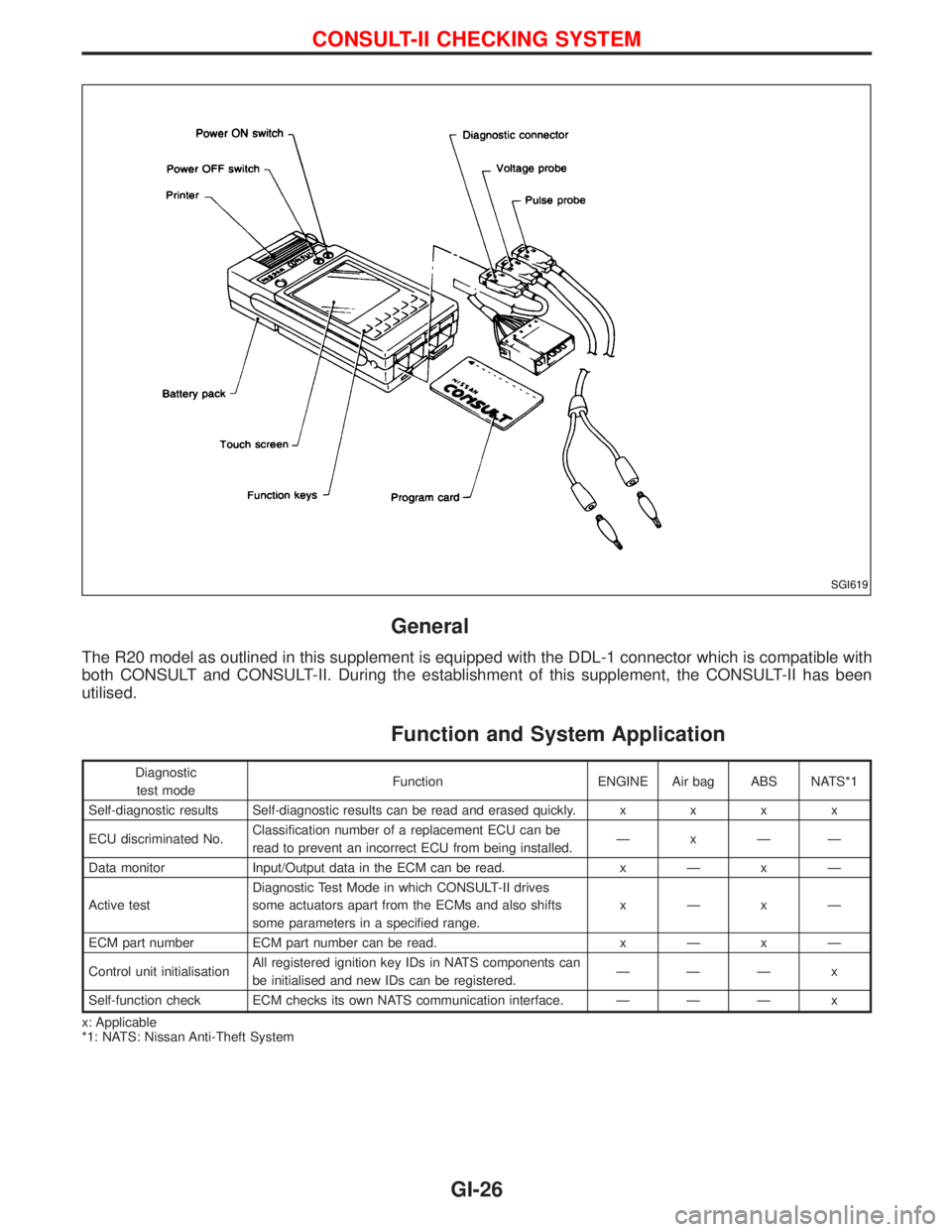
General
The R20 model as outlined in this supplement is equipped with the DDL-1 connector which is compatible with
both CONSULT and CONSULT-II. During the establishment of this supplement, the CONSULT-II has been
utilised.
Function and System Application
Diagnostic
test modeFunction ENGINE Air bag ABS NATS*1
Self-diagnostic results Self-diagnostic results can be read and erased quickly.xxxx
ECU discriminated No.Classification number of a replacement ECU can be
read to prevent an incorrect ECU from being installed.ÐxÐÐ
Data monitor Input/Output data in the ECM can be read.xÐxÐ
Active testDiagnostic Test Mode in which CONSULT-II drives
some actuators apart from the ECMs and also shifts
some parameters in a specified range.xÐxÐ
ECM part number ECM part number can be read.xÐxÐ
Control unit initialisationAll registered ignition key IDs in NATS components can
be initialised and new IDs can be registered.ÐÐÐ x
Self-function check ECM checks its own NATS communication interface. Ð Ð Ð x
x: Applicable
*1: NATS: Nissan Anti-Theft System
SGI619
CONSULT-II CHECKING SYSTEM
GI-26