light NISSAN TERRANO 2002 Service Manual PDF
[x] Cancel search | Manufacturer: NISSAN, Model Year: 2002, Model line: TERRANO, Model: NISSAN TERRANO 2002Pages: 1767, PDF Size: 41.51 MB
Page 999 of 1767
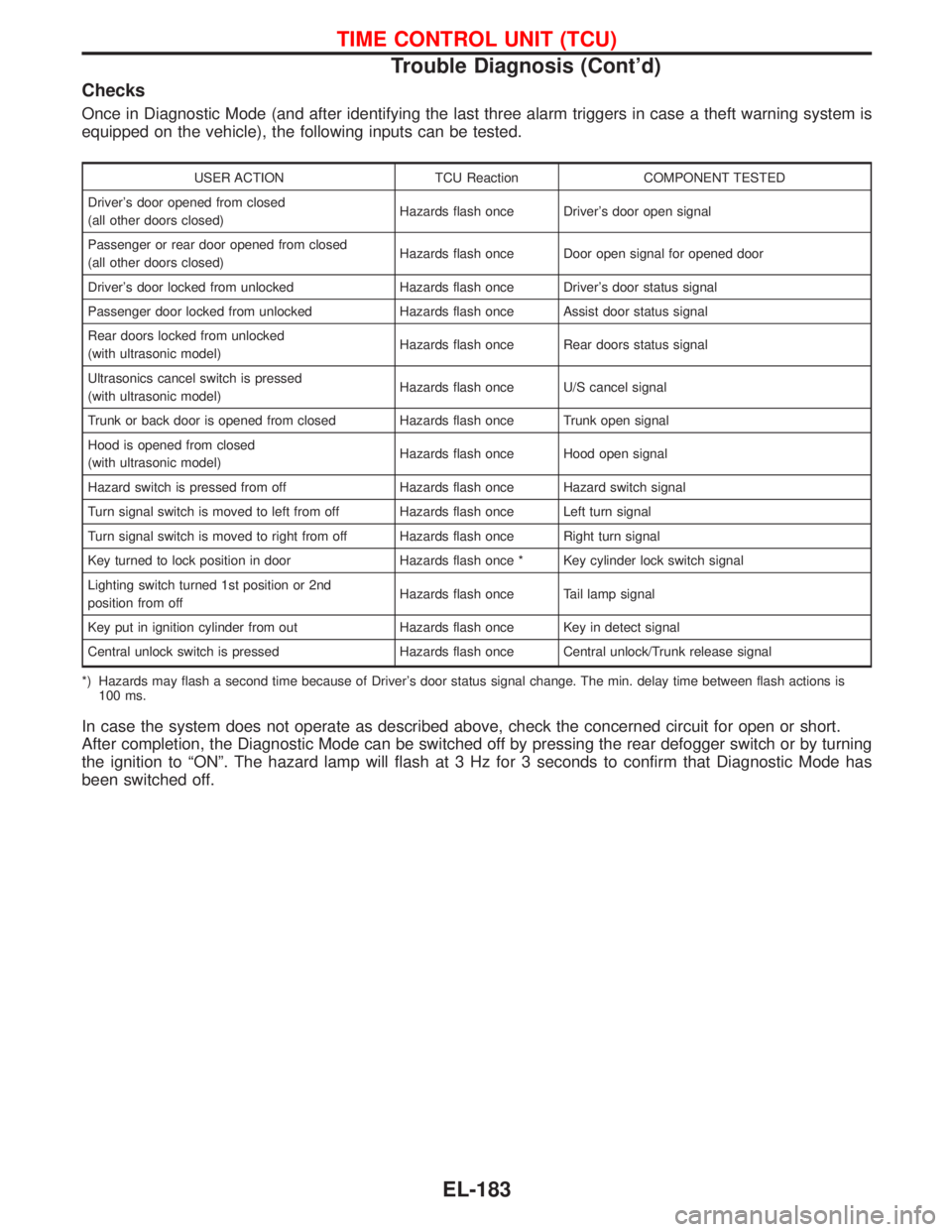
Checks
Once in Diagnostic Mode (and after identifying the last three alarm triggers in case a theft warning system is
equipped on the vehicle), the following inputs can be tested.
USER ACTION TCU Reaction COMPONENT TESTED
Driver's door opened from closed
(all other doors closed)Hazards flash once Driver's door open signal
Passenger or rear door opened from closed
(all other doors closed)Hazards flash once Door open signal for opened door
Driver's door locked from unlocked Hazards flash once Driver's door status signal
Passenger door locked from unlocked Hazards flash once Assist door status signal
Rear doors locked from unlocked
(with ultrasonic model)Hazards flash once Rear doors status signal
Ultrasonics cancel switch is pressed
(with ultrasonic model)Hazards flash once U/S cancel signal
Trunk or back door is opened from closed Hazards flash once Trunk open signal
Hood is opened from closed
(with ultrasonic model)Hazards flash once Hood open signal
Hazard switch is pressed from off Hazards flash once Hazard switch signal
Turn signal switch is moved to left from off Hazards flash once Left turn signal
Turn signal switch is moved to right from off Hazards flash once Right turn signal
Key turned to lock position in door Hazards flash once * Key cylinder lock switch signal
Lighting switch turned 1st position or 2nd
position from offHazards flash once Tail lamp signal
Key put in ignition cylinder from out Hazards flash once Key in detect signal
Central unlock switch is pressed Hazards flash once Central unlock/Trunk release signal
*) Hazards may flash a second time because of Driver's door status signal change. The min. delay time between flash actions is
100 ms.
In case the system does not operate as described above, check the concerned circuit for open or short.
After completion, the Diagnostic Mode can be switched off by pressing the rear defogger switch or by turning
the ignition to ªONº. The hazard lamp will flash at 3 Hz for 3 seconds to confirm that Diagnostic Mode has
been switched off.
TIME CONTROL UNIT (TCU)
Trouble Diagnosis (Cont'd)
EL-183
Page 1002 of 1767
System Description
NATS has the following immobiliser functions:
IThis version of NATS has dongle control unit to improve its anti-theft performance (RHD models). Dongle
control unit has its own ID which is registered into NATS IMMU. So if dongle unit is replaced, initialization
must be carried out.
IWhen malfunction of dongle unit is detected:
The security indicator lamp illuminates for about 15 minutes after ignition switch is turned to ON.
Ð When dongle control unit has a malfunction, and the indicator lamp is illuminated, engine can not be
started. However engine can be started only one time when security indicator lamp turns off in about
15 minutes after ignition switch is turned to ON.
ISince only NATS ignition keys, whose ID nos. have been registered into the ECM and IMMU of NATS,
allow the engine to run, operation of a stolen vehicle without a NATS registered key is prevented by NATS.
That is to say, NATS will immobilize the engine if someone tries to start it without the registered key of
NATS.
IAll of the originally supplied ignition key IDs have been NATS registered.
If requested by the vehicle owner, a maximum of five key IDs can be registered into the NATS compo-
nents.
IThe NATS security indicator (NATS security ind.) blinks when the ignition switch is in ªOFFº or ªACCº
position. Therefore, NATS warns outsiders that the vehicle is equipped with the anti-theft system.
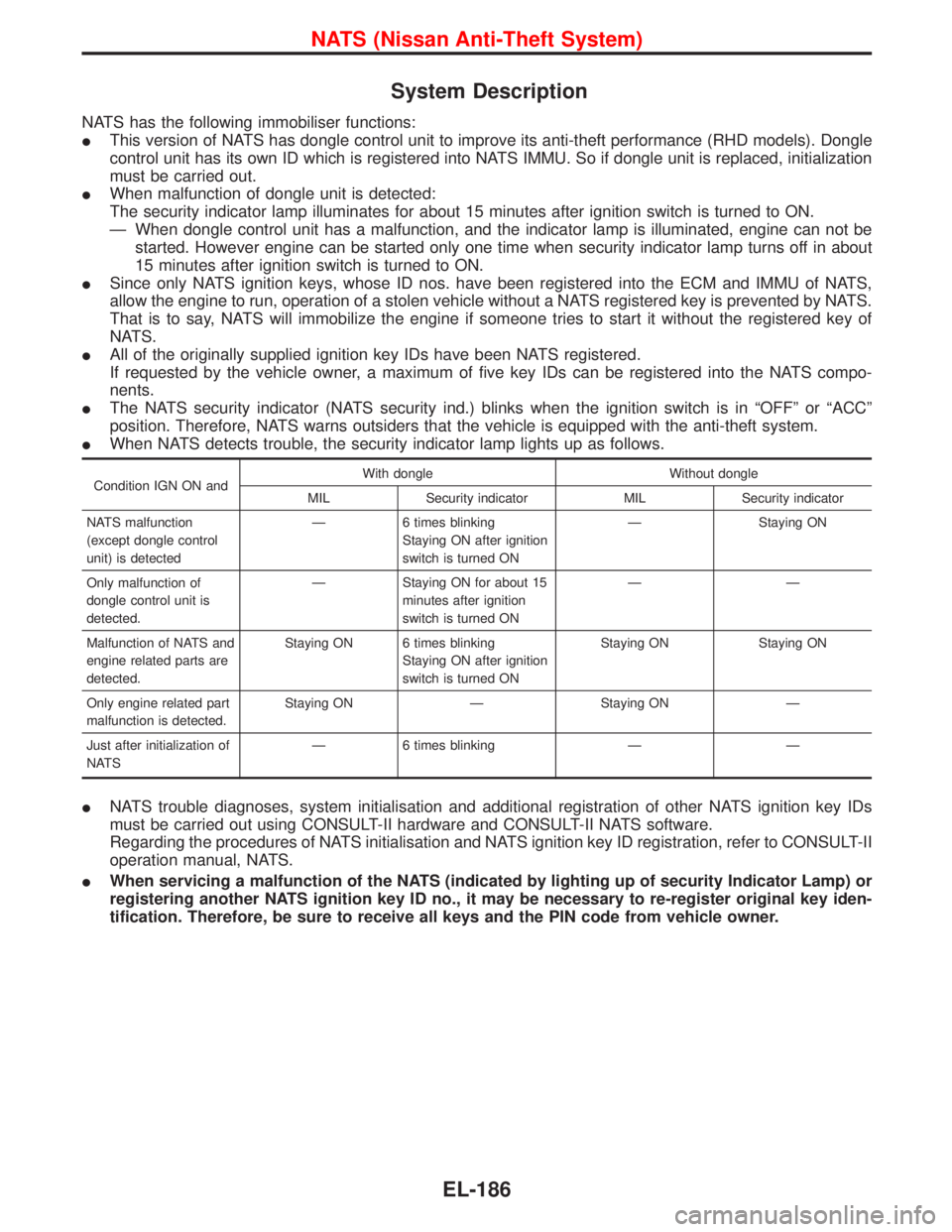
IWhen NATS detects trouble, the security indicator lamp lights up as follows.
Condition IGN ON andWith dongle Without dongle
MIL Security indicator MIL Security indicator
NATS malfunction
(except dongle control
unit) is detectedÐ 6 times blinking
Staying ON after ignition
switch is turned ONÐ Staying ON
Only malfunction of
dongle control unit is
detected.Ð Staying ON for about 15
minutes after ignition
switch is turned ONÐÐ
Malfunction of NATS and
engine related parts are
detected.Staying ON 6 times blinking
Staying ON after ignition
switch is turned ONStaying ON Staying ON
Only engine related part
malfunction is detected.Staying ON Ð Staying ON Ð
Just after initialization of
NATSÐ 6 times blinking Ð Ð
INATS trouble diagnoses, system initialisation and additional registration of other NATS ignition key IDs
must be carried out using CONSULT-II hardware and CONSULT-II NATS software.
Regarding the procedures of NATS initialisation and NATS ignition key ID registration, refer to CONSULT-II
operation manual, NATS.
IWhen servicing a malfunction of the NATS (indicated by lighting up of security Indicator Lamp) or
registering another NATS ignition key ID no., it may be necessary to re-register original key iden-
tification. Therefore, be sure to receive all keys and the PIN code from vehicle owner.
NATS (Nissan Anti-Theft System)
EL-186
Page 1011 of 1767
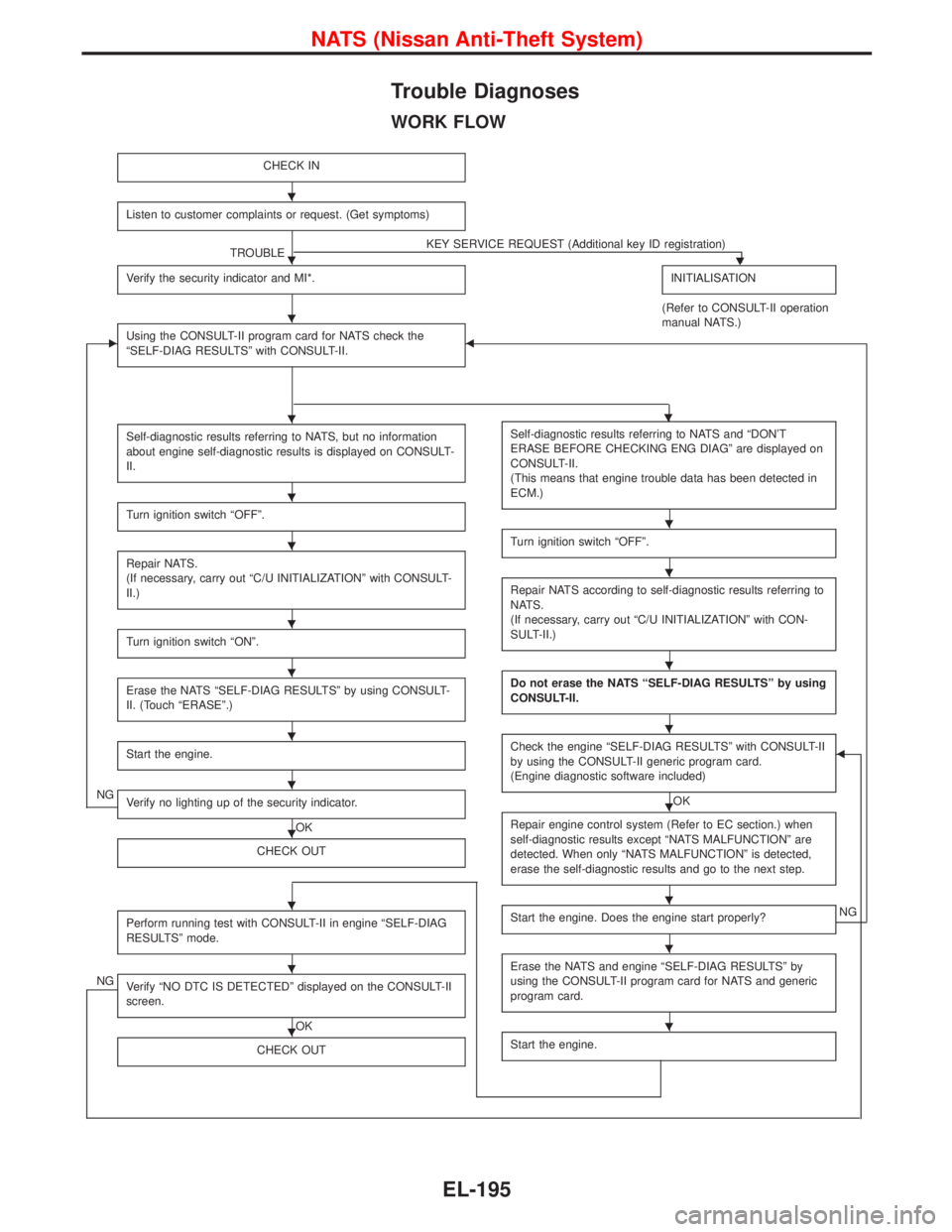
Trouble Diagnoses
WORK FLOW
CHECK IN
Listen to customer complaints or request. (Get symptoms)
TROUBLEKEY SERVICE REQUEST (Additional key ID registration)H
Verify the security indicator and MI*.INITIALISATION
(Refer to CONSULT-II operation
manual NATS.)
EUsing the CONSULT-II program card for NATS check the
ªSELF-DIAG RESULTSº with CONSULT-II.F
Self-diagnostic results referring to NATS, but no information
about engine self-diagnostic results is displayed on CONSULT-
II.
Turn ignition switch ªOFFº.
Repair NATS.
(If necessary, carry out ªC/U INITIALIZATIONº with CONSULT-
II.)
Turn ignition switch ªONº.
Erase the NATS ªSELF-DIAG RESULTSº by using CONSULT-
II. (Touch ªERASEº.)
Start the engine.
NGVerify no lighting up of the security indicator.
OK
CHECK OUT
Perform running test with CONSULT-II in engine ªSELF-DIAG
RESULTSº mode.
NGVerify ªNO DTC IS DETECTEDº displayed on the CONSULT-II
screen.
OK
CHECK OUT
Self-diagnostic results referring to NATS and ªDON'T
ERASE BEFORE CHECKING ENG DIAGº are displayed on
CONSULT-II.
(This means that engine trouble data has been detected in
ECM.)
Turn ignition switch ªOFFº.
Repair NATS according to self-diagnostic results referring to
NATS.
(If necessary, carry out ªC/U INITIALIZATIONº with CON-
SULT-II.)
Do not erase the NATS ªSELF-DIAG RESULTSº by using
CONSULT-II.
Check the engine ªSELF-DIAG RESULTSº with CONSULT-II
by using the CONSULT-II generic program card.
(Engine diagnostic software included)
OK
F
Repair engine control system (Refer to EC section.) when
self-diagnostic results except ªNATS MALFUNCTIONº are
detected. When only ªNATS MALFUNCTIONº is detected,
erase the self-diagnostic results and go to the next step.
Start the engine. Does the engine start properly?NG
Erase the NATS and engine ªSELF-DIAG RESULTSº by
using the CONSULT-II program card for NATS and generic
program card.
Start the engine.
H
H
H
HH
H
H
H
H
H
H
H
H
H
H
H
H
H
H
H
H
H
H
NATS (Nissan Anti-Theft System)
EL-195
Page 1012 of 1767
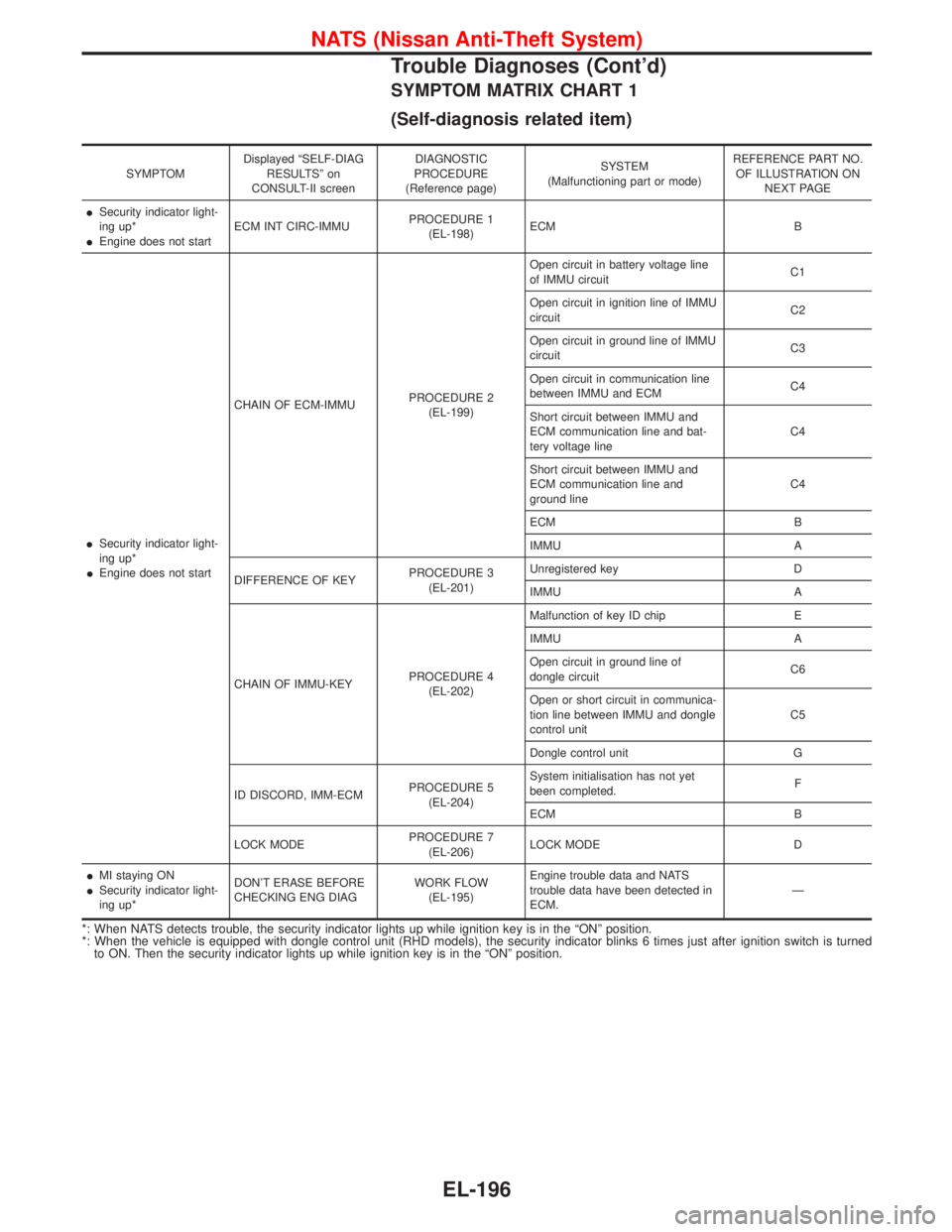
SYMPTOM MATRIX CHART 1
(Self-diagnosis related item)
SYMPTOMDisplayed ªSELF-DIAG
RESULTSº on
CONSULT-II screenDIAGNOSTIC
PROCEDURE
(Reference page)SYSTEM
(Malfunctioning part or mode)REFERENCE PART NO.
OF ILLUSTRATION ON
NEXT PAGE
ISecurity indicator light-
ing up*
IEngine does not startECM INT CIRC-IMMUPROCEDURE 1
(EL-198)ECM B
ISecurity indicator light-
ing up*
IEngine does not startCHAIN OF ECM-IMMUPROCEDURE 2
(EL-199)Open circuit in battery voltage line
of IMMU circuitC1
Open circuit in ignition line of IMMU
circuitC2
Open circuit in ground line of IMMU
circuitC3
Open circuit in communication line
between IMMU and ECMC4
Short circuit between IMMU and
ECM communication line and bat-
tery voltage lineC4
Short circuit between IMMU and
ECM communication line and
ground lineC4
ECM B
IMMU A
DIFFERENCE OF KEYPROCEDURE 3
(EL-201)Unregistered key D
IMMU A
CHAIN OF IMMU-KEYPROCEDURE 4
(EL-202)Malfunction of key ID chip E
IMMU A
Open circuit in ground line of
dongle circuitC6
Open or short circuit in communica-
tion line between IMMU and dongle
control unitC5
Dongle control unit G
ID DISCORD, IMM-ECMPROCEDURE 5
(EL-204)System initialisation has not yet
been completed.F
ECM B
LOCK MODEPROCEDURE 7
(EL-206)LOCK MODE D
IMI staying ON
ISecurity indicator light-
ing up*DON'T ERASE BEFORE
CHECKING ENG DIAGWORK FLOW
(EL-195)Engine trouble data and NATS
trouble data have been detected in
ECM.Ð
*: When NATS detects trouble, the security indicator lights up while ignition key is in the ªONº position.
*: When the vehicle is equipped with dongle control unit (RHD models), the security indicator blinks 6 times just after ignition switch is turned
to ON. Then the security indicator lights up while ignition key is in the ªONº position.
NATS (Nissan Anti-Theft System)
Trouble Diagnoses (Cont'd)
EL-196
Page 1013 of 1767
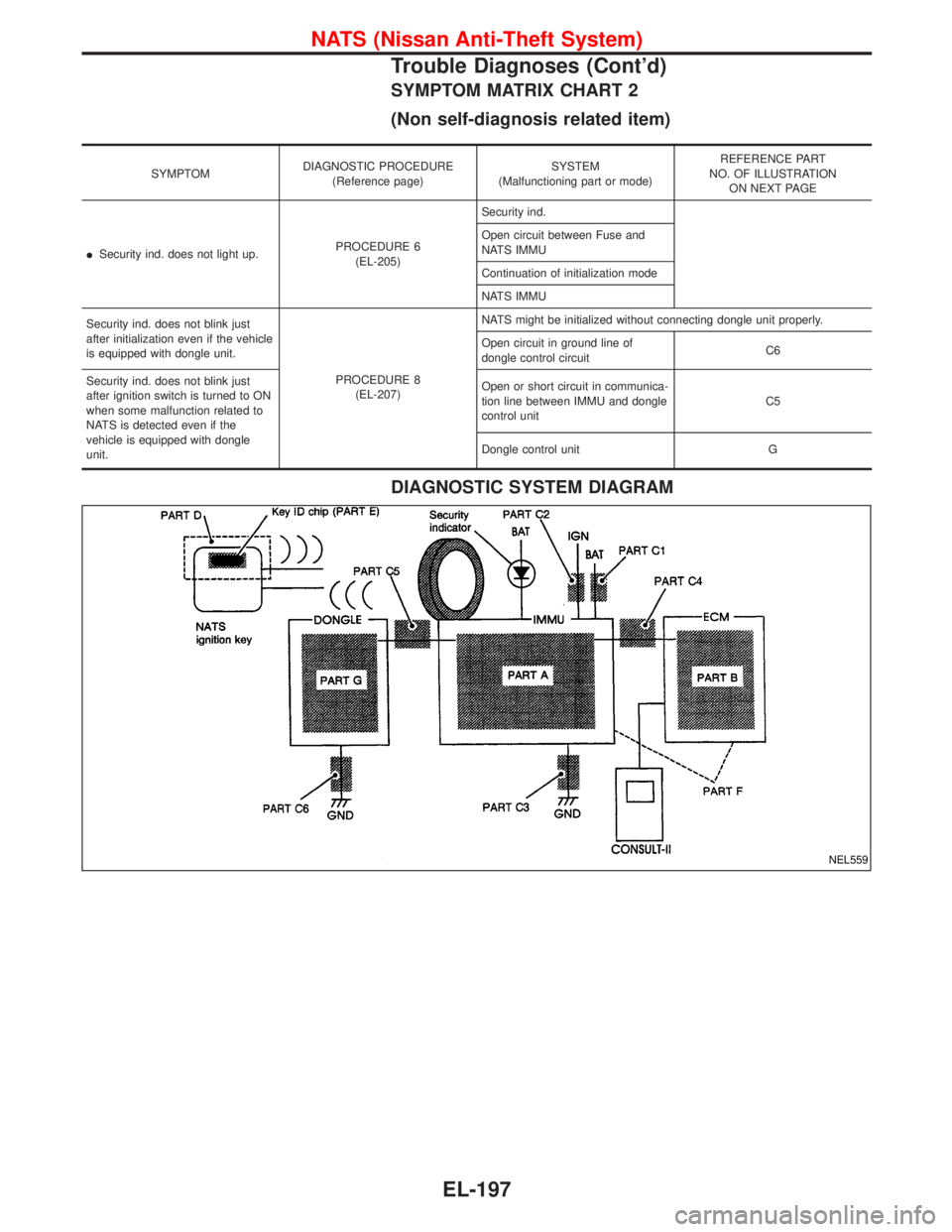
SYMPTOM MATRIX CHART 2
(Non self-diagnosis related item)
SYMPTOMDIAGNOSTIC PROCEDURE
(Reference page)SYSTEM
(Malfunctioning part or mode)REFERENCE PART
NO. OF ILLUSTRATION
ON NEXT PAGE
ISecurity ind. does not light up.PROCEDURE 6
(EL-205)Security ind.
Open circuit between Fuse and
NATS IMMU
Continuation of initialization mode
NATS IMMU
Security ind. does not blink just
after initialization even if the vehicle
is equipped with dongle unit.
PROCEDURE 8
(EL-207)NATS might be initialized without connecting dongle unit properly.
Open circuit in ground line of
dongle control circuitC6
Security ind. does not blink just
after ignition switch is turned to ON
when some malfunction related to
NATS is detected even if the
vehicle is equipped with dongle
unit.Open or short circuit in communica-
tion line between IMMU and dongle
control unitC5
Dongle control unit G
DIAGNOSTIC SYSTEM DIAGRAM
NEL559
NATS (Nissan Anti-Theft System)
Trouble Diagnoses (Cont'd)
EL-197
Page 1021 of 1767
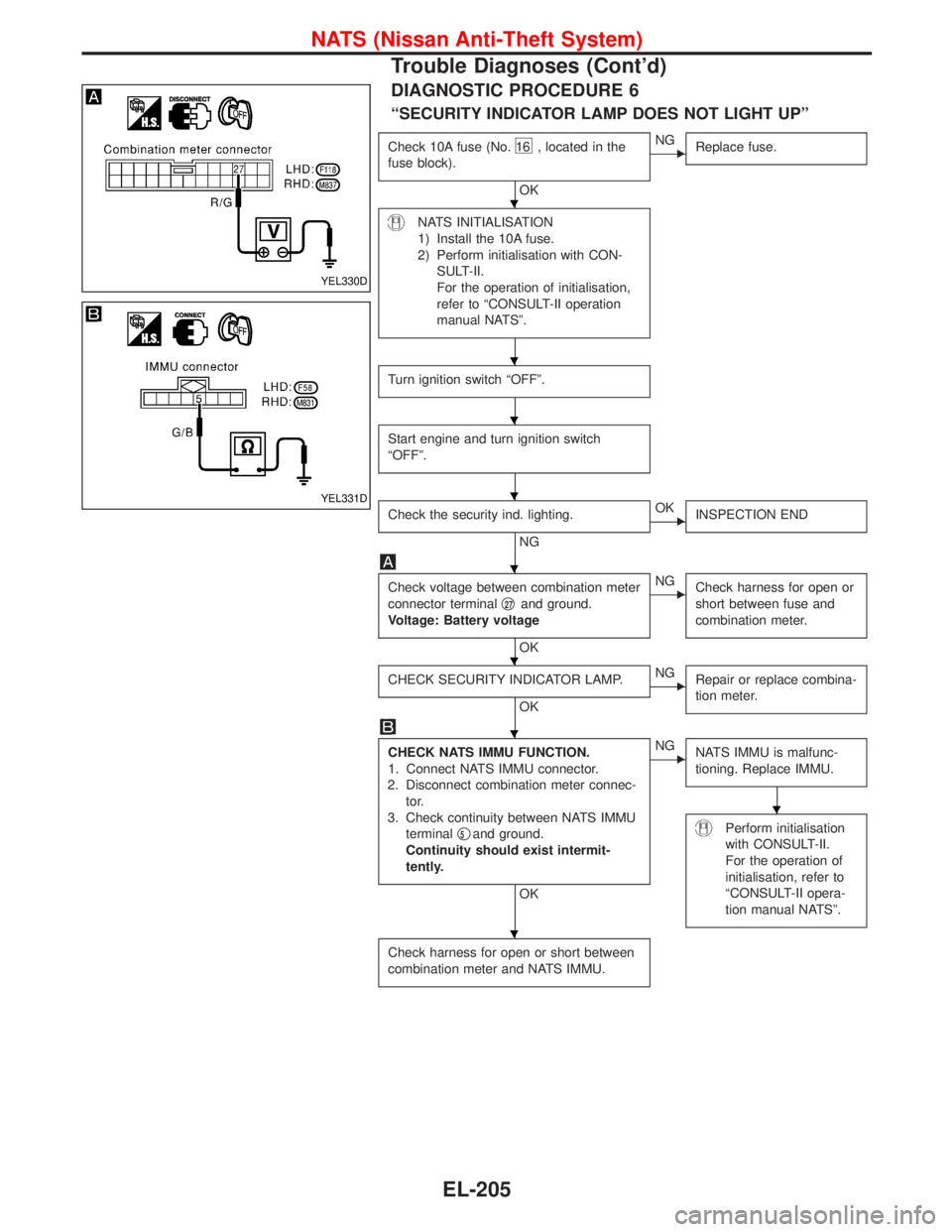
DIAGNOSTIC PROCEDURE 6
ªSECURITY INDICATOR LAMP DOES NOT LIGHT UPº
Check 10A fuse (No.16 , located in the
fuse block).
OK
ENG
Replace fuse.
NATS INITIALISATION
1) Install the 10A fuse.
2) Perform initialisation with CON-
SULT-II.
For the operation of initialisation,
refer to ªCONSULT-II operation
manual NATSº.
Turn ignition switch ªOFFº.
Start engine and turn ignition switch
ªOFFº.
Check the security ind. lighting.
NG
EOK
INSPECTION END
Check voltage between combination meter
connector terminalq
27and ground.
Voltage: Battery voltage
OK
ENG
Check harness for open or
short between fuse and
combination meter.
CHECK SECURITY INDICATOR LAMP.
OK
ENG
Repair or replace combina-
tion meter.
CHECK NATS IMMU FUNCTION.
1. Connect NATS IMMU connector.
2. Disconnect combination meter connec-
tor.
3. Check continuity between NATS IMMU
terminalq
5and ground.
Continuity should exist intermit-
tently.
OK
ENG
NATS IMMU is malfunc-
tioning. Replace IMMU.
Perform initialisation
with CONSULT-II.
For the operation of
initialisation, refer to
ªCONSULT-II opera-
tion manual NATSº.
Check harness for open or short between
combination meter and NATS IMMU.
YEL330D
YEL331D
H
H
H
H
H
H
H
H
H
NATS (Nissan Anti-Theft System)
Trouble Diagnoses (Cont'd)
EL-205
Page 1107 of 1767
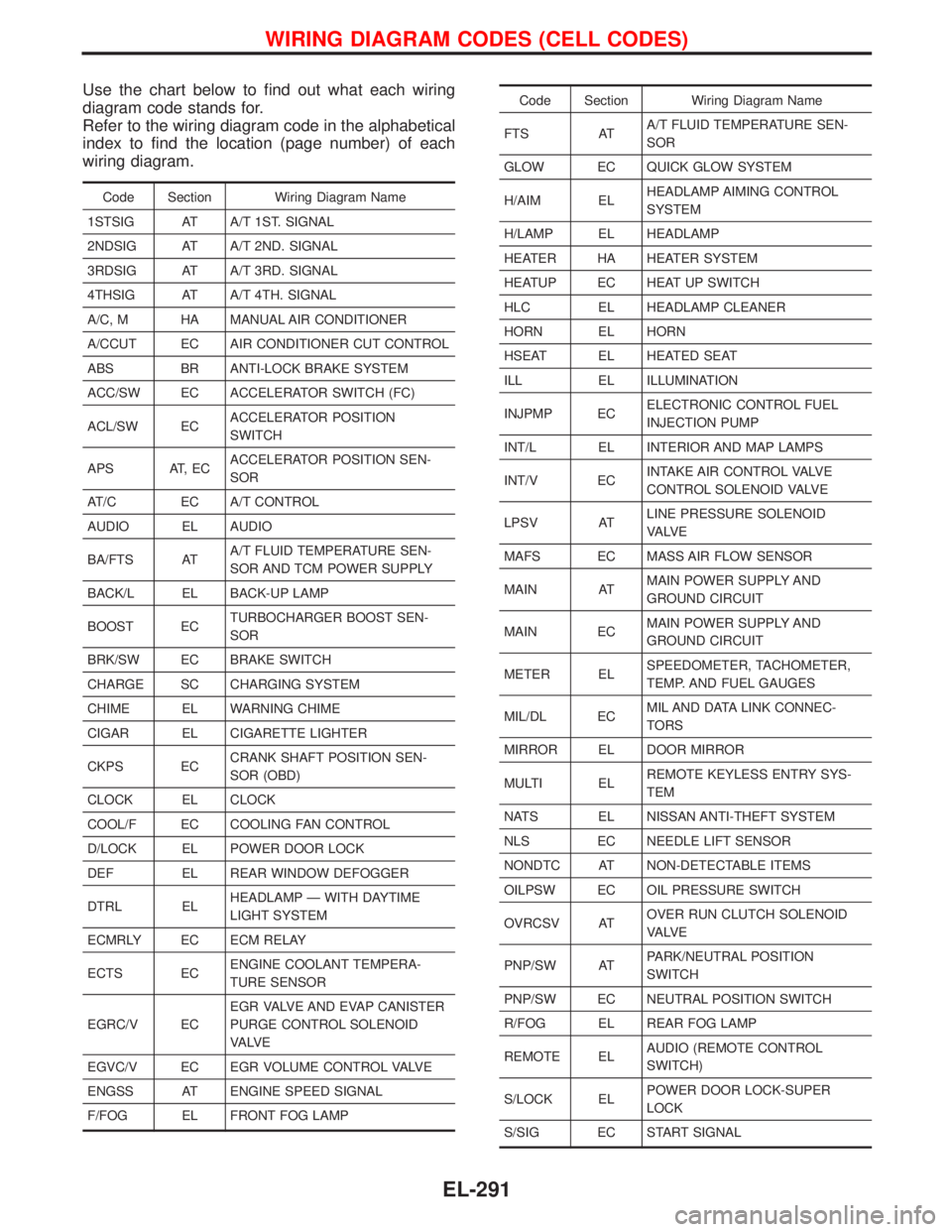
Use the chart below to find out what each wiring
diagram code stands for.
Refer to the wiring diagram code in the alphabetical
index to find the location (page number) of each
wiring diagram.
Code Section Wiring Diagram Name
1STSIG AT A/T 1ST. SIGNAL
2NDSIG AT A/T 2ND. SIGNAL
3RDSIG AT A/T 3RD. SIGNAL
4THSIG AT A/T 4TH. SIGNAL
A/C, M HA MANUAL AIR CONDITIONER
A/CCUT EC AIR CONDITIONER CUT CONTROL
ABS BR ANTI-LOCK BRAKE SYSTEM
ACC/SW EC ACCELERATOR SWITCH (FC)
ACL/SW ECACCELERATOR POSITION
SWITCH
APS AT, ECACCELERATOR POSITION SEN-
SOR
AT/C EC A/T CONTROL
AUDIO EL AUDIO
BA/FTS ATA/T FLUID TEMPERATURE SEN-
SOR AND TCM POWER SUPPLY
BACK/L EL BACK-UP LAMP
BOOST ECTURBOCHARGER BOOST SEN-
SOR
BRK/SW EC BRAKE SWITCH
CHARGE SC CHARGING SYSTEM
CHIME EL WARNING CHIME
CIGAR EL CIGARETTE LIGHTER
CKPS ECCRANK SHAFT POSITION SEN-
SOR (OBD)
CLOCK EL CLOCK
COOL/F EC COOLING FAN CONTROL
D/LOCK EL POWER DOOR LOCK
DEF EL REAR WINDOW DEFOGGER
DTRL ELHEADLAMP Ð WITH DAYTIME
LIGHT SYSTEM
ECMRLY EC ECM RELAY
ECTS ECENGINE COOLANT TEMPERA-
TURE SENSOR
EGRC/V ECEGR VALVE AND EVAP CANISTER
PURGE CONTROL SOLENOID
VA LV E
EGVC/V EC EGR VOLUME CONTROL VALVE
ENGSS AT ENGINE SPEED SIGNAL
F/FOG EL FRONT FOG LAMP
Code Section Wiring Diagram Name
FTS ATA/T FLUID TEMPERATURE SEN-
SOR
GLOW EC QUICK GLOW SYSTEM
H/AIM ELHEADLAMP AIMING CONTROL
SYSTEM
H/LAMP EL HEADLAMP
HEATER HA HEATER SYSTEM
HEATUP EC HEAT UP SWITCH
HLC EL HEADLAMP CLEANER
HORN EL HORN
HSEAT EL HEATED SEAT
ILL EL ILLUMINATION
INJPMP ECELECTRONIC CONTROL FUEL
INJECTION PUMP
INT/L EL INTERIOR AND MAP LAMPS
INT/V ECINTAKE AIR CONTROL VALVE
CONTROL SOLENOID VALVE
LPSV ATLINE PRESSURE SOLENOID
VA LV E
MAFS EC MASS AIR FLOW SENSOR
MAIN ATMAIN POWER SUPPLY AND
GROUND CIRCUIT
MAIN ECMAIN POWER SUPPLY AND
GROUND CIRCUIT
METER ELSPEEDOMETER, TACHOMETER,
TEMP. AND FUEL GAUGES
MIL/DL ECMIL AND DATA LINK CONNEC-
TORS
MIRROR EL DOOR MIRROR
MULTI ELREMOTE KEYLESS ENTRY SYS-
TEM
NATS EL NISSAN ANTI-THEFT SYSTEM
NLS EC NEEDLE LIFT SENSOR
NONDTC AT NON-DETECTABLE ITEMS
OILPSW EC OIL PRESSURE SWITCH
OVRCSV ATOVER RUN CLUTCH SOLENOID
VA LV E
PNP/SW ATPARK/NEUTRAL POSITION
SWITCH
PNP/SW EC NEUTRAL POSITION SWITCH
R/FOG EL REAR FOG LAMP
REMOTE ELAUDIO (REMOTE CONTROL
SWITCH)
S/LOCK ELPOWER DOOR LOCK-SUPER
LOCK
S/SIG EC START SIGNAL
WIRING DIAGRAM CODES (CELL CODES)
EL-291
Page 1132 of 1767
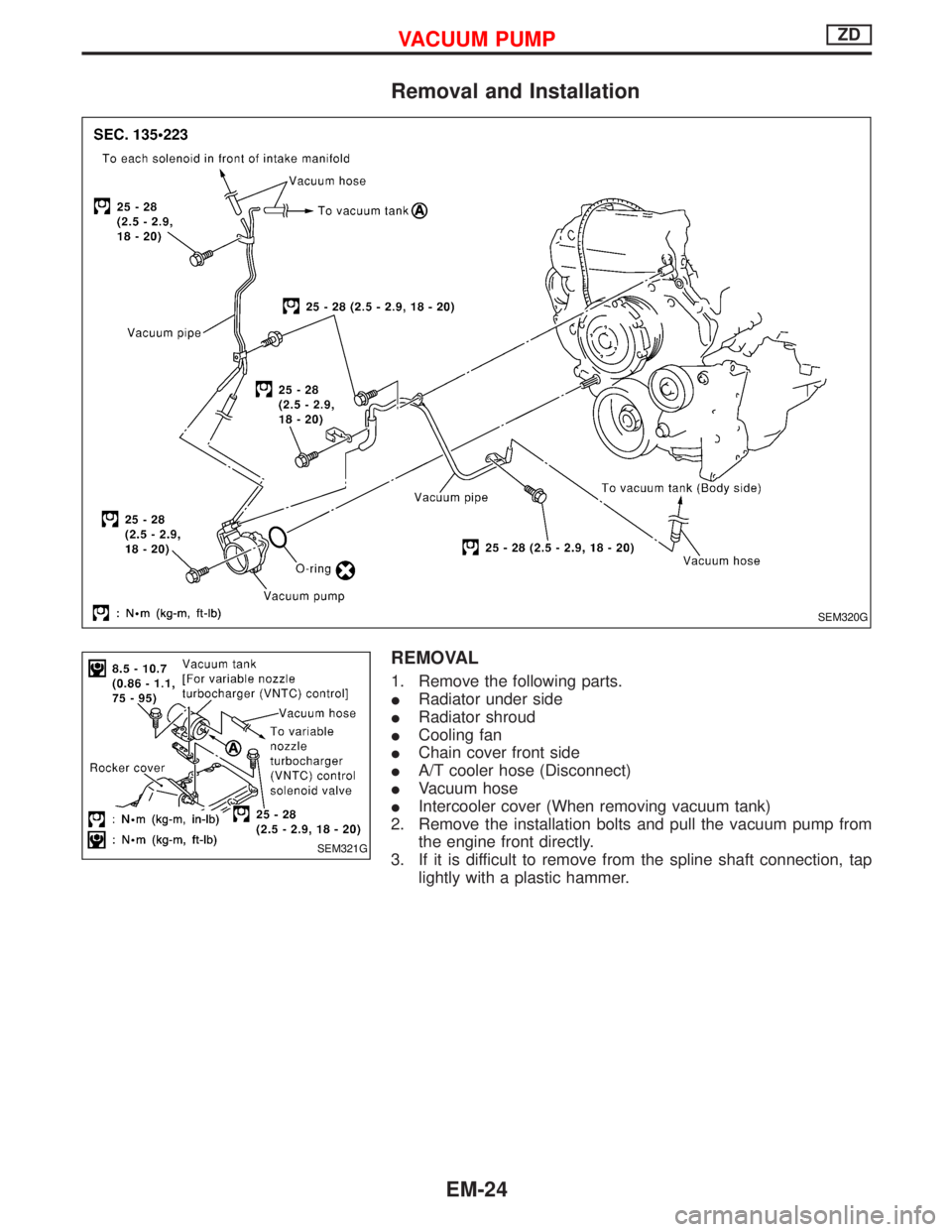
Removal and Installation
REMOVAL
1. Remove the following parts.
IRadiator under side
IRadiator shroud
ICooling fan
IChain cover front side
IA/T cooler hose (Disconnect)
IVacuum hose
IIntercooler cover (When removing vacuum tank)
2. Remove the installation bolts and pull the vacuum pump from
the engine front directly.
3. If it is difficult to remove from the spline shaft connection, tap
lightly with a plastic hammer.
SEM320G
SEM321G
VACUUM PUMPZD
EM-24
Page 1154 of 1767
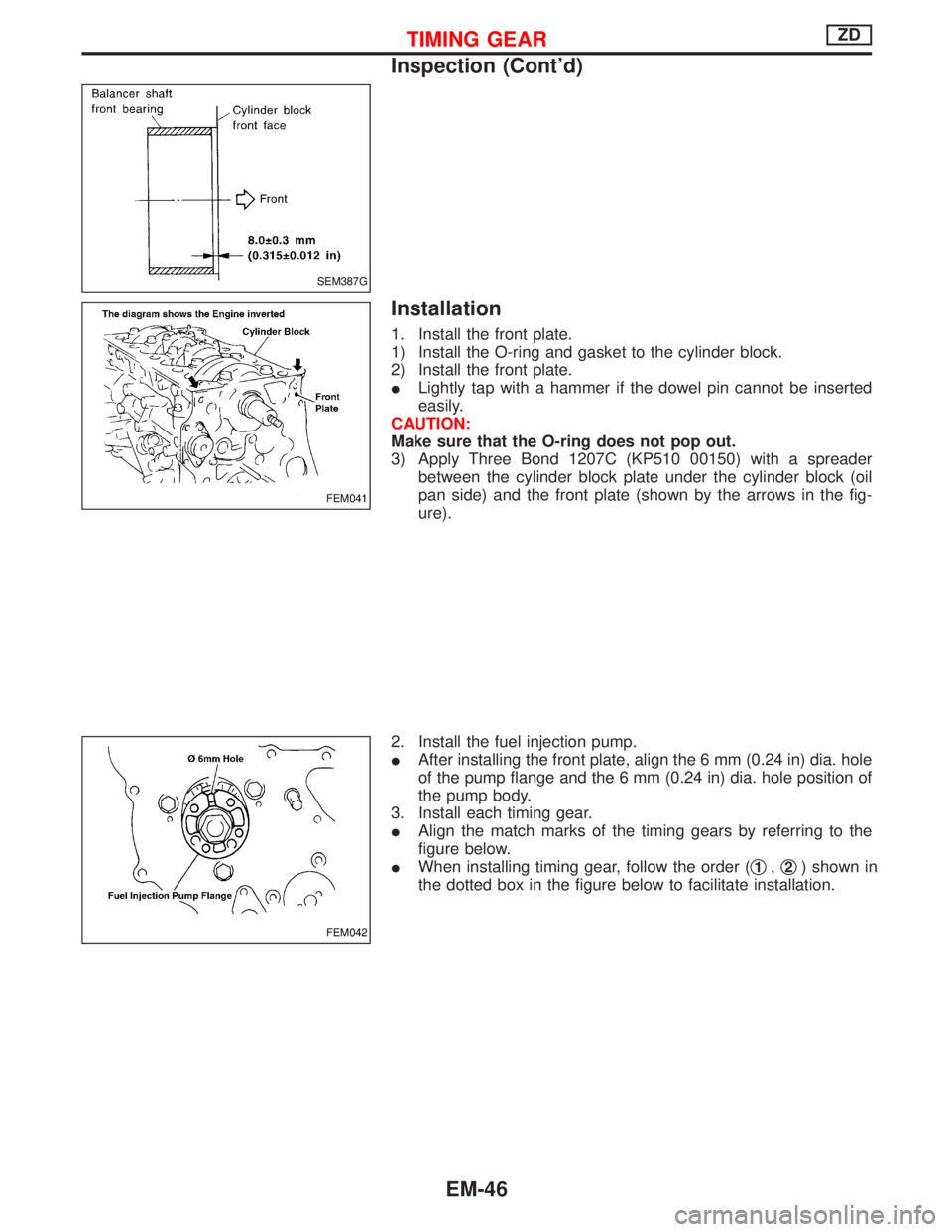
Installation
1. Install the front plate.
1) Install the O-ring and gasket to the cylinder block.
2) Install the front plate.
ILightly tap with a hammer if the dowel pin cannot be inserted
easily.
CAUTION:
Make sure that the O-ring does not pop out.
3) Apply Three Bond 1207C (KP510 00150) with a spreader
between the cylinder block plate under the cylinder block (oil
pan side) and the front plate (shown by the arrows in the fig-
ure).
2. Install the fuel injection pump.
IAfter installing the front plate, align the 6 mm (0.24 in) dia. hole
of the pump flange and the 6 mm (0.24 in) dia. hole position of
the pump body.
3. Install each timing gear.
IAlign the match marks of the timing gears by referring to the
figure below.
IWhen installing timing gear, follow the order (q
1,q2) shown in
the dotted box in the figure below to facilitate installation.
SEM387G
FEM041
FEM042
TIMING GEARZD
Inspection (Cont'd)
EM-46
Page 1185 of 1767
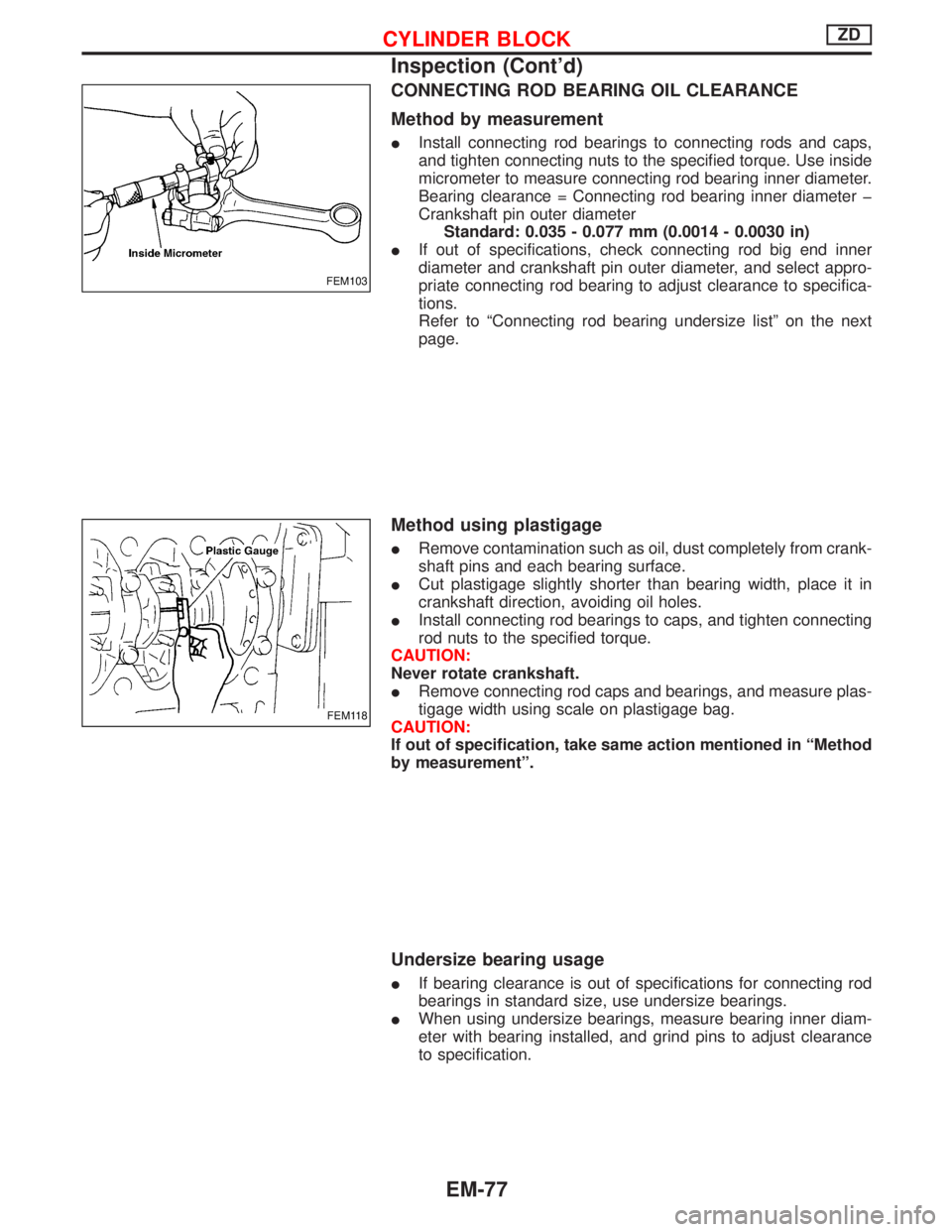
CONNECTING ROD BEARING OIL CLEARANCE
Method by measurement
IInstall connecting rod bearings to connecting rods and caps,
and tighten connecting nuts to the specified torque. Use inside
micrometer to measure connecting rod bearing inner diameter.
Bearing clearance = Connecting rod bearing inner diameter þ
Crankshaft pin outer diameter
Standard: 0.035 - 0.077 mm (0.0014 - 0.0030 in)
IIf out of specifications, check connecting rod big end inner
diameter and crankshaft pin outer diameter, and select appro-
priate connecting rod bearing to adjust clearance to specifica-
tions.
Refer to ªConnecting rod bearing undersize listº on the next
page.
Method using plastigage
IRemove contamination such as oil, dust completely from crank-
shaft pins and each bearing surface.
ICut plastigage slightly shorter than bearing width, place it in
crankshaft direction, avoiding oil holes.
IInstall connecting rod bearings to caps, and tighten connecting
rod nuts to the specified torque.
CAUTION:
Never rotate crankshaft.
IRemove connecting rod caps and bearings, and measure plas-
tigage width using scale on plastigage bag.
CAUTION:
If out of specification, take same action mentioned in ªMethod
by measurementº.
Undersize bearing usage
IIf bearing clearance is out of specifications for connecting rod
bearings in standard size, use undersize bearings.
IWhen using undersize bearings, measure bearing inner diam-
eter with bearing installed, and grind pins to adjust clearance
to specification.
FEM103
FEM118
CYLINDER BLOCKZD
Inspection (Cont'd)
EM-77