Battery NISSAN TIIDA 2007 Service Repair Manual
[x] Cancel search | Manufacturer: NISSAN, Model Year: 2007, Model line: TIIDA, Model: NISSAN TIIDA 2007Pages: 5883, PDF Size: 78.95 MB
Page 5579 of 5883
![NISSAN TIIDA 2007 Service Repair Manual TRANSAXLE ASSEMBLY
TM-633
< REMOVAL AND INSTALLATION >[5MT: RS5F91R]
C
E
F
G
H
I
J
K
L
MA
B
TM
N
O
P
REMOVAL AND INSTALLATION
TRANSAXLE ASSEMBLY
Exploded ViewINFOID:0000000001381692
Removal and Instal](/img/5/57395/w960_57395-5578.png "NISSAN TIIDA 2007 Service Repair Manual TRANSAXLE ASSEMBLY
TM-633
< REMOVAL AND INSTALLATION >[5MT: RS5F91R]
C
E
F
G
H
I
J
K
L
MA
B
TM
N
O
P
REMOVAL AND INSTALLATION
TRANSAXLE ASSEMBLY
Exploded ViewINFOID:0000000001381692
Removal and Instal")
TRANSAXLE ASSEMBLY
TM-633
< REMOVAL AND INSTALLATION >[5MT: RS5F91R]
C
E
F
G
H
I
J
K
L
MA
B
TM
N
O
P
REMOVAL AND INSTALLATION
TRANSAXLE ASSEMBLY
Exploded ViewINFOID:0000000001381692
Removal and InstallationINFOID:0000000001381693
CAUTION:
If transaxle assembly is removed from the vehicle, always replace CSC (Concentric Slave Cylinder).
Return CSC insert to original position to remove transaxle assembly. Dust on clutch disc sliding parts
may damage seal of CSC and may cause clutch fluid leakage.
REMOVAL
1. Remove battery. Refer to PG-6, "Removal and Installation".
2. Remove air breather hose. Refer to TM-632, "
Removal and Installation".
3. Remove air duct (Inlet), air duct and air cleaner case. Refer to EM-27, "
Removal and Installation".
4. Drain clutch fluid and then remove clutch tube from CSC. Refer to CL-12, "
Removal and Installation".
CAUTION:
Do not depress clutch pedal during removal procedure.
5. Disconnect clip of engine harness from bracket.
6. Disconnect ground cable from transaxle assembly.
7. Remove starter motor. Refer to STR-13, "
Removal and Installation".
1. LH engine mount bracket (transaxle
side)2. Transaxle assembly 3. Rear engine mount bracket
4. Washer 5. Rear torque rod
:Refer to installation.
PCIB1514E
Page 5620 of 5883
![NISSAN TIIDA 2007 Service Repair Manual TM-674
< ON-VEHICLE REPAIR >[6MT: RS6F94R]
CONTROL LINKAGE
CONTROL LINKAGE
Exploded ViewINFOID:0000000001381638
Removal and InstallationINFOID:0000000001381639
REMOVAL
1. Remove the air cleaner and a](/img/5/57395/w960_57395-5619.png "NISSAN TIIDA 2007 Service Repair Manual TM-674
< ON-VEHICLE REPAIR >[6MT: RS6F94R]
CONTROL LINKAGE
CONTROL LINKAGE
Exploded ViewINFOID:0000000001381638
Removal and InstallationINFOID:0000000001381639
REMOVAL
1. Remove the air cleaner and a")
TM-674
< ON-VEHICLE REPAIR >[6MT: RS6F94R]
CONTROL LINKAGE
CONTROL LINKAGE
Exploded ViewINFOID:0000000001381638
Removal and InstallationINFOID:0000000001381639
REMOVAL
1. Remove the air cleaner and air duct. Refer to EM-154, "Removal and Installation" (MR18DE) or EM-269,
"Removal and Installation" (K9K).
2. Remove the battery. Refer to PG-6, "
Removal and Installation".
1. Bracket 2. Shift cable 3. Selector lever
4. Shifter lever 5. Tapping bolt 6. Cable mounting bracket
7. Select cable 8. Grommet 9. Control device assembly
10. Control lever 11. Control lever knob
JPDIC0058GB
Page 5625 of 5883
![NISSAN TIIDA 2007 Service Repair Manual AIR BREATHER HOSE
TM-679
< ON-VEHICLE REPAIR >[6MT: RS6F94R]
C
E
F
G
H
I
J
K
L
MA
B
TM
N
O
P MR18DE Engine Models
1. Remove the battery. Refer to PG-6, "Removal and Installation".
2. Remove air duct a](/img/5/57395/w960_57395-5624.png "NISSAN TIIDA 2007 Service Repair Manual AIR BREATHER HOSE
TM-679
< ON-VEHICLE REPAIR >[6MT: RS6F94R]
C
E
F
G
H
I
J
K
L
MA
B
TM
N
O
P MR18DE Engine Models
1. Remove the battery. Refer to PG-6, \"Removal and Installation\".
2. Remove air duct a")
AIR BREATHER HOSE
TM-679
< ON-VEHICLE REPAIR >[6MT: RS6F94R]
C
E
F
G
H
I
J
K
L
MA
B
TM
N
O
P MR18DE Engine Models
1. Remove the battery. Refer to PG-6, "Removal and Installation".
2. Remove air duct and air cleaner case. Refer to EM-269, "
Removal and Installation".
3. Remove the air breather hose.
CAUTION:
When removing air breather hose, be sure to hold two way connector securely.
K9K Engine Models
1. Remove the air duct.
2. Remove the air breather hose.
INSTALLATION
Installation is in the reverse order of removal.
CAUTION:
Make sure air breather hose is not collapsed or blocked due to folding or bending when installed.
MR18DE Engine Models
When installing air breather hose on two way connector, aim paint mark face toward the vehicle front.
When installing air breather hose on two way connector, push it until it hits transaxle case.
When installing air breather hose to air cleaner case, make sure that clips are fully inserted.
K9K Engine Models
When installing air breather hose to transaxle, aim paint mark face toward the vehicle front.
When installing air breather hose to transaxle, push it until it hits transaxle case.
When installing air breather hose to air duct, make sure that clip is fully inserted.
Page 5736 of 5883
WCS
POWER SUPPLY AND GROUND CIRCUIT
WCS-21
< COMPONENT DIAGNOSIS >
C
D
E
F
G
H
I
J
K
L
MB A
O
P
COMPONENT DIAGNOSIS
POWER SUPPLY AND GROUND CIRCUIT
COMBINATION METER
COMBINATION METER : Diagnosis ProcedureINFOID:0000000001728304
1.CHECK FUSES
Check for blown combination meter fuses.
Is the inspection result normal?
YES >> GO TO 2
NO >> If fuse is blown, be sure to eliminate cause of malfunction before installing new fuse.
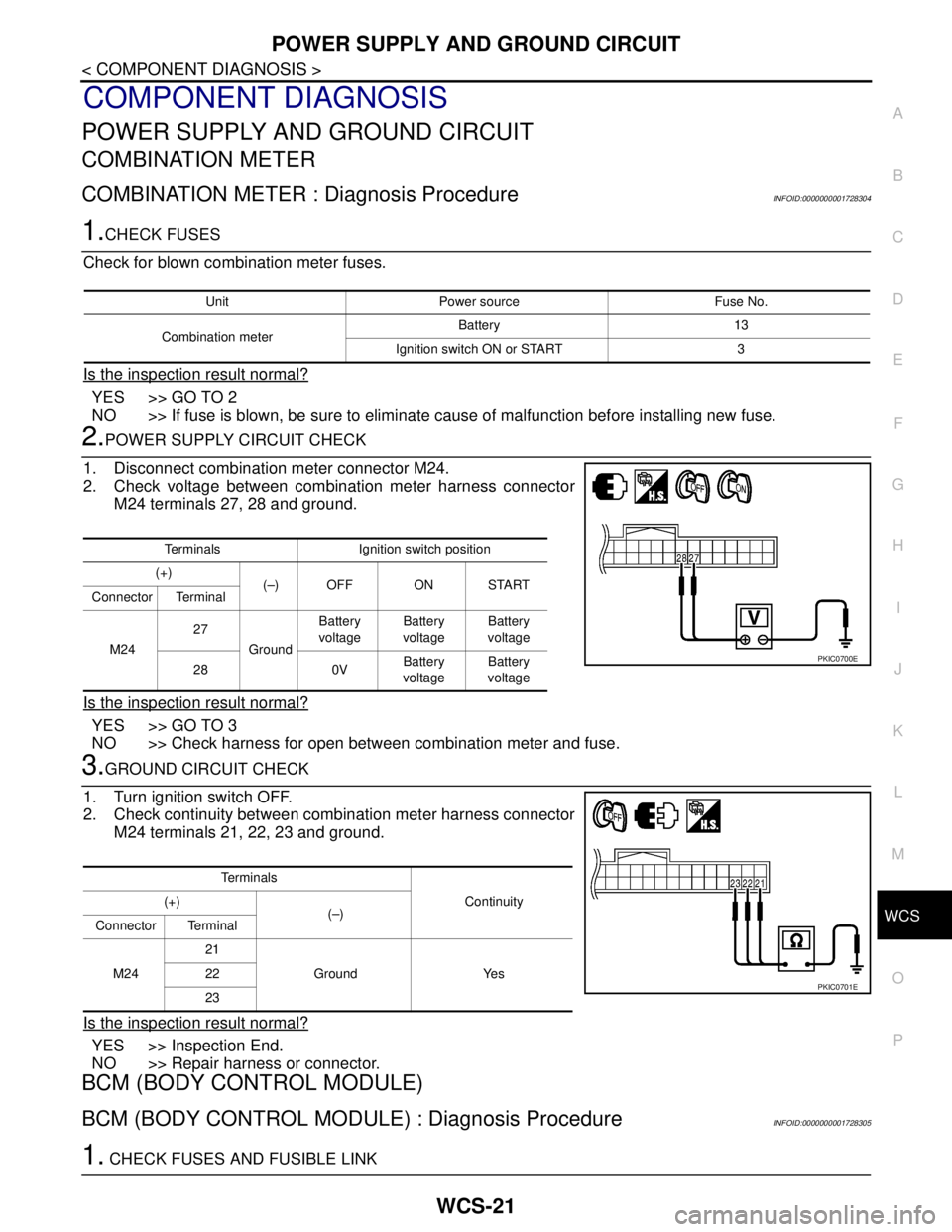
2.POWER SUPPLY CIRCUIT CHECK
1. Disconnect combination meter connector M24.
2. Check voltage between combination meter harness connector
M24 terminals 27, 28 and ground.
Is the inspection result normal?
YES >> GO TO 3
NO >> Check harness for open between combination meter and fuse.
3.GROUND CIRCUIT CHECK
1. Turn ignition switch OFF.
2. Check continuity between combination meter harness connector
M24 terminals 21, 22, 23 and ground.
Is the inspection result normal?
YES >> Inspection End.
NO >> Repair harness or connector.
BCM (BODY CONTROL MODULE)
BCM (BODY CONTROL MODULE) : Diagnosis ProcedureINFOID:0000000001728305
1. CHECK FUSES AND FUSIBLE LINK
Unit Power source Fuse No.
Combination meterBattery 13
Ignition switch ON or START 3
Terminals Ignition switch position
(+)
(–) OFF ON START
Connector Terminal
M2427
GroundBattery
voltageBattery
voltageBattery
voltage
28 0VBattery
voltageBattery
voltage
PKIC0700E
Te r m i n a l s
Continuity (+)
(–)
Connector Terminal
M2421
Ground Yes 22
23
PKIC0701E
Page 5737 of 5883

WCS-22
< COMPONENT DIAGNOSIS >
POWER SUPPLY AND GROUND CIRCUIT
Check that the following fuses and fusible link are not fusing.
Is the fuse fusing?
YES >> Replace the blown fuse or fusible link after repairing the affected circuit if a fuse or fusible link is
blown.
NO >> GO TO 2.
2. CHECK POWER SUPPLY CIRCUIT
1. Turn ignition switch OFF.
2. Disconnect BCM.
3. Check voltage between BCM harness connector and ground.
Is the measurement value normal?
YES >> GO TO 3
NO >> Repair or replace harness.
3. CHECK GROUND CIRCUIT
Check continuity between BCM harness connector and ground.
Does continuity exist?
YES >> INSPECTION END
NO >> Repair or replace harness.
Terminal No. Signal name Fuses and fusible link No.
22
Battery power supply9 (10A)
728 (10A)
74
G (40A)
79
24 Ignition power supply 55 (10A)
Te r m i n a l s
Ignition switch position
(+)
(−) BCM
OFF ACC ON
Connector Terminal
M1822
GroundBattery
voltageBattery
voltageBattery
voltage
24Approx.
0 VApprox.
0 VBattery
voltage
M2072
Battery
voltageBattery
voltageBattery
voltage 74
79
ALMIA0188ZZ
BCM
GroundContinuity
Connector Terminal
M18 2
Ye s
M20 70
ALMIA0189ZZ
Page 5741 of 5883
WCS-26
< COMPONENT DIAGNOSIS >
KEY SWITCH SIGNAL CIRCUIT (WITH INTELLIGENT KEY)
KEY SWITCH SIGNAL CIRCUIT (WITH INTELLIGENT KEY)
DescriptionINFOID:0000000001722936
Transmits a key switch signal to the BCM.
Component Function CheckINFOID:0000000001722937
1.CHECK BCM INPUT SIGNAL
Select “DATA MONITOR” for “BCM” and check the “KEY IN SW” monitor value.
>> Inspection End.
Diagnosis ProcedureINFOID:0000000001722938
1.CHECK FUSE
Check if the key switch and ignition knob switch 10A fuse (No. 31, located in the fuse and relay box) is blown.
Is the fuse blown?
YES >> Be sure to repair the cause of malfunction before installing new fuse.
NO >> GO TO 2
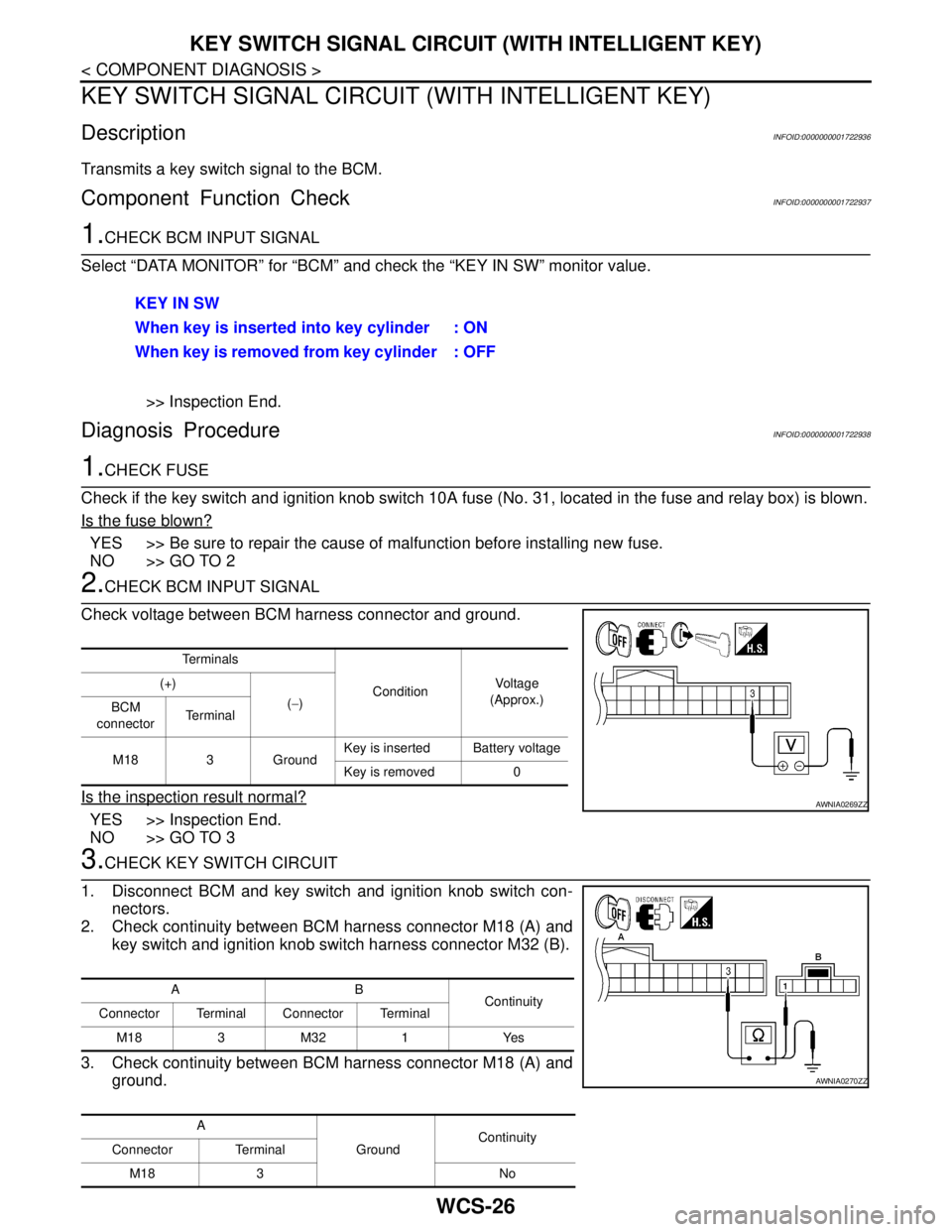
2.CHECK BCM INPUT SIGNAL
Check voltage between BCM harness connector and ground.
Is the inspection result normal?
YES >> Inspection End.
NO >> GO TO 3
3.CHECK KEY SWITCH CIRCUIT
1. Disconnect BCM and key switch and ignition knob switch con-
nectors.
2. Check continuity between BCM harness connector M18 (A) and
key switch and ignition knob switch harness connector M32 (B).
3. Check continuity between BCM harness connector M18 (A) and
ground.KEY IN SW
When key is inserted into key cylinder : ON
When key is removed from key cylinder : OFF
Te r m i n a l s
ConditionVo l ta g e
(Approx.) (+)
(−)
BCM
connectorTe r m i n a l
M18 3 GroundKey is inserted Battery voltage
Key is removed 0
AWNIA0269ZZ
AB
Continuity
Connector Terminal Connector Terminal
M183M321 Yes
A
GroundContinuity
Connector Terminal
M18 3 No
AWNIA0270ZZ
Page 5742 of 5883
WCS
KEY SWITCH SIGNAL CIRCUIT (WITH INTELLIGENT KEY)
WCS-27
< COMPONENT DIAGNOSIS >
C
D
E
F
G
H
I
J
K
L
MB A
O
P
Is the inspection result normal?
YES >> GO TO 4
NO >> Repair harness or connector.
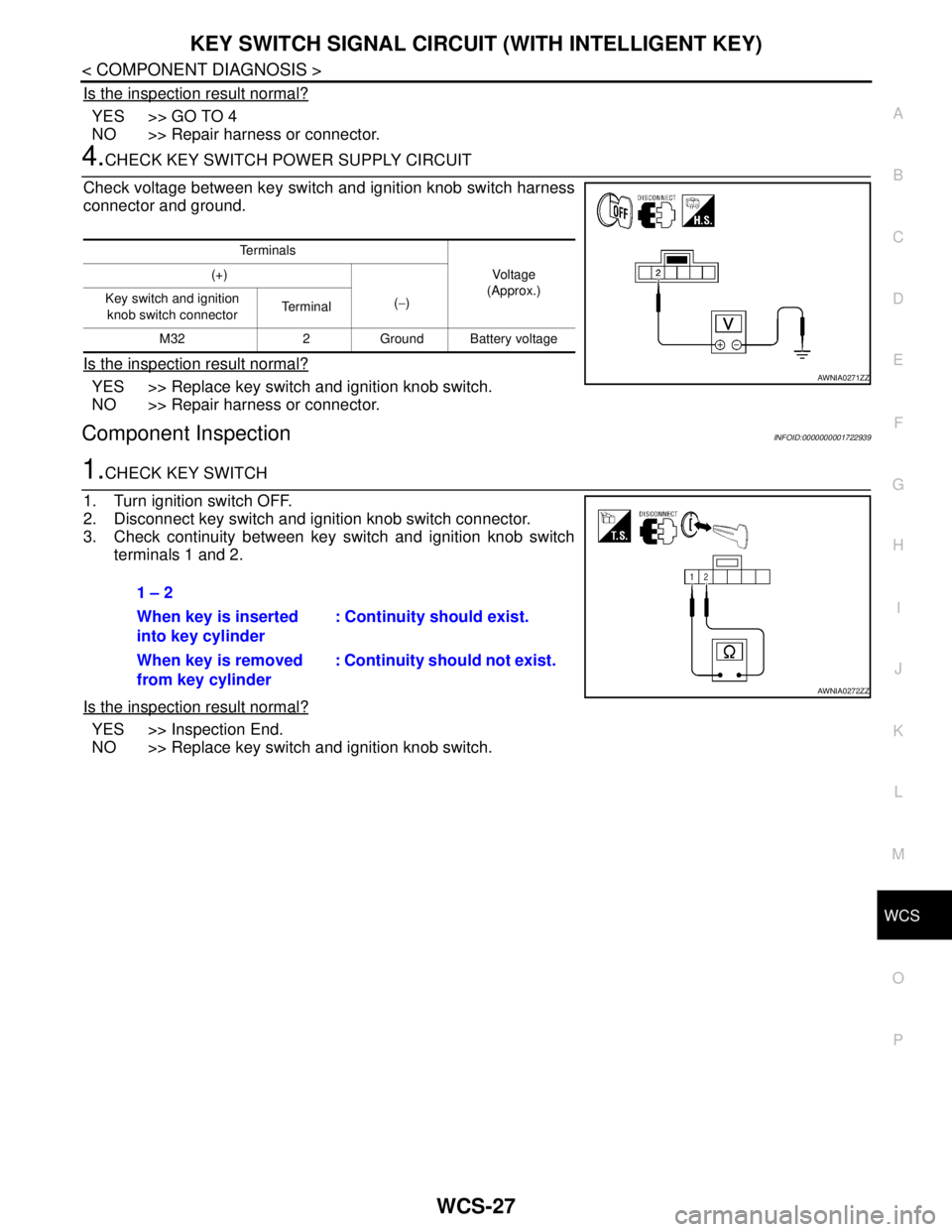
4.CHECK KEY SWITCH POWER SUPPLY CIRCUIT
Check voltage between key switch and ignition knob switch harness
connector and ground.
Is the inspection result normal?
YES >> Replace key switch and ignition knob switch.
NO >> Repair harness or connector.
Component InspectionINFOID:0000000001722939
1.CHECK KEY SWITCH
1. Turn ignition switch OFF.
2. Disconnect key switch and ignition knob switch connector.
3. Check continuity between key switch and ignition knob switch
terminals 1 and 2.
Is the inspection result normal?
YES >> Inspection End.
NO >> Replace key switch and ignition knob switch.
Te r m i n a l s
Vo l ta g e
(Approx.) (+)
(−) Key switch and ignition
knob switch connector Te r m i n a l
M32 2 Ground Battery voltage
AWNIA0271ZZ
1 – 2
When key is inserted
into key cylinder: Continuity should exist.
When key is removed
from key cylinder: Continuity should not exist.
AWNIA0272ZZ
Page 5743 of 5883
WCS-28
< COMPONENT DIAGNOSIS >
KEY SWITCH SIGNAL CIRCUIT (WITHOUT INTELLIGENT KEY)
KEY SWITCH SIGNAL CIRCUIT (WITHOUT INTELLIGENT KEY)
DescriptionINFOID:0000000001722940
Transmits a key switch signal to the BCM.
Component Function CheckINFOID:0000000001722941
1.CHECK BCM INPUT SIGNAL
Select “DATA MONITOR” for “BCM” and check the “KEY IN SW” monitor value.
>> Inspection End.
Diagnosis ProcedureINFOID:0000000001722942
1.CHECK FUSE
Check if the key switch and key lock solenoid 10A fuse [No. 14, located in the fuse block (J/B)] is blown.
Is the fuse blown?
YES >> Be sure to repair the cause of malfunction before installing new fuse.
NO >> GO TO 2
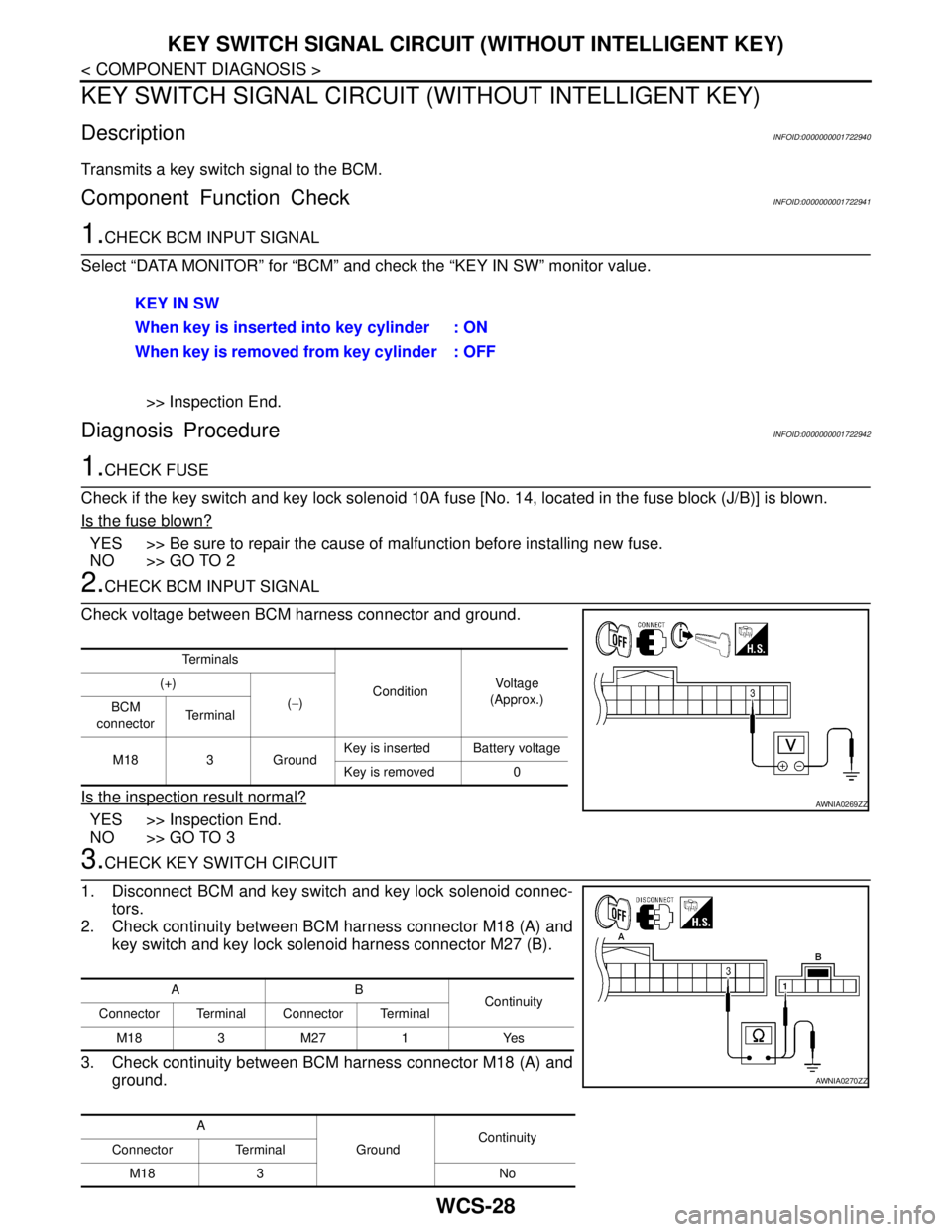
2.CHECK BCM INPUT SIGNAL
Check voltage between BCM harness connector and ground.
Is the inspection result normal?
YES >> Inspection End.
NO >> GO TO 3
3.CHECK KEY SWITCH CIRCUIT
1. Disconnect BCM and key switch and key lock solenoid connec-
tors.
2. Check continuity between BCM harness connector M18 (A) and
key switch and key lock solenoid harness connector M27 (B).
3. Check continuity between BCM harness connector M18 (A) and
ground.KEY IN SW
When key is inserted into key cylinder : ON
When key is removed from key cylinder : OFF
Te r m i n a l s
ConditionVo l ta g e
(Approx.) (+)
(−)
BCM
connectorTe r m i n a l
M18 3 GroundKey is inserted Battery voltage
Key is removed 0
AWNIA0269ZZ
AB
Continuity
Connector Terminal Connector Terminal
M183M271 Yes
A
GroundContinuity
Connector Terminal
M18 3 No
AWNIA0270ZZ
Page 5744 of 5883
WCS
KEY SWITCH SIGNAL CIRCUIT (WITHOUT INTELLIGENT KEY)
WCS-29
< COMPONENT DIAGNOSIS >
C
D
E
F
G
H
I
J
K
L
MB A
O
P
Is the inspection result normal?
YES >> GO TO 4
NO >> Repair harness or connector.
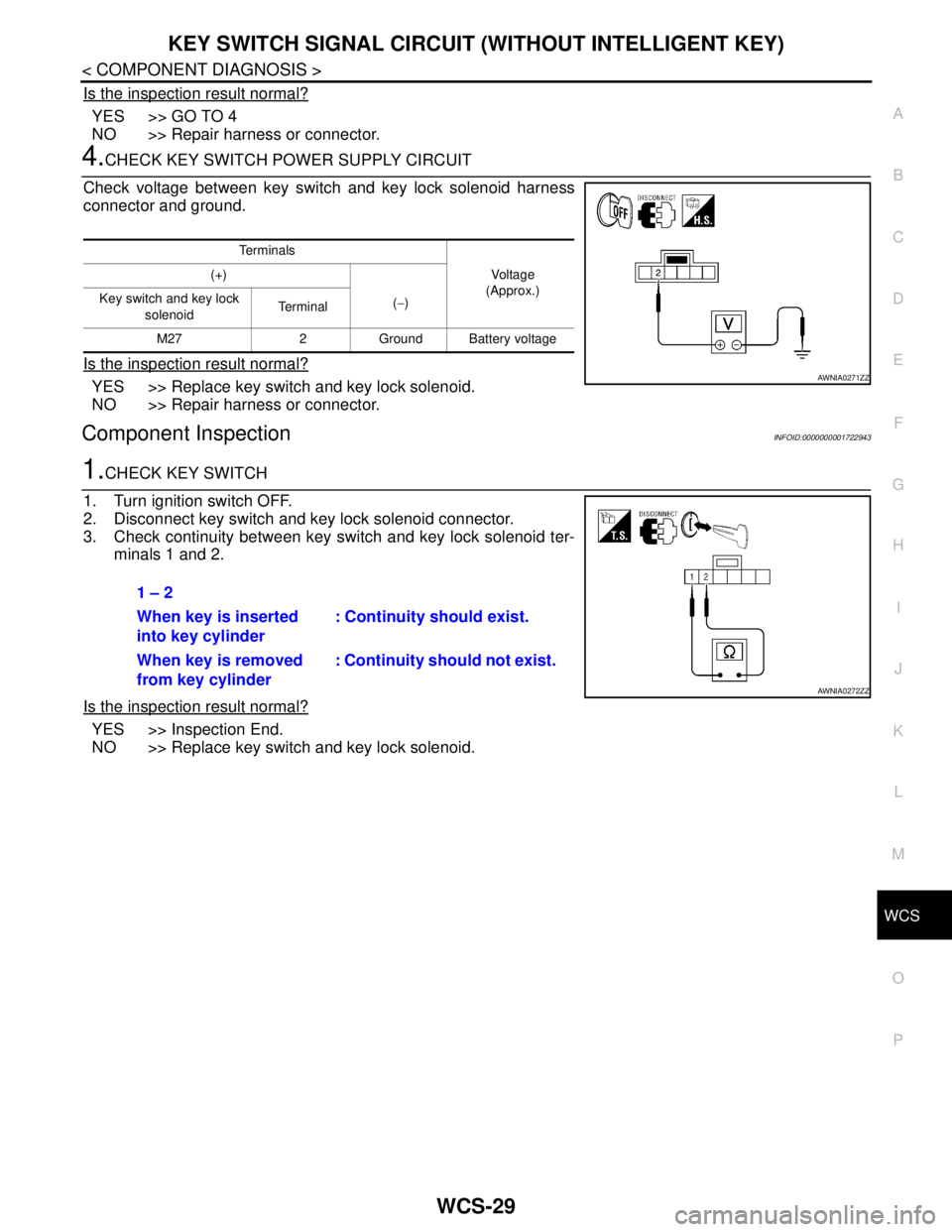
4.CHECK KEY SWITCH POWER SUPPLY CIRCUIT
Check voltage between key switch and key lock solenoid harness
connector and ground.
Is the inspection result normal?
YES >> Replace key switch and key lock solenoid.
NO >> Repair harness or connector.
Component InspectionINFOID:0000000001722943
1.CHECK KEY SWITCH
1. Turn ignition switch OFF.
2. Disconnect key switch and key lock solenoid connector.
3. Check continuity between key switch and key lock solenoid ter-
minals 1 and 2.
Is the inspection result normal?
YES >> Inspection End.
NO >> Replace key switch and key lock solenoid.
Te r m i n a l s
Vo l ta g e
(Approx.) (+)
(−) Key switch and key lock
solenoid Te r m i n a l
M27 2 Ground Battery voltage
AWNIA0271ZZ
1 – 2
When key is inserted
into key cylinder: Continuity should exist.
When key is removed
from key cylinder: Continuity should not exist.
AWNIA0272ZZ
Page 5752 of 5883
WCS
COMBINATION METER
WCS-37
< ECU DIAGNOSIS >
C
D
E
F
G
H
I
J
K
L
MB A
O
P
ECU DIAGNOSIS
COMBINATION METER
Reference ValueINFOID:0000000001728308
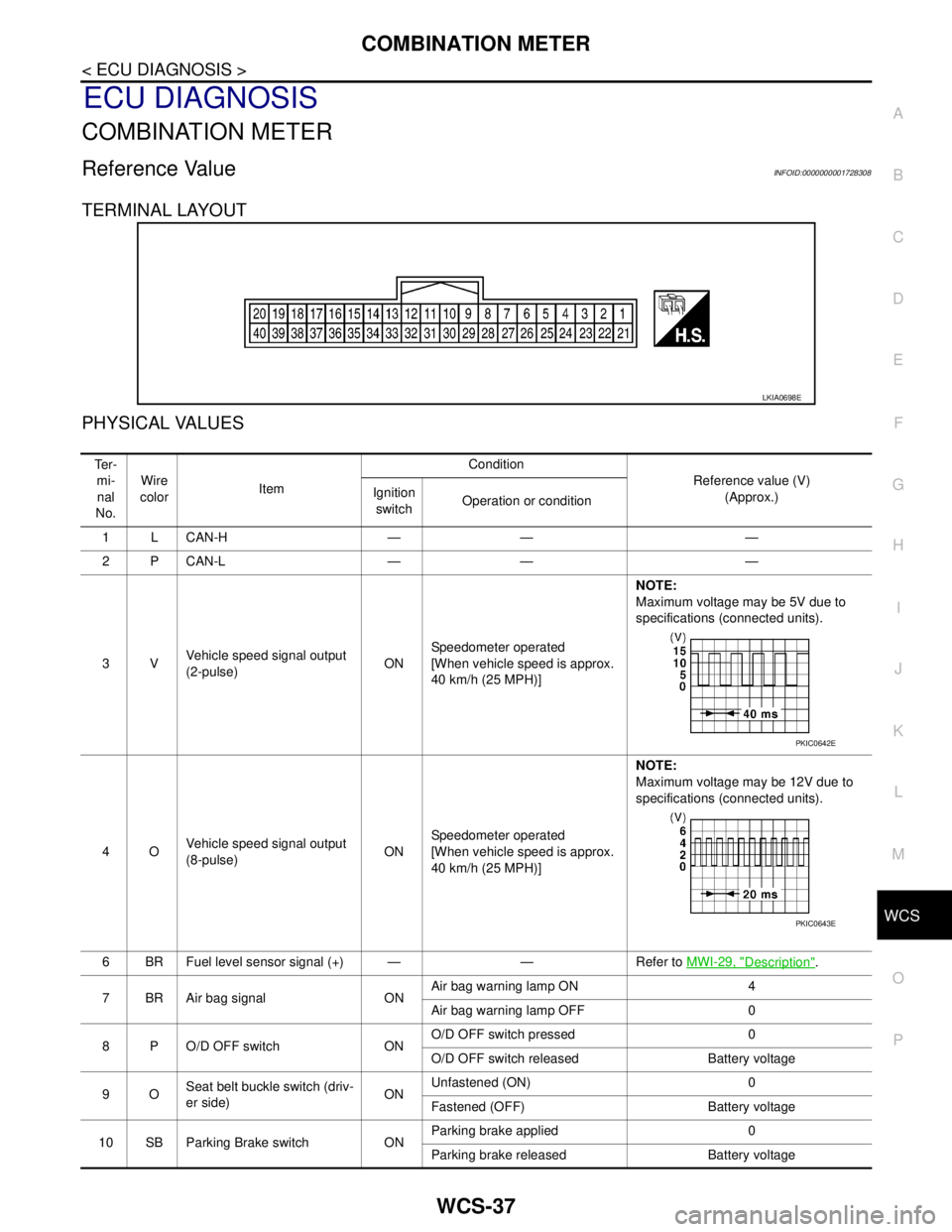
TERMINAL LAYOUT
PHYSICAL VALUES
LKIA0698E
Te r -
mi-
nal
No.Wire
colorItemCondition
Reference value (V)
(Approx.) Ignition
switchOperation or condition
1 L CAN-H — — —
2 P CAN-L — — —
3VVehicle speed signal output
(2-pulse)ONSpeedometer operated
[When vehicle speed is approx.
40 km/h (25 MPH)] NOTE:
Maximum voltage may be 5V due to
specifications (connected units).
4OVehicle speed signal output
(8-pulse)ONSpeedometer operated
[When vehicle speed is approx.
40 km/h (25 MPH)]NOTE:
Maximum voltage may be 12V due to
specifications (connected units).
6 BR Fuel level sensor signal (+) — — Refer to MWI-29, "
Description".
7 BR Air bag signal ONAir bag warning lamp ON 4
Air bag warning lamp OFF 0
8 P O/D OFF switch ONO/D OFF switch pressed 0
O/D OFF switch released Battery voltage
9OSeat belt buckle switch (driv-
er side)ONUnfastened (ON) 0
Fastened (OFF) Battery voltage
10 SB Parking Brake switch ONParking brake applied 0
Parking brake released Battery voltage
PKIC0642E
PKIC0643E