switch NISSAN TIIDA 2007 Service Repair Manual
[x] Cancel search | Manufacturer: NISSAN, Model Year: 2007, Model line: TIIDA, Model: NISSAN TIIDA 2007Pages: 5883, PDF Size: 78.95 MB
Page 458 of 5883
![NISSAN TIIDA 2007 Service Repair Manual CHG
CHARGING SYSTEM PRELIMINARY INSPECTION
CHG-37
< COMPONENT DIAGNOSIS >[K9K]
C
D
E
F
G
H
I
J
K
L B A
O
P N
COMPONENT DIAGNOSIS
CHARGING SYSTEM PRELIMINARY INSPECTION
Inspection ProcedureINFOID:00000](/img/5/57395/w960_57395-457.png "NISSAN TIIDA 2007 Service Repair Manual CHG
CHARGING SYSTEM PRELIMINARY INSPECTION
CHG-37
< COMPONENT DIAGNOSIS >[K9K]
C
D
E
F
G
H
I
J
K
L B A
O
P N
COMPONENT DIAGNOSIS
CHARGING SYSTEM PRELIMINARY INSPECTION
Inspection ProcedureINFOID:00000")
CHG
CHARGING SYSTEM PRELIMINARY INSPECTION
CHG-37
< COMPONENT DIAGNOSIS >[K9K]
C
D
E
F
G
H
I
J
K
L B A
O
P N
COMPONENT DIAGNOSIS
CHARGING SYSTEM PRELIMINARY INSPECTION
Inspection ProcedureINFOID:0000000001724507
1.CHECK BATTERY TERMINALS CONNECTION
Check if battery terminals are clean and tight.
Is the inspection result normal?
YES >> GO TO 2
NO >> Repair battery terminals connection.
2.CHECK FUSE
Check for blown fuse and fusible link.
Is the inspection result normal?
YES >> GO TO 3
NO >> Be sure to eliminate cause of malfunction before installing new fuse or fusible link.
3.CHECK GENERATOR CASE GROUND
Verify generator case ground is clean and tight.
Is the inspection result normal?
YES >> GO TO 4
NO >> Repair connection.
4.CHECK DRIVE BELT TENSION
Check drive belt tension. Refer to XX-XX, "*****"
.
Is the inspection result normal?
YES >> Inspection end.
NO >> Repair as needed.
Unit Power supply terminals Power source
GeneratorBattery (terminal 3) IPDM E/R
Battery (terminal 1) Fusible Link A
Combination meter Ignition switch ON (terminal 2) Fuse 14
Page 459 of 5883
![NISSAN TIIDA 2007 Service Repair Manual CHG-38
< COMPONENT DIAGNOSIS >[K9K]
B TERMINAL CIRCUIT
B TERMINAL CIRCUIT
DescriptionINFOID:0000000001724509
The terminal “1” (B) circuit supplies power to charge the battery and operate the vehic](/img/5/57395/w960_57395-458.png "NISSAN TIIDA 2007 Service Repair Manual CHG-38
< COMPONENT DIAGNOSIS >[K9K]
B TERMINAL CIRCUIT
B TERMINAL CIRCUIT
DescriptionINFOID:0000000001724509
The terminal “1” (B) circuit supplies power to charge the battery and operate the vehic")
CHG-38
< COMPONENT DIAGNOSIS >[K9K]
B TERMINAL CIRCUIT
B TERMINAL CIRCUIT
DescriptionINFOID:0000000001724509
The terminal “1” (B) circuit supplies power to charge the battery and operate the vehicles electrical system.
Diagnosis ProcedureINFOID:0000000001724510
1.CHECK TERMINAL “1” CONNECTION
1. Turn ignition switch OFF.
2. Verify terminal “1” is clean and tight.
Is the inspection result normal?
YES >> GO TO 2
NO >> Repair terminal “1” connection. Confirm repair by performing complete Starting/Charging system
test. Refer to Technical Service Bulletin.
2.CHECK TERMINAL “1” CIRCUIT
Check voltage between generator connector F2 terminal 1 and
ground.
Is voltage reading as specified?
YES >> GO TO 3.
NO >> Check harness for open between generator and fusible
link.
3.CHECK TERMINAL “1” CONNECTION (VOLTAGE DROP TEST)
1. Start engine, then engine running at idle and warm.
2. Check voltage between battery positive terminal and generator
connector F2 terminal 1.
Is the voltage reading as specified?
YES >> Terminal “1” circuit is normal. Refer to CHG-33, "Work
Flow".
NO >> Check harness between battery and generator for high resistance.
(+)
(-) Voltage
Connector Terminal
F2 1 Ground Battery voltage
ALMIA0197ZZ
(+)
(-) Voltage
Connector Terminal
F2 1 Battery positive terminal Less than 0.2V
ALMIA0198ZZ
Page 460 of 5883
![NISSAN TIIDA 2007 Service Repair Manual CHG
L TERMINAL CIRCUIT
CHG-39
< COMPONENT DIAGNOSIS >[K9K]
C
D
E
F
G
H
I
J
K
L B A
O
P N
L TERMINAL CIRCUIT
DescriptionINFOID:0000000001724511
The terminal “2” (L) circuit controls the charge warn](/img/5/57395/w960_57395-459.png "NISSAN TIIDA 2007 Service Repair Manual CHG
L TERMINAL CIRCUIT
CHG-39
< COMPONENT DIAGNOSIS >[K9K]
C
D
E
F
G
H
I
J
K
L B A
O
P N
L TERMINAL CIRCUIT
DescriptionINFOID:0000000001724511
The terminal “2” (L) circuit controls the charge warn")
CHG
L TERMINAL CIRCUIT
CHG-39
< COMPONENT DIAGNOSIS >[K9K]
C
D
E
F
G
H
I
J
K
L B A
O
P N
L TERMINAL CIRCUIT
DescriptionINFOID:0000000001724511
The terminal “2” (L) circuit controls the charge warning lamp. The charge warning lamp illuminates when the
ignition switch is set to ON or START. When the generator is providing sufficient voltage with the engine run-
ning, the charge warning lamp will go off. If the charge warning lamp illuminates with the engine running, a
malfunction is indicated.
Diagnosis ProcedureINFOID:0000000001724512
1.CHECK CHARGE WARNING LAMP CIRCUIT CONNECTION
Verify generator connector F1 terminal 2 is clean and tight.
Is the connection secure?
YES >> GO TO 2
NO >> Repair the connection. Confirm repair by performing complete Starting/Charging system test.
Refer to Technical Service Bulletin.
2.CHECK CHARGE WARNING LAMP CIRCUIT
1. Disconnect generator connector F1.
2. Apply ground to generator harness connector F1 terminal 2 with
the ignition switch in the ON position.
Does the charge lamp illuminate?
YES >> Check generator function. Refer to CHG-33, "Work
Flow".
NO >> GO TO 3
3.CHECK HARNESS CONTINUITY
1. Turn ignition switch OFF.
2. Disconnect the generator connector F1 and combination meter
connector M24.
3. Check continuity between generator harness connector F1 ter-
minal 2 and combination meter harness connector M24 terminal
38.
4. Check continuity between generator harness connector F1 ter-
minal 2 and ground.
Are the continuity results as specified?
YES >> Replace the combination meter. Refer to XX-XX, "*****".
NO >> Repair the harness or connector.Charge lamp should illuminate
ALMIA0328GB
Terminal Terminal
Continuity
Connector Terminal Connector Terminal
F1 2 M24 38 Yes
Te r , m i n a l
—
Continuity
Connector Terminal
F1 2 Ground No
ALMIA0329GB
Page 461 of 5883
![NISSAN TIIDA 2007 Service Repair Manual CHG-40
< COMPONENT DIAGNOSIS >[K9K]
S TERMINAL CIRCUIT
S TERMINAL CIRCUIT
DescriptionINFOID:0000000001724513
The output voltage of the generator is controlled by the IC regulator at terminal “3” (](/img/5/57395/w960_57395-460.png "NISSAN TIIDA 2007 Service Repair Manual CHG-40
< COMPONENT DIAGNOSIS >[K9K]
S TERMINAL CIRCUIT
S TERMINAL CIRCUIT
DescriptionINFOID:0000000001724513
The output voltage of the generator is controlled by the IC regulator at terminal “3” (")
CHG-40
< COMPONENT DIAGNOSIS >[K9K]
S TERMINAL CIRCUIT
S TERMINAL CIRCUIT
DescriptionINFOID:0000000001724513
The output voltage of the generator is controlled by the IC regulator at terminal “3” (S) detecting the input volt-
age. Terminal “3” circuit detects the battery voltage to adjust the generator output voltage with the IC regulator.
Diagnosis ProcedureINFOID:0000000001724514
1.CHECK VOLTAGE REGULATOR CIRCUIT CONNECTION
Check to see if connector F1 terminal 3 is clean and tight.
Is the inspection result normal?
YES >> GO TO 2
NO >> Repair terminal connection. Confirm repair by performing complete Starting/Charging system test.
Refer to Technical Service Bulletin.
2.CHECK VOLTAGE REGULATOR CIRCUIT
1. Disconnect generator harness connector F1.
2. Turn ignition switch ON.
3. Check voltage between generator harness connector F1 termi-
nal 3 and ground.
Does battery voltage exist?
YES >> Refer to CHG-33, "Work Flow".
NO >> Check harness for open between generator and fuse.3 - ground Battery voltage
ALMIA0330GB
Page 463 of 5883
![NISSAN TIIDA 2007 Service Repair Manual CHG-42
< SYMPTOM DIAGNOSIS >[K9K]
CHARGING SYSTEM
SYMPTOM DIAGNOSIS
CHARGING SYSTEM
Symptom TableINFOID:0000000001724516
Symptom Reference
Battery discharged
Refer to CHG-33, "
Work Flow". The charge](/img/5/57395/w960_57395-462.png "NISSAN TIIDA 2007 Service Repair Manual CHG-42
< SYMPTOM DIAGNOSIS >[K9K]
CHARGING SYSTEM
SYMPTOM DIAGNOSIS
CHARGING SYSTEM
Symptom TableINFOID:0000000001724516
Symptom Reference
Battery discharged
Refer to CHG-33, \"
Work Flow\". The charge")
CHG-42
< SYMPTOM DIAGNOSIS >[K9K]
CHARGING SYSTEM
SYMPTOM DIAGNOSIS
CHARGING SYSTEM
Symptom TableINFOID:0000000001724516
Symptom Reference
Battery discharged
Refer to CHG-33, "
Work Flow". The charge warning lamp does not illuminate when the ignition
switch is set to ON.
The charge warning lamp does not turn OFF after the engine
starts.
The charging warning lamp turns ON when increasing the engine
speed.
Page 467 of 5883
CL-2
< SERVICE INFORMATION >
PRECAUTIONS
SERVICE INFORMATION
PRECAUTIONS
Precaution for Supplemental Restraint System (SRS) "AIR BAG" and "SEAT BELT
PRE-TENSIONER"
INFOID:0000000001375288
The Supplemental Restraint System such as “AIR BAG” and “SEAT BELT PRE-TENSIONER”, used along
with a front seat belt, helps to reduce the risk or severity of injury to the driver and front passenger for certain
types of collision. This system includes seat belt switch inputs and dual stage front air bag modules. The SRS
system uses the seat belt switches to determine the front air bag deployment, and may only deploy one front
air bag, depending on the severity of a collision and whether the front occupants are belted or unbelted.
Information necessary to service the system safely is included in the SRS and SB section of this Service Man-
ual.
WARNING:
• To avoid rendering the SRS inoperative, which could increase the risk of personal injury or death in
the event of a collision which would result in air bag inflation, all maintenance must be performed by
an authorized NISSAN/INFINITI dealer.
Improper maintenance, including incorrect removal and installation of the SRS, can lead to personal
injury caused by unintentional activation of the system. For removal of Spiral Cable and Air Bag
Module, see the SRS section.
Do not use electrical test equipment on any circuit related to the SRS unless instructed to in this
Service Manual. SRS wiring harnesses can be identified by yellow and/or orange harnesses or har-
ness connectors.
Service Notice or PrecautionINFOID:0000000001375289
Use recommended brake fluid when adding fluid to the clutch reservoir tank. Refer to MA-19, "Fluids
and Lubricants".
Do not reuse fluid drained from clutch system.
Do not splash brake fluid on painted areas.
Use new brake fluid to clean or wash all parts of master cylinder and operating cylinder.
Do not use mineral oils such as gasoline or kerosene. It will ruin the rubber parts of the hydraulic
system.
If transaxle assembly is removed from the vehicle, always replace CSC (Concentric slave cylinder).
Return CSC to original position to remove transaxle assembly. Dust on clutch disc sliding parts may
damage CSC seal and may cause clutch fluid leakage.
Do not disassemble clutch master cylinder and CSC.
WARNING:
After cleaning clutch disc, clean it with a dust collector. Do not use compressed air.
Page 470 of 5883
CLUTCH PEDAL
CL-5
< SERVICE INFORMATION >
C
E
F
G
H
I
J
K
L
MA
B
CL
N
O
P
CLUTCH PEDAL
On-vehicle Inspection and AdjustmentINFOID:0000000001375293
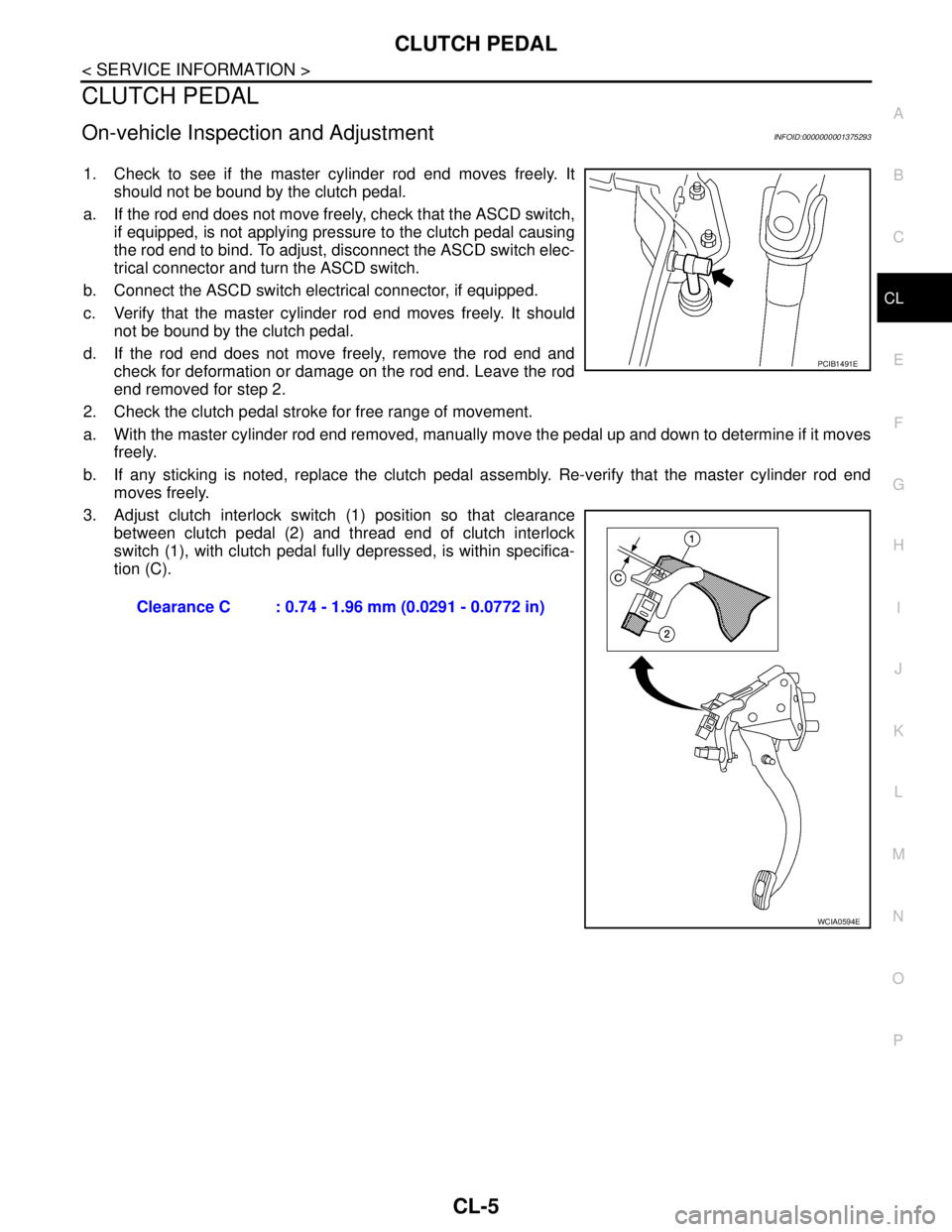
1. Check to see if the master cylinder rod end moves freely. It
should not be bound by the clutch pedal.
a. If the rod end does not move freely, check that the ASCD switch,
if equipped, is not applying pressure to the clutch pedal causing
the rod end to bind. To adjust, disconnect the ASCD switch elec-
trical connector and turn the ASCD switch.
b. Connect the ASCD switch electrical connector, if equipped.
c. Verify that the master cylinder rod end moves freely. It should
not be bound by the clutch pedal.
d. If the rod end does not move freely, remove the rod end and
check for deformation or damage on the rod end. Leave the rod
end removed for step 2.
2. Check the clutch pedal stroke for free range of movement.
a. With the master cylinder rod end removed, manually move the pedal up and down to determine if it moves
freely.
b. If any sticking is noted, replace the clutch pedal assembly. Re-verify that the master cylinder rod end
moves freely.
3. Adjust clutch interlock switch (1) position so that clearance
between clutch pedal (2) and thread end of clutch interlock
switch (1), with clutch pedal fully depressed, is within specifica-
tion (C).
Clearance C : 0.74 - 1.96 mm (0.0291 - 0.0772 in)
PCIB1491E
WCIA0594E
Page 471 of 5883
CL-6
< SERVICE INFORMATION >
CLUTCH PEDAL
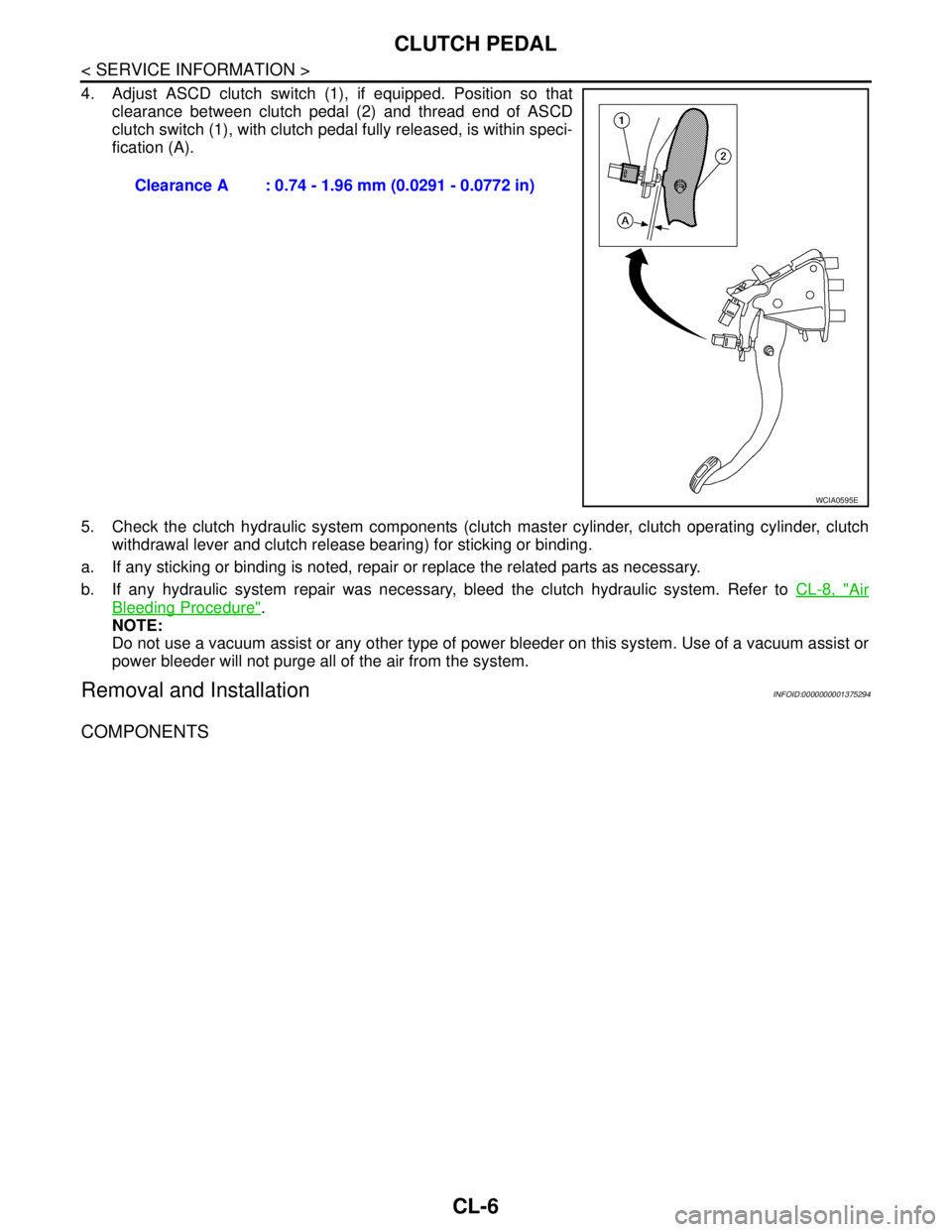
4. Adjust ASCD clutch switch (1), if equipped. Position so that
clearance between clutch pedal (2) and thread end of ASCD
clutch switch (1), with clutch pedal fully released, is within speci-
fication (A).
5. Check the clutch hydraulic system components (clutch master cylinder, clutch operating cylinder, clutch
withdrawal lever and clutch release bearing) for sticking or binding.
a. If any sticking or binding is noted, repair or replace the related parts as necessary.
b. If any hydraulic system repair was necessary, bleed the clutch hydraulic system. Refer to CL-8, "
Air
Bleeding Procedure".
NOTE:
Do not use a vacuum assist or any other type of power bleeder on this system. Use of a vacuum assist or
power bleeder will not purge all of the air from the system.
Removal and InstallationINFOID:0000000001375294
COMPONENTS
Clearance A : 0.74 - 1.96 mm (0.0291 - 0.0772 in)
WCIA0595E
Page 472 of 5883
CLUTCH PEDAL
CL-7
< SERVICE INFORMATION >
C
E
F
G
H
I
J
K
L
MA
B
CL
N
O
P
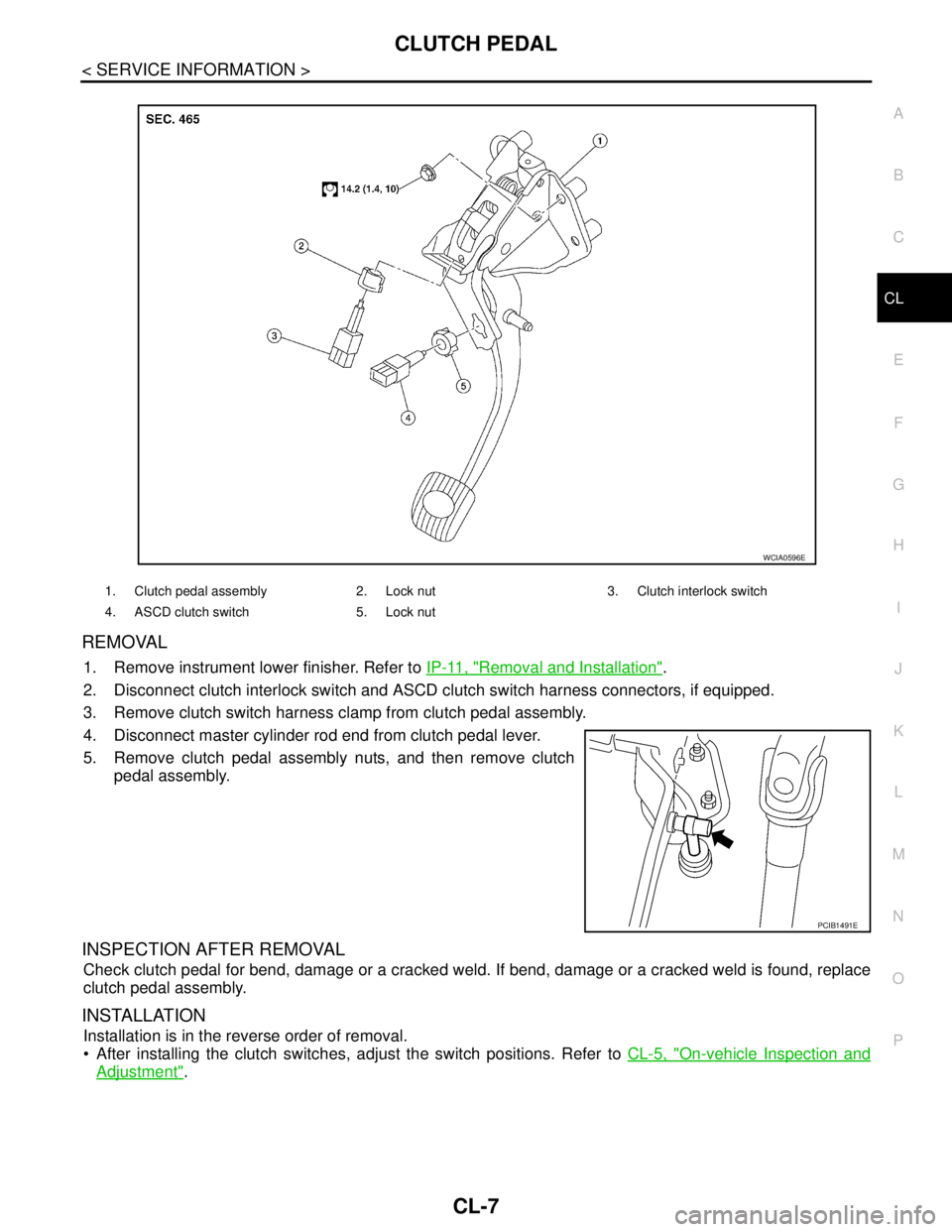
REMOVAL
1. Remove instrument lower finisher. Refer to IP-11, "Removal and Installation".
2. Disconnect clutch interlock switch and ASCD clutch switch harness connectors, if equipped.
3. Remove clutch switch harness clamp from clutch pedal assembly.
4. Disconnect master cylinder rod end from clutch pedal lever.
5. Remove clutch pedal assembly nuts, and then remove clutch
pedal assembly.
INSPECTION AFTER REMOVAL
Check clutch pedal for bend, damage or a cracked weld. If bend, damage or a cracked weld is found, replace
clutch pedal assembly.
INSTALLATION
Installation is in the reverse order of removal.
After installing the clutch switches, adjust the switch positions. Refer to CL-5, "
On-vehicle Inspection and
Adjustment".
1. Clutch pedal assembly 2. Lock nut 3. Clutch interlock switch
4. ASCD clutch switch 5. Lock nut
WCIA0596E
PCIB1491E
Page 481 of 5883

CL-16
< SERVICE INFORMATION >
SERVICE DATA AND SPECIFICATIONS (SDS)
SERVICE DATA AND SPECIFICATIONS (SDS)
Clutch Control SystemINFOID:0000000001375300
Clutch PedalINFOID:0000000001375301
Clutch DiscINFOID:0000000001375302
Clutch CoverINFOID:0000000001375303
Type of clutch controlHydraulic
Clearance ″A″ between clutch pedal and ASCD switch threaded
end while clutch pedal is fully released (if equipped). 0.74 - 1.96 mm (0.0291 - 0.0772 in)
Clearance ″C″ between clutch pedal and clutch interlock switch
threaded end while clutch pedal is fully depressed.0.74 - 1.96 mm (0.0291 - 0.0772 in)
Model225
Facing size (outer dia. × inner dia. × thickness) 225 mm × 160 mm × 3.2 mm (8.86 in × 6.30 in × 0.126 in)
Thickness of disc assembly with load 7.2 - 7.6 mm (0.283 - 0.299 in) with 5,394 N (550 kg, 1,213 lb)
Runout limit/diameter of the area to be measured 1.0 mm (0.039 in) / 215 mm (8.46 in) dia.
Maximum spline backlash (at outer edge of disc) 1.0 mm (0.039 in)
Wear limit of facing surface to rivet head 0.3 mm (0.012 in)
Set-load5,394 N (550 kg, 1,213 lb)
Diaphragm spring lever height 20 - 22 mm (0.79 - 0.87 in)
Uneven limit diaphragm spring toe height 0.7 mm (0.028 in) or less