front NISSAN TIIDA 2007 Service Owner's Manual
[x] Cancel search | Manufacturer: NISSAN, Model Year: 2007, Model line: TIIDA, Model: NISSAN TIIDA 2007Pages: 5883, PDF Size: 78.95 MB
Page 99 of 5883
![NISSAN TIIDA 2007 Service Owners Manual AV-94
< ECU DIAGNOSIS >[AUDIO WITH NAVIGATION]
AV CONTROL UNIT
11
(BR)12
(P)Sound signal front RH OutputIgnition
switch
ONVoice output
13
(O)14
(V)Sound signal rear RH OutputIgnition
switch
ONVoic](/img/5/57395/w960_57395-98.png "NISSAN TIIDA 2007 Service Owners Manual AV-94
< ECU DIAGNOSIS >[AUDIO WITH NAVIGATION]
AV CONTROL UNIT
11
(BR)12
(P)Sound signal front RH OutputIgnition
switch
ONVoice output
13
(O)14
(V)Sound signal rear RH OutputIgnition
switch
ONVoic")
AV-94
< ECU DIAGNOSIS >[AUDIO WITH NAVIGATION]
AV CONTROL UNIT
11
(BR)12
(P)Sound signal front RH OutputIgnition
switch
ONVoice output
13
(O)14
(V)Sound signal rear RH OutputIgnition
switch
ONVoice output
15
(B)Ground Steering switch signal GND —Ignition
switch
ON—0 V
16
(Y)15
(B)Steering switch signal B InputIgnition
switch
ONKeep pressing VOL DOWN
switch.0 V
Keep pressing VOL UP
switch.1.2 V
Keep pressing
switch.2.5 V
Keep pressing switch.3.7 V
Except for above. 5 V
19
(LG)Ground Battery power supply InputIgnition
switch
OFF— Battery voltage
20
(B)Ground GND —Ignition
switch
ON—0 V
23
(L)—AV communication signal
(H)Input/
Output—— —
24
(P)—AV communication signal
(L)Input/
Output—— —
30
(W)31
(O)TEL voice signal InputIgnition
switch
ONTEL voice output
32
(O)33
(W)Voice guidance signal InputIgnition
switch
ONVoice guidance output Terminal
(Wire color)Description
ConditionReference value
(Approx.)
+ – Signal nameInput/
Output
SKIB3609E
SKIB3609E
SKIB3609E
SKIB3609E
Page 108 of 5883
![NISSAN TIIDA 2007 Service Owners Manual AV
NAVI CONTROL UNIT
AV-103
< ECU DIAGNOSIS >[AUDIO WITH NAVIGATION]
C
D
E
F
G
H
I
J
K
L
MB A
O
P
DTC IndexINFOID:0000000001728760
Self-diagnosis results display item
63
(W)Ground Ignition signal Inpu](/img/5/57395/w960_57395-107.png "NISSAN TIIDA 2007 Service Owners Manual AV
NAVI CONTROL UNIT
AV-103
< ECU DIAGNOSIS >[AUDIO WITH NAVIGATION]
C
D
E
F
G
H
I
J
K
L
MB A
O
P
DTC IndexINFOID:0000000001728760
Self-diagnosis results display item
63
(W)Ground Ignition signal Inpu")
AV
NAVI CONTROL UNIT
AV-103
< ECU DIAGNOSIS >[AUDIO WITH NAVIGATION]
C
D
E
F
G
H
I
J
K
L
MB A
O
P
DTC IndexINFOID:0000000001728760
Self-diagnosis results display item
63
(W)Ground Ignition signal InputIgnition
switch
ON— Battery voltage
64
(V)Ground Parking brake signal InputIgnition
switch
ONParking brake ON 0 V
Parking brake OFF 12 V
65
(Y/G)Ground Reverse signal InputIgnition
switch
ONR position 12 V
Other than R position 0 V
66
(Y)GroundVehicle speed signal (8-
pulse) InputIgnition
switch
ONWhen vehicle speed is ap-
prox. 40 km/h (25MPH)
67
(Y)GroundCamera-connection recog-
nition signal InputIgnition
switch
ONConnected to camera con-
trol unit connector0 V
Not connected to camera
control unit connector5 V
69
(L)—AV communication signal
(H)Input/
Output—— —
70
(P)—AV communication signal
(L)Input/
Output—— —
71
(L)—CAN–HInput/
Output—— —
72
(P)—CAN–LInput/
Output—— —
73 Ground GPS antenna signal InputIgnition
switch
ACCNot connected to GPS an-
tenna connector5 V
74 — Shield — — — —Te r m i n a l
(Wire color)Description
ConditionReference value
(Approx.)
+ – Signal nameInput/
Output
SKIA6649J
DTC Error item Refer to
U1000 CAN COMM CIRCUIT [U1000]AV- 5 2 , "
DiagnosisProcedure"
U1010 CONTROL UNIT (CAN) [U1010] AV- 5 3 , "Diagnosis Procedure"
U1310 CONTROL UNIT (AV) [U1310]AV- 5 4 , "DTC Logic"
U1300
U1240
U1249
U124E
U124FAV COMM CIRCUIT [U1300]
SWITCH CONN [U1240]
AUDIO H/U CONN [U1249]
AMP CONN [U124E]
RDS CONN [U124F]AV- 7 9 , "
Description"
U1243 FRONT DISP CONN [U1243]AV- 7 6 , "Diagnosis Procedure"
U1244 GPS ANTENNA CONN [U1244]AV- 7 8 , "Diagnosis Procedure"
U1200 Control Unit FLASH-ROM [U1200]AV- 5 5 , "DTC Logic"
U1201 Gyro NO CONN [U1201]AV- 5 6 , "DTC Logic"
Page 114 of 5883
![NISSAN TIIDA 2007 Service Owners Manual AV
MULTI AV SYSTEM SYMPTOMS
AV-109
< SYMPTOM DIAGNOSIS >[AUDIO WITH NAVIGATION]
C
D
E
F
G
H
I
J
K
L
MB A
O
P
RELATED TO AUDIO
RELATED TO RGB IMAGE
RELATED TO VOICE ACTIVATED CONTROL
RELATED TO HANDS F](/img/5/57395/w960_57395-113.png "NISSAN TIIDA 2007 Service Owners Manual AV
MULTI AV SYSTEM SYMPTOMS
AV-109
< SYMPTOM DIAGNOSIS >[AUDIO WITH NAVIGATION]
C
D
E
F
G
H
I
J
K
L
MB A
O
P
RELATED TO AUDIO
RELATED TO RGB IMAGE
RELATED TO VOICE ACTIVATED CONTROL
RELATED TO HANDS F")
AV
MULTI AV SYSTEM SYMPTOMS
AV-109
< SYMPTOM DIAGNOSIS >[AUDIO WITH NAVIGATION]
C
D
E
F
G
H
I
J
K
L
MB A
O
P
RELATED TO AUDIO
RELATED TO RGB IMAGE
RELATED TO VOICE ACTIVATED CONTROL
RELATED TO HANDS FREE PHONE
It cannot be switched to rear view
monitor.CONSULT-III self-diagnosis detects
a malfunction.Perform the self-diagnosis using CONSULT-III (MULTI
AV ) (AV- 4 8 , "CONSULT - III Function (MULTI AV)").
CONSULT-III self-diagnosis does not
detect a malfunction.NAVI control unit reverse signal circuit Symptoms Check items Possible malfunction location/Action to take
Symptom Check items Possible malfunction location / Action to take
Audio sound is not heard.No sound from all speakers Audio unit (XX-XX, "*****"
)
Sound is not heard only from the specif-
ic places (Front RH, rear RH, front LH
and rear LH).Sound signal circuit of suspect system
Symptoms Check items Possible malfunction location/Action to take
Color of RGB image is not proper.Light blue (Cyan) tintRGB signal (R: red) circuit (AV- 8 2 , "
Diagnosis Proce-
dure")
Purple (Magenta) tint and image is
rolling.RGB signal (G: green) circuit (AV- 8 3 , "
Diagnosis Proce-
dure")
Screen looks yellowish.RGB signal (B: blue) circuit (AV- 8 4 , "
Diagnosis Proce-
dure")
RGB image is too dark.
RGB image is too fuzzy.– RGB ground circuit
RGB image is not displayed.
(Nothing is displayed on the
screen.)“MULTI AV” is displayed on “SELECT
SYSTEM” screen of CONSULT-III.Perform the self-diagnosis using CONSULT-III (AV- 4 8 ,
"CONSULT - III Function (MULTI AV)").
“MULTI AV” is not displayed on “SE-
LECT SYSTEM” screen of CON-
SULT-III.NAVI control unit power supply and ground circuit (AV-
80, "NAVI CONTROL UNIT : Diagnosis Procedure")
Symptoms Check items Possible malfunction location/Action to take
The voice cannot be controlled
even if the voice control screen is
displayed.Voice sounds at “Speaker Test” and
“Voice Microphone Test” of “Confir-
mation / Adjustment Mode”.NAVI control unit (XX-XX, "*****"
)
Voice does not sound at “Speaker
Test” and “Voice Microphone Test” of
“Confirmation / Adjustment Mode”. MIC. power supply circuit (AV- 9 1 , "
Diagnosis Proce-
dure")
Shield (MIC.) circuit (AV- 9 1 , "
Diagnosis Procedure")
MIC. signal circuit (AV- 9 1 , "
Diagnosis Procedure")
The voice cannot be controlled.
(Voice control screen is not dis-
played.)TEL operation screen is displayed by
pressing and holding “ ” switch
of steering wheel switch.NAVI control unit (XX-XX, "*****"
)
TEL operation screen is not dis-
played by pressing and holding
“ ” switch of steering wheel
switch.
Other steering wheel switches are
normal.Steering switch (XX-XX, "*****"
)
“BACK”, “VOL UP”, “VOL DOWN”
and “ ” switches of steering
wheel switch are not operated.Steering switch signal B circuit XX-XX, "*****"
(XX-XX,
"*****")
All steering switches are not operat-
ed.Steering switch signal ground circuit (XX-XX, "*****"
)
Page 119 of 5883
![NISSAN TIIDA 2007 Service Owners Manual AV-114
< SYMPTOM DIAGNOSIS >[AUDIO WITH NAVIGATION]
NORMAL OPERATING CONDITION
EXAMPLES OF CURRENT LOCATION MARK DISPLACEMENT
It calculates vehicle travel by reading travel distance and turn angle. Th](/img/5/57395/w960_57395-118.png "NISSAN TIIDA 2007 Service Owners Manual AV-114
< SYMPTOM DIAGNOSIS >[AUDIO WITH NAVIGATION]
NORMAL OPERATING CONDITION
EXAMPLES OF CURRENT LOCATION MARK DISPLACEMENT
It calculates vehicle travel by reading travel distance and turn angle. Th")
AV-114
< SYMPTOM DIAGNOSIS >[AUDIO WITH NAVIGATION]
NORMAL OPERATING CONDITION
EXAMPLES OF CURRENT LOCATION MARK DISPLACEMENT
It calculates vehicle travel by reading travel distance and turn angle. Therefore, a mistake will occur in the cur-
rent location display if the vehicle is driven in the following manner. Perform location correction if correct loca-
tion has not been restored after driving the vehicle normally.
Rear view monitor image is not
clearFront glass of camera lens is dirty.Dip a soft cloth into water and wipe the glass
softly.
There are raindrops, snow, etc. Wipe it with a soft cloth softly.
The sunlight or the headlight of following vehicle is
shining directly to the camera lens.It returns to the original condition if the light
applied to the lens disappears. Symptoms Possible cause Possible solution
SEL698V
Page 124 of 5883
![NISSAN TIIDA 2007 Service Owners Manual AV
PRECAUTIONS
AV-119
< PRECAUTION >[AUDIO WITH NAVIGATION]
C
D
E
F
G
H
I
J
K
L
MB A
O
P
PRECAUTION
PRECAUTIONS
Precaution for Supplemental Restraint System (SRS) "AIR BAG" and "SEAT BELT
PRE-TENSION](/img/5/57395/w960_57395-123.png "NISSAN TIIDA 2007 Service Owners Manual AV
PRECAUTIONS
AV-119
< PRECAUTION >[AUDIO WITH NAVIGATION]
C
D
E
F
G
H
I
J
K
L
MB A
O
P
PRECAUTION
PRECAUTIONS
Precaution for Supplemental Restraint System (SRS) \"AIR BAG\" and \"SEAT BELT
PRE-TENSION")
AV
PRECAUTIONS
AV-119
< PRECAUTION >[AUDIO WITH NAVIGATION]
C
D
E
F
G
H
I
J
K
L
MB A
O
P
PRECAUTION
PRECAUTIONS
Precaution for Supplemental Restraint System (SRS) "AIR BAG" and "SEAT BELT
PRE-TENSIONER"
INFOID:0000000001731029
The Supplemental Restraint System such as “AIR BAG” and “SEAT BELT PRE-TENSIONER”, used along
with a front seat belt, helps to reduce the risk or severity of injury to the driver and front passenger for certain
types of collision. Information necessary to service the system safely is included in the “SRS AIRBAG” and
“SEAT BELT” of this Service Manual.
WARNING:
To avoid rendering the SRS inoperative, which could increase the risk of personal injury or death in
the event of a collision which would result in air bag inflation, all maintenance must be performed by
an authorized NISSAN/INFINITI dealer.
Improper maintenance, including incorrect removal and installation of the SRS, can lead to personal
injury caused by unintentional activation of the system. For removal of Spiral Cable and Air Bag
Module, see the “SRS AIRBAG”.
Do not use electrical test equipment on any circuit related to the SRS unless instructed to in this
Service Manual. SRS wiring harnesses can be identified by yellow and/or orange harnesses or har-
ness connectors.
Page 128 of 5883
![NISSAN TIIDA 2007 Service Owners Manual AV
FRONT DOOR SPEAKER
AV-123
< ON-VEHICLE REPAIR >[AUDIO WITH NAVIGATION]
C
D
E
F
G
H
I
J
K
L
MB A
O
P
FRONT DOOR SPEAKER
Removal and InstallationINFOID:0000000001724703
For removal and installation,](/img/5/57395/w960_57395-127.png "NISSAN TIIDA 2007 Service Owners Manual AV
FRONT DOOR SPEAKER
AV-123
< ON-VEHICLE REPAIR >[AUDIO WITH NAVIGATION]
C
D
E
F
G
H
I
J
K
L
MB A
O
P
FRONT DOOR SPEAKER
Removal and InstallationINFOID:0000000001724703
For removal and installation,")
AV
FRONT DOOR SPEAKER
AV-123
< ON-VEHICLE REPAIR >[AUDIO WITH NAVIGATION]
C
D
E
F
G
H
I
J
K
L
MB A
O
P
FRONT DOOR SPEAKER
Removal and InstallationINFOID:0000000001724703
For removal and installation, refer to AV-25, "Removal and Installation".
Page 135 of 5883
![NISSAN TIIDA 2007 Service Owners Manual AV-130
< ON-VEHICLE REPAIR >[AUDIO WITH NAVIGATION]
NAVI CONTROL UNIT
NAVI CONTROL UNIT
Removal and InstallationINFOID:0000000001724711
NAVI CONTROL UNIT
Removal
CAUTION:
To avoid damage, eject map DV](/img/5/57395/w960_57395-134.png "NISSAN TIIDA 2007 Service Owners Manual AV-130
< ON-VEHICLE REPAIR >[AUDIO WITH NAVIGATION]
NAVI CONTROL UNIT
NAVI CONTROL UNIT
Removal and InstallationINFOID:0000000001724711
NAVI CONTROL UNIT
Removal
CAUTION:
To avoid damage, eject map DV")
AV-130
< ON-VEHICLE REPAIR >[AUDIO WITH NAVIGATION]
NAVI CONTROL UNIT
NAVI CONTROL UNIT
Removal and InstallationINFOID:0000000001724711
NAVI CONTROL UNIT
Removal
CAUTION:
To avoid damage, eject map DVD-ROM before removing the NAVI control unit.
1. Disconnect the negative battery terminal.
2. Remove the front seat RH. Refer to SE-14, "
Removal and Installation".
3. Remove the NAVI control unit kick shield clips (A), then remove
the NAVI control unit kick shield (1).
4. Disconnect the NAVI control unit connectors (A) and the Blue-
tooth connector (B).
5. Remove the NAVI control unit bolts (C), then remove the NAVI
control unit (1).
6. Remove the NAVI control unit bracket screws and remove the
NAVI control unit brackets.
Installation
Installation is in the reverse order of removal.
ALNIA0873ZZ
ALNIA0874ZZ
Page 142 of 5883
BCS
BODY CONTROL SYSTEM
BCS-7
< FUNCTION DIAGNOSIS >
C
D
E
F
G
H
I
J
K
L B A
O
P N
FUNCTION DIAGNOSIS
BODY CONTROL SYSTEM
System DescriptionINFOID:0000000001451453
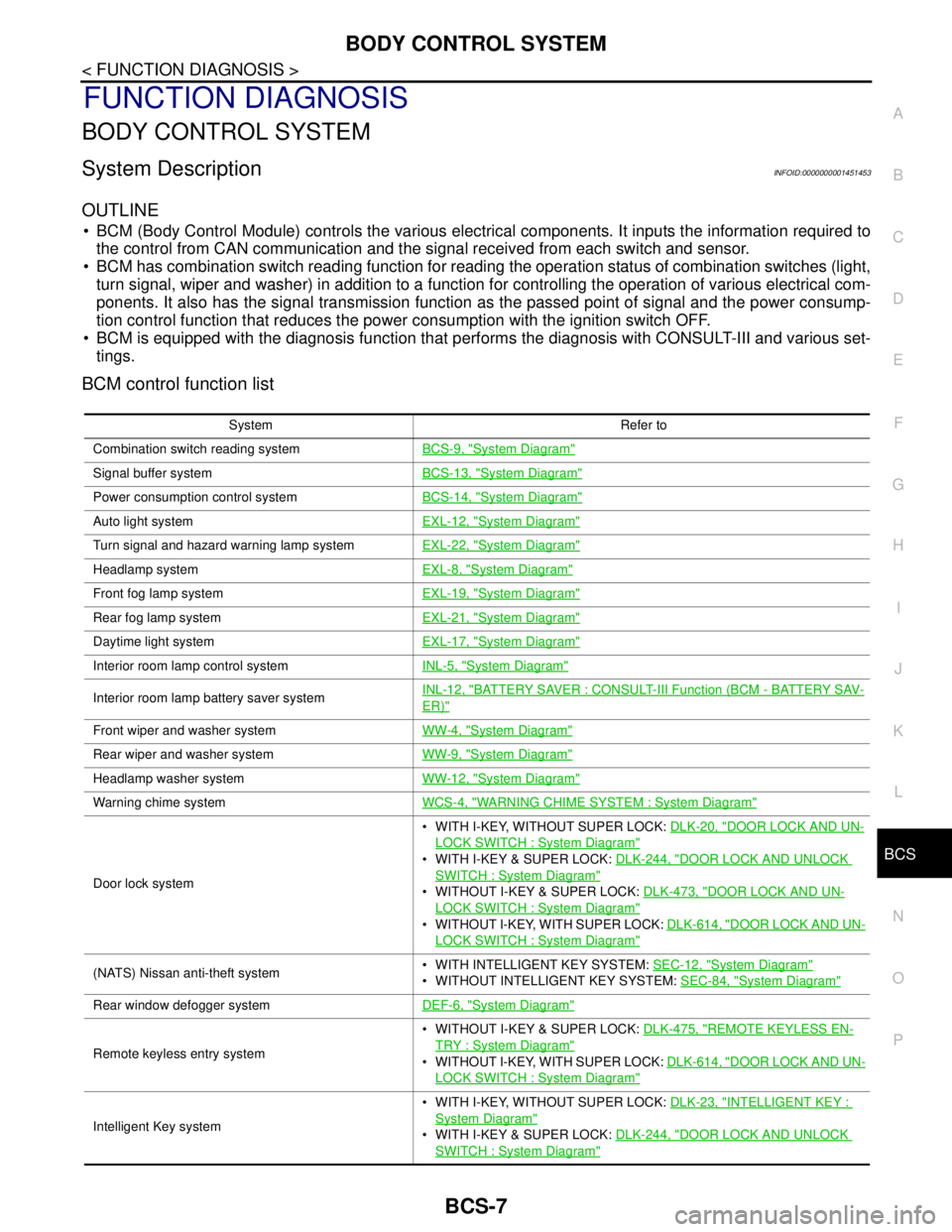
OUTLINE
BCM (Body Control Module) controls the various electrical components. It inputs the information required to
the control from CAN communication and the signal received from each switch and sensor.
BCM has combination switch reading function for reading the operation status of combination switches (light,
turn signal, wiper and washer) in addition to a function for controlling the operation of various electrical com-
ponents. It also has the signal transmission function as the passed point of signal and the power consump-
tion control function that reduces the power consumption with the ignition switch OFF.
BCM is equipped with the diagnosis function that performs the diagnosis with CONSULT-III and various set-
tings.
BCM control function list
System Refer to
Combination switch reading systemBCS-9, "
System Diagram"
Signal buffer systemBCS-13, "System Diagram"
Power consumption control systemBCS-14, "System Diagram"
Auto light systemEXL-12, "System Diagram"
Turn signal and hazard warning lamp systemEXL-22, "System Diagram"
Headlamp systemEXL-8, "System Diagram"
Front fog lamp systemEXL-19, "System Diagram"
Rear fog lamp systemEXL-21, "System Diagram"
Daytime light systemEXL-17, "System Diagram"
Interior room lamp control systemINL-5, "System Diagram"
Interior room lamp battery saver systemINL-12, "BATTERY SAVER : CONSULT-III Function (BCM - BATTERY SAV-
ER)"
Front wiper and washer systemWW-4, "System Diagram"
Rear wiper and washer systemWW-9, "System Diagram"
Headlamp washer systemWW-12, "System Diagram"
Warning chime systemWCS-4, "WARNING CHIME SYSTEM : System Diagram"
Door lock system WITH I-KEY, WITHOUT SUPER LOCK: DLK-20, "
DOOR LOCK AND UN-
LOCK SWITCH : System Diagram"
WITH I-KEY & SUPER LOCK: DLK-244, "DOOR LOCK AND UNLOCK
SWITCH : System Diagram"
WITHOUT I-KEY & SUPER LOCK: DLK-473, "DOOR LOCK AND UN-
LOCK SWITCH : System Diagram"
WITHOUT I-KEY, WITH SUPER LOCK: DLK-614, "DOOR LOCK AND UN-
LOCK SWITCH : System Diagram"
(NATS) Nissan anti-theft system WITH INTELLIGENT KEY SYSTEM: SEC-12, "System Diagram"
WITHOUT INTELLIGENT KEY SYSTEM: SEC-84, "System Diagram"
Rear window defogger systemDEF-6, "System Diagram"
Remote keyless entry system WITHOUT I-KEY & SUPER LOCK: DLK-475, "
REMOTE KEYLESS EN-
TRY : System Diagram"
WITHOUT I-KEY, WITH SUPER LOCK: DLK-614, "DOOR LOCK AND UN-
LOCK SWITCH : System Diagram"
Intelligent Key system WITH I-KEY, WITHOUT SUPER LOCK: DLK-23, "
INTELLIGENT KEY :
System Diagram"
WITH I-KEY & SUPER LOCK: DLK-244, "DOOR LOCK AND UNLOCK
SWITCH : System Diagram"
Page 146 of 5883
BCS
COMBINATION SWITCH READING SYSTEM
BCS-11
< FUNCTION DIAGNOSIS >
C
D
E
F
G
H
I
J
K
L B A
O
P N
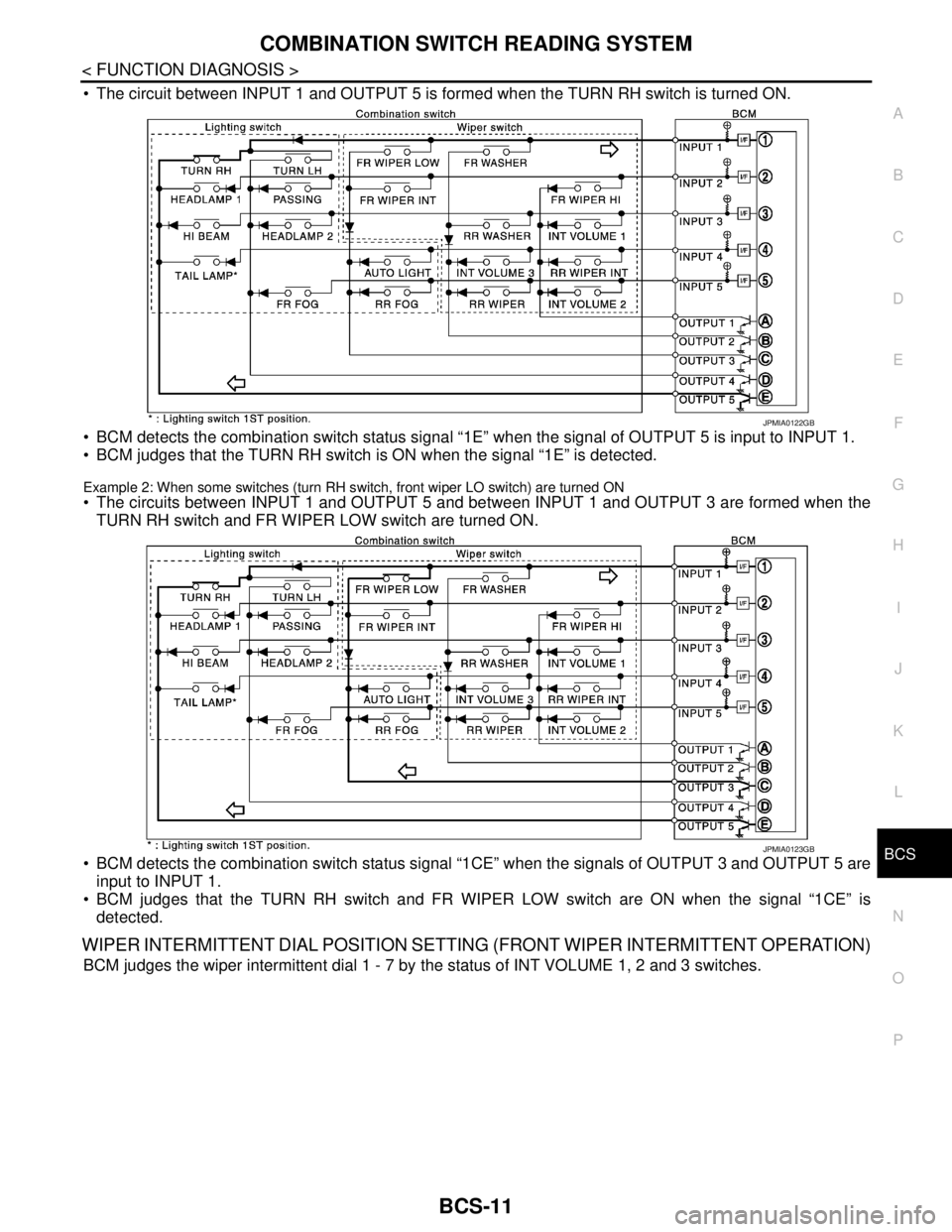
The circuit between INPUT 1 and OUTPUT 5 is formed when the TURN RH switch is turned ON.
BCM detects the combination switch status signal “1E” when the signal of OUTPUT 5 is input to INPUT 1.
BCM judges that the TURN RH switch is ON when the signal “1E” is detected.
Example 2: When some switches (turn RH switch, front wiper LO switch) are turned ON
The circuits between INPUT 1 and OUTPUT 5 and between INPUT 1 and OUTPUT 3 are formed when the
TURN RH switch and FR WIPER LOW switch are turned ON.
BCM detects the combination switch status signal “1CE” when the signals of OUTPUT 3 and OUTPUT 5 are
input to INPUT 1.
BCM judges that the TURN RH switch and FR WIPER LOW switch are ON when the signal “1CE” is
detected.
WIPER INTERMITTENT DIAL POSITION SETTING (FRONT WIPER INTERMITTENT OPERATION)
BCM judges the wiper intermittent dial 1 - 7 by the status of INT VOLUME 1, 2 and 3 switches.
JPMIA0122GB
JPMIA0123GB
Page 152 of 5883

BCS
DIAGNOSIS SYSTEM (BCM)
BCS-17
< FUNCTION DIAGNOSIS >
C
D
E
F
G
H
I
J
K
L B A
O
P N
BCM : CONSULT-III Function (BCM - BCM)INFOID:0000000001451464
WORK SUPPORT
DOOR LOCK
DOOR LOCK : CONSULT-III Function (BCM - DOOR LOCK)INFOID:0000000001451465
WORK SUPPORT
DATA MONITOR
1: With Intelligent Key
2: With remote keyless entry system
ACTIVE TEST
Item Description
RESET SETTING VALUE Return a value set with WORK SUPPORT of each system to a default value in factory shipment.
Work Item Description
SECURITY DOOR LOCK SETAnti hijack function mode can be changed in this mode.
ON: Anti hijack mode is active.
OFF: Anti hijack mode is inactive.
AUTO LOCK SETAuto door lock time can be changed in this mode.
MODE 1: 1 minute
MODE 2: 2 minutes
MODE 3: 3 minutes
MODE 4: 4 minutes
MODE 5: 5 minutes
Monitor Item
[Unit}Description
IGN ON SW [ON/OFF] Indicates condition of ignition switch in ON position.
PUSH SW
1 [ON/OFF]Indicates condition of ignition knob switch.
KEY SW
2 [ON/OFF]Indicates condition of key switch.
CDL LOCK SW [ON/OFF] Indicates condition of door lock and unlock switch.
CDL UNLOCK SW [ON/OFF] Indicates condition of door lock and unlock switch.
DOOR SW-DR [ON/OFF] Indicates condition of front door switch (driver side).
DOOR SW-AS [ON/OFF] Indicates condition of front door switch (passenger side).
DOOR SW-RR [ON/OFF] Indicates condition of rear door switch RH.
DOOR SW-RL [ON/OFF] Indicates condition of rear door switch LH.
TRNK OPNR SW [ON/OFF] Indicates condition of back door switch.
BACK DOOR SW [ON/OFF] Indicates condition of back door switch.
KEYLESS LOCK
2 [ON/OFF]Indicates condition of lock signal from key fob.
KEYLESS UNLOCK
2 [ON/OFF]Indicates condition of unlock signal from key fob.
I-KEY LOCK
1 [ON/OFF]Indicates condition of lock signal from Intelligent Key.
I-KEY UNLOCK
1 [ON/OFF]Indicates condition of unlock signal from Intelligent Key.
Test item Description
DOOR LOCKThis test is able to check door lock operation [ALL LOCK/ALL UNLOCK/DR UNLOCK/
OTHER UNLOCK].
SUPER LOCK
*This test is able to check super lock operation [LOCK (SET)/UNLOCK (RELEASE)].