reverse NISSAN TIIDA 2007 Service Repair Manual
[x] Cancel search | Manufacturer: NISSAN, Model Year: 2007, Model line: TIIDA, Model: NISSAN TIIDA 2007Pages: 5883, PDF Size: 78.95 MB
Page 3733 of 5883
IP-18
< SERVICE INFORMATION >
INSTRUMENT PANEL ASSEMBLY
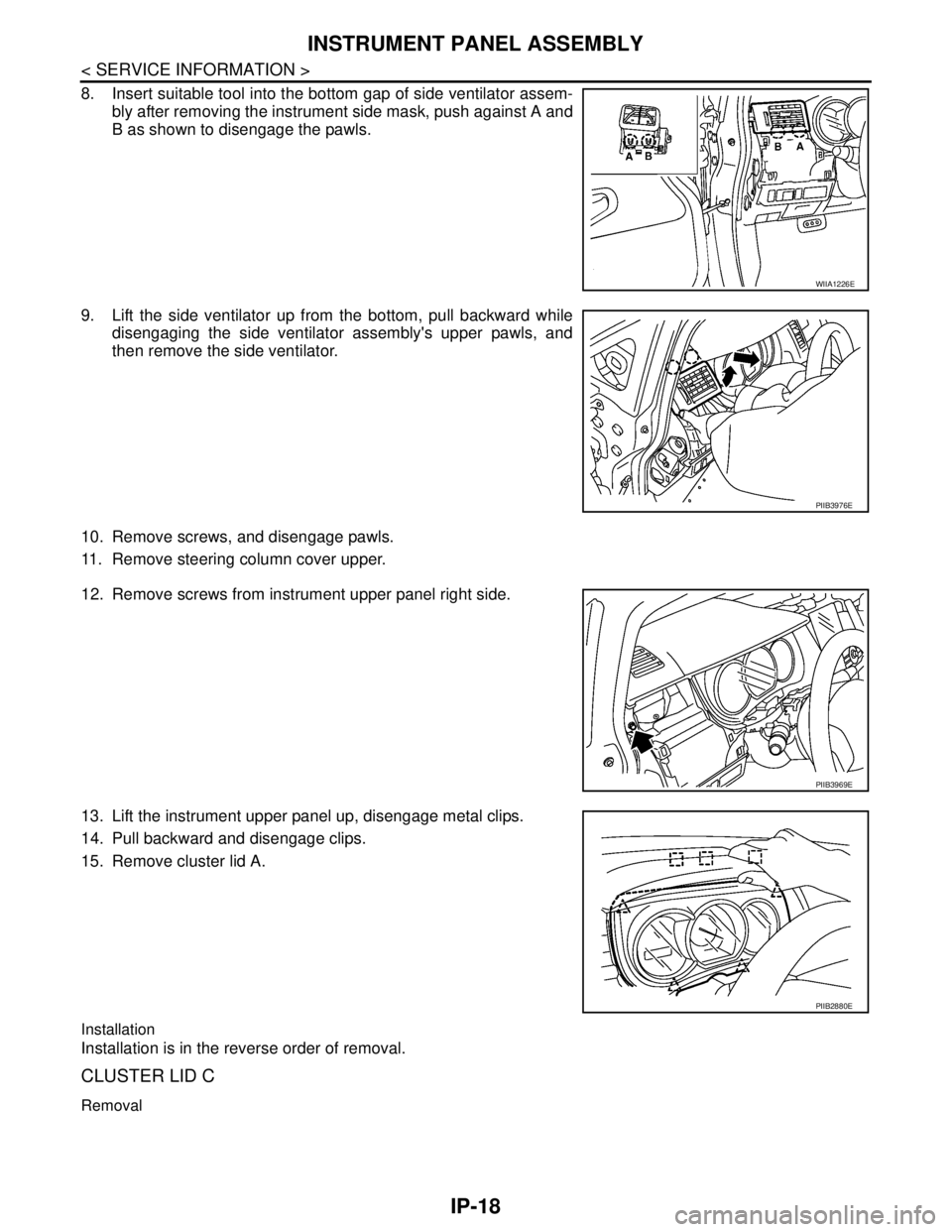
8. Insert suitable tool into the bottom gap of side ventilator assem-
bly after removing the instrument side mask, push against A and
B as shown to disengage the pawls.
9. Lift the side ventilator up from the bottom, pull backward while
disengaging the side ventilator assembly's upper pawls, and
then remove the side ventilator.
10. Remove screws, and disengage pawls.
11. Remove steering column cover upper.
12. Remove screws from instrument upper panel right side.
13. Lift the instrument upper panel up, disengage metal clips.
14. Pull backward and disengage clips.
15. Remove cluster lid A.
Installation
Installation is in the reverse order of removal.
CLUSTER LID C
Removal
WIIA1226E
PIIB3976E
PIIB3969E
PIIB2880E
Page 3734 of 5883
INSTRUMENT PANEL ASSEMBLY
IP-19
< SERVICE INFORMATION >
C
D
E
F
G
H
I
K
L
MA
B
IP
N
O
P
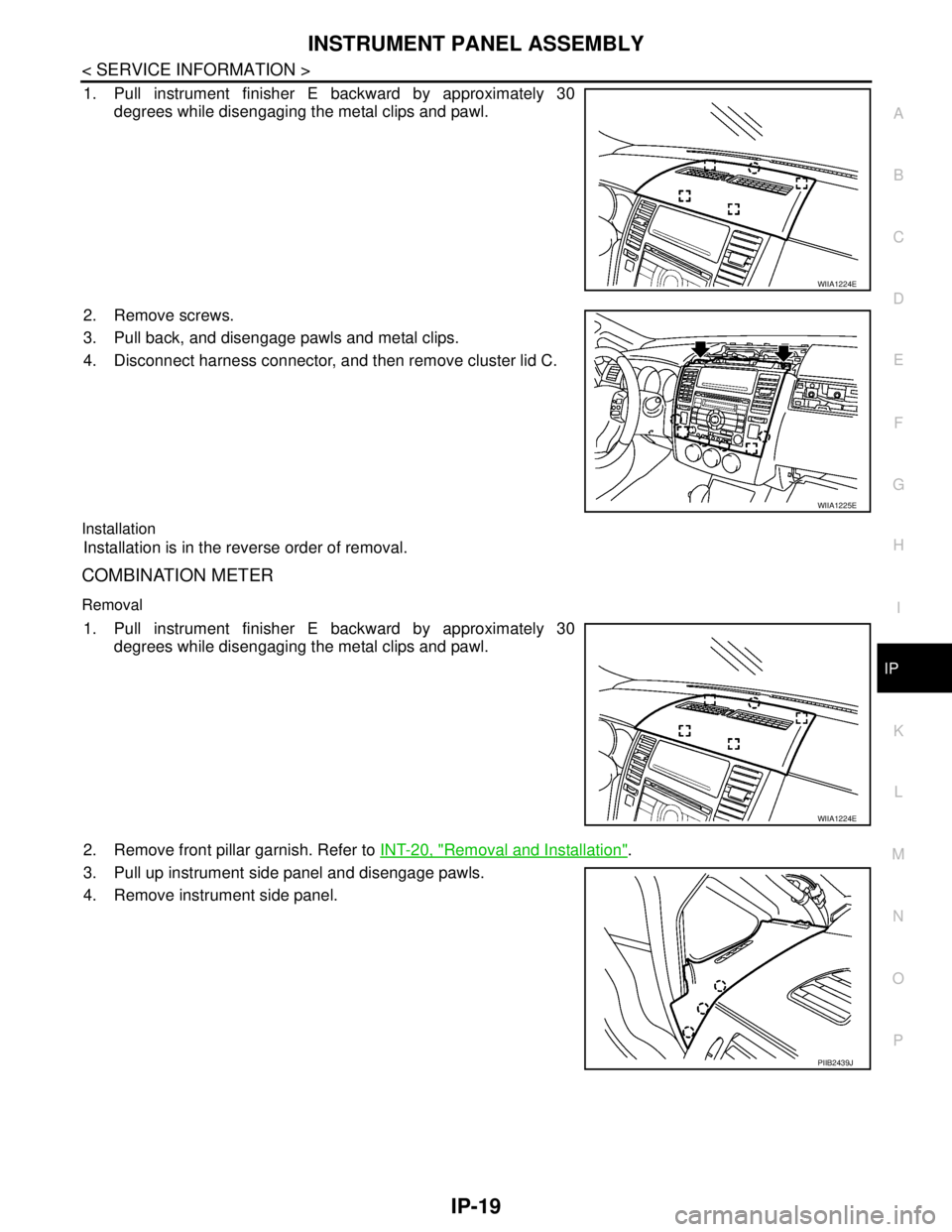
1. Pull instrument finisher E backward by approximately 30
degrees while disengaging the metal clips and pawl.
2. Remove screws.
3. Pull back, and disengage pawls and metal clips.
4. Disconnect harness connector, and then remove cluster lid C.
Installation
Installation is in the reverse order of removal.
COMBINATION METER
Removal
1. Pull instrument finisher E backward by approximately 30
degrees while disengaging the metal clips and pawl.
2. Remove front pillar garnish. Refer to INT-20, "
Removal and Installation".
3. Pull up instrument side panel and disengage pawls.
4. Remove instrument side panel.
WIIA1224E
WIIA1225E
WIIA1224E
PIIB2439J
Page 3736 of 5883
INSTRUMENT PANEL ASSEMBLY
IP-21
< SERVICE INFORMATION >
C
D
E
F
G
H
I
K
L
MA
B
IP
N
O
P
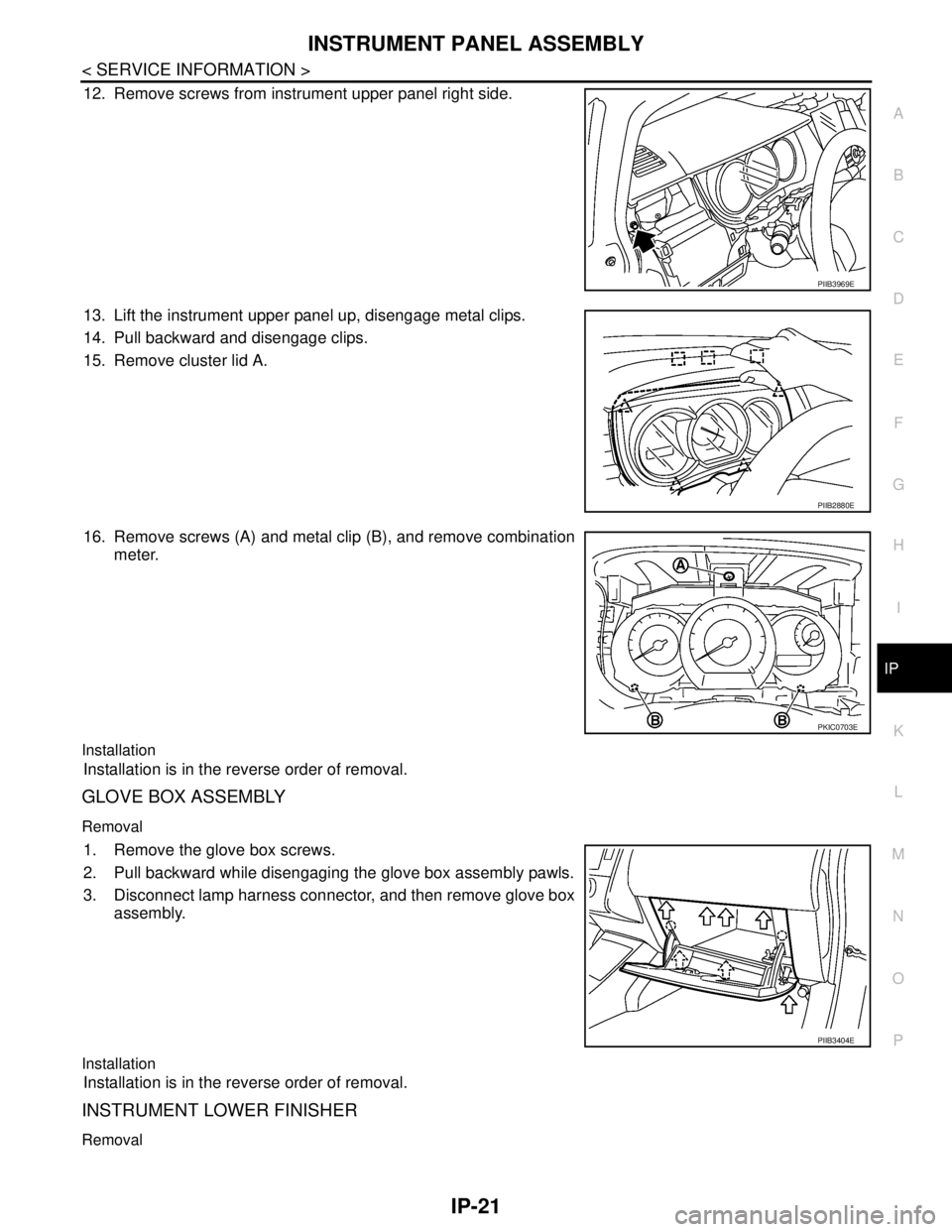
12. Remove screws from instrument upper panel right side.
13. Lift the instrument upper panel up, disengage metal clips.
14. Pull backward and disengage clips.
15. Remove cluster lid A.
16. Remove screws (A) and metal clip (B), and remove combination
meter.
Installation
Installation is in the reverse order of removal.
GLOVE BOX ASSEMBLY
Removal
1. Remove the glove box screws.
2. Pull backward while disengaging the glove box assembly pawls.
3. Disconnect lamp harness connector, and then remove glove box
assembly.
Installation
Installation is in the reverse order of removal.
INSTRUMENT LOWER FINISHER
Removal
PIIB3969E
PIIB2880E
PKIC0703E
PIIB3404E
Page 3737 of 5883
IP-22
< SERVICE INFORMATION >
INSTRUMENT PANEL ASSEMBLY
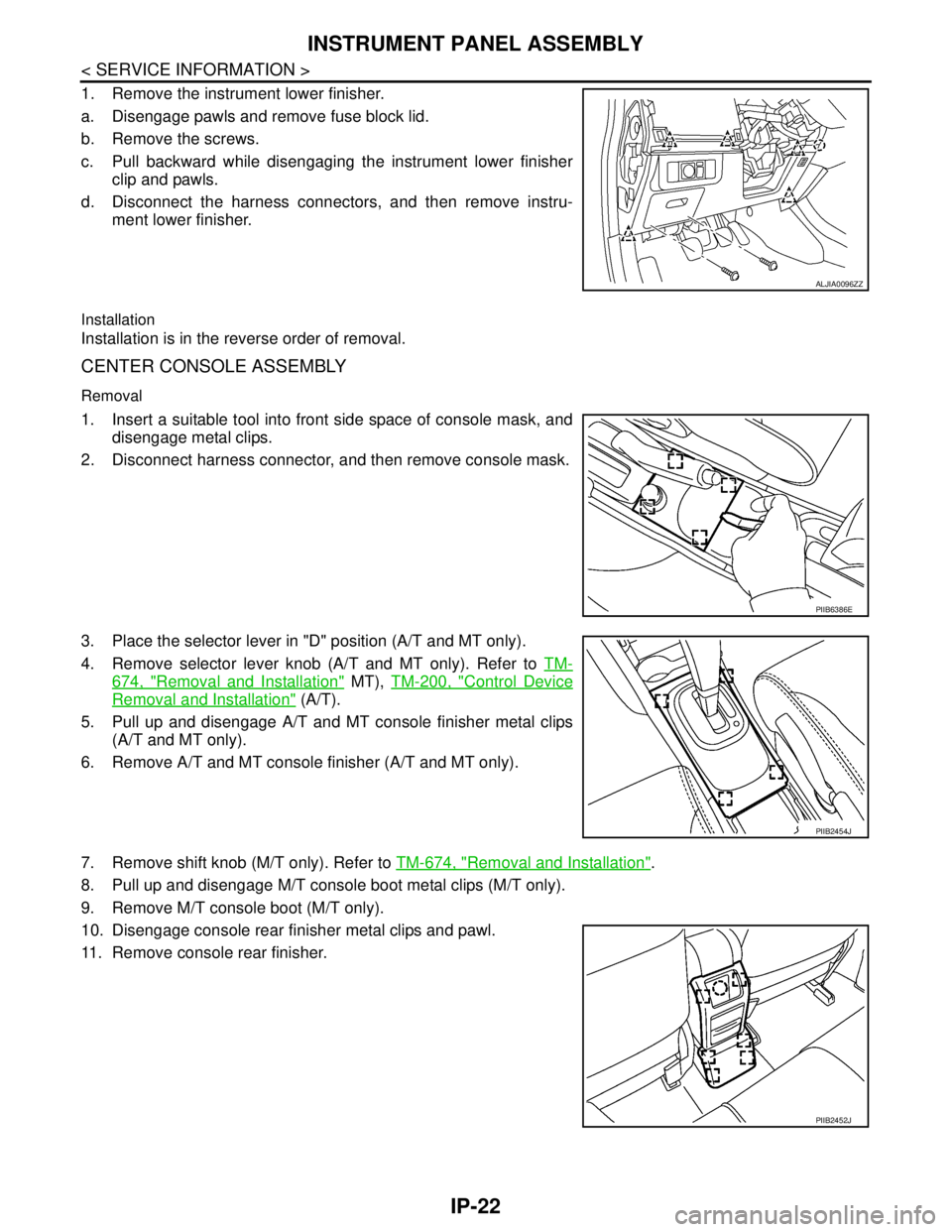
1. Remove the instrument lower finisher.
a. Disengage pawls and remove fuse block lid.
b. Remove the screws.
c. Pull backward while disengaging the instrument lower finisher
clip and pawls.
d. Disconnect the harness connectors, and then remove instru-
ment lower finisher.
Installation
Installation is in the reverse order of removal.
CENTER CONSOLE ASSEMBLY
Removal
1. Insert a suitable tool into front side space of console mask, and
disengage metal clips.
2. Disconnect harness connector, and then remove console mask.
3. Place the selector lever in "D" position (A/T and MT only).
4. Remove selector lever knob (A/T and MT only). Refer to TM-
674, "Removal and Installation" MT), TM-200, "Control Device
Removal and Installation" (A/T).
5. Pull up and disengage A/T and MT console finisher metal clips
(A/T and MT only).
6. Remove A/T and MT console finisher (A/T and MT only).
7. Remove shift knob (M/T only). Refer to TM-674, "
Removal and Installation".
8. Pull up and disengage M/T console boot metal clips (M/T only).
9. Remove M/T console boot (M/T only).
10. Disengage console rear finisher metal clips and pawl.
11. Remove console rear finisher.
ALJIA0096ZZ
PIIB6386E
PIIB2454J
PIIB2452J
Page 3738 of 5883
INSTRUMENT PANEL ASSEMBLY
IP-23
< SERVICE INFORMATION >
C
D
E
F
G
H
I
K
L
MA
B
IP
N
O
P
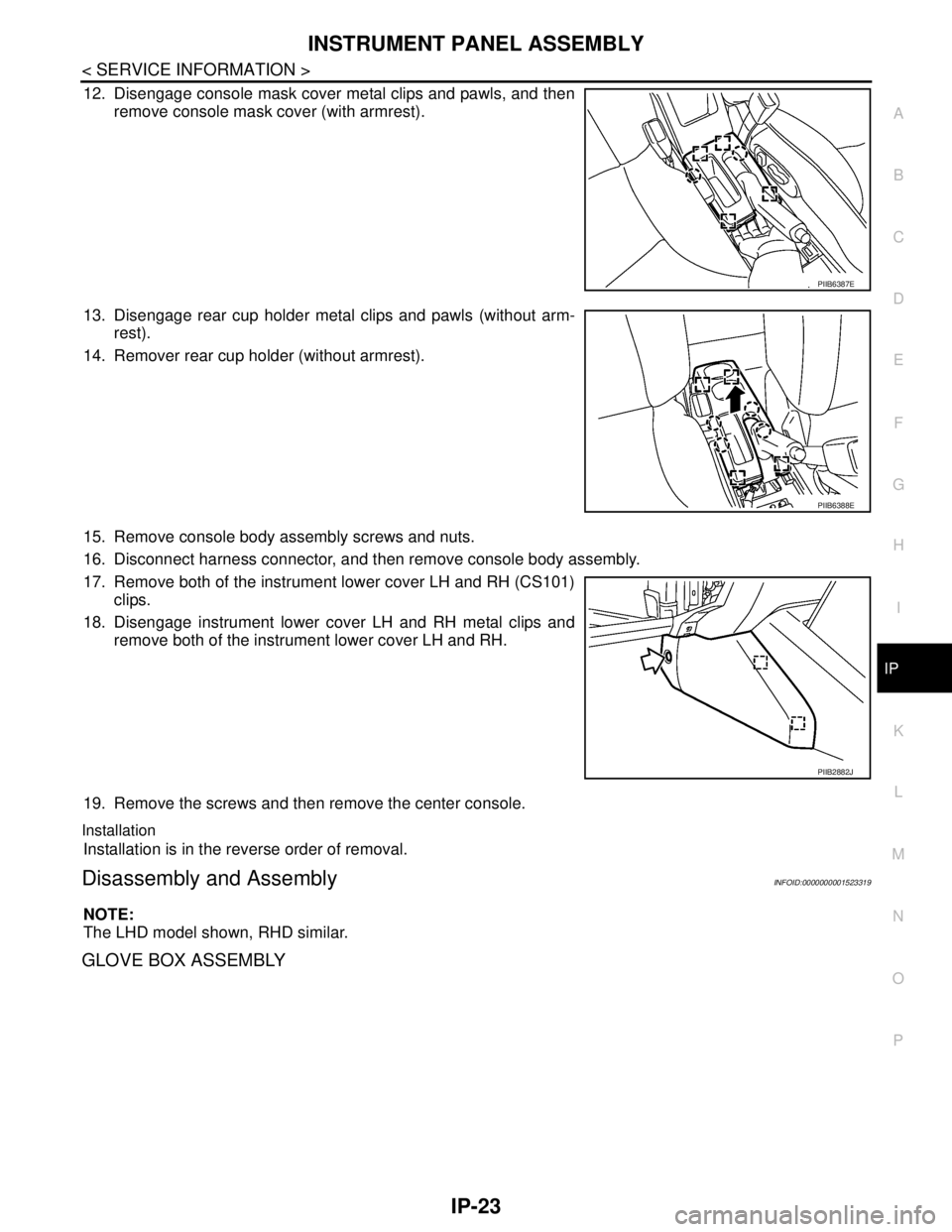
12. Disengage console mask cover metal clips and pawls, and then
remove console mask cover (with armrest).
13. Disengage rear cup holder metal clips and pawls (without arm-
rest).
14. Remover rear cup holder (without armrest).
15. Remove console body assembly screws and nuts.
16. Disconnect harness connector, and then remove console body assembly.
17. Remove both of the instrument lower cover LH and RH (CS101)
clips.
18. Disengage instrument lower cover LH and RH metal clips and
remove both of the instrument lower cover LH and RH.
19. Remove the screws and then remove the center console.
Installation
Installation is in the reverse order of removal.
Disassembly and AssemblyINFOID:0000000001523319
NOTE:
The LHD model shown, RHD similar.
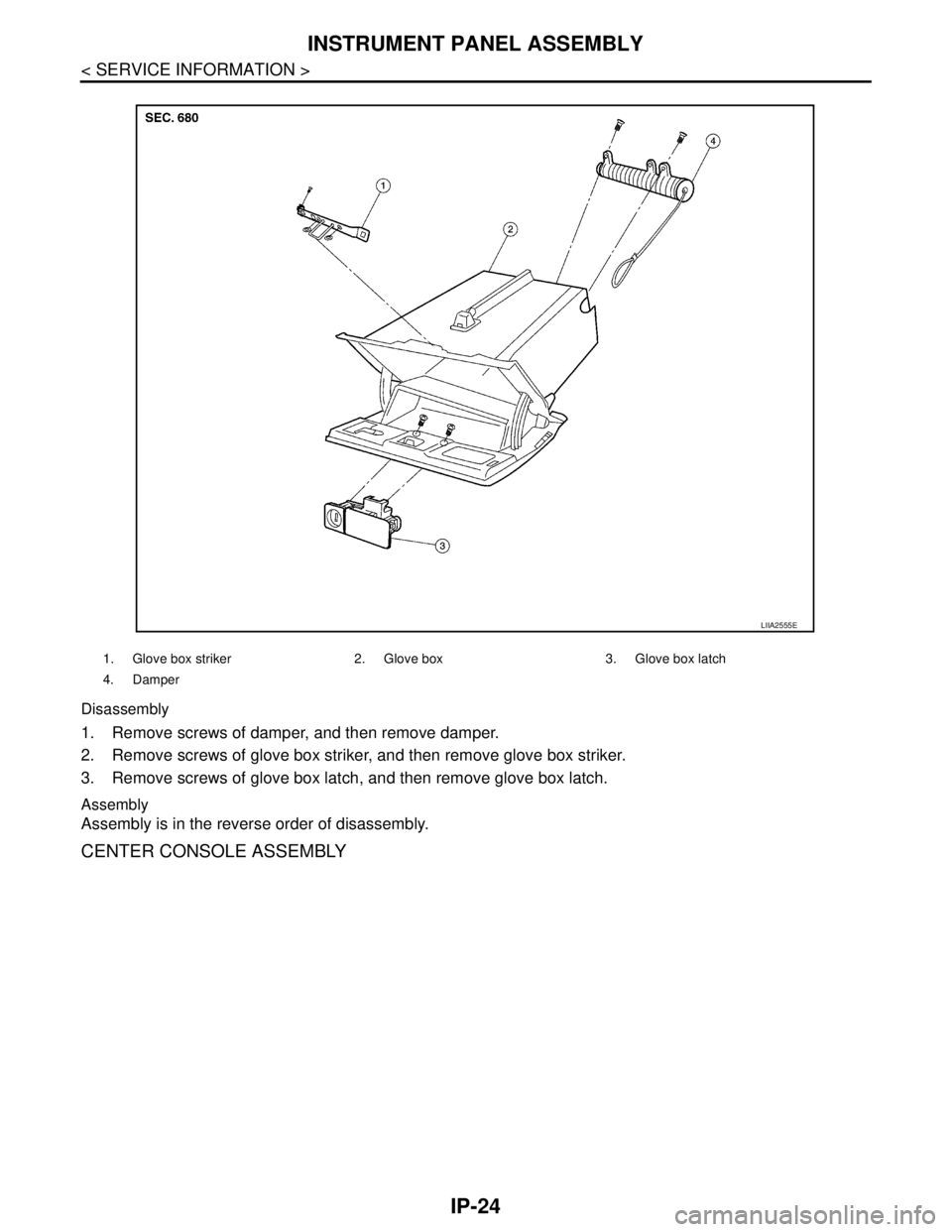
GLOVE BOX ASSEMBLY
PIIB6387E
PIIB6388E
PIIB2882J
Page 3739 of 5883
IP-24
< SERVICE INFORMATION >
INSTRUMENT PANEL ASSEMBLY
Disassembly
1. Remove screws of damper, and then remove damper.
2. Remove screws of glove box striker, and then remove glove box striker.
3. Remove screws of glove box latch, and then remove glove box latch.
Assembly
Assembly is in the reverse order of disassembly.
CENTER CONSOLE ASSEMBLY
1. Glove box striker 2. Glove box 3. Glove box latch
4. Damper
LIIA2555E
Page 3740 of 5883
INSTRUMENT PANEL ASSEMBLY
IP-25
< SERVICE INFORMATION >
C
D
E
F
G
H
I
K
L
MA
B
IP
N
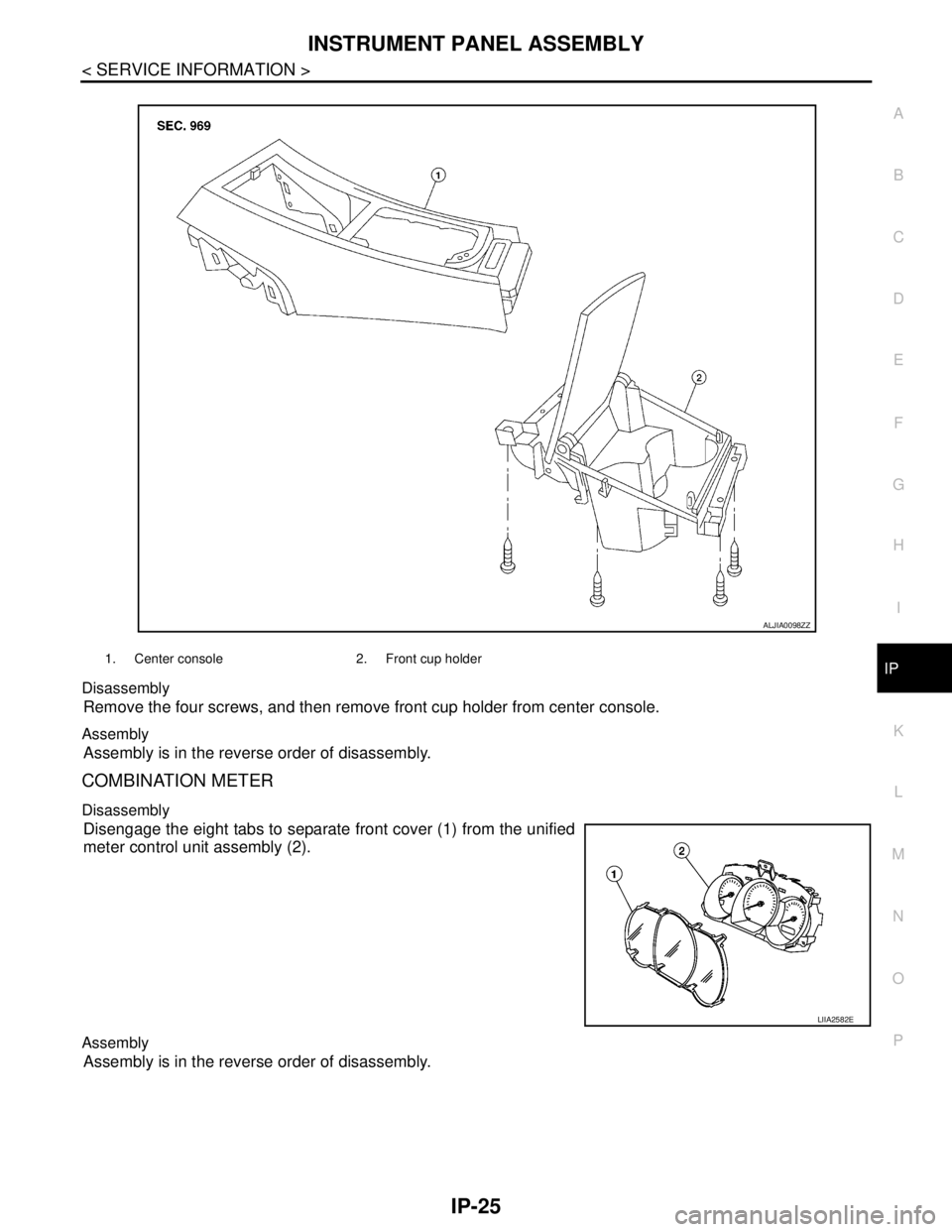
O
P Disassembly
Remove the four screws, and then remove front cup holder from center console.
Assembly
Assembly is in the reverse order of disassembly.
COMBINATION METER
Disassembly
Disengage the eight tabs to separate front cover (1) from the unified
meter control unit assembly (2).
Assembly
Assembly is in the reverse order of disassembly.
1. Center console 2. Front cup holder
ALJIA0098ZZ
LIIA2582E
Page 3756 of 5883
![NISSAN TIIDA 2007 Service Repair Manual LAN-16
< FUNCTION DIAGNOSIS >[CAN FUNDAMENTAL]
TROUBLE DIAGNOSIS
TROUBLE DIAGNOSIS
Condition of Error DetectionINFOID:0000000001162758
“U1000” or “U1001” is indicated on SELF-DIAG RESULTS on C](/img/5/57395/w960_57395-3755.png "NISSAN TIIDA 2007 Service Repair Manual LAN-16
< FUNCTION DIAGNOSIS >[CAN FUNDAMENTAL]
TROUBLE DIAGNOSIS
TROUBLE DIAGNOSIS
Condition of Error DetectionINFOID:0000000001162758
“U1000” or “U1001” is indicated on SELF-DIAG RESULTS on C")
LAN-16
< FUNCTION DIAGNOSIS >[CAN FUNDAMENTAL]
TROUBLE DIAGNOSIS
TROUBLE DIAGNOSIS
Condition of Error DetectionINFOID:0000000001162758
“U1000” or “U1001” is indicated on SELF-DIAG RESULTS on CONSULT-III if CAN communication signal is
not transmitted or received between units for 2 seconds or more.
CAN COMMUNICATION SYSTEM ERROR
CAN communication line open (CAN-H, CAN-L, or both)
CAN communication line short (ground, between CAN communication lines, other harnesses)
Error of CAN communication control circuit of the unit connected to CAN communication line
WHEN “U1000” OR “U1001” IS INDICATED EVEN THOUGH CAN COMMUNICATION SYSTEM IS
NORMAL
Removal/installation of parts: Error may be detected when removing and installing CAN communication unit
and related parts while turning the ignition switch ON. (A DTC except for CAN communication may be
detected.)
Fuse blown out (removed): CAN communication of the unit may cease.
Voltage drop: Error may be detected if voltage drops due to discharged battery when turning the ignition
switch ON (Depending on the control unit which carries out CAN communication).
Error may be detected if the power supply circuit of the control unit, which carries out CAN communication,
malfunctions (Depending on the control unit which carries out CAN communication).
Error may be detected if reprogramming is not completed normally.
NOTE:
CAN communication system is normal if “U1000” or “U1001” is indicated on SELF-DIAG RESULTS of CON-
SULT-III under the above conditions. Erase the memory of the self-diagnosis of each unit.
Symptom When Error Occurs in CAN Communication SystemINFOID:0000000001162759
In CAN communication system, multiple units mutually transmit and receive signals. Each unit cannot transmit
and receive signals if any error occurs on CAN communication line. Under this condition, multiple control units
related to the root cause malfunction or go into fail-safe mode.
ERROR EXAMPLE
NOTE:
Each vehicle differs in symptom of each unit under fail-safe mode and CAN communication line wiring.
Refer to LAN-27, "
Abbreviation List" for the unit abbreviation.
Example: TCM branch line open circuit
SKIB8738E
Unit name Symptom
ECM Engine torque limiting is affected, and shift harshness increases.
BCM Reverse warning chime does not sound.
Page 3758 of 5883
![NISSAN TIIDA 2007 Service Repair Manual LAN-18
< FUNCTION DIAGNOSIS >[CAN FUNDAMENTAL]
TROUBLE DIAGNOSIS
Example: Main Line Between Data Link Connector and ABS Actuator and Electric Unit (Control Unit) Open Circuit
Example: CAN-H, CAN-L Har](/img/5/57395/w960_57395-3757.png "NISSAN TIIDA 2007 Service Repair Manual LAN-18
< FUNCTION DIAGNOSIS >[CAN FUNDAMENTAL]
TROUBLE DIAGNOSIS
Example: Main Line Between Data Link Connector and ABS Actuator and Electric Unit (Control Unit) Open Circuit
Example: CAN-H, CAN-L Har")
LAN-18
< FUNCTION DIAGNOSIS >[CAN FUNDAMENTAL]
TROUBLE DIAGNOSIS
Example: Main Line Between Data Link Connector and ABS Actuator and Electric Unit (Control Unit) Open Circuit
Example: CAN-H, CAN-L Harness Short Circuit
SKIB8740E
Unit name Symptom
ECM Engine torque limiting is affected, and shift harshness increases.
BCM Reverse warning chime does not sound.
The front wiper moves under continuous operation mode even though the front wip-
er switch being in the intermittent position.
EPS control unit The steering effort increases.
Combination meter The shift position indicator and OD OFF indicator turn OFF.
The speedometer is inoperative.
The odo/trip meter stops.
ABS actuator and electric unit (control unit) Normal operation.
TCM No impact on operation.
IPDM E/RWhen the ignition switch is ON,
The headlamps (Lo) turn ON.
The cooling fan continues to rotate.
SKIB8741E
Page 3759 of 5883
![NISSAN TIIDA 2007 Service Repair Manual LAN
TROUBLE DIAGNOSIS
LAN-19
< FUNCTION DIAGNOSIS >[CAN FUNDAMENTAL]
C
D
E
F
G
H
I
J
K
L B A
O
P N
CAN Diagnosis with CONSULT-IIIINFOID:0000000001162760
CAN diagnosis on CONSULT-III extracts the root](/img/5/57395/w960_57395-3758.png "NISSAN TIIDA 2007 Service Repair Manual LAN
TROUBLE DIAGNOSIS
LAN-19
< FUNCTION DIAGNOSIS >[CAN FUNDAMENTAL]
C
D
E
F
G
H
I
J
K
L B A
O
P N
CAN Diagnosis with CONSULT-IIIINFOID:0000000001162760
CAN diagnosis on CONSULT-III extracts the root")
LAN
TROUBLE DIAGNOSIS
LAN-19
< FUNCTION DIAGNOSIS >[CAN FUNDAMENTAL]
C
D
E
F
G
H
I
J
K
L B A
O
P N
CAN Diagnosis with CONSULT-IIIINFOID:0000000001162760
CAN diagnosis on CONSULT-III extracts the root cause by receiving the following information.
Response to the system call
Control unit diagnosis information
Self-diagnosis
CAN diagnostic support monitor
Self-DiagnosisINFOID:0000000001162761
CAN Diagnostic Support MonitorINFOID:0000000001162762
MONITOR ITEM (CONSULT-III)
Unit name Symptom
ECM Engine torque limiting is affected, and shift harshness increases.
Engine speed drops.
BCM Reverse warning chime does not sound.
The front wiper moves under continuous operation mode even though the front
wiper switch being in the intermittent position.
The room lamp does not turn ON.
The engine does not start (if an error or malfunction occurs while turning the igni-
tion switch OFF.)
The steering lock does not release (if an error or malfunction occurs while turning
the ignition switch OFF.)
EPS control unit The steering effort increases.
Combination meter The tachometer and the speedometer do not move.
Warning lamps turn ON.
Indicator lamps do not turn ON.
ABS actuator and electric unit (control unit) Normal operation.
TCM No impact on operation.
IPDM E/RWhen the ignition switch is ON,
The headlamps (Lo) turn ON.
The cooling fan continues to rotate.
DTCSelf-diagnosis item
(CONSULT-III indication)DTC detection condition Inspection/Action
U1000 CAN COMM CIRCUITWhen ECM is not transmitting or receiving CAN
communication signal of OBD (emission-related
diagnosis) for 2 seconds or more.
Start the inspection. Re-
fer to the applicable sec-
tion of the indicated
control unit. When a control unit (except for ECM) is not
transmitting or receiving CAN communication
signal for 2 seconds or more.
U1001 CAN COMM CIRCUITWhen ECM is not transmitting or receiving CAN
communication signal other than OBD (emis-
sion-related diagnosis) for 2 seconds or more.
U1002 SYSTEM COMMWhen a control unit is not transmitting or receiv-
ing CAN communication signal for 2 seconds or
less.
U1010 CONTROL UNIT [CAN]When an error is detected during the initial diag-
nosis for CAN controller of each control unit.Replace the control unit
indicating “U1010”.