alignment NISSAN TIIDA 2007 Service Workshop Manual
[x] Cancel search | Manufacturer: NISSAN, Model Year: 2007, Model line: TIIDA, Model: NISSAN TIIDA 2007Pages: 5883, PDF Size: 78.95 MB
Page 4766 of 5883
COLLISION DIAGNOSIS
SR-23
< ON-VEHICLE REPAIR >
C
D
E
F
G
I
J
K
L
MA
B
SR
N
O
P
COLLISION DIAGNOSIS
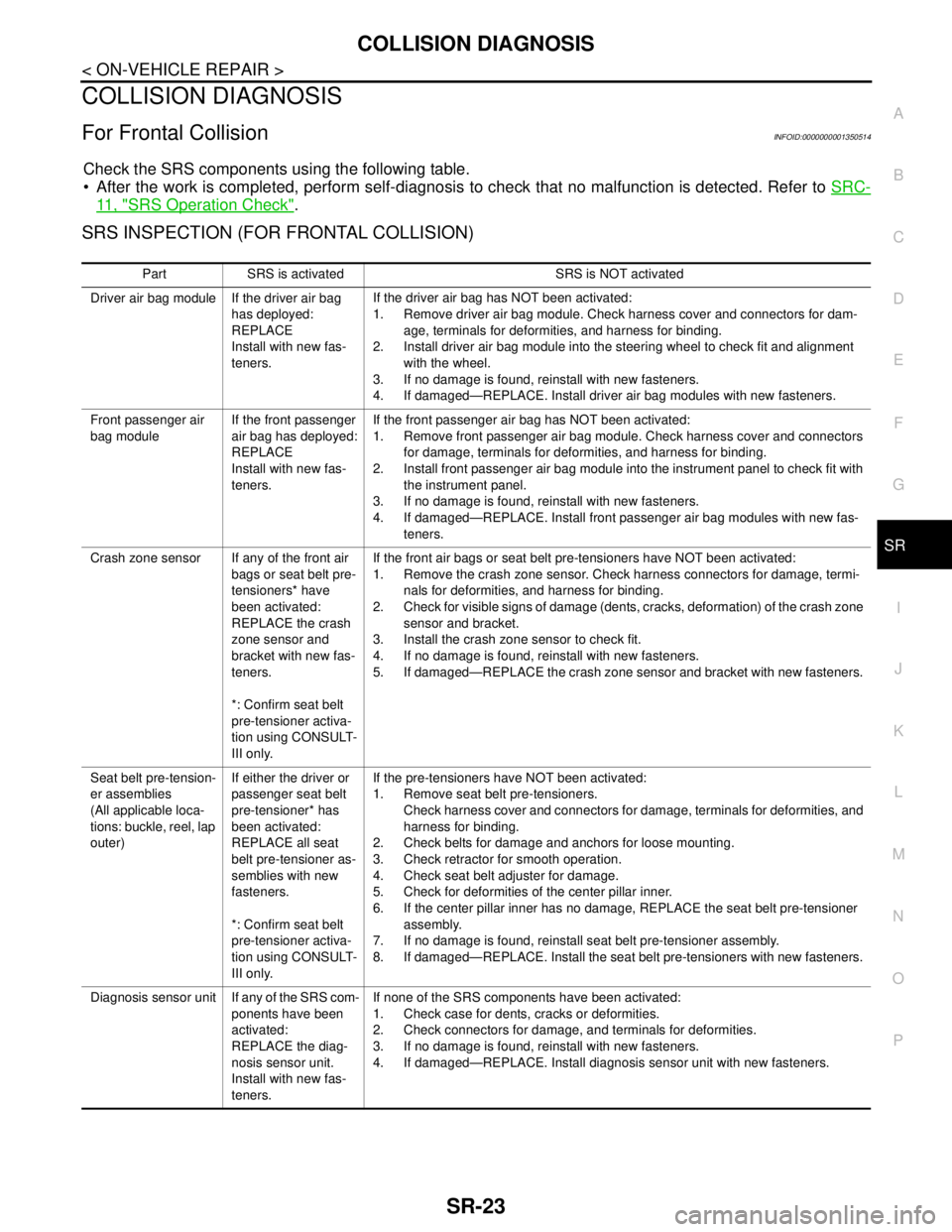
For Frontal CollisionINFOID:0000000001350514
Check the SRS components using the following table.
After the work is completed, perform self-diagnosis to check that no malfunction is detected. Refer to SRC-
11 , "SRS Operation Check".
SRS INSPECTION (FOR FRONTAL COLLISION)
Part SRS is activated SRS is NOT activated
Driver air bag module If the driver air bag
has deployed:
REPLACE
Install with new fas-
teners.If the driver air bag has NOT been activated:
1. Remove driver air bag module. Check harness cover and connectors for dam-
age, terminals for deformities, and harness for binding.
2. Install driver air bag module into the steering wheel to check fit and alignment
with the wheel.
3. If no damage is found, reinstall with new fasteners.
4. If damaged—REPLACE. Install driver air bag modules with new fasteners.
Front passenger air
bag moduleIf the front passenger
air bag has deployed:
REPLACE
Install with new fas-
teners.If the front passenger air bag has NOT been activated:
1. Remove front passenger air bag module. Check harness cover and connectors
for damage, terminals for deformities, and harness for binding.
2. Install front passenger air bag module into the instrument panel to check fit with
the instrument panel.
3. If no damage is found, reinstall with new fasteners.
4. If damaged—REPLACE. Install front passenger air bag modules with new fas-
teners.
Crash zone sensor If any of the front air
bags or seat belt pre-
tensioners* have
been activated:
REPLACE the crash
zone sensor and
bracket with new fas-
teners.
*: Confirm seat belt
pre-tensioner activa-
tion using CONSULT-
III only.If the front air bags or seat belt pre-tensioners have NOT been activated:
1. Remove the crash zone sensor. Check harness connectors for damage, termi-
nals for deformities, and harness for binding.
2. Check for visible signs of damage (dents, cracks, deformation) of the crash zone
sensor and bracket.
3. Install the crash zone sensor to check fit.
4. If no damage is found, reinstall with new fasteners.
5. If damaged—REPLACE the crash zone sensor and bracket with new fasteners.
Seat belt pre-tension-
er assemblies
(All applicable loca-
tions: buckle, reel, lap
outer)If either the driver or
passenger seat belt
pre-tensioner* has
been activated:
REPLACE all seat
belt pre-tensioner as-
semblies with new
fasteners.
*: Confirm seat belt
pre-tensioner activa-
tion using CONSULT-
III only.If the pre-tensioners have NOT been activated:
1. Remove seat belt pre-tensioners.
Check harness cover and connectors for damage, terminals for deformities, and
harness for binding.
2. Check belts for damage and anchors for loose mounting.
3. Check retractor for smooth operation.
4. Check seat belt adjuster for damage.
5. Check for deformities of the center pillar inner.
6. If the center pillar inner has no damage, REPLACE the seat belt pre-tensioner
assembly.
7. If no damage is found, reinstall seat belt pre-tensioner assembly.
8. If damaged—REPLACE. Install the seat belt pre-tensioners with new fasteners.
Diagnosis sensor unit If any of the SRS com-
ponents have been
activated:
REPLACE the diag-
nosis sensor unit.
Install with new fas-
teners.If none of the SRS components have been activated:
1. Check case for dents, cracks or deformities.
2. Check connectors for damage, and terminals for deformities.
3. If no damage is found, reinstall with new fasteners.
4. If damaged—REPLACE. Install diagnosis sensor unit with new fasteners.
Page 4767 of 5883
SR-24
< ON-VEHICLE REPAIR >
COLLISION DIAGNOSIS
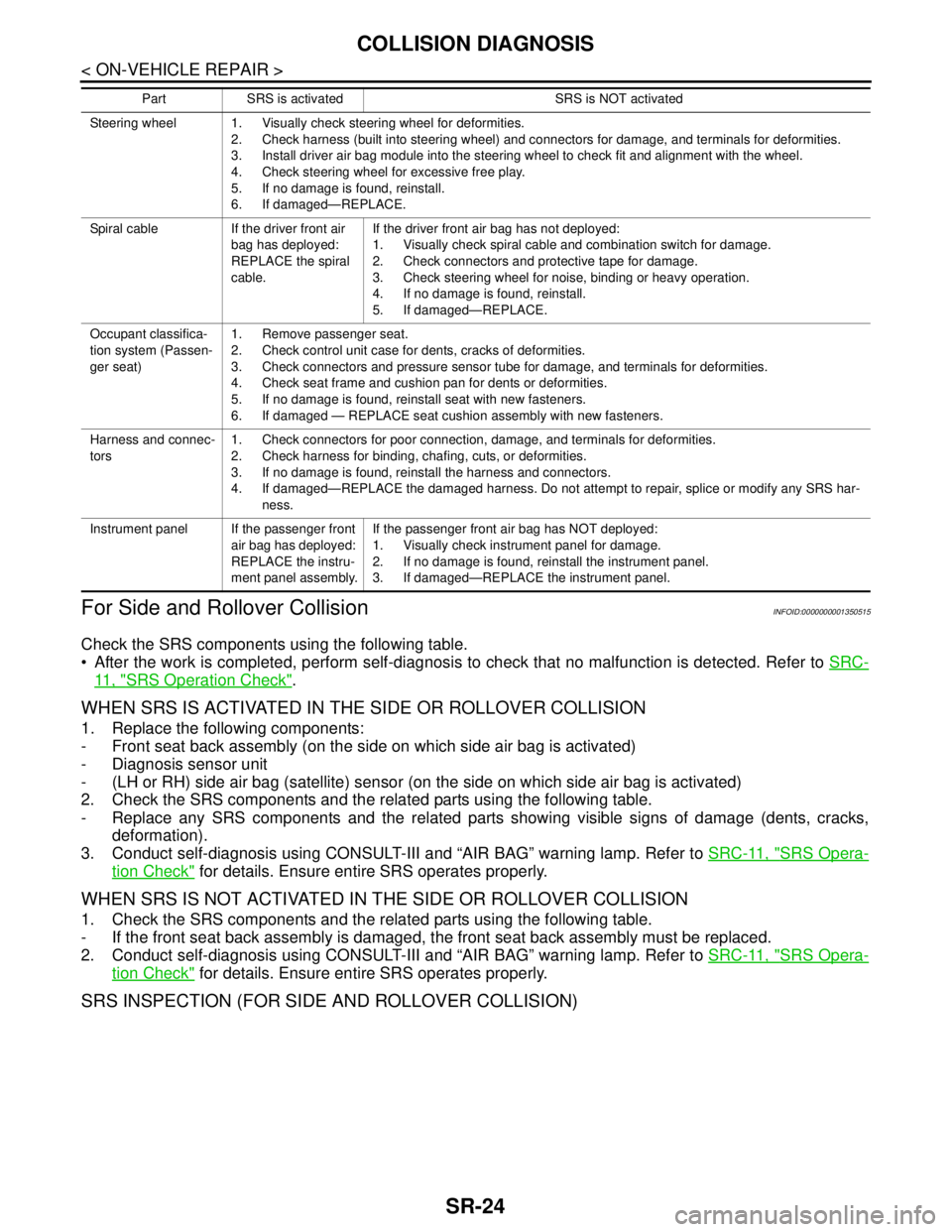
For Side and Rollover Collision
INFOID:0000000001350515
Check the SRS components using the following table.
After the work is completed, perform self-diagnosis to check that no malfunction is detected. Refer to SRC-
11 , "SRS Operation Check".
WHEN SRS IS ACTIVATED IN THE SIDE OR ROLLOVER COLLISION
1. Replace the following components:
- Front seat back assembly (on the side on which side air bag is activated)
- Diagnosis sensor unit
- (LH or RH) side air bag (satellite) sensor (on the side on which side air bag is activated)
2. Check the SRS components and the related parts using the following table.
- Replace any SRS components and the related parts showing visible signs of damage (dents, cracks,
deformation).
3. Conduct self-diagnosis using CONSULT-III and “AIR BAG” warning lamp. Refer to SRC-11, "
SRS Opera-
tion Check" for details. Ensure entire SRS operates properly.
WHEN SRS IS NOT ACTIVATED IN THE SIDE OR ROLLOVER COLLISION
1. Check the SRS components and the related parts using the following table.
- If the front seat back assembly is damaged, the front seat back assembly must be replaced.
2. Conduct self-diagnosis using CONSULT-III and “AIR BAG” warning lamp. Refer to SRC-11, "
SRS Opera-
tion Check" for details. Ensure entire SRS operates properly.
SRS INSPECTION (FOR SIDE AND ROLLOVER COLLISION)
Steering wheel 1. Visually check steering wheel for deformities.
2. Check harness (built into steering wheel) and connectors for damage, and terminals for deformities.
3. Install driver air bag module into the steering wheel to check fit and alignment with the wheel.
4. Check steering wheel for excessive free play.
5. If no damage is found, reinstall.
6. If damaged—REPLACE.
Spiral cable If the driver front air
bag has deployed:
REPLACE the spiral
cable.If the driver front air bag has not deployed:
1. Visually check spiral cable and combination switch for damage.
2. Check connectors and protective tape for damage.
3. Check steering wheel for noise, binding or heavy operation.
4. If no damage is found, reinstall.
5. If damaged—REPLACE.
Occupant classifica-
tion system (Passen-
ger seat)1. Remove passenger seat.
2. Check control unit case for dents, cracks of deformities.
3. Check connectors and pressure sensor tube for damage, and terminals for deformities.
4. Check seat frame and cushion pan for dents or deformities.
5. If no damage is found, reinstall seat with new fasteners.
6. If damaged — REPLACE seat cushion assembly with new fasteners.
Harness and connec-
tors1. Check connectors for poor connection, damage, and terminals for deformities.
2. Check harness for binding, chafing, cuts, or deformities.
3. If no damage is found, reinstall the harness and connectors.
4. If damaged—REPLACE the damaged harness. Do not attempt to repair, splice or modify any SRS har-
ness.
Instrument panel If the passenger front
air bag has deployed:
REPLACE the instru-
ment panel assembly.If the passenger front air bag has NOT deployed:
1. Visually check instrument panel for damage.
2. If no damage is found, reinstall the instrument panel.
3. If damaged—REPLACE the instrument panel. Part SRS is activated SRS is NOT activated
Page 4861 of 5883
ST-6
< ON-VEHICLE MAINTENANCE >
STEERING WHEEL
ON-VEHICLE MAINTENANCE
STEERING WHEEL
On-Vehicle Inspection and ServiceINFOID:0000000001282496
CHECKING CONDITION OF INSTALLATION
Check installation conditions of steering gear assembly, front suspension assembly, axle and steering col-
umn assembly.
Check if movement exists when steering wheel is moved up and down, to the left and right and to the axial
direction.
Check steering gear assembly mounting bolts and nuts for looseness. Refer to ST-12, "
Removal and Instal-
lation" .
CHECKING STEERING WHEEL PLAY
Turn steering wheel so that front wheels come to the straight-ahead position. Start engine and lightly turn
steering wheel to the left and right until front wheels start to move. Measure steering wheel movement on the
outer circumference.
When the measurement value is outside the standard value, check backlash for each joint of steering col-
umn assembly and installation condition of steering gear assembly.
CHECKING NEUTRAL POSITION STEERING WHEEL
Make sure that steering gear assembly, steering column assembly and steering wheel are installed in the
correct position.
Perform neutral position inspection after wheel alignment. Refer to SR-2, "
Precaution for Supplemental
Restraint System (SRS) "AIR BAG" and "SEAT BELT PRE-TENSIONER"" .
Set vehicle to the straight-ahead position and confirm steering wheel is in the neutral position.
Loosen outer socket lock nut and turn inner socket to left and right equally to make fine adjustments if steer-
ing wheel is not in the neutral position.
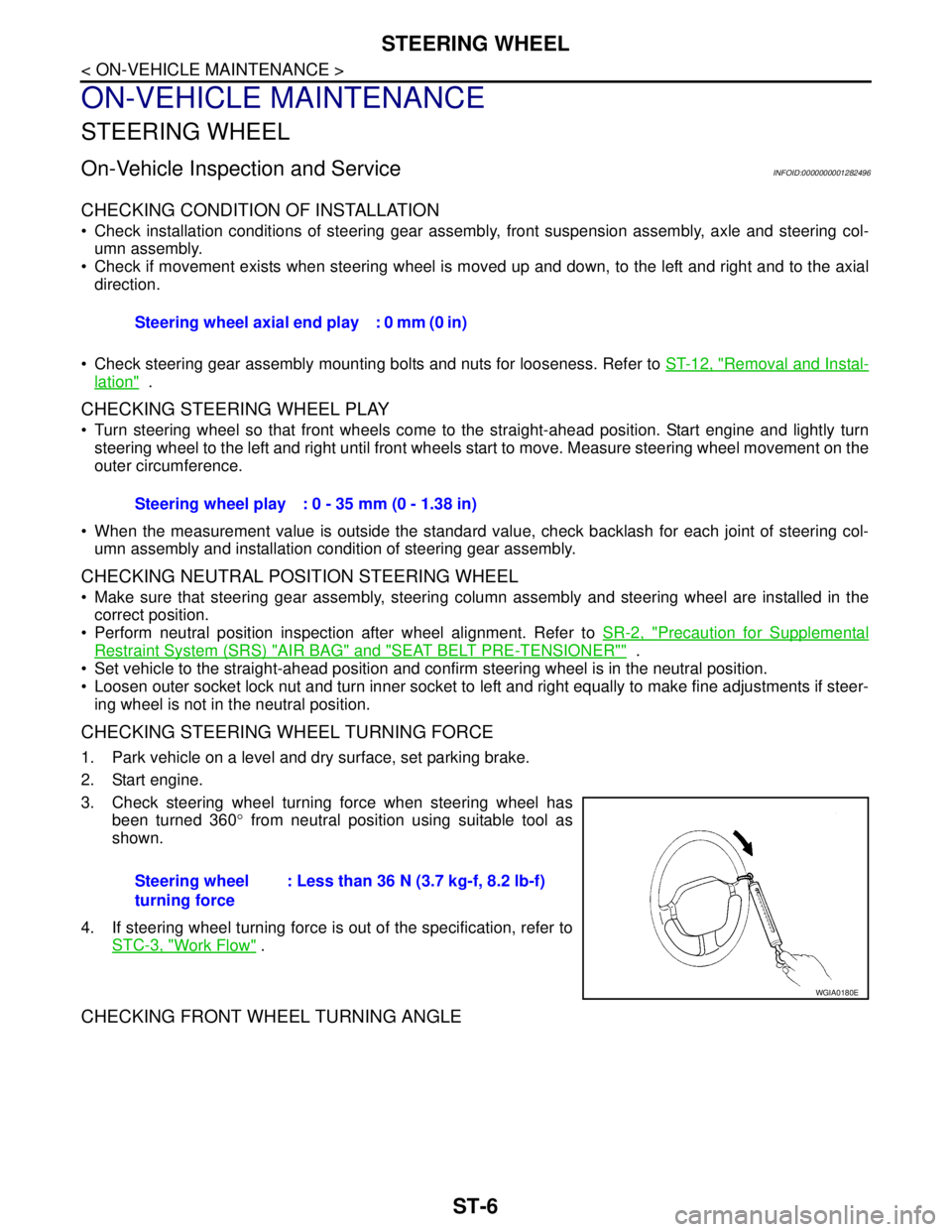
CHECKING STEERING WHEEL TURNING FORCE
1. Park vehicle on a level and dry surface, set parking brake.
2. Start engine.
3. Check steering wheel turning force when steering wheel has
been turned 360° from neutral position using suitable tool as
shown.
4. If steering wheel turning force is out of the specification, refer to
STC-3, "
Work Flow" .
CHECKING FRONT WHEEL TURNING ANGLE
Steering wheel axial end play : 0 mm (0 in)
Steering wheel play : 0 - 35 mm (0 - 1.38 in)
Steering wheel
turning force: Less than 36 N (3.7 kg-f, 8.2 lb-f)
WGIA0180E
Page 4863 of 5883
ST-8
< ON-VEHICLE REPAIR >
STEERING WHEEL
ON-VEHICLE REPAIR
STEERING WHEEL
Removal and InstallationINFOID:0000000001282499
REMOVAL
NOTE:
When reconnecting spiral cable, secure cable with a tape so that case and rotating part keep aligned. This will
omit neutral position alignment procedure during spiral cable installation.
1. Set front wheels to straight-ahead position.
2. Remove driver air bag module. Refer to SR-4, "
Removal and Installation" .
3. Remove steering wheel lock nut after steering is locked.
4. Remove steering wheel.
INSTALLATION
Installation is in the reverse order of removal.
CAUTION:
Do not run spiral cable idle needlessly. And do not turn it more than necessary (or it leads to discon-
nection of the cable).
NOTE:
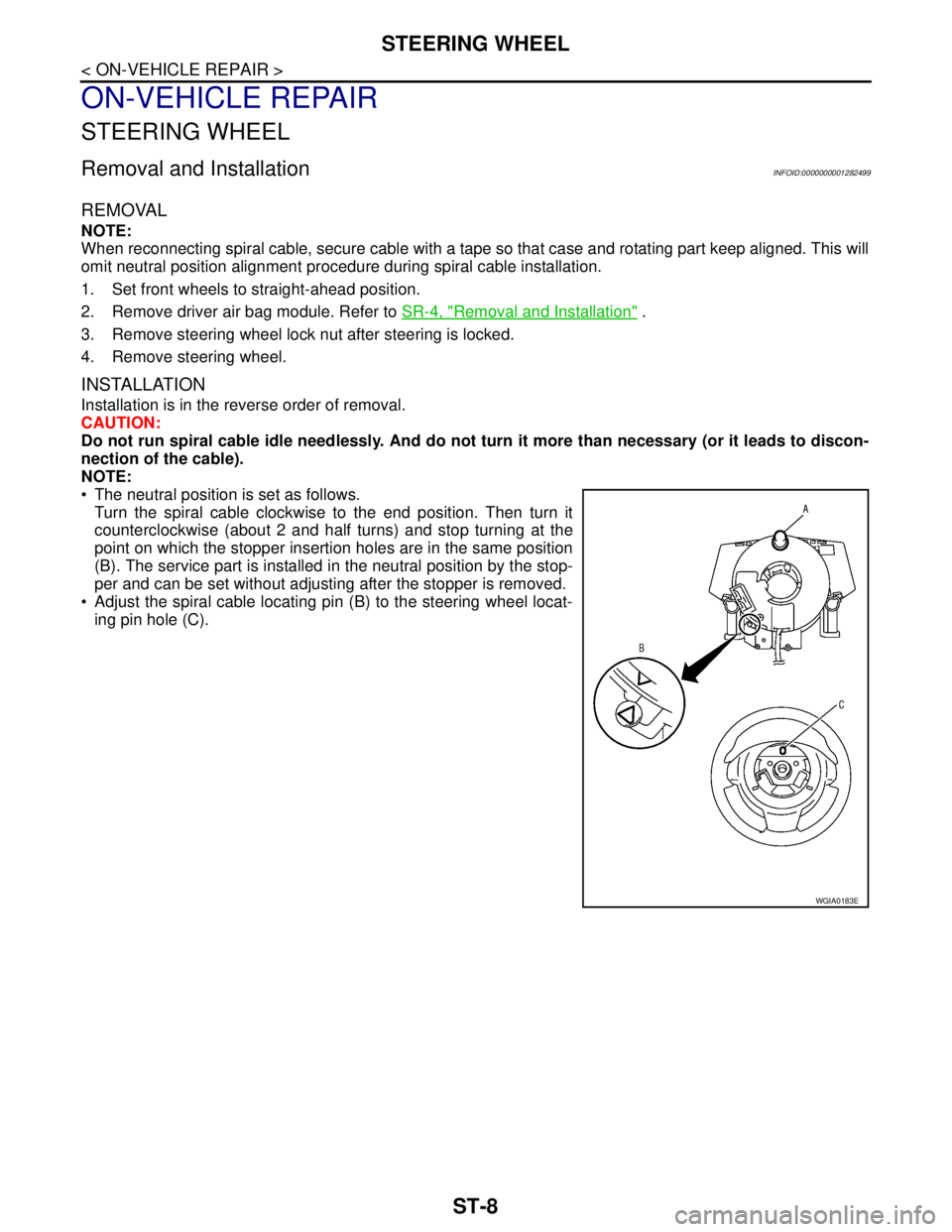
The neutral position is set as follows.
Turn the spiral cable clockwise to the end position. Then turn it
counterclockwise (about 2 and half turns) and stop turning at the
point on which the stopper insertion holes are in the same position
(B). The service part is installed in the neutral position by the stop-
per and can be set without adjusting after the stopper is removed.
Adjust the spiral cable locating pin (B) to the steering wheel locat-
ing pin hole (C).
WGIA0183E
Page 4868 of 5883

STEERING GEAR
ST-13
< ON-VEHICLE REPAIR >
C
D
E
F
H
I
J
K
L
MA
B
ST
N
O
P
Check wheel alignment under unladen conditions with tires on level ground. Refer to FSU-6, "Wheel Align-
ment Inspection".
INSPECTION AFTER INSTALLATION
Rotate steering wheel to check for decentered condition, binding, noise or excessive steering effort.
Page 4872 of 5883
STEERING GEAR
ST-17
< DISASSEMBLY AND ASSEMBLY >
C
D
E
F
H
I
J
K
L
MA
B
ST
N
O
P
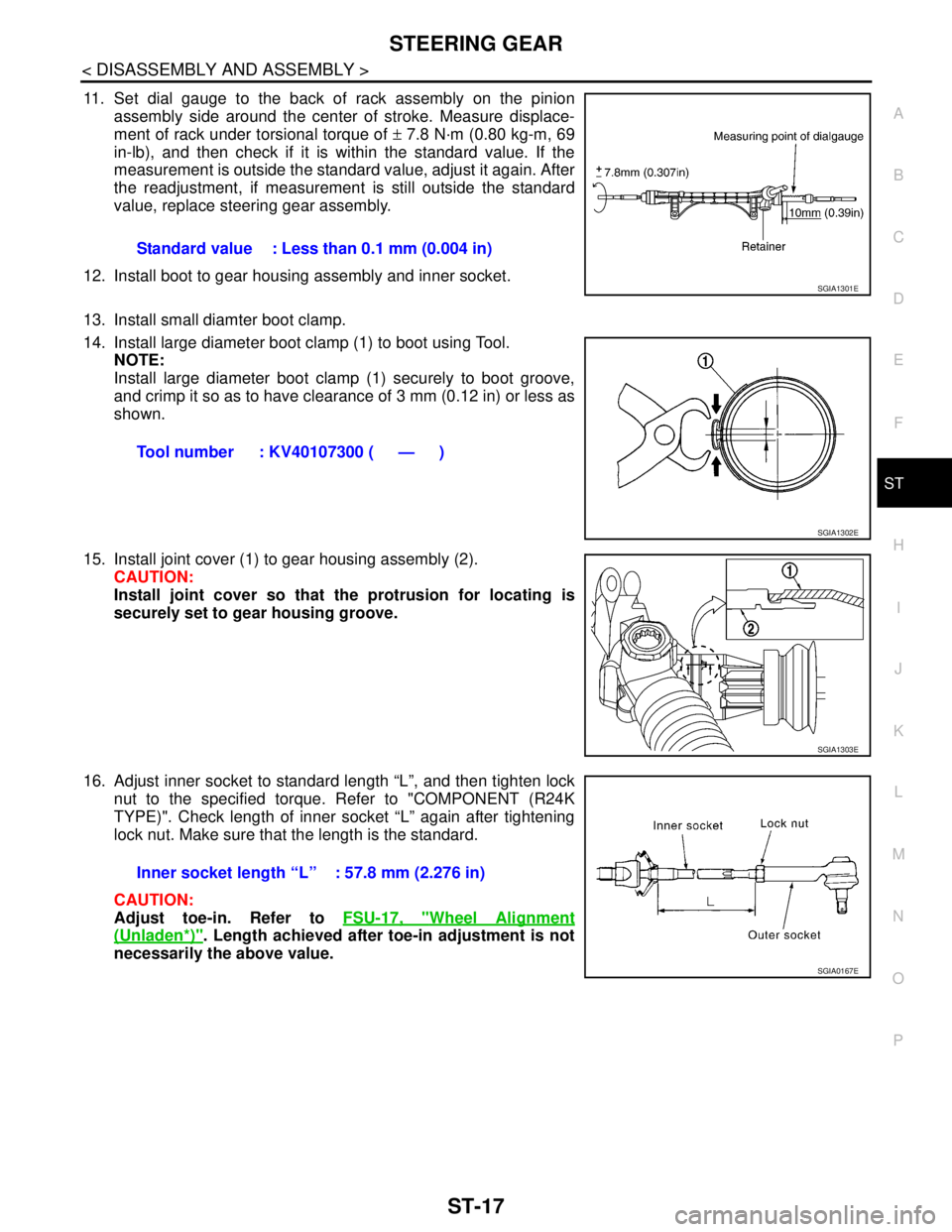
11. Set dial gauge to the back of rack assembly on the pinion
assembly side around the center of stroke. Measure displace-
ment of rack under torsional torque of ± 7.8 N·m (0.80 kg-m, 69
in-lb), and then check if it is within the standard value. If the
measurement is outside the standard value, adjust it again. After
the readjustment, if measurement is still outside the standard
value, replace steering gear assembly.
12. Install boot to gear housing assembly and inner socket.
13. Install small diamter boot clamp.
14. Install large diameter boot clamp (1) to boot using Tool.
NOTE:
Install large diameter boot clamp (1) securely to boot groove,
and crimp it so as to have clearance of 3 mm (0.12 in) or less as
shown.
15. Install joint cover (1) to gear housing assembly (2).
CAUTION:
Install joint cover so that the protrusion for locating is
securely set to gear housing groove.
16. Adjust inner socket to standard length “L”, and then tighten lock
nut to the specified torque. Refer to "COMPONENT (R24K
TYPE)". Check length of inner socket “L” again after tightening
lock nut. Make sure that the length is the standard.
CAUTION:
Adjust toe-in. Refer to FSU-17, "
Wheel Alignment
(Unladen*)". Length achieved after toe-in adjustment is not
necessarily the above value.Standard value : Less than 0.1 mm (0.004 in)
SGIA1301E
Tool number : KV40107300 ( — )
SGIA1302E
SGIA1303E
Inner socket length “L” : 57.8 mm (2.276 in)
SGIA0167E
Page 4903 of 5883
![NISSAN TIIDA 2007 Service Workshop Manual EPS SYSTEM SYMPTOMS
STC-29
< SYMPTOM DIAGNOSIS >[EPS]
C
D
E
F
H
I
J
K
L
MA
B
STC
N
O
P
SYMPTOM DIAGNOSIS
EPS SYSTEM SYMPTOMS
Symptom ChartINFOID:0000000001716771
If EPS warning lamp turns ON, perform](/img/5/57395/w960_57395-4902.png "NISSAN TIIDA 2007 Service Workshop Manual EPS SYSTEM SYMPTOMS
STC-29
< SYMPTOM DIAGNOSIS >[EPS]
C
D
E
F
H
I
J
K
L
MA
B
STC
N
O
P
SYMPTOM DIAGNOSIS
EPS SYSTEM SYMPTOMS
Symptom ChartINFOID:0000000001716771
If EPS warning lamp turns ON, perform")
EPS SYSTEM SYMPTOMS
STC-29
< SYMPTOM DIAGNOSIS >[EPS]
C
D
E
F
H
I
J
K
L
MA
B
STC
N
O
P
SYMPTOM DIAGNOSIS
EPS SYSTEM SYMPTOMS
Symptom ChartINFOID:0000000001716771
If EPS warning lamp turns ON, perform self-diagnosis. Refer to STC-7, "CONSULT-III Function (EPS)".
Symptom Condition Check item Reference page
EPS warning lamp does not turn ON when ig-
nition switch to “ON”.
(EPS warning lamp check)Ignition switch: ONCAN communication line
STC-30
Combination meter
EPS warning lamp does not turn OFF for sev-
eral seconds after starting the engineEngine runningCAN communication line
STC-31
Power supply and ground for
EPS control unit
Torque sensor
EPS motor
Vehicle speed signal
Engine status signal
Combination meter
Steering wheel turning force is heavy or light,
while driving While driving
Steering wheel turningCAN communication line
STC-33
Vehicle speed signal
Engine status signal
EPS motor
Steering wheel turning force
(Mechanical malfunction)
Unbalance steering wheel turning force and
return between right and left, while driving While driving
Steering wheel turningWheel alignment
STC-34
Steering wheel turning force
(Mechanical malfunction)
Unbalance steering wheel turning force,
while driving (Torque variation) While driving
Steering wheel turningSteering column intermediate
shaft installation condition
STC-35
Steering wheel turning force
(Mechanical malfunction)
Page 4908 of 5883
![NISSAN TIIDA 2007 Service Workshop Manual STC-34
< SYMPTOM DIAGNOSIS >[EPS]
UNBALANCE STEERING WHEEL TURNING FORCE AND RETURN BETWEEN
RIGHT AND LEFT
UNBALANCE STEERING WHEEL TURNING FORCE AND RETURN BE-
TWEEN RIGHT AND LEFT
Diagnosis Procedu](/img/5/57395/w960_57395-4907.png "NISSAN TIIDA 2007 Service Workshop Manual STC-34
< SYMPTOM DIAGNOSIS >[EPS]
UNBALANCE STEERING WHEEL TURNING FORCE AND RETURN BETWEEN
RIGHT AND LEFT
UNBALANCE STEERING WHEEL TURNING FORCE AND RETURN BE-
TWEEN RIGHT AND LEFT
Diagnosis Procedu")
STC-34
< SYMPTOM DIAGNOSIS >[EPS]
UNBALANCE STEERING WHEEL TURNING FORCE AND RETURN BETWEEN
RIGHT AND LEFT
UNBALANCE STEERING WHEEL TURNING FORCE AND RETURN BE-
TWEEN RIGHT AND LEFT
Diagnosis ProcedureINFOID:0000000001697736
SYMPTOM:
Unbalance steering wheel turning force and return between right and left, while driving.
DIAGNOSTIC PROCEDURE
1.CHECK EPS WARNING LAMP
Confirm EPS warning lamp during engine running.
Does EPS warning lamp turn OFF?
YES >> GO TO 2.
NO >> Go to STC-31, "
Diagnosis Procedure".
2.CHECK WHEEL ALIGNMENT
Check wheel alignment. Refer to FSU-6, "
Wheel Alignment Inspection".
OK or NG
OK >> GO TO 3.
NG >> Adjust wheel alignment. Refer to FSU-6, "
Wheel Alignment Inspection".
3.CHECK EPS CONTROL UNIT
Check EPS control unit input/output signal. Refer to STC-22, "
EPS Control Unit Input/Output Signal Reference
Va l u e".
OK or NG
OK >> GO TO 4.
NG >> Check EPS control unit pin terminals for damage or loose connection with harness connector. If
any items are damaged, repair or replace damaged parts.
4.SYMPTOM CHECK
Check again.
OK or NG
OK >>INSPECTION END
NG >> Check the steering wheel turning force because there may be mechanical malfunction. Refer to
ST-6, "
On-Vehicle Inspection and Service".
Page 4911 of 5883
![NISSAN TIIDA 2007 Service Workshop Manual PRECAUTIONS
STC-37
< PRECAUTION >[EPS]
C
D
E
F
H
I
J
K
L
MA
B
STC
N
O
P
Check if the connection of steering column assembly and steering gear assembly is proper (there is
not looseness of mounting b](/img/5/57395/w960_57395-4910.png "NISSAN TIIDA 2007 Service Workshop Manual PRECAUTIONS
STC-37
< PRECAUTION >[EPS]
C
D
E
F
H
I
J
K
L
MA
B
STC
N
O
P
Check if the connection of steering column assembly and steering gear assembly is proper (there is
not looseness of mounting b")
PRECAUTIONS
STC-37
< PRECAUTION >[EPS]
C
D
E
F
H
I
J
K
L
MA
B
STC
N
O
P
Check if the connection of steering column assembly and steering gear assembly is proper (there is
not looseness of mounting bolts, damage of rods, boots or sealants, and leakage of grease, etc).
Check if the wheel alignment is adjusted properly.
Check if there is any damage or modification to suspension or body resulting in increased weight or
altered ground clearance.
Check if installation conditions of each link and suspension are proper.
Check if the battery voltage is proper
Check connection conditions of each connector are proper.
Before connecting or disconnecting the EPS control unit har-
ness connector, turn ignition switch “OFF” and disconnect
battery ground cable. Because battery voltage is applied to
EPS control unit even if ignition switch is turned “OFF”.
When connecting or disconnecting pin connectors into or
from EPS control unit, take care not to damage pin terminals
(bend or break).
When connecting pin connectors, make sure that there are no
bends or breaks on EPS control unit pin terminal.
Before replacing EPS control unit, perform EPS control unit
input/output signal inspection and make sure whether EPS
control unit functions properly or not. Refer to STC-22, "
EPS
Control Unit Input/Output Signal Reference Value".
SEF289H
SEF291H
SDIA1848E
Page 5158 of 5883
![NISSAN TIIDA 2007 Service Workshop Manual TM-212
< REMOVAL AND INSTALLATION >[TYPE 1 (4AT: RE4F03B)]
TRANSAXLE ASSEMBLY
When installing the torque converter to the transaxle measure dis-
tance A.
INSTALLATION
Installation is in the reverse or](/img/5/57395/w960_57395-5157.png "NISSAN TIIDA 2007 Service Workshop Manual TM-212
< REMOVAL AND INSTALLATION >[TYPE 1 (4AT: RE4F03B)]
TRANSAXLE ASSEMBLY
When installing the torque converter to the transaxle measure dis-
tance A.
INSTALLATION
Installation is in the reverse or")
TM-212
< REMOVAL AND INSTALLATION >[TYPE 1 (4AT: RE4F03B)]
TRANSAXLE ASSEMBLY
When installing the torque converter to the transaxle measure dis-
tance A.
INSTALLATION
Installation is in the reverse order of removal.
CAUTION:
When replacing an engine or transmission you must make sure any dowels are installed correctly
during re-assembly.
Improper alignment caused by missing dowels may cause vibration, oil leaks or breakage of drive
train components.
Do not reuse O-rings and copper washers. Refer to TM-210, "
Exploded View".
When turning crankshaft, turn it clockwise as viewed from the front of the engine.
When tightening the bolts for the torque converter while securing the crankshaft pulley bolt, be sure
to confirm the tightening torque of the crankshaft pulley bolt. Refer to EM-50, "
Removal and Installa-
tion".
After converter is installed to drive plate, rotate crankshaft several turns to check that transaxle
rotates freely without binding.
When installing the transaxle to the engine, align the matching mark on the drive plate with the matching
mark on the torque converter.
When securing the transaxle assembly to the engine, attach the
bolts in accordance with the following standard.
(A): A/T to engine
(B): Engine to A/T
Align the positions for the bolts on drive plate with those of the
torque converter, and temporarily tighten bolts. Then, tighten bolts
to the specified torque.
After completing installation, check for A/T fluid leakage, A/T fluid
level and A/T positions. Refer to TM-171, "
Checking A/T Fluid" and
TM-204, "
Checking of A/T Position". Dimension A: 16.2 mm (0.638 in) or more
SAT430D
Bolt No. 1234
Number of bolts 2 2 1 3
Bolt length “L”
[mm (in)]40 (1.57) 44 (1.73) 69 (2.72) 49 (1.93)
Tightening torque
[N·m (kg-m, ft-lb)]48 (4.9, 35)
SCIA7096E
Converter bolts : 51 N·m (5.2 kg-m, 38 ft-lb)
WCIA0616E