ACC NISSAN TIIDA 2007 Service Manual PDF
[x] Cancel search | Manufacturer: NISSAN, Model Year: 2007, Model line: TIIDA, Model: NISSAN TIIDA 2007Pages: 5883, PDF Size: 78.95 MB
Page 204 of 5883
BR-12
< ON-VEHICLE REPAIR >
BRAKE PEDAL
ON-VEHICLE REPAIR
BRAKE PEDAL
Removal and InstallationINFOID:0000000001716977
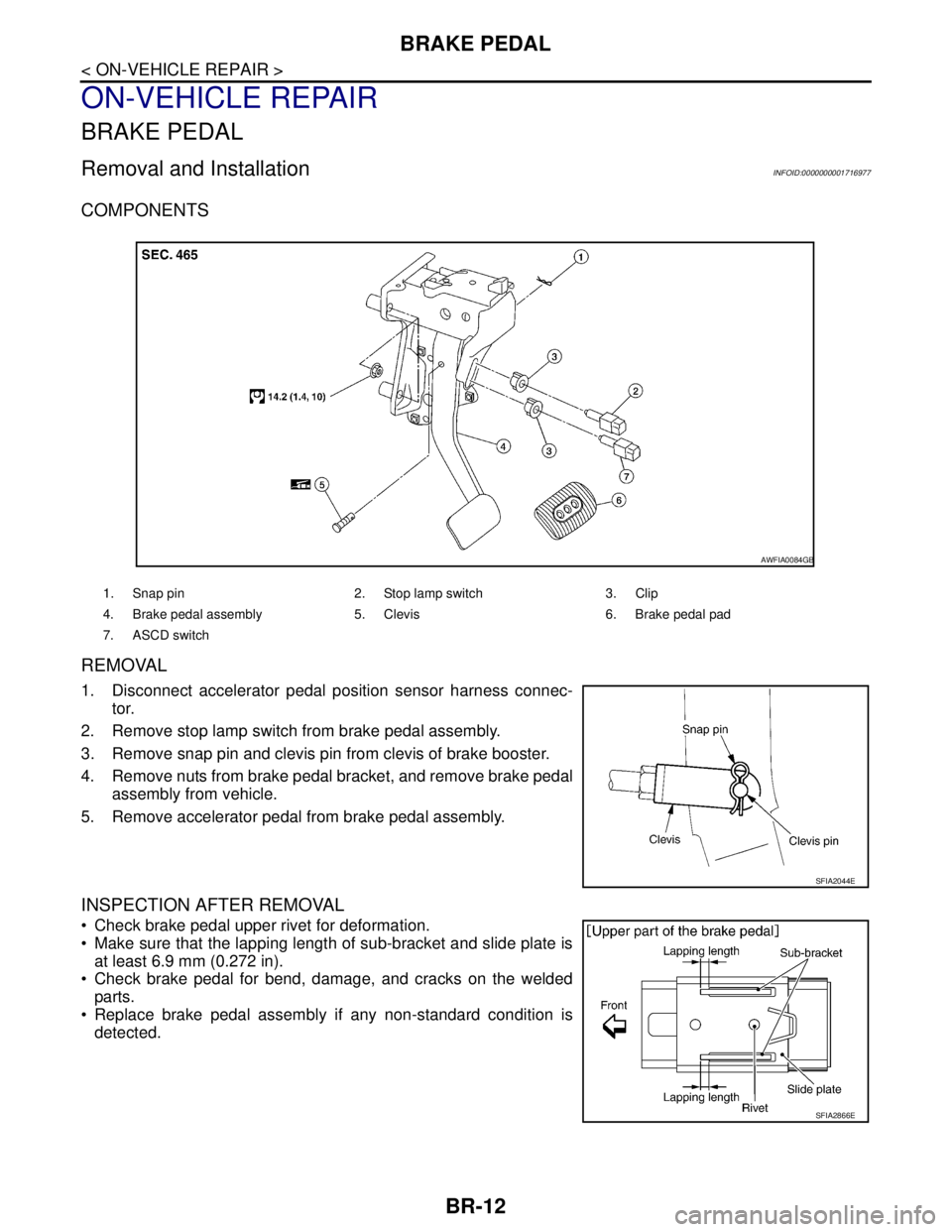
COMPONENTS
REMOVAL
1. Disconnect accelerator pedal position sensor harness connec-
tor.
2. Remove stop lamp switch from brake pedal assembly.
3. Remove snap pin and clevis pin from clevis of brake booster.
4. Remove nuts from brake pedal bracket, and remove brake pedal
assembly from vehicle.
5. Remove accelerator pedal from brake pedal assembly.
INSPECTION AFTER REMOVAL
Check brake pedal upper rivet for deformation.
Make sure that the lapping length of sub-bracket and slide plate is
at least 6.9 mm (0.272 in).
Check brake pedal for bend, damage, and cracks on the welded
parts.
Replace brake pedal assembly if any non-standard condition is
detected.
1. Snap pin 2. Stop lamp switch 3. Clip
4. Brake pedal assembly 5. Clevis 6. Brake pedal pad
7. ASCD switch
AWFIA0084GB
SFIA2044E
SFIA2866E
Page 205 of 5883
BRAKE PEDAL
BR-13
< ON-VEHICLE REPAIR >
C
D
E
G
H
I
J
K
L
MA
B
BR
N
O
P
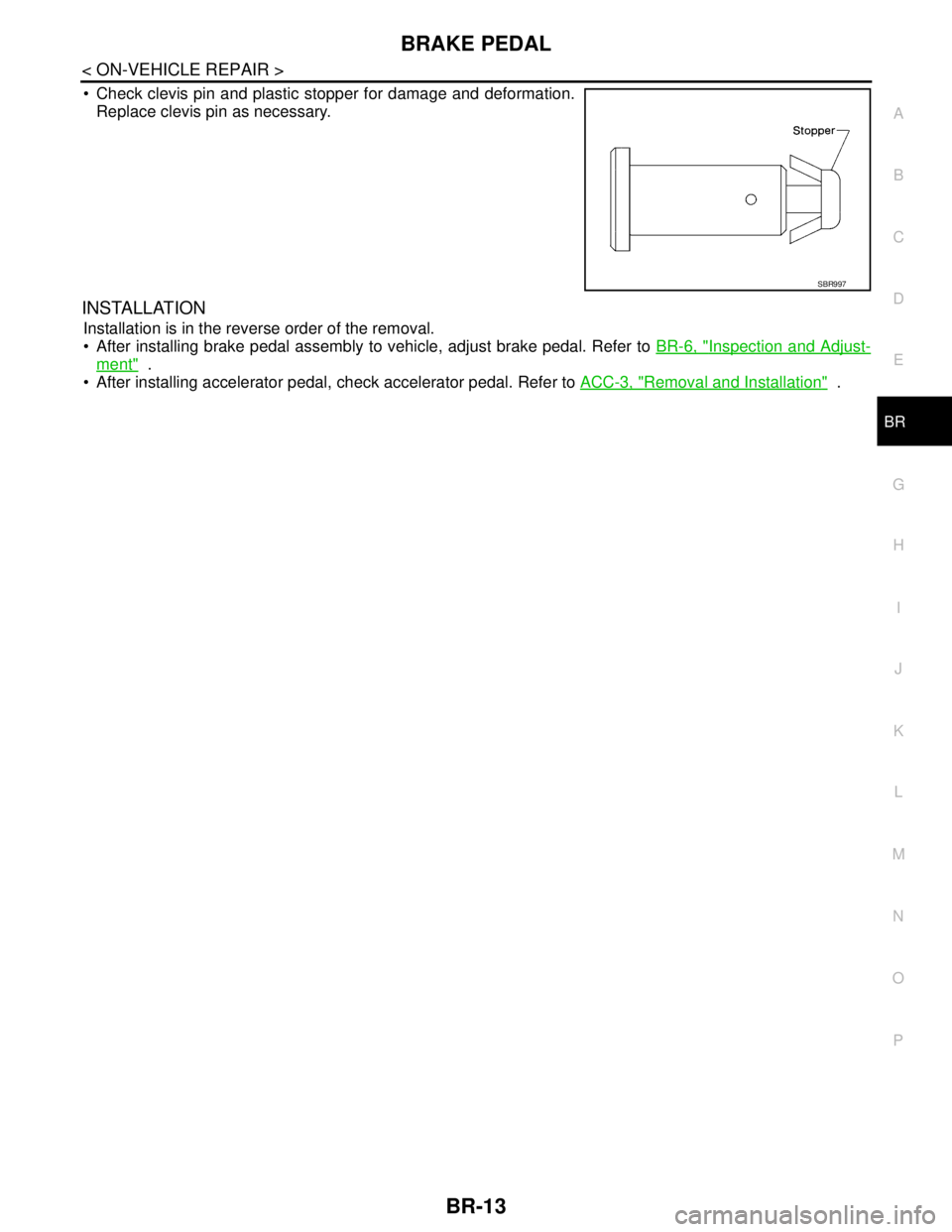
Check clevis pin and plastic stopper for damage and deformation.
Replace clevis pin as necessary.
INSTALLATION
Installation is in the reverse order of the removal.
After installing brake pedal assembly to vehicle, adjust brake pedal. Refer to BR-6, "
Inspection and Adjust-
ment" .
After installing accelerator pedal, check accelerator pedal. Refer to ACC-3, "
Removal and Installation" .
SBR997
Page 217 of 5883
FRONT DISC BRAKE
BR-25
< ON-VEHICLE REPAIR >
C
D
E
G
H
I
J
K
L
MA
B
BR
N
O
P
2. Remove sliding pin bolt (lower side).
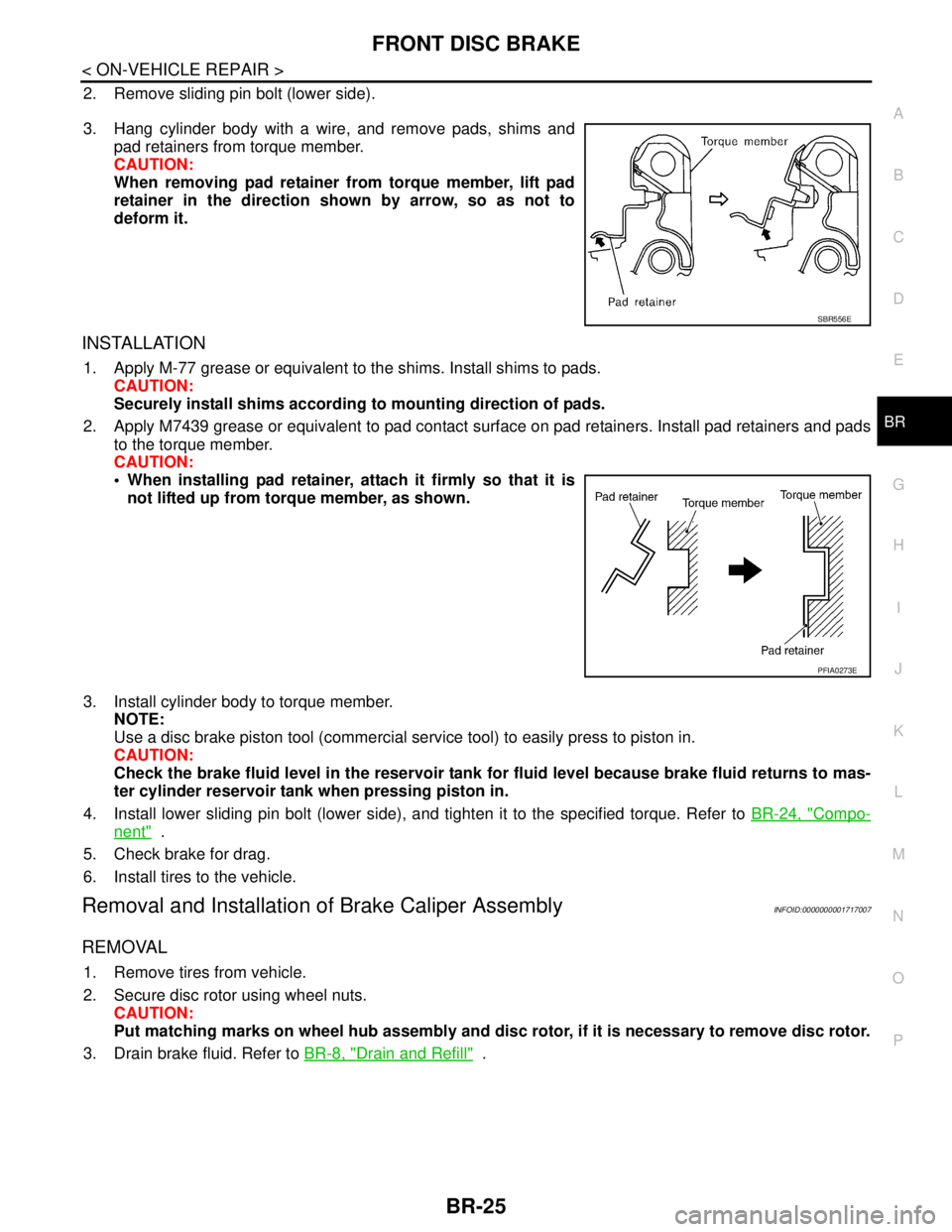
3. Hang cylinder body with a wire, and remove pads, shims and
pad retainers from torque member.
CAUTION:
When removing pad retainer from torque member, lift pad
retainer in the direction shown by arrow, so as not to
deform it.
INSTALLATION
1. Apply M-77 grease or equivalent to the shims. Install shims to pads.
CAUTION:
Securely install shims according to mounting direction of pads.
2. Apply M7439 grease or equivalent to pad contact surface on pad retainers. Install pad retainers and pads
to the torque member.
CAUTION:
When installing pad retainer, attach it firmly so that it is
not lifted up from torque member, as shown.
3. Install cylinder body to torque member.
NOTE:
Use a disc brake piston tool (commercial service tool) to easily press to piston in.
CAUTION:
Check the brake fluid level in the reservoir tank for fluid level because brake fluid returns to mas-
ter cylinder reservoir tank when pressing piston in.
4. Install lower sliding pin bolt (lower side), and tighten it to the specified torque. Refer to BR-24, "
Compo-
nent" .
5. Check brake for drag.
6. Install tires to the vehicle.
Removal and Installation of Brake Caliper AssemblyINFOID:0000000001717007
REMOVAL
1. Remove tires from vehicle.
2. Secure disc rotor using wheel nuts.
CAUTION:
Put matching marks on wheel hub assembly and disc rotor, if it is necessary to remove disc rotor.
3. Drain brake fluid. Refer to BR-8, "
Drain and Refill" .
SBR556E
PFIA0273E
Page 218 of 5883
BR-26
< ON-VEHICLE REPAIR >
FRONT DISC BRAKE
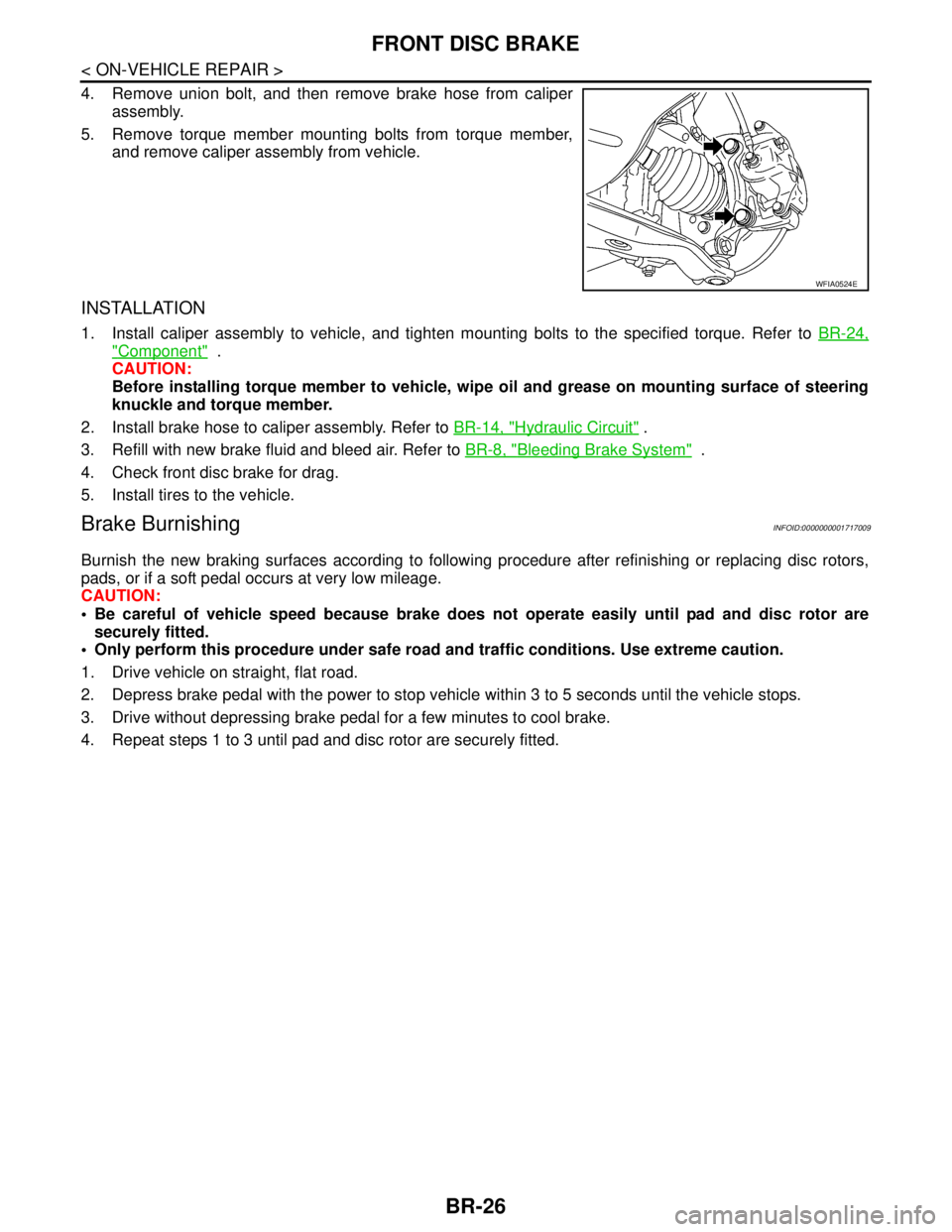
4. Remove union bolt, and then remove brake hose from caliper
assembly.
5. Remove torque member mounting bolts from torque member,
and remove caliper assembly from vehicle.
INSTALLATION
1. Install caliper assembly to vehicle, and tighten mounting bolts to the specified torque. Refer to BR-24,
"Component" .
CAUTION:
Before installing torque member to vehicle, wipe oil and grease on mounting surface of steering
knuckle and torque member.
2. Install brake hose to caliper assembly. Refer to BR-14, "
Hydraulic Circuit" .
3. Refill with new brake fluid and bleed air. Refer to BR-8, "
Bleeding Brake System" .
4. Check front disc brake for drag.
5. Install tires to the vehicle.
Brake BurnishingINFOID:0000000001717009
Burnish the new braking surfaces according to following procedure after refinishing or replacing disc rotors,
pads, or if a soft pedal occurs at very low mileage.
CAUTION:
Be careful of vehicle speed because brake does not operate easily until pad and disc rotor are
securely fitted.
Only perform this procedure under safe road and traffic conditions. Use extreme caution.
1. Drive vehicle on straight, flat road.
2. Depress brake pedal with the power to stop vehicle within 3 to 5 seconds until the vehicle stops.
3. Drive without depressing brake pedal for a few minutes to cool brake.
4. Repeat steps 1 to 3 until pad and disc rotor are securely fitted.
WFIA0524E
Page 221 of 5883
REAR DISC BRAKE
BR-29
< ON-VEHICLE REPAIR >
C
D
E
G
H
I
J
K
L
MA
B
BR
N
O
P
3. Drain brake fluid. Refer to BR-8, "Bleeding Brake System".
4. Remove connecting bolt and torque member bolts using power tool, and remove cylinder body.
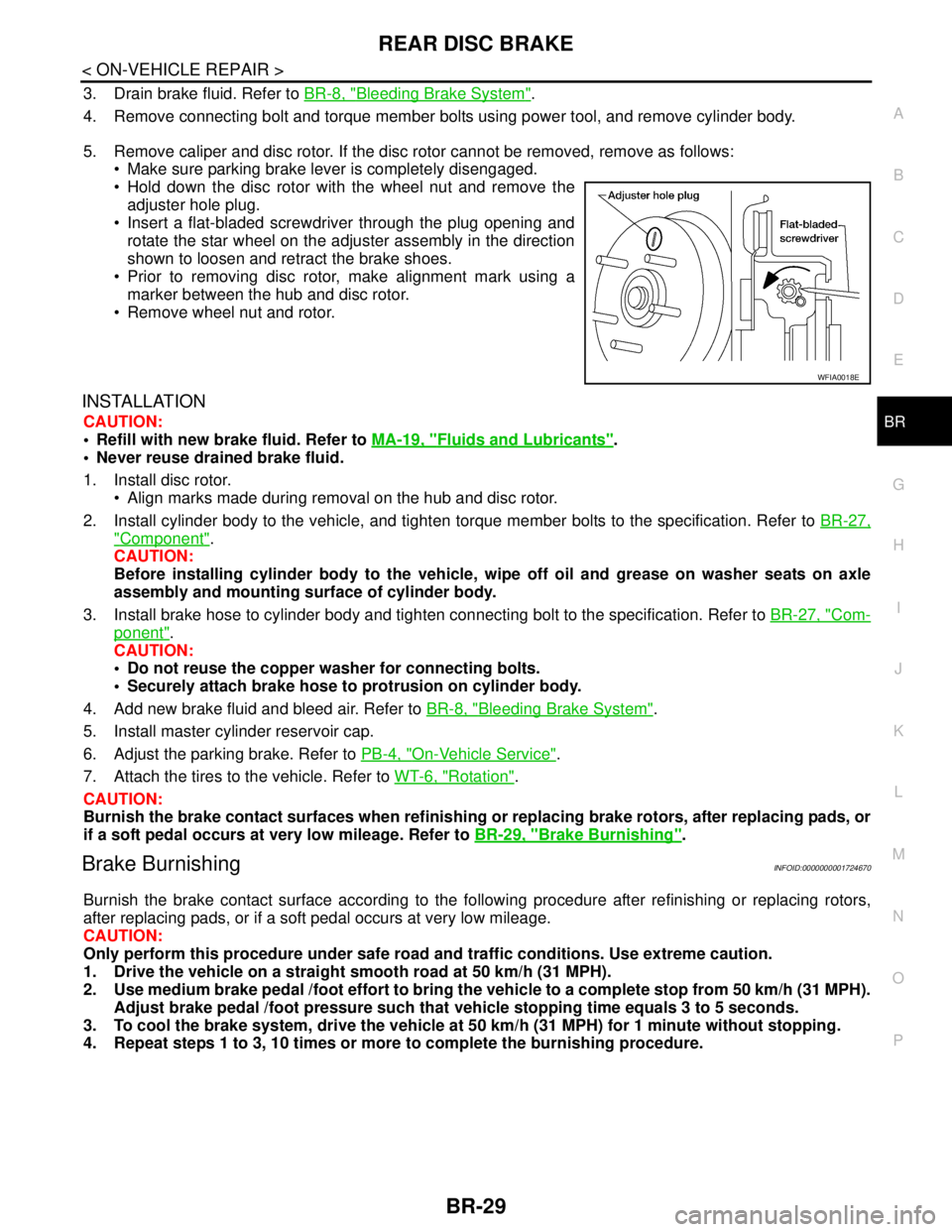
5. Remove caliper and disc rotor. If the disc rotor cannot be removed, remove as follows:
Make sure parking brake lever is completely disengaged.
Hold down the disc rotor with the wheel nut and remove the
adjuster hole plug.
Insert a flat-bladed screwdriver through the plug opening and
rotate the star wheel on the adjuster assembly in the direction
shown to loosen and retract the brake shoes.
Prior to removing disc rotor, make alignment mark using a
marker between the hub and disc rotor.
Remove wheel nut and rotor.
INSTALLATION
CAUTION:
Refill with new brake fluid. Refer to MA-19, "
Fluids and Lubricants".
Never reuse drained brake fluid.
1. Install disc rotor.
Align marks made during removal on the hub and disc rotor.
2. Install cylinder body to the vehicle, and tighten torque member bolts to the specification. Refer to BR-27,
"Component".
CAUTION:
Before installing cylinder body to the vehicle, wipe off oil and grease on washer seats on axle
assembly and mounting surface of cylinder body.
3. Install brake hose to cylinder body and tighten connecting bolt to the specification. Refer to BR-27, "
Com-
ponent".
CAUTION:
Do not reuse the copper washer for connecting bolts.
Securely attach brake hose to protrusion on cylinder body.
4. Add new brake fluid and bleed air. Refer to BR-8, "
Bleeding Brake System".
5. Install master cylinder reservoir cap.
6. Adjust the parking brake. Refer to PB-4, "
On-Vehicle Service".
7. Attach the tires to the vehicle. Refer to WT-6, "
Rotation".
CAUTION:
Burnish the brake contact surfaces when refinishing or replacing brake rotors, after replacing pads, or
if a soft pedal occurs at very low mileage. Refer to BR-29, "
Brake Burnishing".
Brake BurnishingINFOID:0000000001724670
Burnish the brake contact surface according to the following procedure after refinishing or replacing rotors,
after replacing pads, or if a soft pedal occurs at very low mileage.
CAUTION:
Only perform this procedure under safe road and traffic conditions. Use extreme caution.
1. Drive the vehicle on a straight smooth road at 50 km/h (31 MPH).
2. Use medium brake pedal /foot effort to bring the vehicle to a complete stop from 50 km/h (31 MPH).
Adjust brake pedal /foot pressure such that vehicle stopping time equals 3 to 5 seconds.
3. To cool the brake system, drive the vehicle at 50 km/h (31 MPH) for 1 minute without stopping.
4. Repeat steps 1 to 3, 10 times or more to complete the burnishing procedure.
WFIA0018E
Page 255 of 5883
![NISSAN TIIDA 2007 Service Manual PDF BRC-22
< FUNCTION DIAGNOSIS >[ABS]
EBD
EBD
System DiagramINFOID:0000000001731220
System DescriptionINFOID:0000000001731221
Electric Brake force Distribution is a following function. ABS actuator and](/img/5/57395/w960_57395-254.png "NISSAN TIIDA 2007 Service Manual PDF BRC-22
< FUNCTION DIAGNOSIS >[ABS]
EBD
EBD
System DiagramINFOID:0000000001731220
System DescriptionINFOID:0000000001731221
Electric Brake force Distribution is a following function. ABS actuator and")
BRC-22
< FUNCTION DIAGNOSIS >[ABS]
EBD
EBD
System DiagramINFOID:0000000001731220
System DescriptionINFOID:0000000001731221
Electric Brake force Distribution is a following function. ABS actuator and electric unit (control unit) detects
subtle slippages between the front and rear wheels during braking. Then it electronically controls the rear
braking force (brake fluid pressure) to reduce rear wheel slippage. Accordingly, it improves vehicle stability.
Electrical system diagnosis by CONSULT-III is available.
AWFIA0014GB
Page 258 of 5883
![NISSAN TIIDA 2007 Service Manual PDF DIAGNOSIS SYSTEM [ABS ACTUATOR AND ELECTRIC UNIT (CONTROL
UNIT)]
BRC-25
< FUNCTION DIAGNOSIS >[ABS]
C
D
E
G
H
I
J
K
L
MA
B
BRC
N
O
P
DIAGNOSIS SYSTEM [ABS ACTUATOR AND ELECTRIC UNIT (CONTROL
UNIT)]
C](/img/5/57395/w960_57395-257.png "NISSAN TIIDA 2007 Service Manual PDF DIAGNOSIS SYSTEM [ABS ACTUATOR AND ELECTRIC UNIT (CONTROL
UNIT)]
BRC-25
< FUNCTION DIAGNOSIS >[ABS]
C
D
E
G
H
I
J
K
L
MA
B
BRC
N
O
P
DIAGNOSIS SYSTEM [ABS ACTUATOR AND ELECTRIC UNIT (CONTROL
UNIT)]
C")
DIAGNOSIS SYSTEM [ABS ACTUATOR AND ELECTRIC UNIT (CONTROL
UNIT)]
BRC-25
< FUNCTION DIAGNOSIS >[ABS]
C
D
E
G
H
I
J
K
L
MA
B
BRC
N
O
P
DIAGNOSIS SYSTEM [ABS ACTUATOR AND ELECTRIC UNIT (CONTROL
UNIT)]
CONSULT-III Function (ABS)INFOID:0000000001731224
FUNCTION
CONSULT-III can display each diagnostic item using the diagnostic test modes shown following.
SELF-DIAG RESULTS MODE
Operation Procedure
1. Before performing the self-diagnosis, start engine and drive vehicle at 30 km/h (19 MPH) or more for
approximately 1 minute.
How to Erase Self-diagnosis Results
1. After erasing DTC memory, start engine and drive vehicle at 30 km/h (19 MPH) or more for approximately
1 minute as the final inspection, and make sure that the ABS warning lamp, VDC OFF indicator lamp,
SLIP indicator lamp and brake warning lamp turn OFF.
CAUTION:
If memory cannot be erased, perform applicable diagnosis.
NOTE:
When the wheel sensor malfunctions, after inspecting the wheel sensor system, the ABS warning lamp,
VDC OFF indicator lamp, SLIP indicator lamp and brake warning lamp will not turn OFF even when the
system is normal unless the vehicle is driving at approximately 30 km/h (19 MPH) or more for approxi-
mately 1 minute.
Brake warning lamp will turn ON in case of parking brake operation (when switch is ON) or of brake fluid
level switch operation (when brake fluid is insufficient).
VDC OFF switch should not stay “ON” position.
Display Item List
Refer to BRC-71, "DTC No. Index".
DATA MONITOR MODE
Display Item List
Diagnostic test mode Function
Work supportThis mode enables a technician to adjust some devices faster and more accurately by following
the indications on CONSULT-III.
Self-diagnostic results Self-diagnostic results can be read and erased quickly.
Data monitor Input/Output data in the ABS actuator and electric unit (control unit) can be read.
Active testDiagnostic test mode is which CONSULT-III drives some actuators apart from the ABS actuator
and electric unit (control unit) and also shifts some parameters in a specified range.
ECU part number ABS actuator and electric unit (control unit) part number can be read.
CAN diagnostic support monitor The results of transmit/receive diagnosis of CAN communication can be read.
Item
(Unit)Data monitor item selection
Remarks
ECU INPUT
SIGNALSMAIN
SIGNALSSELECTION
FROM MENU
GEAR×××Gear position judged by PNP switch
signal is displayed.
FR RH SENSOR
(km/h, MPH)×××Wheel speed calculated by front RH
wheel sensor signal is displayed.
FR LH SENSOR
(km/h, MPH)×××Wheel speed calculated by front LH
wheel sensor signal is displayed.
RR RH SENSOR
(km/h, MPH)×××Wheel speed calculated by rear RH
wheel sensor signal is displayed.
Page 259 of 5883
![NISSAN TIIDA 2007 Service Manual PDF BRC-26
< FUNCTION DIAGNOSIS >[ABS]
DIAGNOSIS SYSTEM [ABS ACTUATOR AND ELECTRIC UNIT (CONTROL
UNIT)]
RR LH SENSOR
(km/h, MPH)×××Wheel speed calculated by rear LH
wheel sensor signal is displayed](/img/5/57395/w960_57395-258.png "NISSAN TIIDA 2007 Service Manual PDF BRC-26
< FUNCTION DIAGNOSIS >[ABS]
DIAGNOSIS SYSTEM [ABS ACTUATOR AND ELECTRIC UNIT (CONTROL
UNIT)]
RR LH SENSOR
(km/h, MPH)×××Wheel speed calculated by rear LH
wheel sensor signal is displayed")
BRC-26
< FUNCTION DIAGNOSIS >[ABS]
DIAGNOSIS SYSTEM [ABS ACTUATOR AND ELECTRIC UNIT (CONTROL
UNIT)]
RR LH SENSOR
(km/h, MPH)×××Wheel speed calculated by rear LH
wheel sensor signal is displayed.
BATTERY VOLT
(V)×××Voltage supplied to ABS actuator
and electric unit (control unit) is dis-
played.
N POSI SIG – –×Shift position judged by PNP switch
signal.
P POSI SIG – –×Shift position judged by PNP switch
signal.
ACCEL POS SIG
(%)×–×Throttle valve open/close status
judged by CAN communication sig-
nal is displayed.
ENGINE SPEED
(rpm)×××Engine speed judged by CAN com-
munication signal is displayed.
STR ANGLE SIG
(deg)×–×Steering angle detected by steering
angle sensor is displayed.
YAW RATE SEN
(d/s)×××Yaw rate detected by yaw rate sen-
sor is displayed.
SIDE G-SENSOR
(m/s
2)×– ×Transverse acceleration detected
by side G-sensor is displayed.
STOP LAMP SW
(ON/OFF)×××Stop lamp switch (ON/OFF) status
is displayed.
OFF SW
(ON/OFF) ×× ×VDC OFF switch (ON/OFF) status
is displayed.
ABS WARN LAMP
(ON/OFF)–××ABS warning lamp (ON/OFF) status
is displayed.
SLIP LAMP
(ON/OFF)–××SLIP indicator lamp (ON/OFF) sta-
tus is displayed.
FR LH IN SOL
(ON/OFF)–××Front LH IN ABS solenoid (ON/
OFF) status is displayed.
FR LH OUT SOL
(ON/OFF)–××Front LH OUT ABS solenoid (ON/
OFF) status is displayed.
RR RH IN SOL
(ON/OFF)–××Rear RH IN ABS solenoid (ON/
OFF) status is displayed.
RR RH OUT SOL
(ON/OFF) –××Rear RH OUT ABS solenoid (ON/
OFF) status is displayed.
FR RH IN SOL
(ON/OFF)–××Front RH IN ABS solenoid (ON/
OFF) status is displayed.
FR RH OUT SOL
(ON/OFF)–××Front RH OUT ABS solenoid (ON/
OFF) status is displayed.
RR LH IN SOL
(ON/OFF)–××Rear LH IN ABS solenoid (ON/OFF)
status is displayed.
RR LH OUT SOL
(ON/OFF)–××Rear LH OUT ABS solenoid (ON/
OFF) status is displayed.
OFF LAMP
(ON/OFF)–××OFF Lamp (ON/OFF) status is dis-
played.
MOTOR RELAY
(ON/OFF)–××ABS motor relay signal (ON/OFF)
status is displayed.
ACTUATOR RLY
(ON/OFF)– ××ABS actuator relay signal (ON/OFF)
status is displayed. Item
(Unit)Data monitor item selection
Remarks
ECU INPUT
SIGNALS
MAIN
SIGNALSSELECTION
FROM MENU
Page 261 of 5883
![NISSAN TIIDA 2007 Service Manual PDF BRC-28
< FUNCTION DIAGNOSIS >[ABS]
DIAGNOSIS SYSTEM [ABS ACTUATOR AND ELECTRIC UNIT (CONTROL
UNIT)]
×: Applicable
–: Not applicable
ACTIVE TEST MODE
CAUTION:
• Do not perform active test while d](/img/5/57395/w960_57395-260.png "NISSAN TIIDA 2007 Service Manual PDF BRC-28
< FUNCTION DIAGNOSIS >[ABS]
DIAGNOSIS SYSTEM [ABS ACTUATOR AND ELECTRIC UNIT (CONTROL
UNIT)]
×: Applicable
–: Not applicable
ACTIVE TEST MODE
CAUTION:
• Do not perform active test while d")
BRC-28
< FUNCTION DIAGNOSIS >[ABS]
DIAGNOSIS SYSTEM [ABS ACTUATOR AND ELECTRIC UNIT (CONTROL
UNIT)]
×: Applicable
–: Not applicable
ACTIVE TEST MODE
CAUTION:
• Do not perform active test while driving vehicle.
Make sure to completely bleed air from brake system.
The active test cannot be performed with the ABS warning lamp, VDC OFF indicator lamp, SLIP indi-
cator lamp or brake warning lamp on.
ABS warning lamp, VDC OFF indicator lamp, SLIP indicator lamp and brake warning lamp are on
during active test.
NOTE:
When active test is performed while depressing the pedal, the pedal depression amount will change. This is
normal. (Only solenoid valve and ABS motor.)
“TEST IS STOPPED” is displayed 10 seconds after operation start.
After “TEST IS STOPPED” is displayed, to perform test again, touch BACK.
Test Item
SOLENOID VALVE When performing an active test of the ABS function, select the “MAIN SIGNALS” for each test item. In addi-
tion, when performing an active test of the VDC/TCS function, select the item menu for each test item.
For ABS solenoid valve, touch “UP”, “KEEP”, and “DOWN” on the display screen. For ABS solenoid valve
(ACT), touch “UP”, “ACT UP”, “ACT KEEP” and confirm that solenoid valves operate as shown in the table
below.
RELEASE SW NO – –×Release switch signal (ON/OFF)
status is displayed. “ON” indicates
that the brake pedal is depressed.
“OFF”“ is that the brake pedal is re-
leased.
RELEASE SW NC – –×Release switch signal (ON/OFF)
status is displayed. “OFF” indicates
that the brake pedal is depressed
on. “ON” is that the brake pedal is
released.
OHB FAIL – –×OHB fail status is displayed.
HBA FAIL – –×HBA fail status is displayed.
OHB SIG – –×OHB operation (ON/OFF) status is
displayed.
HBA SIG – –×HBA operation (ON/OFF) status is
displayed.
PRES CTRL ACC – –×This item is not used for this model.
PRES FAIL ACC – –×This item is not used for this model.
STP OFF RLY – –×Stop lamp relay signal (ON/OFF)
status is displayed. Item
(Unit)Data monitor item selection
Remarks
ECU INPUT
SIGNALSMAIN
SIGNALSSELECTION
FROM MENU
OperationABS solenoid valve ABS solenoid valve (ACT)
UP KEEP DOWN UPACTUA-
TOR UPACTUA-
TOR KEEP
FR RH SOL
FR RH ABS SOLE-
NOID (ACT)FR RH IN SOL OFF ON ON OFF OFF OFF
FR RH OUT SOL OFF OFF ON* OFF OFF OFF
FR LH SOL
FR LH ABS SOLE-
NOID (ACT)FR LH IN SOL OFF ON ON OFF OFF OFF
FR LH OUT SOL OFF OFF ON* OFF OFF OFF
Page 272 of 5883
![NISSAN TIIDA 2007 Service Manual PDF C1111 ABS MOTOR, MOTOR RELAY SYSTEM
BRC-39
< COMPONENT DIAGNOSIS >[ABS]
C
D
E
G
H
I
J
K
L
MA
B
BRC
N
O
P
C1111 ABS MOTOR, MOTOR RELAY SYSTEM
DescriptionINFOID:0000000001731242
PUMP
The pump returns th](/img/5/57395/w960_57395-271.png "NISSAN TIIDA 2007 Service Manual PDF C1111 ABS MOTOR, MOTOR RELAY SYSTEM
BRC-39
< COMPONENT DIAGNOSIS >[ABS]
C
D
E
G
H
I
J
K
L
MA
B
BRC
N
O
P
C1111 ABS MOTOR, MOTOR RELAY SYSTEM
DescriptionINFOID:0000000001731242
PUMP
The pump returns th")
C1111 ABS MOTOR, MOTOR RELAY SYSTEM
BRC-39
< COMPONENT DIAGNOSIS >[ABS]
C
D
E
G
H
I
J
K
L
MA
B
BRC
N
O
P
C1111 ABS MOTOR, MOTOR RELAY SYSTEM
DescriptionINFOID:0000000001731242
PUMP
The pump returns the brake fluid stored in the reservoir to the master cylinder by reducing the pressure.
MOTOR
The motor drives the pump according to the signals transmitted by the ABS actuator and electric unit (control
unit).
DTC LogicINFOID:0000000001731243
DTC DETECTION LOGIC
DTC CONFIRMATION PROCEDURE
1.CHECK SELF-DIAGNOSIS RESULTS
Check the self-diagnosis results.
Is above displayed on the self-diagnosis display?
YES >> Proceed to diagnosis procedure. Refer to BRC-39, "Diagnosis Procedure".
NO >> INSPECTION END
Diagnosis ProcedureINFOID:0000000001731244
INSPECTION PROCEDURE
1.CHECK CONNECTOR
1. Turn ignition switch OFF.
2. Disconnect ABS actuator and electric unit (control unit) connector.
3. Check terminal for deformation, disconnect, looseness, and so on. If any malfunction is found, repair or
replace terminal.
4. Reconnect connectors and then perform the self-diagnosis. Refer to BRC-25, "
CONSULT-III Function
(ABS)".
Is any item indicated on the self-diagnosis display?
YES >> GO TO 2
NO >> Poor connection of connector terminal. Repair or replace connector.
2.CHECK ABS MOTOR AND MOTOR RELAY POWER SUPPLY CIRCUIT
DTC Display item Malfunction detected condition Possible cause
C 1111 P U M P M O T O RDuring the actuator motor operating with ON, when the
actuator motor turns OFF, or when the control line for ac-
tuator motor relay is open. Harness or connector
ABS actuator and electric unit
(control unit) During the actuator motor operating with OFF, when the
actuator motor turns ON, or when the control line for relay
is shorted to ground.
Self-diagnosis results
PUMP MOTOR