ESP NISSAN TIIDA 2007 Service Repair Manual
[x] Cancel search | Manufacturer: NISSAN, Model Year: 2007, Model line: TIIDA, Model: NISSAN TIIDA 2007Pages: 5883, PDF Size: 78.95 MB
Page 2 of 5883

FOREWORD
This manual contains maintenance and repair procedures for the NISSAN
TIIDA, model C11 series.
In order to assure your safety and the efficient functioning of the vehicle,
this manual should be read thoroughly. It is especially important that the
PRECAUTIONS in the GI section be completely understood before starting
any repair task.
All information in this manual is based on the latest product information
at the time of publication. The right is reserved to make changes in speci-
fications and methods at any time without notice.
IMPORTANT SAFETY NOTICE
The proper performance of service is essential for both the safety of the
technician and the efficient functioning of the vehicle.
The service methods in this Service Manual are described in such a man-
ner that the service may be performed safely and accurately.
Service varies with the procedures used, the skills of the technician and the
tools and parts available. Accordingly, anyone using service procedures,
tools or parts which are not specifically recommended by NISSAN must
first be completely satisfied that neither personal safety nor the vehicle's
safety will be jeopardized by the service method selected.
NISSAN EUROPE S.A.S.
Service Engineering SectionParis, France
Page 24 of 5883
![NISSAN TIIDA 2007 Service Repair Manual AV
MULTI AV SYSTEM SYMPTOMS
AV-19
< SYMPTOM DIAGNOSIS >[AUDIO WITHOUT NAVIGATION]
C
D
E
F
G
H
I
J
K
L
MB A
O
P
SYMPTOM DIAGNOSIS
MULTI AV SYSTEM SYMPTOMS
Symptom TableINFOID:0000000001728624
RELATED T](/img/5/57395/w960_57395-23.png "NISSAN TIIDA 2007 Service Repair Manual AV
MULTI AV SYSTEM SYMPTOMS
AV-19
< SYMPTOM DIAGNOSIS >[AUDIO WITHOUT NAVIGATION]
C
D
E
F
G
H
I
J
K
L
MB A
O
P
SYMPTOM DIAGNOSIS
MULTI AV SYSTEM SYMPTOMS
Symptom TableINFOID:0000000001728624
RELATED T")
AV
MULTI AV SYSTEM SYMPTOMS
AV-19
< SYMPTOM DIAGNOSIS >[AUDIO WITHOUT NAVIGATION]
C
D
E
F
G
H
I
J
K
L
MB A
O
P
SYMPTOM DIAGNOSIS
MULTI AV SYSTEM SYMPTOMS
Symptom TableINFOID:0000000001728624
RELATED TO AUDIO
RELATED TO HANDS FREE PHONE
Check that the cellular phone is corresponding type (Bluetooth® enabled) when the hands free related mal-
function vehicle is in service before performing a diagnosis.
There is a case that malfunction occurs due to the version change of the phone type, etc. even though it is a
corresponding type. Therefore, confirm it by changing the cellular phone to another corresponding type
phone, and check that it operates normally. It is necessary to distinguish whether the cause is the vehicle or
cellular phone. Check to ensure the customers phone is supported by checking the phone compatibility for
the hands free system.
Trouble diagnosis chart by symptom
RELATED TO STEERING SWITCH
Symptom Check items Possible malfunction location / Action to take
Audio sound is not heard.No sound from all speakers Audio unit (XX-XX, "*****"
)
Sound is not heard only from the specif-
ic places (Front RH, rear RH, front LH
and rear LH).Sound signal circuit of suspect system
Symptoms Check items Possible malfunction location / Action to take
Does not recognize cellular
phone connection. Repeat the registration of cellular phone. Audio unit (XX-XX, "*****"
)
Hands free phone cannot be
established. Hands free phone operation can be
made, but the communication cannot
be established.
Hands free phone operation can be
performed, however, voice between
each other cannot be heard during the
conversation.Audio unit (XX-XX, "*****"
)
The other party's voice cannot
be heard by hands free phone.No sound from all speakers Audio unit (XX-XX, "*****"
)
Sound is not heard only from the specific
places (Front RH or front LH).Sound signal circuit (TEL voice)
Originating sound is not heard
by the other party with hands
free phone communication.Sound operation function is normal. Audio unit (XX-XX, "*****"
)
Sound operation function does not work. Microphone signal circuit (XX-XX, "*****"
)
Symptoms Possible malfunction location / Action to take
All steering switches are not operated. Steering switch signal ground circuit (XX-XX, "*****"
)
Only specified switch cannot be operated. Steering switch (XX-XX, "*****"
)
“MENU UP”, “VOL UP” and “SOURCE” switches are not op-
erated.Steering switch signal A circuit (XX-XX, "*****"
)
“ ”, “MENU DOWN” and “VOL DOWN” switches are not
operated.Steering switch signal B circuit (XX-XX, "*****"
)
Page 37 of 5883
![NISSAN TIIDA 2007 Service Repair Manual AV-32
< FUNCTION DIAGNOSIS >[AUDIO WITH NAVIGATION]
MULTI AV SYSTEM
FUNCTION DIAGNOSIS
MULTI AV SYSTEM
System DiagramINFOID:0000000001728627
System DescriptionINFOID:0000000001728628
Multi AV system m](/img/5/57395/w960_57395-36.png "NISSAN TIIDA 2007 Service Repair Manual AV-32
< FUNCTION DIAGNOSIS >[AUDIO WITH NAVIGATION]
MULTI AV SYSTEM
FUNCTION DIAGNOSIS
MULTI AV SYSTEM
System DiagramINFOID:0000000001728627
System DescriptionINFOID:0000000001728628
Multi AV system m")
AV-32
< FUNCTION DIAGNOSIS >[AUDIO WITH NAVIGATION]
MULTI AV SYSTEM
FUNCTION DIAGNOSIS
MULTI AV SYSTEM
System DiagramINFOID:0000000001728627
System DescriptionINFOID:0000000001728628
Multi AV system means that the following systems are integrated.
Two AV communication lines (H, L) connect between units that configure MULTI AV system. NAVI control
unit controls by sending/receiving data one by one with each unit (slave unit) that configures them com-
pletely as a master unit.
Two AV communication lines (H, L) adopt a twisted pair line that is resistant to noise.
NAVI control unit is connected by CAN communication, and it receives data signal from ECM, combination
meter. It computes and displays fuel economy information value with the obtained information. Sending/
receiving of data signal is performed by BCM. Also, it sends the required signal of vehicle setting and
receives the response signal.
ALNIA0882GB
System name System explanation
NAVIGATION SYSTEMAV- 3 5 , "
System Description"
AUDIO SYSTEMXX-XX, "*****"
VEHICLE INFORMATION SYSTEM Status of audio, fuel economy, maintenance and navigation is
displayed.
NAVI control unit displays the fuel consumption status and trip
computer status while receiving data signal through CAN com-
munication from ECM, combination meter and BCM.
HANDS-FREE PHONE SYSTEM Refer to the following “HANDS-FREE PHONE SYSTEM”.
Page 38 of 5883
![NISSAN TIIDA 2007 Service Repair Manual AV
MULTI AV SYSTEM
AV-33
< FUNCTION DIAGNOSIS >[AUDIO WITH NAVIGATION]
C
D
E
F
G
H
I
J
K
L
MB A
O
P
NAVI control unit is connected with display and serial communication, and it sends the required si](/img/5/57395/w960_57395-37.png "NISSAN TIIDA 2007 Service Repair Manual AV
MULTI AV SYSTEM
AV-33
< FUNCTION DIAGNOSIS >[AUDIO WITH NAVIGATION]
C
D
E
F
G
H
I
J
K
L
MB A
O
P
NAVI control unit is connected with display and serial communication, and it sends the required si")
AV
MULTI AV SYSTEM
AV-33
< FUNCTION DIAGNOSIS >[AUDIO WITH NAVIGATION]
C
D
E
F
G
H
I
J
K
L
MB A
O
P
NAVI control unit is connected with display and serial communication, and it sends the required signal of dis-
play and display control and receives the response signal from front display. Also, it is connected with satel-
lite radio by serial communication, and it sends the operating signal and receives the display signal.
NOTE:
NAVI control unit can perform CONSULT-III self-operating function and on board self-diagnosis.
CONSULT-III self diagnosis: Refer to AV-48, "
CONSULT - III Function (MULTI AV)".
On board self diagnosis: Refer to AV-39, "
Diagnosis Description".
HANDS-FREE PHONE SYSTEM
Hands-free communication can be operated by connecting using Bluetooth® with cellular phone.
Operation is performed by steering switch, and operating condition is indicated on display.
Guide sound that is heard during operation is input from NAVI control unit to audio unit and is output from
front speaker.
When a call is originated
Spoken voice sound output from the microphone (Mic. Signal) is input to NAVI control unit. NAVI control unit
outputs to cellular phone with Bluetooth
® communication as a TEL voice signal. Voice sound is then heard at
the other party.
When receiving a call
Voice sound is input to own cellular phone from the other party. TEL voice signal is output to front speaker, and
the signal is input to audio unit via NAVI control unit by establishing Bluetooth
® communication from cellular
phone.
Component Parts LocationINFOID:0000000001728629
1. AV control unit M43, M44 2. Display unit M100 3. Navi control unit B68, B69
ALNIA0891GB
Page 115 of 5883
![NISSAN TIIDA 2007 Service Repair Manual AV-110
< SYMPTOM DIAGNOSIS >[AUDIO WITH NAVIGATION]
MULTI AV SYSTEM SYMPTOMS
Check that the cellular phone is corresponding type (Bluetooth® enabled) when the hands free related mal-
function vehic](/img/5/57395/w960_57395-114.png "NISSAN TIIDA 2007 Service Repair Manual AV-110
< SYMPTOM DIAGNOSIS >[AUDIO WITH NAVIGATION]
MULTI AV SYSTEM SYMPTOMS
Check that the cellular phone is corresponding type (Bluetooth® enabled) when the hands free related mal-
function vehic")
AV-110
< SYMPTOM DIAGNOSIS >[AUDIO WITH NAVIGATION]
MULTI AV SYSTEM SYMPTOMS
Check that the cellular phone is corresponding type (Bluetooth® enabled) when the hands free related mal-
function vehicle is in service before performing a diagnosis.
There is a case that malfunction occurs due to the version change of the phone type, etc. even though it is a
corresponding type. Therefore, confirm it by changing the cellular phone to another corresponding type
phone, and check that it operates normally. It is necessary to distinguish whether the cause is the vehicle or
cellular phone. Check to ensure the customers phone is supported by checking the phone compatibility for
the hands free system.
Trouble diagnosis chart by symptom
RELATED TO STEERING WHEEL SWITCH
Symptoms Check items Possible malfunction location/Action to take
Does not recognize cellular
phone connection.Repeat the registration of cellular phone. NAVI control unit (XX-XX, "*****"
)
Hands free phone cannot be
established. Hands free phone operation can be
made, but the communication cannot
be established.
Hands free phone operation can be
performed, however, voice between
each other cannot be heard during the
conversation.NAVI control unit (XX-XX, "*****"
)
The other party's voice cannot
be heard by hands free phone.Check the “microphone speaker ”in In-
spection & Adjustment Mode if sound is
heard.NAVI control unit (AV- 4 8 , "
CONSULT - III Function
(MULTI AV)")
Check the “microphone speaker ”in In-
spection & Adjustment Mode if sound is
not heard.TEL voice signal circuit
Originating sound is not heard
by the other party with hands
free phone communication.Sound operation function is normal. NAVI control unit (XX-XX, "*****"
)
Sound operation function does not work.Microphone signal circuit (AV- 9 1 , "
Diagnosis Proce-
dure")
Symptoms Possible malfunction location/Action to take
All steering switches are not operated. Steering switch signal ground circuit (XX-XX, "*****"
)
Only specified switch cannot be operated. Steering switch (XX-XX, "*****"
)
“ENTER”, “MENU UP”, “MENU DOWN” and “SOURCE”
switches are not operated.Steering switch signal A circuit (XX-XX, "*****"
)
“BACK”, “ ”, “VOL UP” and “VOL DOWN” switches are
not operated.Steering switch signal B circuit (XX-XX, "*****"
)
Page 118 of 5883
![NISSAN TIIDA 2007 Service Repair Manual AV
NORMAL OPERATING CONDITION
AV-113
< SYMPTOM DIAGNOSIS >[AUDIO WITH NAVIGATION]
C
D
E
F
G
H
I
J
K
L
MB A
O
P
VOICE GUIDANCE
VOICE RECOGNITION
REAR VIEW MONITOR
The part of the route already
passed](/img/5/57395/w960_57395-117.png "NISSAN TIIDA 2007 Service Repair Manual AV
NORMAL OPERATING CONDITION
AV-113
< SYMPTOM DIAGNOSIS >[AUDIO WITH NAVIGATION]
C
D
E
F
G
H
I
J
K
L
MB A
O
P
VOICE GUIDANCE
VOICE RECOGNITION
REAR VIEW MONITOR
The part of the route already
passed")
AV
NORMAL OPERATING CONDITION
AV-113
< SYMPTOM DIAGNOSIS >[AUDIO WITH NAVIGATION]
C
D
E
F
G
H
I
J
K
L
MB A
O
P
VOICE GUIDANCE
VOICE RECOGNITION
REAR VIEW MONITOR
The part of the route already
passed is deleted.A route is managed by sections between waypoints.
The section between the starting point and the way-
point is deleted if you passed the first waypoint. (It
may not be deleted depending on the area.)This is not a malfunction.
An indirect route is suggested.The system may suggest an indirect route if there
are restrictions (such as one way streets) on roads
close to the starting point or destination.Adjust the location of the starting point or
destination.
The system may suggest an indirect route because
route calculation does not take into consideration
some areas such as narrow streets (gray roads).Reset the destination to a main or ordinary
road, and recalculate the route.
The landmark information does not
correspond to the actual informa-
tion.This may be caused by insufficient or incorrect data
on the DVD-ROM.This is not a malfunction.
The suggested route does not ex-
actly connect to the starting point,
waypoints, or destination.There is no data for route calculation closer to these
locations.Set the starting point, waypoints and desti-
nation on main road, and perform route cal-
culation. Symptoms Possible cause Possible solution
Symptoms Possible cause Possible solution
The voice guidance is not available.Voice guidance is only available at certain intersec-
tions. In some cases, voice guidance is not avail-
able even when the vehicle should make a turn.This is not a malfunction.
The vehicle has deviated from the suggested route.Go back to the suggested route or request
route calculation again.
Voice guidance is set to off. Turn on the voice guidance.
Route guidance is set to off. Turn on the voice guidance.
The guidance content does not cor-
respond to the actual condition.The content of the voice guidance may vary, de-
pending on the types of intersections at which turns
are made.Follow all traffic rules and regulations.
Symptom Possible cause Possible solution
The system does not recognize the
command.
The system recognizes the com-
mand incorrectly.The interior of the vehicle is too noisy.Close the windows or have other occupants
be quiet.
The volume of the voice is too low. Speak louder.
Pronunciation is unclear. Speak clearly.
Voice recognition mode is not yet ready to speak.Push the release “ ” on the steering
switch, and speak a command after the
tone sounds.
5 seconds or more have passed after pushed and
released “ ” on the steering switch.Make sure to speak a command within 5
seconds after push and release “ ” on
the steering switch.
Only a limited range of voice commands is usable
for each screen.Use a correct voice command appropriate
for the current screen.
Symptoms Possible cause Possible solution
Rear view monitor image is not dis-
playedShift lever (M/T models) or selector lever (CVT
models) is not in R position.Shift lever (M/T models) or selector lever
(CVT models) is in R position.
Page 145 of 5883
BCS-10
< FUNCTION DIAGNOSIS >
COMBINATION SWITCH READING SYSTEM
NOTE:
Headlamp has a dual system switch.
COMBINATION SWITCH READING FUNCTION
Description
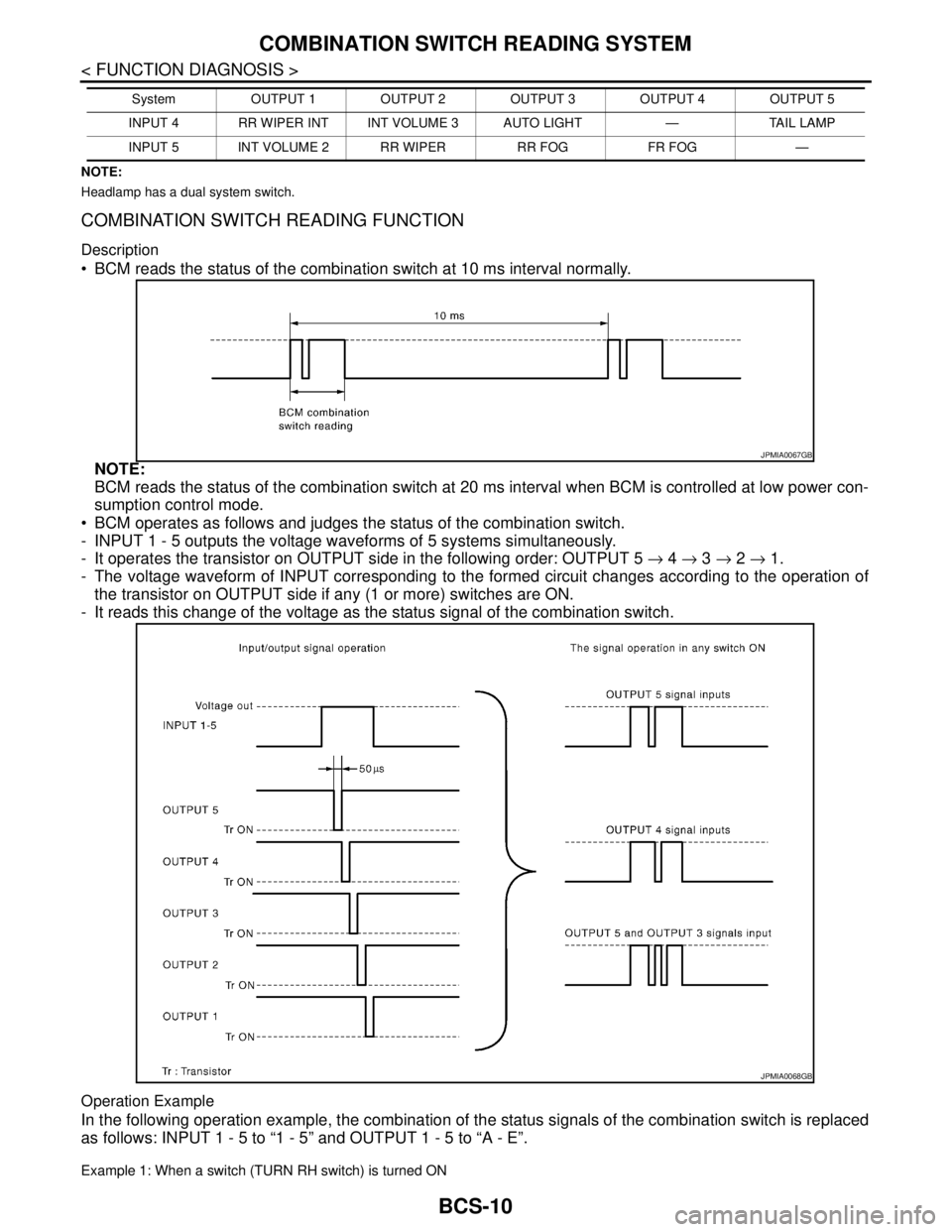
BCM reads the status of the combination switch at 10 ms interval normally.
NOTE:
BCM reads the status of the combination switch at 20 ms interval when BCM is controlled at low power con-
sumption control mode.
BCM operates as follows and judges the status of the combination switch.
- INPUT 1 - 5 outputs the voltage waveforms of 5 systems simultaneously.
- It operates the transistor on OUTPUT side in the following order: OUTPUT 5 → 4 → 3 → 2 → 1.
- The voltage waveform of INPUT corresponding to the formed circuit changes according to the operation of
the transistor on OUTPUT side if any (1 or more) switches are ON.
- It reads this change of the voltage as the status signal of the combination switch.
Operation Example
In the following operation example, the combination of the status signals of the combination switch is replaced
as follows: INPUT 1 - 5 to “1 - 5” and OUTPUT 1 - 5 to “A - E”.
Example 1: When a switch (TURN RH switch) is turned ON
INPUT 4 RR WIPER INT INT VOLUME 3 AUTO LIGHT — TAIL LAMP
INPUT 5 INT VOLUME 2 RR WIPER RR FOG FR FOG —System OUTPUT 1 OUTPUT 2 OUTPUT 3 OUTPUT 4 OUTPUT 5
JPMIA0067GB
JPMIA0068GB
Page 236 of 5883

BRC-3
C
D
E
G
H
I
J
K
L
MA
B
BRC
N
O
P
PREPARATION ...........................................82
PREPARATION ..................................................82
Special Service Tool ...............................................82
REMOVAL AND INSTALLATION ...............83
WHEEL SENSORS ............................................83
Removal and Installation .........................................83
SENSOR ROTOR ...............................................84
Removal and Installation .........................................84
ACTUATOR AND ELECTRIC UNIT (ASSEM-
BLY) ....................................................................
85
Removal and Installation .........................................85
ESP/TCS/ABS
BASIC INSPECTION ...................................
86
DIAGNOSIS AND REPAIR WORKFLOW .........86
Work Flow ...............................................................86
Diagnostic Work Sheet ............................................89
INSPECTION AND ADJUSTMENT ....................90
ADDITIONAL SERVICE WHEN REPLACING
CONTROL UNIT ........................................................
90
ADDITIONAL SERVICE WHEN REPLACING
CONTROL UNIT : Description ................................
90
ADDITIONAL SERVICE WHEN REPLACING
CONTROL UNIT : Special Repair Requirement .....
90
ADJUSTMENT OF STEERING ANGLE SENSOR
NEUTRAL POSITION ................................................
90
ADJUSTMENT OF STEERING ANGLE SENSOR
NEUTRAL POSITION : Description ........................
90
ADJUSTMENT OF STEERING ANGLE SENSOR
NEUTRAL POSITION : Special Repair Require-
ment ........................................................................
90
CALIBRATION OF DECEL G SENSOR ...................91
CALIBRATION OF DECEL G SENSOR : Descrip-
tion ..........................................................................
91
CALIBRATION OF DECEL G SENSOR : Special
Repair Requirement ................................................
92
FUNCTION DIAGNOSIS ..............................93
VDC ....................................................................93
System Diagram ......................................................93
System Description .................................................93
Component Parts Location ......................................94
Component Description ...........................................95
TCS .....................................................................96
System Diagram ......................................................96
System Description .................................................96
Component Parts Location ......................................97
Component Description ...........................................98
ABS ....................................................................99
System Diagram ......................................................99
System Description ..................................................99
Component Parts Location ....................................100
Component Description .........................................101
EBD .................................................................102
System Diagram ....................................................102
System Description ................................................102
Component Parts Location ....................................103
Component Description .........................................104
DIAGNOSIS SYSTEM [ABS ACTUATOR
AND ELECTRIC UNIT (CONTROL UNIT)] .....
105
CONSULT-III Function (ABS) ................................105
COMPONENT DIAGNOSIS .......................110
C1101, C1102, C1103, C1104 WHEEL SEN-
SOR-1 ..............................................................
110
Description .............................................................110
DTC Logic ..............................................................110
Diagnosis Procedure .............................................110
Component Inspection ...........................................112
Special Repair Requirement ..................................112
C1105, C1106, C1107, C1108 WHEEL SEN-
SOR-2 ..............................................................
113
Description .............................................................113
DTC Logic ..............................................................113
Diagnosis Procedure .............................................113
Component Inspection ...........................................115
Special Repair Requirement ..................................115
C1109 POWER AND GROUND SYSTEM ......116
Description .............................................................116
DTC Logic ..............................................................116
Diagnosis Procedure .............................................116
Special Repair Requirement ..................................117
C1110, C1170 ABS ACTUATOR AND ELEC-
TRIC UNIT (CONTROL UNIT) ........................
118
DTC Logic ..............................................................118
Diagnosis Procedure .............................................118
Special Repair Requirement ..................................118
C1111 ABS MOTOR, MOTOR RELAY SYS-
TEM .................................................................
119
Description .............................................................119
DTC Logic ..............................................................119
Diagnosis Procedure .............................................119
Component Inspection ...........................................120
Special Repair Requirement ..................................120
C1113, C1145, C1146 YAW RATE/SIDE/DE-
CEL G SENSOR ..............................................
121
Description .............................................................121
DTC Logic ..............................................................121
Diagnosis Procedure .............................................121
Component Inspection ...........................................122
Special Repair Requirement ..................................122
Page 305 of 5883
![NISSAN TIIDA 2007 Service Repair Manual BRC-72
< ECU DIAGNOSIS >[ABS]
ABS ACTUATOR AND ELECTRIC UNIT (CONTROL UNIT)
C1145 YAW RATE SENSOR
XX-XX, "*****"
C1146 SIDE G-SEN CIRCUIT
C1155 BR FLUID LEVEL LOWBRC-56, "
Description"
C1156 ST ANG SE](/img/5/57395/w960_57395-304.png "NISSAN TIIDA 2007 Service Repair Manual BRC-72
< ECU DIAGNOSIS >[ABS]
ABS ACTUATOR AND ELECTRIC UNIT (CONTROL UNIT)
C1145 YAW RATE SENSOR
XX-XX, \"*****\"
C1146 SIDE G-SEN CIRCUIT
C1155 BR FLUID LEVEL LOWBRC-56, \"
Description\"
C1156 ST ANG SE")
BRC-72
< ECU DIAGNOSIS >[ABS]
ABS ACTUATOR AND ELECTRIC UNIT (CONTROL UNIT)
C1145 YAW RATE SENSOR
XX-XX, "*****"
C1146 SIDE G-SEN CIRCUIT
C1155 BR FLUID LEVEL LOWBRC-56, "
Description"
C1156 ST ANG SEN COM CIRXX-XX, "*****"
C1160 DECEL G SEN SETXX-XX, "*****"
C1163 ST ANGL SEN SAFEXX-XX, "*****"
C1164 CV1
XX-XX, "*****"
C1165 CV2
C1166 SV1
C1167 SV2
C1170 VARIANT CORDINGBRC-38, "
DTC Logic"
C1178 ABS ACTIVE BOOSTER SV NGXX-XX, "*****"
C1179 ABS DELTA S SEN NGXX-XX, "*****"
C1181 ABS ACTIVE BOOSTER RESPONSE NG
XX-XX, "*****"
C1184 ABS BRAKE RELEASE SW NG
C1189 ABS BRAKE BOOSTER DEFECT
U1000 CAN COMM CIRCUITBRC-59, "
Description"
DTC Items (CONSULT screen terms) Reference
Page 319 of 5883
![NISSAN TIIDA 2007 Service Repair Manual BRC-86
< BASIC INSPECTION >[ESP/TCS/ABS]
DIAGNOSIS AND REPAIR WORKFLOW
BASIC INSPECTION
DIAGNOSIS AND REPAIR WORKFLOW
Work FlowINFOID:0000000001731359
PRECAUTIONS FOR DIAGNOSIS
If steering angle senso](/img/5/57395/w960_57395-318.png "NISSAN TIIDA 2007 Service Repair Manual BRC-86
< BASIC INSPECTION >[ESP/TCS/ABS]
DIAGNOSIS AND REPAIR WORKFLOW
BASIC INSPECTION
DIAGNOSIS AND REPAIR WORKFLOW
Work FlowINFOID:0000000001731359
PRECAUTIONS FOR DIAGNOSIS
If steering angle senso")
BRC-86
< BASIC INSPECTION >[ESP/TCS/ABS]
DIAGNOSIS AND REPAIR WORKFLOW
BASIC INSPECTION
DIAGNOSIS AND REPAIR WORKFLOW
Work FlowINFOID:0000000001731359
PRECAUTIONS FOR DIAGNOSIS
If steering angle sensor, steering system parts, suspension system parts, ABS actuator and electric unit (con-
trol unit) or tires have been replaced, or if wheel alignment has been adjusted, be sure to adjust neutral posi-
tion of steering angle sensor before driving. Refer to BRC-90, "
ADJUSTMENT OF STEERING ANGLE
SENSOR NEUTRAL POSITION : Description".