front NISSAN TIIDA 2007 Service Repair Manual
[x] Cancel search | Manufacturer: NISSAN, Model Year: 2007, Model line: TIIDA, Model: NISSAN TIIDA 2007Pages: 5883, PDF Size: 78.95 MB
Page 3645 of 5883
![NISSAN TIIDA 2007 Service Repair Manual HAC-312
< SYMPTOM DIAGNOSIS >[AUTO AIR CONDITIONER (W/NAVI)]
MEMORY FUNCTION DOES NOT OPERATE
MEMORY FUNCTION DOES NOT OPERATE
Memory Function CheckINFOID:0000000001682705
SYMPTOM: Memory function doe](/img/5/57395/w960_57395-3644.png "NISSAN TIIDA 2007 Service Repair Manual HAC-312
< SYMPTOM DIAGNOSIS >[AUTO AIR CONDITIONER (W/NAVI)]
MEMORY FUNCTION DOES NOT OPERATE
MEMORY FUNCTION DOES NOT OPERATE
Memory Function CheckINFOID:0000000001682705
SYMPTOM: Memory function doe")
HAC-312
< SYMPTOM DIAGNOSIS >[AUTO AIR CONDITIONER (W/NAVI)]
MEMORY FUNCTION DOES NOT OPERATE
MEMORY FUNCTION DOES NOT OPERATE
Memory Function CheckINFOID:0000000001682705
SYMPTOM: Memory function does not operate.
INSPECTION FLOW
1.CONFIRM SYMPTOM BY PERFORMING OPERATIONAL CHECK - MEMORY FUNCTION
1. Set the temperature to 32°C (90°F).
2. Rotate the front blower control dial (driver) to turn system OFF.
3. Turn ignition switch OFF.
4. Turn ignition switch ON.
5. Press the AUTO switch.
6. Confirm that the set temperature remains at previous temperature.
7. Rotate the front blower control dial (LH) to turn system OFF.
Can the symptom be duplicated?
YES >> GO TO 3.
NO >> GO TO 2.
2.PERFORM COMPLETE OPERATIONAL CHECK
Perform a complete operational check and check for any symptoms. Refer to HAC-87, "
Operational Check".
Can a symptom be duplicated?
YES >> Refer to HAC-86, "How to Perform Trouble Diagnosis For Quick And Accurate Repair".
NO >> System OK.
3.CHECK FOR SERVICE BULLETINS
Check for any service bulletins.
>> GO TO 4.
4.PERFORM SELF-DIAGNOSIS
Perform self-diagnosis to check for any codes. Refer to HAC-98, "
Front Air Control Self-Diagnosis".
Are any self-diagnosis codes present?
YES >> Refer to HAC-104, "A/C System Self-Diagnosis Code Chart".
NO >> GO TO 5.
5.CHECK POWER AND GROUND CIRCUIT
Check main power supply and ground circuit. Refer to HAC-163, "
Front Air Control Component Function
Check".
Is the inspection result normal?
YES >> GO TO 6.
NO >> Repair or replace as necessary.
6.RECHECK FOR SYMPTOMS
Perform a complete operational check for any symptoms. Refer to HAC-87, "
Operational Check".
Does another symptom exist?
YES >> Refer to HAC-86, "How to Perform Trouble Diagnosis For Quick And Accurate Repair".
NO >> Replace A/C Auto amp. Refer to XX-XX, "*****"
.
Page 3646 of 5883
![NISSAN TIIDA 2007 Service Repair Manual PRECAUTIONS
HAC-313
< PRECAUTION >[AUTO AIR CONDITIONER (W/NAVI)]
C
D
E
F
G
H
J
K
L
MA
B
HAC
N
O
P
PRECAUTION
PRECAUTIONS
Precaution for Supplemental Restraint System (SRS) "AIR BAG" and "SEAT BELT
P](/img/5/57395/w960_57395-3645.png "NISSAN TIIDA 2007 Service Repair Manual PRECAUTIONS
HAC-313
< PRECAUTION >[AUTO AIR CONDITIONER (W/NAVI)]
C
D
E
F
G
H
J
K
L
MA
B
HAC
N
O
P
PRECAUTION
PRECAUTIONS
Precaution for Supplemental Restraint System (SRS) \"AIR BAG\" and \"SEAT BELT
P")
PRECAUTIONS
HAC-313
< PRECAUTION >[AUTO AIR CONDITIONER (W/NAVI)]
C
D
E
F
G
H
J
K
L
MA
B
HAC
N
O
P
PRECAUTION
PRECAUTIONS
Precaution for Supplemental Restraint System (SRS) "AIR BAG" and "SEAT BELT
PRE-TENSIONER"
INFOID:0000000001548120
The Supplemental Restraint System such as “AIR BAG” and “SEAT BELT PRE-TENSIONER”, used along
with a front seat belt, helps to reduce the risk or severity of injury to the driver and front passenger for certain
types of collision. Information necessary to service the system safely is included in the SRS and SB section of
this Service Manual.
WARNING:
To avoid rendering the SRS inoperative, which could increase the risk of personal injury or death in
the event of a collision which would result in air bag inflation, all maintenance must be performed by
an authorized NISSAN/INFINITI dealer.
Improper maintenance, including incorrect removal and installation of the SRS, can lead to personal
injury caused by unintentional activation of the system. For removal of Spiral Cable and Air Bag
Module, see the SRS section.
Do not use electrical test equipment on any circuit related to the SRS unless instructed to in this
Service Manual. SRS wiring harnesses can be identified by yellow and/or orange harnesses or har-
ness connectors.
Precaution for Procedures Without Cowl Top CoverINFOID:0000000001548121
When performing the procedure after removing cowl top cover, cover
the lower end of windshield with urethane, etc.
Working with HFC-134a (R-134a)INFOID:0000000001547383
WARNING:
CFC-12 (R-12) refrigerant and HFC-134a (R-134a) refrigerant are not compatible. If the refrigerants
are mixed compressor failure is likely to occur. Refer to XX-XX, "*****"
. To determine the purity of
HFC-134a (R-134a) in the vehicle and recovery tank, use Refrigerant Recovery/Recycling Recharging
equipment and Refrigerant Identifier.
Use only specified oil for the HFC-134a (R-134a) A/C system and HFC-134a (R-134a) components. If
oil other than that specified is used, compressor failure is likely to occur.
The specified HFC-134a (R-134a) oil rapidly absorbs moisture from the atmosphere. The following
handling precautions must be observed:
- When removing refrigerant components from a vehicle, immediately cap (seal) the component to
minimize the entry of moisture from the atmosphere.
- When installing refrigerant components to a vehicle, do not remove the caps (unseal) until just
before connecting the components. Connect all refrigerant loop components as quickly as possible
to minimize the entry of moisture into system.
- Only use the specified oil from a sealed container. Immediately reseal containers of oil. Without
proper sealing, oil will become moisture saturated and should not be used.
- Avoid breathing A/C refrigerant and oil vapor or mist. Exposure may irritate eyes, nose and throat.
Remove HFC-134a (R-134a) from the A/C system using certified service equipment meeting require-
ments of SAE J2210 [HFC-134a (R-134a) recycling equipment], or J2209 [HFC-134a (R-134a) recy-
cling equipment], If accidental system discharge occurs, ventilate work area before resuming
service. Additional health and safety information may be obtained from refrigerant and oil manufac-
turers.
PIIB3706J
Page 3649 of 5883

HRN-2
< PRECAUTION >
PRECAUTION
PRECAUTION
PRECAUTION
Precaution for Supplemental Restraint System (SRS) "AIR BAG" and "SEAT BELT
PRE-TENSIONER"
INFOID:0000000001702210
The Supplemental Restraint System such as “AIR BAG” and “SEAT BELT PRE-TENSIONER”, used along
with a front seat belt, helps to reduce the risk or severity of injury to the driver and front passenger for certain
types of collision. Information necessary to service the system safely is included in the SR and SB section of
this Service Manual.
WARNING:
• To avoid rendering the SRS inoperative, which could increase the risk of personal injury or death in
the event of a collision which would result in air bag inflation, all maintenance must be performed by
an authorized NISSAN/INFINITI dealer.
Improper maintenance, including incorrect removal and installation of the SRS, can lead to personal
injury caused by unintentional activation of the system. For removal of Spiral Cable and Air Bag
Module, see the SR section.
Do not use electrical test equipment on any circuit related to the SRS unless instructed to in this
Service Manual. SRS wiring harnesses can be identified by yellow and/or orange harnesses or har-
ness connectors.
Page 3651 of 5883
HRN-4
< ON-VEHICLE REPAIR >
HORN
ON-VEHICLE REPAIR
HORN
Removal and InstallationINFOID:0000000001728320
REMOVAL
NOTE:
Front grille, front bumper fascia and front bumper shown removed for clarity.
1. Remove the front grille. Refer to EXT-19, "
Removal and Installation".
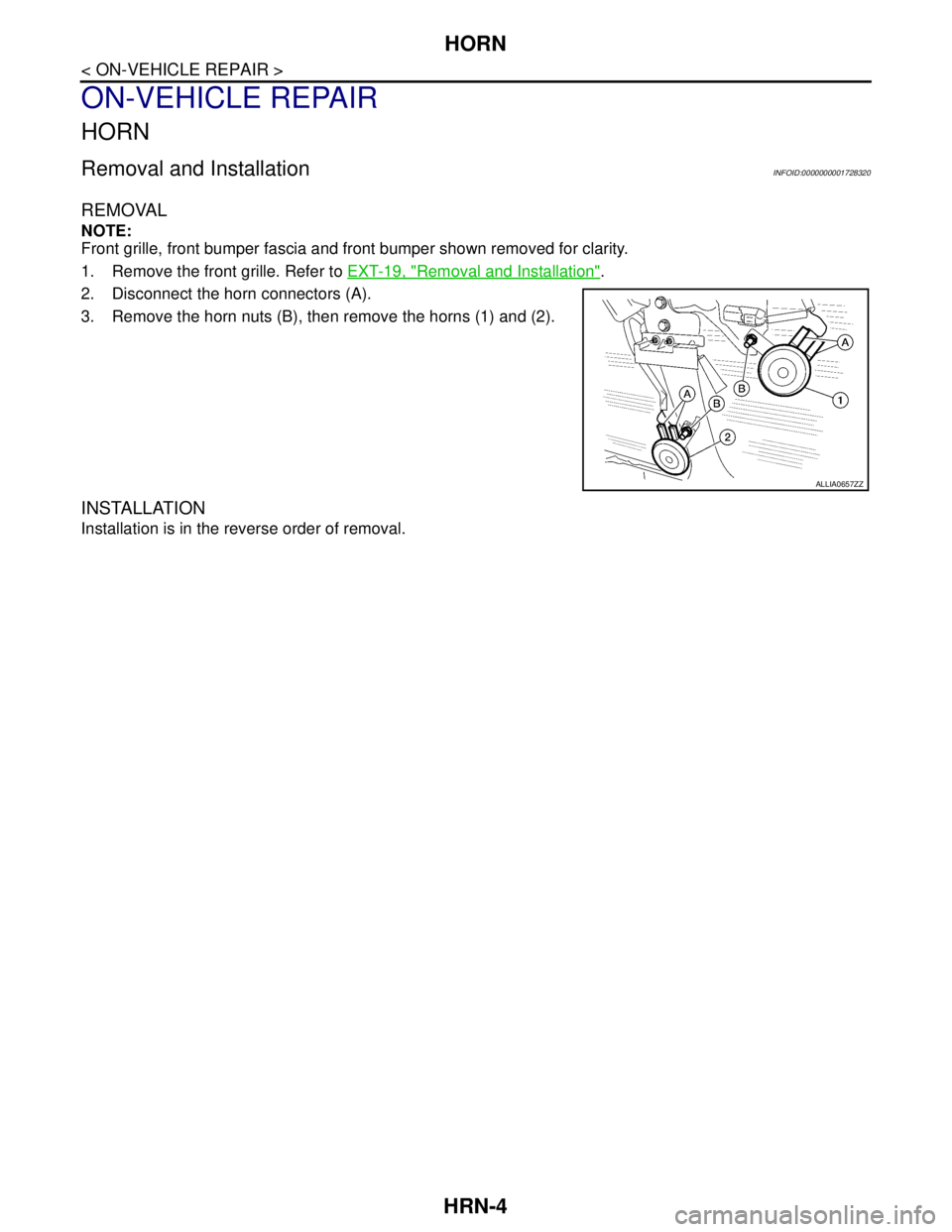
2. Disconnect the horn connectors (A).
3. Remove the horn nuts (B), then remove the horns (1) and (2).
INSTALLATION
Installation is in the reverse order of removal.
ALLIA0657ZZ
Page 3656 of 5883
INTERIOR ROOM LAMP CONTROL SYSTEM
INL-5
< FUNCTION DIAGNOSIS >
C
D
E
F
G
H
I
J
K
MA
B
INL
N
O
P
FUNCTION DIAGNOSIS
INTERIOR ROOM LAMP CONTROL SYSTEM
System DiagramINFOID:0000000001728854
System DescriptionINFOID:0000000001728855
OUTLINE
• Interior room lamps* are controlled by the interior room lamp timer control function of the BCM.
*Map lamp, interior room lamp, vanity lamps and trunk room lamp.
The timer control functions of the BCM activate based on inputs from the remote keyless entry receiver, the
key cylinder lock/unlock switch, the door switches, the key switch and key lock solenoid (without Intelligent
Key) or the key switch and ignition knob switch (with Intelligent Key).
ROOM LAMP TIMER OPERATION
When the interior room lamp switch is in the DOOR position and when all conditions below are met, the BCM
begins timer control (maximum 30 seconds) for interior room lamp ON/OFF.
When the front door LH is unlocked [with Intelligent Key, main power window and door lock/unlock switch, or
front door lock assembly (key cylinder switch)].
When a door opens → closes and the Intelligent Key is not inserted in the key slot.
Timer control is canceled under the following conditions.
When the front door LH is locked [with Intelligent Key, main power window and door lock/unlock switch, or
front door lock assembly (key cylinder switch)].
A door is opened (door switch turns ON).
Intelligent Key is inserted into the key slot.
Interior lamp operational settings can be changed with the function setting of CONSULT-III.
INTERIOR LAMP BATTERY SAVER CONTROL
If an interior lamp is left ON and does not turn OFF even when the doors are closed, the BCM turns off power
to the interior lamps automatically to save the battery 30 minutes after the ignition switch is turned OFF.
The BCM controls power and ground to all interior lamps.
After the battery saver system turns the lamps OFF, the lamps will illuminate again when
ALNIA0892GB
Page 3657 of 5883
INL-6
< FUNCTION DIAGNOSIS >
INTERIOR ROOM LAMP CONTROL SYSTEM
a signal is received from an Intelligent Key or main power window and door lock/unlock switch, or when the
front door LH lock assembly (key cylinder switch) is locked or unlocked
a door is opened or closed
the Intelligent Key is removed from or inserted into the key slot.
The Interior lamp battery saver control time period can be changed with the function setting of CONSULT-III.
Component Parts LocationINFOID:0000000001728856
Component DescriptionINFOID:0000000001728857
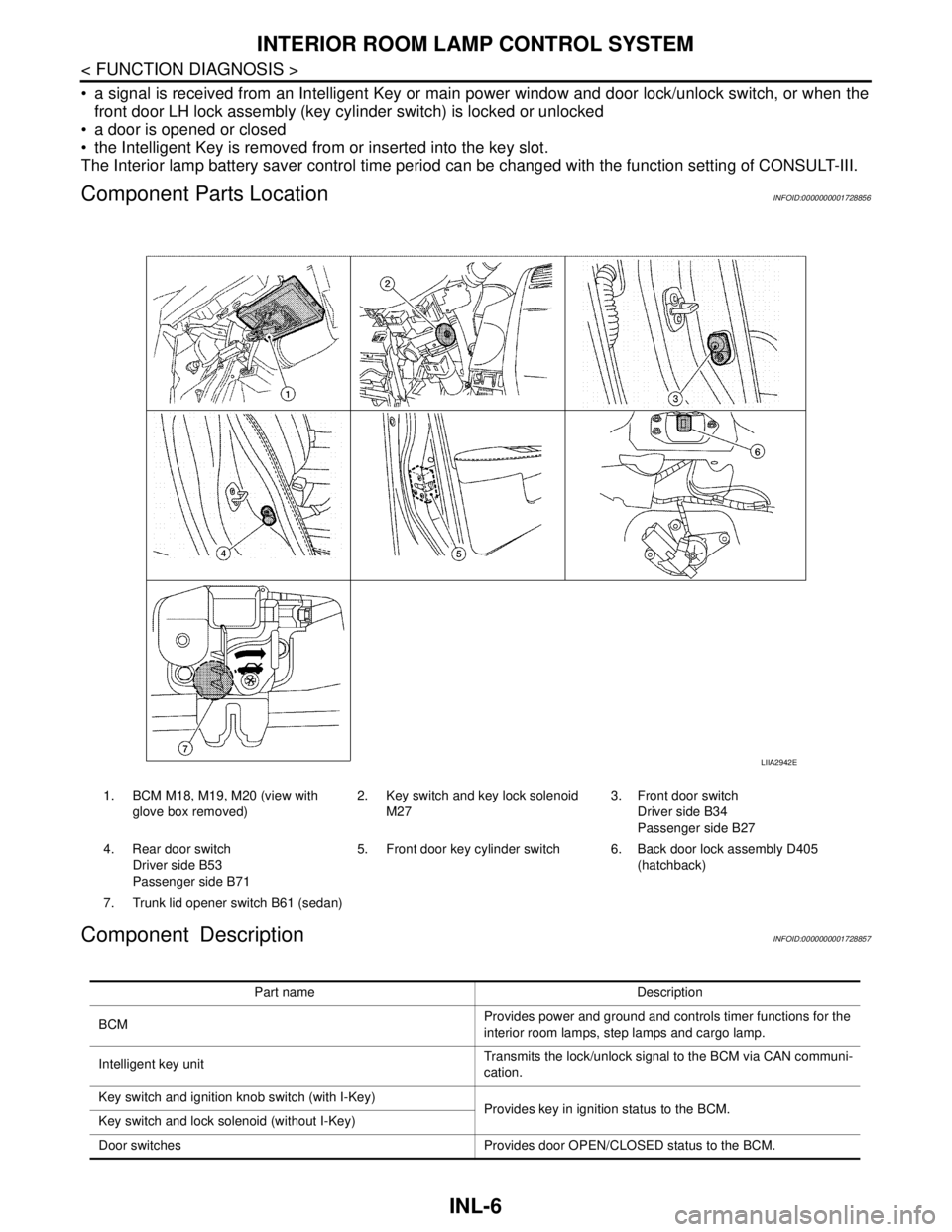
1. BCM M18, M19, M20 (view with
glove box removed)2. Key switch and key lock solenoid
M273. Front door switch
Driver side B34
Passenger side B27
4. Rear door switch
Driver side B53
Passenger side B715. Front door key cylinder switch 6. Back door lock assembly D405
(hatchback)
7. Trunk lid opener switch B61 (sedan)
LIIA2942E
Part name Description
BCMProvides power and ground and controls timer functions for the
interior room lamps, step lamps and cargo lamp.
Intelligent key unitTransmits the lock/unlock signal to the BCM via CAN communi-
cation.
Key switch and ignition knob switch (with I-Key)
Provides key in ignition status to the BCM.
Key switch and lock solenoid (without I-Key)
Door switches Provides door OPEN/CLOSED status to the BCM.
Page 3658 of 5883

INTERIOR ROOM LAMP CONTROL SYSTEM
INL-7
< FUNCTION DIAGNOSIS >
C
D
E
F
G
H
I
J
K
MA
B
INL
N
O
P
Back door lock assembly (hatchback)
Provides back door OPEN/CLOSED status to the BCM.
Back door opener switch (hatchback)
Trunk lid opener switch (sedan) Provides trunk lid OPEN/CLOSED status to the BCM.
Main power window and door lock/unlock switch [front door lock
assembly LH (key cylinder switch)]. Provides door lock/unlock position switch LH status to the BCM.
Page 3662 of 5883

DIAGNOSIS SYSTEM (BCM)
INL-11
< FUNCTION DIAGNOSIS >
C
D
E
F
G
H
I
J
K
MA
B
INL
N
O
P
*: Initial setting
DATA MONITOR
ROOM LAMP ON TIME SETMODE 1 0.5 sec.
Sets the interior room lamp gradual brightening time. MODE 2* 1 sec.
MODE 3 2 sec.
MODE 4 3 sec.
MODE 5 4 sec.
MODE 6 5 sec.
MODE 7 0 sec.
ROOM LAMP OFF TIME SETMODE 1 0.5 sec.
Sets the interior room lamp gradual dimming time. MODE 2* 1 sec.
MODE 3 2 sec.
MODE 4 3 sec.
MODE 5 4 sec.
MODE 6 5 sec.
MODE 7 0 sec.
R LAMP TIMER LOGIC SETMODE 1* Interior room lamp timer activates with synchronizing all doors.
MODE 2Interior room lamp timer activates with synchronizing the driver door
only. Service item Setting item Setting
Monitor item
[Unit]Description
IGN ON SW
[ON/OFF]Ignition switch (ON) status judges from IGN signal (ignition power supply)
ACC SW
[ON/OFF]Ignition switch (ACC) status judges from ACC signal (ACC power supply)
KEY ON SW
[ON/OFF]The switch status input from key switch
PUSH SW
[ON/OFF]Push switch status received from Intelligent Key unit by CAN communication
DOOR SW-DR
[ON/OFF]The switch status input from front door switch (driver side)
DOOR SW-AS
[ON/OFF]The switch status input from front door switch (passenger side)
DOOR SW-RR
[ON/OFF]The switch status input from rear door switch RH
DOOR SW- RL
[ON/OFF]The switch status input from rear door switch LH
BACK DOOR SW
[ON/OFF]The switch status input from back door switch
CDL LOCK SW
[ON/OFF]Lock switch status input from door lock and unlock switch
CDL UNLOCK SW
[ON/OFF]Unlock switch status input from door lock and unlock switch
I-KEY LOCK
[ON/OFF]Lock signal status received from Intelligent Key unit by CAN communication
I-KEY UNLOCK
[ON/OFF]Unlock signal status received from Intelligent Key unit by CAN communication
Page 3663 of 5883

INL-12
< FUNCTION DIAGNOSIS >
DIAGNOSIS SYSTEM (BCM)
ACTIVE TEST
BATTERY SAVER
BATTERY SAVER : CONSULT-III Function (BCM - BATTERY SAVER)INFOID:0000000001728868
WORK SUPPORT
*: Initial setting
DATA MONITOR
KEYLESS LOCK
[ON/OFF]Lock signal status received from remote keyless entry receiver (integrated in the
BCM)
KEYLESS UNLOCK
[ON/OFF]Unlock signal status received from remote keyless entry receiver (integrated in the
BCM) Monitor item
[Unit]Description
Test item Operation Description
INT LAMPONOutputs the interior room lamp control signal to turn the interior room lamps ON.
[Map lamp, personal lamp, room lamp, luggage room lamp (when applicable lamps
switch is in DOOR position.)]
OFF Stops the interior room lamp control signal to turn the interior room lamps.
Service item Setting item Setting
ROOM LAMP TIMER SETMODE 1* 30 min.
Sets the interior room lamp battery saver timer operating
time.
MODE 2 60 min.
Monitor item
[Unit]Description
IGN ON SW
[ON/OFF]Ignition switch (ON) status judges from IGN signal (ignition power supply)
ACC SW
[ON/OFF]Ignition switch (ACC) status judges from ACC signal (ACC power supply)
KEY ON SW
[ON/OFF]The switch status input from key switch
PUSH SW
[ON/OFF]Push switch status received from Intelligent Key unit by CAN communication
DOOR SW-DR
[ON/OFF]The switch status input from front door switch (driver side)
DOOR SW-AS
[ON/OFF]The switch status input from front door switch (passenger side)
DOOR SW-RR
[ON/OFF]The switch status input from rear door switch RH
DOOR SW- RL
[ON/OFF]The switch status input from rear door switch LH
BACK DOOR SW
[ON/OFF]The switch status input from back door switch
CDL LOCK SW
[ON/OFF]Lock switch status input from door lock and unlock switch
CDL UNLOCK SW
[ON/OFF]Unlock switch status input from door lock and unlock switch
I-KEY LOCK
[ON/OFF]Lock signal status received from Intelligent Key unit by CAN communication
Page 3675 of 5883

INL-24
< PRECAUTION >
PRECAUTIONS
PRECAUTION
PRECAUTIONS
Supplemental Restraint System (SRS) "AIR BAG" and "SEAT BELT PRE-TENSION-
ER"
INFOID:0000000001726696
The Supplemental Restraint System such as “AIR BAG” and “SEAT BELT PRE-TENSIONER”, used along
with a front seat belt, helps to reduce the risk or severity of injury to the driver and front passenger for certain
types of collision. Information necessary to service the system safely is included in the SR and SB section of
this Service Manual.
Information necessary to service the system safely is included in the SR and SB section of this Service Man-
ual.
WARNING:
• To avoid rendering the SRS inoperative, which could increase the risk of personal injury or death in
the event of a collision which would result in air bag inflation, all maintenance must be performed by
an authorized NISSAN/INFINITI dealer.
Improper maintenance, including incorrect removal and installation of the SRS, can lead to personal
injury caused by unintentional activation of the system. For removal of Spiral Cable and Air Bag
Module, see the SR section.
Do not use electrical test equipment on any circuit related to the SRS unless instructed to in this
Service Manual. SRS wiring harnesses can be identified by yellow and/or orange harnesses or har-
ness connectors.
General precautions for service operationsINFOID:0000000001726697
When removing or disassembling any part, be careful not to damage or deform it. Protect parts which may
get in the way with cloth.
When removing parts with a screw driver or other tool, protect parts by wrapping them with vinyl or tape.
Keep removed parts protected with cloth.
If an non-reuseable part is removed, replace it with a new one.
After re-assembly has been completed, make sure each part functions correctly.
Never work with wet hands.
Turn the lighting switch OFF before disconnecting and connecting the connector.
Do not use organic solvent (paint thinner or gasoline) to clean lamps or remove sealant residue.