ACC NISSAN TIIDA 2007 Service Repair Manual
[x] Cancel search | Manufacturer: NISSAN, Model Year: 2007, Model line: TIIDA, Model: NISSAN TIIDA 2007Pages: 5883, PDF Size: 78.95 MB
Page 1 of 5883

MODEL C11 SERIES
2007 NISSAN EUROPE S.A.S.
All rights reserved. No part of this Electronic Service Manual may be reproduced or stored in a retrieval system, or transmitted in any form,
or by any means, electronic, mechanical, photocopying, recording or otherwise, without the prior written permission of Nissan Europe
S.A.S., Paris, France.
A GENERAL INFORMATION
B ENGINE
D TRANSMISSION& DRIVELINE
E SUSPENSION F BRAKES
G STEERING H RESTRAINTS
I VENTILATION, HEATER & AIR CONDITIONER
J BODY INTERIOR
K BODY EXTERIOR, DOOR, ROOF & VEHICLE SECURITY
L DRIVER CONTROLS
M ELECTRICAL & POWER CONTROL
N DRIVER INFORMATION & MULTIMEDIA
O CRUISE CONTROL P MAINTENANCEGI General Information
EM Engine Mechanical
LU Engine Lubrication System
CO Engine Cooling System
EC Engine Control System
FL Fuel System
EX Exhaust System
STR Starting System
ACC Accelerator Control System
CL Clutch
TM Transaxle & Transmission
FAX Front Axle
RAX Rear Axle
FSU Front Suspension
RSU Rear Suspension
WT Road Wheels & Tires
BR Brake System
PB Parking Brake System
BRC Brake Control System
ST Steering System
STC Steering Control System
SB Seat Belt
SR SRS Airbag
SRC SRS Airbag Control System
VTL Ventilation System
HA Heater & Air Conditioning System
HAC Heater & Air Conditioning Control System
INT Interior
IP Instrument Panel
SE Seat
DLK Door & Lock
SEC Security Control System
GW Glass & Window System
PWC Power Window Control System
RF Roof
EXT Exterior
MIR Mirrors
EXL Exterior Lighting System
INL Interior Lighting System
WW Wiper & Washer
DEF Defogger
HRN Horn
PWO Power Outlet
BCS Body Control System
LAN LAN System
PCS Power Control System
CHG Charging System
PG Power Supply, Ground & Circuit Elements
MWI Meter, Warning Lanp & Indicator
WCS Warning Chime System
AV Audio, Visual & Navigation System
CCS Cruise Control System Maintenance
MA Maintenance
QUICK REFERENCE INDEX
A
B
C
D
E
F
G
H
I
J
K
L
M
N
O
P
M
Publication Number:
SM7E00-1C11E0E
Page 2 of 5883

FOREWORD
This manual contains maintenance and repair procedures for the NISSAN
TIIDA, model C11 series.
In order to assure your safety and the efficient functioning of the vehicle,
this manual should be read thoroughly. It is especially important that the
PRECAUTIONS in the GI section be completely understood before starting
any repair task.
All information in this manual is based on the latest product information
at the time of publication. The right is reserved to make changes in speci-
fications and methods at any time without notice.
IMPORTANT SAFETY NOTICE
The proper performance of service is essential for both the safety of the
technician and the efficient functioning of the vehicle.
The service methods in this Service Manual are described in such a man-
ner that the service may be performed safely and accurately.
Service varies with the procedures used, the skills of the technician and the
tools and parts available. Accordingly, anyone using service procedures,
tools or parts which are not specifically recommended by NISSAN must
first be completely satisfied that neither personal safety nor the vehicle's
safety will be jeopardized by the service method selected.
NISSAN EUROPE S.A.S.
Service Engineering SectionParis, France
Page 3 of 5883

ACC-1
ENGINE
C
D
E
F
G
H
I
J
K
L
M
SECTION ACC
A
ACC
N
O
P
CONTENTS
ACCELERATOR CONTROL SYSTEM
PRECAUTION ...............................................2
PRECAUTIONS ...................................................2
Precaution for Supplemental Restraint System
(SRS) "AIR BAG" and "SEAT BELT PRE-TEN-
SIONER" ...................................................................
2
ON-VEHICLE REPAIR ..................................3
ACCELERATOR CONTROL SYSTEM ..............3
Component ...............................................................3
Removal and Installation ..........................................3
Page 4 of 5883

ACC-2
< PRECAUTION >
PRECAUTIONS
PRECAUTION
PRECAUTIONS
Precaution for Supplemental Restraint System (SRS) "AIR BAG" and "SEAT BELT
PRE-TENSIONER"
INFOID:0000000001724596
The Supplemental Restraint System such as “AIR BAG” and “SEAT BELT PRE-TENSIONER”, used along
with a front seat belt, helps to reduce the risk or severity of injury to the driver and front passenger for certain
types of collision. Information necessary to service the system safely is included in the SR and SB section of
this Service Manual.
WARNING:
• To avoid rendering the SRS inoperative, which could increase the risk of personal injury or death in
the event of a collision which would result in air bag inflation, all maintenance must be performed by
an authorized NISSAN/INFINITI dealer.
Improper maintenance, including incorrect removal and installation of the SRS, can lead to personal
injury caused by unintentional activation of the system. For removal of Spiral Cable and Air Bag
Module, see the SR section.
Do not use electrical test equipment on any circuit related to the SRS unless instructed to in this
Service Manual. SRS wiring harnesses can be identified by yellow and/or orange harnesses or har-
ness connectors.
Page 5 of 5883
ACCELERATOR CONTROL SYSTEM
ACC-3
< ON-VEHICLE REPAIR >
C
D
E
F
G
H
I
J
K
L
MA
ACC
N
P O
ON-VEHICLE REPAIR
ACCELERATOR CONTROL SYSTEM
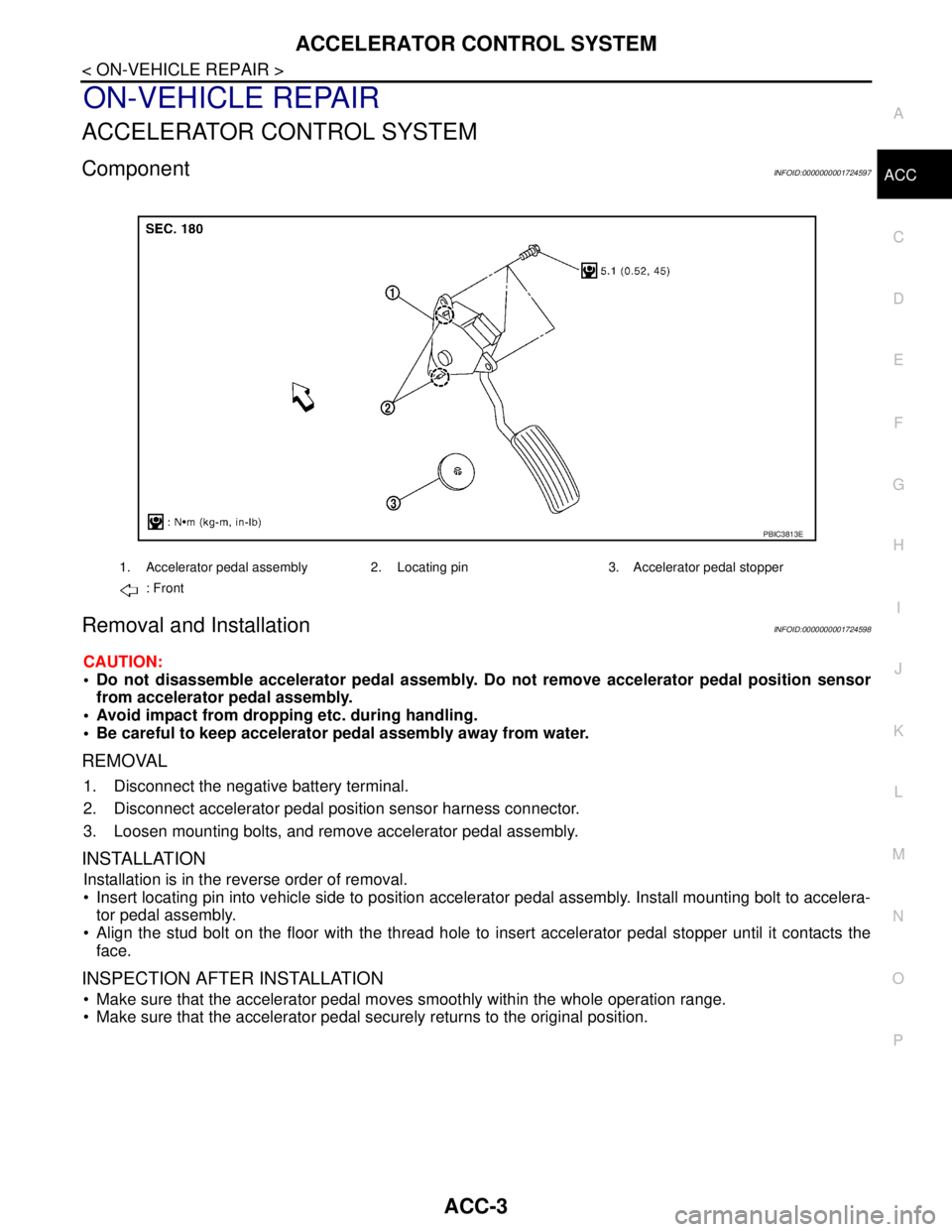
ComponentINFOID:0000000001724597
Removal and InstallationINFOID:0000000001724598
CAUTION:
Do not disassemble accelerator pedal assembly. Do not remove accelerator pedal position sensor
from accelerator pedal assembly.
Avoid impact from dropping etc. during handling.
Be careful to keep accelerator pedal assembly away from water.
REMOVAL
1. Disconnect the negative battery terminal.
2. Disconnect accelerator pedal position sensor harness connector.
3. Loosen mounting bolts, and remove accelerator pedal assembly.
INSTALLATION
Installation is in the reverse order of removal.
Insert locating pin into vehicle side to position accelerator pedal assembly. Install mounting bolt to accelera-
tor pedal assembly.
Align the stud bolt on the floor with the thread hole to insert accelerator pedal stopper until it contacts the
face.
INSPECTION AFTER INSTALLATION
Make sure that the accelerator pedal moves smoothly within the whole operation range.
Make sure that the accelerator pedal securely returns to the original position.
1. Accelerator pedal assembly 2. Locating pin 3. Accelerator pedal stopper
: Front
PBIC3813E
Page 14 of 5883
![NISSAN TIIDA 2007 Service Repair Manual AV
POWER SUPPLY AND GROUND CIRCUIT
AV-9
< COMPONENT DIAGNOSIS >[AUDIO WITHOUT NAVIGATION]
C
D
E
F
G
H
I
J
K
L
MB A
O
P
COMPONENT DIAGNOSIS
POWER SUPPLY AND GROUND CIRCUIT
AV CONTROL UNIT
AV CONTROL UN](/img/5/57395/w960_57395-13.png "NISSAN TIIDA 2007 Service Repair Manual AV
POWER SUPPLY AND GROUND CIRCUIT
AV-9
< COMPONENT DIAGNOSIS >[AUDIO WITHOUT NAVIGATION]
C
D
E
F
G
H
I
J
K
L
MB A
O
P
COMPONENT DIAGNOSIS
POWER SUPPLY AND GROUND CIRCUIT
AV CONTROL UNIT
AV CONTROL UN")
AV
POWER SUPPLY AND GROUND CIRCUIT
AV-9
< COMPONENT DIAGNOSIS >[AUDIO WITHOUT NAVIGATION]
C
D
E
F
G
H
I
J
K
L
MB A
O
P
COMPONENT DIAGNOSIS
POWER SUPPLY AND GROUND CIRCUIT
AV CONTROL UNIT
AV CONTROL UNIT : Diagnosis ProcedureINFOID:0000000001728609
1.CHECK FUSE
Check for blown fuses.
Is inspection result OK?
YES >> GO TO 2
NO >> Be sure to eliminate cause of malfunction before installing new fuse.
2.CHECK POWER SUPPLY CIRCUIT
Check voltage between AV control unit harness connector and ground.
Is inspection result OK?
YES >> GO TO 3
NO >> Check harness between AV control unit and fuse.
3.CHECK GROUND CIRCUIT
1. Turn ignition switch OFF.
2. Disconnect AV control unit connector.
3. Check continuity between AV control unit harness connector and ground.
Is inspection result OK?
YES >> INSPECTION END.
NO >> Repair harness or connector.
MICROPHONE
MICROPHONE : Diagnosis ProcedureINFOID:0000000001728770
1.CHECK POWER SUPPLY CIRCUIT (MICROPHONE SIDE)
1. Turn ignition switch ON.
Check voltage between microphone harness connector R15 terminal
4 and ground.
Is approximately 5V present?
YES >> GO TO 4
NO >> GO TO 2
Power source Fuse No.
Battery 27
Ignition switch ACC or ON 6
Signal name Connector No. Terminal No. Ignition switch position Value (Approx.)
Battery power supply M43 19 OFF 12V
ACC power supply M43 7 ACC 12V
Signal name Connector No. Terminal No. Ignition switch position Continuity
Ground M44 21 OFF Continuity should exist.
Signal nameConnector
No.Te r m i n a l N o .Ignition
switch posi-
tionValue (Ap-
prox.)
MIC power R15 4 ON 5V
WKIA5796E
Page 15 of 5883
![NISSAN TIIDA 2007 Service Repair Manual AV-10
< COMPONENT DIAGNOSIS >[AUDIO WITHOUT NAVIGATION]
POWER SUPPLY AND GROUND CIRCUIT
2.CHECK POWER SUPPLY CIRCUIT (CONTINUITY)
1. Turn ignition switch OFF.
2. Disconnect microphone and AV control u](/img/5/57395/w960_57395-14.png "NISSAN TIIDA 2007 Service Repair Manual AV-10
< COMPONENT DIAGNOSIS >[AUDIO WITHOUT NAVIGATION]
POWER SUPPLY AND GROUND CIRCUIT
2.CHECK POWER SUPPLY CIRCUIT (CONTINUITY)
1. Turn ignition switch OFF.
2. Disconnect microphone and AV control u")
AV-10
< COMPONENT DIAGNOSIS >[AUDIO WITHOUT NAVIGATION]
POWER SUPPLY AND GROUND CIRCUIT
2.CHECK POWER SUPPLY CIRCUIT (CONTINUITY)
1. Turn ignition switch OFF.
2. Disconnect microphone and AV control unit harness connectors.
3. Check continuity between microphone harness connector R15
(A) terminal 4 and AV control unit harness connector M44 (B)
terminal 29.
4. Check continuity between microphone harness connector R15
(A) terminal 4 and ground.
Are the continuity test results as specified?
YES >> GO TO 3
NO >> Repair harness or connector.
3.CHECK POWER SUPPLY CIRCUIT (AV CONTROL UNIT SIDE)
1. Connect AV control unit harness connector.
2. Turn ignition switch to ACC.
3. Check voltage between AV control unit harness connector M44
terminal 29 and ground.
Is approximately 5V present?
YES >> Inspection End.
NO >> Replace AV control unit. Refer to XX-XX, "*****"
4.CHECK GROUND CIRCUIT
1. Turn ignition switch OFF.
2. Disconnect microphone harness connector R15 and AV control unit harness connector M44.
3. Check continuity between microphone harness connector R15 (A) terminal 2 and AV control unit harness
connector M44 (B) terminal 28.
Does continuity exist?
YES >> Inspection End.
NO >> Repair harness or connector.
AB
Continuity
Connector Terminal Connector Terminal
R15 4 M44 29 Yes
A
—Continuity
Connector Terminal
R15 4 Ground No
ALNIA0320GB
Signal nameConnector
No.Te r m i n a l
No.Ignition switch
positionValue (Approx.)
MIC power M44 29 ACC 5V
ALNIA0321GB
AB
Continuity
Connector Terminal Connector Terminal
R15 2 M44 28 Yes
Page 20 of 5883
![NISSAN TIIDA 2007 Service Repair Manual AV
AV CONTROL UNIT
AV-15
< ECU DIAGNOSIS >[AUDIO WITHOUT NAVIGATION]
C
D
E
F
G
H
I
J
K
L
MB A
O
P
ECU DIAGNOSIS
AV CONTROL UNIT
Reference ValueINFOID:0000000001728621
TERMINAL LAYOUT
PHYSICAL VALUES
J](/img/5/57395/w960_57395-19.png "NISSAN TIIDA 2007 Service Repair Manual AV
AV CONTROL UNIT
AV-15
< ECU DIAGNOSIS >[AUDIO WITHOUT NAVIGATION]
C
D
E
F
G
H
I
J
K
L
MB A
O
P
ECU DIAGNOSIS
AV CONTROL UNIT
Reference ValueINFOID:0000000001728621
TERMINAL LAYOUT
PHYSICAL VALUES
J")
AV
AV CONTROL UNIT
AV-15
< ECU DIAGNOSIS >[AUDIO WITHOUT NAVIGATION]
C
D
E
F
G
H
I
J
K
L
MB A
O
P
ECU DIAGNOSIS
AV CONTROL UNIT
Reference ValueINFOID:0000000001728621
TERMINAL LAYOUT
PHYSICAL VALUES
JPNIA0230ZZ
Te r m i n a l
(Wire color)Description
ConditionReference value
(Approx.)
+ – Signal nameInput/
Output
2
(L)3
(G)Sound signal front LH OutputIgnition
switch
ONVoice output
4
(LG)5
(Y)Sound signal rear LH OutputIgnition
switch
ONVoice output
6
(R)15
(B)Steering switch signal A InputIgnition
switch
ONKeep pressing SOURCE
switch. 0 V
Keep pressing SEEK UP
switch.1.7 V
Keep pressing VOL UP
switch.3.3 V
Except for above. 5 V
7
(R)Ground ACC power supply InputIgnition
switch
ACC−Battery voltage
11
(BR)12
(P)Sound signal front RH OutputIgnition
switch
ONVoice output
SKIB3609E
SKIB3609E
SKIB3609E
Page 39 of 5883
![NISSAN TIIDA 2007 Service Repair Manual AV-34
< FUNCTION DIAGNOSIS >[AUDIO WITH NAVIGATION]
MULTI AV SYSTEM
Component Description
INFOID:0000000001728630
4. Front door speaker
Driver side D12
Passenger side D1125. Rear door speaker
LH D207](/img/5/57395/w960_57395-38.png "NISSAN TIIDA 2007 Service Repair Manual AV-34
< FUNCTION DIAGNOSIS >[AUDIO WITH NAVIGATION]
MULTI AV SYSTEM
Component Description
INFOID:0000000001728630
4. Front door speaker
Driver side D12
Passenger side D1125. Rear door speaker
LH D207")
AV-34
< FUNCTION DIAGNOSIS >[AUDIO WITH NAVIGATION]
MULTI AV SYSTEM
Component Description
INFOID:0000000001728630
4. Front door speaker
Driver side D12
Passenger side D1125. Rear door speaker
LH D207
RH D3076. Front tweeter
LH M109
RH M47
7. Steering wheel audio control switch-
es M1028. Microphone R15
Part name Description
NAVI CONTROL UNIT Map data can be read from the Map DVD-ROM by installing Map DVD-ROM.
It is the master unit of the MULTI AV system, and it is connected to each con-
trol unit by means of communication. It operates each system according to
communication signals from the NAVI control unit.
The NAVI control unit includes the audio, hands-free phone, navigation, and
vehicle information functions.
It is connected to ECM and combination meter via CAN communication to ob-
tain necessary information for the vehicle information function.
It inputs the illumination signals that are required for the display dimming con-
trol.
It inputs the signals for driving status recognition (vehicle speed, reverse and
parking brake).
MAP DVD-ROM A collection of Map data.
DISPLAY UNIT Display image is controlled by the serial communication from NAVI control
unit.
RGB image signal is input from NAVI control unit (RGB, RGB area and RGB
synchronizing). Camera image signal is input from camera control unit.
Synchronize signal (HP, VP) is output to NAVI control unit.
AV CONTROL UNIT Operational switch of MULTI AV system is integrated.
NAVI control unit and AV communication are connected with AV control unit.
Operating signals of the switch are sent to the NAVI control unit.
FRONT DOOR SPEAKER Outputs sound signal from AV control unit.
Outputs high, mid and low range sounds.
REAR DOOR SPEAKER Outputs sound signal from AV control unit.
Outputs high, mid and low range sounds.
FRONT TWEETER Outputs sound signal from AV control unit.
Outputs high range sound.
STEERING WHEEL AUDIO CONTROL SWITCH Operations for audio, hands-free phone, voice recognition and navigation,
etc. are possible.
Steering switch signal (operation signal) is output to AV control unit.
MICROPHONE Used for hands-free phone operation and voice recognition.
Mic. signal is sent to NAVI control unit.
Power (Mic. VCC) is supplied from NAVI control unit.
GPS ANTENNA GPS signal is received and sent to NAVI control unit.
RADIO ANTENNA Radio signal received by antenna is sent to AV control unit.
Page 40 of 5883
![NISSAN TIIDA 2007 Service Repair Manual AV
NAVIGATION SYSTEM
AV-35
< FUNCTION DIAGNOSIS >[AUDIO WITH NAVIGATION]
C
D
E
F
G
H
I
J
K
L
MB A
O
P
NAVIGATION SYSTEM
System DiagramINFOID:0000000001728631
System DescriptionINFOID:0000000001728632](/img/5/57395/w960_57395-39.png "NISSAN TIIDA 2007 Service Repair Manual AV
NAVIGATION SYSTEM
AV-35
< FUNCTION DIAGNOSIS >[AUDIO WITH NAVIGATION]
C
D
E
F
G
H
I
J
K
L
MB A
O
P
NAVIGATION SYSTEM
System DiagramINFOID:0000000001728631
System DescriptionINFOID:0000000001728632")
AV
NAVIGATION SYSTEM
AV-35
< FUNCTION DIAGNOSIS >[AUDIO WITH NAVIGATION]
C
D
E
F
G
H
I
J
K
L
MB A
O
P
NAVIGATION SYSTEM
System DiagramINFOID:0000000001728631
System DescriptionINFOID:0000000001728632
NAVIGATION SYSTEM
Location Detection Principle
The navigation system periodically calculates the vehicle's current
position according to the following three signals:
Travel distance of the vehicle as determined by the vehicle speed
sensor
Turning angle of the vehicle as determined by the gyroscope
(angular velocity sensor)
Direction of vehicle travel as determined by the GPS antenna
(GPS information)
The current position of the vehicle is then identified by comparing the
calculated vehicle position with map data read from the map DVD-
ROM, which is stored in the DVD-ROM drive (map-matching), and
indicated on the screen as a vehicle mark. More accurate data is
judged and used by comparing vehicle position detection results found by the GPS with the result by map-
matching.
The current vehicle position will be calculated by detecting the dis-
tance the vehicle moved from the previous calculation point and its
direction.
Travel distance
Travel distance calculations are based on the vehicle speed sen-
sor input signal. Therefore, the calculation may become incorrect
as the tires wear down. To prevent this, an automatic distance cor-
rection function has been adopted.
Travel direction
Change in the travel direction of the vehicle is calculated by a gyro-
scope (angular velocity sensor) and a GPS antenna (GPS informa-
tion). They have both advantages and disadvantages.
JPNIA0157GB
SKIB1058E
SEL684V