Bcm NISSAN TIIDA 2007 Service Repair Manual
[x] Cancel search | Manufacturer: NISSAN, Model Year: 2007, Model line: TIIDA, Model: NISSAN TIIDA 2007Pages: 5883, PDF Size: 78.95 MB
Page 37 of 5883
![NISSAN TIIDA 2007 Service Repair Manual AV-32
< FUNCTION DIAGNOSIS >[AUDIO WITH NAVIGATION]
MULTI AV SYSTEM
FUNCTION DIAGNOSIS
MULTI AV SYSTEM
System DiagramINFOID:0000000001728627
System DescriptionINFOID:0000000001728628
Multi AV system m](/img/5/57395/w960_57395-36.png "NISSAN TIIDA 2007 Service Repair Manual AV-32
< FUNCTION DIAGNOSIS >[AUDIO WITH NAVIGATION]
MULTI AV SYSTEM
FUNCTION DIAGNOSIS
MULTI AV SYSTEM
System DiagramINFOID:0000000001728627
System DescriptionINFOID:0000000001728628
Multi AV system m")
AV-32
< FUNCTION DIAGNOSIS >[AUDIO WITH NAVIGATION]
MULTI AV SYSTEM
FUNCTION DIAGNOSIS
MULTI AV SYSTEM
System DiagramINFOID:0000000001728627
System DescriptionINFOID:0000000001728628
Multi AV system means that the following systems are integrated.
Two AV communication lines (H, L) connect between units that configure MULTI AV system. NAVI control
unit controls by sending/receiving data one by one with each unit (slave unit) that configures them com-
pletely as a master unit.
Two AV communication lines (H, L) adopt a twisted pair line that is resistant to noise.
NAVI control unit is connected by CAN communication, and it receives data signal from ECM, combination
meter. It computes and displays fuel economy information value with the obtained information. Sending/
receiving of data signal is performed by BCM. Also, it sends the required signal of vehicle setting and
receives the response signal.
ALNIA0882GB
System name System explanation
NAVIGATION SYSTEMAV- 3 5 , "
System Description"
AUDIO SYSTEMXX-XX, "*****"
VEHICLE INFORMATION SYSTEM Status of audio, fuel economy, maintenance and navigation is
displayed.
NAVI control unit displays the fuel consumption status and trip
computer status while receiving data signal through CAN com-
munication from ECM, combination meter and BCM.
HANDS-FREE PHONE SYSTEM Refer to the following “HANDS-FREE PHONE SYSTEM”.
Page 136 of 5883

BCS
BCS-1
ELECTRICAL & POWER CONTROL
C
D
E
F
G
H
I
J
K
L B
SECTION BCS
A
O
P N
CONTENTS
BODY CONTROL SYSTEM
BASIC INSPECTION ....................................3
INSPECTION AND ADJUSTMENT .....................3
ADDITIONAL SERVICE WHEN REPLACING
CONTROL UNIT ..........................................................
3
ADDITIONAL SERVICE WHEN REPLACING
CONTROL UNIT : Description ..................................
3
ADDITIONAL SERVICE WHEN REPLACING
CONTROL UNIT : Special Repair Requirement .......
3
CONFIGURATION .......................................................3
CONFIGURATION : Description ...............................3
CONFIGURATION : Special Repair Requirement ......4
FUNCTION DIAGNOSIS ...............................7
BODY CONTROL SYSTEM ................................7
System Description ...................................................7
Component Parts Location ........................................8
COMBINATION SWITCH READING SYSTEM
.....
9
System Diagram ........................................................9
System Description ...................................................9
Component Parts Location ......................................12
SIGNAL BUFFER SYSTEM ...............................13
System Diagram ......................................................13
System Description .................................................13
POWER CONSUMPTION CONTROL SYS-
TEM ....................................................................
14
System Diagram ......................................................14
System Description .................................................14
Component Parts Location ......................................15
DIAGNOSIS SYSTEM (BCM) ............................16
COMMON ITEM .........................................................16
COMMON ITEM : CONSULT-III Function (BCM -
COMMON ITEM) .....................................................
16
BCM ...........................................................................16
BCM : CONSULT-III Function (BCM - BCM) ...........17
DOOR LOCK ..............................................................17
DOOR LOCK : CONSULT-III Function (BCM -
DOOR LOCK) ..........................................................
17
REAR WINDOW DEFOGGER ...................................18
REAR WINDOW DEFOGGER : CONSULT-III
Function (BCM - REAR DEFOGGER) .....................
18
BUZZER .....................................................................18
BUZZER : CONSULT-III Function (BCM - BUZZ-
ER) ..........................................................................
18
INT LAMP ...................................................................19
INT LAMP : CONSULT-III Function (BCM - INT
LAMP) ......................................................................
19
MULTIREMOTE ENT .................................................19
MULTIREMOTE ENT : CONSULT-III Function
(BCM - MULTIREMOTE ENT) .................................
19
HEADLAMP ...............................................................20
HEADLAMP : CONSULT-III Function (BCM -
HEAD LAMP) ...........................................................
20
WIPER ........................................................................21
WIPER : CONSULT-III Function (BCM - WIPER) ....21
FLASHER ...................................................................22
FLASHER : CONSULT-III Function (BCM -
FLASHER) ...............................................................
22
AIR CONDITIONER ...................................................23
AIR CONDITIONER : CONSULT-III Function
(BCM - AUTO AIR CONDITIONER) ........................
23
INTELLIGENT KEY ....................................................23
INTELLIGENT KEY : CONSULT-III Function
(BCM - INTELLIGENT KEY) ....................................
23
COMB SW ..................................................................24
Page 137 of 5883

BCS-2
COMB SW : CONSULT-III Function (BCM -
COMB SW) .............................................................
24
IMMU .........................................................................24
IMMU : CONSULT-III Function (BCM - IMMU) .......24
BATTERY SAVER ....................................................25
BATTERY SAVER : CONSULT-III Function (BCM
- BATTERY SAVER) ..............................................
25
THEFT ALM ..............................................................26
THEFT ALM : CONSULT-III Function (BCM -
THEFT ALM) ..........................................................
26
SIGNAL BUFFER ......................................................26
SIGNAL BUFFER : CONSULT-III Function (BCM
- SIGNAL BUFFER) ................................................
26
PTC HEATER ............................................................26
PTC HEATER : CONSULT-III Function (BCM -
PTC HEATER) ........................................................
26
COMPONENT DIAGNOSIS ........................28
U1000 CAN COMM CIRCUIT ............................28
Description ..............................................................28
DTC Logic ...............................................................28
Diagnosis Procedure ..............................................28
U1010 CONTROL UNIT (CAN) .........................29
DTC Logic ...............................................................29
Diagnosis Procedure ..............................................29
Special Repair Requirement ...................................29
POWER SUPPLY AND GROUND CIRCUIT .....30
Diagnosis Procedure ..............................................30
COMBINATION SWITCH INPUT CIRCUIT .......31
Diagnosis Procedure ..............................................31
Special Repair Requirement ...................................32
COMBINATION SWITCH OUTPUT CIRCUIT ...33
Diagnosis Procedure ...............................................33
Special Repair Requirement ...................................33
COMBINATION SWITCH ..................................34
Description ..............................................................34
Diagnosis Procedure ...............................................34
ECU DIAGNOSIS .......................................35
BCM (BODY CONTROL MODULE) ..................35
Reference Value .....................................................35
Terminal Layout ......................................................38
Physical Values .......................................................39
Wiring Diagram .......................................................50
DTC Inspection Priority Chart ...............................53
DTC Index ..............................................................54
SYMPTOM DIAGNOSIS ............................55
COMBINATION SWITCH SYSTEM SYMP-
TOMS .................................................................
55
Symptom Table .......................................................55
PRECAUTION ............................................56
PRECAUTIONS .................................................56
Precaution for Supplemental Restraint System
(SRS) "AIR BAG" and "SEAT BELT PRE-TEN-
SIONER" .................................................................
56
ON-VEHICLE REPAIR ...............................57
BCM (BODY CONTROL MODULE) ..................57
Removal and Installation of BCM ............................57
Page 138 of 5883
BCS
INSPECTION AND ADJUSTMENT
BCS-3
< BASIC INSPECTION >
C
D
E
F
G
H
I
J
K
L B A
O
P N
BASIC INSPECTION
INSPECTION AND ADJUSTMENT
ADDITIONAL SERVICE WHEN REPLACING CONTROL UNIT
ADDITIONAL SERVICE WHEN REPLACING CONTROL UNIT : Description
INFOID:0000000001451449
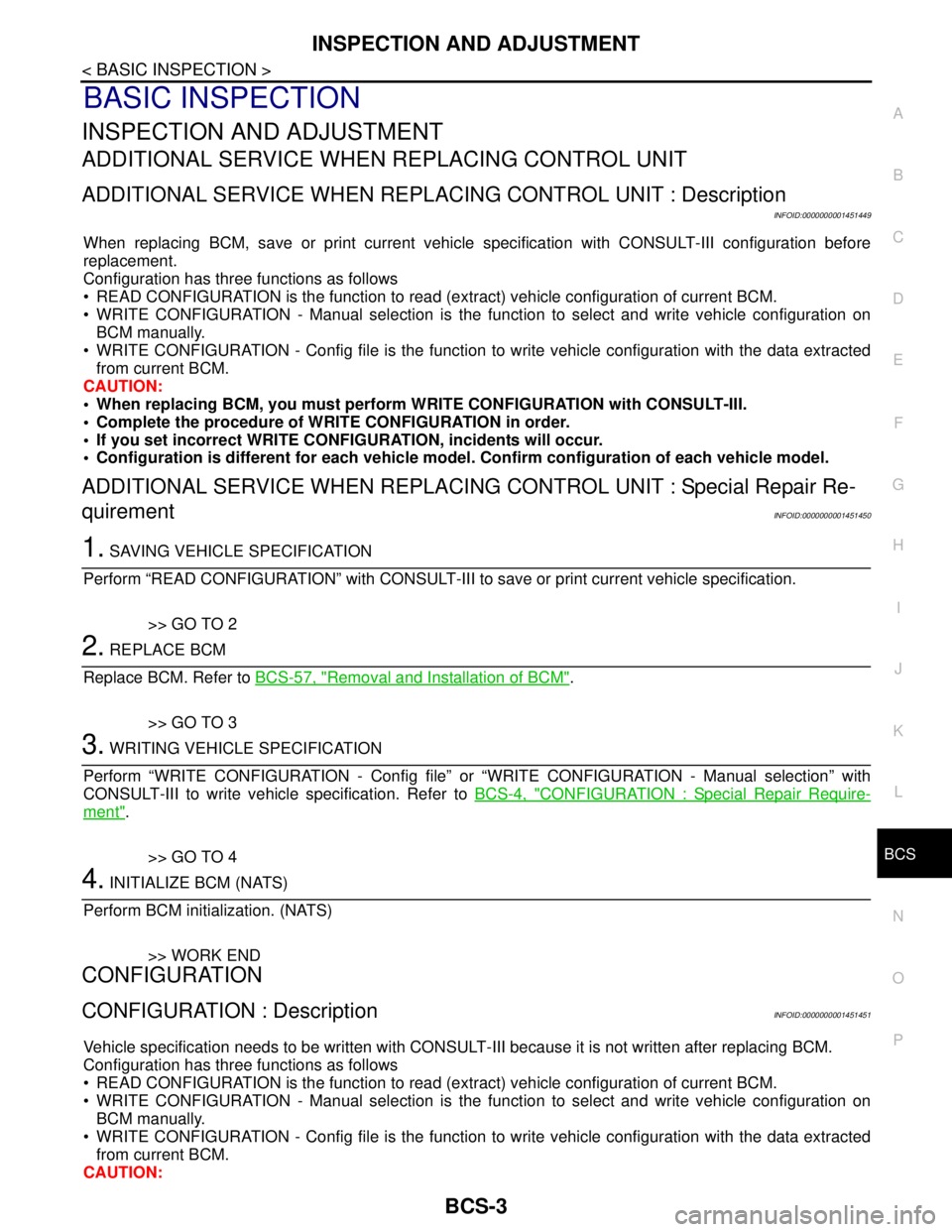
When replacing BCM, save or print current vehicle specification with CONSULT-III configuration before
replacement.
Configuration has three functions as follows
• READ CONFIGURATION is the function to read (extract) vehicle configuration of current BCM.
WRITE CONFIGURATION - Manual selection is the function to select and write vehicle configuration on
BCM manually.
WRITE CONFIGURATION - Config file is the function to write vehicle configuration with the data extracted
from current BCM.
CAUTION:
• When replacing BCM, you must perform WRITE CONFIGURATION with CONSULT-III.
Complete the procedure of WRITE CONFIGURATION in order.
If you set incorrect WRITE CONFIGURATION, incidents will occur.
Configuration is different for each vehicle model. Confirm configuration of each vehicle model.
ADDITIONAL SERVICE WHEN REPLACING CONTROL UNIT : Special Repair Re-
quirement
INFOID:0000000001451450
1. SAVING VEHICLE SPECIFICATION
Perform “READ CONFIGURATION” with CONSULT-III to save or print current vehicle specification.
>> GO TO 2
2. REPLACE BCM
Replace BCM. Refer to BCS-57, "
Removal and Installation of BCM".
>> GO TO 3
3. WRITING VEHICLE SPECIFICATION
Perform “WRITE CONFIGURATION - Config file” or “WRITE CONFIGURATION - Manual selection” with
CONSULT-III to write vehicle specification. Refer to BCS-4, "
CONFIGURATION : Special Repair Require-
ment".
>> GO TO 4
4. INITIALIZE BCM (NATS)
Perform BCM initialization. (NATS)
>> WORK END
CONFIGURATION
CONFIGURATION : DescriptionINFOID:0000000001451451
Vehicle specification needs to be written with CONSULT-III because it is not written after replacing BCM.
Configuration has three functions as follows
READ CONFIGURATION is the function to read (extract) vehicle configuration of current BCM.
WRITE CONFIGURATION - Manual selection is the function to select and write vehicle configuration on
BCM manually.
WRITE CONFIGURATION - Config file is the function to write vehicle configuration with the data extracted
from current BCM.
CAUTION:
Page 139 of 5883

BCS-4
< BASIC INSPECTION >
INSPECTION AND ADJUSTMENT
When replacing BCM, you must perform WRITE CONFIGURATION with CONSULT-III.
Complete the procedure of WRITE CONFIGURATION in order.
If you set incorrect WRITE CONFIGURATION, incidents will occur.
Configuration is different for each vehicle model. Confirm configuration of each vehicle model.
CONFIGURATION : Special Repair RequirementINFOID:0000000001451452
1. WRITING VEHICLE SPECIFICATION
Perform “WRITE CONFIGURATION” with CONSULT-III.
When writing saved data>>GO TO 2
When writing manually>>GO TO 3
2. PERFORM “WRITE CONFIGURATION - CONFIG FILE”
Perform “WRITE CONFIGURATION - Config file” with CONSULT-III.
>> WORK END
3. PERFORM “WRITE CONFIGURATION - MANUAL SELECTION”
For “WRITE CONFIGURATION - Manual selection”, using the following flow chart, identify the correct model
and configuration list.
Confirm and/or change setting value for each item according to the configuration list.
Depending on CONSULT-III software version being used, some or all of the write configuration items shown in
the following configuration lists may be displayed. If an item does not display on the CONSULT-III “WRITE
CONFIGURATION - Manual selection” screen, then it is an auto setting item and it cannot be manually set or
changed.
Gasoline engine models (RHD)
Gasoline engine models (LHD)
MANUAL SETTING ITEM
Items Setting value
HANDLE RHD
PTC HEATER WITHOUT
AUTO LIGHT WITH⇔WITHOUT
KEYLESS ENTRY WITH⇔WITHOUT
DTRL WITHOUT
THEFT ALARM WITH⇔WITHOUT
AUTO SETTING ITEM
RAIN SENSOR WITH or WITHOUT
H/L WSR SWTRG FR WSR SW
H/L_BULB H4 HALOGEN or DEFAULT
FR FOG LAMP WITH or WITHOUT
DONGLE WITH or WITHOUT
SUPER LOCK WITH
I-KEY WITH or WITHOUT
DOOR/L SPEED WITH
H/L BAT SAVER WITH
KEY WARNING MODE1
R LAMP LOGIC MODE2
Page 142 of 5883
BCS
BODY CONTROL SYSTEM
BCS-7
< FUNCTION DIAGNOSIS >
C
D
E
F
G
H
I
J
K
L B A
O
P N
FUNCTION DIAGNOSIS
BODY CONTROL SYSTEM
System DescriptionINFOID:0000000001451453
OUTLINE
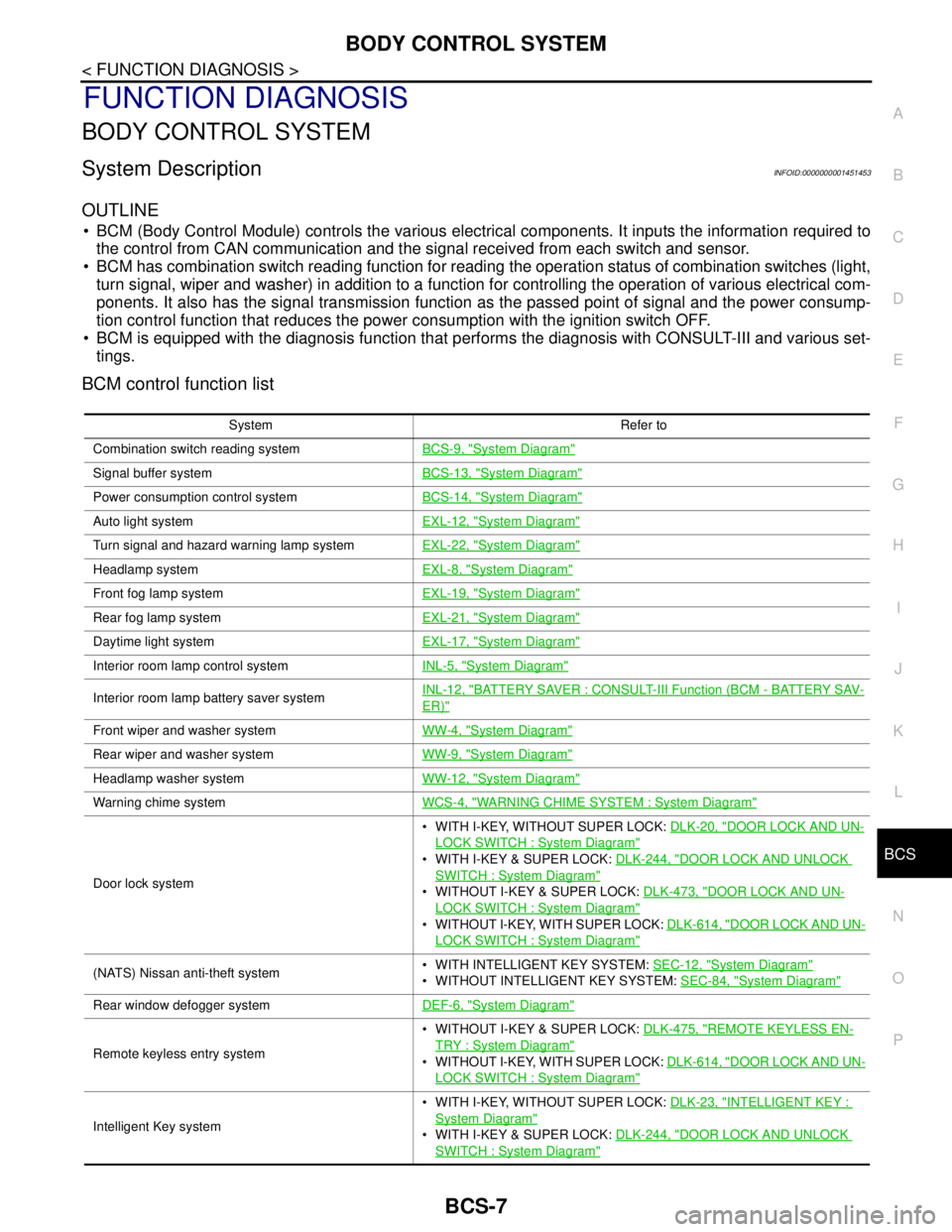
BCM (Body Control Module) controls the various electrical components. It inputs the information required to
the control from CAN communication and the signal received from each switch and sensor.
BCM has combination switch reading function for reading the operation status of combination switches (light,
turn signal, wiper and washer) in addition to a function for controlling the operation of various electrical com-
ponents. It also has the signal transmission function as the passed point of signal and the power consump-
tion control function that reduces the power consumption with the ignition switch OFF.
BCM is equipped with the diagnosis function that performs the diagnosis with CONSULT-III and various set-
tings.
BCM control function list
System Refer to
Combination switch reading systemBCS-9, "
System Diagram"
Signal buffer systemBCS-13, "System Diagram"
Power consumption control systemBCS-14, "System Diagram"
Auto light systemEXL-12, "System Diagram"
Turn signal and hazard warning lamp systemEXL-22, "System Diagram"
Headlamp systemEXL-8, "System Diagram"
Front fog lamp systemEXL-19, "System Diagram"
Rear fog lamp systemEXL-21, "System Diagram"
Daytime light systemEXL-17, "System Diagram"
Interior room lamp control systemINL-5, "System Diagram"
Interior room lamp battery saver systemINL-12, "BATTERY SAVER : CONSULT-III Function (BCM - BATTERY SAV-
ER)"
Front wiper and washer systemWW-4, "System Diagram"
Rear wiper and washer systemWW-9, "System Diagram"
Headlamp washer systemWW-12, "System Diagram"
Warning chime systemWCS-4, "WARNING CHIME SYSTEM : System Diagram"
Door lock system WITH I-KEY, WITHOUT SUPER LOCK: DLK-20, "
DOOR LOCK AND UN-
LOCK SWITCH : System Diagram"
WITH I-KEY & SUPER LOCK: DLK-244, "DOOR LOCK AND UNLOCK
SWITCH : System Diagram"
WITHOUT I-KEY & SUPER LOCK: DLK-473, "DOOR LOCK AND UN-
LOCK SWITCH : System Diagram"
WITHOUT I-KEY, WITH SUPER LOCK: DLK-614, "DOOR LOCK AND UN-
LOCK SWITCH : System Diagram"
(NATS) Nissan anti-theft system WITH INTELLIGENT KEY SYSTEM: SEC-12, "System Diagram"
WITHOUT INTELLIGENT KEY SYSTEM: SEC-84, "System Diagram"
Rear window defogger systemDEF-6, "System Diagram"
Remote keyless entry system WITHOUT I-KEY & SUPER LOCK: DLK-475, "
REMOTE KEYLESS EN-
TRY : System Diagram"
WITHOUT I-KEY, WITH SUPER LOCK: DLK-614, "DOOR LOCK AND UN-
LOCK SWITCH : System Diagram"
Intelligent Key system WITH I-KEY, WITHOUT SUPER LOCK: DLK-23, "
INTELLIGENT KEY :
System Diagram"
WITH I-KEY & SUPER LOCK: DLK-244, "DOOR LOCK AND UNLOCK
SWITCH : System Diagram"
Page 143 of 5883
BCS-8
< FUNCTION DIAGNOSIS >
BODY CONTROL SYSTEM
Component Parts Location
INFOID:0000000001451454
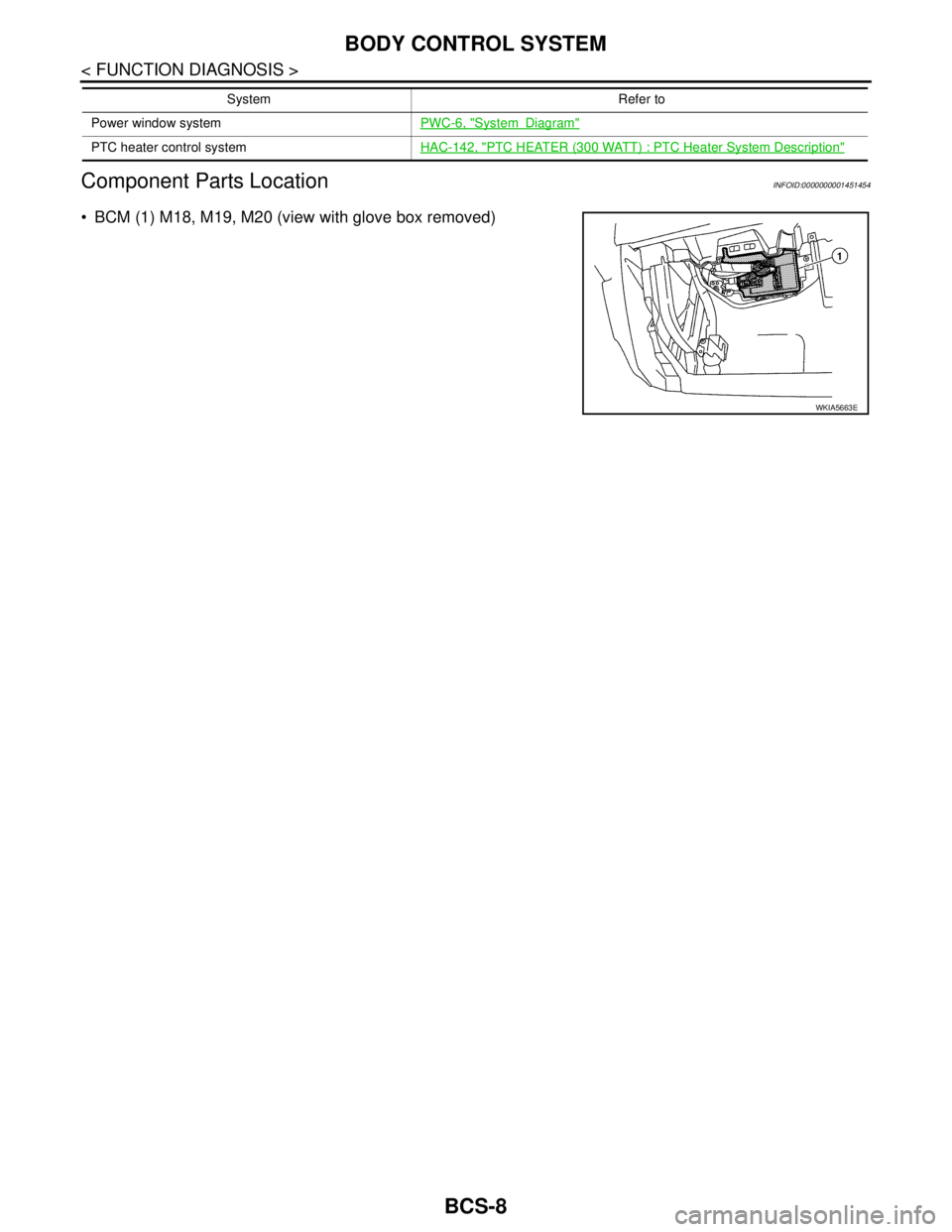
BCM (1) M18, M19, M20 (view with glove box removed)
Power window systemPWC-6, "SystemDiagram"
PTC heater control systemHAC-142, "PTC HEATER (300 WATT) : PTC Heater System Description"
System Refer to
WKIA5663E
Page 144 of 5883
BCS
COMBINATION SWITCH READING SYSTEM
BCS-9
< FUNCTION DIAGNOSIS >
C
D
E
F
G
H
I
J
K
L B A
O
P N
COMBINATION SWITCH READING SYSTEM
System DiagramINFOID:0000000001451455
System DescriptionINFOID:0000000001451456
OUTLINE
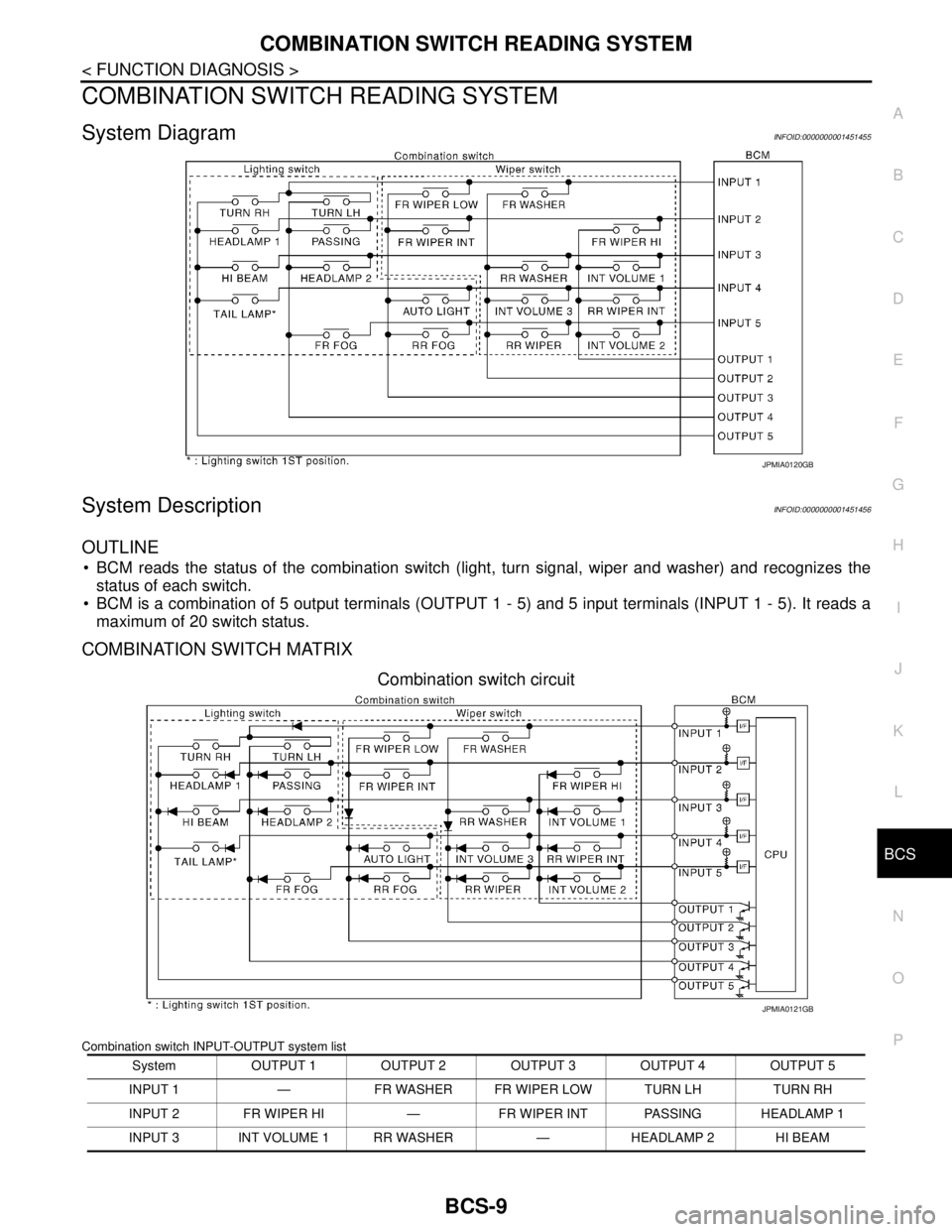
BCM reads the status of the combination switch (light, turn signal, wiper and washer) and recognizes the
status of each switch.
BCM is a combination of 5 output terminals (OUTPUT 1 - 5) and 5 input terminals (INPUT 1 - 5). It reads a
maximum of 20 switch status.
COMBINATION SWITCH MATRIX
Combination switch circuit
Combination switch INPUT-OUTPUT system list
JPMIA0120GB
System OUTPUT 1 OUTPUT 2 OUTPUT 3 OUTPUT 4 OUTPUT 5
INPUT 1 — FR WASHER FR WIPER LOW TURN LH TURN RH
INPUT 2 FR WIPER HI — FR WIPER INT PASSING HEADLAMP 1
INPUT 3 INT VOLUME 1 RR WASHER — HEADLAMP 2 HI BEAM
JPMIA0121GB
Page 145 of 5883
BCS-10
< FUNCTION DIAGNOSIS >
COMBINATION SWITCH READING SYSTEM
NOTE:
Headlamp has a dual system switch.
COMBINATION SWITCH READING FUNCTION
Description
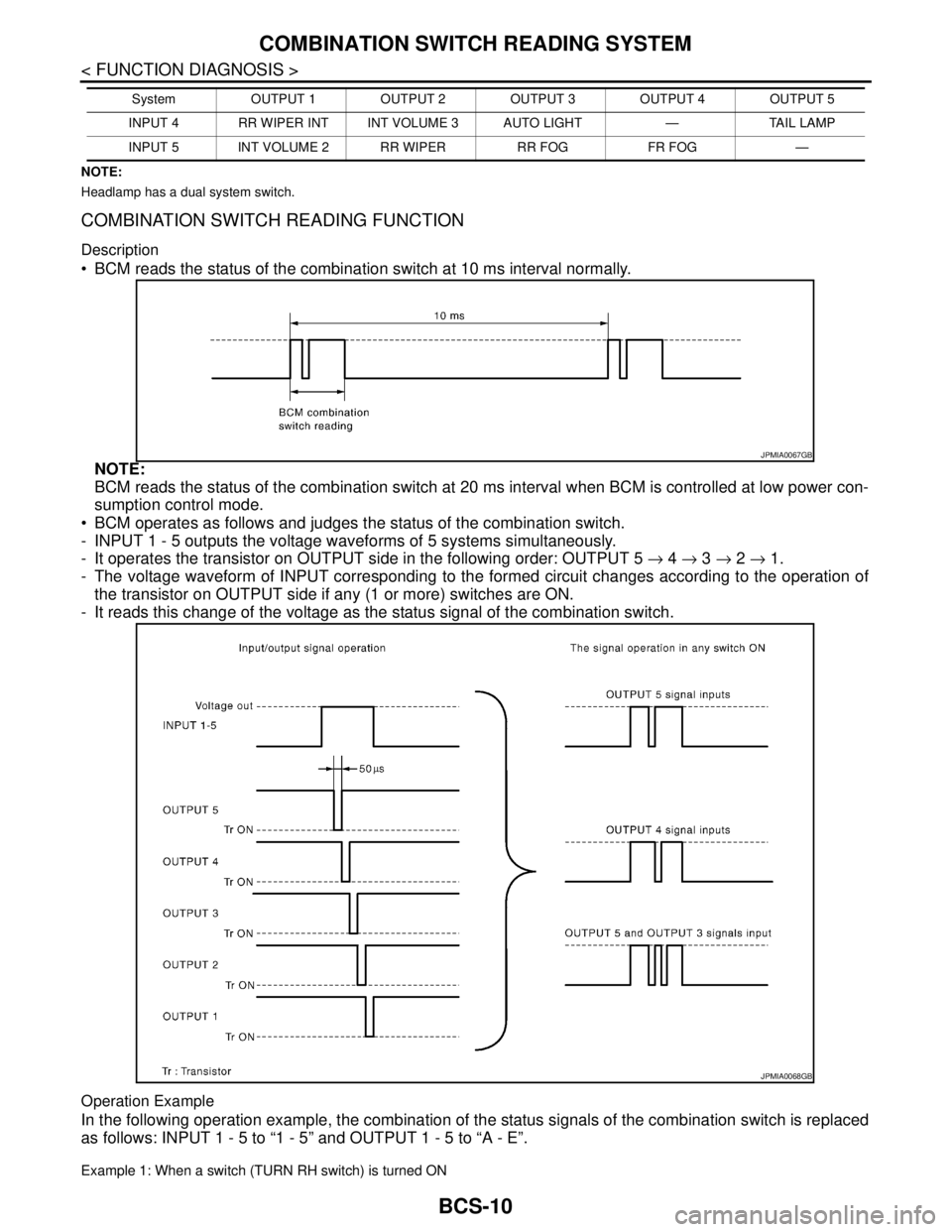
BCM reads the status of the combination switch at 10 ms interval normally.
NOTE:
BCM reads the status of the combination switch at 20 ms interval when BCM is controlled at low power con-
sumption control mode.
BCM operates as follows and judges the status of the combination switch.
- INPUT 1 - 5 outputs the voltage waveforms of 5 systems simultaneously.
- It operates the transistor on OUTPUT side in the following order: OUTPUT 5 → 4 → 3 → 2 → 1.
- The voltage waveform of INPUT corresponding to the formed circuit changes according to the operation of
the transistor on OUTPUT side if any (1 or more) switches are ON.
- It reads this change of the voltage as the status signal of the combination switch.
Operation Example
In the following operation example, the combination of the status signals of the combination switch is replaced
as follows: INPUT 1 - 5 to “1 - 5” and OUTPUT 1 - 5 to “A - E”.
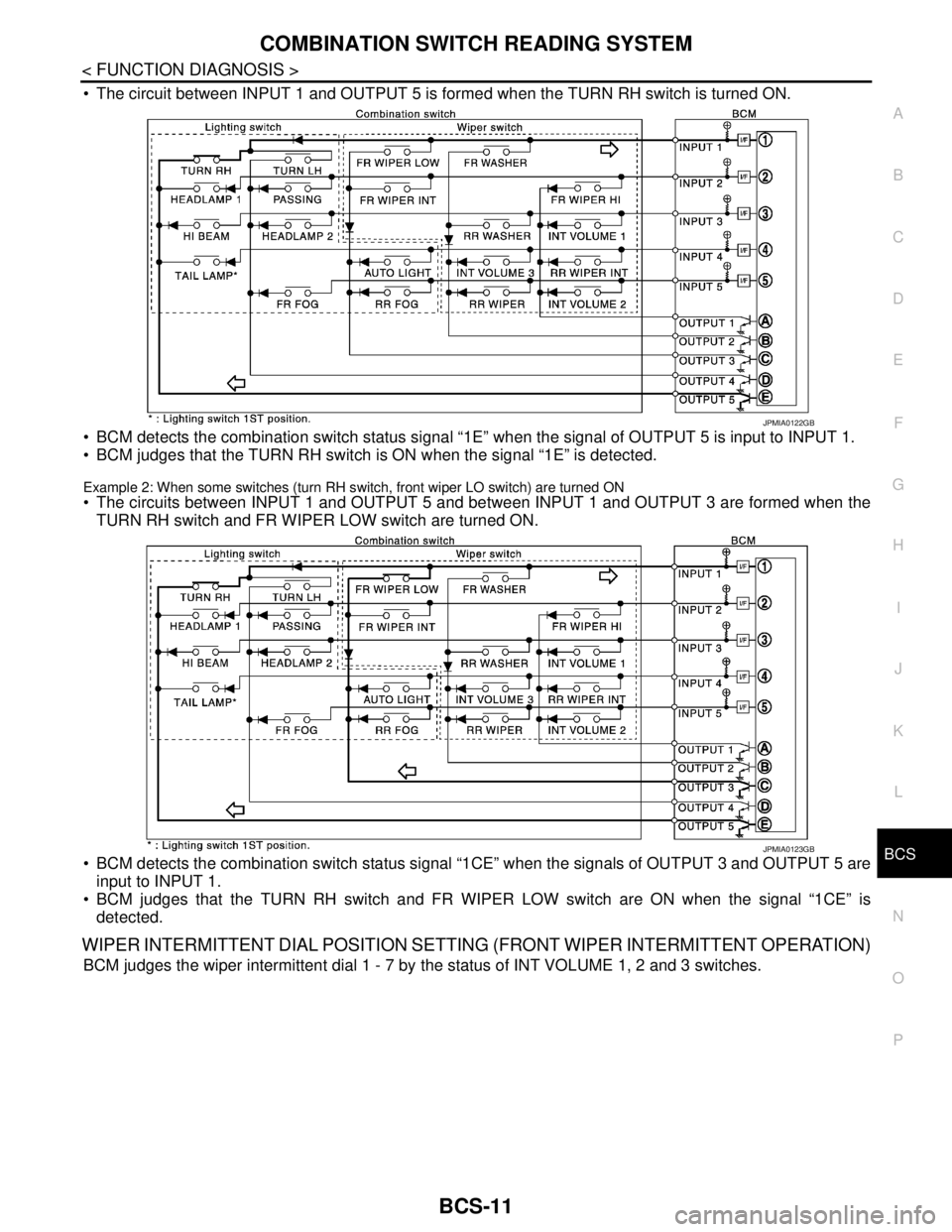
Example 1: When a switch (TURN RH switch) is turned ON
INPUT 4 RR WIPER INT INT VOLUME 3 AUTO LIGHT — TAIL LAMP
INPUT 5 INT VOLUME 2 RR WIPER RR FOG FR FOG —System OUTPUT 1 OUTPUT 2 OUTPUT 3 OUTPUT 4 OUTPUT 5
JPMIA0067GB
JPMIA0068GB
Page 146 of 5883
BCS
COMBINATION SWITCH READING SYSTEM
BCS-11
< FUNCTION DIAGNOSIS >
C
D
E
F
G
H
I
J
K
L B A
O
P N
The circuit between INPUT 1 and OUTPUT 5 is formed when the TURN RH switch is turned ON.
BCM detects the combination switch status signal “1E” when the signal of OUTPUT 5 is input to INPUT 1.
BCM judges that the TURN RH switch is ON when the signal “1E” is detected.
Example 2: When some switches (turn RH switch, front wiper LO switch) are turned ON
The circuits between INPUT 1 and OUTPUT 5 and between INPUT 1 and OUTPUT 3 are formed when the
TURN RH switch and FR WIPER LOW switch are turned ON.
BCM detects the combination switch status signal “1CE” when the signals of OUTPUT 3 and OUTPUT 5 are
input to INPUT 1.
BCM judges that the TURN RH switch and FR WIPER LOW switch are ON when the signal “1CE” is
detected.
WIPER INTERMITTENT DIAL POSITION SETTING (FRONT WIPER INTERMITTENT OPERATION)
BCM judges the wiper intermittent dial 1 - 7 by the status of INT VOLUME 1, 2 and 3 switches.
JPMIA0122GB
JPMIA0123GB