schematic NISSAN TIIDA 2009 Service Owner's Manual
[x] Cancel search | Manufacturer: NISSAN, Model Year: 2009, Model line: TIIDA, Model: NISSAN TIIDA 2009Pages: 4331, PDF Size: 58.04 MB
Page 2462 of 4331
![NISSAN TIIDA 2009 Service Owners Manual EC-1106< SERVICE INFOMATION >
[MR TYPE 2]
TROUBLE DIAGNOSIS
Vacuum Hose Drawing INFOID:0000000004499942
Refer to EC-1027, " Schematic " for Vacuum Control System.
: Vehicle front : From EVAP canist](/img/5/57398/w960_57398-2461.png "NISSAN TIIDA 2009 Service Owners Manual EC-1106< SERVICE INFOMATION >
[MR TYPE 2]
TROUBLE DIAGNOSIS
Vacuum Hose Drawing INFOID:0000000004499942
Refer to EC-1027, \" Schematic \" for Vacuum Control System.
: Vehicle front : From EVAP canist")
EC-1106< SERVICE INFOMATION >
[MR TYPE 2]
TROUBLE DIAGNOSIS
Vacuum Hose Drawing INFOID:0000000004499942
Refer to EC-1027, " Schematic " for Vacuum Control System.
: Vehicle front : From EVAP canister
1. Intake manifold 2. EVAP canister purge volume control solenoid valve3. EVAP service port
4. EVAP purge resonator
NOTE:
Do not use soapy water or any type of solven t while installing vacuum hoses or purge hoses. PBIB3330E
Page 3022 of 4331
EM
NP
O
5. Perform the following inspection if engine oil does not
come out from intake valve timing control solenoid
valve oil hole of the cylinder head.
• Remove oil filter, and then clean it. Refer to EM-70, " Inspection " .
• Clean oil groove between oil strainer and intake valve timing control solenoid valve. Refer to LU-6," Engine Lubrication System " and
LU-6, " Engine Lubrication System Schematic " .
6. Remove components between intake valve timing control solenoid valve and camshaft sprocket (INT), and then check each oil groove for clogging.
• Clean oil groove if necessary. Refer to LU-6, " Engine Lubrication System " and
LU-6, " Engine Lubrica-
tion System Schematic " .
7. After inspection, installation is in the reverse order of removal.
Page 3272 of 4331
GI
N
O P
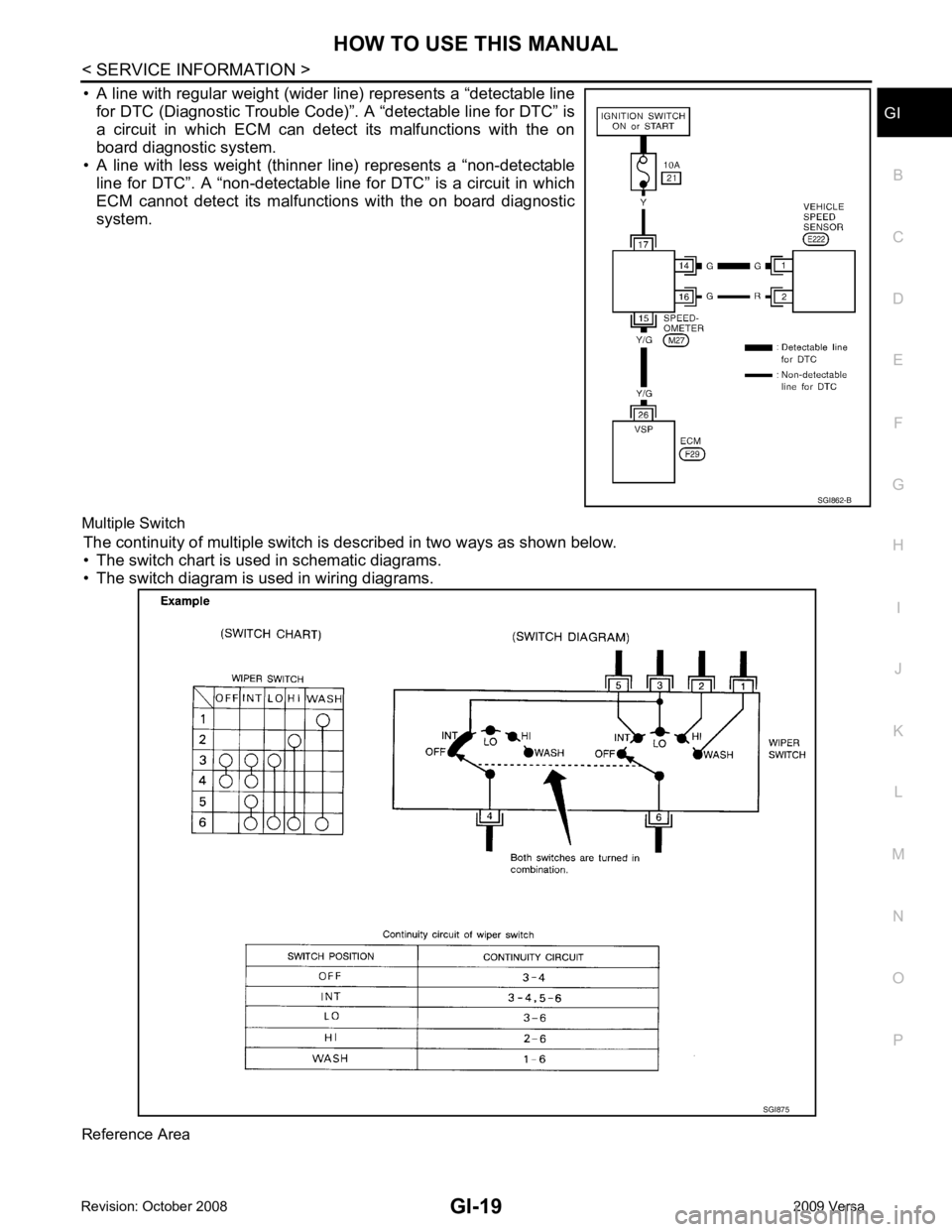
• A line with regular weight (wider line) represents a “detectable line
for DTC (Diagnostic Trouble Code)”. A “detectable line for DTC” is
a circuit in which ECM can detect its malfunctions with the on
board diagnostic system.
• A line with less weight (thinner line) represents a “non-detectable line for DTC”. A “non-detectable line for DTC” is a circuit in which
ECM cannot detect its malfunctions with the on board diagnostic
system.
Multiple Switch The continuity of multiple switch is described in two ways as shown below.
• The switch chart is used in schematic diagrams.
• The switch diagram is used in wiring diagrams.
Reference Area SGI875
Page 3282 of 4331
GI
N
O P
• Close the relay and probe at the solenoid.
voltage; open is further down the circuit than the solenoid.
no voltage; open is between relay and solenoid (point C).
Any powered circuit can be diagnosed using the approach in the previous example.
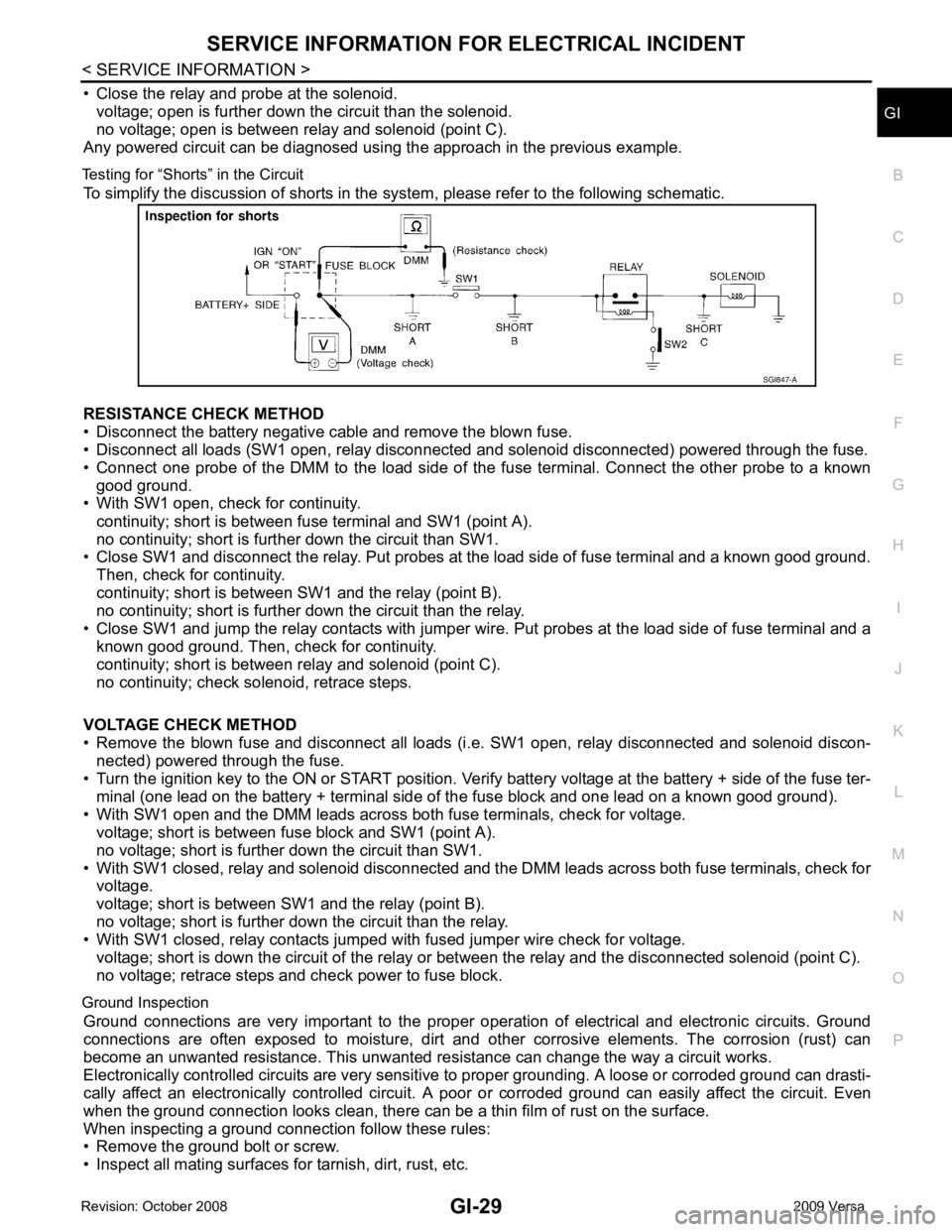
Testing for “Shorts” in the Circuit To simplify the discussion of shorts in the system, please refer to the following schematic.
RESISTANCE CHECK METHOD
• Disconnect the battery negative cable and remove the blown fuse.
• Disconnect all loads (SW1 open, relay disconnected and solenoid disconnected) powered through the fuse.
• Connect one probe of the DMM to the load side of the fuse terminal. Connect the other probe to a known
good ground.
• With SW1 open, check for continuity.
continuity; short is between fuse terminal and SW1 (point A).
no continuity; short is further down the circuit than SW1.
• Close SW1 and disconnect the relay. Put probes at the load side of fuse terminal and a known good ground.
Then, check for continuity.
continuity; short is between SW1 and the relay (point B).
no continuity; short is further down the circuit than the relay.
• Close SW1 and jump the relay contacts with jumper wir e. Put probes at the load side of fuse terminal and a
known good ground. Then, check for continuity.
continuity; short is between relay and solenoid (point C).
no continuity; check solenoid, retrace steps.
VOLTAGE CHECK METHOD
• Remove the blown fuse and disconnect all loads (i .e. SW1 open, relay disconnected and solenoid discon-
nected) powered through the fuse.
• Turn the ignition key to the ON or START position. Veri fy battery voltage at the battery + side of the fuse ter-
minal (one lead on the battery + terminal side of the fuse block and one lead on a known good ground).
• With SW1 open and the DMM leads across both fuse terminals, check for voltage.
voltage; short is between fuse block and SW1 (point A).
no voltage; short is further down the circuit than SW1.
• With SW1 closed, relay and solenoid disconnected and t he DMM leads across both fuse terminals, check for
voltage.
voltage; short is between SW1 and the relay (point B).
no voltage; short is further down the circuit than the relay.
• With SW1 closed, relay contacts jumped with fused jumper wire check for voltage.
voltage; short is down the circuit of the relay or between the relay and the disconnected solenoid (point C).
no voltage; retrace steps and check power to fuse block.
Ground Inspection Ground connections are very important to the proper oper ation of electrical and electronic circuits. Ground
connections are often exposed to moisture, dirt and other corrosive elements. The corrosion (rust) can
become an unwanted resistance. This unwanted re sistance can change the way a circuit works.
Electronically controlled circuits are very sensitive to proper grounding. A loose or corroded ground can drasti-
cally affect an electronically controlled circuit. A poor or corroded ground can easily affect the circuit. Even
when the ground connection looks clean, there can be a thin film of rust on the surface.
When inspecting a ground connection follow these rules:
• Remove the ground bolt or screw.
• Inspect all mating surfaces for tarnish, dirt, rust, etc.
Page 3304 of 4331

GW
N
O P
CONTENTS
GLASSES, WINDOW SYSTEM & MIRRORS
SERVICE INFORMATION .. ..........................3
PRECAUTIONS .............................................. .....3
Precaution for Supplemental Restraint System
(SRS) "AIR BAG" and "SEAT BELT PRE-TEN-
SIONER" ............................................................. ......
3
Precaution Necessary fo r Steering Wheel Rota-
tion After Battery Disconnect ............................... ......
3
Precaution for Procedure without Cowl Top Cover ......4
Handling for Adhesive and Primer ...................... ......4
PREPARATION .............................................. .....5
Commercial Service Tool .................................... ......5
SQUEAK AND RATTLE TROUBLE DIAG-
NOSES ........................ ........................................6
Work Flow ........................................................... ......6
Generic Squeak and Rattle Troubleshooting ...... ......8
Diagnostic Worksheet ......................................... ....10
WINDSHIELD GLASS .................................... ....12
Removal and Installation .........................................12
OPERA WINDOW GLASS ............................. ....14
Removal and Installation .........................................14
REAR WINDOW GLASS AND MOLDING ..... ....16
Removal and Installation .........................................16
POWER WINDOW SYST EM ..............................19
Component Parts and Harness Connector Loca-
tion ...................................................................... ....
19
System Description ............................................. ....19
CAN Communication System Description ........... ....23
Schematic ........................................................... ....24
Wiring Diagram - WINDOW- ............................... ....25
Main Power Window and Door Lock/Unlock
Switch Harness Connector Terminal Layout ....... ....
29
Terminal and Reference Value for Main Power
Window and Door Lock/Unlock Switch ............... ....
29
Terminal and Reference Value for BCM ............. ....30
Work Flow ........................................................... ....30 CONSULT-III Function (B
CM) .................................30
Power Window Auto Operat ion Initialization ............31
Trouble Diagnosis Symptom Chart ...................... ....31
BCM Power Supply and Ground Circuit Inspection ....32
Main Power Window and Door Lock/Unlock
Switch Power Supply and Ground Circuit Inspec-
tion ....................................................................... ....
32
Front Power Window Motor LH Circuit Inspection ....33
Front Power Window RH Circuit Inspection (Pow-
er Window and Door Lock/Unlock Switch RH Op-
eration) ................................................................ ....
34
Front Power Window Motor RH Circuit Inspection ....34
Encoder Circuit Inspection ................................... ....36
Door Switch Check .............................................. ....38
Rear Power Window LH Circuit Inspection (Rear
Power Window Switch LH Operation) ................. ....
39
Rear Power Window RH Circu it Inspection (Rear
Power Window Switch RH Operation) ................. ....
40
Rear Power Window Motor LH Circuit Inspection ....40
Rear Power Window Motor RH Circuit Inspection ....42
FRONT DOOR GLASS AND REGULATOR ..... 44
Removal and Installation ..................................... ....44
Disassembly and Assembly ................................. ....46
Inspection after Installati on ......................................46
REAR DOOR GLASS AND REGULATOR ....... 48
Removal and Installation ..................................... ....48
Disassembly and Assembly ................................. ....50
Inspection after Installati on ......................................50
REAR WINDOW DEFOGGER .......................... 51
Component Parts and Harness Connector Loca-
tion ....................................................................... ....
51
System Description .............................................. ....51
CAN Communication System Description ........... ....52
Wiring Diagram - DEF - ....................................... ....53
Terminal and Reference Value for BCM ..................55
Terminal and Reference Va lue for IPDM E/R ..........55
Work Flow ............................................................ ....55
Page 3396 of 4331

LAN
N
O P
CONTENTS
LAN SYSTEM
CAN FUNDAMENTAL
PRECAUTION ....... ........................................
7
PRECAUTIONS .............................................. .....7
Precautions for Trouble Diagnosis ...................... ......7
Precautions for Harness Repair ................................7
FUNCTION DIAGNOSIS .. .............................8
CAN COMMUNICATION SYSTEM ................ .....8
System Description ............................................. ......8
System Diagram .................................................. ......8
CAN Communication Control Circuit ................... ......9
DIAG ON CAN ................................................ ....10
Description .......................................................... ....10
System Diagram .................................................. ....10
TROUBLE DIAGNOSIS ................................. ....11
Condition of Error Detection ................................ ....11
Symptom When Error Oc curs in CAN Communi-
cation System ...................................................... ....
11
CAN Diagnosis with CONSULT-III ...................... ....14
Self-Diagnosis ..................................................... ....14
CAN Diagnostic Support Monitor ........................ ....14
How to Use CAN Communication Signal Chart .. ....16
BASIC INSPECTION ....... ............................17
DIAGNOSIS AND REPAIR WORKFLOW ..... ....17
Trouble Diagnosis Flow Chart ............................. ....17
Trouble Diagnosis Procedure .............................. ....17
CAN
HOW TO USE THIS MANU AL .....................22
HOW TO USE THIS SECTION ....................... ....22
Caution ................................................................ ....22
Abbreviation List .................................................. ....22
PRECAUTION ....... .......................................23 PRECAUTIONS .................................................
23
Precaution for Supplemental Restraint System
(SRS) "AIR BAG" and "SEAT BELT PRE-TEN-
SIONER" ............................................................. ....
23
Precautions for Trouble Diagnosis ...................... ....23
Precautions for Harness Repair .......................... ....23
BASIC INSPECTION ....... ............................25
DIAGNOSIS AND REPAIR WORKFLOW ........ 25
Interview Sheet .................................................... ....25
FUNCTION DIAGNOSIS .. ............................26
CAN COMMUNICATION SYSTEM ................... 26
CAN System Specification Chart ......................... ....26
CAN Communication Signal Chart ...................... ....26
COMPONENT DIAGNOSIS .........................29
CAN COMMUNICATION SYSTEM ................... 29
Component Parts Location .................................. ....29
Schematic ............................................................ ....30
Wiring Diagram - CAN - ....................................... ....31
MALFUNCTION AREA CHART ........................ 33
Main Line ............................................................. ....33
Branch Line ......................................................... ....33
Short Circuit ......................................................... ....33
MAIN LINE BETWEEN DLC AND ABS CIR-
CUIT .................................................................. 34
Diagnosis Procedure ........................................... ....34
MAIN LINE BETWEEN DLC AND TCM CIR-
CUIT .................................................................. 35
Diagnosis Procedure ........................................... ....35
ECM BRANCH LINE CIRCUIT ......................... 36
Diagnosis Procedure ........................................... ....36
BCM BRANCH LINE CIRCUIT ......................... 37
Diagnosis Procedure ........................................... ....37
Page 3607 of 4331

LT
N
O P
CONTENTS
LIGHTING SYSTEM
SERVICE INFORMATION .. ..........................3
PRECAUTIONS .............................................. .....3
Precaution for Supplemental Restraint System
(SRS) "AIR BAG" and "SEAT BELT PRE-TEN-
SIONER" ............................................................. ......
3
Precaution Necessary fo r Steering Wheel Rota-
tion After Battery Disconnect ............................... ......
3
HEADLAMP (FOR USA) ................................ .....4
Component Parts and Harness Connector Loca-
tion ...................................................................... ......
4
System Description ............................................. ......4
CAN COMMUNICATION SYSTEM DESCRIP-
TION .................................................................... ......
5
Schematic ........................................................... ......6
Wiring Diagram ................................................... ......7
Terminal and Reference Value for BCM ............. ....10
Terminal and Reference Value for IPDM E/R ..... ....10
How to Perform Trouble Diagnosis ..................... ....11
Preliminary Check ............................................... ....11
CONSULT-III Function (BCM) ............................. ....11
CONSULT-III Function (IPDM E/R) ..................... ....12
Headlamp High Beam Does Not Illuminate (Both
Sides) .................................................................. ....
13
Headlamp High Beam Does Not Illuminate (One
Side) .................................................................... ....
15
High Beam Indicator Lamp Does Not Illuminate .....16
Headlamp Low Beam Does Not Illuminate (Both
Sides) .................................................................. ....
16
Headlamp Low Beam Does Not Illuminate (One
Side) .................................................................... ....
19
Headlamps Do Not Turn OFF ............................. ....20
Aiming Adjustment .............................................. ....21
Bulb Replacement ........ ...........................................22
Removal and Installation .........................................23
Disassembly and Assembly ................................ ....23
HEADLAMP (FOR CANADA) - DAYTIME
LIGHT SYSTEM - ........................................... ....25 Component Parts and Harness Connector Loca-
tion ....................................................................... ....
25
Page 3657 of 4331
LT
N
O P
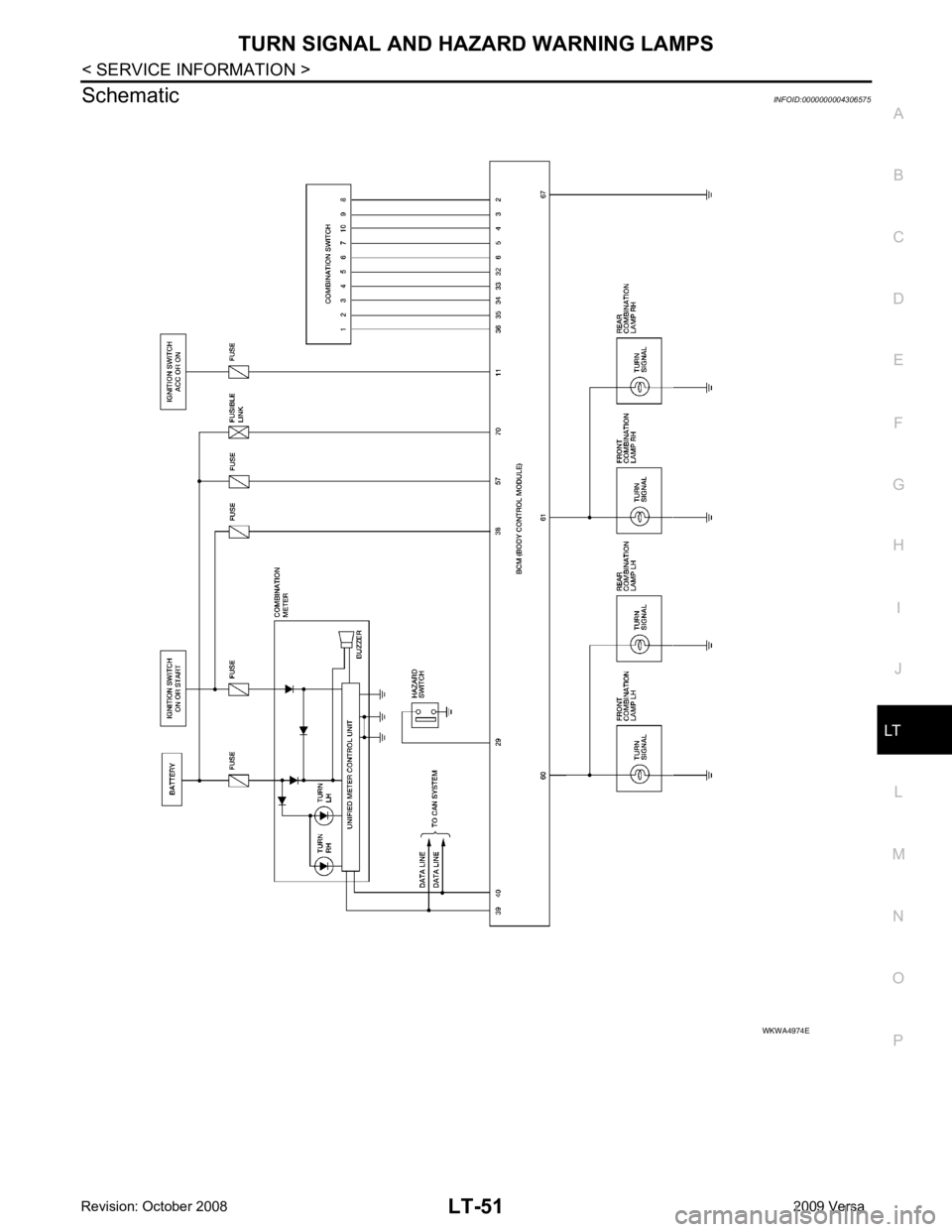
Schematic
INFOID:0000000004306575
Page 3681 of 4331
LT
N
O P
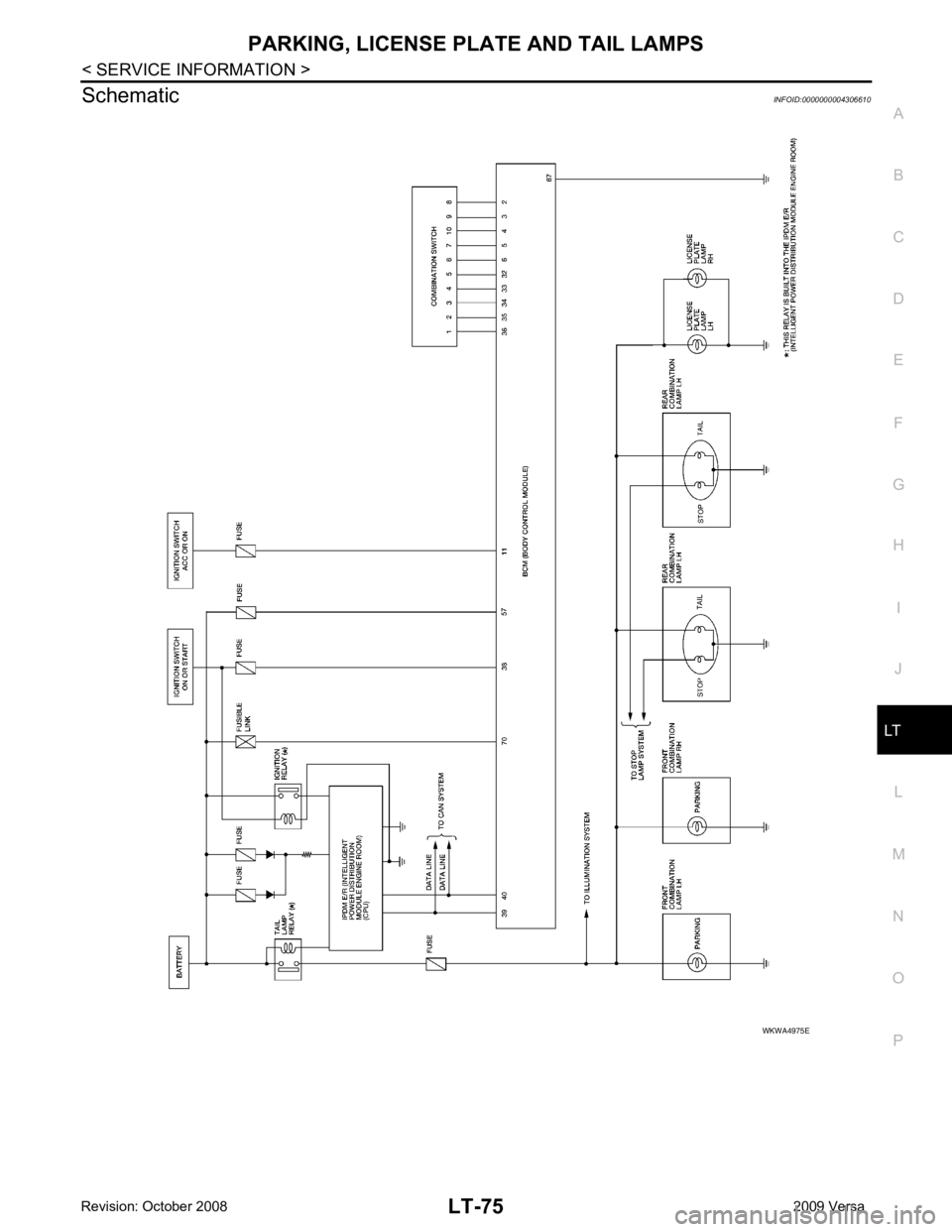
Schematic
INFOID:0000000004306610
Page 3701 of 4331
LT
N
O P
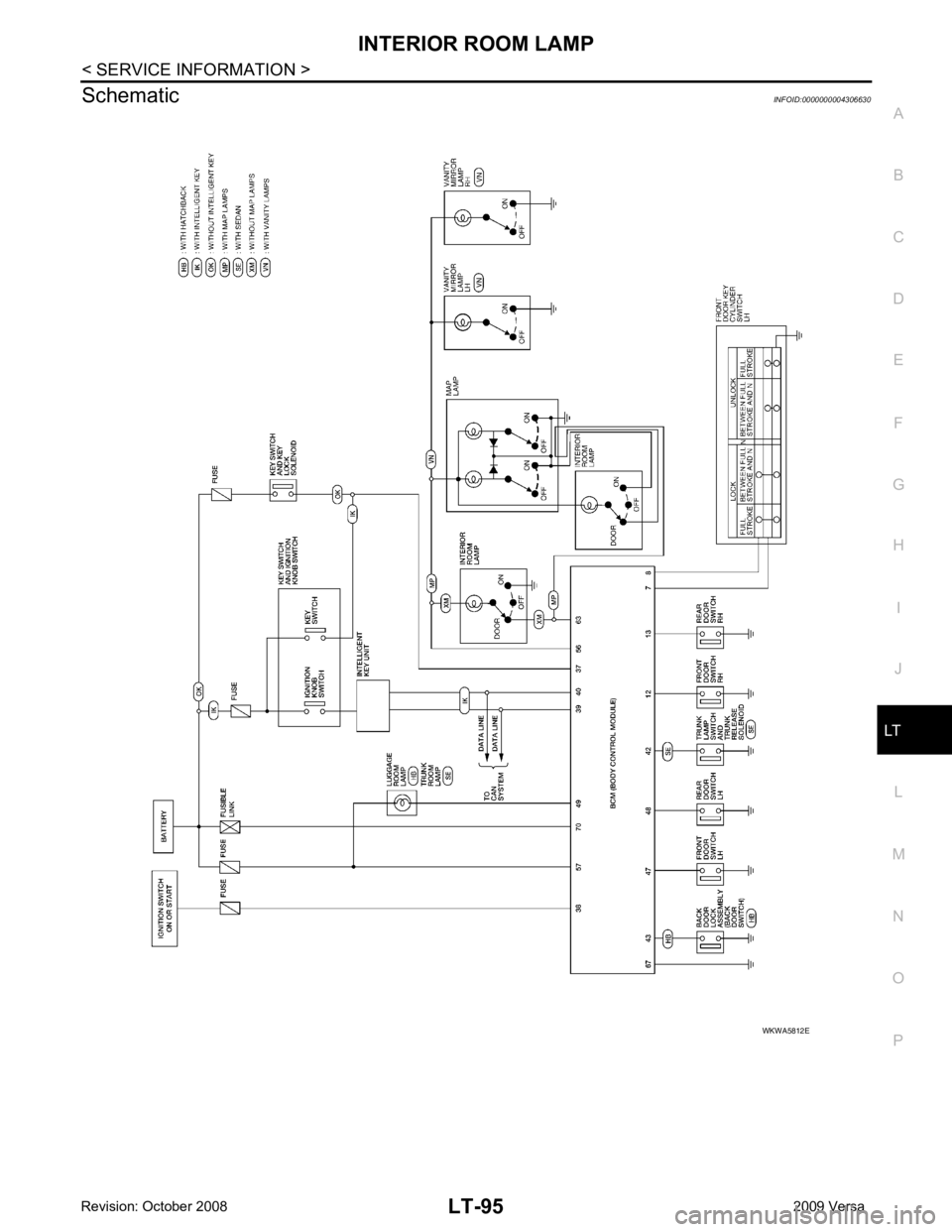
Schematic
INFOID:0000000004306630