system NISSAN TIIDA 2011 Service Repair Manual
[x] Cancel search | Manufacturer: NISSAN, Model Year: 2011, Model line: TIIDA, Model: NISSAN TIIDA 2011Pages: 3787, PDF Size: 78.35 MB
Page 587 of 3787
REMOTE KEYLESS ENTRY SYSTEMBL-77
< SERVICE INFORMATION >
C
DE
F
G H
J
K L
M A
B
BL
N
O P
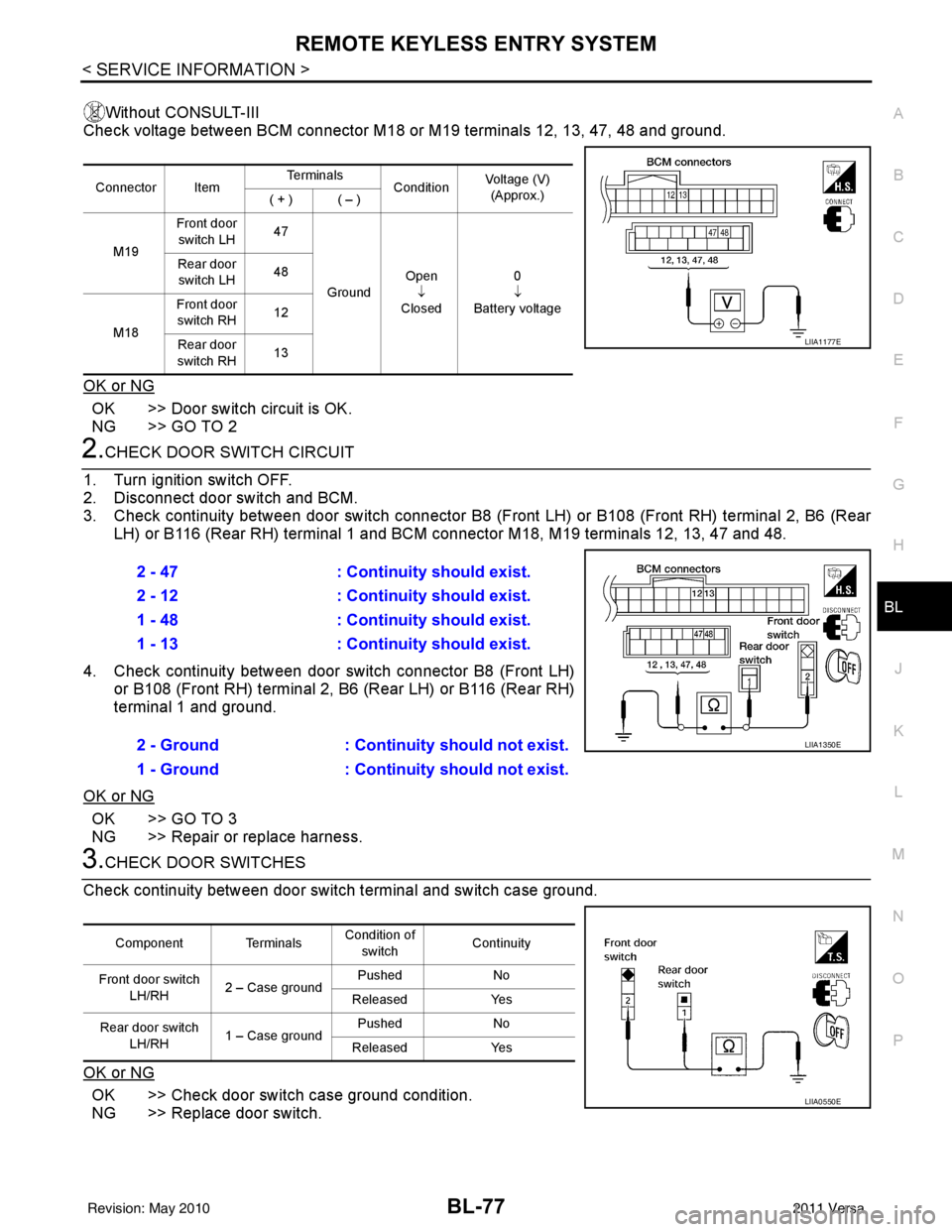
Without CONSULT-III
Check voltage between BCM connector M18 or M19 terminals 12, 13, 47, 48 and ground.
OK or NG
OK >> Door switch circuit is OK.
NG >> GO TO 2
2.CHECK DOOR SWITCH CIRCUIT
1. Turn ignition switch OFF.
2. Disconnect door switch and BCM.
3. Check continuity between door switch connector B8 (F ront LH) or B108 (Front RH) terminal 2, B6 (Rear
LH) or B116 (Rear RH) terminal 1 and BCM connector M18, M19 terminals 12, 13, 47 and 48.
4. Check continuity between door switch connector B8 (Front LH) or B108 (Front RH) terminal 2, B6 (Rear LH) or B116 (Rear RH)
terminal 1 and ground.
OK or NG
OK >> GO TO 3
NG >> Repair or replace harness.
3.CHECK DOOR SWITCHES
Check continuity between door switch terminal and switch case ground.
OK or NG
OK >> Check door switch case ground condition.
NG >> Replace door switch.
Connector Item Te r m i n a l s
ConditionVoltage (V)
(Approx.)
( + ) ( – )
M19 Front door
switch LH 47
Ground Open
↓
Closed 0
↓
Battery voltage
Rear door
switch LH 48
M18 Front door
switch RH 12
Rear door
switch RH 13
LIIA1177E
2 - 47
: Continuity should exist.
2 - 12 : Continuity should exist.
1 - 48 : Continuity should exist.
1 - 13 : Continuity should exist.
2 - Ground : Continuity should not exist.
1 - Ground : Continuity should not exist.
LIIA1350E
Component Terminals Condition of
switch Continuity
Front door switch LH/RH 2 – Case ground Pushed
No
Released Yes
Rear door switch LH/RH 1 – Case ground Pushed
No
Released Yes
LIIA0550E
Revision: May 2010 2011 Versa
Page 588 of 3787
BL-78
< SERVICE INFORMATION >
REMOTE KEYLESS ENTRY SYSTEM
Key Switch (I nsert) Check
INFOID:0000000006221154
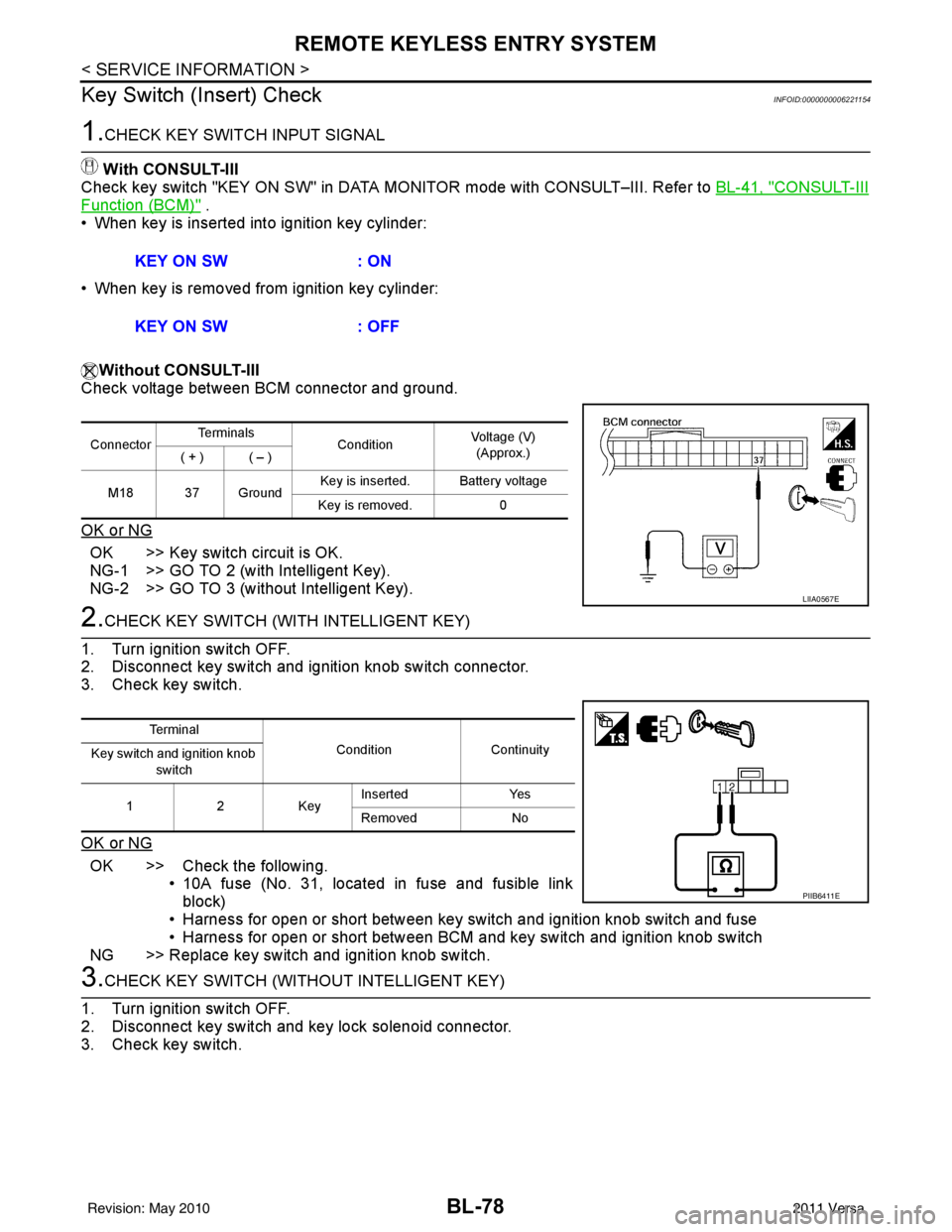
1.CHECK KEY SWITCH INPUT SIGNAL
With CONSULT-III
Check key switch "KEY ON SW" in DATA MONITOR mode with CONSULT–III. Refer to BL-41, "
CONSULT-III
Function (BCM)" .
• When key is inserted into ignition key cylinder:
• When key is removed from ignition key cylinder:
Without CONSULT-III
Check voltage between BCM connector and ground.
OK or NG
OK >> Key switch circuit is OK.
NG-1 >> GO TO 2 (with Intelligent Key).
NG-2 >> GO TO 3 (without Intelligent Key).
2.CHECK KEY SWITCH (WITH INTELLIGENT KEY)
1. Turn ignition switch OFF.
2. Disconnect key switch and ignition knob switch connector.
3. Check key switch.
OK or NG
OK >> Check the following. • 10A fuse (No. 31, located in fuse and fusible link
block)
• Harness for open or short between key switch and ignition knob switch and fuse
• Harness for open or short between BCM and key switch and ignition knob switch
NG >> Replace key switch and ignition knob switch.
3.CHECK KEY SWITCH (WITHO UT INTELLIGENT KEY)
1. Turn ignition switch OFF.
2. Disconnect key switch and key lock solenoid connector.
3. Check key switch. KEY ON SW
: ON
KEY ON SW : OFF
ConnectorTe r m i n a l s
ConditionVoltage (V)
(Approx.)
( + ) ( – )
M18 37 Ground Key is inserted. Battery voltage
Key is removed. 0
LIIA0567E
Te r m i n a l
Condition Continuity
Key switch and ignition knob
switch
12K ey Inserted
Yes
Removed No
PIIB6411E
Revision: May 2010 2011 Versa
Page 589 of 3787
![NISSAN TIIDA 2011 Service Repair Manual REMOTE KEYLESS ENTRY SYSTEMBL-79
< SERVICE INFORMATION >
C
DE
F
G H
J
K L
M A
B
BL
N
O P
OK or NG
OK >> Check the following. • 10A fuse [No. 14, located in fuse block (J/B)]
• Harness for open or](/img/5/57396/w960_57396-588.png "NISSAN TIIDA 2011 Service Repair Manual REMOTE KEYLESS ENTRY SYSTEMBL-79
< SERVICE INFORMATION >
C
DE
F
G H
J
K L
M A
B
BL
N
O P
OK or NG
OK >> Check the following. • 10A fuse [No. 14, located in fuse block (J/B)]
• Harness for open or")
REMOTE KEYLESS ENTRY SYSTEMBL-79
< SERVICE INFORMATION >
C
DE
F
G H
J
K L
M A
B
BL
N
O P
OK or NG
OK >> Check the following. • 10A fuse [No. 14, located in fuse block (J/B)]
• Harness for open or short between key switch and keylock solenoid and fuse
• Harness for open or short between BCM and key
switch and key lock solenoid
NG >> Replace key switch and key lock solenoid.
Hazard Function CheckINFOID:0000000005929318
1.CHECK HAZARD WARNING LAMP
Does hazard warning lamp flash with hazard switch?
OK or NG
OK >> Hazard warning lamp circuit is OK.
NG >> Check hazard circuit. Refer to LT- 5 0
.
Horn Function CheckINFOID:0000000005929319
First perform the “SELF-DIAG RESULTS” in “BCM” with CONSULT-III, then perform the trouble diagnosis of
malfunction system indicated “SELF-DIAG RESULTS” of “BCM”. Refer to BCS-18, "
CAN Communication
Inspection Using CONSULT-III (Self-Diagnosis)" .
1.CHECK HORN FUNCTION
Does horn sound with horn switch?
OK or NG
OK >> GO TO 2
NG >> Check horn circuit. Refer to WW-40
.
2.CHECK IPDM E/R INPUT SIGNAL
Check voltage between IPDM E/R connector and ground.
OK or NG
OK >> Replace IPDM E/R. Refer to PG-28, "Removal and
Installation of IPDM E/R".
NG >> GO TO 3
3.CHECK HORN RELAY CIRCUIT
1. Turn ignition switch OFF.
2. Disconnect IPDM E/R and horn relay connector.
Terminals Condition Continuity
1 – 2 Key is inserted.
Yes
Key is removed. No
PIIB6411E
Te r m i n a l s
Voltage (V)
(Approx.)
(+)
(–)
IPDM E/R connector Terminal
E46 45Ground Battery voltage
WIIA1251E
Revision: May 2010 2011 Versa
Page 590 of 3787
BL-80
< SERVICE INFORMATION >
REMOTE KEYLESS ENTRY SYSTEM
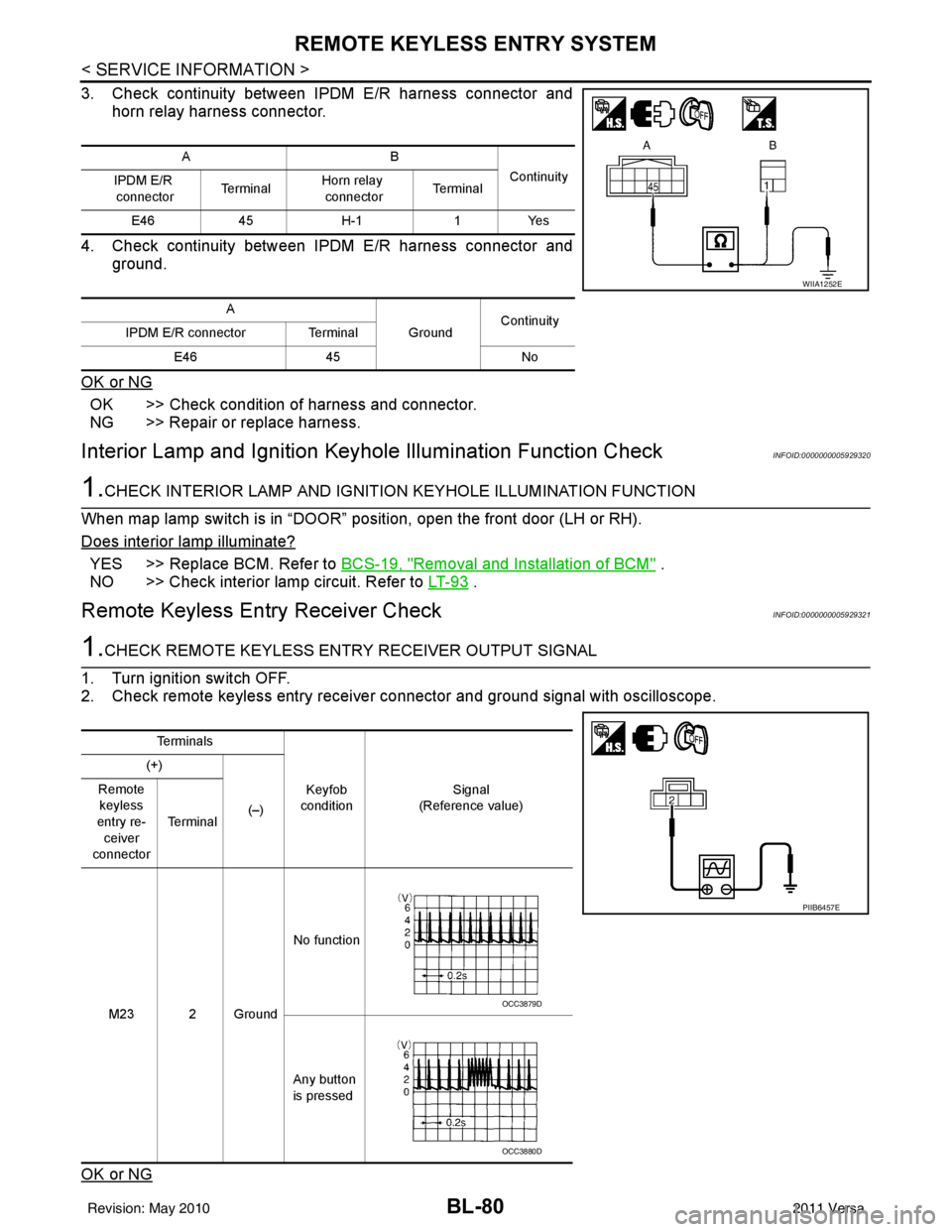
3. Check continuity between IPDM E/R harness connector andhorn relay harness connector.
4. Check continuity between IPDM E/R harness connector and ground.
OK or NG
OK >> Check condition of harness and connector.
NG >> Repair or replace harness.
Interior Lamp and Ignition Keyhole Illumination Function CheckINFOID:0000000005929320
1.CHECK INTERIOR LAMP AND IGNITION KEYHOLE ILLUMINATION FUNCTION
When map lamp switch is in “DOOR” position, open the front door (LH or RH).
Does interior lamp illuminate?
YES >> Replace BCM. Refer to BCS-19, "Removal and Installation of BCM" .
NO >> Check interior lamp circuit. Refer to LT- 9 3
.
Remote Keyless Entry Receiver CheckINFOID:0000000005929321
1.CHECK REMOTE KEYLESS ENTRY RECEIVER OUTPUT SIGNAL
1. Turn ignition switch OFF.
2. Check remote keyless entry receiver connector and ground signal with oscilloscope.
OK or NG
AB Continuity
IPDM E/R
connector Te r m i n a lHorn relay
connector Te r m i n a l
E46 45H-1 1Yes
A GroundContinuity
IPDM E/R connector Terminal
E46 45 No
WIIA1252E
Te r m i n a l s
Keyfob
condition Signal
(Reference value)
(+)
(–)
Remote
keyless
entry re- ceiver
connector Te r m i n a l
M23 2 Ground No function
Any button
is pressed
PIIB6457E
OCC3879D
OCC3880D
Revision: May 2010 2011 Versa
Page 591 of 3787
REMOTE KEYLESS ENTRY SYSTEMBL-81
< SERVICE INFORMATION >
C
DE
F
G H
J
K L
M A
B
BL
N
O P
OK >> Remote keyless entry receiver circuit is OK.
NG >> GO TO 2
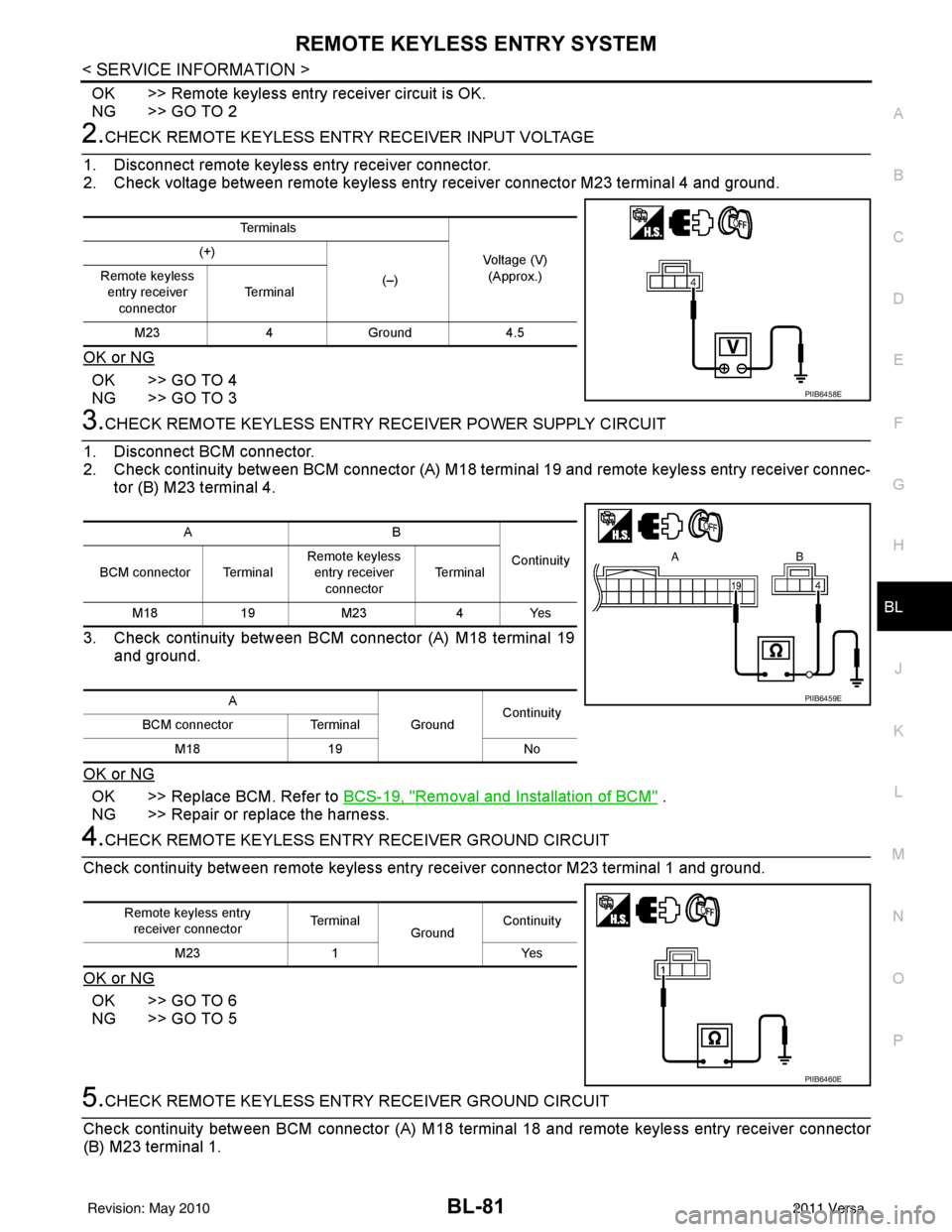
2.CHECK REMOTE KEYLESS ENTRY RECEIVER INPUT VOLTAGE
1. Disconnect remote keyless entry receiver connector.
2. Check voltage between remote keyless entry receiver connector M23 terminal 4 and ground.
OK or NG
OK >> GO TO 4
NG >> GO TO 3
3.CHECK REMOTE KEYLESS ENTRY RECEIVER POWER SUPPLY CIRCUIT
1. Disconnect BCM connector.
2. Check continuity between BCM connector (A) M18 term inal 19 and remote keyless entry receiver connec-
tor (B) M23 terminal 4.
3. Check continuity between BCM connector (A) M18 terminal 19 and ground.
OK or NG
OK >> Replace BCM. Refer to BCS-19, "Removal and Installation of BCM" .
NG >> Repair or replace the harness.
4.CHECK REMOTE KEYLESS ENTR Y RECEIVER GROUND CIRCUIT
Check continuity between remote keyless entry receiver connector M23 terminal 1 and ground.
OK or NG
OK >> GO TO 6
NG >> GO TO 5
5.CHECK REMOTE KEYLESS ENTR Y RECEIVER GROUND CIRCUIT
Check continuity between BCM connecto r (A) M18 terminal 18 and remote keyless entry receiver connector
(B) M23 terminal 1.
Te r m i n a l s
Voltage (V)(Approx.)
(+)
(–)
Remote keyless
entry receiver connector Te r m i n a l
M23 4Ground 4.5
PIIB6458E
AB
Continuity
BCM connector Terminal Remote keyless
entry receiver connector Te r m i n a l
M18 19M23 4Yes
A GroundContinuity
BCM connector Terminal
M18 19 No
PIIB6459E
Remote keyless entry
receiver connector Te r m i n a l
GroundContinuity
M23 1 Yes
PIIB6460E
Revision: May 2010 2011 Versa
Page 592 of 3787
BL-82
< SERVICE INFORMATION >
REMOTE KEYLESS ENTRY SYSTEM
OK or NG
OK >> Replace BCM. Refer to BCS-19, "Removal and Installa-
tion of BCM" .
NG >> Repair or replace the harness.
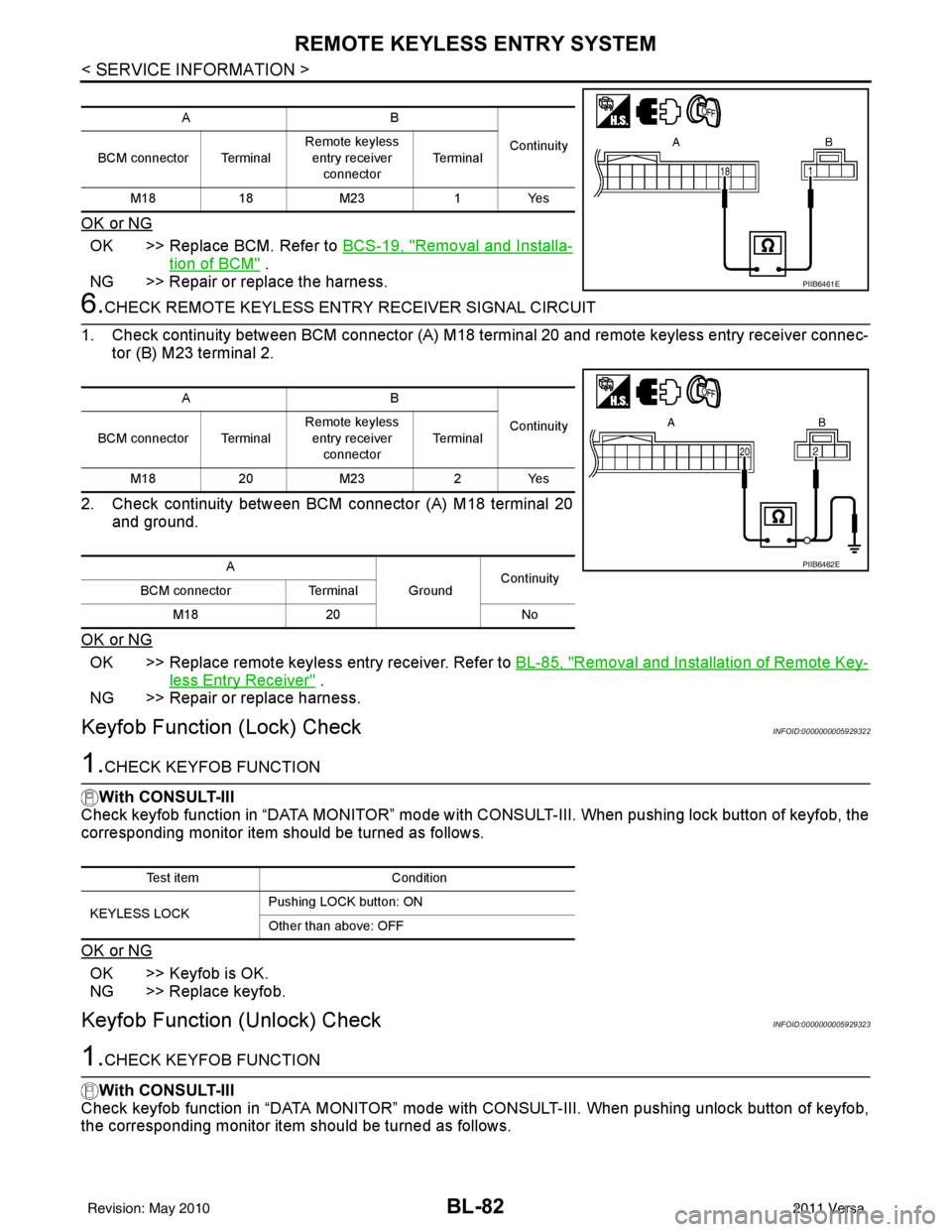
6.CHECK REMOTE KEYL ESS ENTRY RECEIVER SIGNAL CIRCUIT
1. Check continuity between BCM connector (A) M18 terminal 20 and remote keyless entry receiver connec- tor (B) M23 terminal 2.
2. Check continuity between BCM connector (A) M18 terminal 20 and ground.
OK or NG
OK >> Replace remote keyless entry receiver. Refer to BL-85, "Removal and Installation of Remote Key-
less Entry Receiver" .
NG >> Repair or replace harness.
Keyfob Function (Lock) CheckINFOID:0000000005929322
1.CHECK KEYFOB FUNCTION
With CONSULT-III
Check keyfob function in “DATA MONITOR” mode with CO NSULT-III. When pushing lock button of keyfob, the
corresponding monitor item should be turned as follows.
OK or NG
OK >> Keyfob is OK.
NG >> Replace keyfob.
Keyfob Function (Unlock) CheckINFOID:0000000005929323
1.CHECK KEYFOB FUNCTION
With CONSULT-III
Check keyfob function in “DATA MONITOR” mode with CONSULT-III. When pushing unlock button of keyfob,
the corresponding monitor item should be turned as follows.
AB
Continuity
BCM connector Terminal Remote keyless
entry receiver
connector Te r m i n a l
M18 18M23 1Yes
PIIB6461E
AB
Continuity
BCM connector Terminal Remote keyless
entry receiver
connector Te r m i n a l
M18 20M23 2Yes
A GroundContinuity
BCM connector Terminal
M18 20 No
PIIB6462E
Test item Condition
KEYLESS LOCK Pushing LOCK button: ON
Other than above: OFF
Revision: May 2010
2011 Versa
Page 593 of 3787

REMOTE KEYLESS ENTRY SYSTEMBL-83
< SERVICE INFORMATION >
C
DE
F
G H
J
K L
M A
B
BL
N
O P
OK or NG
OK >> Keyfob is OK.
NG >> Replace keyfob.
ID Code Entry ProcedureINFOID:0000000005929324
KEYFOB ID SET UP WITH CONSULT-III
NOTE:
• If a keyfob is lost, the ID code of the lost keyfob must be erased to prevent unauthorized use. A spe-
cific ID code can be erased with CONSULT-III. However, when the ID code of a lost keyfob is not
known, all controller ID codes should be erased. After all ID codes are erased, the ID codes of all
remaining and/or new keyfobs must be re-registered.
• When registering an addi tional keyfob, the existing ID codes in memory may or may not be erased. If
five ID codes are stored in memory , when an additional code is registered, only the oldest code is
erased. If less than five ID codes are stored in memory, when an additional ID code is registered, the
new ID code is added and no ID codes are erased.
• Entry of maximum five ID codes is allowed. When more than five ID codes are entered, the oldest ID
code will be erased.
• Even if same ID code that is already in the memo ry is input, the same ID code can be entered. The
code is counted as an additional code.
1. Touch “MULTI REMOTE ENT”.
2. Touch “WORK SUPPORT”.
3. The items are shown on the figure can be set up. • “REMO CONT ID CONFIR”Use this mode to confirm if a keyfob ID code is registered or not.
• “REMO CONT ID REGIST” Use this mode to register a keyfob ID code.
NOTE:
Register the ID code when keyfob or BCM is replaced, or when additional keyfob is required.
• “REMO CONT ID ERASUR” Use this mode to erase a keyfob ID code.
Test item Condition
KEYLESS UNLOCK Pushing UNLOCK button: ON
Other than above: OFF
Revision: May 2010
2011 Versa
Page 594 of 3787
BL-84
< SERVICE INFORMATION >
REMOTE KEYLESS ENTRY SYSTEM
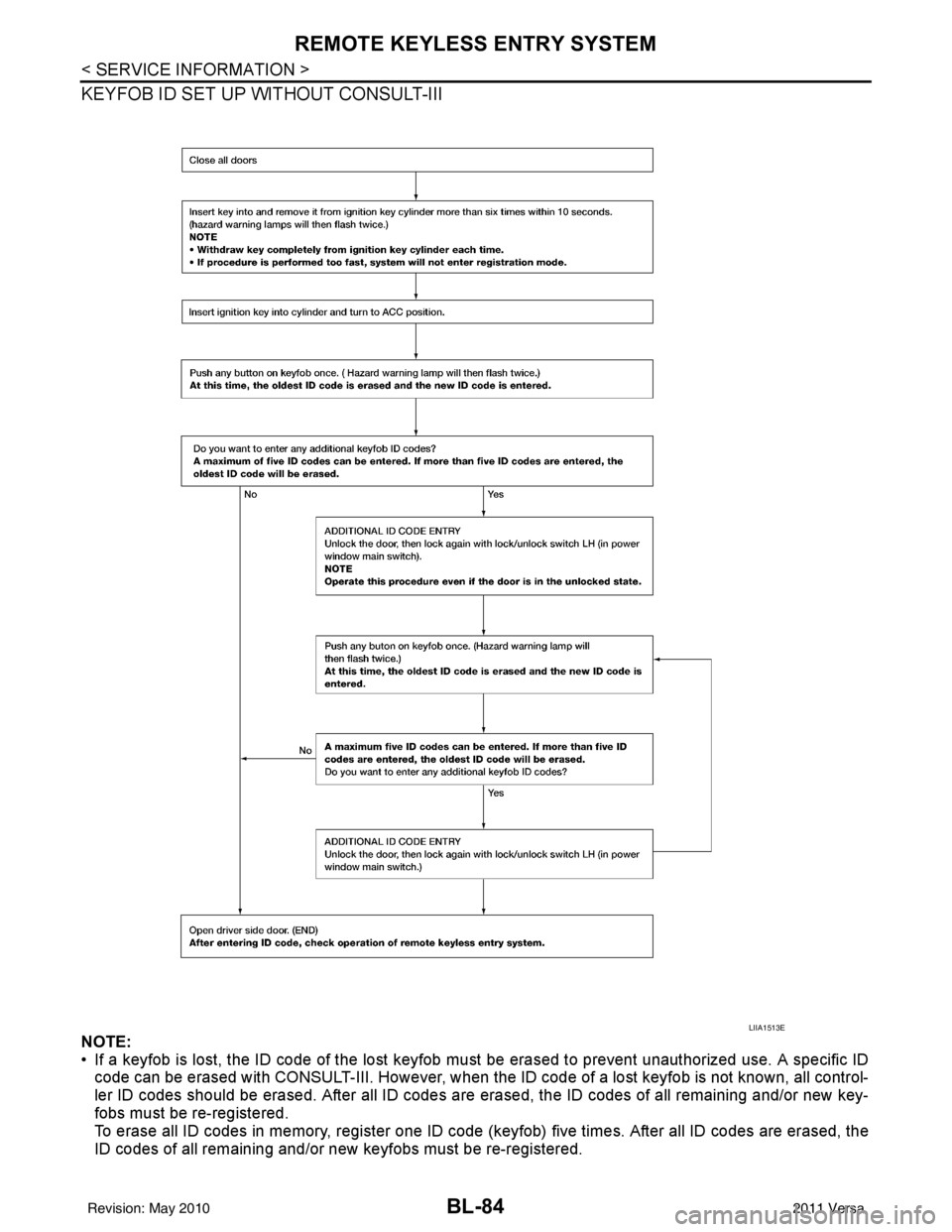
KEYFOB ID SET UP WITHOUT CONSULT-III
NOTE:
• If a keyfob is lost, the ID code of the lost keyfob must be erased to prevent unauthorized use. A specific ID
code can be erased with CONSULT-III. However, when the ID code of a lost keyfob is not known, all control-
ler ID codes should be erased. After all ID codes are erased, the ID codes of all remaining and/or new key-
fobs must be re-registered.
To erase all ID codes in memory, register one ID code (keyfob) five times. After all ID codes are erased, the
ID codes of all remaining and/or new keyfobs must be re-registered.
LIIA1513E
Revision: May 2010 2011 Versa
Page 595 of 3787
REMOTE KEYLESS ENTRY SYSTEMBL-85
< SERVICE INFORMATION >
C
DE
F
G H
J
K L
M A
B
BL
N
O P
• When registering an additional keyfob, the existing ID codes in memory may or may not be erased. If five ID
codes are stored in memory, when an additional code is registered, only the oldest code is erased. If less
than five ID codes are stored in memory, when an additional ID code is registered, the new ID code is added
and no ID codes are erased.
• If you need to activate more than two additional new keyfobs, repeat the procedure “Additional ID code
entry” for each new keyfob.
• Entry of maximum five ID codes is allowed. When mo re than five ID codes are entered, the oldest ID code
will be erased.
• Even if same ID code that is already in the memory is input, the same ID code can be entered. The code is
counted as an additional code.
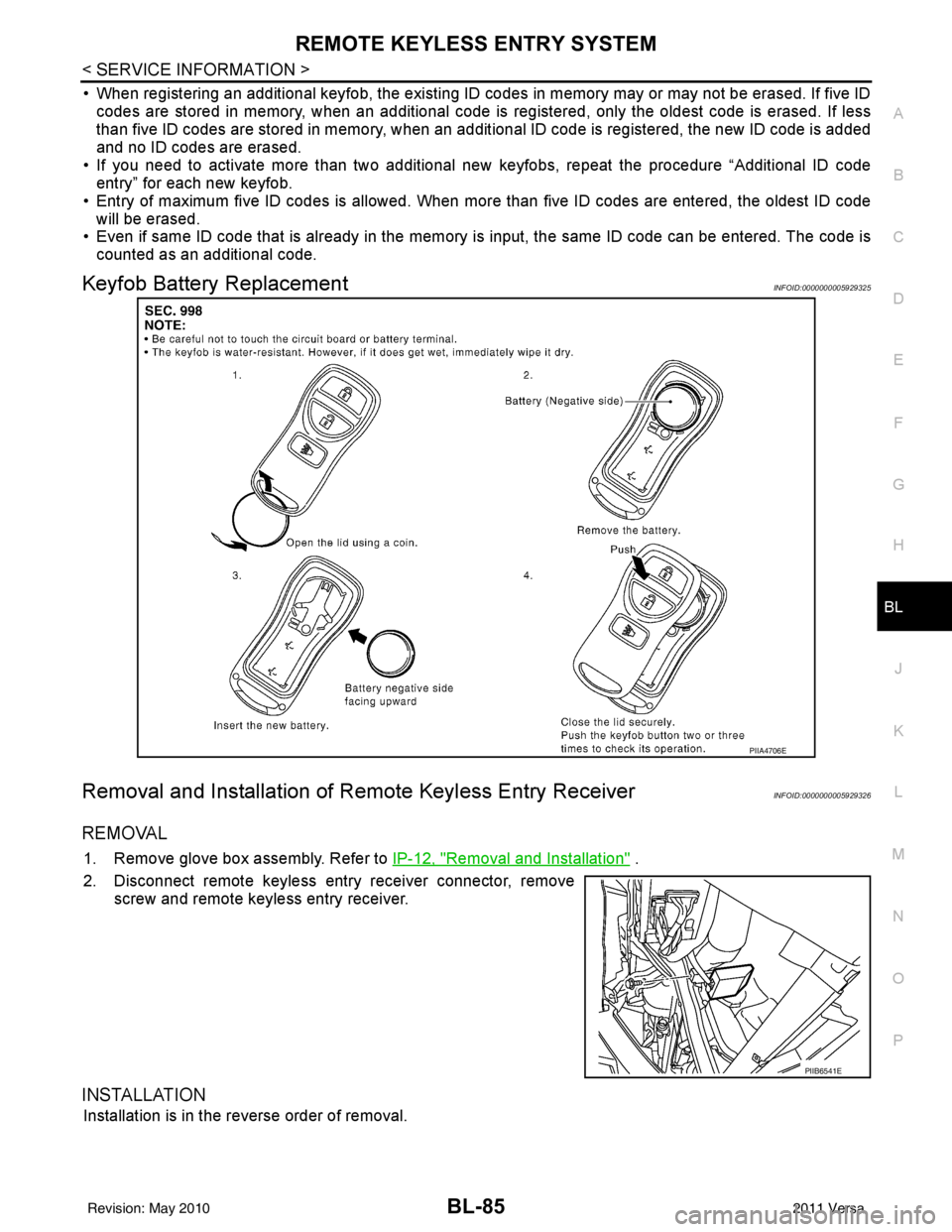
Keyfob Battery ReplacementINFOID:0000000005929325
Removal and Installation of Re mote Keyless Entry ReceiverINFOID:0000000005929326
REMOVAL
1. Remove glove box assembly. Refer to IP-12, "Removal and Installation" .
2. Disconnect remote keyless entry receiver connector, remove screw and remote keyless entry receiver.
INSTALLATION
Installation is in the reverse order of removal.
PIIA4706E
PIIB6541E
Revision: May 2010 2011 Versa
Page 596 of 3787
BL-86
< SERVICE INFORMATION >
INTELLIGENT KEY SYSTEM
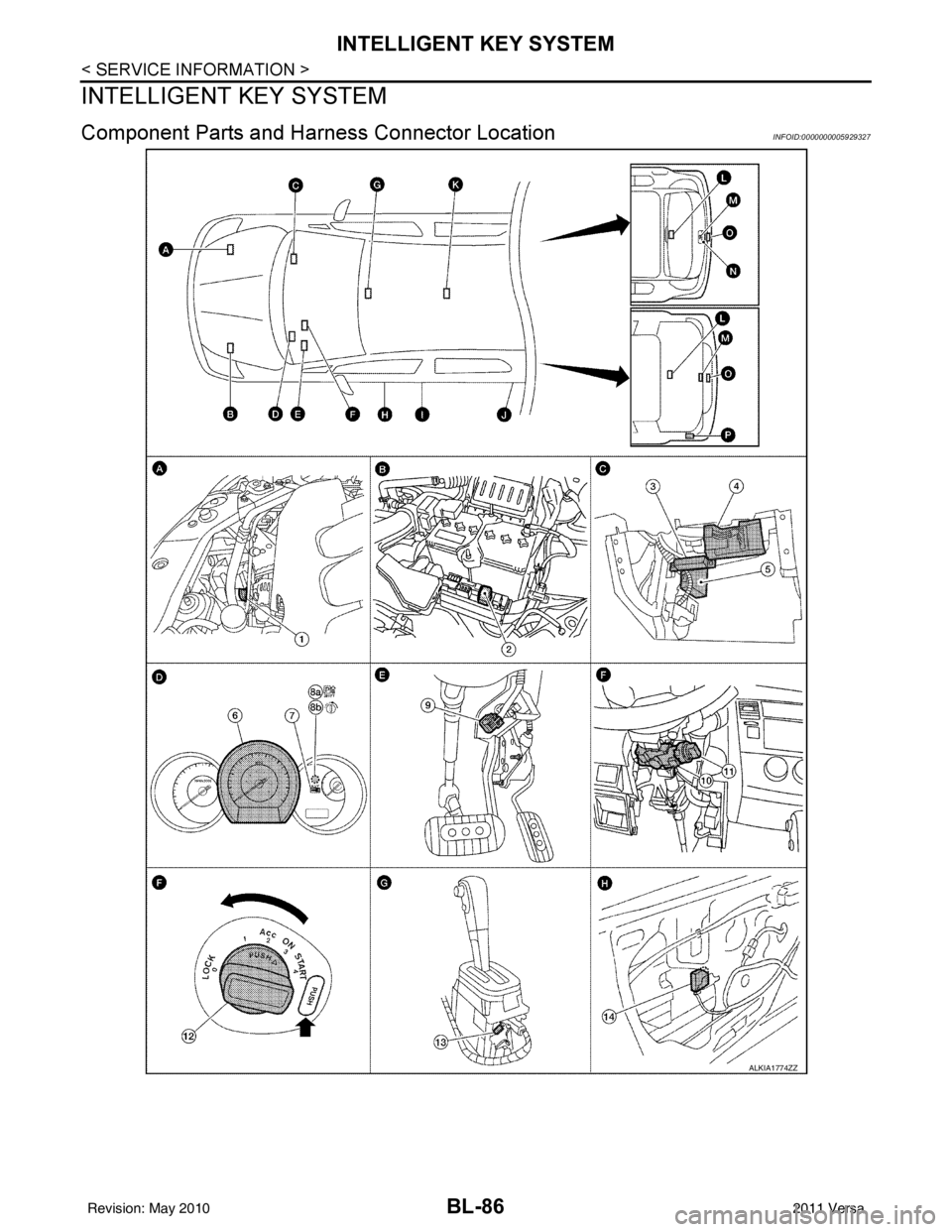
INTELLIGENT KEY SYSTEM
Component Parts and Harness Connector LocationINFOID:0000000005929327
ALKIA1774ZZ
Revision: May 2010 2011 Versa