steering NISSAN TITAN 2018 Owner´s Manual
[x] Cancel search | Manufacturer: NISSAN, Model Year: 2018, Model line: TITAN, Model: NISSAN TITAN 2018Pages: 650, PDF Size: 7.54 MB
Page 389 of 650
![NISSAN TITAN 2018 Owner´s Manual PHONE SETTINGS
To access the phone settings:1. Press the [
] button.
2. Touch the “Settings” key.
3. Touch the “Phone & Bluetooth” key.
4. Touch the “Phone Settings” key and ad- just the f](/img/5/40372/w960_40372-388.png "NISSAN TITAN 2018 Owner´s Manual PHONE SETTINGS
To access the phone settings:1. Press the [
] button.
2. Touch the “Settings” key.
3. Touch the “Phone & Bluetooth” key.
4. Touch the “Phone Settings” key and ad- just the f")
PHONE SETTINGS
To access the phone settings:1. Press the [
] button.
2. Touch the “Settings” key.
3. Touch the “Phone & Bluetooth” key.
4. Touch the “Phone Settings” key and ad- just the following settings as desired:
∙ Start Siri® by: Touch “Short Press” or “Long Press” to
set how Siri® is operated on the steering
wheel.
∙ Sort Phonebook By: Touch “First Name” or “Last Name” to
choose how phonebook entries are al-
phabetically displayed on the screen.
∙ Use Phonebook From: Touch “Handset” to use the phone’s
phonebook. Touch “SIM” to use the
phonebook on the SIM card. Select
“Both” to use both sources.
∙ Download Phonebook Now: Touch to download the phonebook to
the vehicle from the chosen source. ∙ Record Name for Phonebook Entry:
Touch to record a name for a phone-
book entry for use with the NISSAN
Voice Recognition System.
∙ Phone Notifications for: Touch “Driver” to have phone notifica-
tions shown in the vehicle information
display (if so equipped). Select “Both” to
have phone notifications shown in both
the vehicle information display (if so
equipped) and the center display
screen.
∙ Text Messaging: Touch to toggle the text message func-
tionality on or off.
∙ Show Incoming Text for: Touch “Driver” to have incoming text no-
tifications shown in the vehicle informa-
tion display (if so equipped). Touch
“Both” to have text notifications shown
in both the vehicle information display
(if so equipped) and the center display
screen. Touch “Off ” to turn off all text
notifications.
∙ Auto Reply: Touch to toggle the auto reply function-
ality on or off. ∙ Auto Reply Message:
Touch to indicate preferred message to
be sent when “Auto Reply” function is
activated.
∙ Use Vehicle’s Signature: Touch to toggle on or off the addition of
the vehicle signature to outgoing mes-
sages.
∙ Custom Text Messages: Touch this option to select a custom
message to edit. There are 4 customer
message slots available.
4-140Monitor, climate, audio, phone and voice recognition systems
Page 391 of 650
The NISSAN Voice Recognition system al-
lows hands-free operation of the systems
equipped on this vehicle, such as the
phone and navigation systems.
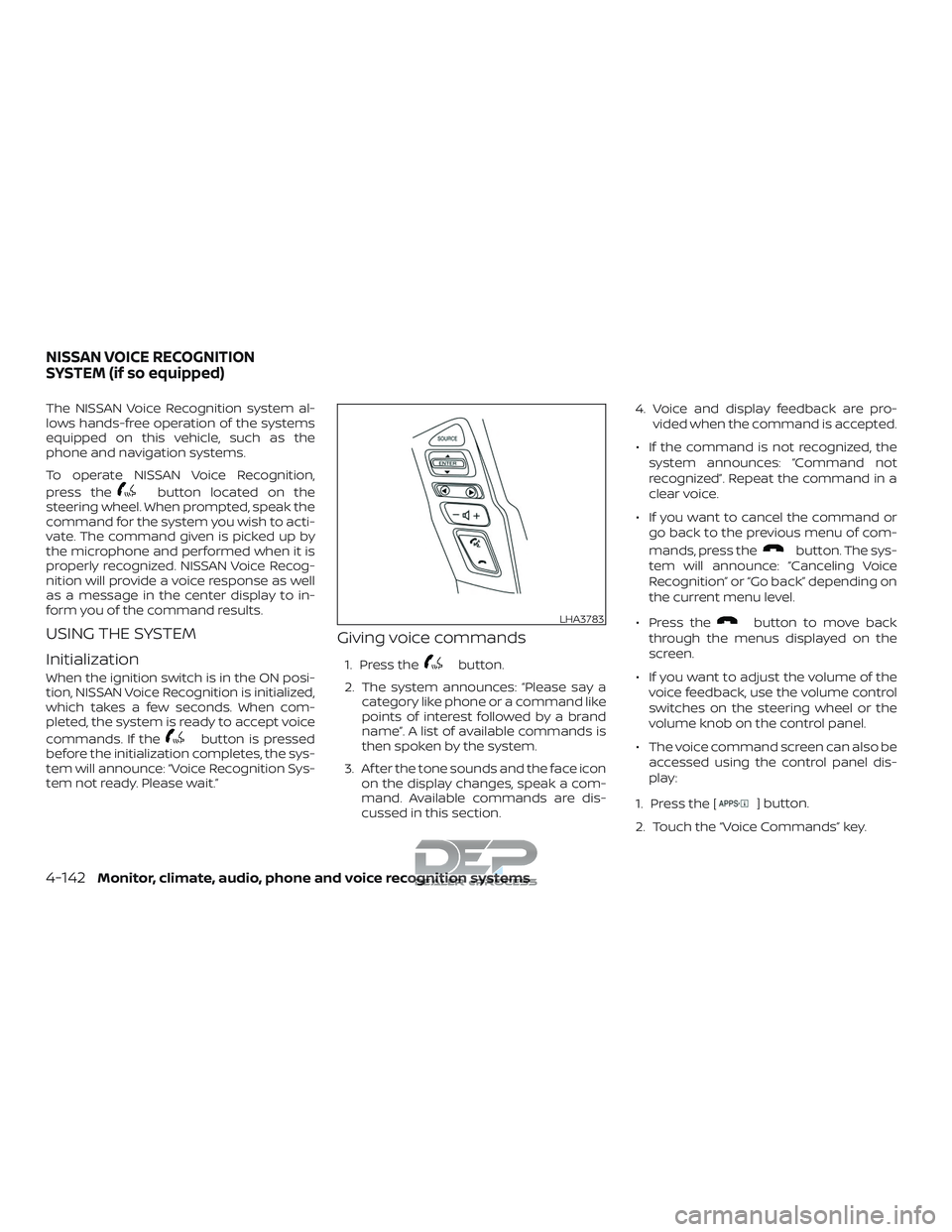
To operate NISSAN Voice Recognition,
press the
button located on the
steering wheel. When prompted, speak the
command for the system you wish to acti-
vate. The command given is picked up by
the microphone and performed when it is
properly recognized. NISSAN Voice Recog-
nition will provide a voice response as well
as a message in the center display to in-
form you of the command results.
USING THE SYSTEM
Initialization
When the ignition switch is in the ON posi-
tion, NISSAN Voice Recognition is initialized,
which takes a few seconds. When com-
pleted, the system is ready to accept voice
commands. If the
button is pressed
before the initialization completes, the sys-
tem will announce: “Voice Recognition Sys-
tem not ready. Please wait.”
Giving voice commands
1. Press thebutton.
2. The system announces: “Please say a category like phone or a command like
points of interest followed by a brand
name”. A list of available commands is
then spoken by the system.
3. Af ter the tone sounds and the face icon on the display changes, speak a com-
mand. Available commands are dis-
cussed in this section. 4. Voice and display feedback are pro-
vided when the command is accepted.
∙ If the command is not recognized, the system announces: “Command not
recognized”. Repeat the command in a
clear voice.
∙ If you want to cancel the command or go back to the previous menu of com-
mands, press the
button. The sys-
tem will announce: “Canceling Voice
Recognition” or “Go back” depending on
the current menu level.
∙ Press the
button to move back
through the menus displayed on the
screen.
∙ If you want to adjust the volume of the voice feedback, use the volume control
switches on the steering wheel or the
volume knob on the control panel.
∙ The voice command screen can also be accessed using the control panel dis-
play:
1. Press the [
] button.
2. Touch the “Voice Commands” key.
LHA3783
NISSAN VOICE RECOGNITION
SYSTEM (if so equipped)
4-142Monitor, climate, audio, phone and voice recognition systems
Page 398 of 650
Using 4–wheel drive (4WD) (if so equipped)......5-45
Transfer case shif ting procedures ...........5-46
Electronic locking rear differential (E-Lock)
system (if so equipped) ......................... 5-52
Eco Drive Report (if so equipped) ...............5-54
Parking/parking on hills ........................5-55
Power steering ................................. 5-56
Brake system ................................... 5-56
Brake precautions ........................... 5-56
Anti-lock Braking System (ABS) ..............5-57
Brake assist ................................. 5-58
Active brake limited slip (ABLS) system ..........5-59
Vehicle Dynamic Control (VDC) system .........5-60
Brake force distribution ......................5-61
Hill Descent Control System (if so equipped) ....5-62
Hill start assist system .......................... 5-63Front and rear sonar system (if so equipped) . . . 5-64
System operation ........................... 5-65
How to enable/disable the Sonar
system ...................................... 5-67
Sonar limitations ............................ 5-68
System maintenance ........................ 5-69
Cold weather driving ........................... 5-69
Freeing a frozen door lock ...................5-69
Antifreeze ................................... 5-69
Battery...................................... 5-69
Draining of coolant water ....................5-70
Tire equipment .............................. 5-70
Special winter equipment ...................5-70
Driving on snow or ice .......................5-70
Engine block heater (if so equipped) .........5-71
Page 401 of 650
prevent the TPMS from functioning prop-
erly. Always check the TPMS malfunction
telltale af ter replacing one or more tires or
wheels on your vehicle to ensure that the
replacement or alternate tires and wheels
allow the TPMS to continue to function
properly.
Additional information:∙ When replacing a wheel without the TPMS such as the spare tire, the TPMS
does not monitor the tire pressure of
the spare tire.
∙ The TPMS will activate only when the vehicle is driven at speeds above
16 mph (25 km/h). Also, this system may
not detect a sudden drop in tire pres-
sure (for example, a flat tire while driv-
ing).
∙ The low tire pressure warning light does not automatically turn off when the tire
pressure is adjusted. Af ter your tires are
inflated to the recommended pressure,
the vehicle must be driven at speeds
above 16 mph (25 km/h) to activate the
TPMS and turn off the low tire pressure
warning light. Use a tire pressure gauge
to check the tire pressure. ∙ The “Tire Pressure Low – Add Air” warn-
ing appears in the vehicle information
display when the low tire pressure
warning light is illuminated and low tire
pressure is detected. The “Tire Pressure
Low – Add Air” warning turns off when
the low tire pressure warning light turns
off.
∙ The “Tire Pressure Low – Add Air” warn- ing does not appear if the low tire pres-
sure warning light illuminates to indi-
cate a TPMS malfunction.
∙ Tire pressure rises and falls depending on the heat caused by the vehicle’s op-
eration and the outside temperature.
Do not reduce the tire pressure af ter
driving because the tire pressure rises
af ter driving. Low outside temperature
can lower the temperature of the air
inside the tire which can cause a lower
tire inflation pressure. This may cause
the low tire pressure warning light to
illuminate. If the warning light illumi-
nates, check the tire pressure for all four
tires.
∙ The Tire and Loading Information label is located in the driver’s door opening. For additional information, refer to “Low tire
pressure warning light” in the “Instruments
and controls” section and “Tire Pressure
Monitoring System (TPMS)” in the “In case of
emergency” section of this manual.
WARNING
∙ Radio waves could adversely affect
electric medical equipment. Those
who use a pacemaker should contact
the electric medical equipment
manufacturer for the possible influ-
ences before use.
∙ If the low tire pressure warning light illuminates while driving, avoid sud-
den steering maneuvers or abrupt
braking, reduce vehicle speed, pull off
the road to a safe location and stop
the vehicle as soon as possible. Driv-
ing with under-inflated tires may per-
manently damage the tires and in-
crease the likelihood of tire failure.
Serious vehicle damage could occur
and may lead to an accident and could
result in serious personal injury.
Check the tire pressure for all four
tires. Adjust the tire pressure to the
recommended COLD tire pressure
5-4Starting and driving
Page 404 of 650
sports cars are designed to perform satis-
factorily under off-road conditions. If at all
possible, avoid sharp turns at high speeds.
As with other vehicles of this type, failure to
operate this vehicle correctly may result in
loss of control or vehicle rollover. In a roll-
over crash, an unbelted person is signifi-
cantly more likely to die than a person
wearing a seat belt.
For additional information, refer to “Driving
safety precautions” in this section.
AVOIDING COLLISION AND
ROLLOVER
WARNING
Failure to operate this vehicle in a safe
and prudent manner may result in loss
of control or an accident.
Be alert and drive defensively at all times.
Obey all traffic regulations. Avoid excessive
speed, high speed cornering, or sudden
steering maneuvers, because these driving
practices could cause you to lose control of
your vehicle.
As with any vehicle, loss of control could
result in a collision with other vehicles or
objects or cause the vehicle to roll over, particularly if the loss of control causes
the vehicle to slide sideways.
Be attentive at all times, and avoid driving
when tired. Never drive when under the in-
fluence of alcohol or drugs (including pre-
scription or over-the-counter drugs which
may cause drowsiness). Always wear your
seat belt as outlined in the “Safety – Seats,
seat belts and supplemental restraint sys-
tem” section of this manual, and also in-
struct your passengers to do so.
Seat belts help reduce the risk of injury in
collisions and rollovers.
In a rollover crash,
an unbelted or improperly belted person
is significantly more likely to be injured
or killed than a person properly wearing
a seat belt.
OFF-ROAD RECOVERY
While driving, the right side or lef t side
wheels may unintentionally leave the road
surface. If this occurs, maintain control of
the vehicle by following the procedure be-
low. Please note that this procedure is only
a general guide. The vehicle must be driven
as appropriate based on the conditions of
the vehicle, road and traffic.
1. Remain calm and do not overreact.
2. Do not apply the brakes. 3. Maintain a firm grip on the steering
wheel with both hands and try to hold a
straight course.
4. When appropriate, slowly release the accelerator pedal to gradually slow the
vehicle.
5. If there is nothing in the way, steer the vehicle to follow the road while vehicle
speed is reduced. Do not attempt to
drive the vehicle back onto the road
surface until vehicle speed is reduced.
6. When it is safe to do so, gradually turn the steering wheel until both tires re-
turn to the road surface. When all tires
are on the road surface, steer the ve-
hicle to stay in the appropriate driving
lane.
∙ If you decide that it is not safe to re- turn the vehicle to the road surface
based on vehicle, road or traffic con-
ditions, gradually slow the vehicle to a
stop in a safe place off the road.
Starting and driving5-7
Page 405 of 650
RAPID AIR PRESSURE LOSS
Rapid air pressure loss or a “blow-out” can
occur if the tire is punctured or is damaged
due to hitting a curb or pothole. Rapid air
pressure loss can also be caused by driving
on under-inflated tires.
Rapid air pressure loss can affect the han-
dling and stability of the vehicle, especially
at highway speeds.
Help prevent rapid air pressure loss by
maintaining the correct air pressure and
visually inspecting the tires for wear and
damage. For additional information, refer
to “Wheels and tires” in the “Do-it-yourself ”
section of this manual. If a tire rapidly loses
air pressure or “blows-out” while driving,
maintain control of the vehicle by following
the procedure below. Please note that this
procedure is only a general guide. The ve-
hicle must be driven as appropriate based
on the conditions of the vehicle, road and
traffic.
WARNING
The following actions can increase the
chance of losing control of the vehicle if
there is a sudden loss of tire air pres-
sure. Losing control of the vehicle may
cause a collision and result in personal
injury.
∙ The vehicle generally moves or pullsin the direction of the flat tire.
∙ Do not rapidly apply the brakes.
∙ Do not rapidly release the accelerator pedal.
∙ Do not rapidly turn the steering wheel.
1. Remain calm and do not overreact.
2. Maintain a firm grip on the steering wheel with both hands and try to hold a
straight course.
3. When appropriate, slowly release the accelerator pedal to gradually slow the
vehicle.
4. Gradually steer the vehicle to a safe location off the road and away from
traffic if possible.
5. Lightly apply the brake pedal to gradu- ally stop the vehicle. 6. Turn on the hazard warning flashers
and contact a roadside emergency
service to change the tire. For addi-
tional information, refer to “Changing a
flat tire” in the “In case of emergency”
section of this manual.
DRINKING ALCOHOL/DRUGS AND
DRIVING
WARNING
Never drive under the influence of alco-
hol or drugs. Alcohol in the bloodstream
reduces coordination, delays reaction
time and impairs judgement. Driving af-
ter drinking alcohol increases the likeli-
hood of being involved in an accident in-
juring yourself and others. Additionally, if
you are injured in an accident, alcohol can
increase the severity of the injury.
NISSAN is committed to safe driving. How-
ever, you must choose not to drive under the
influence of alcohol. Every year thousands of
people are injured or killed in alcohol-related
collisions. Although the local laws vary on
what is considered to be legally intoxicated,
the fact is that alcohol affects all people dif-
ferently and most people underestimate the
effects of alcohol.
5-8Starting and driving
Page 406 of 650
Remember, drinking and driving don’t mix!
That is true for drugs (over-the-counter,
prescription) and illegal drugs, too. Don’t
drive if your ability to operate your vehicle is
impaired by alcohol, drugs, or some other
physical condition.
DRIVING SAFETY PRECAUTIONS
Your NISSAN is designed for both normal
and off-road use. However, avoid driving in
deep water or mud as your NISSAN is
mainly designed for leisure use, unlike a
conventional off-road vehicle.
Remember that 2-wheel drive models are
less capable than 4-wheel drive models for
rough road driving and extrication when
stuck in deep snow or mud, or the like.
Please observe the following precautions:
WARNING
∙ Drive carefully when off the road andavoid dangerous areas. Every person
who drives or rides in this vehicle
should be seated with their seat belt
fastened. This will keep you and your
passengers in position when driving
over rough terrain. ∙ Do not drive across steep slopes. In-
stead drive either straight up or
straight down the slopes. Off-road ve-
hicles can tip over sideways much
more easily than they can forward or
backward.
∙ Many hills are too steep for any ve- hicle. If you drive up them, you may
stall. If you drive down them, you may
not be able to control your speed. If
you drive across them, you may roll
over.
∙ Do not shif t gears while driving on downhill grades as this could cause
loss of control of the vehicle.
∙ Stay alert when driving to the top of a hill. At the top there could be a drop-
off or other hazard that could cause
an accident.
∙ If your engine stalls or you cannot make it to the top of a steep hill, never
attempt to turn around. Your vehicle
could tip or roll over. Always back
straight down in R (Reverse) gear and
apply brakes to control your speed. ∙ Heavy braking going down a hill could
cause your brakes to overheat and
fade, resulting in loss of control and
an accident. Apply brakes lightly and
use a low gear to control your speed.
∙ Unsecured cargo can be thrown around when driving over rough ter-
rain. Properly secure all cargo so it will
not be thrown forward and cause in-
jury to you or your passengers.
∙ Secure heavy loads in the cargo area as far forward and as low as possible.
Do not equip the vehicle with tires
larger than specified in this manual.
This could cause your vehicle to roll
over.
∙ Do not grip the inside or spokes of the steering wheel when driving off-road.
The steering wheel could move sud-
denly and injure your hands. Instead
drive with your fingers and thumbs on
the outside of the rim.
∙ Before operating the vehicle, ensure that the driver and all passengers
have their seat belts fastened.
Starting and driving5-9
Page 407 of 650
∙ Lower your speed when encounteringstrong crosswinds. With a higher cen-
ter of gravity, your NISSAN is more af-
fected by strong side winds. Slower
speeds ensure better vehicle control.
∙ Do not drive beyond the performance capability of the tires, even with 4WD
engaged.
∙ For 4WD equipped vehicles, do not at- tempt to raise two wheels off the
ground and shif t the transmission to
any drive or reverse position with the
engine running. Doing so may result
in drivetrain damage or unexpected
vehicle movement which could result
in serious vehicle damage or personal
injury. ∙ Do not attempt to test a 4WD
equipped vehicle on a 2-wheel dyna-
mometer (such as the dynamometers
used by some states for emissions
testing), or similar equipment even if
the other two wheels are raised off the
ground. Make sure you inform test fa-
cility personnel that your vehicle is
equipped with 4WD before it is placed
on a dynamometer. Using the wrong
test equipment may result in drive-
train damage or unexpected vehicle
movement which could result in seri-
ous vehicle damage or personal
injury.
∙ Accelerating quickly, sharp steering maneuvers or sudden braking may
cause loss of control.
∙ If at all possible, avoid sharp turning maneuvers, particularly at high
speeds. Your NISSAN 4-wheel drive
vehicle has a higher center of gravity
than a passenger car. The vehicle is
not designed for cornering at the
same speeds as passenger cars. Fail-
ure to operate this vehicle correctly
could result in loss of control and/or a
rollover accident. ∙ Always use tires of the same type,
size, brand, construction (bias, bias-
belted, or radial), and tread pattern on
all four wheels. Install tire chains on
the rear wheels when driving on slip-
pery roads and drive carefully.
∙ Be sure to check the brakes immedi- ately af ter driving in mud or water. For
additional information, refer to “Wet
brakes” in this section.
∙ Avoid parking your vehicle on steep hills. If you get out of the vehicle and it
rolls forward, backward or sideways,
you could be injured.
∙ Whenever you drive off-road through sand, mud or water as deep as the
wheel hub, more frequent mainte-
nance may be required. For additional
information, refer to “Maintenance
schedules” in the “Maintenance and
schedules” section of this manual.
5-10Starting and driving
Page 418 of 650
When canceling the manual shif t mode
Press and hold the +(UP) button to return
the transmission to the normal driving
mode.∙ In the manual shif t mode, the trans-
mission may not shif t to the selected
gear immediately because of vehicle
speed. The transmission will up or
down shif t when vehicle speed
matches the programmed transmis-
sion shif t points. This helps maintain
driving performance and reduces the
chance of vehicle damage or loss of
control.
∙ In the manual shif t mode, the trans-
mission will not up shif t to a higher
gear than is manually selected. When
the vehicle speed decreases, the
transmission automatically shif ts
down and shif ts to 1st gear before the
vehicle comes to a stop.
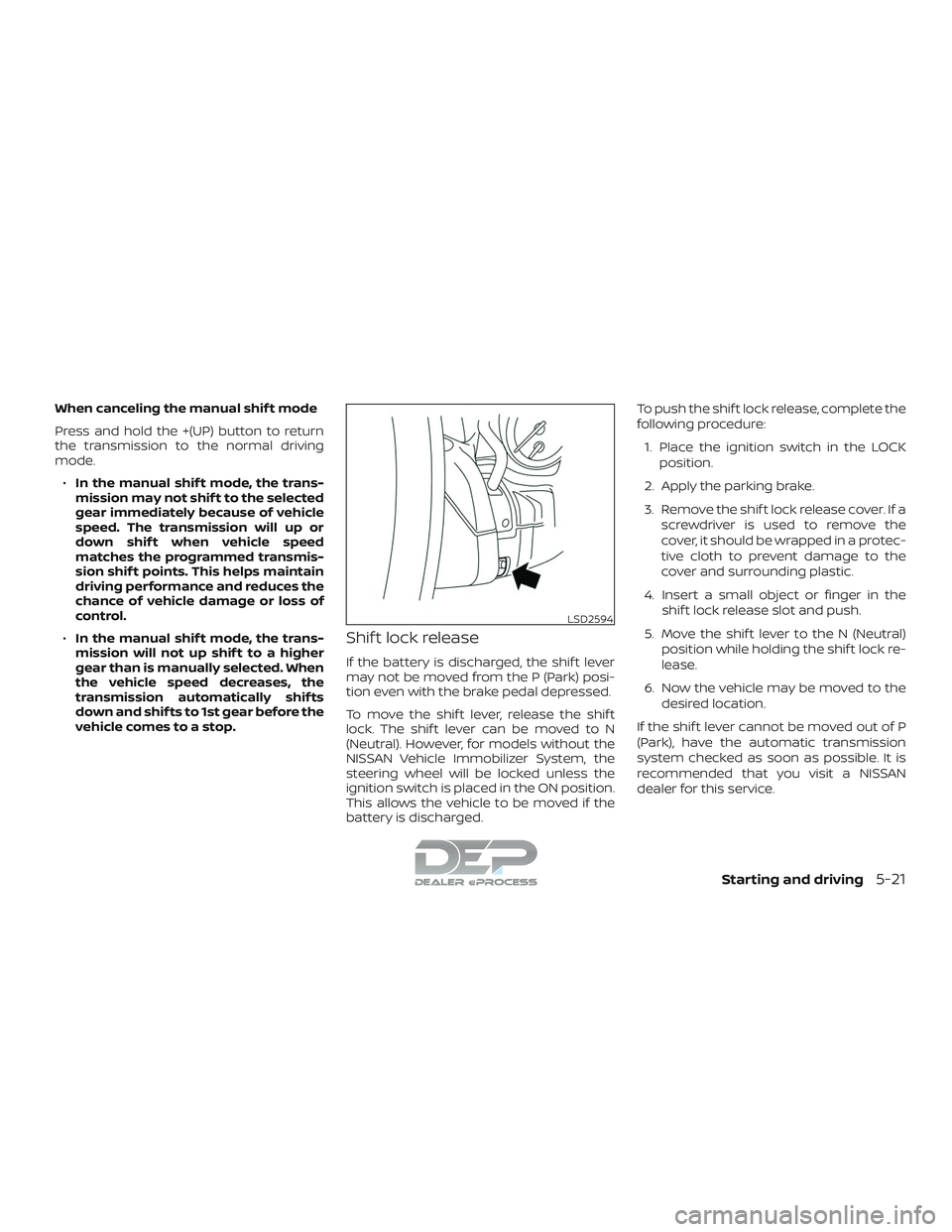
Shif t lock release
If the battery is discharged, the shif t lever
may not be moved from the P (Park) posi-
tion even with the brake pedal depressed.
To move the shif t lever, release the shif t
lock. The shif t lever can be moved to N
(Neutral). However, for models without the
NISSAN Vehicle Immobilizer System, the
steering wheel will be locked unless the
ignition switch is placed in the ON position.
This allows the vehicle to be moved if the
battery is discharged. To push the shif t lock release, complete the
following procedure:
1. Place the ignition switch in the LOCK position.
2. Apply the parking brake.
3. Remove the shif t lock release cover. If a screwdriver is used to remove the
cover, it should be wrapped in a protec-
tive cloth to prevent damage to the
cover and surrounding plastic.
4. Insert a small object or finger in the shif t lock release slot and push.
5. Move the shif t lever to the N (Neutral) position while holding the shif t lock re-
lease.
6. Now the vehicle may be moved to the desired location.
If the shif t lever cannot be moved out of P
(Park), have the automatic transmission
system checked as soon as possible. It is
recommended that you visit a NISSAN
dealer for this service.
LSD2594
Starting and driving5-21
Page 450 of 650
WARNING
∙ Never leave the E-Lock system onwhen driving on paved or hard-
surfaced roads. Turning the vehicle
may result in the rear wheels slipping
and result in an accident and personal
injury. Af ter using the E-Lock system
to free the vehicle, turn the system off.
∙ Use the E-Lock system only in an emergency when it is not possible to
free a stuck vehicle even when using
4LO. Never use the E-Lock system on a
slippery road surface such as snow or
ice surface. Using the E-Lock system
when driving in these road conditions
may cause unexpected movement of
the vehicle during engine braking, ac-
celerating or turning, which may re-
sult in an accident and serious per-
sonal injury.
∙ Observe the above warnings. Other- wise, loss of normal steering control
may result. This may result in an acci-
dent and serious personal injury.
CAUTION
∙ Af ter using the E-Lock system, or dur-ing normal driving, turn the switch off
to prevent possible damage to the
drivetrain components from ex-
tended use.
∙ Avoid quick starts while the E-Lock system is in operation. Otherwise, the
drivetrain components could be
damaged.
∙ When the E-Lock system is in opera- tion, turning the vehicle becomes dif-
ficult. This can be dangerous, espe-
cially at high speeds. Doing so could
damage the drivetrain components.
∙ Do not operate the E-Lock system when the vehicle is turning or when
one side wheel is rotating. Otherwise,
the drivetrain components could be
damaged.
∙ The E-Lock system operates only when the engine is running.
∙ In 4H mode, the E-Lock system does not operate when the E-Lock system
switch is turned to the ON position.
(The E-Lock system indicator light will
flash.) ∙ Observe the above cautions. Other-
wise, loss of normal steering control
may result.
Starting and driving5-53