low NISSAN VERSA 2007 1.G Navigation Manual
[x] Cancel search | Manufacturer: NISSAN, Model Year: 2007, Model line: VERSA, Model: NISSAN VERSA 2007 1.GPages: 272, PDF Size: 4.16 MB
Page 138 of 272
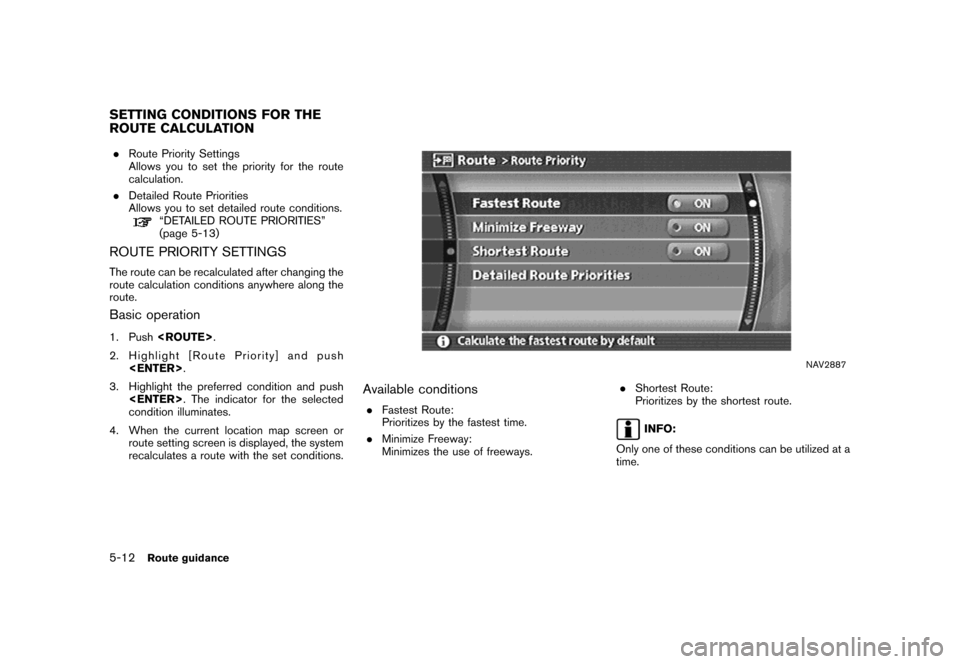
.Route Priority Settings
Allows you to set the priority for the route
calculation.
.Detailed Route Priorities
Allows you to set detailed route conditions.
“DETAILED ROUTE PRIORITIES”
(page 5-13)
ROUTE PRIORITY SETTINGS
The route can be recalculated after changing the
route calculation conditions anywhere along the
route.
Basic operation
1. Push
2. Highlight [Route Priority] and push
3. Highlight the preferred condition and push
condition illuminates.
4. When the current location map screen or
route setting screen is displayed, the system
recalculates a route with the set conditions.
NAV2887
Available conditions
.Fastest Route:
Prioritizes by the fastest time.
.Minimize Freeway:
Minimizes the use of freeways..Shortest Route:
Prioritizes by the shortest route.
INFO:
Only one of these conditions can be utilized at a
time.
SETTING CONDITIONS FOR THE
ROUTE CALCULATION
5-12Route guidance
Page 140 of 272
![NISSAN VERSA 2007 1.G Navigation Manual INFO:
.The recalculated route may not be the
shortest route because the system priori-
tizes easy-to-drive roads for safety reasons.
.If you set the route conditions from [Route
Priority], all section](/img/5/721/w960_721-139.png "NISSAN VERSA 2007 1.G Navigation Manual INFO:
.The recalculated route may not be the
shortest route because the system priori-
tizes easy-to-drive roads for safety reasons.
.If you set the route conditions from [Route
Priority], all section")
INFO:
.The recalculated route may not be the
shortest route because the system priori-
tizes easy-to-drive roads for safety reasons.
.If you set the route conditions from [Route
Priority], all sections in the route are subject
to the same route conditions even though
you have set different route conditions for
different sections in [Edit Route].
.If [Use Time Restricted Roads] is deacti-
vated, the system calculates a route without
any consideration of the regulations con-
cerning the time or day of the week. There-
fore, the suggested route may include a road
subject to traffic regulations concerning the
time or day of the week. When driving along
the route, always follow all regulations.
.If the system cannot calculate any alternative
routes, it displays the previous route.
.If the vehicle overly deviates from the
suggested route, the system calculates a
new route.
5-14Route guidance
Page 145 of 272
![NISSAN VERSA 2007 1.G Navigation Manual NAV2895
EDITING A ROUTE
1. Highlight [Edit Route] and push<ENTER>.
2. Highlight the preferred condition and push
<ENTER>.
3. Push<BACK>/<PREV>to return to the
previous screen. Push<MAP>to return to
th](/img/5/721/w960_721-144.png "NISSAN VERSA 2007 1.G Navigation Manual NAV2895
EDITING A ROUTE
1. Highlight [Edit Route] and push<ENTER>.
2. Highlight the preferred condition and push
<ENTER>.
3. Push<BACK>/<PREV>to return to the
previous screen. Push<MAP>to return to
th")
NAV2895
EDITING A ROUTE
1. Highlight [Edit Route] and push
2. Highlight the preferred condition and push
3. Push
previous screen. Push
Page 146 of 272
“Changing route calculation conditions”
(page 5-24)
&5Allows you to add a destination.“Setting a destination or waypoint”
(page 5-20)
&6Allows you to add a waypoint.“Setting a destination or waypoint”
(page 5-20)
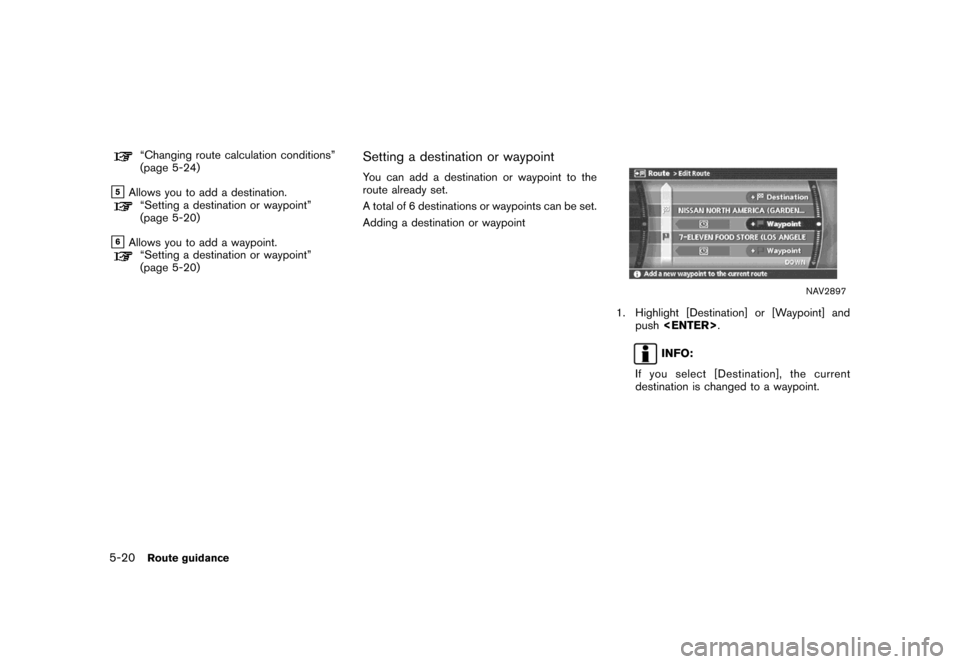
Setting a destination or waypoint
You can add a destination or waypoint to the
route already set.
A total of 6 destinations or waypoints can be set.
Adding a destination or waypoint
NAV2897
1. Highlight [Destination] or [Waypoint] and
push
INFO:
If you select [Destination], the current
destination is changed to a waypoint.
5-20Route guidance
Page 152 of 272
![NISSAN VERSA 2007 1.G Navigation Manual When the suggested route is displayed after
calculation, you can confirm the route informa-
tion or simulate the suggested route.
BASIC OPERATION
1. Highlight [Route Information] and push
<ENTER>.
2.](/img/5/721/w960_721-151.png "NISSAN VERSA 2007 1.G Navigation Manual When the suggested route is displayed after
calculation, you can confirm the route informa-
tion or simulate the suggested route.
BASIC OPERATION
1. Highlight [Route Information] and push
<ENTER>.
2.")
When the suggested route is displayed after
calculation, you can confirm the route informa-
tion or simulate the suggested route.
BASIC OPERATION
1. Highlight [Route Information] and push
2. Highlight the preferred item and push
NAV2909
Available items
.Turn list:
Displays the details of the suggested route.
“USING TURN LIST” (page 5-27)
.Where am I? (Armada, Maxima, Murano,
Pathfinder, Quest, Titan):
Allows you to display the information about
the vehicle location on the route when
driving according to route guidance.
“VIEWING INFORMATION ABOUT
CURRENT VEHICLE LOCATION”
(page 7-3).Preview:
Allows you to confirm the suggested route
by scrolling the map.
“USING ROUTE PREVIEW”
(page 5-27)
.Simulation:
Allows you to simulate the suggested route.
This function provides a detailed image of
the route with voice guidance.
“CONFIRMING BY SIMULATION”
(page 5-28)
CONFIRMING A ROUTE
5-26Route guidance
Page 156 of 272

Turn Arrow on Map is displayed.
.Voice Announcements:
Sets how many times voice guidance is
repeated for guide points.
“VOICE GUIDANCE SETTINGS”
(page 5-32)
.Set Average Speeds:
Allows you to set an average vehicle speed
for each type of road, which is reflected in
the calculation of the required time to the
destination.
“SET AVERAGE SPEEDS”
(page 5-33)
5-30Route guidance
Page 159 of 272
![NISSAN VERSA 2007 1.G Navigation Manual SET AVERAGE SPEEDS
You can calculate the required time to the
destination based on the set vehicle speeds.
Basic operation
1. Highlight [Set Average Speeds] and push
<ENTER>.
2. Highlight the preferre](/img/5/721/w960_721-158.png "NISSAN VERSA 2007 1.G Navigation Manual SET AVERAGE SPEEDS
You can calculate the required time to the
destination based on the set vehicle speeds.
Basic operation
1. Highlight [Set Average Speeds] and push
<ENTER>.
2. Highlight the preferre")
SET AVERAGE SPEEDS
You can calculate the required time to the
destination based on the set vehicle speeds.
Basic operation
1. Highlight [Set Average Speeds] and push
2. Highlight the preferred item and push
3. Use the joystick to make an adjustment. The
speed can be increased/decreased by 5
MPH (5 km/h) .
4. After finishing the setting, push
or
setting.
5. Push
previous screen. Push
Page 170 of 272
![NISSAN VERSA 2007 1.G Navigation Manual NAV2937
4. Highlight [None (Add New)] and push
<ENTER>.
INFO:
A maximum of 5 Avoid Areas can be stored.
“DELETING A STORED ITEM”
(page 6-28)
NAV2938
5. Highlight the appropriate method to search
f](/img/5/721/w960_721-169.png "NISSAN VERSA 2007 1.G Navigation Manual NAV2937
4. Highlight [None (Add New)] and push
<ENTER>.
INFO:
A maximum of 5 Avoid Areas can be stored.
“DELETING A STORED ITEM”
(page 6-28)
NAV2938
5. Highlight the appropriate method to search
f")
NAV2937
4. Highlight [None (Add New)] and push
INFO:
A maximum of 5 Avoid Areas can be stored.
“DELETING A STORED ITEM”
(page 6-28)
NAV2938
5. Highlight the appropriate method to search
for a location and push
“4. Setting a destination”
NAV2939
6. Set the following items for the searched
location.
Available setting items
.Rename.Alter Location.Resize Area.FWY.Delete
7. After finishing the setting, highlight [OK] and
push
6-8Storing a location/route
Page 175 of 272
![NISSAN VERSA 2007 1.G Navigation Manual NAV2946
4. A confirmation message is displayed. Con-
firm the contents of the message, highlight
[Yes] and push<ENTER>.
The current route is stored.
NAV2947
INFO:
You can also store a route using the](/img/5/721/w960_721-174.png "NISSAN VERSA 2007 1.G Navigation Manual NAV2946
4. A confirmation message is displayed. Con-
firm the contents of the message, highlight
[Yes] and push<ENTER>.
The current route is stored.
NAV2947
INFO:
You can also store a route using the")
NAV2946
4. A confirmation message is displayed. Con-
firm the contents of the message, highlight
[Yes] and push
The current route is stored.
NAV2947
INFO:
You can also store a route using the following
procedure.
1) Push
2) Highlight [Navigation] and push
3) Highlight [Address Book] and push
4) Highlight [Stored Routes] and push
5) Highlight [None (Add New)] and push
INFO:
.The route is stored in the first available
position number in the store current route
list.
.A maximum of 5 routes can be stored.
“DELETING A STORED ITEM”
(page 6-28)
.If you have not set any waypoints on the
route, the route cannot be stored.
Storing a location/route6-13
Page 179 of 272
![NISSAN VERSA 2007 1.G Navigation Manual MINOR ADJUSTMENT OF THE
STORED HOME AND LOCATIONS
When you select [Edit], you can edit the
following items of the home or stored location.
.Show Icon on Map
.Name (only for stored locations)
.Icon
.So](/img/5/721/w960_721-178.png "NISSAN VERSA 2007 1.G Navigation Manual MINOR ADJUSTMENT OF THE
STORED HOME AND LOCATIONS
When you select [Edit], you can edit the
following items of the home or stored location.
.Show Icon on Map
.Name (only for stored locations)
.Icon
.So")
MINOR ADJUSTMENT OF THE
STORED HOME AND LOCATIONS
When you select [Edit], you can edit the
following items of the home or stored location.
.Show Icon on Map
.Name (only for stored locations)
.Icon
.Sound
.Direction
.Distance
.Phone No.
.Group (only for stored locations)
.Entry Number (only for stored locations)
NAV2953
Show Icon on Map
Displays the home icon or the stored location
icon on the map.
1. Highlight [Show Icon on Map] and push
2. The indicator illuminates when the item is
set. Then the system displays the icon on
the map.
NAV2954
Name (only for stored locations)
Changes the name of a stored location.
1. Highlight [Name] and push
A character input screen is displayed.
Storing a location/route6-17