low NISSAN VERSA 2007 1.G Navigation Manual
[x] Cancel search | Manufacturer: NISSAN, Model Year: 2007, Model line: VERSA, Model: NISSAN VERSA 2007 1.GPages: 272, PDF Size: 4.16 MB
Page 76 of 272

If you know the address of a friend or business
or you are going to a central location (tourist
spot, etc.) in a city, the following setting
methods are available.
.Setting a Street Address
If you know the address of your destination,
use this method to enter the address and
then have the system calculate a route. You
can also search for a location near the
preferred destination by entering the house
number if the map DVD-ROM contains the
relevant data.
.Setting a City Center
This allows you to have the system calculate
a route to the center of a city, without setting
a specific location.
.Setting an Intersection
This allows you to set the destination to an
intersection of any two streets, and then
have the system calculate a route.
SETTING A STREET ADDRESS/
RESIDENCE AS THE DESTINATION
4-4Setting a destination
Page 92 of 272
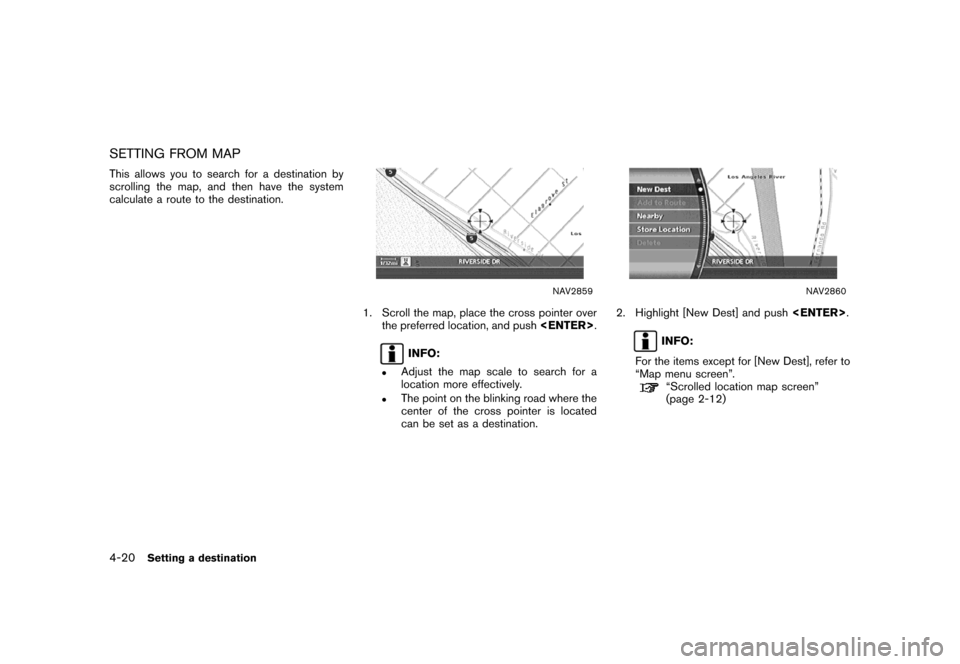
SETTING FROM MAP
This allows you to search for a destination by
scrolling the map, and then have the system
calculate a route to the destination.
NAV2859
1. Scroll the map, place the cross pointer over
the preferred location, and push
INFO:
.Adjust the map scale to search for a
location more effectively.
.The point on the blinking road where the
center of the cross pointer is located
can be set as a destination.
NAV2860
2. Highlight [New Dest] and push
INFO:
For the items except for [New Dest], refer to
“Map menu screen”.
“Scrolled location map screen”
(page 2-12)
4-20Setting a destination
Page 94 of 272

The following setting methods are available
when setting the destination to your home or
any location stored in the Address Book.
.Setting your home
This allows you to set your home as the
destination and have the system calculate a
route. It is useful especially when you are
searching for a route to return to your home.
“STORING A LOCATION” (page 6-2)
.Setting from Address Book
This allows you to set the destination to a
location stored in the Address Book and
have the system calculate a route. To utilize
this function more effectively, destinations
that you often travel to should be stored in
advance.
“STORING A LOCATION” (page 6-2)
.Setting a Previous Destination
This allows you to set the destination to a
location that you have previously set as the
destination and have the system calculate a
route. Up to 100 previous destinations will
be automatically stored.
If the number of previous destinations
exceeds 100, the oldest one will be
replaced by the new one..Setting the Previous Starting Point
This allows you to set the destination to the
starting point of the previous route guidance
and have the system calculate a route.
.Setting from Stored Routes
You can select a preferred route from the
stored routes.
SETTING A STORED LOCATION AS
THE DESTINATION
4-22Setting a destination
Page 105 of 272

When you are setting the destination to a facility,
the following methods are available.
.Setting a Point of Interest
This allows you to find a facility by type, and
then have the system calculate a route to
that destination. Specify the region and city
of the destination to find it more quickly.
.Setting a Freeway Entrance/Exit
This allows you to set the destination to an
entrance or exit of a freeway, and then have
the system calculate a route.
.Setting by Phone Number
If you know the telephone number of the
facility, use this to find the facility by entering
the number, and then have the system
calculate a route.
.Setting a Nearby Place
This allows you to set the destination to a
facility located near the current vehicle
location or another location that you move
to by scrolling the map, and then have the
system calculate a route.
If there is any particular facility type that you
intend to use frequently, you can store it in
the list of nearby facilities.
“CUSTOMIZING NEARBY PLACES”
(page 6-33)
SETTING A FACILITY AS THE
DESTINATION
Setting a destination4-33
Page 122 of 272
![NISSAN VERSA 2007 1.G Navigation Manual The following operations are available after you
set a destination.
INFO:
The menu will not be displayed if you select,
[Stored Route] or [Nearby Places] from the
Destination menu.
NAV2863
AVAILABLE S](/img/5/721/w960_721-121.png "NISSAN VERSA 2007 1.G Navigation Manual The following operations are available after you
set a destination.
INFO:
The menu will not be displayed if you select,
[Stored Route] or [Nearby Places] from the
Destination menu.
NAV2863
AVAILABLE S")
The following operations are available after you
set a destination.
INFO:
The menu will not be displayed if you select,
[Stored Route] or [Nearby Places] from the
Destination menu.
NAV2863
AVAILABLE SETTING ITEMS
.OK:
Sets the destination. If the route is already
set, the location becomes the new destina-
tion, and the route is recalculated.
.Alter Location:
Displays a map screen where you can adjust
the location of the destination.
.Add to Route:
Allows you to add a waypoint to the route
already set..POI Info:
Allows you to view information about the
facility that you have set as the destination if
it is included in the map DVD-ROM data.
.Store Location:
Allows you to store the location in the
Address Book.
OPERATIONS AFTER SETTING A
DESTINATION
4-50Setting a destination
Page 128 of 272
![NISSAN VERSA 2007 1.G Navigation Manual After you set a destination using an appropriate
method and select [OK], the system starts
calculating a route to the destination.
Select the preferred setting item and push
<ENTER>.
INFO:
If you have](/img/5/721/w960_721-127.png "NISSAN VERSA 2007 1.G Navigation Manual After you set a destination using an appropriate
method and select [OK], the system starts
calculating a route to the destination.
Select the preferred setting item and push
<ENTER>.
INFO:
If you have")
After you set a destination using an appropriate
method and select [OK], the system starts
calculating a route to the destination.
Select the preferred setting item and push
INFO:
If you have not performed any operations on the
system for several seconds, [Start] is automati-
cally selected, and the system starts route
guidance.
NAV2872
AVAILABLE ITEMS AFTER SETTING A
DESTINATION
.Start:
Starts route guidance to the selected
destination.
“STARTING ROUTE GUIDANCE”
(page 5-3)
.More Routes:
Displays 3 alternative routes.
“SELECTING A ROUTE” (page 5-3).Route Info:
Displays the route information.
“CONFIRMING A ROUTE”
(page 5-4)
.Add Way Pt.:
Allows you to edit the route by adding a
destination or waypoint.
“ADDING A DESTINATION OR
WAYPOINT” (page 5-5)
PROCEDURES AFTER SETTING A
DESTINATION
5-2Route guidance
Page 130 of 272
![NISSAN VERSA 2007 1.G Navigation Manual NAV2876
CONFIRMING A ROUTE
1. Highlight [Route Info] and push<ENTER>.
2. Highlight the preferred information item and
push<ENTER>.
3. Push<BACK>/<PREV>to return to the
previous screen.
NAV2877
Availab](/img/5/721/w960_721-129.png "NISSAN VERSA 2007 1.G Navigation Manual NAV2876
CONFIRMING A ROUTE
1. Highlight [Route Info] and push<ENTER>.
2. Highlight the preferred information item and
push<ENTER>.
3. Push<BACK>/<PREV>to return to the
previous screen.
NAV2877
Availab")
NAV2876
CONFIRMING A ROUTE
1. Highlight [Route Info] and push
2. Highlight the preferred information item and
push
3. Push
previous screen.
NAV2877
Available information
.Preview:
Allows you to confirm the route by scrolling
on the map manually.
“USING ROUTE PREVIEW”
(page 5-27)
.Simulation:
Allows you to view a simulation of the route.
“CONFIRMING BY SIMULATION”
(page 5-28)
5-4Route guidance
Page 133 of 272
![NISSAN VERSA 2007 1.G Navigation Manual After setting the route, select [Start] to begin
route guidance.
Throughout route guidance, the system navi-
gates you through the guide points using visual
and voice guidance.
CAUTION
The navigation](/img/5/721/w960_721-132.png "NISSAN VERSA 2007 1.G Navigation Manual After setting the route, select [Start] to begin
route guidance.
Throughout route guidance, the system navi-
gates you through the guide points using visual
and voice guidance.
CAUTION
The navigation")
After setting the route, select [Start] to begin
route guidance.
Throughout route guidance, the system navi-
gates you through the guide points using visual
and voice guidance.
CAUTION
The navigation system’s visual and voice
guidance is for reference purposes only.
The contents of the guidance may be
inappropriate depending on the situa-
tion.
When driving along the suggested route,
follow all traffic regulations (e.g., one-
way traffic) .
“ROUTE GUIDANCE” (page 9-11)
VOICE GUIDANCE DURING ROUTE
GUIDANCE
When approaching a guide point (intersection or
corner) , destination, etc. during route guidance,
voice guidance announces the remaining dis-
tance and/or turning direction.
Push
voice guidance.
NAI0418
Example of voice guidance
&1“In about one quarter mile (400 meters) ,
right (left) turn.”
“Right (left) turn ahead.”
&2“In about one quarter mile (400 meters)
freeway entrance on your right onto (road
number and direction) .”
“Freeway entrance on your right onto (road
number and direction) .”
&3“In about one mile (1.6 kilometers) , exit on
your right.”
“Take the second exit on your right.”
&4“You have arrived at your destination. Ending
route guidance.”
ABOUT ROUTE GUIDANCE
Route guidance5-7
Page 136 of 272
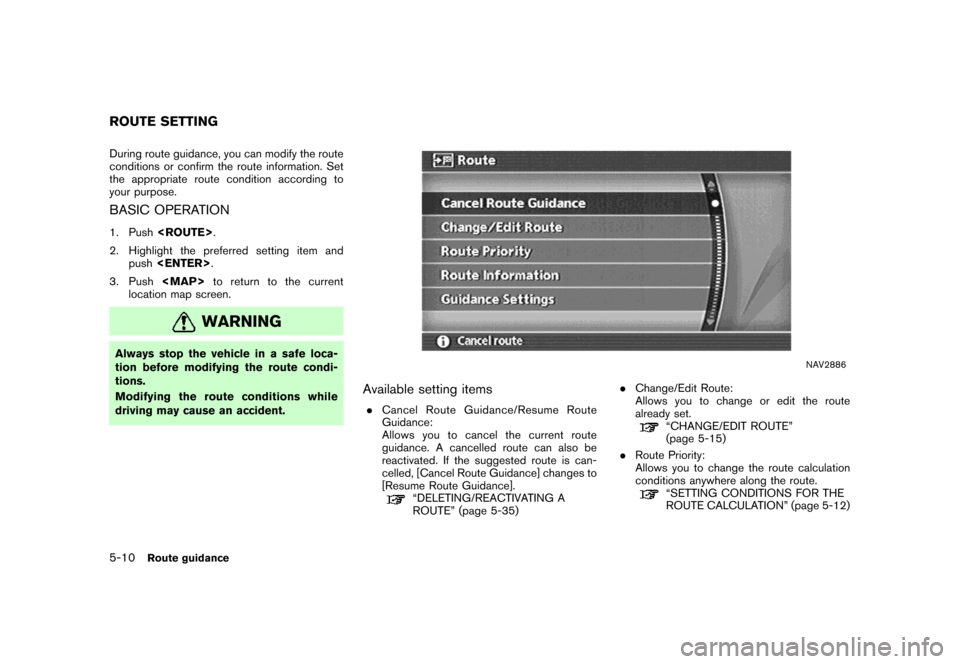
During route guidance, you can modify the route
conditions or confirm the route information. Set
the appropriate route condition according to
your purpose.
BASIC OPERATION
1. Push
2. Highlight the preferred setting item and
push
3. Push
Page 137 of 272

.Route Information:
Allows you to confirm the route by the route
information or simulation.
“CONFIRMING A ROUTE”
(page 5-26)
.Guidance Settings:
You can set various guidance information to
be displayed during route guidance and
activate or deactivate route and/or voice
guidance.
“ROUTE GUIDANCE SETTINGS”
(page 5-29)
Route guidance5-11