air suspension NISSAN X-TRAIL 2001 Service User Guide
[x] Cancel search | Manufacturer: NISSAN, Model Year: 2001, Model line: X-TRAIL, Model: NISSAN X-TRAIL 2001Pages: 3833, PDF Size: 39.49 MB
Page 2733 of 3833
REAR SUSPENSION MEMBER
RSU-13
C
D
F
G
H
I
J
K
L
MA
B
RSU
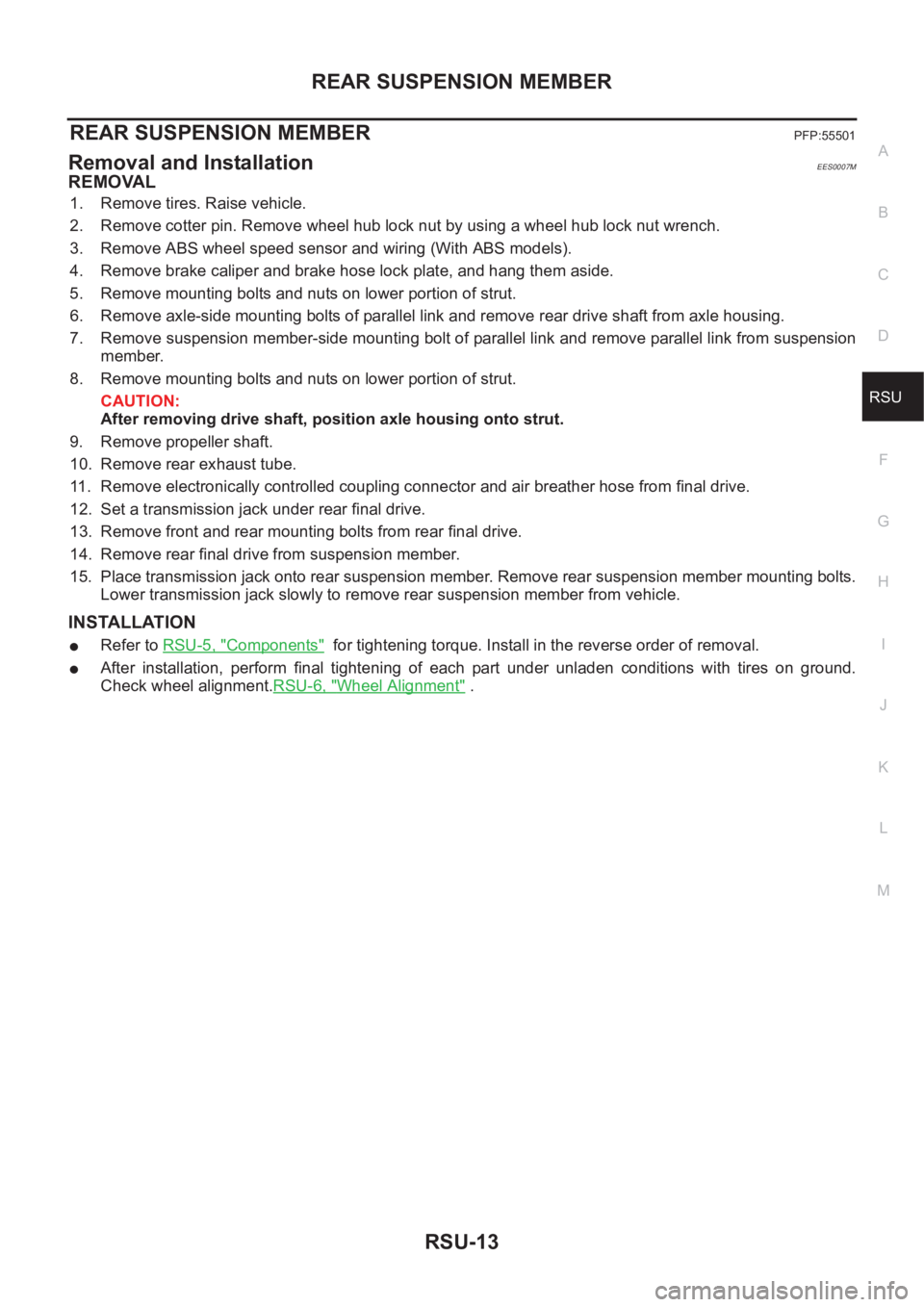
REAR SUSPENSION MEMBERPFP:55501
Removal and InstallationEES0007M
REMOVAL
1. Remove tires. Raise vehicle.
2. Remove cotter pin. Remove wheel hub lock nut by using a wheel hub lock nut wrench.
3. Remove ABS wheel speed sensor and wiring (With ABS models).
4. Remove brake caliper and brake hose lock plate, and hang them aside.
5. Remove mounting bolts and nuts on lower portion of strut.
6. Remove axle-side mounting bolts of parallel link and remove rear drive shaft from axle housing.
7. Remove suspension member-side mounting bolt of parallel link and remove parallel link from suspension
member.
8. Remove mounting bolts and nuts on lower portion of strut.
CAUTION:
After removing drive shaft, position axle housing onto strut.
9. Remove propeller shaft.
10. Remove rear exhaust tube.
11. Remove electronically controlled coupling connector and air breather hose from final drive.
12. Set a transmission jack under rear final drive.
13. Remove front and rear mounting bolts from rear final drive.
14. Remove rear final drive from suspension member.
15. Place transmission jack onto rear suspension member. Remove rear suspension member mounting bolts.
Lower transmission jack slowly to remove rear suspension member from vehicle.
INSTALLATION
●Refer to RSU-5, "Components" for tightening torque. Install in the reverse order of removal.
●After installation, perform final tightening of each part under unladen conditions with tires on ground.
Check wheel alignment.RSU-6, "
Wheel Alignment" .
Page 2736 of 3833
WT-2
NOISE, VIBRATION, AND HARSHNESS (NVH) TROUBLESHOOTING
NOISE, VIBRATION, AND HARSHNESS (NVH) TROUBLESHOOTING
PFP:00003
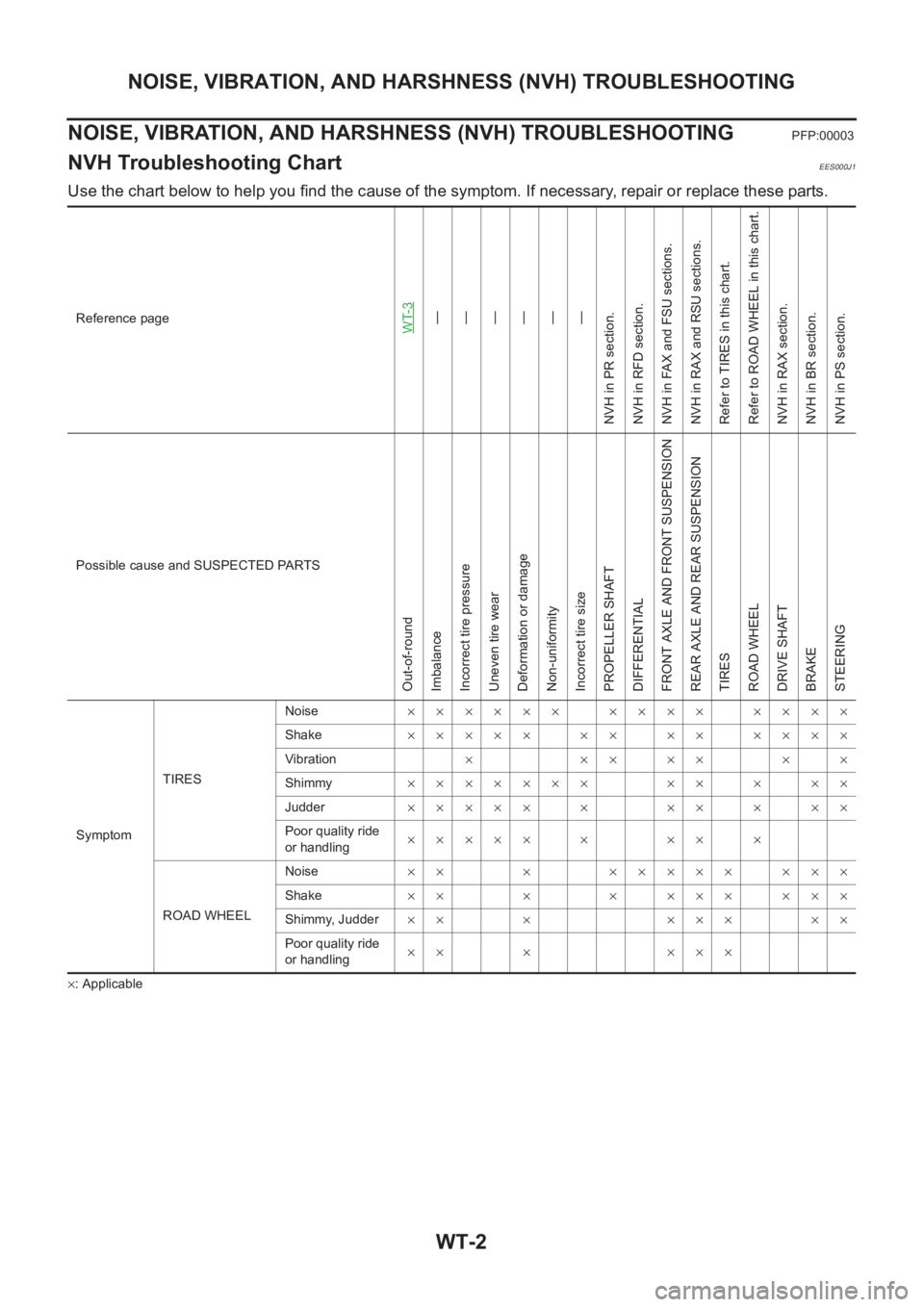
NVH Troubleshooting ChartEES000J1
Use the chart below to help you find the cause of the symptom. If necessary, repair or replace these parts.
×: ApplicableReference page
WT-3—
—
—
—
—
—
NVH in PR section.
NVH in RFD section.
NVH in FAX and FSU sections.
NVH in RAX and RSU sections.
Refer to TIRES in this chart.
Refer to ROAD WHEEL in this chart.
NVH in RAX section.
NVH in BR section.
NVH in PS section.
Possible cause and SUSPECTED PARTS
Out-of-round
Imbalance
Incorrect tire pressure
Uneven tire wear
Deformation or damage
Non-uniformity
Incorrect tire size
PROPELLER SHAFT
DIFFERENTIAL
FRONT AXLE AND FRONT SUSPENSION
REAR AXLE AND REAR SUSPENSION
TIRES
ROAD WHEEL
DRIVE SHAFT
BRAKE
STEERING
SymptomTIRESNoise×××××× ×××× ××××
Shake××××× ×× ×× ××××
Vibration×××××××
Shimmy××××××× ×× × ××
Judder××××× × ×× × ××
Poor quality ride
or handling××××× × ×× ×
ROAD WHEELNoise×× × ××××× ×××
Shake×× × × ××× ×××
Shimmy, Judder×× × ××× ××
Poor quality ride
or handling×× × ×××
Page 2745 of 3833
NOISE, VIBRATION, AND HARSHNESS (NVH) TROUBLESHOOTING
BR-5
C
D
E
G
H
I
J
K
L
MA
B
BR
NOISE, VIBRATION, AND HARSHNESS (NVH) TROUBLESHOOTINGPFP:00003
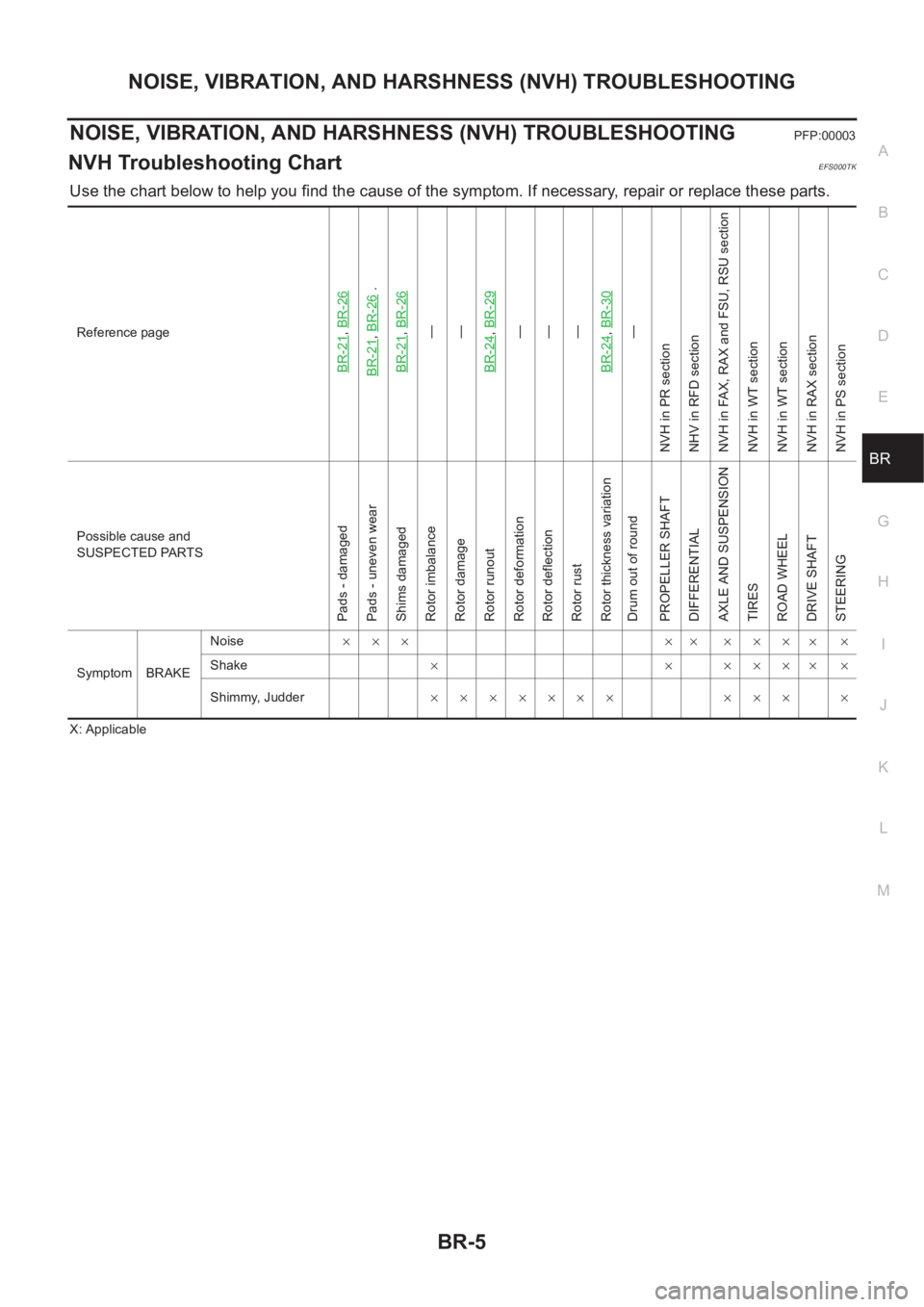
NVH Troubleshooting ChartEFS000TK
Use the chart below to help you find the cause of the symptom. If necessary, repair or replace these parts.
X: ApplicableReference page
BR-21
,BR-26
BR-21
,BR-26
.
BR-21
,BR-26—
—
BR-24,BR-29—
—
—
BR-24,BR-30—
NVH in PR section
NHV in RFD section
NVH in FAX, RAX and FSU, RSU section
NVH in WT section
NVH in WT section
NVH in RAX section
NVH in PS section
Possible cause and
SUSPECTED PARTS
Pads - damaged
Pads - uneven wear
Shims damaged
Rotor imbalance
Rotor damage
Rotor runout
Rotor deformation
Rotor deflection
Rotor rust
Rotor thickness variation
Drum out of round
PROPELLER SHAFT
DIFFERENTIAL
AXLE AND SUSPENSION
TIRES
ROAD WHEEL
DRIVE SHAFT
STEERING
Symptom BRAKENoise××× ×× ×××
××
Shake×××××
××
Shimmy, Judder××××××× ××× ×
Page 2776 of 3833
PB-2
NOISE, VIBRATION, AND HARSHNESS (NVH) TROUBLESHOOTING
NOISE, VIBRATION, AND HARSHNESS (NVH) TROUBLESHOOTING
PFP:00003
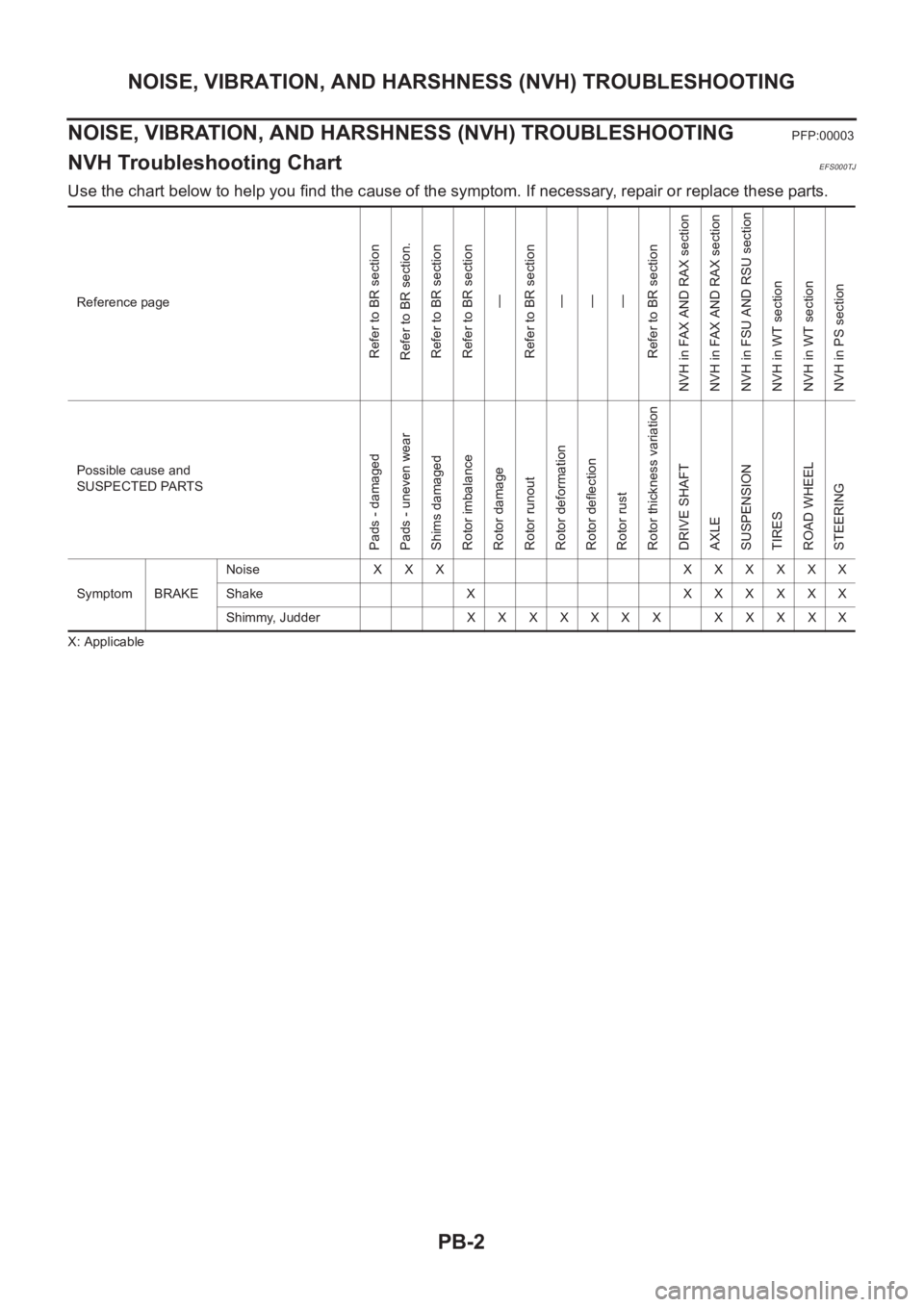
NVH Troubleshooting ChartEFS000TJ
Use the chart below to help you find the cause of the symptom. If necessary, repair or replace these parts.
X: ApplicableReference page
Refer to BR section
Refer to BR section.
Refer to BR section
Refer to BR section
—
Refer to BR section
—
—
—
Refer to BR section
NVH in FAX AND RAX section
NVH in FAX AND RAX section
NVH in FSU AND RSU section
NVH in WT section
NVH in WT section
NVH in PS section
Possible cause and
SUSPECTED PARTS
Pads - damaged
Pads - uneven wear
Shims damaged
Rotor imbalance
Rotor damage
Rotor runout
Rotor deformation
Rotor deflection
Rotor rust
Rotor thickness variation
DRIVE SHAFT
AXLE
SUSPENSION
TIRES
ROAD WHEEL
STEERING
Symptom BRAKENoise XXX XXXXXX
Shake X XXXXXX
Shimmy, JudderXXXXXXX XXXXX
Page 2874 of 3833
![NISSAN X-TRAIL 2001 Service User Guide BRC-90
[ESP/TCS/ABS]
TROUBLE DIAGNOSIS
ABS Warning Lamp
Touch “ON” and “OFF”on the “ABS WARNING LAMP” screen to check that the ABS warning lamp operates as
follows.
NOTE:
During the active](/img/5/57405/w960_57405-2873.png "NISSAN X-TRAIL 2001 Service User Guide BRC-90
[ESP/TCS/ABS]
TROUBLE DIAGNOSIS
ABS Warning Lamp
Touch “ON” and “OFF”on the “ABS WARNING LAMP” screen to check that the ABS warning lamp operates as
follows.
NOTE:
During the active")
BRC-90
[ESP/TCS/ABS]
TROUBLE DIAGNOSIS
ABS Warning Lamp
Touch “ON” and “OFF”on the “ABS WARNING LAMP” screen to check that the ABS warning lamp operates as
follows.
NOTE:
During the active test when “OFF” on the “ABS WARNING LAMP” screen is touched, all of the ESP OFF indi-
cator lamp, SLIP indicator lamp, and ABS warning lamp flash once. This is not abnormal.
For Correct and Quick DiagnosisEFS001A8
PRECAUTIONS FOR TROUBLE DIAGNOSIS
●Before performing the trouble diagnosis, always read the GI-3, "PRECAUTIONS" to confirm the general
precautions.
●After replacement of ESP/TCS/ABS control unit, steering wheel angle sensor, steering parts, suspension
parts, or tires, and adjustment of alignment, always adjust the neutral position of steering wheel angle
sensor before driving.
●When the ESP/TCS/ABS control unit is replaced, check that the label on the computer unit is identical
color.
●After completing the trouble diagnosis, always erase the malfunctioning memory. Refer to BRC-81, "Pro-
cedure" .
●When inspection of the continuity or voltage between units is performed, check the connector terminals for
disconnection, looseness, bend, or collapse. If any malfunction is detected, repair or replace the applica-
ble part.
●Intermittent problems may be caused by a malfunction on harness, connector, or terminal. Move the har-
nesses, harness connectors, or terminals by hand to make sure that there is no contact malfunction.
●If a circuit tester is used for the check, be careful not to forcibly extend any connector terminal.
●For self-diagnosis, active test, and work support of ESP/TCS/ABS control unit with CONSULT-II, stop and
connect CONSULT-II and select “ABS”.
●CONSULT-II self-diagnosis results are displayed without regard to occurrence timing. In some case, the
later ones (timing value is small) appear on the next screen.
●While the self-diagnosis results of CONSULT-II shows a malfunction, if CONSULT-II active test is per-
formed, an engine system malfunction may be indicated. In this case, start the engine to resume the nor-
mal screen.
●ESP/TCS/ABS system electronically controls the brake operation and engine output. The following symp-
toms may be caused by the normal operations.
Operation ON OFF
ABS WARNING LAMP ON (Lamp ON) OFF (Lamp OFF)
Symptom Symptom description Result
Motor operation noiseDuring ESP, TCS, or ABS operation, sometimes a faint noise can be
heard. This is a motor operation noise in the ESP actuator.
Normal
Just after the engine starts, the motor operating noise may be heard.
This is a normal status of the system operation check.
System operation check
noiseWhen the engine starts, a“click” noise may be heard from the engine
compartment. This is a normal status of the system operation check.Normal
Page 2914 of 3833
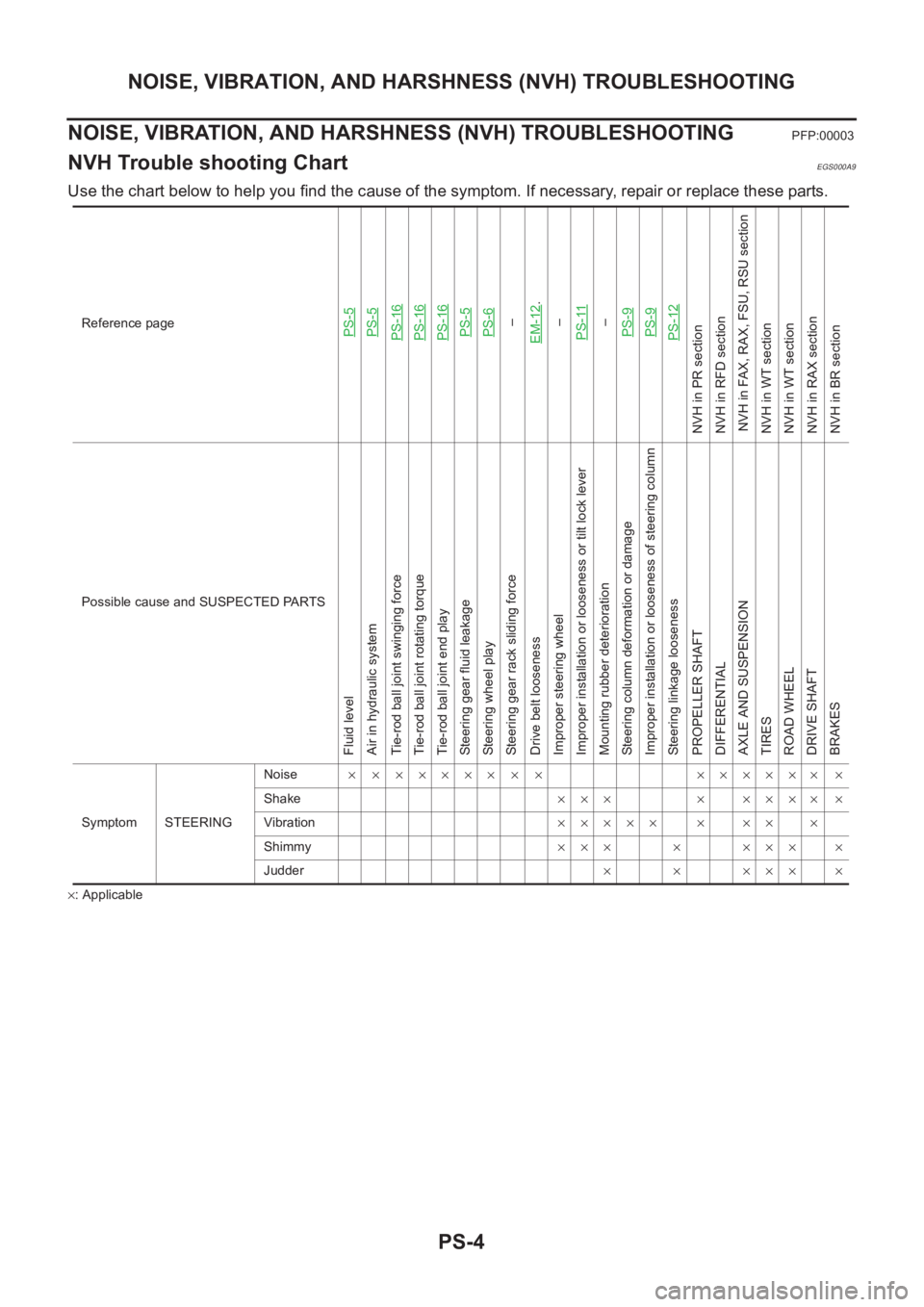
PS-4
NOISE, VIBRATION, AND HARSHNESS (NVH) TROUBLESHOOTING
NOISE, VIBRATION, AND HARSHNESS (NVH) TROUBLESHOOTING
PFP:00003
NVH Trouble shooting ChartEGS000A9
Use the chart below to help you find the cause of the symptom. If necessary, repair or replace these parts.
×: ApplicableReference page
PS-5PS-5PS-16PS-16PS-16PS-5PS-6–
EM-12
.
–
PS-11
–
PS-9PS-9PS-12
NVH in PR section
NVH in RFD section
NVH in FAX, RAX, FSU, RSU section
NVH in WT section
NVH in WT section
NVH in RAX section
NVH in BR section
Possible cause and SUSPECTED PARTS
Fluid level
Air in hydraulic system
Tie-rod ball joint swinging force
Tie-rod ball joint rotating torque
Tie-rod ball joint end play
Steering gear fluid leakage
Steering wheel play
Steering gear rack sliding force
Drive belt looseness
Improper steering wheel
Improper installation or looseness or tilt lock lever
Mounting rubber deterioration
Steering column deformation or damage
Improper installation or looseness of steering column
Steering linkage looseness
PROPELLER SHAFT
DIFFERENTIAL
AXLE AND SUSPENSION
TIRES
ROAD WHEEL
DRIVE SHAFT
BRAKES
Symptom STEERINGNoise× × ××××× × × ×××××× ×
Shake××× × ×××× ×
Vibration××××× × ×× ×
Shimmy××× × ××× ×
Judder× × ××× ×
Page 2917 of 3833
STEERING WHEEL
PS-7
C
D
E
F
H
I
J
K
L
MA
B
PS
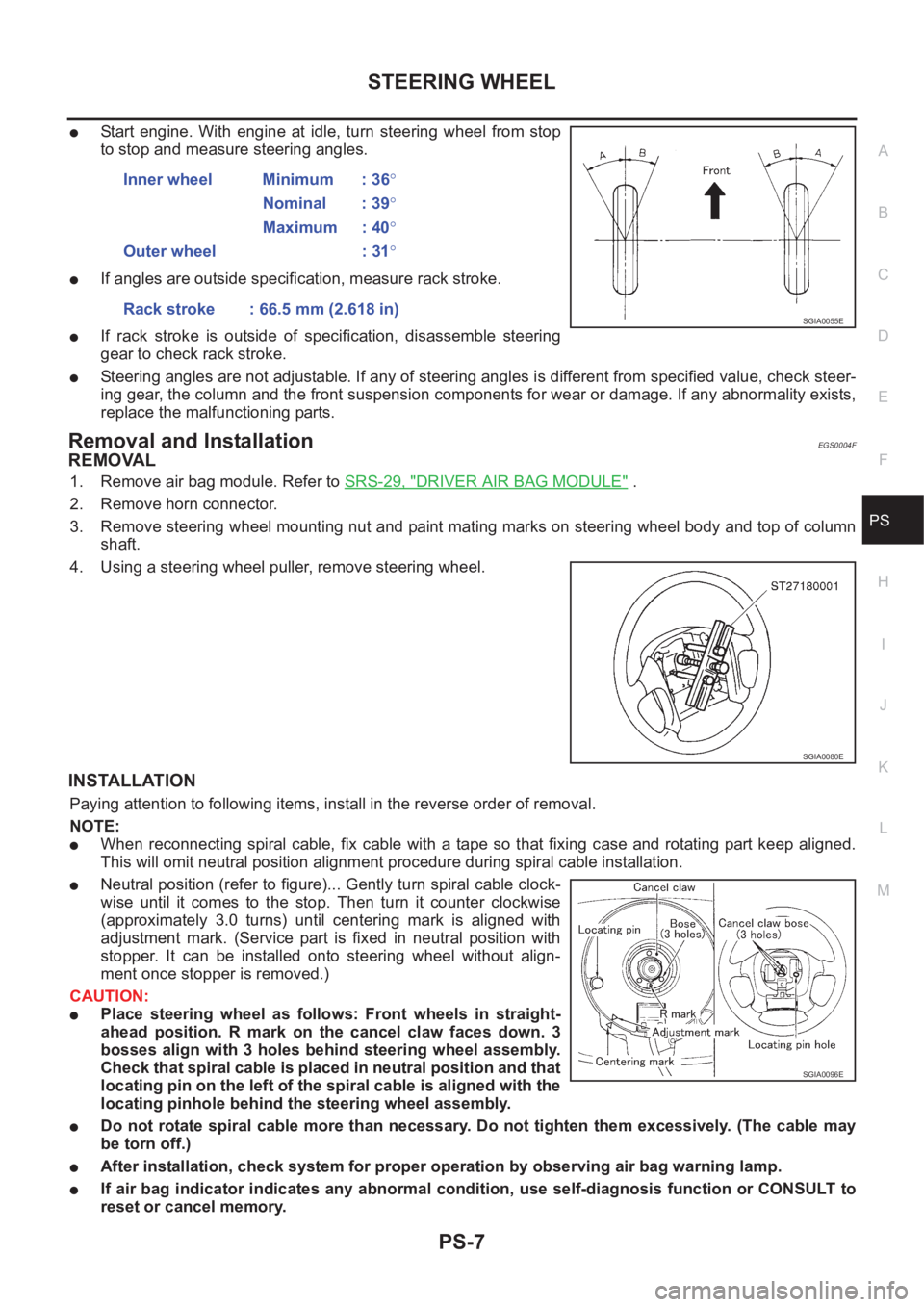
●Start engine. With engine at idle, turn steering wheel from stop
to stop and measure steering angles.
●If angles are outside specification, measure rack stroke.
●If rack stroke is outside of specification, disassemble steering
gear to check rack stroke.
●Steering angles are not adjustable. If any of steering angles is different from specified value, check steer-
ing gear, the column and the front suspension components for wear or damage. If any abnormality exists,
replace the malfunctioning parts.
Removal and InstallationEGS0004F
REMOVAL
1. Remove air bag module. Refer to SRS-29, "DRIVER AIR BAG MODULE" .
2. Remove horn connector.
3. Remove steering wheel mounting nut and paint mating marks on steering wheel body and top of column
shaft.
4. Using a steering wheel puller, remove steering wheel.
INSTALLATION
Paying attention to following items, install in the reverse order of removal.
NOTE:
●When reconnecting spiral cable, fix cable with a tape so that fixing case and rotating part keep aligned.
This will omit neutral position alignment procedure during spiral cable installation.
●Neutral position (refer to figure)... Gently turn spiral cable clock-
wise until it comes to the stop. Then turn it counter clockwise
(approximately 3.0 turns) until centering mark is aligned with
adjustment mark. (Service part is fixed in neutral position with
stopper. It can be installed onto steering wheel without align-
ment once stopper is removed.)
CAUTION:
●Place steering wheel as follows: Front wheels in straight-
ahead position. R mark on the cancel claw faces down. 3
bosses align with 3 holes behind steering wheel assembly.
Check that spiral cable is placed in neutral position and that
locating pin on the left of the spiral cable is aligned with the
locating pinhole behind the steering wheel assembly.
●Do not rotate spiral cable more than necessary. Do not tighten them excessively. (The cable may
be torn off.)
●After installation, check system for proper operation by observing air bag warning lamp.
●If air bag indicator indicates any abnormal condition, use self-diagnosis function or CONSULT to
reset or cancel memory.Inner wheel Minimum : 36°
Nominal : 39°
Maximum : 40°
Outer wheel : 31°
Rack stroke : 66.5 mm (2.618 in)
SGIA0055E
SGIA0080E
SGIA0096E
Page 2922 of 3833
PS-12
POWER STEERING GEAR AND LINKAGE
POWER STEERING GEAR AND LINKAGE
PFP:49001
Removal and InstallationEGS0004I
REMOVAL
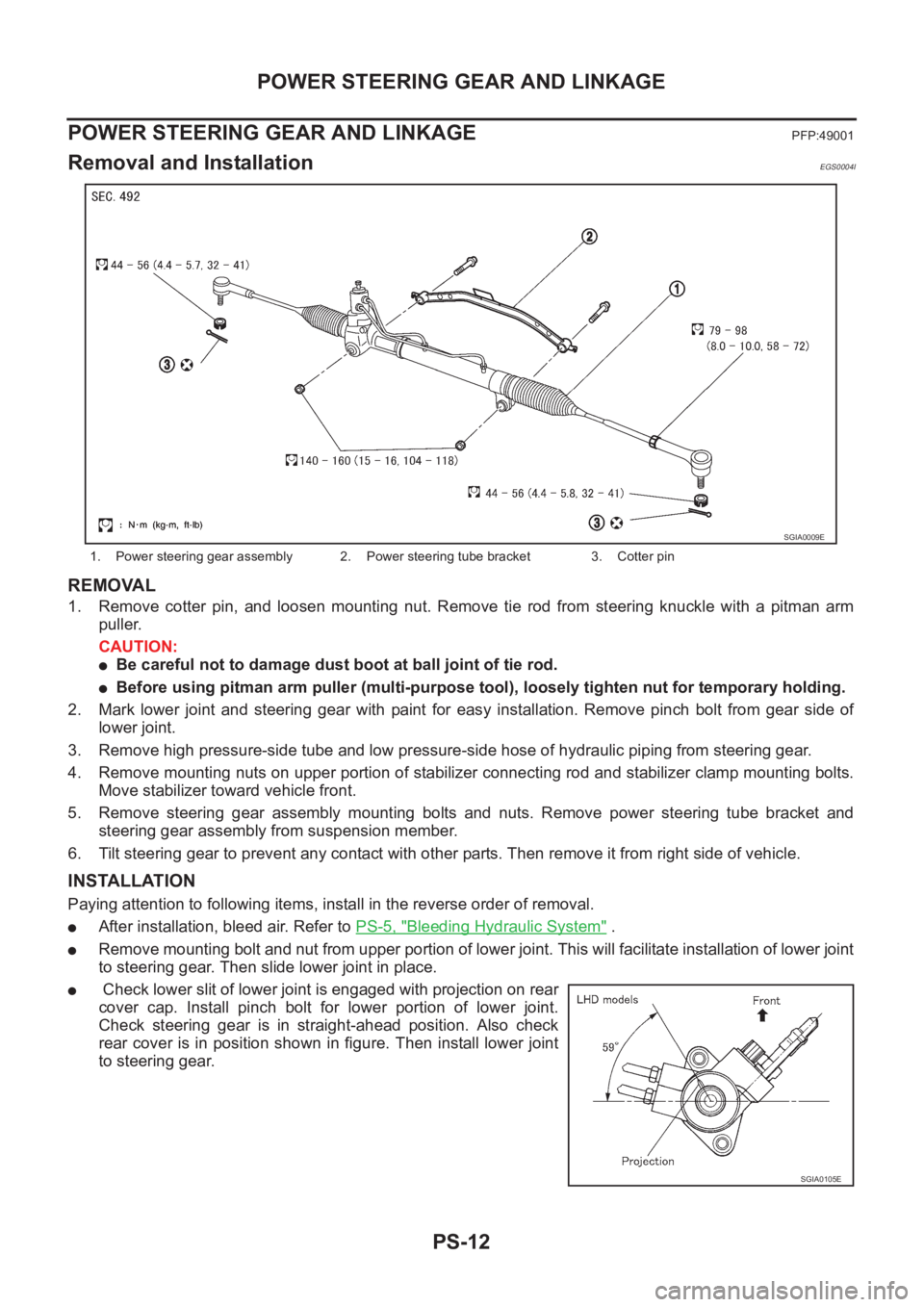
1. Remove cotter pin, and loosen mounting nut. Remove tie rod from steering knuckle with a pitman arm
puller.
CAUTION:
●Be careful not to damage dust boot at ball joint of tie rod.
●Before using pitman arm puller (multi-purpose tool), loosely tighten nut for temporary holding.
2. Mark lower joint and steering gear with paint for easy installation. Remove pinch bolt from gear side of
lower joint.
3. Remove high pressure-side tube and low pressure-side hose of hydraulic piping from steering gear.
4. Remove mounting nuts on upper portion of stabilizer connecting rod and stabilizer clamp mounting bolts.
Move stabilizer toward vehicle front.
5. Remove steering gear assembly mounting bolts and nuts. Remove power steering tube bracket and
steering gear assembly from suspension member.
6. Tilt steering gear to prevent any contact with other parts. Then remove it from right side of vehicle.
INSTALLATION
Paying attention to following items, install in the reverse order of removal.
●After installation, bleed air. Refer to PS-5, "Bleeding Hydraulic System" .
●Remove mounting bolt and nut from upper portion of lower joint. This will facilitate installation of lower joint
to steering gear. Then slide lower joint in place.
● Check lower slit of lower joint is engaged with projection on rear
cover cap. Install pinch bolt for lower portion of lower joint.
Check steering gear is in straight-ahead position. Also check
rear cover is in position shown in figure. Then install lower joint
to steering gear.
1. Power steering gear assembly 2. Power steering tube bracket 3. Cotter pin
SGIA0009E
SGIA0105E
Page 2950 of 3833
FAX-2
PRECAUTIONS
PRECAUTIONS
PFP:00001
CautionEDS0005P
●When installing rubber parts, final tightening must be carried out under unladen condition* with tires on
ground.
●Oil will shorten the life of rubber bushes. Be sure to wipe off any spilled oil.
*: Fuel, radiator coolant and engine oil full. Spare tire, jack, hand tools and mats in designated positions.
●After installing removed suspension parts, check wheel alignment and adjust if necessary.
Observe the following precautions when disassembling and servicing drive shaft.
●Perform work in a location which is as dust-free and dirt-free as possible.
●Before disassembling and servicing, clean the outside of parts.
●Disassembly and service location must be taken to prevent the entry of foreign objects.
●Disassembled parts must be carefully reassembled in the correct order. If work is interrupted, a clean
cover must be placed over parts.
●Paper shop cloths must be used. Fabric shop cloths must not be used because of the danger of lint adher-
ing to parts.
●Disassembled parts (except for rubber parts) should be cleaned with kerosene which shall be removed by
blowing with air or wiping with paper shop cloths.
Page 2954 of 3833
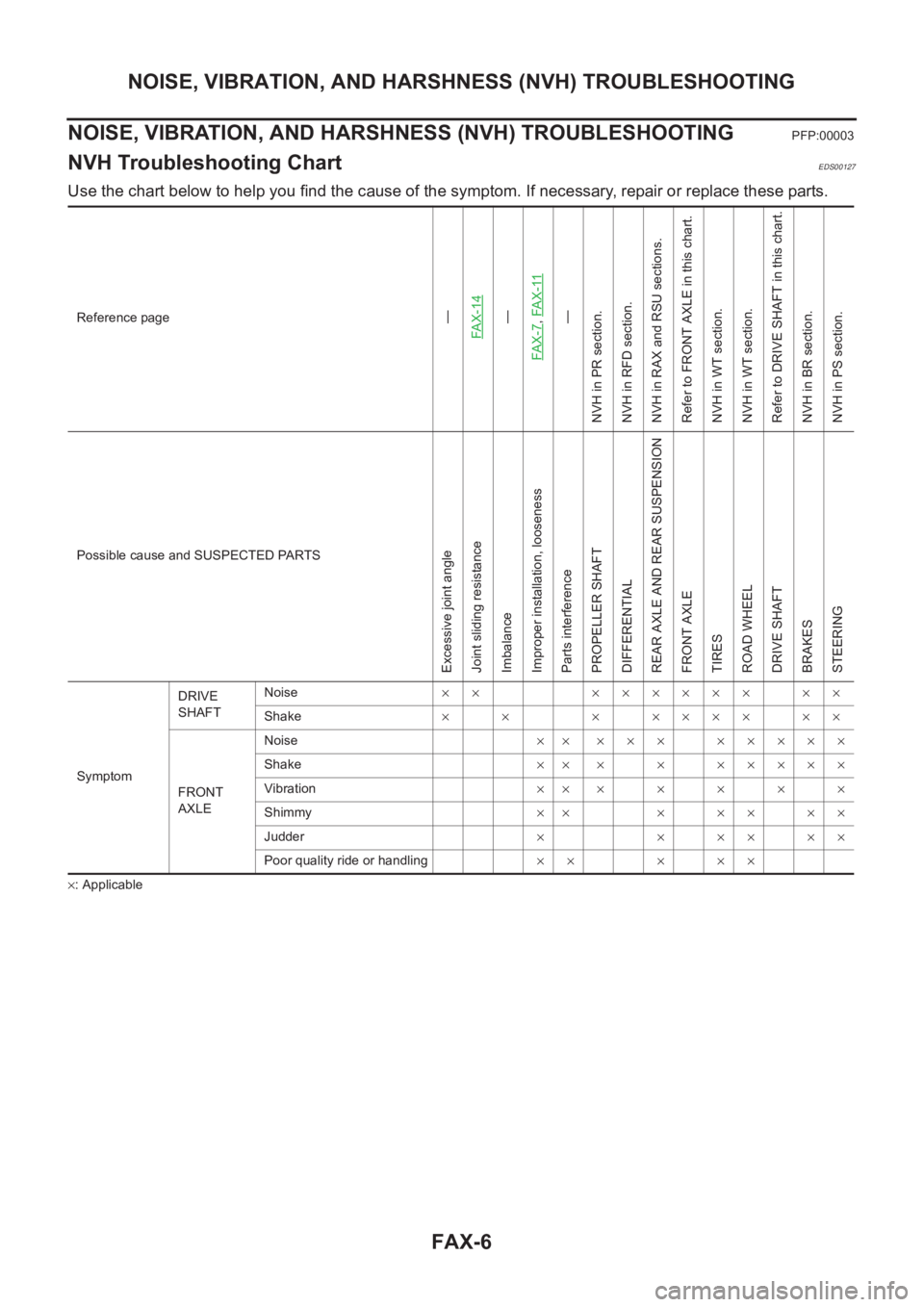
FAX-6
NOISE, VIBRATION, AND HARSHNESS (NVH) TROUBLESHOOTING
NOISE, VIBRATION, AND HARSHNESS (NVH) TROUBLESHOOTING
PFP:00003
NVH Troubleshooting ChartEDS00127
Use the chart below to help you find the cause of the symptom. If necessary, repair or replace these parts.
×: ApplicableReference page
—
FAX-14—
FAX-7,FA X -11—
NVH in PR section.
NVH in RFD section.
NVH in RAX and RSU sections.
Refer to FRONT AXLE in this chart.
NVH in WT section.
NVH in WT section.
Refer to DRIVE SHAFT in this chart.
NVH in BR section.
NVH in PS section.
Possible cause and SUSPECTED PARTS
Excessive joint angle
Joint sliding resistance
Imbalance
Improper installation, looseness
Parts interference
PROPELLER SHAFT
DIFFERENTIAL
REAR AXLE AND REAR SUSPENSION
FRONT AXLE
TIRES
ROAD WHEEL
DRIVE SHAFT
BRAKES
STEERING
SymptomDRIVE
SHAFTNoise×× ×××××× ××
Shake×× ×××××××
FRONT
AXLENoise×× ××× ×××××
Shake×××××××××
Vibration×××××××
Shimmy×× ×××××
Judder× × ×× ××
Poor quality ride or handling×× × ××