reset NISSAN X-TRAIL 2001 Service User Guide
[x] Cancel search | Manufacturer: NISSAN, Model Year: 2001, Model line: X-TRAIL, Model: NISSAN X-TRAIL 2001Pages: 3833, PDF Size: 39.49 MB
Page 1480 of 3833
![NISSAN X-TRAIL 2001 Service User Guide EC-1130
[QR20(WITHOUT EURO-OBD)]
ENGINE CONTROL SYSTEM
SYSTEM DESCRIPTION
The amount of fuel injected from the fuel injector is determined by the ECM. The ECM controls the length of
time the valve rem](/img/5/57405/w960_57405-1479.png "NISSAN X-TRAIL 2001 Service User Guide EC-1130
[QR20(WITHOUT EURO-OBD)]
ENGINE CONTROL SYSTEM
SYSTEM DESCRIPTION
The amount of fuel injected from the fuel injector is determined by the ECM. The ECM controls the length of
time the valve rem")
EC-1130
[QR20(WITHOUT EURO-OBD)]
ENGINE CONTROL SYSTEM
SYSTEM DESCRIPTION
The amount of fuel injected from the fuel injector is determined by the ECM. The ECM controls the length of
time the valve remains open (injection pulse duration). The amount of fuel injected is a program value in the
ECM memory. The program value is preset by engine operating conditions. These conditions are determined
by input signals (for engine speed and intake air) from both the crankshaft position sensor and the mass air
flow sensor.
VARIOUS FUEL INJECTION INCREASE/DECREASE COMPENSATION
In addition, the amount of fuel injected is compensated to improve engine performance under various operat-
ing conditions as listed below.
●During warm-up
●When starting the engine
●During acceleration
●Hot-engine operation
●When selector lever is changed from “N” to “D”
●High-load, high-speed operation
●During deceleration
●During high engine speed operation
MIXTURE RATIO FEEDBACK CONTROL (CLOSED LOOP CONTROL)
The mixture ratio feedback system provides the best air-fuel mixture ratio for driveability and emission control.
The three way catalyst (manifold) can then better reduce CO, HC and NOx emissions. This system uses
heated oxygen sensor 1 in the exhaust manifold to monitor if the engine operation is rich or lean. The ECM
adjusts the injection pulse width according to the sensor voltage signal. For more information about heated
oxygen sensor 1, refer to EC-1229
. This maintains the mixture ratio within the range of stoichiometric (ideal
air-fuel mixture).
This stage is referred to as the closed loop control condition.
Heated oxygen sensor 2 is located downstream of the three way catalyst (manifold). Even if the switching
characteristics of heated oxygen sensor 1 shift, the air-fuel ratio is controlled to stoichiometric by the signal
from heated oxygen sensor 2.
Open Loop Control
The open loop system condition refers to when the ECM detects any of the following conditions. Feedback
control stops in order to maintain stabilized fuel combustion.
●Deceleration and acceleration
●High-load, high-speed operation
●Malfunction of heated oxygen sensor 1 or its circuit
●Insufficient activation of heated oxygen sensor 1 at low engine coolant temperature
●High engine coolant temperature
●During warm-up
●After shifting from “N” to “D”
●When starting the engine
PBIB0121E
Page 1532 of 3833
![NISSAN X-TRAIL 2001 Service User Guide EC-1182
[QR20(WITHOUT EURO-OBD)]
TROUBLE DIAGNOSIS
–While trying to detect the DTC/1st trip DTC by performing the “DTC Confirmation Procedure”, be sure to
select to “DATA MONITOR (AUTO TRIG)â€](/img/5/57405/w960_57405-1531.png "NISSAN X-TRAIL 2001 Service User Guide EC-1182
[QR20(WITHOUT EURO-OBD)]
TROUBLE DIAGNOSIS
–While trying to detect the DTC/1st trip DTC by performing the “DTC Confirmation Procedure”, be sure to
select to “DATA MONITOR (AUTO TRIG)â€")
EC-1182
[QR20(WITHOUT EURO-OBD)]
TROUBLE DIAGNOSIS
–While trying to detect the DTC/1st trip DTC by performing the “DTC Confirmation Procedure”, be sure to
select to “DATA MONITOR (AUTO TRIG)” mode. You can confirm the malfunction at the moment it is
detected.
–While narrowing down the possible causes, CONSULT-II should be set in “DATA MONITOR (AUTO
TRIG)” mode, especially in case the incident is intermittent.
When you are inspecting the circuit by gently shaking (or twisting) the suspicious connectors, components
and harness in the “DTC Confirmation Procedure”, the moment a malfunction is found the DTC/1st trip
DTC will be displayed. (Refer to “Incident Simulation Tests” in GI-23, "
How to Perform Efficient Diagnosis
for an Electrical Incident" .)
2. “MANU TRIG”
–If the malfunction is displayed as soon as “DATA MONITOR” is selected, reset CONSULT-II to “MANU
TRIG”. By selecting “MANU TRIG” you can monitor and store the data. The data can be utilized for further
diagnosis, such as a comparison with the value for the normal operating condition.
CONSULT-II Reference Value in Data MonitorEBS00N46
Remarks:
● Specification data are reference values.
● Specification data are output/input values which are detected or supplied by the ECM at the connector.
* Specification data may not be directly related to their components signals/values/operations.
i.e. Adjust ignition timing with a timing light before monitoring IGN TIMING, because the monitor may show the specification data in
spite of the ignition timing not being adjusted to the specification data. This IGN TIMING monitors the data calculated by the ECM
according to the signals input from the camshaft position sensor and other ignition timing related sensors.
PBIB0197E
MONITOR ITEM CONDITION SPECIFICATION
ENG SPEED
●Run engine and compare the CONSULT-II value with tachometer indica-
tion.Almost the same speed as the
tachometer indication.
MAS A/F SE-B1
●Engine: After warming up
●Air conditioner switch: OFF
●Shift lever: N
●No-loadIdle Approx. 1.0 - 1.5V
2,500 rpm Approx. 1.6 - 2.0V
Page 1749 of 3833
![NISSAN X-TRAIL 2001 Service User Guide ENGINE CONTROL SYSTEM
EC-1399
[YD]
C
D
E
F
G
H
I
J
K
L
MA
EC
System ChartEBS0037B
*: The input signals are sent to the ECM through CAN communication line.
Fuel Injection Control SystemEBS0036G
SYSTEM](/img/5/57405/w960_57405-1748.png "NISSAN X-TRAIL 2001 Service User Guide ENGINE CONTROL SYSTEM
EC-1399
[YD]
C
D
E
F
G
H
I
J
K
L
MA
EC
System ChartEBS0037B
*: The input signals are sent to the ECM through CAN communication line.
Fuel Injection Control SystemEBS0036G
SYSTEM")
ENGINE CONTROL SYSTEM
EC-1399
[YD]
C
D
E
F
G
H
I
J
K
L
MA
EC
System ChartEBS0037B
*: The input signals are sent to the ECM through CAN communication line.
Fuel Injection Control SystemEBS0036G
SYSTEM DESCRIPTION
Three types of fuel injection control are provided to accommodate engine operating conditions; normal control,
idle control and start control. The ECM determines the appropriate fuel injection control. Under each control,
the amount of fuel injected is adjusted to improve engine performance.
Pulse signals are exchanged between ECM and Electronic Drive Unit (EDU). EDU controls fuel injectors
according to the input signals to adjust the amount of fuel injected to the preset value.
START CONTROL
Input/Output Signal Chart
When the ECM receives a start signal from the ignition switch, the
ECM adapts the fuel injection system for the start control. The
amount of fuel injected at engine starting is a preset program value
in the ECM. The program is determined by the engine speed, engine
coolant temperature and common rail fuel pressure.
For better startability under cool engine conditions, the lower the
coolant temperature becomes, the greater the amount of fuel
injected. The ECM ends the start control when the engine speed
reaches the specific value, and shifts the control to the normal or idle
control.
Input (Sensor) ECM Function Output (Actuator)
●Accelerator pedal position sensor
●Accelerator pedal released position switch
●Common rail fuel pressure sensor
●Fuel temperature sensor
●Engine coolant temperature sensor
●Crankshaft position sensor (TDC)
●Camshaft position sensor
●Vehicle speed sensor
●ESP/TCS/ABS control unit*
●Ignition switch
●Stop L amp s witch
●Air conditioner switch
●Mass air flow sensor
●Park/neutral position switch
●Battery voltage
●Power steering oil pressure switch Fuel injection controlEDU, Fuel injectors and Suction control
valve
Fuel injection timing controlEDU, Fuel injectors and Suction control
valve
Fuel cut controlEDU, Fuel injectors and Suction control
valve
Glow control system Glow relay & glow indictor lamp
On board diagnostic system Malfunction indicator (MI)
EGR volume control EGR volume control valve
Cooling fan control Cooling fan relay
Air conditioning cut control Air conditioner relay
Sensor Input Signal to ECM ECM Function Actuator
Engine coolant temperature sensor Engine coolant temperature
Fuel injection
control (start
control)EDU
Fuel injectors
Suction control valve Crankshaft position sensor (TDC) Engine speed
Camshaft position sensor Piston position
Ignition switch Start signal
Common rail fuel pressure sensor Common rail fuel pressure
SEF648S
Page 1787 of 3833
![NISSAN X-TRAIL 2001 Service User Guide TROUBLE DIAGNOSIS
EC-1437
[YD]
C
D
E
F
G
H
I
J
K
L
MA
EC
–While narrowing down the possible causes, CONSULT-II should be set in “DATA MONITOR (AUTO
TRIG)” mode, especially in case th](/img/5/57405/w960_57405-1786.png "NISSAN X-TRAIL 2001 Service User Guide TROUBLE DIAGNOSIS
EC-1437
[YD]
C
D
E
F
G
H
I
J
K
L
MA
EC
–While narrowing down the possible causes, CONSULT-II should be set in “DATA MONITOR (AUTO
TRIG)” mode, especially in case th")
TROUBLE DIAGNOSIS
EC-1437
[YD]
C
D
E
F
G
H
I
J
K
L
MA
EC
–While narrowing down the possible causes, CONSULT-II should be set in “DATA MONITOR (AUTO
TRIG)” mode, especially in case the incident is intermittent.
When you are inspecting the circuit by gently shaking (or twisting) the suspicious connectors, components
and harness in the “DTC Confirmation Procedure”, the moment a malfunction is found the DTC will be dis-
played. Refer to GI-23, "
How to Perform Efficient Diagnosis for an Electrical Incident" , “INCIDENT SIMU-
LATION TESTS”.
2. “MANU TRIG”
–If the malfunction is displayed as soon as “DATA MONITOR” is selected, reset CONSULT-II to “MANU
TRIG”. By selecting “MANU TRIG” you can monitor and store the data. The data can be utilized for further
diagnosis, such as a comparison with the value for the normal operating condition.
FUNCTION TEST
This mode is used to inform customers of their vehicle condition of periodic maintenance.
CONSULT-II Reference Value in Data Monitor ModeEBS0037I
Remarks:
● Specification data are reference values.
● Specification data are output/input values which are detected or supplied by the ECM at the connector.
* Specification data may not be directly related to their components signals/values/operations.
SEF720X
MONITOR ITEM CONDITION SPECIFICATION
CKPS-RPM (TDC)
●Tachometer: Connect
●Run engine and compare CONSULT-II value with the tachometer
indicationAlmost the same speed as the
tachometer indication
COOLAN TEMP/S
●Engine: After warming up More than 70°C (158°F)
VHCL SPEED SE
●Turn drive wheels and compare CONSULT-II value with the speed-
ometer indicationAlmost the same speed as the
speedometer indication
FUEL TEMP SEN
●Engine: After warming up More than 40°C (104°F)
ACCEL POS SEN*
●Ignition switch: ON
(Engine stopped)Accelerator pedal: fully released 0.8 - 1.3V
Accelerator pedal: fully depressed More than 3.5V
Page 2666 of 3833
TF-56
TROUBLE DIAGNOSIS
2. COMBINATION METER POWER SUPPLY CIRCUIT INSPECTION
1. Disconnect combination meter connector.
2. Check voltage between the combination meter harness connector M46 terminal No. LHD models: 46 (W/
L) RHD models: 59 (W/L) and body ground.
OK or NG
OK >> Malfunctioning combination meter.
NG >> Check fuse 10A [#11] to combination meter harness and connector.
4WD WARNING LAMP DOES NOT GO OUT SEVERAL SECONDS AFTER ENGINE
STARTED.(4WD MODE INDICATOR LAMP GOES OUT)
1. PERFORM SELF-DIAGNOSIS
Using CONSULT-II perform self-diagnosis.
OK or NG
OK >> No malfunction detected. Perform inspection again.
NG >>
●Determine the location of the malfunction according to the result of Self-diagnosis using CON-
SULT-II. (Malfunction is present in the 4WD system.)
●CONSULT-II does not display 4WD system-related trouble codes. GO TO 2.
2. 4WD CONTROL UNIT CONNECTOR CONNECTION INSPECTION
●Check 4WD control unit connector for proper connection.
OK or NG
OK >> Reconnect the 4WD control unit connector properly and perform inspection again.
NG >> Repair or replace the connector.
HEAVY TIGHT-CORNER BRAKING SYMPTOM OCCURS WHEN THE VEHICLE IS DRIVEN IN
AUTO MODE AND THE STEERING WHEEL IS TURNED FULLY TO EITHER SIDE AFTER THE
ENGINE IS STARTED
1. PERFORM SELF-DIAGNOSIS.
Using CONSULT-II perform self-diagnosis.
OK or NG
OK >> GO TO 2. (No self-diagnosis malfunction indicated.)
NG >> Determine the location of the malfunction according to the result of self-diagnosis using CON-
SULT-II. (Malfunction is present in the 4WD system.)
2. CHECK USING THE DATA MONITOR FUNCTION OF THE CONSULT- II.
●Perform inspection by the data monitor function of the CONSULT-II.
●Check that the operation is in AUTO mode.
●Measure voltage when the accelerator pedal is not depressed. (Accelerator pedal not depressed: approx.
0.5V or lower)
●Measure the current supplied to the 4WD solenoid valve. (Accelerator pedal not depressed: approx. 0A)
OK or NG
OK >> GO TO 3. (No self-diagnosis malfunction indicated.)
NG >>
●Not in AUTO mode. GO TO 3.
●Voltage when accelerator pedal is not depressed is higher than approximately 0.5V.
●4WD solenoid valve current when the accelerator pedal is not depressed is other than 0A.
●Countermeasure: Keep the vehicle idling for approximately 15 minutes before checking again.
(Voltage when accelerator pedal is not depressed will be automatically reset to zero during this
period.)
Page 2726 of 3833
RSU-6
REAR SUSPENSION ASSEMBLY
On-Vehicle Inspection and Service
EES0007F
Check axle and suspension parts for excessive play, wear, and damage.
●Move rear wheels (RH/LH) to check abnormal free play.
●Retighten all nuts and bolts to the specified torque.
●Check strut for oil leakage and damage.
Wheel AlignmentEES0007G
DESCRIPTION
●Measure wheel alignment under unladen conditions. “Unladen conditions” means that fuel, coolant, and
lubricant are full. However, spare tire, jack, and hand tools should be unloaded.
PRELIMINARY INSPECTION
1. Check the tires for improper air pressure and wear.
2. Check road wheels for runout.
3. Check wheel bearing axial endplay.
4. Check strut operation.
5. Check each mounting point of axle and suspension for looseness and deformation.
6. Check each link and arm for cracks, deformation, and other damage.
7. Check the vehicle posture.
CAMBER
Camber is preset at factory and cannot be adjusted.
●If the camber is not within specification, inspect and replace any damaged or worn rear suspension parts.
TOE-IN
Measure toe-in using the following procedure.
●Always perform following procedure on a flat surface.
●Make sure that no person is in front of the vehicle before push-
ing it.
1. Bounce rear of vehicle up and down to stabilize the posture.
2. Push the vehicle straight ahead about 5 m (16 ft).
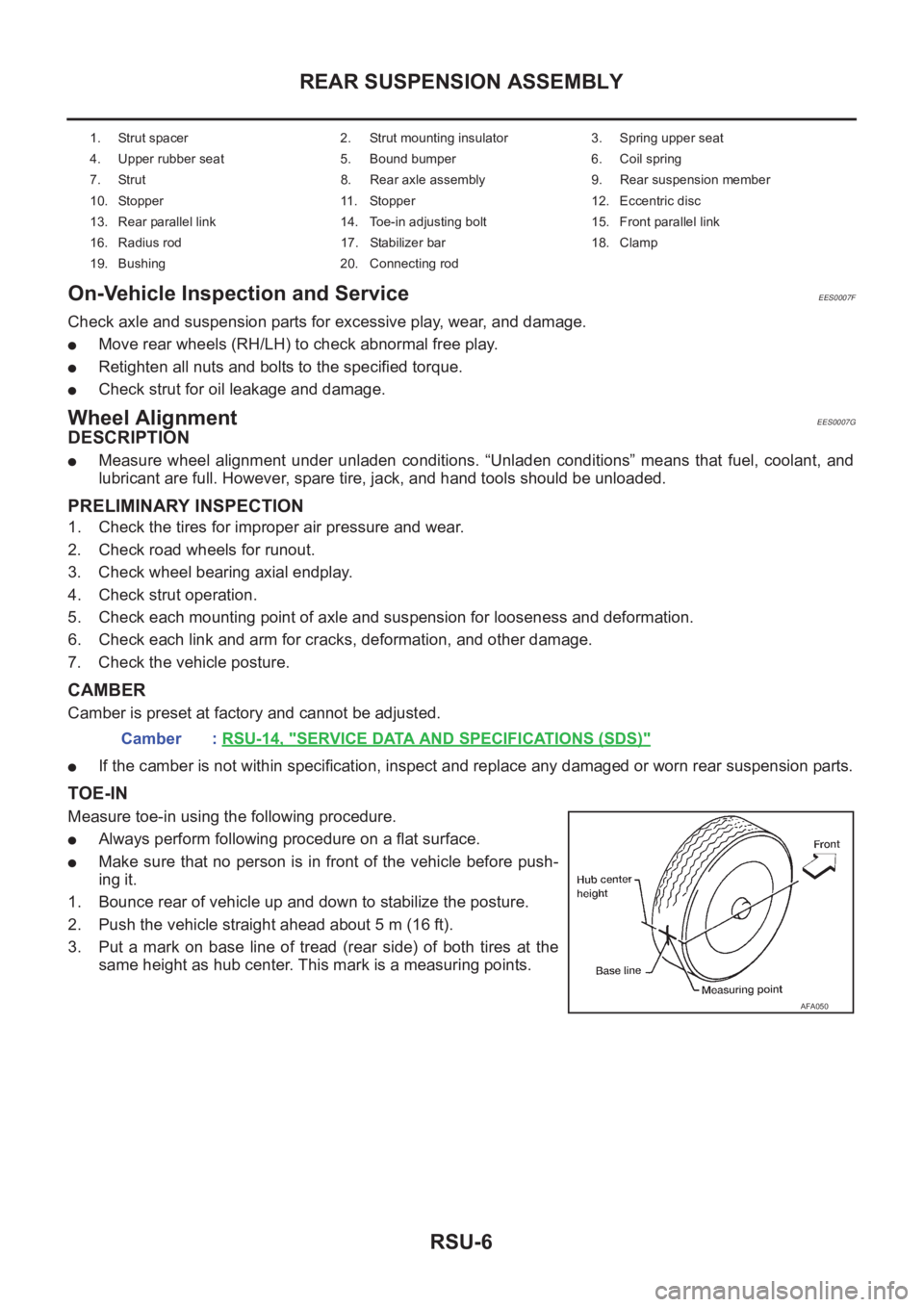
3. Put a mark on base line of tread (rear side) of both tires at the
same height as hub center. This mark is a measuring points.
1. Strut spacer 2. Strut mounting insulator 3. Spring upper seat
4. Upper rubber seat 5. Bound bumper 6. Coil spring
7. Strut 8. Rear axle assembly 9. Rear suspension member
10. Stopper 11. Stopper 12. Eccentric disc
13. Rear parallel link 14. Toe-in adjusting bolt 15. Front parallel link
16. Radius rod 17. Stabilizer bar 18. Clamp
19. Bushing 20. Connecting rod
Camber : RSU-14, "SERVICE DATA AND SPECIFICATIONS (SDS)"
AFA050
Page 2824 of 3833
![NISSAN X-TRAIL 2001 Service User Guide BRC-40
[4WD/ABS]
TROUBLE DIAGNOSIS
2. CHECK USING THE DATA MONITOR FUNCTION OF THE CONSULT- II
●Perform inspection by the data monitor function of the CONSULT-II.
●Check that the operation is in A](/img/5/57405/w960_57405-2823.png "NISSAN X-TRAIL 2001 Service User Guide BRC-40
[4WD/ABS]
TROUBLE DIAGNOSIS
2. CHECK USING THE DATA MONITOR FUNCTION OF THE CONSULT- II
●Perform inspection by the data monitor function of the CONSULT-II.
●Check that the operation is in A")
BRC-40
[4WD/ABS]
TROUBLE DIAGNOSIS
2. CHECK USING THE DATA MONITOR FUNCTION OF THE CONSULT- II
●Perform inspection by the data monitor function of the CONSULT-II.
●Check that the operation is in AUTO mode.
●Measure voltage when the accelerator pedal is not depressed. (Accelerator pedal not depressed: Approx.
0.5V or lower)
●Measure the current supplied to the E-TS solenoid valve. (Accelerator pedal not depressed: Approx. 0A)
OK or NG
OK >> GO TO 3. (No self-diagnosis malfunction indicated.)
NG >>
●Not in AUTO mode. GO TO 3.
●Voltage when accelerator pedal is not depressed is higher than approximately 0.5V.
●4WD solenoid valve current when the accelerator pedal is not depressed is other than 0A.
●Countermeasure: Keep the vehicle idling for approximately 15 minutes before checking again.
(Voltage when accelerator pedal is not depressed will be automatically reset to zero during this
period.)
3. INSPECTION USING 4WD MODE CHANGE-OVER SWITCH
●On data monitor screen of the CONSULT-II, check 4WD mode switch.
●Check if the display changes from ## to 2WD mode when the 2WD switch is pressed.
●Check if the display changes from ## to AUTO mode when the AUTO switch is pressed.
●Check if the display changes from ## to LOCK mode when the LOCK switch is pressed.
OK or NG
OK >> No malfunction detected.
NG >>
●Not in AUTO mode. (In 2WD or LOCK mode)
Countermeasure: Slightly depress the accelerator pedal and check that the operation mode
changes to LOCK mode.
●Check circuit between 4WD mode switch harness connector M39 terminal No.1 (BR) and
4WD control unit harness connector E122 terminal No. 27 (BR).
(AUTO mode is not available because a malfunction is present in the 2WD mode harness.)
NOTICE:
Mechanism of 4WD mode change-over
●2WD mode: Operation changes to 2WD mode when 4WD/ABS control unit harness connector
E122 terminal No. 27 (BR) is shorted to ground.
●AUTO mode: Operation changes to AUTO mode when 4WD/ABS control unit harness connec-
tor E122 terminals No. 27 (BR) and No. 26 (L) is shorted to ground.
●LOCK mode: Operation changes to LOCK mode when 4WD/ABS control unit harness connec-
tor E122 terminal No. 26 (L) is shorted to ground.
Page 2828 of 3833
![NISSAN X-TRAIL 2001 Service User Guide BRC-44
[4WD/ABS]
TROUBLE DIAGNOSIS
2. 4WD/ABS CONTROL UNIT CONNECTOR CONNECTION INSPECTION
●Remove glove box on the passenger side and check 4WD/ABS control unit connector for proper connec-
tion.
I](/img/5/57405/w960_57405-2827.png "NISSAN X-TRAIL 2001 Service User Guide BRC-44
[4WD/ABS]
TROUBLE DIAGNOSIS
2. 4WD/ABS CONTROL UNIT CONNECTOR CONNECTION INSPECTION
●Remove glove box on the passenger side and check 4WD/ABS control unit connector for proper connec-
tion.
I")
BRC-44
[4WD/ABS]
TROUBLE DIAGNOSIS
2. 4WD/ABS CONTROL UNIT CONNECTOR CONNECTION INSPECTION
●Remove glove box on the passenger side and check 4WD/ABS control unit connector for proper connec-
tion.
Is inspection result OK?
YES >> 4WD/ABS control unit connector is properly connected.
NO >> Reconnect the 4WD/ABS control module connector properly and perform inspection again.
Heavy Tight-corner Braking Symptom Occurs When The Vehicle Is Driven In
Auto Mode And The Steering Wheel Is Turned Fully To Either Side After The
Engine Is Started.
EFS001BT
1. USING CONSULT, PERFORM OR SELF-DIAGNOSIS
Heavy tight-corner braking symptom occurs when the vehicle is driven in AUTO mode and the steering wheel
is turned fully to either side after the engine is started.
Is inspection result OK?
YES >> GO TO 2. (No self-diagnosis malfunction indicated.)
NO >> Determine the location of the malfunction according to the result of self-diagnosis using CON-
SULT-II. (Malfunction is present in the 4WD system.)
2. CHECK USING THE DATA MONITOR FUNCTION OF THE CONSULT-II
●Perform inspection by the data monitor function of the CONSULT-II.
●Check that the operation is in AUTO mode.
●Measure voltage when the accelerator pedal is not depressed. (Accelerator pedal not depressed: Approx.
0.5V or lower)
●Measure the current supplied to the E-TS solenoid valve. (Accelerator pedal not depressed: Approx. 0A)
Is inspection result OK?
YES >> GO TO 3. (No self-diagnosis malfunction indicated.)
NO >>
●Not in AUTO mode. GO TO 3.
●Voltage when accelerator pedal is not depressed is higher than approximately 0.5V.
●E-TS solenoid valve current when accelerator pedal is not depressed is other than 0A.
●Countermeasure: Keep the vehicle idling for approximately 15 minutes before checking again.
(Voltage when accelerator pedal is not depressed will be automatically reset to zero during this
period.)
Page 2917 of 3833
STEERING WHEEL
PS-7
C
D
E
F
H
I
J
K
L
MA
B
PS
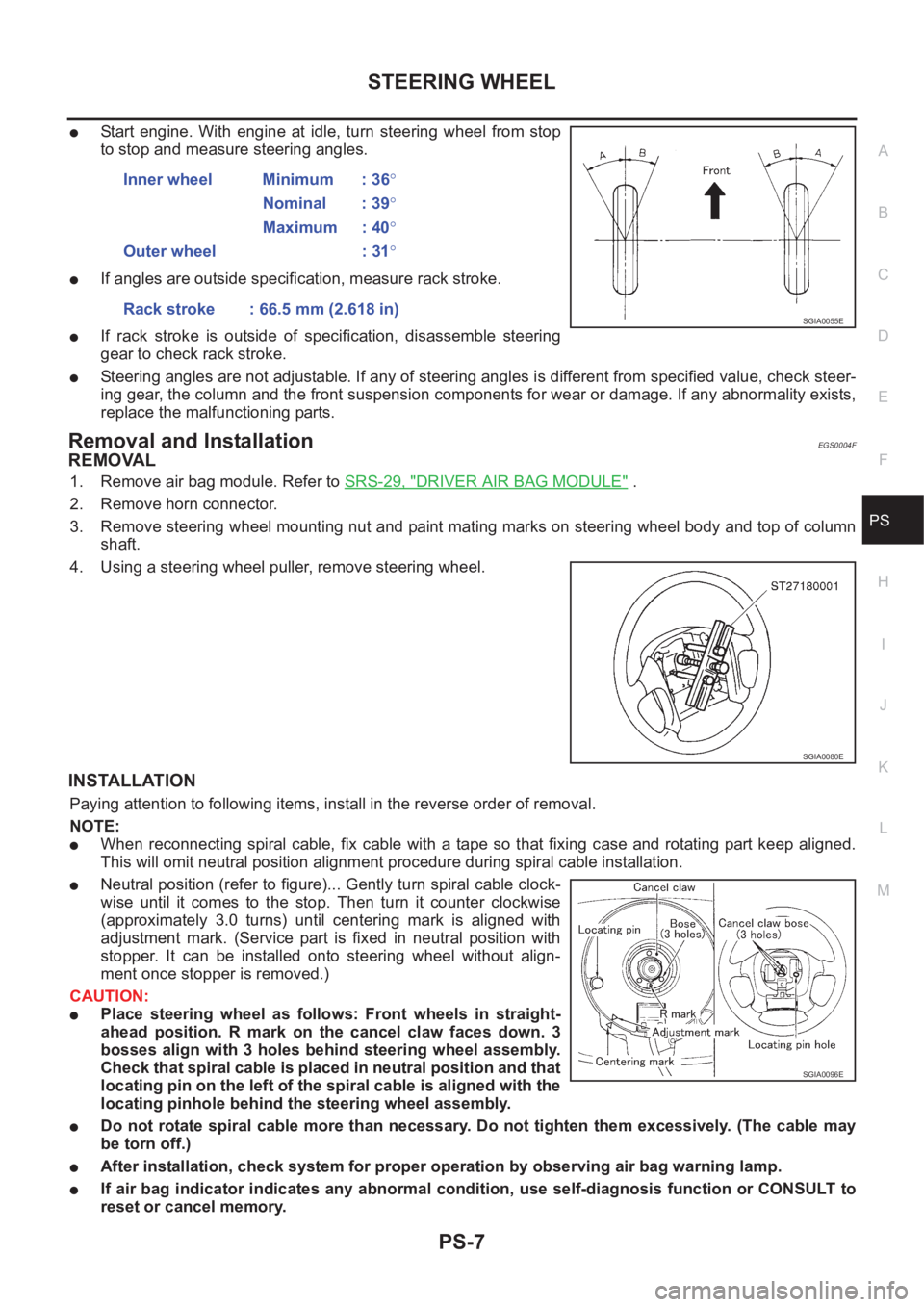
●Start engine. With engine at idle, turn steering wheel from stop
to stop and measure steering angles.
●If angles are outside specification, measure rack stroke.
●If rack stroke is outside of specification, disassemble steering
gear to check rack stroke.
●Steering angles are not adjustable. If any of steering angles is different from specified value, check steer-
ing gear, the column and the front suspension components for wear or damage. If any abnormality exists,
replace the malfunctioning parts.
Removal and InstallationEGS0004F
REMOVAL
1. Remove air bag module. Refer to SRS-29, "DRIVER AIR BAG MODULE" .
2. Remove horn connector.
3. Remove steering wheel mounting nut and paint mating marks on steering wheel body and top of column
shaft.
4. Using a steering wheel puller, remove steering wheel.
INSTALLATION
Paying attention to following items, install in the reverse order of removal.
NOTE:
●When reconnecting spiral cable, fix cable with a tape so that fixing case and rotating part keep aligned.
This will omit neutral position alignment procedure during spiral cable installation.
●Neutral position (refer to figure)... Gently turn spiral cable clock-
wise until it comes to the stop. Then turn it counter clockwise
(approximately 3.0 turns) until centering mark is aligned with
adjustment mark. (Service part is fixed in neutral position with
stopper. It can be installed onto steering wheel without align-
ment once stopper is removed.)
CAUTION:
●Place steering wheel as follows: Front wheels in straight-
ahead position. R mark on the cancel claw faces down. 3
bosses align with 3 holes behind steering wheel assembly.
Check that spiral cable is placed in neutral position and that
locating pin on the left of the spiral cable is aligned with the
locating pinhole behind the steering wheel assembly.
●Do not rotate spiral cable more than necessary. Do not tighten them excessively. (The cable may
be torn off.)
●After installation, check system for proper operation by observing air bag warning lamp.
●If air bag indicator indicates any abnormal condition, use self-diagnosis function or CONSULT to
reset or cancel memory.Inner wheel Minimum : 36°
Nominal : 39°
Maximum : 40°
Outer wheel : 31°
Rack stroke : 66.5 mm (2.618 in)
SGIA0055E
SGIA0080E
SGIA0096E
Page 3016 of 3833
![NISSAN X-TRAIL 2001 Service User Guide SRS-14
TROUBLE DIAGNOSIS
CONSULT-II Function
EHS000O6
DIAGNOSIS MODE FOR CONSULT-II
●“SELF-DIAG [CURRENT]”
A current Self-diagnosis result (also indicated by the number of warning lam](/img/5/57405/w960_57405-3015.png "NISSAN X-TRAIL 2001 Service User Guide SRS-14
TROUBLE DIAGNOSIS
CONSULT-II Function
EHS000O6
DIAGNOSIS MODE FOR CONSULT-II
●“SELF-DIAG [CURRENT]”
A current Self-diagnosis result (also indicated by the number of warning lam")
SRS-14
TROUBLE DIAGNOSIS
CONSULT-II Function
EHS000O6
DIAGNOSIS MODE FOR CONSULT-II
●“SELF-DIAG [CURRENT]”
A current Self-diagnosis result (also indicated by the number of warning lamp flashes in the Diagnosis
mode) is displayed on the CONSULT-II screen in real time. This refers to a malfunctioning part requiring
repairs.
●“SELF-DIAG [PAST]”
Diagnosis results previously stored in the memory are displayed on the CONSULT-II screen. The stored
results are not erased until memory erasing is executed.
●“TROUBLE DIAG RECORD”
With TROUBLE DIAG RECORD, diagnosis results previously erased by a reset operation can be dis-
played on the CONSULT-II screen.
●“ECU DISCRIMINATED NO.”
The diagnosis sensor unit for each vehicle model is assigned with its own, individual classification num-
ber. Refer to SRS-40, "
ECU DISCRIMINATED NO." This number will be displayed on the CONSULT-II
screen. When replacing the diagnosis sensor unit, refer to the part number for the compatibility. After
installation, replacement with a correct unit can be checked by confirming this classification number on the
CONSULT-II screen.
HOW TO CHANGE SELF-DIAGNOSIS MODE WITH CONSULT-II
From User Mode to Diagnosis Mode
After selecting “AIR BAG” on the “SELECT SYSTEM” screen, User mode automatically changes to Diagnosis
mode.
From Diagnosis Mode to User Mode
To return to User mode from Diagnosis mode, touch “BACK” key of CONSULT-II until “SELECT SYSTEM”
appears, Diagnosis mode automatically changes to User mode.
SRS803
SRS804