change time NISSAN X-TRAIL 2003 Electronic Repair Manual
[x] Cancel search | Manufacturer: NISSAN, Model Year: 2003, Model line: X-TRAIL, Model: NISSAN X-TRAIL 2003Pages: 3066, PDF Size: 51.47 MB
Page 2 of 3066
FOREWORD
This manual contains maintenance and repair procedures for the NISSAN
X-TRAIL , model T30 series.
In order to assure your safety and the efficient functioning of the vehicle,
this manual should be read thoroughly. It is especially important that the
PRECAUTIONS in the GI section be completely understood before starting
any repair task.
All information in this manual is based on the latest product information
at the time of publication. The right is reserved to make changes in speci-
fications and methods at any time without notice.
IMPORTANT SAFETY NOTICE
The proper performance of service is essential for both the safety of the
technician and the efficient functioning of the vehicle.
The service methods in this Service Manual are described in such a man-
ner that the service may be performed safely and accurately.
Service varies with the procedures used, the skills of the technician and the
tools and parts available. Accordingly, anyone using service procedures,
tools or parts which are not specifically recommended by NISSAN must
first be completely satisfied that neither personal safety nor the vehicle's
safety will be jeopardized by the service method selected.
NISSAN EUROPE N.V.
Service Operations Section
Paris, France
Page 158 of 3066
![NISSAN X-TRAIL 2003 Electronic Repair Manual AT-152
[EURO-OBD]
DTC P0731 A/T 1ST GEAR FUNCTION
DIAGNOSTIC TROUBLE CODE (DTC) CONFIRMATION
PROCEDURE
CAUTION:
lAlways drive vehicle at a safe speed.
lBe careful not to rev engine into the red zone o](/img/5/57402/w960_57402-157.png "NISSAN X-TRAIL 2003 Electronic Repair Manual AT-152
[EURO-OBD]
DTC P0731 A/T 1ST GEAR FUNCTION
DIAGNOSTIC TROUBLE CODE (DTC) CONFIRMATION
PROCEDURE
CAUTION:
lAlways drive vehicle at a safe speed.
lBe careful not to rev engine into the red zone o")
AT-152
[EURO-OBD]
DTC P0731 A/T 1ST GEAR FUNCTION
DIAGNOSTIC TROUBLE CODE (DTC) CONFIRMATION
PROCEDURE
CAUTION:
lAlways drive vehicle at a safe speed.
lBe careful not to rev engine into the red zone on the tachometer.
NOTE:
If “DIAGNOSTIC TROUBLE CODE CONFIRMATION PROCEDURE” has been previously conducted,
always turn ignition switch “OFF” and wait at least 5 seconds before conducting the next test.
TESTING CONDITION:
Always drive vehicle on a level road to improve the accuracy of test.
After the repair, perform the following procedure to confirm the malfunction is eliminated.
With CONSULT-II
1. Start engine and select “DATA MONITOR” mode for “A/T” with CONSULT-II.
2. Make sure that output voltage of A/T fluid temperature sensor is within the range below.
FLUID TEMP SEN : 0.4 - 1.5V
If out of range, drive the vehicle to decrease the voltage (warm up the fluid) or stop engine to increase the
voltage (cool down the fluid).
3. Select “1ST GR FNCTN P0731” of “DTC WORK SUPPORT”
mode for “A/T” with CONSULT-II and touch “START”.
4. Accelerate vehicle to 15 to 20 km/h (9 to 12 MPH) under the fol-
lowing condition and release the accelerator pedal completely.
THROTTLE POSI: Less than 1.0/8 (at all times during step 4)
Selector lever: D position (OD “ON”)
lCheck that “GEAR” shows “2” after releasing pedal.
5. Depress accelerator pedal to WOT (more than 7.0/8 of “THROT-
TLE POSI”) quickly from a speed of 15 to 20 km/h (9 to 12 MPH)
until “TESTING” changes to “STOP VEHICLE” or “COM-
PLETED”. (It will take approximately 3 seconds.)
If the check result NG appears on CONSULT-II screen, go to
“DIAGNOSTIC PROCEDURE”,AT-155, "
Diagnostic Procedure".
If “STOP VEHICLE” appears on CONSULT-II screen, go to the following step.
lCheck that “GEAR” shows “1” when depressing accelerator pedal to WOT.
lIf “TESTING” does not appear on CONSULT-II for a long time, select “SELF-DIAGNOSIS” for
“ENGINE”. In case a 1st trip DTC other than P0731 is shown, refer to applicable “TROUBLE DIAG-
NOSIS FOR DTC”.
SAT014K
SAT971J
SAT021J
Page 165 of 3066
![NISSAN X-TRAIL 2003 Electronic Repair Manual DTC P0732 A/T 2ND GEAR FUNCTION
AT-159
[EURO-OBD]
D
E
F
G
H
I
J
K
L
MA
B
AT
DIAGNOSTIC TROUBLE CODE (DTC) CONFIRMATION PROCEDURE
CAUTION:
lAlways drive vehicle at a safe speed.
lBe careful not to rev](/img/5/57402/w960_57402-164.png "NISSAN X-TRAIL 2003 Electronic Repair Manual DTC P0732 A/T 2ND GEAR FUNCTION
AT-159
[EURO-OBD]
D
E
F
G
H
I
J
K
L
MA
B
AT
DIAGNOSTIC TROUBLE CODE (DTC) CONFIRMATION PROCEDURE
CAUTION:
lAlways drive vehicle at a safe speed.
lBe careful not to rev")
DTC P0732 A/T 2ND GEAR FUNCTION
AT-159
[EURO-OBD]
D
E
F
G
H
I
J
K
L
MA
B
AT
DIAGNOSTIC TROUBLE CODE (DTC) CONFIRMATION PROCEDURE
CAUTION:
lAlways drive vehicle at a safe speed.
lBe careful not to rev engine into the red zone on the
tachometer.
NOTE:
If “DIAGNOSTIC TROUBLE CODE CONFIRMATION PROCE-
DURE” has been previously conducted, always turn ignition
switch “OFF” and wait at least 5 seconds before conducting the
next test.
TESTING CONDITION:
Always drive vehicle on a level road to improve the accuracy of
test.
After the repair, perform the following procedure to confirm the mal-
function is eliminated.
With CONSULT-II
1. Start engine and select “DATA MONITOR” mode for “A/T” with CONSULT-II.
2. Make sure that output voltage of A/T fluid temperature sensor is within the range below.
FLUID TEMP SEN : 0.4 - 1.5V
If out of range, drive the vehicle to decrease the voltage (warm up the fluid) or stop engine to increase the
voltage (cool down the fluid).
3. Select “2ND GR FNCTN P0732” of “DTC WORK SUPPORT”
mode for “A/T” with CONSULT-II and touch “START”.
4. Accelerate vehicle to 35 to 40 km/h (22 to 25 MPH) under the
following condition and release the accelerator pedal com-
pletely.
THROTTLE POSI: Less than 1.0/8 (at all times during step 4)
Selector lever: D position (OD “ON”)
lCheck that “GEAR” shows “3” or “4” after releasing pedal.
5. Depress accelerator pedal to WOT (more than 7.0/8 of “THROT-
TLE POSI”) quickly from a speed of 35 to 40 km/h (22 to 25
MPH) until “TESTING” changes to “STOP VEHICLE” or “COM-
PLETED”. (It will take approximately 3 seconds.)
If the check result NG appears on CONSULT-II screen, go to “DIAGNOSTIC PROCEDURE”,AT-162,
"Diagnostic Procedure".
If “STOP VEHICLE” appears on CONSULT-II screen, go to following step.
lCheck that “GEAR” shows “2” when depressing accelerator pedal to WOT.
lIf “TESTING” does not appear on CONSULT-II for a long time, select “SELF-DIAGNOSIS” for
“ENGINE”. In case a 1st trip DTC other than P0732 is shown, refer to applicable “TROUBLE DIAG-
NOSIS FOR DTC”.
6. Stop vehicle.
7. Follow the instruction displayed. (Check for normal shifting referring to the table below.)
SAT014K
SAT971J
SAT021J
Page 172 of 3066
![NISSAN X-TRAIL 2003 Electronic Repair Manual AT-166
[EURO-OBD]
DTCP0733A/T3RDGEARFUNCTION
DIAGNOSTIC TROUBLE CODE (DTC) CONFIRMATION PROCEDURE
CAUTION:
lAlways drive vehicle at a safe speed.
lBe careful not to rev engine into the red zone on the](/img/5/57402/w960_57402-171.png "NISSAN X-TRAIL 2003 Electronic Repair Manual AT-166
[EURO-OBD]
DTCP0733A/T3RDGEARFUNCTION
DIAGNOSTIC TROUBLE CODE (DTC) CONFIRMATION PROCEDURE
CAUTION:
lAlways drive vehicle at a safe speed.
lBe careful not to rev engine into the red zone on the")
AT-166
[EURO-OBD]
DTCP0733A/T3RDGEARFUNCTION
DIAGNOSTIC TROUBLE CODE (DTC) CONFIRMATION PROCEDURE
CAUTION:
lAlways drive vehicle at a safe speed.
lBe careful not to rev engine into the red zone on the
tachometer.
NOTE:
If “DIAGNOSTIC TROUBLE CODE CONFIRMATION PROCE-
DURE” has been previously conducted, always turn ignition
switch “OFF” and wait at least 5 seconds before conducting the
next test.
TESTING CONDITION:
Always drive vehicle on a level road to improve the accuracy of
test.
After the repair, perform the following procedure to confirm the mal-
function is eliminated.
With CONSULT-II
1. Start engine and select “DATA MONITOR” mode for “A/T” with CONSULT-II.
2. Make sure that output voltage of A/T fluid temperature sensor is within the range below.
FLUID TEMP SEN: 0.4 - 1.5V
If out of range, drive the vehicle to decrease the voltage (warm up the fluid) or stop engine to increase the
voltage (cool down the fluid).
3. Select “3RD GR FNCTN P0733” of “DTC WORK SUPPORT”
mode for “A/T” with CONSULT-II and touch “START”.
4. Accelerate vehicle to 55 to 70 km/h (34 to 44 MPH) under the
following condition and release the accelerator pedal com-
pletely.
THROTTLE POSI: Less than 1.0/8 (at all times during step 4)
Selector lever: D position (OD “ON”)
lCheck that “GEAR” shows “4” after releasing pedal.
5. Depress accelerator pedal steadily with 3.5/8 - 4.5/8 of “THROT-
TLE POSI” from a speed of 55 to 70 km/h (34 to 44 MPH) until
“TESTING” changes to “STOP VEHICLE” or “COMPLETED”. (It
will take approximately 3 seconds.)
If the check result NG appears on CONSULT-II screen, go to “DIAGNOSTIC PROCEDURE”,AT-169,
"Diagnostic Procedure".
If “STOP VEHICLE” appears on CONSULT-II screen, go to following step.
lCheck that “GEAR” shows “3” when depressing accelerator pedal with 3.5/8 - 4.5/8 of “THROTTLE
POSI”.
lIf “TESTING” does not appear on CONSULT-II for a long time, select “SELF-DIAGNOSIS” for
“ENGINE”. In case a 1st trip DTC other than P0733 is shown, refer to applicable “TROUBLE DIAG-
NOSIS FOR DTC”.
6. Stop vehicle.
7. Follow the instruction displayed. (Check for normal shifting referring to the table below.)
SAT014K
SAT971J
SAT021J
Page 180 of 3066
![NISSAN X-TRAIL 2003 Electronic Repair Manual AT-174
[EURO-OBD]
DTC P0734 A/T 4TH GEAR FUNCTION
3. Select “4TH GR FNCTN P0734” of “DTC WORK SUPPORT”
mode for “A/T” with CONSULT-II and touch “START”.
4. Accelerate vehicle to 55 to](/img/5/57402/w960_57402-179.png "NISSAN X-TRAIL 2003 Electronic Repair Manual AT-174
[EURO-OBD]
DTC P0734 A/T 4TH GEAR FUNCTION
3. Select “4TH GR FNCTN P0734” of “DTC WORK SUPPORT”
mode for “A/T” with CONSULT-II and touch “START”.
4. Accelerate vehicle to 55 to")
AT-174
[EURO-OBD]
DTC P0734 A/T 4TH GEAR FUNCTION
3. Select “4TH GR FNCTN P0734” of “DTC WORK SUPPORT”
mode for “A/T” with CONSULT-II and touch “START”.
4. Accelerate vehicle to 55 to 65 km/h (34 to 40 MPH) under the
following condition and release the accelerator pedal com-
pletely.
THROTTLE POSI: Less than 5.5/8 (at all times during step 4)
Selector lever: D position (OD “ON”)
lCheck that “GEAR” shows “3” after releasing pedal.
5. Depress accelerator pedal steadily with 1.0/8 - 2.0/8 of “THROT-
TLE POSI” from a speed of 55 to 65 km/h (34 to 40 MPH) until
“TESTING” has turned to “STOP VEHICLE” or “COMPLETED”.
(It will take approximately 3 seconds.)
If the check result NG appears on CONSULT-II screen, go to “DIAGNOSTIC PROCEDURE”,AT-176,
"Diagnostic Procedure".
If “STOP VEHICLE” appears on CONSULT-II screen, go to following step.
lCheck that “GEAR” shows “4” when depressing accelerator pedal with 1.0/8 - 2.0/8 of “THROTTLE
POSI”.
lIf “TESTING” does not appear on CONSULT-II for a long time, select “SELF-DIAGNOSIS” for
“ENGINE”. In case a 1st trip DTC other than P0734 is shown, refer to applicable “TROUBLE DIAG-
NOSIS FOR DTC”.
6. Stop vehicle.
7. Follow the instruction displayed. (Check for normal shifting referring to the table below.)
8. Make sure that “OK” is displayed. (If “NG” is displayed, refer to “DIAGNOSTIC PROCEDURE”.)
Refer to “DIAGNOSTIC PROCEDURE”,AT - 1 7 6 , "
Diagnostic Procedure".
Refer to shift schedule,AT-563, "
Shift Schedule".
With GST
Follow the procedure “With CONSULT-II”.
Vehicle conditionGear on actual transmission shift pattern when
screen is changed to 1®2®3®4
No malfunction exists 1®2®3®4
Malfunction for P0734 exists. 1®2®2®1
SAT021J
Page 587 of 3066
PRECAUTIONS
ATC-9
C
D
E
F
G
H
I
K
L
MA
B
AT C
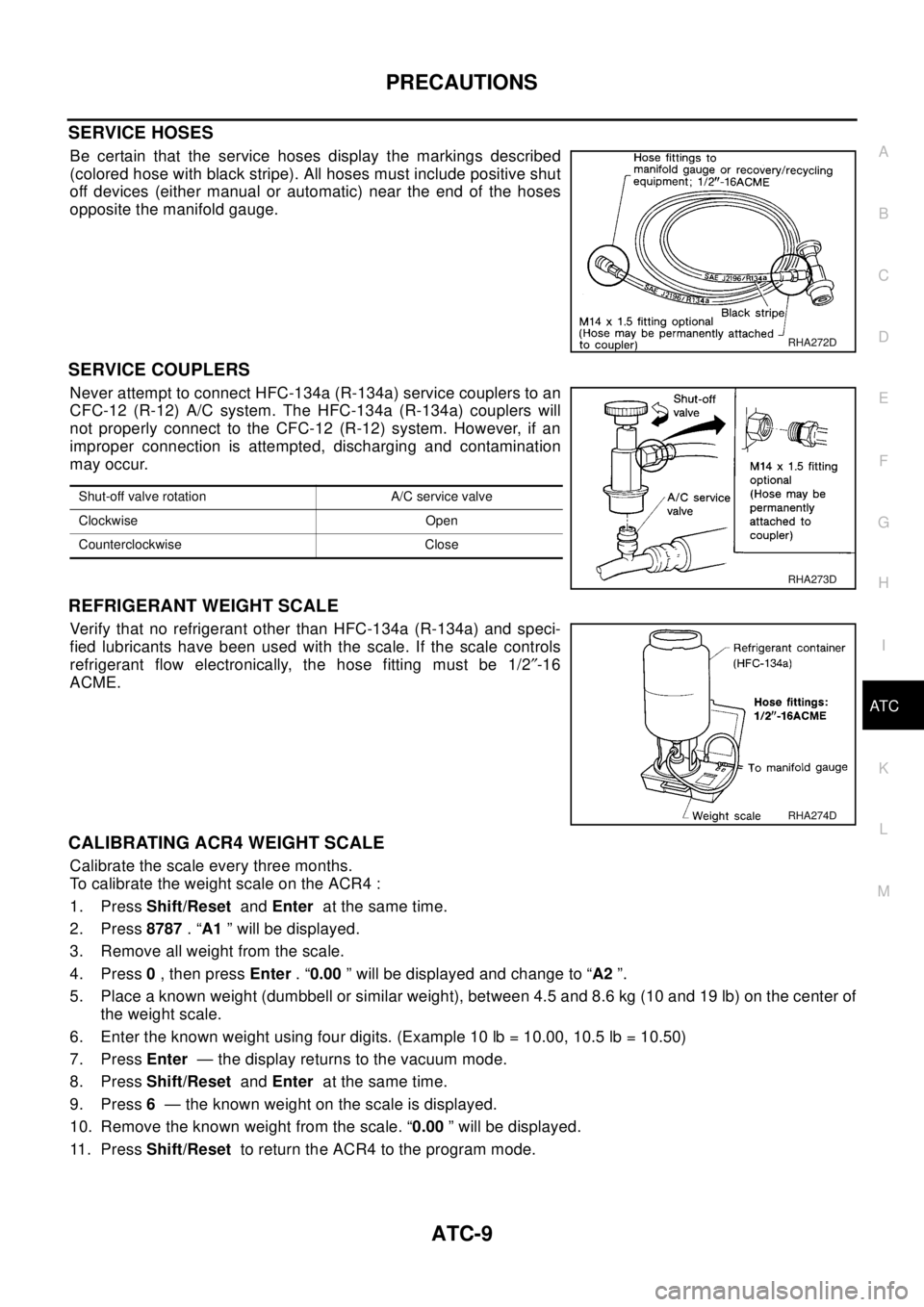
SERVICE HOSES
Be certain that the service hoses display the markings described
(colored hose with black stripe). All hoses must include positive shut
off devices (either manual or automatic) near the end of the hoses
opposite the manifold gauge.
SERVICE COUPLERS
Never attempt to connect HFC-134a (R-134a) service couplers to an
CFC-12 (R-12) A/C system. The HFC-134a (R-134a) couplers will
not properly connect to the CFC-12 (R-12) system. However, if an
improper connection is attempted, discharging and contamination
may occur.
REFRIGERANT WEIGHT SCALE
Verify that no refrigerant other than HFC-134a (R-134a) and speci-
fied lubricants have been used with the scale. If the scale controls
refrigerant flow electronically, the hose fitting must be 1/2²-16
ACME.
CALIBRATING ACR4 WEIGHT SCALE
Calibrate the scale every three months.
To calibrate the weight scale on the ACR4 :
1. PressShift/ResetandEnterat the same time.
2. Press8787.“A1” will be displayed.
3. Remove all weight from the scale.
4. Press0,thenpressEnter.“0.00” will be displayed and change to “A2”.
5. Place a known weight (dumbbell or similar weight), between 4.5 and 8.6 kg (10 and 19 lb) on the center of
the weight scale.
6. Enter the known weight using four digits. (Example 10 lb = 10.00, 10.5 lb = 10.50)
7. PressEnter— the display returns to the vacuum mode.
8. PressShift/ResetandEnterat the same time.
9. Press6— the known weight on the scale is displayed.
10. Remove the known weight from the scale. “0.00” will be displayed.
11 . P r e s sShift/Resetto return the ACR4 to the program mode.
RHA272D
Shut-off valve rotation A/C service valve
Clockwise Open
Counterclockwise Close
RHA273D
RHA274D
Page 627 of 3066
TROUBLE DIAGNOSIS
ATC-49
C
D
E
F
G
H
I
K
L
MA
B
AT C
14.CHECK MALFUNCTIONING DOOR MOTOR POSITION SWITCH
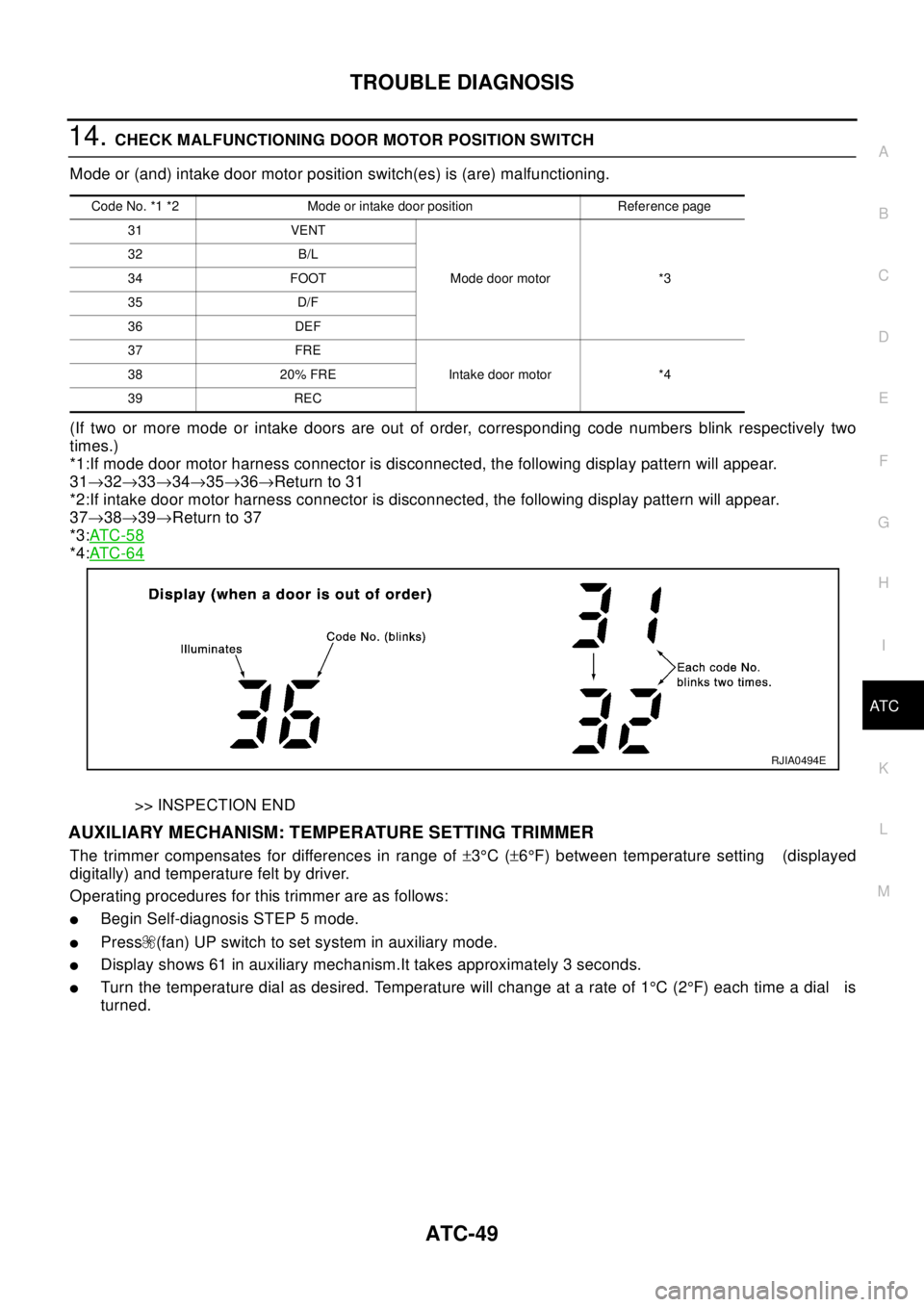
Mode or (and) intake door motor position switch(es) is (are) malfunctioning.
(If two or more mode or intake doors are out of order, corresponding code numbers blink respectively two
times.)
*1:If mode door motor harness connector is disconnected, the following display pattern will appear.
31®32®33®34®35®36®Return to 31
*2:If intake door motor harness connector is disconnected, the following display pattern will appear.
37®38®39®Return to 37
*3:AT C - 5 8
*4:AT C - 6 4
>> INSPECTION END
AUXILIARY MECHANISM: TEMPERATURE SETTING TRIMMER
The trimmer compensates for differences in range of±3°C(±6°F) between temperature setting (displayed
digitally) and temperature felt by driver.
Operating procedures for this trimmer are as follows:
lBegin Self-diagnosis STEP 5 mode.
lPress (fan) UP switch to set system in auxiliary mode.
lDisplay shows 61 in auxiliary mechanism.It takes approximately 3 seconds.
lTurn the temperature dial as desired. Temperature will change at a rate of 1°C(2°F)eachtimeadial is
turned.
Code No. *1 *2 Mode or intake door position Reference page
31 VENT
Mode door motor *3 32 B/L
34 FOOT
35 D/F
36 DEF
37 FRE
Intake door motor *4 38 20% FRE
39 REC
RJIA0494E
Page 630 of 3066
ATC-52
TROUBLE DIAGNOSIS
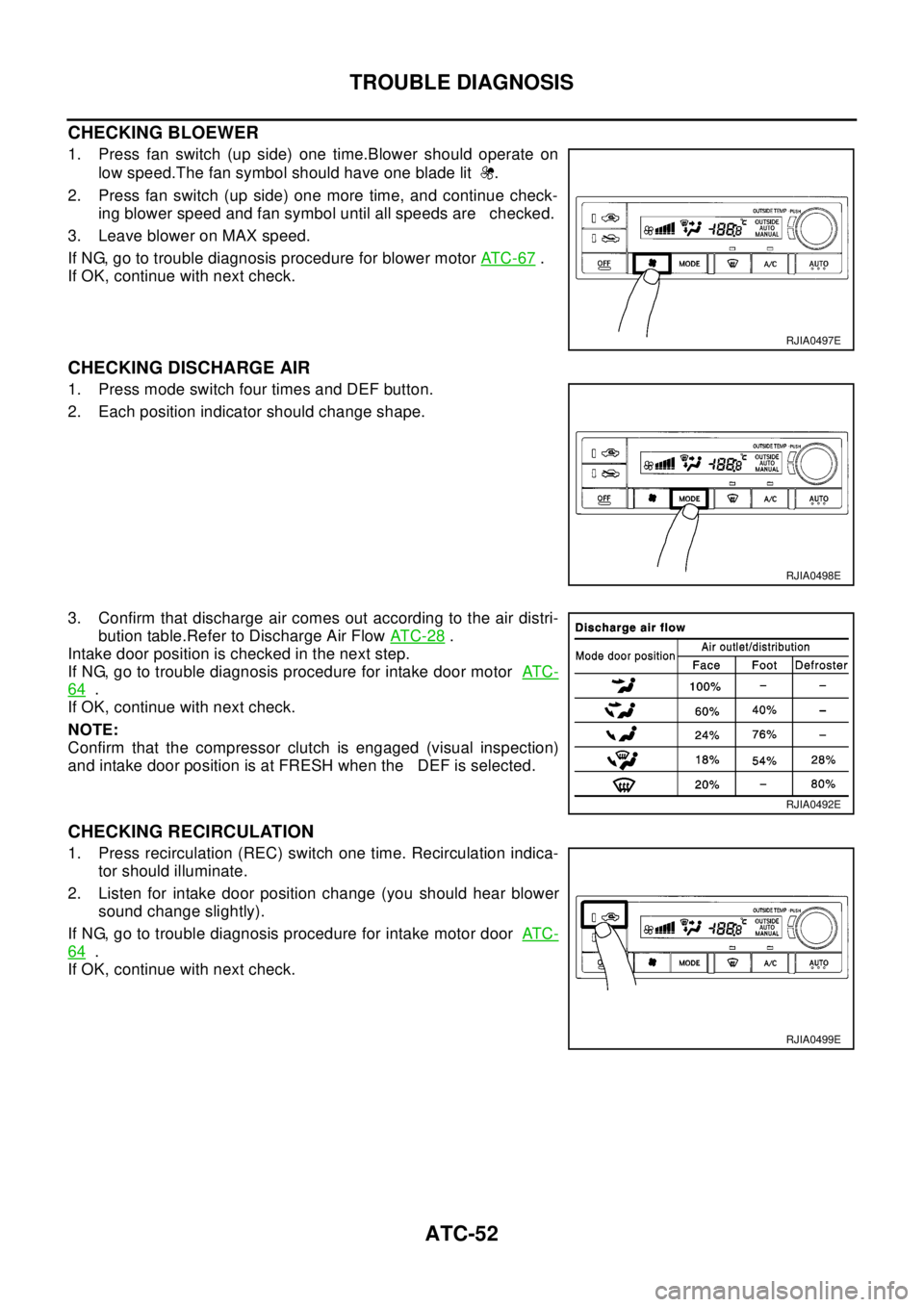
CHECKING BLOEWER
1. Press fan switch (up side) one time.Blower should operate on
low speed.The fan symbol should have one blade lit .
2. Press fan switch (up side) one more time, and continue check-
ing blower speed and fan symbol until all speeds are checked.
3. Leave blower on MAX speed.
If NG, go to trouble diagnosis procedure for blower motorAT C - 6 7
.
If OK, continue with next check.
CHECKING DISCHARGE AIR
1. Press mode switch four times and DEF button.
2. Each position indicator should change shape.
3. Confirm that discharge air comes out according to the air distri-
bution table.Refer to Discharge Air FlowAT C - 2 8
.
Intake door position is checked in the next step.
If NG, go to trouble diagnosis procedure for intake door motorAT C -
64.
If OK, continue with next check.
NOTE:
Confirm that the compressor clutch is engaged (visual inspection)
and intake door position is at FRESH when the DEF is selected.
CHECKING RECIRCULATION
1. Press recirculation (REC) switch one time. Recirculation indica-
tor should illuminate.
2. Listen for intake door position change (you should hear blower
sound change slightly).
If NG, go to trouble diagnosis procedure for intake motor doorAT C -
64.
If OK, continue with next check.
RJIA0497E
RJIA0498E
RJIA0492E
RJIA0499E
Page 664 of 3066

ATC-86
TROUBLE DIAGNOSIS
TROUBLE DIAGNOSES FOR ABNORMAL PRESSURE
Whenever system's high and/or low side pressure is abnormal, diagnose using a manifold gauge. The marker
above the gauge scale in the following tables indicates the standard (normal) pressure range. Since the stan-
dard (normal) pressure, however, differs from vehicle to vehicle, refer to above table (Ambient air temperature-
to-operating pressure table).
Both High and Low-pressure Sides are Too High.
Ambient air
High-pressure (Discharge side)
kPa (kg/cm2, psi)Low-pressure (Suction side)
kPa (kg/cm2, psi) Relative humidity
%Air temperature
°C(°F)
50 - 7020 (68) 765 - 922 (7.8 - 9.4, 111 - 134) 177 - 226 (1.8 - 2.3, 26 - 33)
25 (77) 922 - 1,020 ( 9.4 - 10.4, 134 - 148) 196 - 245 (2.0 - 2.5, 28 - 36)
30 (86) 1,177 - 1,451 (12.0 - 14.8, 171 - 210) 235 - 284 (2.4 - 2.9, 34 - 41)
35 (95) 1,373 - 1,667 (14 - 17, 199 - 242) 275 - 333 (2.8 - 3.4, 40 - 48)
40 (104) 1,618 - 1,961 (16.5 - 20.0, 235 - 284) 333 - 392 (3.4 - 4.0, 48 - 57)
Gauge indication Refrigerant cycle Probable cause Corrective action
Both high and low-pressure
sides are too high.Pressure is reduced soon after
water is splashed on con-
denser.Excessive refrigerant charge in
refrigeration cycleReduce refrigerant until speci-
fied pressure is obtained.
Air suction by cooling fan is
insufficient.Insufficient condenser cooling
performance
¯
1. Condenser fins are clogged.
2. Improper fan rotation of cool-
ing fan
lClean condenser.
lCheck and repair cooling fan
as necessary.
lLow-pressure pipe is not
cold.
lWhen compressor is stopped
high-pressure value quickly
drops by approximately 196
kPa (2 kg/cm2, 28 psi). It
then decreases gradually
thereafter.Poor heat exchange in con-
denser
(After compressor operation
stops, high pressure decreases
too slowly.)
¯
Air in refrigeration cycleEvacuate repeatedly and
recharge system.
Engine tends to overheat.Engine cooling systems mal-
function.Check and repair each engine
cooling system.
lAn area of the low-pressure
pipe is colder than areas
near the evaporator outlet.
lPlates are sometimes cov-
ered with frost.
lExcessive liquid refrigerant
on low-pressure side
lExcessive refrigerant dis-
charge flow
lExpansion valve is open a lit-
tle compared with the specifi-
cation.
¯
1. Improper thermal valve
installation
2. Improper expansion valve
adjustmentReplace expansion valve.
AC359A
Page 676 of 3066
ATC-98
TROUBLE DIAGNOSIS
If NG, replace in-vehicle sensor.
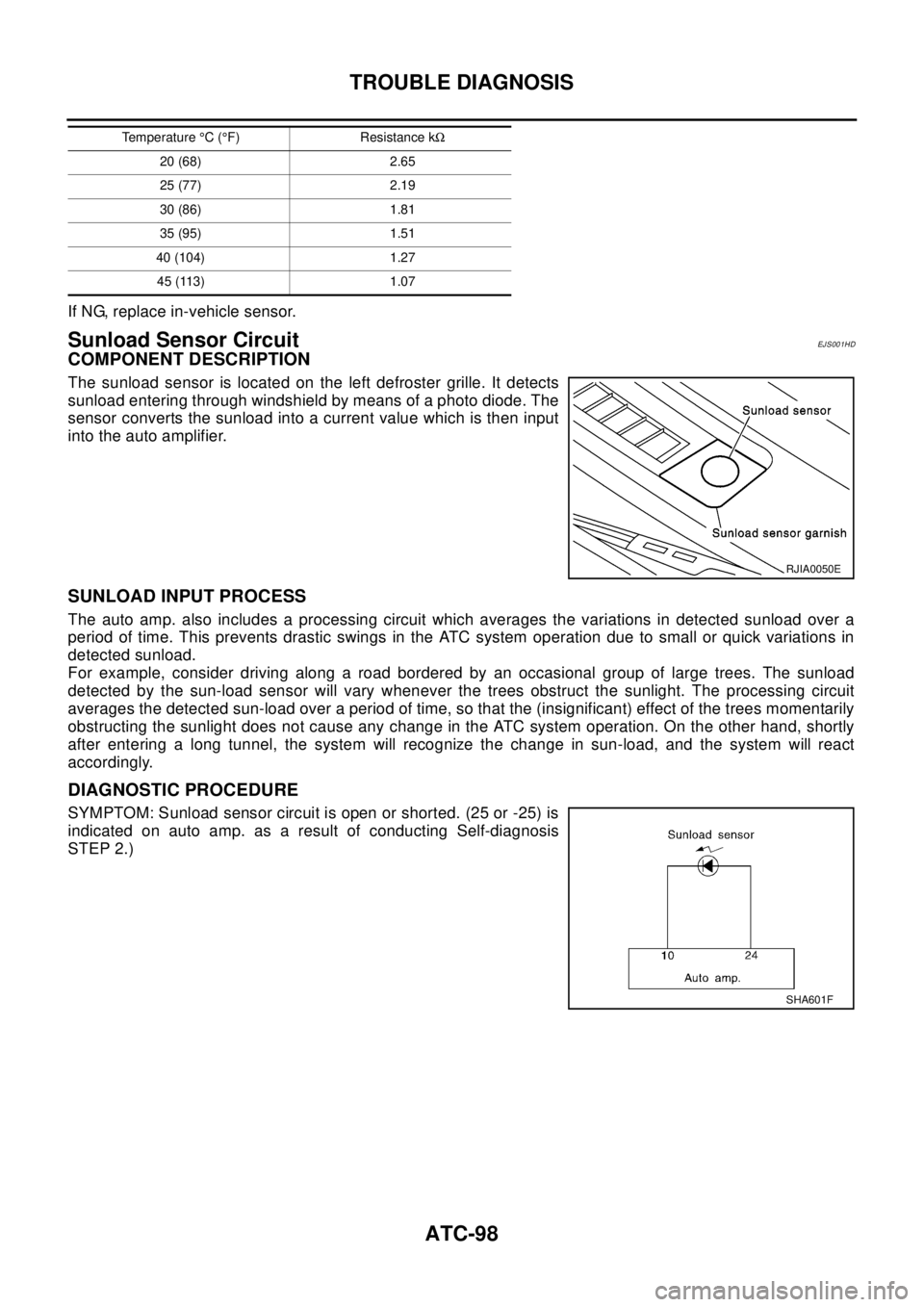
Sunload Sensor CircuitEJ S00 1HD
COMPONENT DESCRIPTION
The sunload sensor is located on the left defroster grille. It detects
sunload entering through windshield by means of a photo diode. The
sensor converts the sunload into a current value which is then input
into the auto amplifier.
SUNLOAD INPUT PROCESS
The auto amp. also includes a processing circuit which averages the variations in detected sunload over a
period of time. This prevents drastic swings in the ATC system operation due to small or quick variations in
detected sunload.
For example, consider driving along a road bordered by an occasional group of large trees. The sunload
detected by the sun-load sensor will vary whenever the trees obstruct the sunlight. The processing circuit
averages the detected sun-load over a period of time, so that the (insignificant) effect of the trees momentarily
obstructing the sunlight does not cause any change in the ATC system operation. On the other hand, shortly
after entering a long tunnel, the system will recognize the change in sun-load, and the system will react
accordingly.
DIAGNOSTIC PROCEDURE
SYMPTOM: Sunload sensor circuit is open or shorted. (25 or -25) is
indicated on auto amp. as a result of conducting Self-diagnosis
STEP 2.)
20 (68) 2.65
25 (77) 2.19
30 (86) 1.81
35 (95) 1.51
40 (104) 1.27
45 (113) 1.07 Temperature°C(°F) Resistance kW
RJIA0050E
SHA601F