change time OLDSMOBILE CUTLASS 1997 Owners Manual
[x] Cancel search | Manufacturer: OLDSMOBILE, Model Year: 1997, Model line: CUTLASS, Model: OLDSMOBILE CUTLASS 1997Pages: 353, PDF Size: 16.72 MB
Page 3 of 353
GENERAL MOTORS, GM, the GM Emblem, OLDSMOBILE, the OLDSMOBILE Rocket Emblem
and the name CUTLASS are registered trademarks of
General Motors Corporation.
This manual includes the latest information at the time
it was printed. We reserve the right to make changes in
the product after that time without further notice.
Please keep this manual
in your Oldsmobile, so it will
be there
if you ever need it when you’re on the road. If
you sell the vehicle, please leave this manual in it so the
new owner can use it.
Litho in
U.S.A.
Part No. 22652546 A First Edition
WE SUPPORT VOLUNTARY TECHNICIAN
CERTIFICATION THROUGH
National Institute for
AUTOMOTIVE SERVICE
EXCELLENCE
We support voluntary
technician certification.
How to Use this Manual
Many people read their owner’s manual from beginning to end when they first receive their new vehicle.
If you
do this, it will help you learn about the features and
controls for your vehicle. In this manual, you’ll find
that pictures and words work together to explain
things quickly.
@Copyright General Motors Corporation 1996 All Rights Reserved
ii
ProCarManuals.com
Page 58 of 353
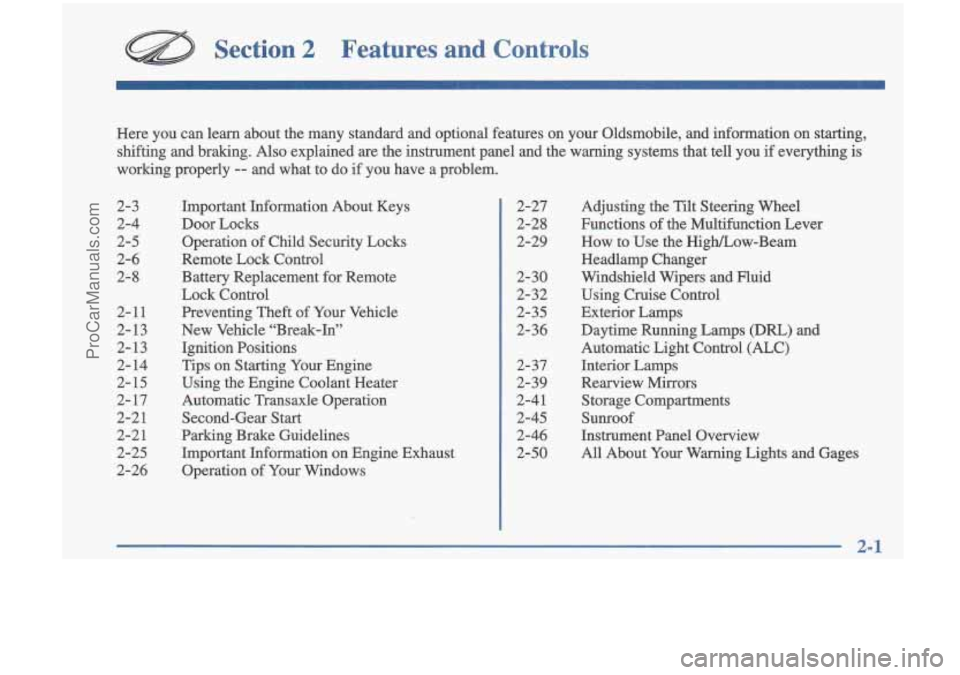
Section 2 Features and Controls
2-3
2-4
2-5
2-6
2-8
2-11
2-13
2-13
2- 14
2-
15
2- 17
2-2
1
2-21
2-25
2-26
Here
you can learn about the many standard and optional features on your Oldsmobile, and infomation on starting,
shifting and braking.
Also explained are the instrument panel and the warning systems that tell you if everything is
working properly
-- and what to do if you have a problem.
Important Information About Keys
Door Locks Operation of Child Security Locks
Remote Lock Control
Battery Replacement for Remote
Lock Control
Preventing Theft of Your Vehicle
New Vehicle “Break-In”
Ignition Positions
Tips on Starting Your Engine
Using the Engine Coolant Heater
Automatic Transaxle Operation
Second-Gear Start
Parking Brake Guidelines Important Information on Engine Exhaust
Operation of Your Windows 2-27
2-28
2-29
2-30
2-32
2-35
2-36
2- 37
2-39
2-41
2-45
2-46
2-50 Adjusting
the Tilt Steering Wheel
Functions of the Multifunction Lever
How to Use the High/Low-Beam
Headlamp Changer
Windshield Wipers and Fluid Using Cruise Control
Exterior Lamps
Daytime Running Lamps (Dm) and
Automatic Light Control
(ALC)
Interior Lamps
Rearview Mirrors Storage Compartments
Sunroof
Instrument Panel Overview
All About Your Warning Lights and Gages
2-1
~
ProCarManuals.com
Page 64 of 353
This device complies with Part 15 of the FCC Rules.
Operation is subject to the following two conditions:
(1) this device may not cause harmful interference,
and (2) this device must accept any interference
received, including interference that may cause
undesired operation.
This device complies with RSS-2 10 of Industry
Canada. Operation is subject to the following two
conditions:
(1) this device may not cause interference,
and
(2) this device must accept any interference
received, including interference that may cause
undesired operation of the device.
This system has a range of about 3 feet (1 m) up to
30 feet (9 m). At times you may notice a decrease in
range. This is normal for any remote keyless entry
system.
If the transmitter does not work or if you have
to stand closer to your vehicle for the transmitter to
work, try
this:
Check to determine if battery replacement or
resynchronization is necessary. See the instructions
that follow.
Check the distance. You may be too far from your
vehicle. You may need to stand closer during rainy
or snowy weather.
Check the location. Other vehicles or objects may be
blocking the signal. Take a few steps to the left or
right, hold the transmitter higher, and
try again.
If you’re still having trouble, see your Oldsmobile
retailer or a qualified technician for service.
Changes or modifications to this system by other than
an authorized service facility could void authorization
to use this equipment.
Operation
The following functions are available with the Remote
Lock Control system:
LOCK: All doors will automatically lock when the
LOCK button on the transmitter
is pressed. Press the
button a second time and you will hear a “chqf’ to
indicate that the doors have been locked.
UNLOCK: The driver’s door will unlock automatically
when the UNLOCK button on the transmitter is pressed.
If the UNLOCK button is pressed again within five
seconds, all remaining doors will unlock.
Trunk Release: The trunk will unlock anytime the
vehicle symbol on the transmitter is pressed, the
trunk lockout is not engaged and the gear selector is
in
PARK (P) or NEUTRAL (N> .
ProCarManuals.com
Page 65 of 353
Matching Tral ~ itter(s) To Your V ~ le
Each remote lock COI 11 transmitter is coded to prevent
another transmitter from unlocking your vehicle.
If a
transmitter is lost or stolen, a replacement can be
purchased through your retailer. Remember to bring any remaining transmitters with you when you
go to
your retailer. When the retailer matches the replacement
transmitter to your vehicle, any remaining transmitters
must also be matched. Once your retailer has coded the
new transmitter, the lost transmitter will not unlock your
vehicle. Each vehicle can have only four transmitters
matched to it.
You can match your transmitter to as many
1997
General Motors vehicles as you own, as long as they
have the same Remote Lock Control system. Contact
your retailer- for assistance with this.
Battery Replacement
Under normal use, the battery in your remote lock
control transmitter should last about two years.
You can tell the battery is weak
if the transmitter won’t
work at the normal range in any location.
If you have to
get close to your vehicle before the transmitter works,
it’s probably time to change the battery.
~
~ .
NOTICE:
When replacing the battery, use care not to
touch any of the circuitry. Static from your
body transferred to these surfaces may damage
the transmitter.
2-8
ProCarManuals.com
Page 93 of 353
Daytime Running Lamps / Automatic
Light
Control
Daytime Running Lamps (DRL) can make it easier for
others to see the front of your vehicle during the day.
DRL can be helpful in many different driving
conditions, but they can be especially helpful in the
short periods after dawn and before sunset.
A light sensor below the defroster grille makes the
DRL and Automatic Light Control (ALC) work, so
be sure it isn’t covered. The DRL system will make
your low-beam headlamps come on at
a reduced
brightness when:
0 The ignition is on,
0 The headlamp switch is off,
0 The transaxle is not in PARK (P) and
0 The park brake is not set. When the
DRL are on, only your low-beam headlamps
will be on. The taillamps, sidemarker and other
lamps won’t be on. Your instrument panel won’t be
lit up either.
When it’s dark enough outside, the
ALC system will
turn your headlamps on to full brightness. The other
lamps that come on with your headlamps will also
come on.
When it’s bright enough outside, the ALC system will
turn off your regular lamps, and your low-beam
headlamps change to the reduced brightness of DRL.
To idle your vehicle with the DIU
off, set the park
brake while the ignition is off. Then start the vehicle.
The
DRL will stay off until you release the park brake.
As with any vehicle, you should turn
on the regular
headlamp system when you need it.
2-36
ProCarManuals.com
Page 129 of 353
RECALL: Press this button briefly to recall the station
being played or to display the clock. To change what is
normally shown on the display (station or time), press the RECALL button until you see the display you want,
then hold the RECALL button until the display flashes.
If you press the button when the ignition is
off, the clock
will show for a few seconds.
Finding a Station
AM-FM: Press this button to switch between AM, FM1
and FM2. The display shows your selection.
TUNE: Press this knob lightly so it extends. Turn it to
choose radio stations. Push the knob back into its stored
position when you’re not using it.
SEEK: Press the up or down arrow to go to the next
higher or lower station and stay there. The sound will
mute while seeking.
SCAN: Press this button and release it to listen to
stations for a few seconds. The radio will go to a station,
stop for a few seconds, then go on to the next station.
Press the button again to stop scanning. The sound
will mute while scanning, and SCAN will appear on the display.
If you press SCAN for more than two seconds,
the radio will change to P SCAN mode.
P SCAN will
appear on the display.
PUSHBUTTONS: The five numbered pushbuttons let
you return to your favorite stations. You can set up to
15 stations (five AM, five FM1 and five FM2). Just:
1. Turn the radio on.
2. Press AM-FM to select the band.
3. Tune in the desired station.
4. Press and hold one of the five numbered buttons.
The sound will mute. When it returns, release the
button. Whenever you press that numbered button,
the station you set will return.
5. Repeat the steps for each pushbutton.
P SCAN: Press SCAN for more than two seconds, and
P SCAN will appear on the display. The radio will go to
the
first preset station stored on your pushbuttons, stop
for a few seconds, then go on to the next preset station.
Press SCAN again to stop scanning.
3-8
ProCarManuals.com
Page 131 of 353
RCL: Press this button briefly to recall the station being
played or to display the clock. To change what
is
normally shown on the display (station or time), press
the RCL button until you see the display you want, then
hold the RCL button until the display flashes. If you
press the button when the ignition is
off, the clock will
show for a few seconds.
Finding a Station
AM-FM:
Press this button to switch between AM, FM1
and FM2. The display shows your selection.
TUNE: Press this knob lightly so it extends. Turn it to
choose radio stations. Push the knob back into its stored
position when you’re not using it.
SEEK: Press the up or down arrow to go to the next
higher or lower station and stay there. The sound will
mute while seeking.
SCAN: Press this button and release it to listen to
stations-for a few seconds. The radio
will go to a station,
stop for a few seconds, then go on to the next station.
Press the button again to stop scanning. The sound will
mute while scanning, and SCAN will appear on the display.
If you press SCAN for more than two seconds,
the radio will change to P SCAN mode. P SCAN will appear on the display.
PUSHBUTTONS: The five numbered pushbuttons let
you return to your favorite stations. You can set up to
15 stations (five AM, five FM1 and five FM2). Just:
1. Turn the radio on.
2. Press AM-FM to select the band.
3. Tune in the desired station.
4. Press TONE to select the equalization that best suits
the type of station selected.
5. Press and hold one of the five numbered buttons.
The sound will mute. When it returns, release the
button. Whenever you press that numbered button, the station you set will return and the tone that you selected will also be automatically selected for
that button.
6. Repeat the steps for each pushbutton.
P SCAN: Press SCAN for more than two seconds, and
P SCAN will appear on the display. The radio will go to
the first preset station stored on your pushbuttons, stop
for a
few seconds, then go on to the next preset station.
Press SCAN again to stop scanning.
3-10
ProCarManuals.com
Page 135 of 353
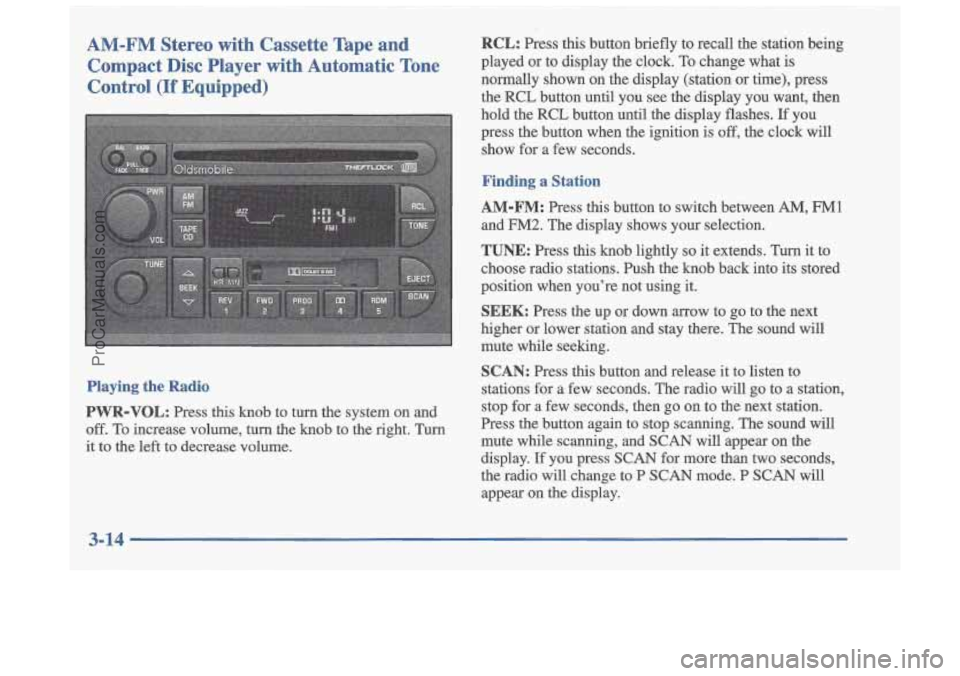
AM-FM Stereo with Cassette Tape and Compact Disc Player with Automatic Tone
Control
(If Equipped)
Playing the Radio
PWR-VOL: Press this knob to turn the system on and
off. To increase volume, turn the knob to the right. Turn
it to the left to decrease volume.
RCL: Press this button briefly to recall the station being
played or to display the clock.
To change what is
normally shown on the display (station or time), press
the RCL button until you see the display you want, then
hold the RCL button until the display flashes.
If you
press the button when the ignition
is off, the clock will
show for a few seconds.
Finding a Station
AM-FM:
Press this button to switch between AM, FM1
and FM2. The display shows your selection.
TUNE: Press this knob lightly so it extends. Turn it to
choose radio stations. Push the knob back into its stored
position when you’re not using it.
SEEK: Press the up or down arrow to go to the next
higher
or lower station and stay there. The sound will
mute while seeking.
SCAN: Press this button and release it to listen to
stations for a few seconds. The radio will go to a station,
stop for a few seconds, then go on to the next station.
Press the button again to stop scanning. The sound will
mute while scanning,
and SCAN will appear on the
display. If you press SCAN for more than two seconds,
the radio will change to P SCAN mode. P
SCAN will
appear on the display.
ProCarManuals.com
Page 140 of 353
RCL: Press this button to see which track is playing.
Press it again within five seconds to see how long it has
been playing. To change what
is normally shown on the
display (track or elapsed time), press the button until
you see the display you want, then hold the button until
the display flashes. While elapsed time is showing, EL
TM will appear on the display.
AM-FM: Press this button to play the radio when a disc
is
in the player.
TAPE-CD: Press this button to change to the tape or
disc function when the radio is on and either a tape or
CD is inserted. Press
AM-FM to return to the radio
while a CD or tape is playing. The inactive tape or CD
will remain safely inside the radio for future listening.
EJECT: Press this button to remove the compact disc or
cassette tape. The item with the box around it
on the
display will eject and the radio will play. EJECT may be
activated with either the ignition or radio
off. Cassettes
and compact discs may be loaded with the radio and
ignition
off if this button is pressed first. If you leave a
compact disc in the player while listening to the radio, it
may become warm.
Theft-Deterrent Feature
THEFTLOCK" is designed to discourage theft of your
radio. It works by using a secret code to disable all radio
functions whenever battery power is removed.
The THEFTLOCK feature for the radio may be used
or
ignored. If ignored, the system plays normally and the
radio is not protected by the feature.
If THEFTLOCK is
activated, your radio will not operate
if stolen.
When THEFTLOCK is activated, the radio will display
LOC to indicate a locked condition anytime battery
power is removed.
If your battery loses power for any
reason, you must unlock the radio with the secret code
before it will operate.
Activating the Theft-Deterrent Feature
The instructions which follow, explain how to enter your
secret code to activate the THEFTLOCK system. It is
recommended that you read through all nine steps
before starting the procedure.
NOTE: If you allow more than 15 seconds to elapse
between any steps, the radio automatically reverts to
time and you must start the procedure over at Step
4.
1. Write down any three or four-digit number from
000 to 1999 and keep it in a safe place separate from
the vehicle.
ProCarManuals.com
Page 154 of 353
Remember: Anti-lock doesn’t change the time you need
to get your foot up to the brake pedal or always decrease
stopping distance. If you get too close to the vehicle in
front
of you, you won’t have time to apply your brakes
if that vehicle suddenly slows or stops. Always leave
enough room up ahead to stop, even though you have
.anti-lock brakes.
Using Anti-Lock
Don’t pump the brakes. Just hold the brake pedal
down and let anti-lock work for you. You may feel the
system working, or you may notice some noise, but
this
is normal.
Braking in Emergencies
With anti-lock, you can steer and brake at the same
time.
In many emergencies, steering can help you more
than even the very best braking.
Steering
Power Steering
If you lose power steering assist because the engine
stops or the system is not functioning, you can steer but
it will take much more effort.
Steering Tips
Driving on Curves
It’s important to take curves at a reasonable speed.
A lot of the “driver lost control” accidents mentioned on
the news happen on curves. Here’s why:
Experienced driver or beginner, each of us is subject to
the same laws of physics when driving on curves. The
traction of the tires against the road surface makes it
possible for the vehicle to change its path when you
turn
the front wheels. If there’s no traction, inertia will keep
the vehicle going in the same direction. If you’ve ever
tried to steer a vehicle on wet ice, you’ll understand this\
.
The traction you can get
in a curve depends on the
condition
of your tires and the road surface, the angle at
which the curve is banked, and yom speed. While you’re
in a curve, speed is the one factor you can control.
Suppose you’re steering through a sharp curve. Then you
suddenly accelerate. Both control systems
-- steering and
acceleration
-- have to do their work where the tires meet
the road. Adding the sudden acceleration can demand too
much
of those places. You can lose control.
4-9
ProCarManuals.com