battery OPEL FRONTERA 1998 Workshop Manual
[x] Cancel search | Manufacturer: OPEL, Model Year: 1998, Model line: FRONTERA, Model: OPEL FRONTERA 1998Pages: 6000, PDF Size: 97 MB
Page 3553 of 6000

10A–2
CRUISE CONTROL SYSTEM
2. RESUME/ACCEL Switch Function
1.Resume Function: When the RESUME/ACCEL
switch is turned on/off after the system is temporarily
deactivated by pressing the brake or clutch pedal
while the vehicle is running, the vehicle resumes the
speed stored before the system was released, and
the vehicle automatically runs at the stored speed .
2.Accelerate Function: When the RESUME/ACCEL
switch is kept on after the system is released
completely, the vehicle accelerates its speed during
t h a t t i m e . T h e v e h i c l e s p e e d a t w h i c h t h e v e h i c l e w a s
running when the switch was turned off is stored in the
memory, and the vehicle automatically returns to this
speed.
3.Tap-up Function: When the RESUME/ACCEL
switch is turned on and off instantaneously while the
vehicle is running, the vehicle decelerates a mile for
each on/off operation. The vehicle speed at which the
vehicle was running when the switch was turned off
last is stored in the memory, and the vehicle
automatically returns to this stored speed.
3. CANCEL Function
1.Temporary Cancellation:
When the brake pedal is pressed.
When the clutch pedal is pressed. (M/T)
When the select lever is shifted to any position other
than “D”, “3”, “2” or “L”. (A/T)
When the cancel switch is operated.
When the vehicle speed exceeds about 20 km/h
over the vehicle speed stored in the memory.
Turning the RESUME/ACCEL switch will return the
vehicle to the speed stored in the cruise control
memory.
2.Complete Cancellation:
When the starter switch or the main switch is turned
off.
When the fail-safe function is activated.
When the vehicle speed is about 38.5 km/h.
Diagnosis
Refer to the Cruise Control System Diagnosis in Wiring
System section.
Brake Switch
Removal
1. Disconnect the battery ground cable.
2. Remove the brake switch (1).
Disconnect the connector.
Loosen the lock nuts of the switch.
Remove the switch by turning it.
310RS004
Installation
To install, follow the removal steps in the reverse order,
noting the following points.
1. Check to see if the brake pedal has been returned by
the return spring to the specified position.2. Turn the switch clockwise until the tip of the threaded
portion of the brake switch contacts the pedal arm.
3. Turn the switch counterclockwise until the space
between the tip of the threaded portion and the pedal
arm is 0.5 to 1.0 mm (0.02-0.04 in.) as shown in the
figure.
310RS003
Page 3555 of 6000

10A–4
CRUISE CONTROL SYSTEM
Starter Switch
Removal
1. Disconnect the battery ground cable.
2. Remove the front console assembly (1). Refer to the
Instrument Panel Assembly in Body Structure
section.
3. Remove the lower cluster assembly (2). Refer to the
Instrument Panel Assembly in Body Structure
section.
4. Remove the instrument panel driver lower cover
assembly (3). Refer to the Instrument Panel
Assembly in Body Structure section.
821RW024
5. Remove seven screws to remove the steering cowl
(6).
6. Disconnect the connector, remove the screw (4) and
then remove the starter switch (5).
431RW005
Installation
To install, follow the removal steps in the reverse order,
noting the following point.
1. When installing the steering cowl (10), be sure to pass
the harnesses through the route as shown in the
figure so that the starter switch harness (7), the
combination switch harness (8) and the inflator
module harness (9) will not catch.
825RW058
Page 3556 of 6000
10A–5
CRUISE CONTROL SYSTEM
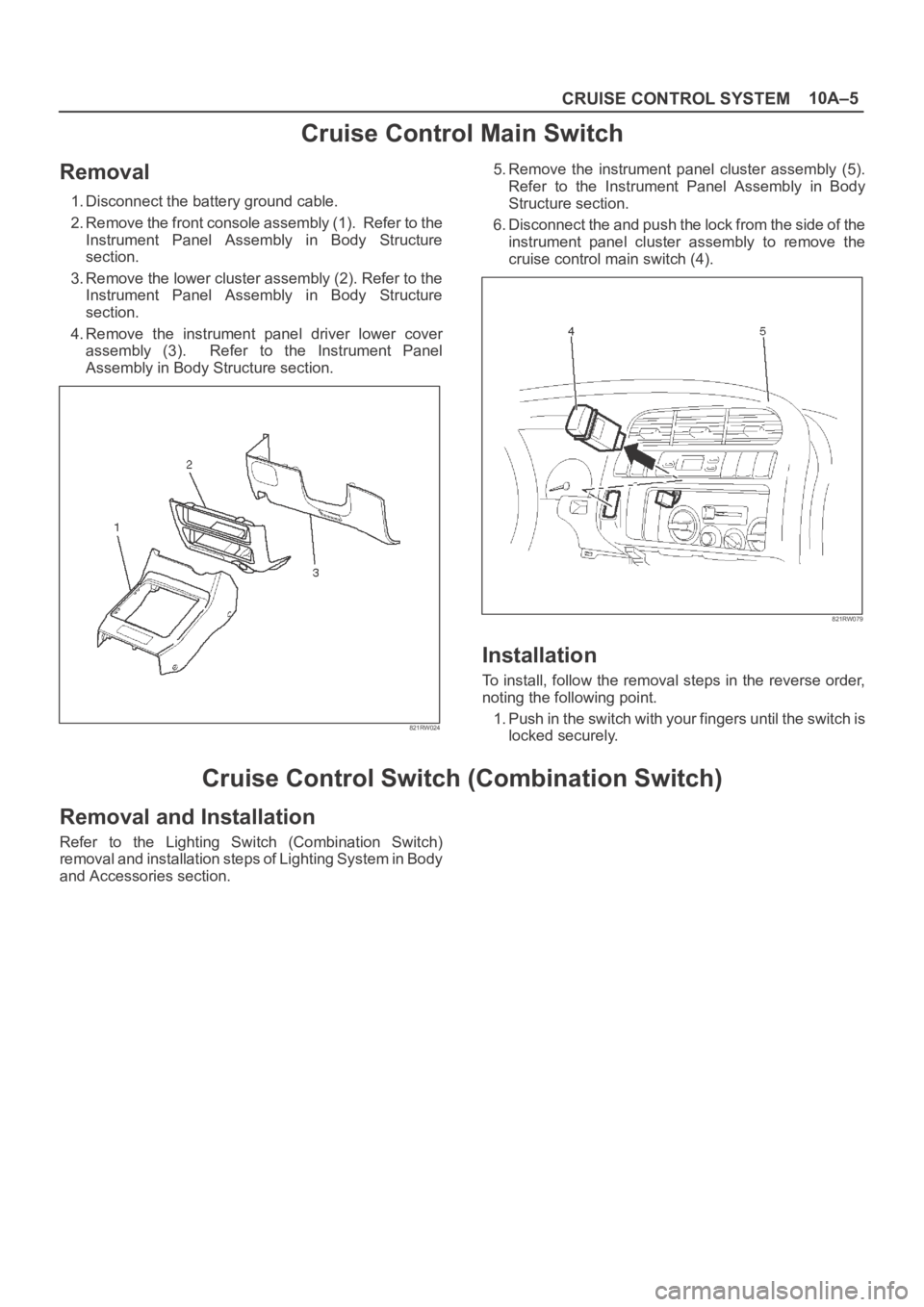
Cruise Control Main Switch
Removal
1. Disconnect the battery ground cable.
2. Remove the front console assembly (1). Refer to the
Instrument Panel Assembly in Body Structure
section.
3. Remove the lower cluster assembly (2). Refer to the
Instrument Panel Assembly in Body Structure
section.
4. Remove the instrument panel driver lower cover
assembly (3). Refer to the Instrument Panel
Assembly in Body Structure section.
821RW024
5. Remove the instrument panel cluster assembly (5).
Refer to the Instrument Panel Assembly in Body
Structure section.
6. Disconnect the and push the lock from the side of the
instrument panel cluster assembly to remove the
cruise control main switch (4).
821RW079
Installation
To install, follow the removal steps in the reverse order,
noting the following point.
1. Push in the switch with your fingers until the switch is
locked securely.
Cruise Control Switch (Combination Switch)
Removal and Installation
Refer to the Lighting Switch (Combination Switch)
removal and installation steps of Lighting System in Body
and Accessories section.
Page 3557 of 6000

10A–6
CRUISE CONTROL SYSTEM
Cruise Control Unit
Removal
1. Disconnect the battery ground cable.
2. Remove the dash side trim panel (RH)(2).
3. Disconnect the connector.
4. Remove a fixing nut to remove the cruise control unit
(1).
825RW050
Installation
To install, follow the removal steps in the reverse order.
Page 3559 of 6000

10A–8
CRUISE CONTROL SYSTEM
Removal
1. Disconnect the battery ground cable.
2. Remove the cruise actuator Assembly (4).
Disconnect the connector (3).
R e m o v e t h e c a b l e e n d ( 1 ) f r o m t h e c a m l i n k ( c r u i s e
control side).
Loosen two fixing nuts (2).
Remove three actuator fixing screws.
825RW049
Installation
To install, follow the removal steps in the reverse order,
noting the following point.
1. Take care not to bend the cable excessively.
Mode Switch
Removal and Installation
Refer to the Mode Switch removal and installation steps
in Automatic Transmission section.
Page 3754 of 6000

20
25
30A
UT
O
4321
C01RW020
43
3 41
2 21
No continuity between terminals (2) and (4).
Continuity between terminal (2) and (4) when battery
voltage is applied between (1) and (3).
C01RY00003
1
2
3
Terminal
No.Conduction
Conducted (50‰ maximum)
Conducted (100‰ maximum)
Conducted (220‰ maximum) Not conducted
Not conducted 1
�−
23
Te s t i n g
rod
�−
�−
�−
�−
�+
�+
�+
�+
�+
1 23
C01RY00002
Page 4050 of 6000

4B1–5 DRIVE LINE CONTROL SYSTEM (SHIFT ON THE FLY)
4. If vacuum is not applicable as much as –400mmHg,
and if there is resistance on the intake side, replace
with a new check valve.
VSV Assembly
Inspect the vehicle side harness as follows:
412RS071
Legend
(1) Grey
(2) Blue
1. Remove connector.
2. Shift transfer lever to 2H and start the engine.
NOTE: Do not move the vehicle while inspection.
3. Make sure that there is continuity in the vehicle side of
harness. If there is no continuity, check transfer shift
switch and wiring.
Inspect both VSVs as follows:
F04RS004
1. With battery not connected (Usual).
A–C:There is continuity
B:Closed
2. With battery connected
A – B:There is continuity
C:Closed
3. If 1) and 2) fail, replace with a new VSV.
Axle Position Switch
412RS048
1. With ball (1) being free
A – B:There is continuity
2. With ball forced into the switch
A – B:No continuity
3. If 1) and 2) fail, replace with a new switch.
Page 4079 of 6000

4B1–34
DRIVE LINE CONTROL SYSTEM (SHIFT ON THE FLY)
4. If vacuum is not applicable as much as –400mmHg,
and if there is resistance on the intake side, replace
with a new check valve.
VSV Assembly
Inspect the vehicle side harness as follows:
412RS071
Legend
(1) Grey
(2) Blue
1. Remove connector.
2. Shift transfer lever to 2H and start the engine.
NOTE: Do not move the vehicle while inspection.
3. Make sure that there is continuity in the vehicle side of
harness. If there is no continuity, check transfer shift
switch and wiring.
Inspect both VSVs as follows:
F04RS004
1. With battery not connected (Usual).
A–C:There is continuity
B:Closed
2. With battery connected
A – B:There is continuity
C:Closed
3. If 1) and 2) fail, replace with a new VSV.
Axle Position Switch
412RS048
1. With ball (1) being free
A – B:There is continuity
2. With ball forced into the switch
A – B:No continuity
3. If 1) and 2) fail, replace with a new switch.
Motor Actuator Assembly
Inspect the function of the motor actuator assembly as
follows:
Page 4101 of 6000

DRIVE LINE CONTROL SYSTEM (TOD) 4B2–18
Parts Location (RHD 6VE1)
D08RW621
Legend
(1) I–9
(2) B–13 or B–14
(3) H–12
(4) I–12
(5) A–3
(6) H–7, H–8
(7) H–32
(8) C–16
(9) H–5, H–6
(10) C–63
(11) H–49(12) M–22
(13) M–23
(14) M–24
(15) H–10
(16) E–5
(17) E–29
(18) H–42
(19) E–30
(20) Battery
(21) H–13, H–15, H–25, H–26, H–27
(22) Fuse Box
(23) B–67, B–68
Page 4122 of 6000
4B2–39 DRIVE LINE CONTROL SYSTEM (TOD)
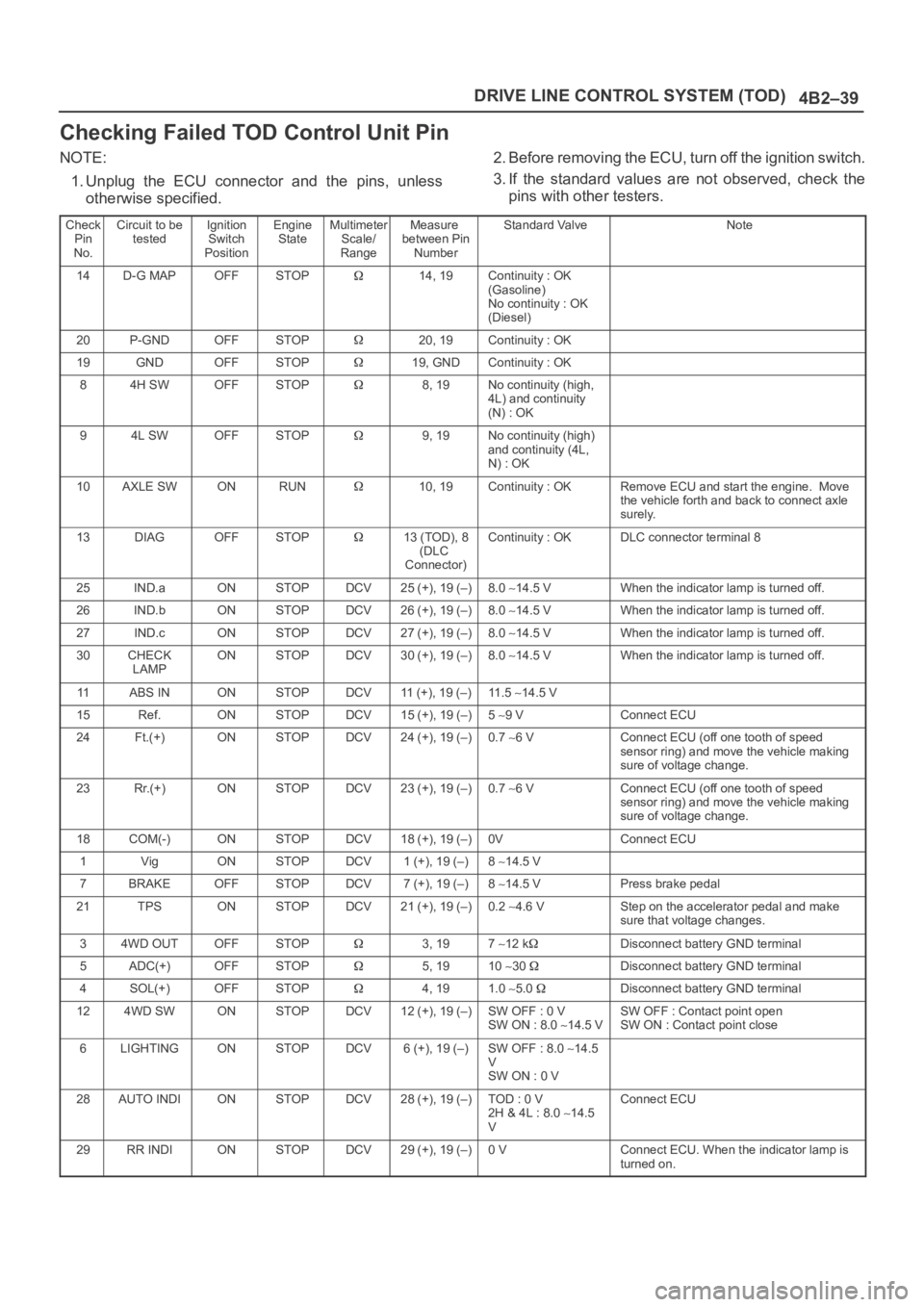
Checking Failed TOD Control Unit Pin
NOTE:
1. Unplug the ECU connector and the pins, unless
otherwise specified.2. Before removing the ECU, turn off the ignition switch.
3. If the standard values are not observed, check the
pins with other testers.
Check
Pin
No.Circuit to be
testedIgnition
Switch
PositionEngine
StateMultimeter
Scale/
RangeMeasure
between Pin
NumberStandard ValveNote
14D-G MAPOFFSTOP14, 19Continuity : OK
(Gasoline)
No continuity : OK
(Diesel)
20P-GNDOFFSTOP20, 19Continuity : OK
19GNDOFFSTOP19, GNDContinuity : OK
84H SWOFFSTOP8, 19No continuity (high,
4L) and continuity
(N) : OK
94L SWOFFSTOP9, 19No continuity (high)
and continuity (4L,
N) : OK
10AXLE SWONRUN10, 19Continuity : OKRemove ECU and start the engine. Move
the vehicle forth and back to connect axle
surely.
13DIAGOFFSTOP13 (TOD), 8
(DLC
Connector)Continuity : OKDLC connector terminal 8
25IND.aONSTOPDCV25 (+), 19 (–)8.0 14.5 VWhen the indicator lamp is turned off.
26IND.bONSTOPDCV26 (+), 19 (–)8.0 14.5 VWhen the indicator lamp is turned off.
27IND.cONSTOPDCV27 (+), 19 (–)8.0 14.5 VWhen the indicator lamp is turned off.
30CHECK
LAMPONSTOPDCV30 (+), 19 (–)8.0 14.5 VWhen the indicator lamp is turned off.
11ABS INONSTOPDCV11 (+), 19 (–)11 . 5 14.5 V
15Ref.ONSTOPDCV15 (+), 19 (–)5 9 VConnect ECU
24Ft.(+)ONSTOPDCV24 (+), 19 (–)0.7 6 VConnect ECU (off one tooth of speed
sensor ring) and move the vehicle making
sure of voltage change.
23Rr.(+)ONSTOPDCV23 (+), 19 (–)0.7 6 VConnect ECU (off one tooth of speed
sensor ring) and move the vehicle making
sure of voltage change.
18COM(-)ONSTOPDCV18 (+), 19 (–)0VConnect ECU
1VigONSTOPDCV1 (+), 19 (–)8 14.5 V
7BRAKEOFFSTOPDCV7 (+), 19 (–)8 14.5 VPress brake pedal
21TPSONSTOPDCV21 (+), 19 (–)0.2 4.6 VStep on the accelerator pedal and make
sure that voltage changes.
34WD OUTOFFSTOP3, 197 12 kDisconnect battery GND terminal
5ADC(+)OFFSTOP5, 1910 30 Disconnect battery GND terminal
4SOL(+)OFFSTOP4, 191.0 5.0 Disconnect battery GND terminal
124WD SWONSTOPDCV12 (+), 19 (–)SW OFF : 0 V
SW ON : 8.0 14.5 VSW OFF : Contact point open
SW ON : Contact point close
6LIGHTINGONSTOPDCV6 (+), 19 (–)SW OFF : 8.0 14.5
V
SW ON : 0 V
28AUTO INDIONSTOPDCV28 (+), 19 (–)TOD : 0 V
2H & 4L : 8.0 14.5
VConnect ECU
29RR INDIONSTOPDCV29 (+), 19 (–)0 VConnect ECU. When the indicator lamp is
turned on.