buttons PEUGEOT 108 2015 User Guide
[x] Cancel search | Manufacturer: PEUGEOT, Model Year: 2015, Model line: 108, Model: PEUGEOT 108 2015Pages: 271, PDF Size: 7.42 MB
Page 187 of 271
185
108_en_Chap12a_Autoradio-Toyota-tactile-1_ed01-2015
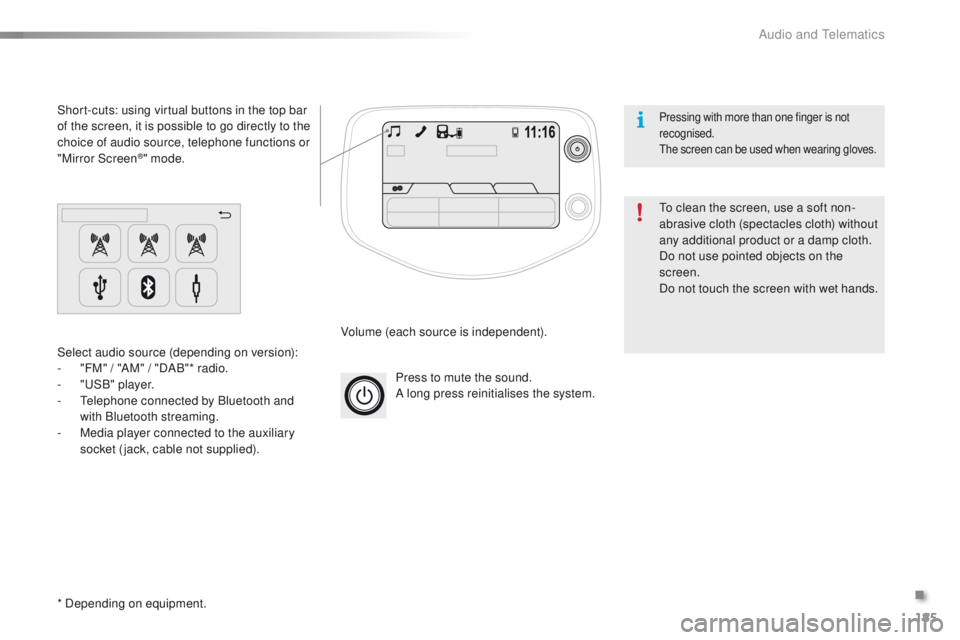
Press to mute the sound.
A long press reinitialises the system.
Volume (each source is independent).
Select audio source (depending on version):
-
"
FM" / "AM" / "DAB"* radio.
-
"uS
B" player.
-
t
e
lephone connected by Bluetooth and
with Bluetooth streaming.
-
M
edia player connected to the auxiliary
socket (jack, cable not supplied).
Short-cuts: using virtual buttons in the top bar
of the screen, it is possible to go directly to the
choice of audio source, telephone functions or
"Mirror Screen
®" mode.
* Depending on equipment.
to c
lean the screen, use a soft non-
abrasive cloth (spectacles cloth) without
any additional product or a damp cloth.
Do not use pointed objects on the
screen.
Do not touch the screen with wet hands.
Pressing with more than one finger is not
recognised.
th
e screen can be used when wearing gloves.
.
Audio and telematics
Page 194 of 271
192
108_en_Chap12a_Autoradio-Toyota-tactile-1_ed01-2015
Radio
* Depending on equipment.
Selecting a station
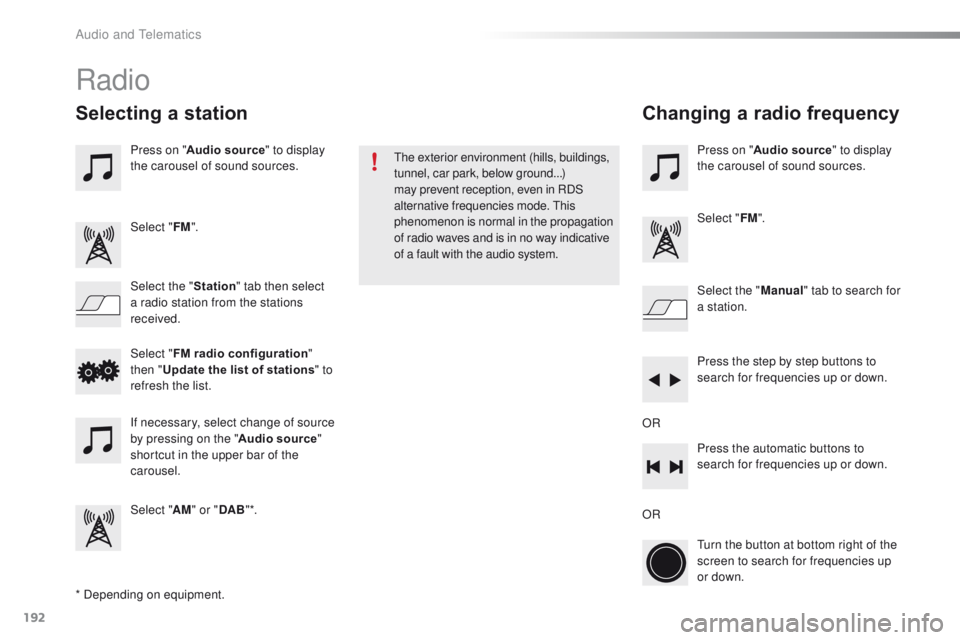
Press on "Audio source " to display
the carousel of sound sources.
Select " FM".
Select the " Station" tab then select
a radio station from the stations
received. Select the "
Manual" tab to search for
a station.
Select " FM radio configuration "
then " Update the list of stations " to
refresh the list.
If necessary, select change of source
by pressing on the " Audio source"
shortcut in the upper bar of the
carousel.
Select " AM" or " DAB" *. Press on "
Audio source " to display
the carousel of sound sources.
Select " FM".
Press the step by step buttons to
search for frequencies up or down.
Press the automatic buttons to
search for frequencies up or down.
tu
rn the button at bottom right of the
screen to search for frequencies up
or down.
OR ORthe
exterior environment (hills, buildings,
tunnel, car park, below ground...)
may prevent reception, even in RDS
alternative frequencies mode.
t
h
is
phenomenon is normal in the propagation
of radio waves and is in no way indicative
of a fault with the audio system.
Changing a radio frequency
Audio and telematics
Page 229 of 271
227
108_en_Chap12b_Autoradio-toyota-2_ed01-2015
First steps
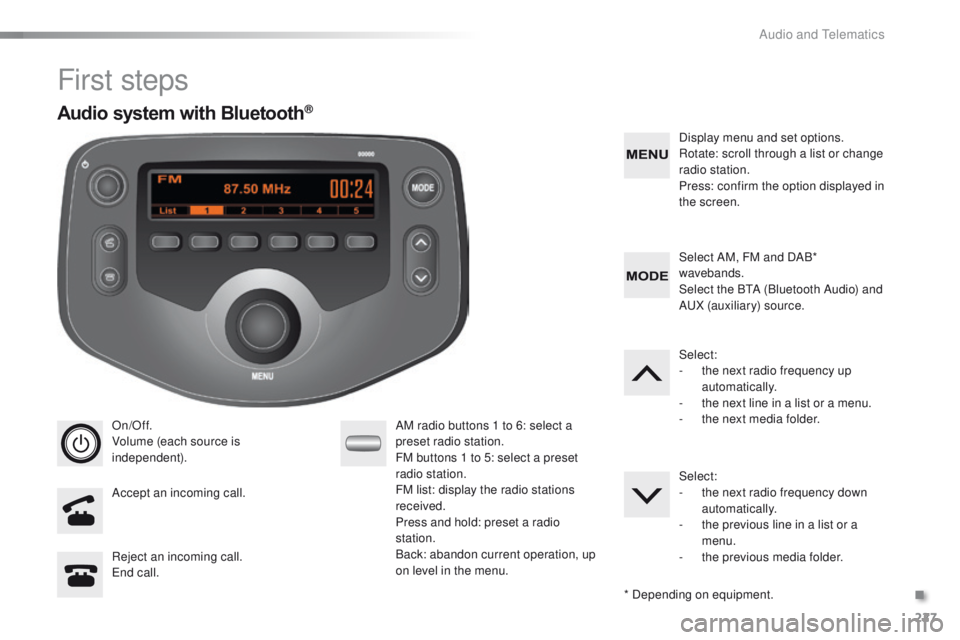
On/Off.
Volume (each source is
independent).
Accept an incoming call. AM radio buttons 1 to 6: select a
preset radio station.
FM buttons 1 to 5: select a preset
radio station.
FM list: display the radio stations
received.
Press and hold: preset a radio
station.
Back: abandon current operation, up
on level in the menu.Display menu and set options.
Rotate: scroll through a list or change
radio station.
Press: confirm the option displayed in
the screen.
Reject an incoming call.
en
d call. Select AM, FM and DAB*
wavebands.
Select the B
tA (
Bluetooth Audio) and
A
uX
(auxiliary) source.
Select:
-
t
he next radio frequency up
automatically.
-
t
he next line in a list or a menu.
- t he next media folder.
Select:
-
t
he next radio frequency down
automatically.
-
t
he previous line in a list or a
menu.
-
t
he previous media folder.
* Depending on equipment.
Audio system with Bluetooth®
.
Audio and telematics
Page 230 of 271
228
108_en_Chap12b_Autoradio-toyota-2_ed01-2015
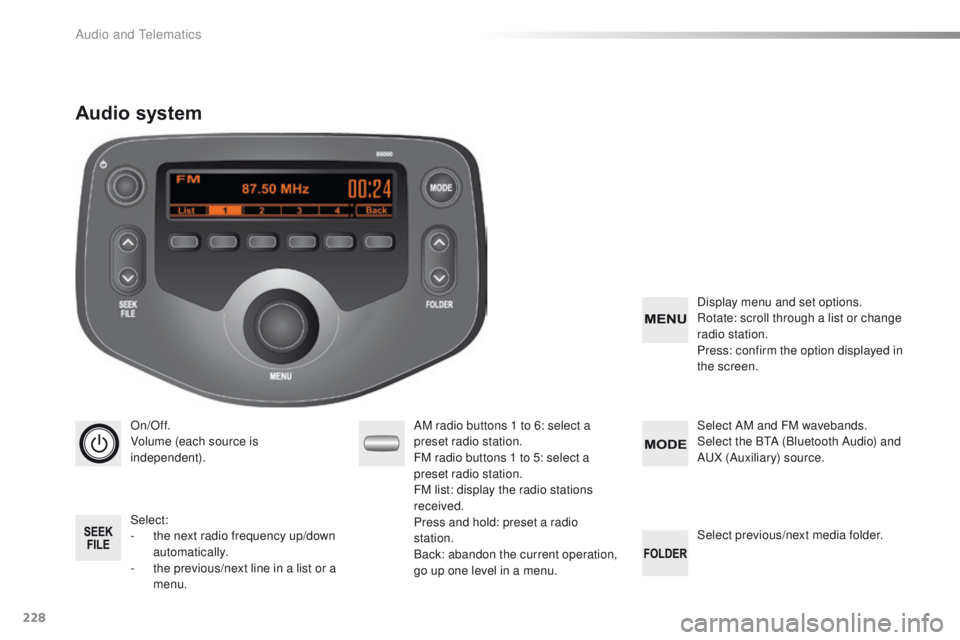
On/Off.
Volume (each source is
independent).
Select:
-
t
he next radio frequency up/down
automatically.
-
t
he previous/next line in a list or a
menu. AM radio buttons 1 to 6: select a
preset radio station.
FM radio buttons 1 to 5: select a
preset radio station.
FM
list: display the radio stations
received.
Press and hold: preset a radio
station.
Back: abandon the current operation,
go up one level in a menu. Display menu and set options.
Rotate: scroll through a list or change
radio station.
Press: confirm the option displayed in
the screen.
Select AM and FM
wavebands.
Select the BtA ( Bluetooth Audio) and
A
uX
(Auxiliary) source.
Select previous/next media folder.
Audio system
Audio and telematics
Page 232 of 271
230
108_en_Chap12b_Autoradio-toyota-2_ed01-2015
Radio
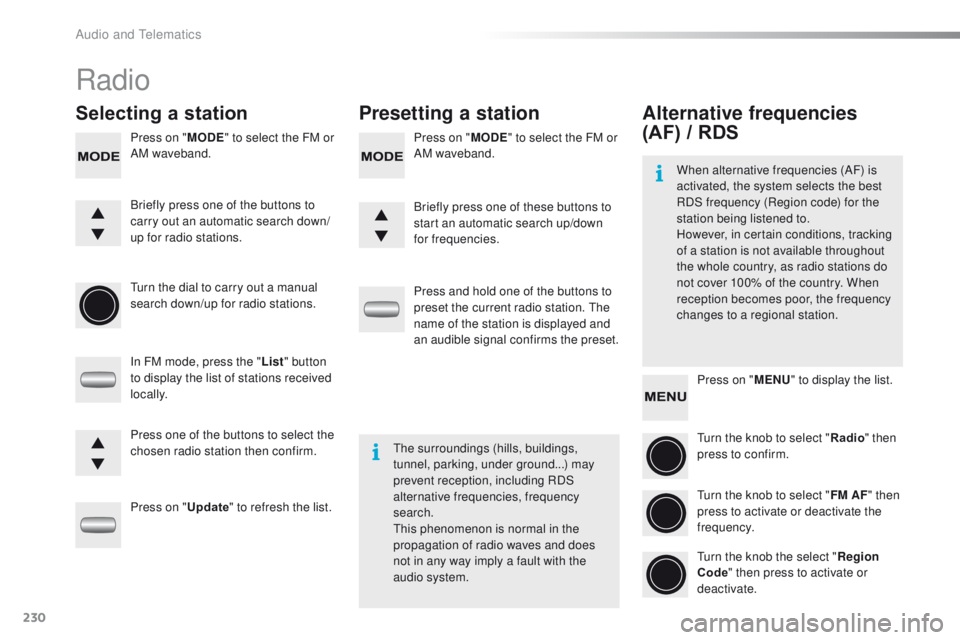
Selecting a station Presetting a station
Press on "MODE" to select the FM or
AM waveband. Press on "
MODE" to select the FM or
AM waveband.
tu
rn the dial to carry out a manual
search down/up for radio stations.
In FM mode, press the " List" button
to display the list of stations received
locally.
Press on " Update" to refresh the list. Press and hold one of the buttons to
preset the current radio station.
t
h
e
name of the station is displayed and
an audible signal confirms the preset.
Briefly press one of the buttons to
carry out an automatic search down/
up for radio stations.
Briefly press one of these buttons to
start an automatic search up/down
for frequencies.
Press one of the buttons to select the
chosen radio station then confirm.
the
surroundings (hills, buildings,
tunnel, parking, under ground...) may
prevent reception, including RDS
alternative frequencies, frequency
search.
th
is phenomenon is normal in the
propagation of radio waves and does
not in any way imply a fault with the
audio system.
Alternative frequencies
(AF) / RDS
Press on " MENU" to display the list.
tu
rn the knob to select " Radio" then
press to confirm.
tu
rn the knob to select " FM AF" then
press to activate or deactivate the
frequency.
tu
rn the knob the select " Region
Code " then press to activate or
deactivate.
When alternative frequencies (AF) is
activated, the system selects the best
RDS frequency (Region code) for the
station being listened to.
However, in certain conditions, tracking
of a station is not available throughout
the whole country, as radio stations do
not cover 100% of the country. When
reception becomes poor, the frequency
changes to a regional station.
Audio and telematics
Page 233 of 271
231
108_en_Chap12b_Autoradio-toyota-2_ed01-2015
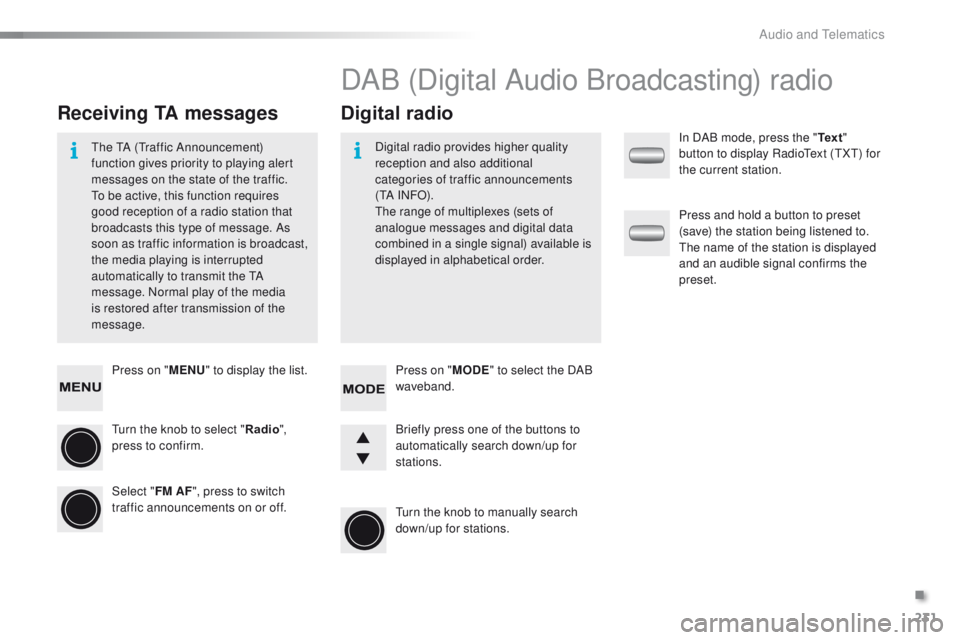
Press on "MENU" to display the list.
tu
rn the knob to select " Radio",
press to confirm.
Select " FM AF", press to switch
traffic announcements on or off.
Receiving TA messages Digital radio
the tA (traffic Announcement)
function gives priority to playing alert
messages on the state of the traffic.
to b
e active, this function requires
good reception of a radio station that
broadcasts this type of message. As
soon as traffic information is broadcast,
the media playing is interrupted
automatically to transmit the
t
A
m
essage. Normal play of the media
is restored after transmission of the
message. Digital radio provides higher quality
reception and also additional
categories of traffic announcements
(
t
A I N FO) .
th
e range of multiplexes (sets of
analogue messages and digital data
combined in a single signal) available is
displayed in alphabetical order.
DAB (Digital Audio Broadcasting) radio
Press on " MODE" to select the DAB
waveband.
tu
rn the knob to manually search
down/up for stations. Briefly press one of the buttons to
automatically search down/up for
stations. In DAB mode, press the "
Te x t"
button to display Radio
te
xt (
tXt) f
or
the current station.
Press and hold a button to preset
(save) the station being listened to.
th
e name of the station is displayed
and an audible signal confirms the
preset.
.
Audio and telematics
Page 266 of 271
.
Audio and Telematics 7
c1-108-post-it-web_en_chap12a_complementnav_toyota_tactile-1_ed01-2015
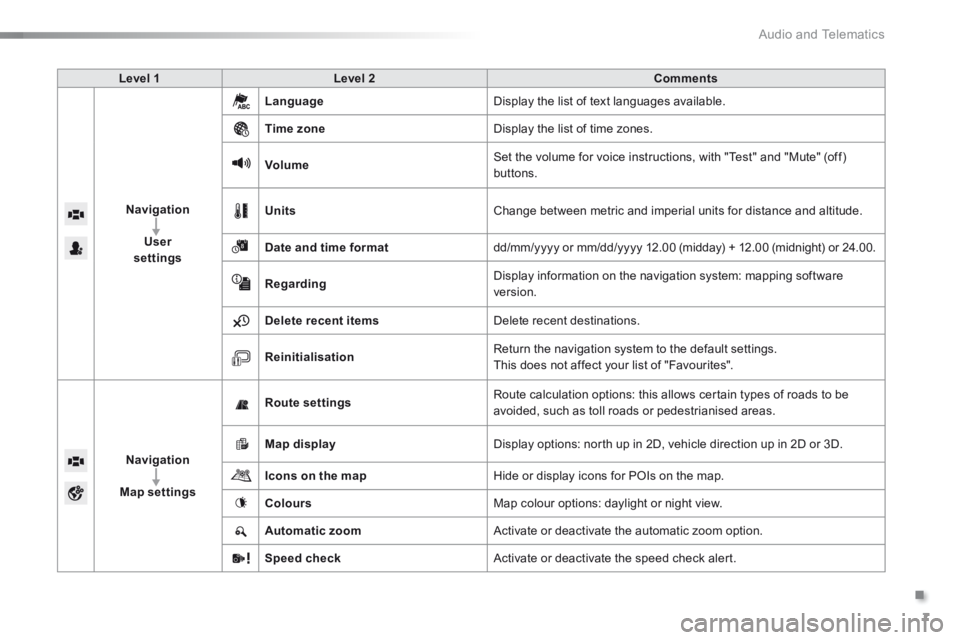
Level 1Level 2Comments
Navigation
User settings
Language Display the list of text languages available.
Time zone Display the list of time zones.
Volume Set the volume for voice instructions, with "Test" and "Mute" (off) buttons.
Units Change between metric and imperial units for distance and altitude.
Date and time format dd/mm/yyyy or mm/dd/yyyy 12.00 (midday) + 12.00 (midnight) or 24.00.
Regarding Display information on the navigation system: mapping software version.
Delete recent items Delete recent destinations.
Reinitialisation Return the navigation system to the default settings. This does not affect your list of "Favourites".
Navigation
Map settings
Route settings Route calculation options: this allows certain types of roads to be avoided, such as toll roads or pedestrianised areas.
Map display Display options: north up in 2D, vehicle direction up in 2D or 3D.
Icons on the map Hide or display icons for POIs on the map.
Colours Map colour options: daylight or night view.
Automatic zoom Activate or deactivate the automatic zoom option.
Speed check Activate or deactivate the speed check alert.