ESP PEUGEOT 108 2015 Owner's Manual
[x] Cancel search | Manufacturer: PEUGEOT, Model Year: 2015, Model line: 108, Model: PEUGEOT 108 2015Pages: 271, PDF Size: 7.42 MB
Page 176 of 271
174
108_en_Chap10_verifications_ed01-2015
Checking levels
take care when working under the
bonnet, as certain areas of the engine
may be extremely hot (risk of burns) and
the cooling fan could start at any time
(even with the ignition off).
Oil level
the check of the oil level is carried
out with the dipstick, located under
the bonnet. For the position of the
dipstick, refer to the under-bonnet
view on a previous page.
Checking with dipstick
Check all of these levels regularly, in line with the manufacturer's service schedule. top them up if necessary, unless other wise indicated.
If a level drops significantly, have the corresponding system checked by a Pe ugeOt dealer or a qualified workshop.
to e
nsure the accuracy of the reading,
your vehicle must be on a level
sur face, with the engine off for at least
30
minutes.
It is normal to top up the oil level between
two services (or oil changes). P
e
uge
Ot
recommends that you check the level, and top
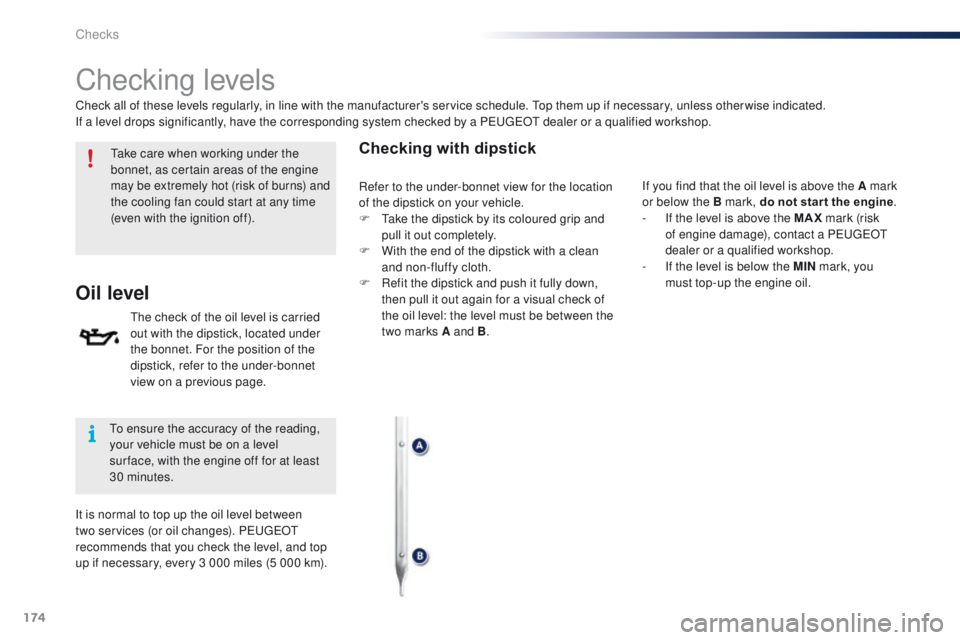
up if necessary, every 3 000 miles (5 000 km). If you find that the oil level is above the A mark
or below the B mark, do not star t the engine
.
-
I
f the level is above the MAX mark (risk
of engine damage), contact a P
e
uge
Ot
dealer or a qualified workshop.
-
I
f the level is below the MIN mark, you
must top-up the engine oil.
Refer to the under-bonnet view for the location
of the dipstick on your vehicle.
F
t
a
ke the dipstick by its coloured grip and
pull it out completely.
F
W
ith the end of the dipstick with a clean
and non-fluffy cloth.
F
R
efit the dipstick and push it fully down,
then pull it out again for a visual check of
the oil level: the level must be between the
two marks A and B .
Checks
Page 181 of 271
179
108_en_Chap11_caracteristiques-techniques_ed01-2015
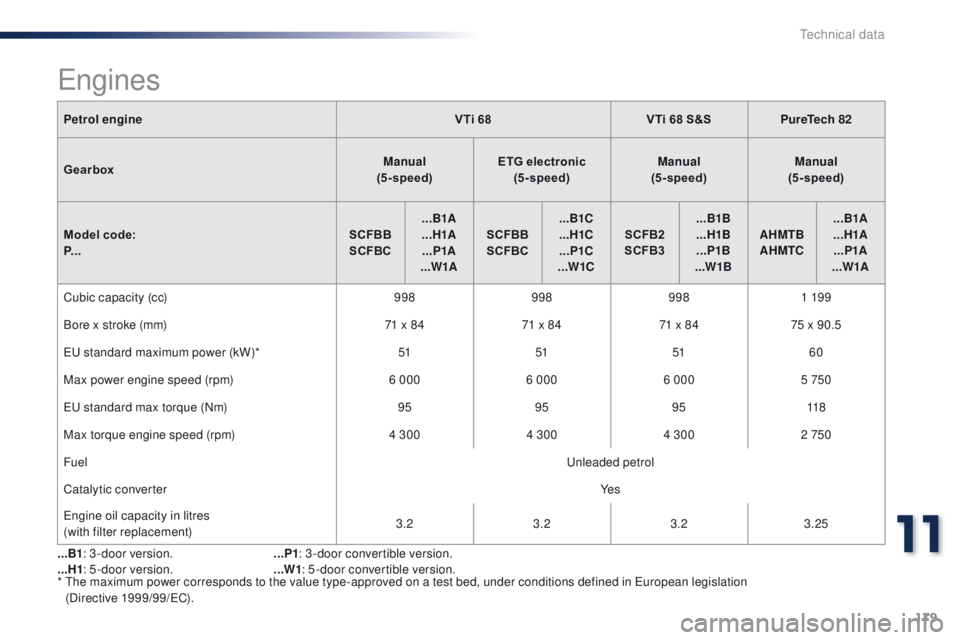
Petrol engineVTi 68VTi 68 S&SPureTech 82
Gearbox Manual
(5 - speed) ETG electronic
(5 - speed) Manual
(5 - speed) Manual
(5 - speed)
Model code:
P... SCFBB
SCFBC ...B1A
...H1A ...P1A
...W1A SCFBB
SCFBC ...B1C
...H1C ...P1C
...W1C SCFB2
SCFB3 ...B1B
...H1B ...P1B
...W1B AHMTB
AHMTC ...B1A
...H1A ...P1A
...W1A
Cubic capacity (cc) 9989989981 19 9
Bore x stroke (mm) 71 x 8471 x 8471 x 8475 x 90.5
e
u standard maximum power (kW)* 51515160
Max power engine speed (rpm) 6 0006 0006 000 5 750
e
u standard max torque (Nm) 959595118
Max torque engine speed (rpm) 4 3004 3004 300 2 750
Fuel
u
nleaded petrol
Catalytic converter Ye s
en
gine oil capacity in litres
(with filter replacement) 3.2
3.23.23.25
*
t
h
e maximum power corresponds to the value type-approved on a test bed, under conditions defined in e
u
ropean legislation
(Directive 1999/99/
eC
).
engines
...B1: 3 -door version.
...H1 : 5 -door version. ...P1
: 3 -door convertible version.
...W1 : 5 -door convertible version.
11
technical data
Page 197 of 271
195
108_en_Chap12a_Autoradio-Toyota-tactile-1_ed01-2015
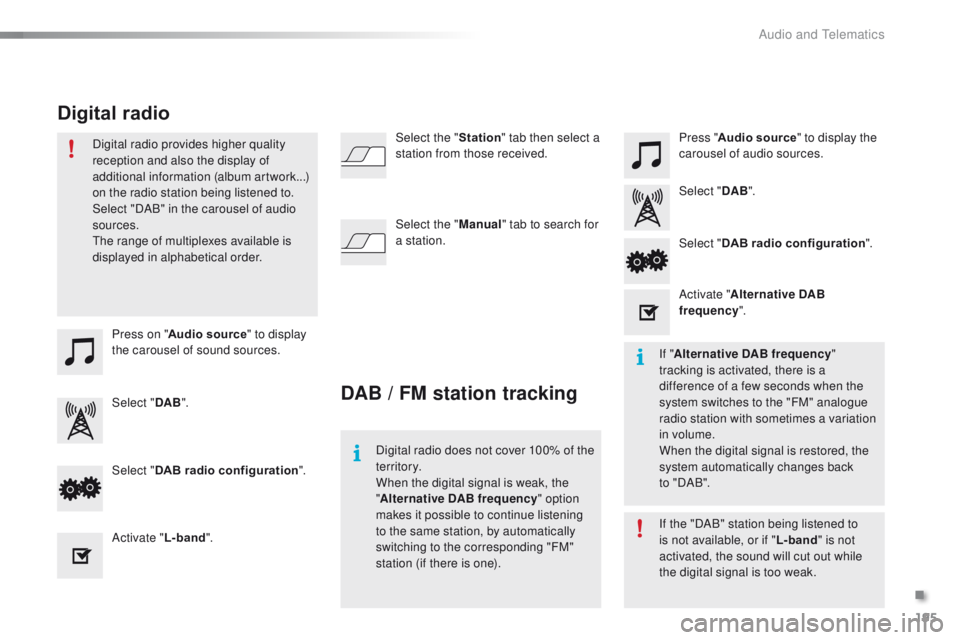
Press on "Audio source " to display
the carousel of sound sources. Press "
Audio source " to display the
carousel of audio sources.
Select " DAB". Select "
DAB".
Select " DAB radio configuration ".
Activate " L-band". Select "
DAB radio configuration ".
Activate " Alternative DAB
frequency ".
Select the "
Station" tab then select a
station from those received.
Select the " Manual" tab to search for
a station.
Digital radio provides higher quality
reception and also the display of
additional information (album artwork...)
on the radio station being listened to.
Select "DAB" in the carousel of audio
sources.
th
e range of multiplexes available is
displayed in alphabetical order.
Digital radio does not cover 100% of the
te r r i to r y.
When the digital signal is weak, the
"Alternative DAB frequency " option
makes it possible to continue listening
to the same station, by automatically
switching to the corresponding "FM"
station (if there is one). If the "DAB" station being listened to
is not available, or if "
L-band" is not
activated, the sound will cut out while
the digital signal is too weak. If " Alternative DAB frequency "
tracking is activated, there is a
difference of a few seconds when the
system switches to the "FM" analogue
radio station with sometimes a variation
in volume.
When the digital signal is restored, the
system automatically changes back
to
" DA B ".
DAB / FM station tracking
Digital radio
.
Audio and telematics
Page 226 of 271
224
108_en_Chap12b_Autoradio-toyota-2_ed01-2015
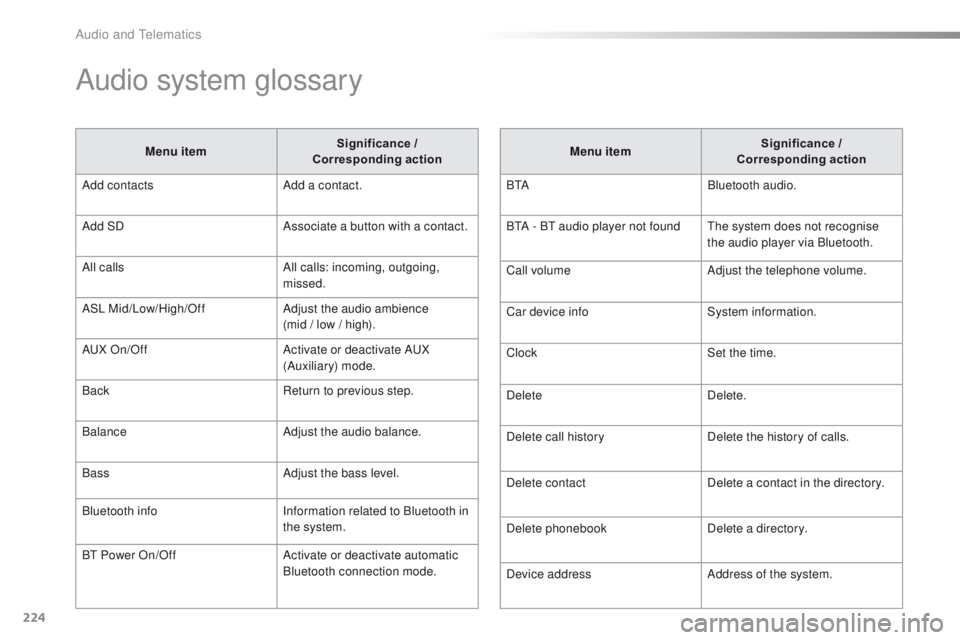
Audio system glossary
Menu item Significance /
Corresponding action
Add contacts Add a contact.
Add SD Associate a button with a contact.
All calls All calls: incoming, outgoing,
missed.
ASL Mid/Low/High/Off Adjust the audio ambience
(mid / low / high).
A
uX
On/Off Activate or deactivate A
uX
(
Auxiliary) mode.
Back Return to previous step.
Balance Adjust the audio balance.
Bass Adjust the bass level.
Bluetooth info Information related to Bluetooth in
the system.
B
t
Power On/Off Activate or deactivate automatic
Bluetooth connection mode. Menu item
Significance /
Corresponding action
B
t
ABluetooth audio.
B
tA - Bt
audio player not found
th
e system does not recognise
the audio player via Bluetooth.
Call volume Adjust the telephone volume.
Car device info System information.
Clock Set the time.
Delete Delete.
Delete call history Delete the history of calls.
Delete contact Delete a contact in the directory.
Delete phonebook Delete a directory.
Device address Address of the system.
Audio and telematics
Page 227 of 271
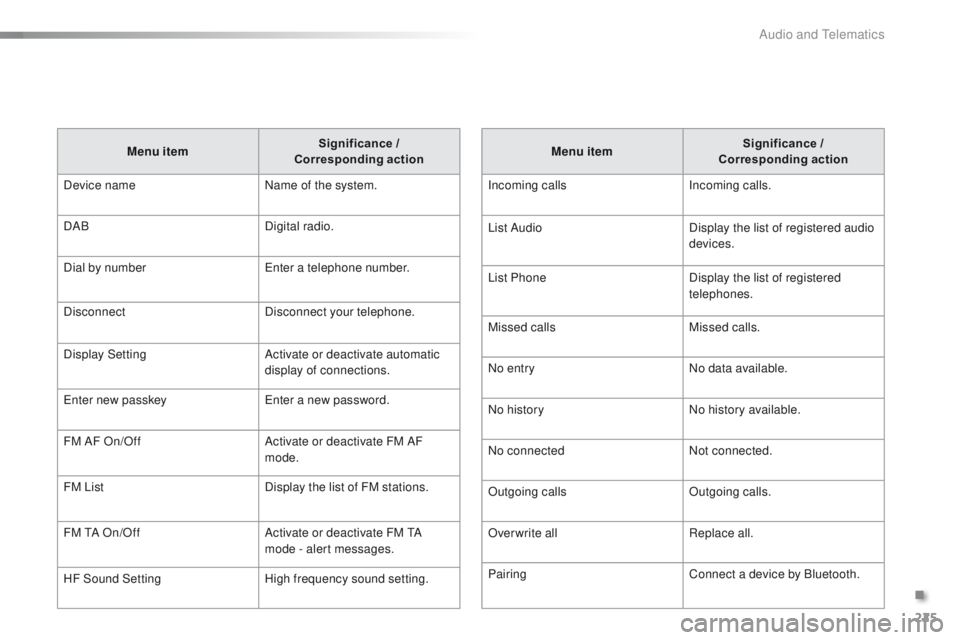
225
108_en_Chap12b_Autoradio-toyota-2_ed01-2015
Menu item Significance /
Corresponding action
Incoming calls Incoming calls.
List Audio Display the list of registered audio
devices.
List Phone Display the list of registered
telephones.
Missed calls Missed calls.
No entry No data available.
No history No history available.
No connected Not connected.
Outgoing calls Outgoing calls.
Overwrite all Replace all.
Pairing Connect a device by Bluetooth.
Menu item
Significance /
Corresponding action
Device name Name of the system.
DAB Digital radio.
Dial by number
en
ter a telephone number.
Disconnect Disconnect your telephone.
Display Setting Activate or deactivate automatic
display of connections.
en
ter new passkey
en
ter a new password.
FM AF On/Off Activate or deactivate FM AF
mode.
FM List Display the list of FM stations.
FM
t
A O
n/Off Activate or deactivate FM
t
A
m
ode - alert messages.
HF Sound Setting High frequency sound setting.
.
Audio and telematics
Page 228 of 271
226
108_en_Chap12b_Autoradio-toyota-2_ed01-2015
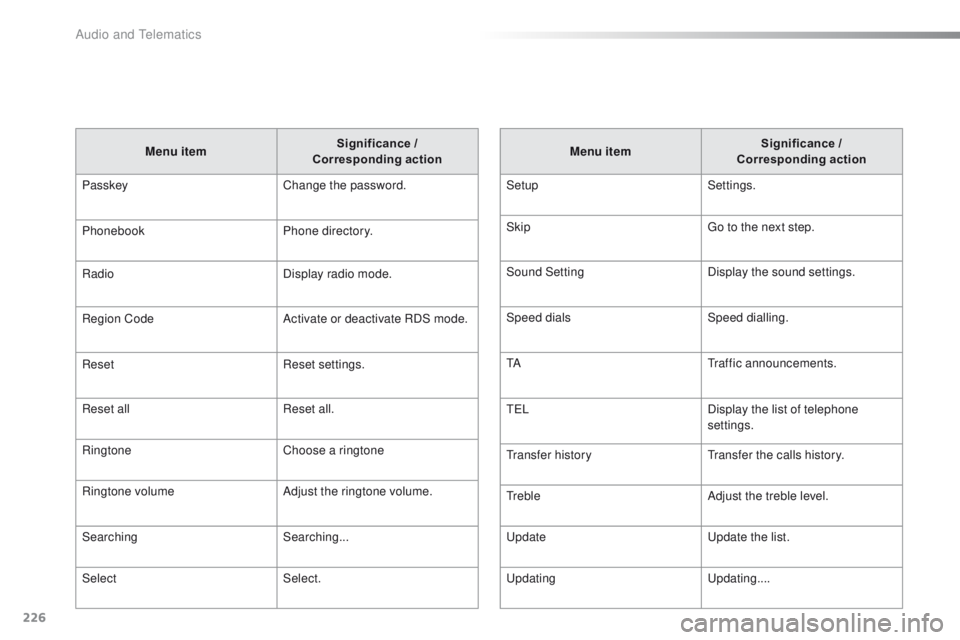
Menu item Significance /
Corresponding action
Passkey Change the password.
Phonebook Phone directory.
Radio Display radio mode.
Region Code Activate or deactivate RDS mode.
Reset Reset settings.
Reset all Reset all.
Ringtone Choose a ringtone
Ringtone volume Adjust the ringtone volume.
Searching Searching...
Select Select. Menu item
Significance /
Corresponding action
Setup Settings.
Skip
go t
o the next step.
Sound Setting Display the sound settings.
Speed dials Speed dialling.
t
A
tr
affic announcements.
t
e LDisplay the list of telephone
settings.
tr
ansfer history
tr
ansfer the calls history.
tr
ebleAdjust the treble level.
up
date
up
date the list.
upd
ating
up
dating....
Audio and telematics
Page 234 of 271
232
108_en_Chap12b_Autoradio-toyota-2_ed01-2015
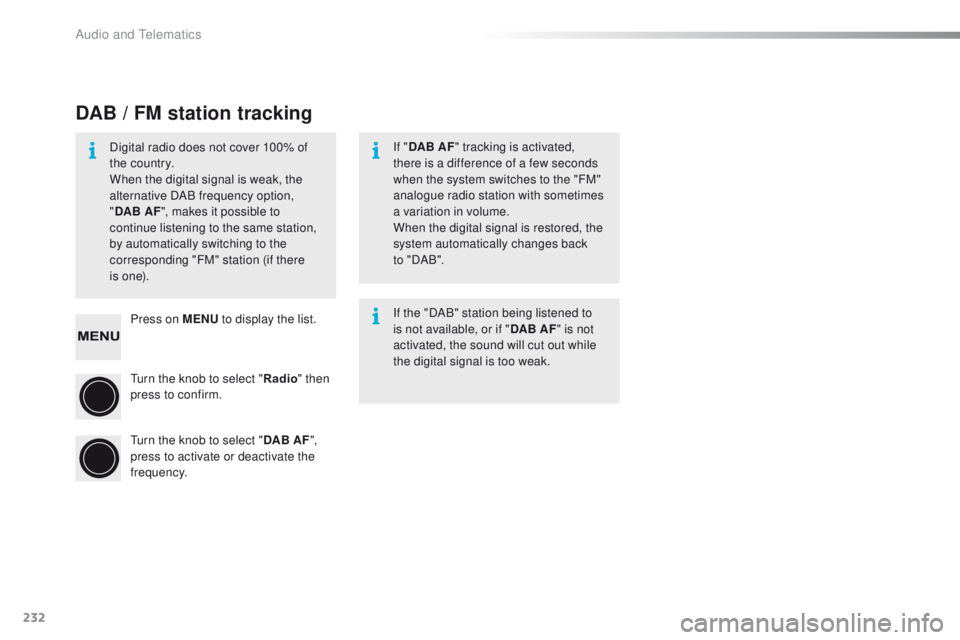
Press on MENU to display the list.
tu
rn the knob to select " Radio" then
press to confirm.
tu
rn the knob to select " DAB AF",
press to activate or deactivate the
frequency.
DAB / FM station tracking
Digital radio does not cover 100% of
the country.
When the digital signal is weak, the
alternative DAB frequency option,
" DAB AF ", makes it possible to
continue listening to the same station,
by automatically switching to the
corresponding "FM" station (if there
i s
o n e). If "
DAB AF " tracking is activated,
there is a difference of a few seconds
when the system switches to the "FM"
analogue radio station with sometimes
a variation in volume.
When the digital signal is restored, the
system automatically changes back
to
" DA B ".
If the "DAB" station being listened to
is not available, or if " DAB AF" is not
activated, the sound will cut out while
the digital signal is too weak.
Audio and telematics
Page 238 of 271
236
108_en_Chap12b_Autoradio-toyota-2_ed01-2015
Receiving a call List of telephone menus
An incoming call is announced by a ring and a
superimposed display in the screen.
Press this button to accept the
incoming call. Press on MENU
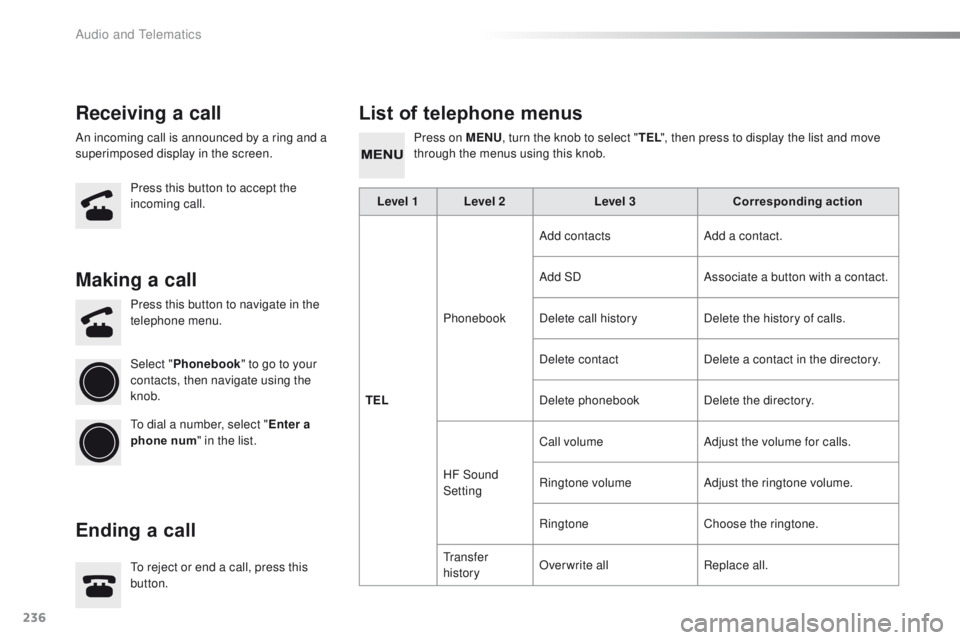
, turn the knob to select " TEL", then press to display the list and move
through the menus using this knob.
to r
eject or end a call, press this
button. Press this button to navigate in the
telephone menu.
Making a call
Ending a call
Select " Phonebook " to go to your
contacts, then navigate using the
knob.
to d
ial a number, select " Enter a
phone num " in the list. Level 1 Level 2
Level 3Corresponding action
TEL Phonebook Add contacts
Add a contact.
Add SD Associate a button with a contact.
Delete call history Delete the history of calls.
Delete contact Delete a contact in the directory.
Delete phonebook Delete the directory.
HF Sound
Setting Call volume
Adjust the volume for calls.
Ringtone volume Adjust the ringtone volume.
Ringtone Choose the ringtone.
t
r a n s f e r
history Overwrite all
Replace all.
Audio and telematics
Page 239 of 271
237
108_en_Chap12b_Autoradio-toyota-2_ed01-2015
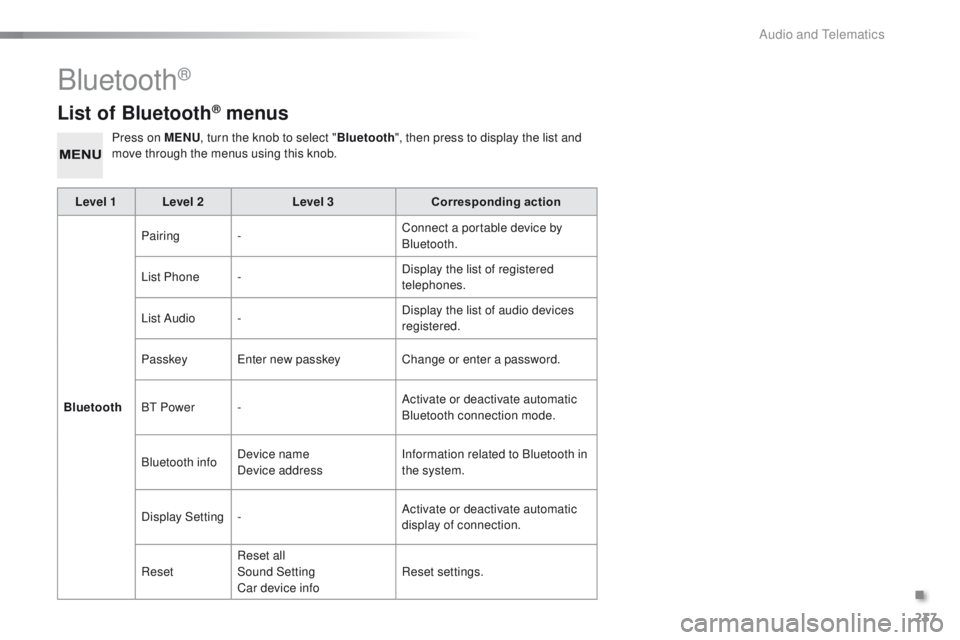
List of Bluetooth® menus
Press on MENU, turn the knob to select " Bluetooth", then press to display the list and
move through the menus using this knob.
Level 1 Level 2 Level 3Corresponding action
Bluetooth Pairing
- Connect a portable device by
Bluetooth.
List Phone - Display the list of registered
telephones.
List Audio - Display the list of audio devices
registered.
Passkey
en
ter new passkey Change or enter a password.
B
t
Power - Activate or deactivate automatic
Bluetooth connection mode.
Bluetooth info Device name
Device address Information related to Bluetooth in
the system.
Display Setting - Activate or deactivate automatic
display of connection.
Reset Reset all
Sound Setting
Car device info Reset settings.
Bluetooth®
.
Audio and telematics
Page 240 of 271
238
108_en_Chap12b_Autoradio-toyota-2_ed01-2015
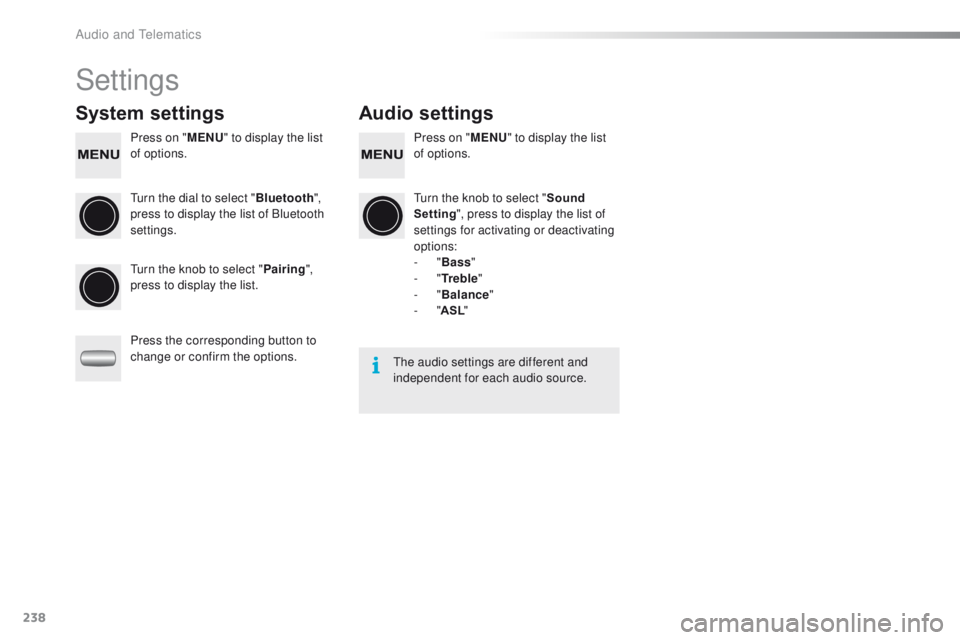
Settings
System settings Audio settings
Press on "MENU" to display the list
of options. Press on "
MENU" to display the list
of options.
tu
rn the dial to select " Bluetooth",
press to display the list of Bluetooth
settings.
tu
rn the knob to select "Sound
Setting ", press to display the list of
settings for activating or deactivating
options:
-
"Bass "
-
"Tr e b l e "
-
"Balance "
-
"ASL "
tu
rn the knob to select " Pairing",
press to display the list.
Press the corresponding button to
change or confirm the options.
the
audio settings are different and
independent for each audio source.
Audio and telematics