turn signal PEUGEOT 108 2015 Owners Manual
[x] Cancel search | Manufacturer: PEUGEOT, Model Year: 2015, Model line: 108, Model: PEUGEOT 108 2015Pages: 271, PDF Size: 7.42 MB
Page 21 of 271
19
108_en_Chap01_controle-de-marche_ed01-2015
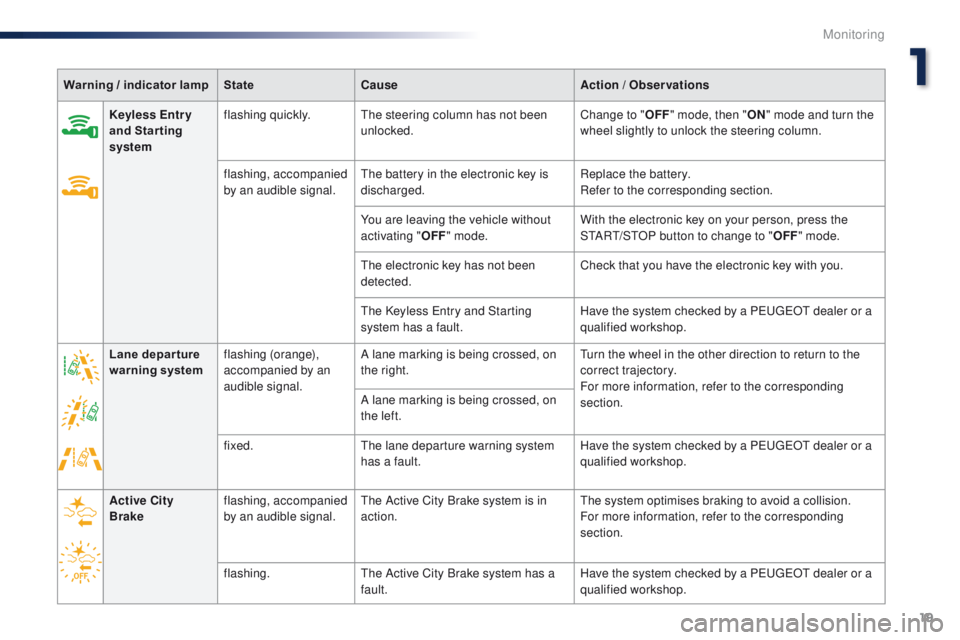
Warning / indicator lampStateCause Action / Observations
Keyless Entr y
and Starting
system flashing quickly.
th
e steering column has not been
unlocked. Change to "
OFF" mode, then " ON" mode and turn the
wheel slightly to unlock the steering column.
flashing, accompanied
by an audible signal.
th
e battery in the electronic key is
discharged. Replace the battery.
Refer to the corresponding section.
You are leaving the vehicle without
activating " OFF" mode. With the electronic key on your person, press the
S
tA
R
t/
S
tO
P button to change to "OFF" mode.
th
e electronic key has not been
detected. Check that you have the electronic key with you.
th
e Keyless e
n
try and Starting
system has a fault. Have the system checked by a P
e
uge
Ot
dealer or a
qualified workshop.
Lane depar ture
warning system flashing (orange),
accompanied by an
audible signal. A lane marking is being crossed, on
the right.
tu
rn the wheel in the other direction to return to the
correct trajectory.
For more information, refer to the corresponding
section.
A lane marking is being crossed, on
the left.
fixed.
th
e lane departure warning system
has a fault. Have the system checked by a P
e
uge
Ot
dealer or a
qualified workshop.
Active City
Brake flashing, accompanied
by an audible signal.
th
e Active City Brake system is in
action.
th
e system optimises braking to avoid a collision.
For more information, refer to the corresponding
section.
flashing.
th
e Active City Brake system has a
fault. Have the system checked by a P
e
uge
Ot
dealer or a
qualified workshop.
1
Monitoring
Page 22 of 271
20
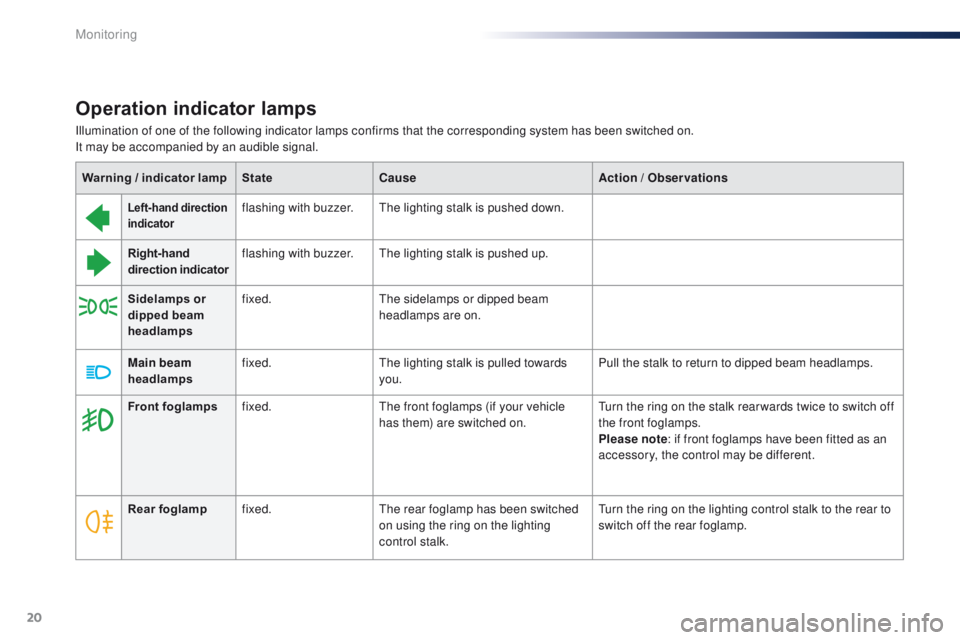
Operation indicator lamps
Left-hand direction
indicatorflashing with buzzer.th e lighting stalk is pushed down.
Right-hand
direction indicator flashing with buzzer.
th
e lighting stalk is pushed up.
Sidelamps or
dipped beam
headlamps fixed.
th
e sidelamps or dipped beam
headlamps are on.
Main beam
headlamps fixed.
th
e lighting stalk is pulled towards
you. Pull the stalk to return to dipped beam headlamps.
Warning / indicator lamp
StateCause Action / Observations
Illumination of one of the following indicator lamps confirms that the corresponding system has been switched on.
It may be accompanied by an audible signal.
Rear foglamp fixed.
th
e rear foglamp has been switched
on using the ring on the lighting
control stalk.
tu
rn the ring on the lighting control stalk to the rear to
switch off the rear foglamp.
Front foglamps
fixed.
th
e front foglamps (if your vehicle
has them) are switched on.
tu
rn the ring on the stalk rear wards twice to switch off
the front foglamps.
Please note : if front foglamps have been fitted as an
accessory, the control may be different.
Monitoring
Page 37 of 271

35
108_en_Chap02_ouvertures_ed01-2015
Emergency procedure
Unlocking
F Insert the integral key into the driver's door lock barrel and turn it towards the front of
the vehicle to unlock the vehicle.
Locking
F Insert the integral key into the driver's door lock barrel and turn it towards the rear of
the vehicle to lock the vehicle.
th
e integral key is used to lock and unlock the
vehicle when the electronic key cannot operate
and in the event of a fault with the Keyless
en
try and Starting system:
-
c
ell battery discharged, vehicle battery
discharged or disconnected, ...
-
v
ehicle located in an area with strong
electromagnetic signals.
F
P
ress and hold the latch 1 to extract the
integral key 2 .
Saving the electronic key
battery
to preserve the battery, it is possible to prevent
the electronic key working (no reception of
radio waves).
When this function is activated, the "Keyless
en
try and Starting" system is inoperative.
to r
eactivate the electronic key, press one of
the buttons (open or closed padlock). F
P
ress on the open padlock twice,
while pressing on and holding
the closed padlock.
Check that the indicator lamp in the electronic
key flashes 4 times.
2
Access
Page 72 of 271
70
108_en_Chap05_conduite_ed01-2015
If you use the accessories for a
prolonged period, the vehicle will
automatically switch to "OFF" mode
after about 20 minutes.
Be aware in order to avoid discharging
the battery.
Starting - switching off the engine with
the Keyless e
n
try and Starting system
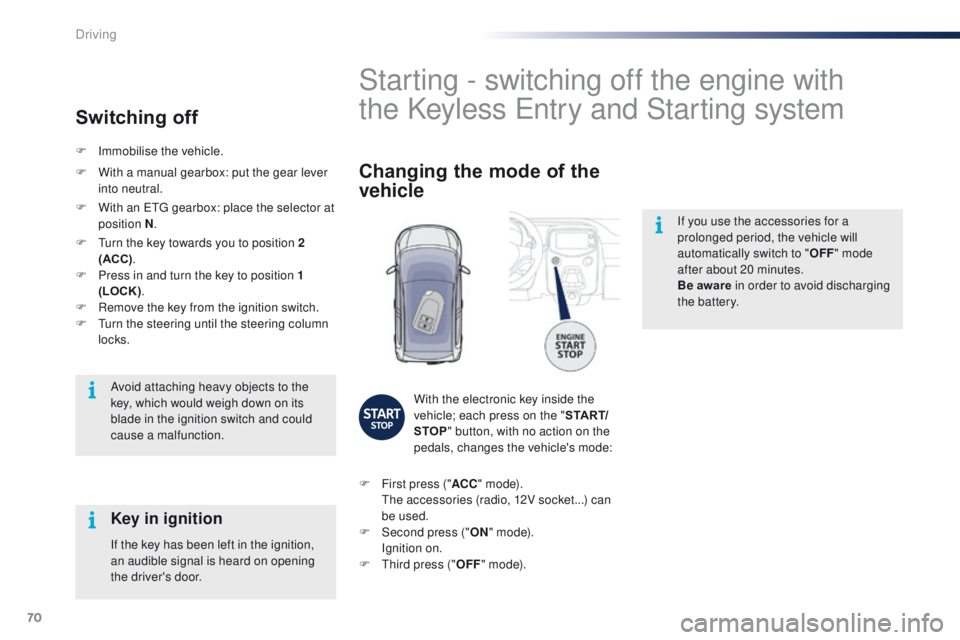
Changing the mode of the
vehicle
With the electronic key inside the
vehicle; each press on the " S TA R T/
STOP " button, with no action on the
pedals, changes the vehicle's mode:
F
F
irst press (" ACC" m o d e).
t
h
e accessories (radio, 12V socket...) can
be used.
F
Sec
ond press (" ON" m o d e).
I
gnition on.
F
t
h
ird press (" OFF" m o d e).
Avoid attaching heavy objects to the
key, which would weigh down on its
blade in the ignition switch and could
cause a malfunction.
Key in ignition
If the key has been left in the ignition,
an audible signal is heard on opening
the driver's door.
F
Imm
obilise the vehicle.
Switching off
F With a manual gearbox: put the gear lever
into neutral.
F
W
ith an etg gearbox: place the selector at
position N .
F
t
u
rn the key towards you to position 2
(ACC) .
F
P
ress in and turn the key to position 1
(LOCK) .
F
R
emove the key from the ignition switch.
F
t
u
rn the steering until the steering column
locks.
Driving
Page 79 of 271
77
108_en_Chap05_conduite_ed01-2015
Temporarily taking control of
gear changes
You can temporarily take control of gear
changes using the "+" and "-"
steering
mounted control paddles.
ge
ar change commands are only acted on if
the engine speed allows.
t
h
ere is an audible
signal if a command is not accepted.
th
e gear engaged is displayed in the
instrument panel.
th
is function allows you to anticipate certain
situations such as overtaking a vehicle or
approaching a corner.
After a few moments with no action on the
controls, the gearbox returns to automatic
control of the gears. It is possible to change mode at any time, by
moving the gear selector from position E to
position M and the other way round.
Never select neutral N when the vehicle
is moving.
F
P
lace the gear selector in position M
.
F
C
hange up or down using:
- t he gear selector, pushing:
- back, "+" to change up,
-
for ward, "-" to change down.
-
o
r the "+" or "-" steering mounted
control paddle.
the
gear engaged is displayed.
ge
ar change commands are only acted on if
the engine speed allows.
It is not necessary to release the accelerator
peal during gear changes.
t
h
ere is an audible
signal if a command is not accepted.
When braking or slowing down, the gearbox
automatically changes down so that pick-up is
in the right gear.
Manual mode
under sharp acceleration, the gearbox will
not change up without action by the driver on
the gear selector or steering mounted control
paddles (unless the engine speed is close to
maximum).
5
Driving
Page 80 of 271
78
108_en_Chap05_conduite_ed01-2015
to engage reverse, the vehicle must be
stationary with your foot on the brake pedal.
F
Sel
ect position R .
Reverse
there is an audible signal on engaging reverse.
th
e vehicle can be stopped whatever the
position of the gear selector ( N, E or R ).
However, there is an audible signal on opening
the driver's door if the gear selector is not at
position N .
Switching off
When the vehicle is stopped with the
engine running, always put the gear
selector to neutral N .
th
ere is a continuous audible signal
if you turn the ignition switch to " OFF"
with the vehicle in 2
nd, 3rd, 4th or 5th g e a r.
In this case return the ignition switch
to " ON ", move the gear selector to
position
N , then to position E , M or R,
then turn the ignition switch to " OFF". On a slope, use the brakes to
immobilise the vehicle and place the
gear selector in position N
, E or R.
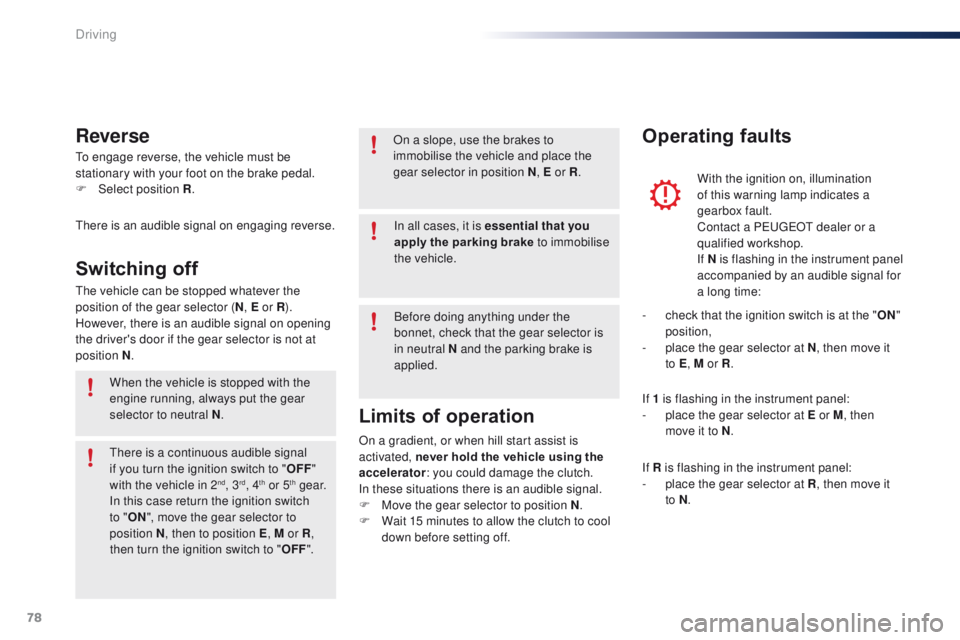
With the ignition on, illumination
of this warning lamp indicates a
gearbox fault.
Contact a P
e
uge
Ot
dealer or a
qualified workshop.
If N
i
s flashing in the instrument panel
accompanied by an audible signal for
a long time:
Operating faults
In all cases, it is essential that you
apply the parking brake to immobilise
the vehicle.
Before doing anything under the
bonnet, check that the gear selector is
in neutral N and the parking brake is
applied.
Limits of operation
On a gradient, or when hill start assist is
activated, never hold the vehicle using the
accelerator : you could damage the clutch.
In these situations there is an audible signal.
F
M
ove the gear selector to position N .
F
W
ait 15 minutes to allow the clutch to cool
down before setting off. -
c
heck that the ignition switch is at the "
ON"
position,
-
p
lace the gear selector at N
, then move it
to E , M or R .
If 1 is flashing in the instrument panel:
-
p
lace the gear selector at E or M
, then
move it to N .
If R is flashing in the instrument panel:
-
p
lace the gear selector at R, then move it
to N .
Driving
Page 88 of 271
86
108_en_Chap05_conduite_ed01-2015
Switching off
F Press the end of the control stalk. th e display of information related to the
speed limiter disappears.
Operating fault
Illumination of this warning lamp in
the instrument panel indicates a fault
with the speed limiter.
Have it checked by a P
e
uge
Ot
dealer or a qualified workshop.
th
e use of mats not approved by
P
e
uge
Ot
may inter fere with the
operation of the speed limiter.
to a
void any risk of jamming of the
pedals:
-
e
nsure that the mat is secured
c o r r e c t l y,
-
d
o not fit one mat on top of another.
Temporarily exceeding the
programmed speed
F Press f irmly on the accelerator pedal,
going beyond the point of resistance ,
to
exceed the programmed speed limit.
th
e speed limiter is deactivated temporarily
and the displayed programmed speed flashes.
As soon as the vehicle's speed returns to the
programmed value, the limiter operates again:
the display of the programmed speed becomes
steady again. An audible signal accompanies the
flashing of the programmed speed
when exceeding the speed is not due to
an action by the driver (steep hill...).
Driving
Page 91 of 271
89
108_en_Chap05_conduite_ed01-2015
Switching off
F Press the end of the control stalk th e display of information related to the
speed limiter disappears.
Operating fault
Illumination of this warning lamp in
the instrument panel indicates a fault
with the speed limiter.
th
e use of mats not approved by
P
e
uge
Ot
may inter fere with the
operation of the speed limiter.
to a
void any risk of jamming of the
pedals:
-
e
nsure that the mat is secured
c o r r e c t l y,
-
d
o not fit one mat on top of another.
Temporarily exceeding the
programmed speed
F Press f irmly on the accelerator pedal,
going beyond the point of resistance ,
to
exceed the programmed speed limit.
th
e speed limiter is deactivated temporarily
and the displayed programmed speed flashes. Have it checked by a P
e
uge
Ot
dealer or a
qualified workshop.
An audible signal accompanies the
flashing of the programmed speed
when exceeding the speed is not due to
an action by the driver (steep hill...).
As soon as the vehicle's speed returns to the
programmed value, the limiter operates again:
the display of the programmed speed becomes
steady again.
5
Driving
Page 97 of 271
95
108_en_Chap06_visibilite_ed01-2015
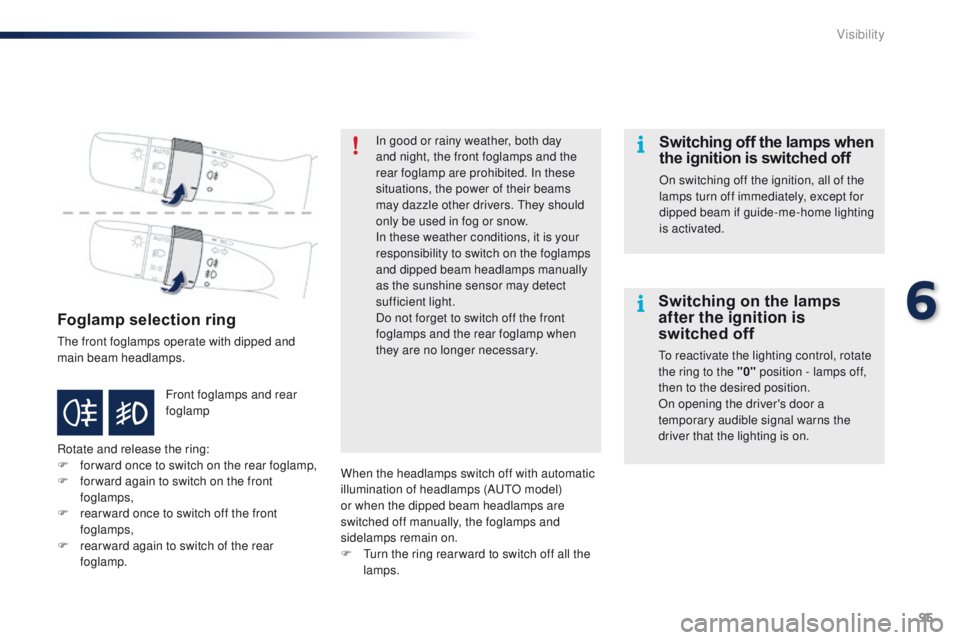
Foglamp selection ring
the front foglamps operate with dipped and
main beam headlamps.
Rotate and release the ring:
F
fo
rward once to switch on the rear foglamp,
F
f
or ward again to switch on the front
foglamps,
F
r
ear ward once to switch off the front
foglamps,
F
r
ear ward again to switch of the rear
foglamp. Front foglamps and rear
foglamp In good or rainy weather, both day
and night, the front foglamps and the
rear foglamp are prohibited. In these
situations, the power of their beams
may dazzle other drivers.
t
he
y should
only be used in fog or snow.
In these weather conditions, it is your
responsibility to switch on the foglamps
and dipped beam headlamps manually
as the sunshine sensor may detect
sufficient light.
Do not forget to switch off the front
foglamps and the rear foglamp when
they are no longer necessary.
Switching off the lamps when
the ignition is switched off
On switching off the ignition, all of the
lamps turn off immediately, except for
dipped beam if guide-me-home lighting
is activated.
Switching on the lamps
after the ignition is
switched off
to reactivate the lighting control, rotate
the ring to the "0" position - lamps off,
then to the desired position.
On opening the driver's door a
temporary audible signal warns the
driver that the lighting is on.
When the headlamps switch off with automatic
illumination of headlamps (A
u
t
O m
odel)
or when the dipped beam headlamps are
switched off manually, the foglamps and
sidelamps remain on.
F
t
u
rn the ring rear ward to switch off all the
lamps.
6
Visibility
Page 262 of 271
.
Audio and Telematics 3
c1-108-post-it-web_en_chap12a_complementnav_toyota_tactile-1_ed01-2015
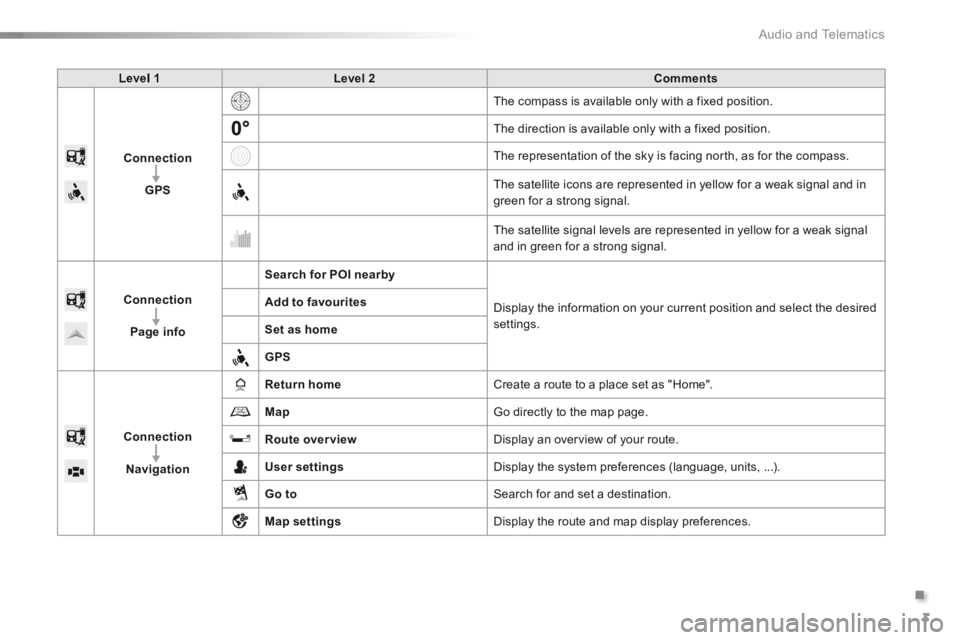
Level 1Level 2Comments
Connection
GPS
The compass is available only with a fixed position.
The direction is available only with a fixed position.
The representation of the sky is facing north, as for the compass.
The satellite icons are represented in yellow for a weak signal and in green for a strong signal.
The satellite signal levels are represented in yellow for a weak signal and in green for a strong signal.
Connection
Page info
Search for POI nearby
Display the information on your current position and select the desired settings.
Add to favourites
Set as home
GPS
Connection
Navigation
Return home Create a route to a place set as "Home".
Map Go directly to the map page.
Route overview Display an overview of your route.
User settings Display the system preferences (language, units, ...).
Go to Search for and set a destination.
Map settings Display the route and map display preferences.