lock PEUGEOT 206 2002 User Guide
[x] Cancel search | Manufacturer: PEUGEOT, Model Year: 2002, Model line: 206, Model: PEUGEOT 206 2002Pages: 160, PDF Size: 2.03 MB
Page 27 of 160
INSTRUMENTS AND CONTROLS
28
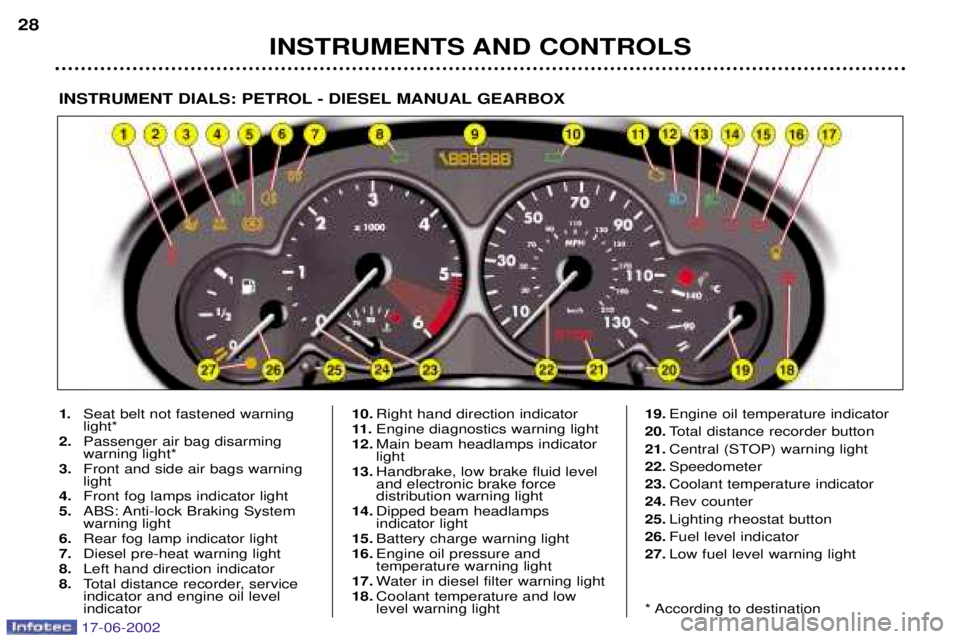
INSTRUMENT DIALS: PETROL - DIESEL MANUAL GEARBOX
1.
Seat belt not fastened warning light*
2. Passenger air bag disarmingwarning light*
3. Front and side air bags warninglight
4. Front fog lamps indicator light
5. ABS: Anti-lock Braking Systemwarning light
6. Rear fog lamp indicator light
7. Diesel pre-heat warning light
8. Left hand direction indicator
8. Total distance recorder, serviceindicator and engine oil level indicator 10.
Right hand direction indicator
11 . Engine diagnostics warning light
12. Main beam headlamps indicatorlight
13. Handbrake, low brake fluid leveland electronic brake force distribution warning light
14. Dipped beam headlamps indicator light
15. Battery charge warning light
16. Engine oil pressure and temperature warning light
17. Water in diesel filter warning light
18. Coolant temperature and lowlevel warning light 19.
Engine oil temperature indicator
20. Total distance recorder button
21. Central (STOP) warning light
22. Speedometer
23. Coolant temperature indicator
24. Rev counter
25. Lighting rheostat button
26. Fuel level indicator
27. Low fuel level warning light
* According to destination
17-06-2002
Page 28 of 160
INSTRUMENTS AND CONTROLS29
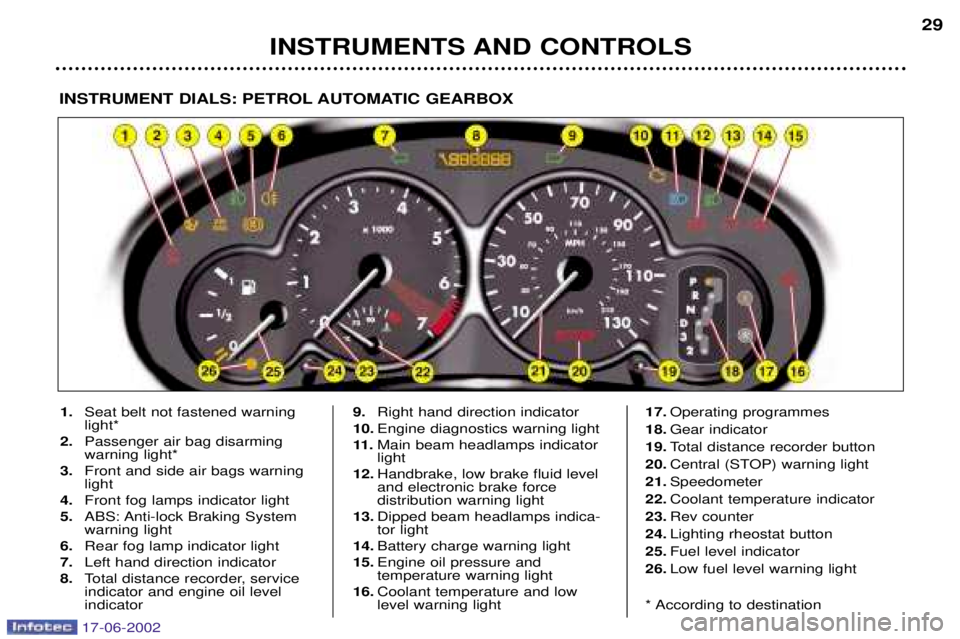
INSTRUMENT DIALS: PETROL AUTOMATIC GEARBOX
1.
Seat belt not fastened warning light*
2. Passenger air bag disarmingwarning light*
3. Front and side air bags warninglight
4. Front fog lamps indicator light
5. ABS: Anti-lock Braking Systemwarning light
6. Rear fog lamp indicator light
7. Left hand direction indicator
8. Total distance recorder, serviceindicator and engine oil level indicator 9.
Right hand direction indicator
10. Engine diagnostics warning light
11 . Main beam headlamps indicatorlight
12. Handbrake, low brake fluid leveland electronic brake force distribution warning light
13. Dipped beam headlamps indica-tor light
14. Battery charge warning light
15. Engine oil pressure and temperature warning light
16. Coolant temperature and lowlevel warning light 17.
Operating programmes
18. Gear indicator
19. Total distance recorder button
20. Central (STOP) warning light
21. Speedometer
22. Coolant temperature indicator
23. Rev counter
24. Lighting rheostat button
25. Fuel level indicator
26. Low fuel level warning light
* According to destination
17-06-2002
Page 29 of 160

INSTRUMENTS AND CONTROLS
30
Handbrake, low brake fluid and ElectronicBrake Force Distributionsystem fault warninglight
Linked to the central (STOP) warninglight. This indicates one of the following:
Ð that the handbrake is applied or not fully released,
Ð an excessive drop in brake fluid level (if the warning light remains on even when the handbrake isreleased).
Ð a fault in the Electronic Brake Force Distribution system, if lit at
the same time as the ABS warninglight.
You must stop.
Consult a PEUGEOT dealer.
INSTRUMENTS AND CONTROLS
A permanently lit warning light or one flashing, with the engine run-ning, indicates an operating faultof the unit concerned. The illumi-nation of certain warning lightsmay be accompanied by anaudible signal and a message on
the multi-function display. Do notignore this warning: consult aPEUGEOT dealer as soon as pos-sible.
If the central (STOP) warning light comes on when you are driving,
stop your vehicle immediately,where it is safe to do so.
Anti-lock Braking System (ABS) warninglight
If this warning light is permanentlyon, it indicates a malfunction of theABS.
However, the vehicle retains conventional servo-assisted bra-king.
Consult a PEUGEOT dealer.
Coolant temperature and low coolant level warninglight
Linked to the central (STOP) warninglight.You must stop.
Wait for the engine to cool before top-ping up the level. The cooling circuit is pressurised.In the event of breakdown and to prevent any risk of burns , unscrew
the cap by two turns to allow thepressure to drop. When the pressure has dropped, remove the cap and top up the level.
Consult a PEUGEOT dealer.
Central (STOP) warning light Linked to the "engine
oil pressure", "coolant temperature and low coolant level", "handbrake","low brake fluid level" and "electronicbrake force distribution system fault"warning lights.You must stop if the light flasheswith the engine running.
Consult a PEUGEOT dealer.
Engine oil pressure and temperaturewarning light
Linked to the central (STOP) warninglight.
You must stop.
This warning light indicates one ofthe following:
Ð insufficient oil pressure,
Ð a lack of oil in the lubrication cir- cuit. Top up the level.
Ð an oil temperature which is too high. The warning light is acompa-
nied by an audible signal. To lowerthe oil temperature, reduce yourspeed.
Consult a PEUGEOT dealer.
17-06-2002
Page 32 of 160
INSTRUMENTS AND CONTROLS
32
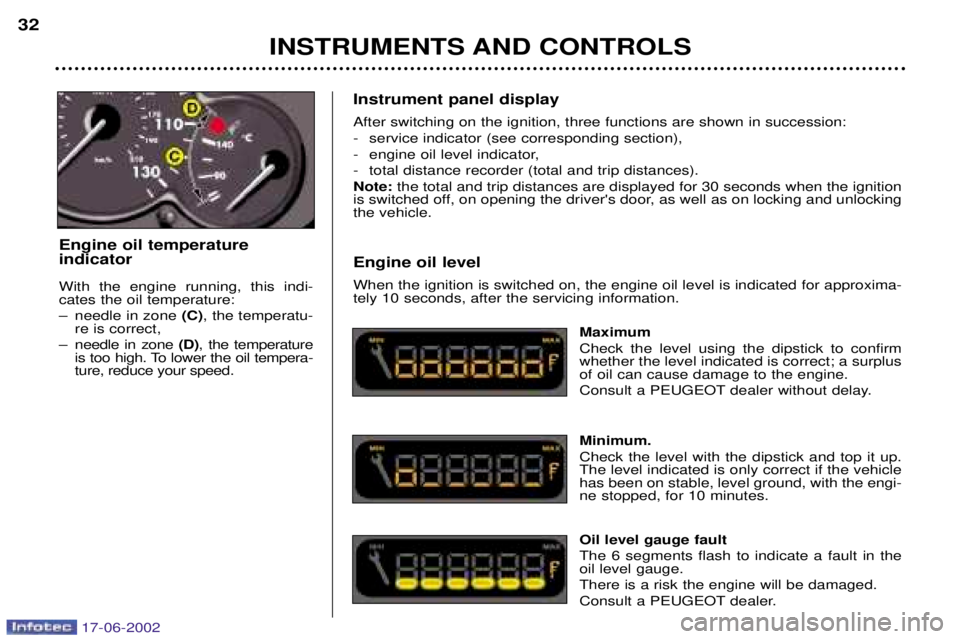
Instrument panel display After switching on the ignition, three functions are shown in succession:
- service indicator (see corresponding section),
- engine oil level indicator,
- total distance recorder (total and trip distances).Note:the total and trip distances are displayed for 30 seconds when the ignition
is switched off, on opening the driver's door, as well as on locking and unlocking the vehicle. Engine oil level When the ignition is switched on, the engine oil level is indicated for approxima- tely 10 seconds, after the servicing information.
Maximum Check the level using the dipstick to confirm whether the level indicated is correct; a surplusof oil can cause damage to the engine.
Consult a PEUGEOT dealer without delay. Minimum. Check the level with the dipstick and top it up. The level indicated is only correct if the vehiclehas been on stable, level ground, with the engi-ne stopped, for 10 minutes. Oil level gauge fault The 6 segments flash to indicate a fault in the oil level gauge. There is a risk the engine will be damaged.
Consult a PEUGEOT dealer.
Engine oil temperature indicator With the engine running, this indi- cates the oil temperature:
Ð needle in zone
(C), the temperatu-
re is correct,
Ð needle in zone (D), the temperature
is too high. To lower the oil tempera- ture, reduce your speed.
17-06-2002
Page 33 of 160
INSTRUMENTS AND CONTROLS
32
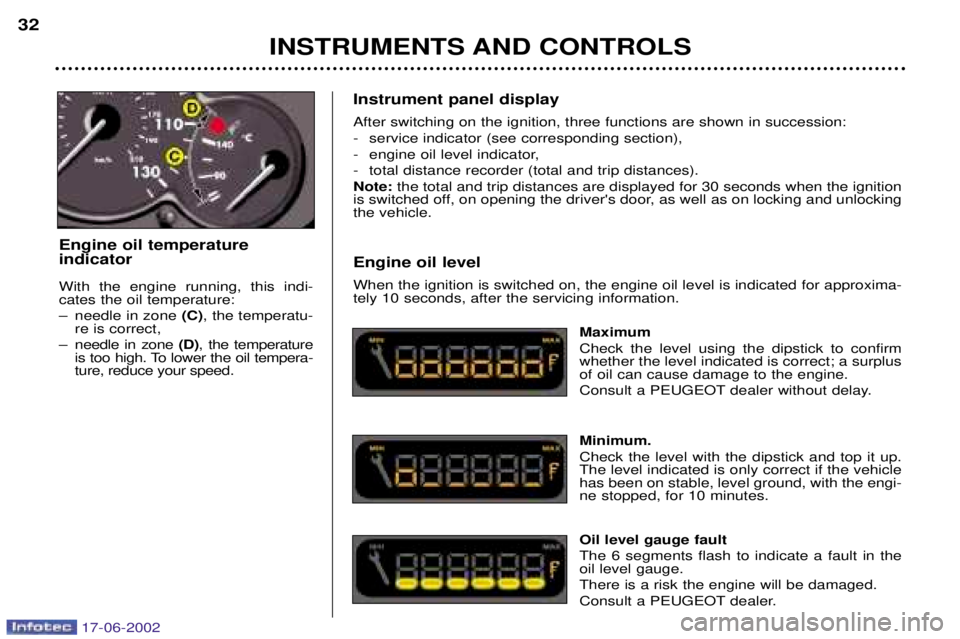
Instrument panel display After switching on the ignition, three functions are shown in succession:
- service indicator (see corresponding section),
- engine oil level indicator,
- total distance recorder (total and trip distances).Note:the total and trip distances are displayed for 30 seconds when the ignition
is switched off, on opening the driver's door, as well as on locking and unlocking the vehicle. Engine oil level When the ignition is switched on, the engine oil level is indicated for approxima- tely 10 seconds, after the servicing information.
Maximum Check the level using the dipstick to confirm whether the level indicated is correct; a surplusof oil can cause damage to the engine.
Consult a PEUGEOT dealer without delay. Minimum. Check the level with the dipstick and top it up. The level indicated is only correct if the vehiclehas been on stable, level ground, with the engi-ne stopped, for 10 minutes. Oil level gauge fault The 6 segments flash to indicate a fault in the oil level gauge. There is a risk the engine will be damaged.
Consult a PEUGEOT dealer.
Engine oil temperature indicator With the engine running, this indi- cates the oil temperature:
Ð needle in zone
(C), the temperatu-
re is correct,
Ð needle in zone (D), the temperature
is too high. To lower the oil tempera- ture, reduce your speed.
17-06-2002
Page 38 of 160
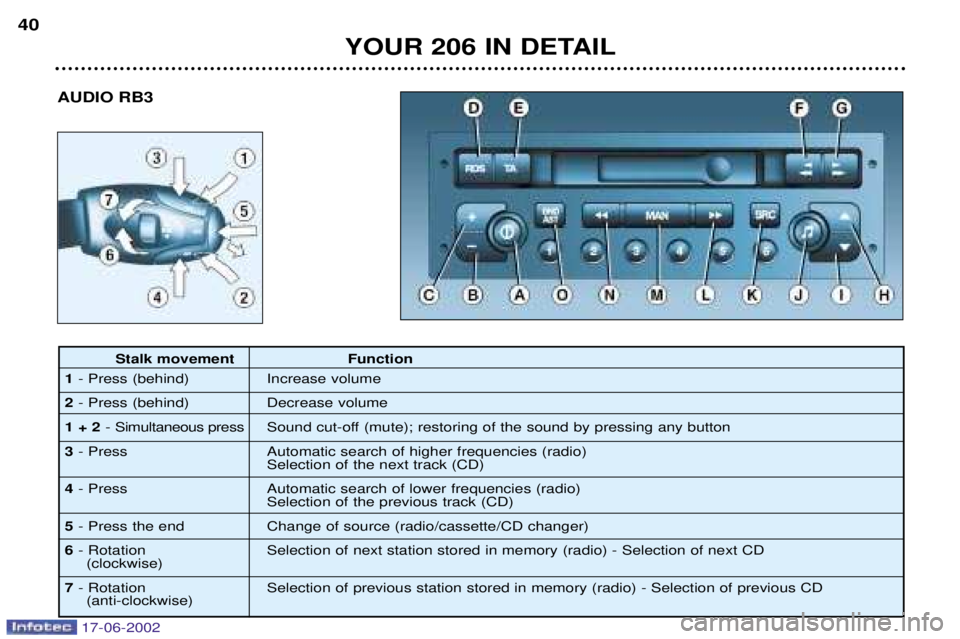
AUDIO RB3
YOUR 206 IN DETAIL
40
Stalk movement Function
1 - Press (behind) Increase volume
2 - Press (behind) Decrease volume
1 + 2 - Simultaneous press Sound cut-off (mute); restoring of the sound by pressing any button
3 - Press Automatic search of higher frequencies (radio)
Selection of the next track (CD)
4 - Press Automatic search of lower frequencies (radio)
Selection of the previous track (CD)
5 - Press the end Change of source (radio/cassette/CD changer)
6 - Rotation Selection of next station stored in memory (radio) - Selection of next CD
(clockwise)
7 - Rotation Selection of previous station stored in memory (radio) - Selection of previous CD
(anti-clockwise)
17-06-2002
Page 47 of 160
YOUR 206 IN DETAIL
42
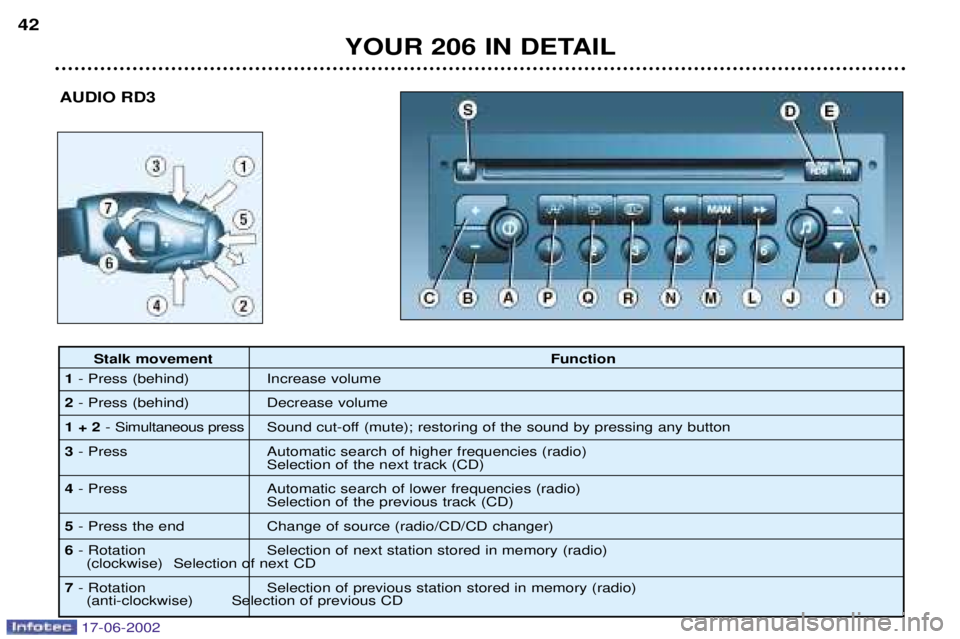
AUDIO RD3
Stalk movement Function
1 - Press (behind) Increase volume
2 - Press (behind) Decrease volume
1 + 2 - Simultaneous press Sound cut-off (mute); restoring of the sound by pressing any button
3 - Press Automatic search of higher frequencies (radio)
Selection of the next track (CD)
4 - Press Automatic search of lower frequencies (radio)
Selection of the previous track (CD)
5 - Press the end Change of source (radio/CD/CD changer)
6 - Rotation Selection of next station stored in memory (radio)
(clockwise) Selection of next CD
7 - Rotation Selection of previous station stored in memory (radio)
(anti-clockwise) Selection of previous CD
17-06-2002
Page 75 of 160
YOUR 206 IN DETAIL
74
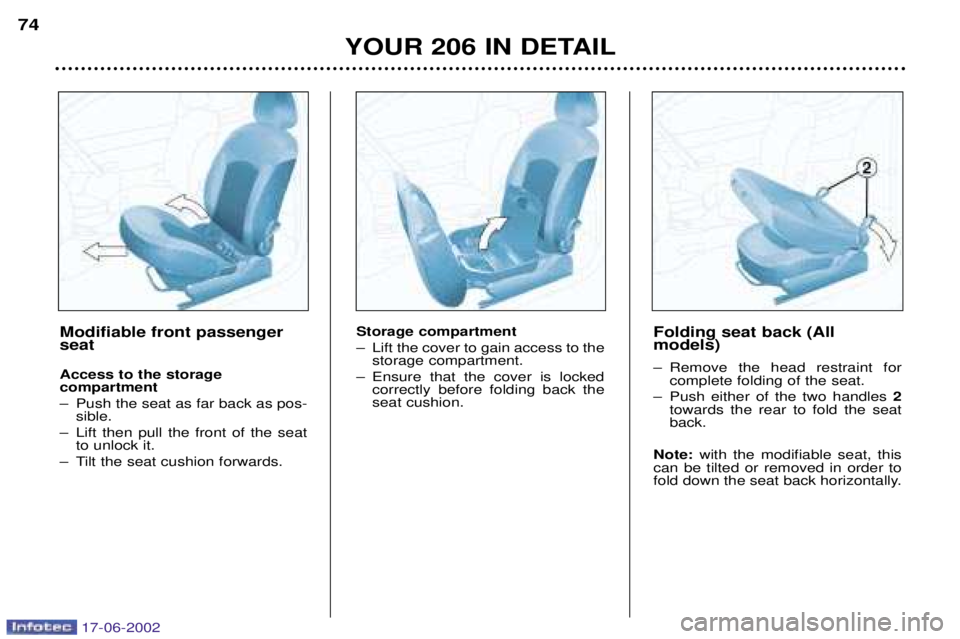
Storage compartment
Ð Lift the cover to gain access to the
storage compartment.
Ð Ensure that the cover is locked correctly before folding back the seat cushion. Folding seat back (Allmodels)
Ð Remove the head restraint for
complete folding of the seat.
Ð Push either of the two handles 2
towards the rear to fold the seat back.
Note: with the modifiable seat, this
can be tilted or removed in order to
fold down the seat back horizontally.Modifiable front passenger seat Access to the storage compartment
Ð Push the seat as far back as pos- sible.
Ð Lift then pull the front of the seat to unlock it.
Ð Tilt the seat cushion forwards.
17-06-2002
Page 76 of 160
YOUR 206 IN DETAIL75
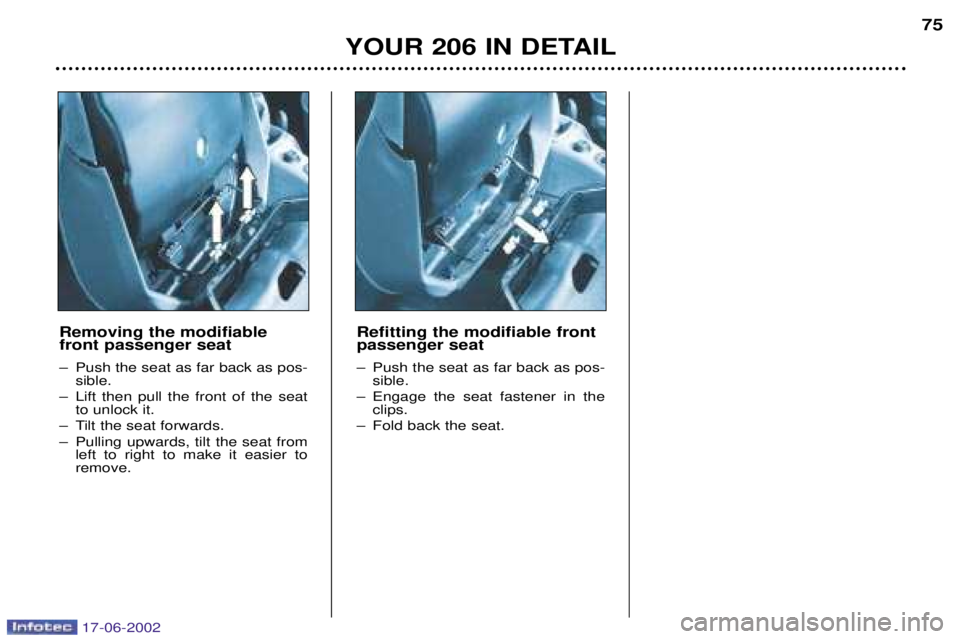
Removing the modifiable front passenger seat
Ð Push the seat as far back as pos- sible.
Ð Lift then pull the front of the seat to unlock it.
Ð Tilt the seat forwards.
Ð Pulling upwards, tilt the seat from left to right to make it easier to remove. Refitting the modifiable frontpassenger seat
Ð Push the seat as far back as pos-
sible.
Ð Engage the seat fastener in the clips.
Ð Fold back the seat.
17-06-2002
Page 78 of 160
YOUR 206 IN DETAIL
76
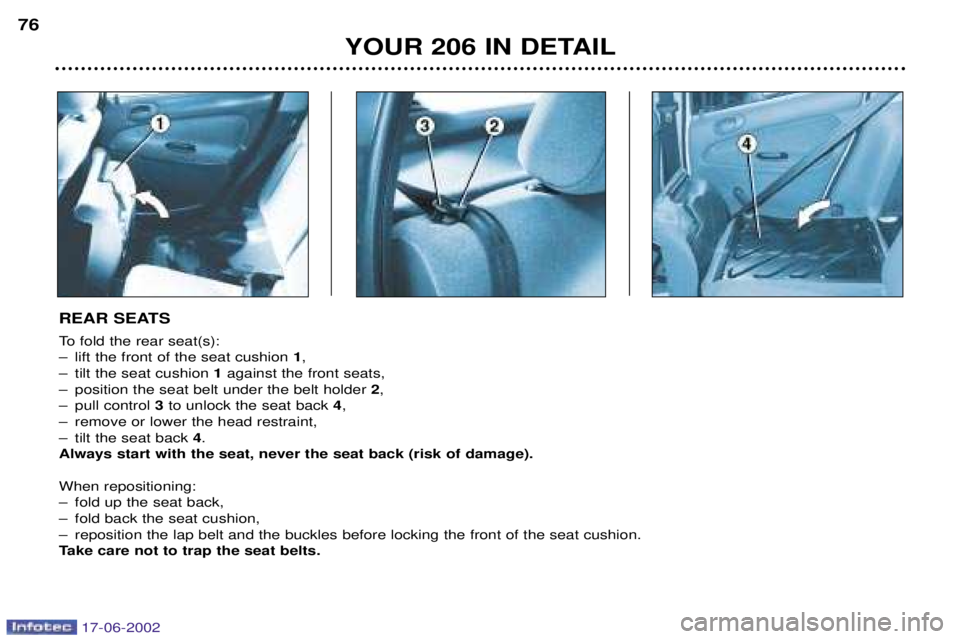
REAR SEATS
To fold the rear seat(s):
Ð lift the front of the seat cushion
1,
Ð tilt the seat cushion 1against the front seats,
Ð position the seat belt under the belt holder 2,
Ð pull control 3to unlock the seat back 4,
Ð remove or lower the head restraint,
Ð tilt the seat back 4.
Always start with the seat, never the seat back (risk of damage). When repositioning:
Ð fold up the seat back,
Ð fold back the seat cushion,
Ð reposition the lap belt and the buckles before locking the front of the seat cushion.
Take care not to trap the seat belts.
17-06-2002