light PEUGEOT 206 2002 Owner's Manual
[x] Cancel search | Manufacturer: PEUGEOT, Model Year: 2002, Model line: 206, Model: PEUGEOT 206 2002Pages: 160, PDF Size: 2.03 MB
Page 91 of 160
Selection of the type of protection Locking without setting the alarmSpecial precaution
To set the alarm to external protection only If you want to leave a window partially open, or a pet inside the vehicle, youneed to select external protectiononly:
Ð Switch off the ignition.
Ð Within the next ten seconds, pressthe internal protection button 1until
the warning light comes on conti-
nuously.
Ð Get out of the vehicle.
Ð Deadlock the vehicle.
Ð The doors lock.
Ð The direction indicators light for two seconds.
Ð The red light on the switch flashes once a second.
To de-activate external protection only Press the release button on the remote control. The doors unlock.The direction indicators flash for two seconds. The red light on the switch goes out. To lock the vehicle without setting the alarm It is the remote control which sets the alarm. Therefore, to lock the vehicle without setting the alarm: use the
key.
To recharge or replace the battery:
Ð Turn on the ignition.
Ð You have 10 seconds after turning
on the ignition to press the internal protection button 1and hold it down
for two seconds.
Ð The warning light flashes rapidly for three seconds.
Ð You can now disconnect the battery.
After reconnecting the battery:
Ð Deadlock, then unlock the vehicle using the remote control.
The alarm will be set after the next deadlocking operation.
SPECIAL FEATURES 149
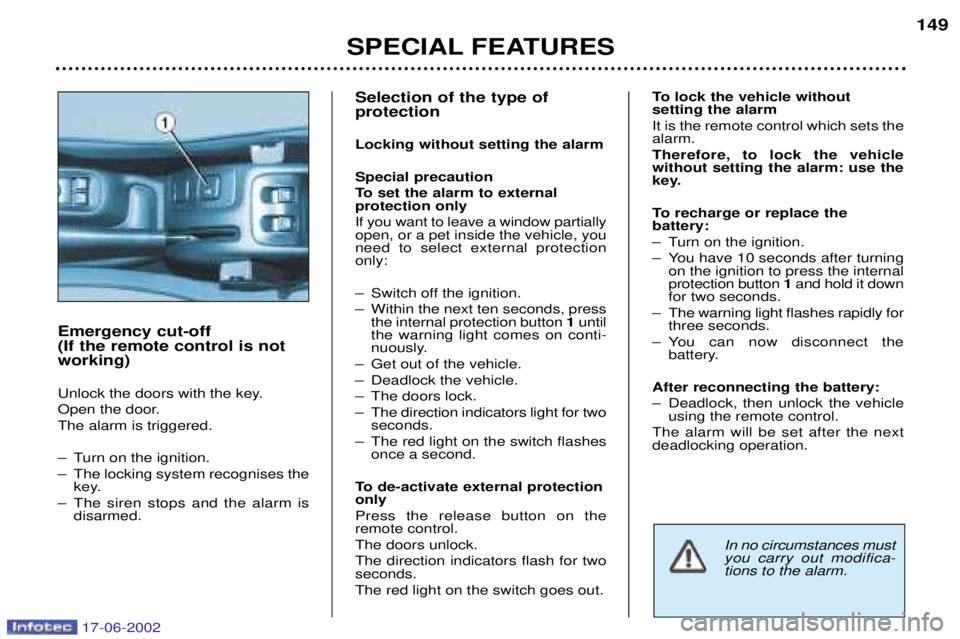
Emergency cut-off (If the remote control is notworking)
Unlock the doors with the key.
Open the door.The alarm is triggered.
Ð Turn on the ignition.
Ð The locking system recognises the key.
Ð The siren stops and the alarm is disarmed.
In no circumstances must you carry out modifica-tions to the alarm.
17-06-2002
Page 92 of 160
YOUR 206 IN DETAIL85
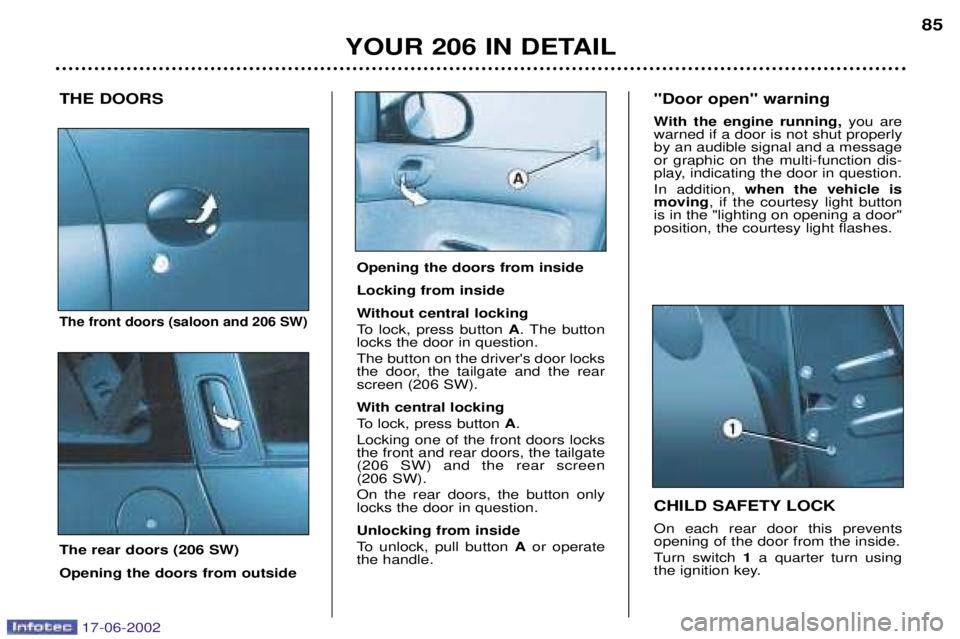
THE DOORS
The front doors (saloon and 206 SW)
The rear doors (206 SW) Opening the doors from outside CHILD SAFETY LOCK On each rear door this prevents opening of the door from the inside.
Turn switch
1a quarter turn using
the ignition key.
"Door open" warning
With the engine running,
you are
warned if a door is not shut properly by an audible signal and a messageor graphic on the multi-function dis-
play, indicating the door in question. In addition, when the vehicle is
moving , if the courtesy light button
is in the "lighting on opening a door" position, the courtesy light flashes.
Opening the doors from inside Locking from inside
Without central locking
To lock, press button A. The button
locks the door in question. The button on the driver's door locks
the door, the tailgate and the rearscreen (206 SW).
With central locking
To lock, press button A.
Locking one of the front doors locks the front and rear doors, the tailgate(206 SW) and the rear screen (206 SW). On the rear doors, the button only locks the door in question. Unlocking from inside
To unlock, pull button Aor operate
the handle.
17-06-2002
Page 93 of 160
YOUR 206 IN DETAIL
86
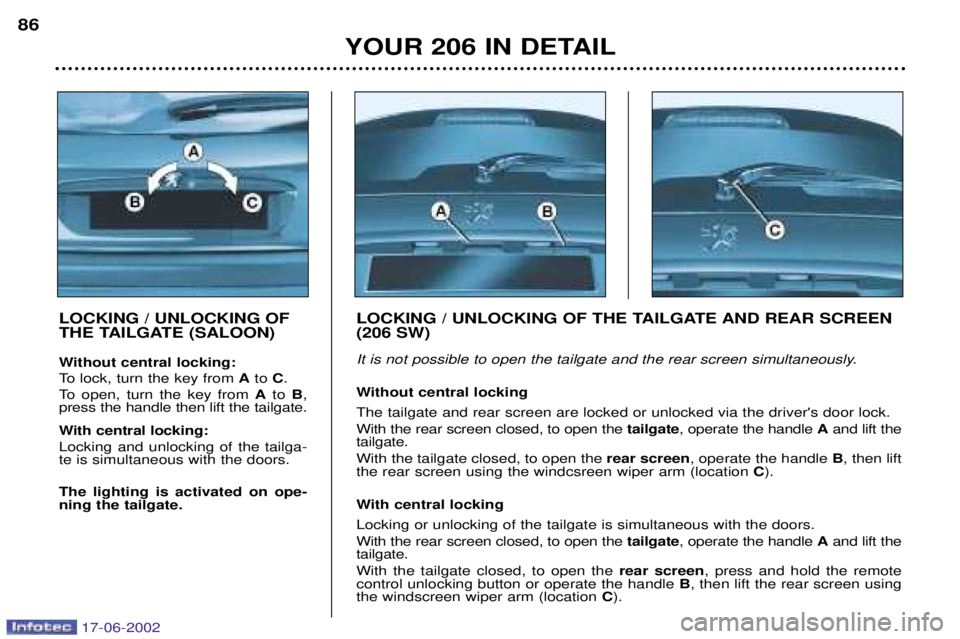
LOCKING / UNLOCKING OF
THE TAILGATE (SALOON)
Without central locking:
To lock, turn the key from Ato C.
To open, turn the key from Ato B,
press the handle then lift the tailgate.
With central locking: Locking and unlocking of the tailga- te is simultaneous with the doors. The lighting is activated on ope- ning the tailgate. LOCKING / UNLOCKING OF THE TAILGATE AND REAR SCREEN (206 SW)
It is not possible to open the tailgate and the rear screen simultaneously.
Without central locking The tailgate and rear screen are locked or unlocked via the driver's door lock. With the rear screen closed, to open the
tailgate, operate the handle Aand lift the
tailgate.With the tailgate closed, to open the rear screen, operate the handle B, then lift
the rear screen using the windcsreen wiper arm (location C).
With central locking Locking or unlocking of the tailgate is simultaneous with the doors. With the rear screen closed, to open the tailgate, operate the handle Aand lift the
tailgate.With the tailgate closed, to open the rear screen, press and hold the remote
control unlocking button or operate the handle B, then lift the rear screen using
the windscreen wiper arm (location C).
17-06-2002
Page 94 of 160
YOUR 206 IN DETAIL87
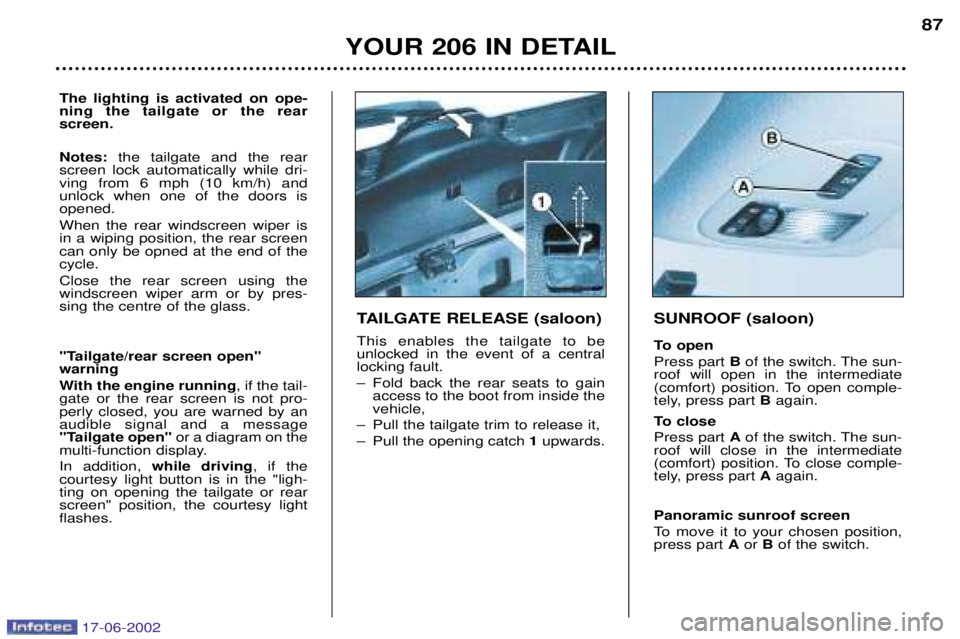
TAILGATE RELEASE (saloon) This enables the tailgate to be unlocked in the event of a centrallocking fault.
Ð Fold back the rear seats to gain access to the boot from inside the vehicle,
Ð Pull the tailgate trim to release it,
Ð Pull the opening catch 1upwards.
SUNROOF (saloon)
To open Press part Bof the switch. The sun-
roof will open in the intermediate
(comfort) position. To open comple-
tely, press part Bagain.
To close Press part Aof the switch. The sun-
roof will close in the intermediate
(comfort) position. To close comple-
tely, press part Aagain.
Panoramic sunroof screen
To move it to your chosen position, press part Aor Bof the switch.
The lighting is activated on ope- ning the tailgate or the rearscreen. Notes: the tailgate and the rear
screen lock automatically while dri- ving from 6 mph (10 km/h) andunlock when one of the doors isopened. When the rear windscreen wiper is in a wiping position, the rear screencan only be opned at the end of thecycle. Close the rear screen using the windscreen wiper arm or by pres-sing the centre of the glass.
"Tailgate/rear screen open" warning
With the engine running , if the tail-
gate or the rear screen is not pro- perly closed, you are warned by anaudible signal and a message
"Tailgate open" or a diagram on the
multi-function display. In addition, while driving , if the
courtesy light button is in the "ligh- ting on opening the tailgate or rearscreen" position, the courtesy lightflashes.
17-06-2002
Page 95 of 160
YOUR 206 IN DETAIL87
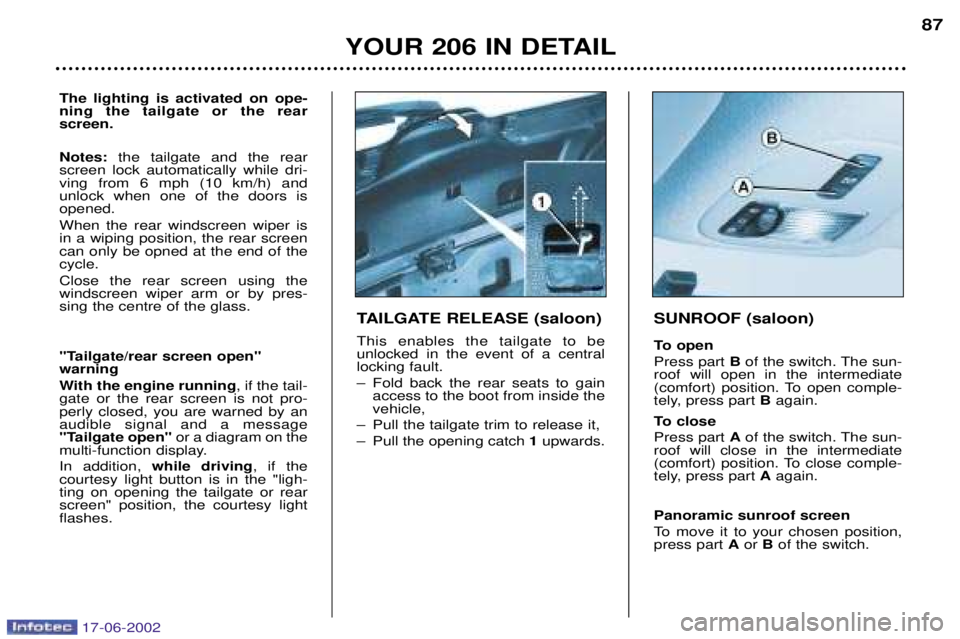
TAILGATE RELEASE (saloon) This enables the tailgate to be unlocked in the event of a centrallocking fault.
Ð Fold back the rear seats to gain access to the boot from inside the vehicle,
Ð Pull the tailgate trim to release it,
Ð Pull the opening catch 1upwards.
SUNROOF (saloon)
To open Press part Bof the switch. The sun-
roof will open in the intermediate
(comfort) position. To open comple-
tely, press part Bagain.
To close Press part Aof the switch. The sun-
roof will close in the intermediate
(comfort) position. To close comple-
tely, press part Aagain.
Panoramic sunroof screen
To move it to your chosen position, press part Aor Bof the switch.
The lighting is activated on ope- ning the tailgate or the rearscreen. Notes: the tailgate and the rear
screen lock automatically while dri- ving from 6 mph (10 km/h) andunlock when one of the doors isopened. When the rear windscreen wiper is in a wiping position, the rear screencan only be opned at the end of thecycle. Close the rear screen using the windscreen wiper arm or by pres-sing the centre of the glass.
"Tailgate/rear screen open" warning
With the engine running , if the tail-
gate or the rear screen is not pro- perly closed, you are warned by anaudible signal and a message
"Tailgate open" or a diagram on the
multi-function display. In addition, while driving , if the
courtesy light button is in the "ligh- ting on opening the tailgate or rearscreen" position, the courtesy lightflashes.
17-06-2002
Page 97 of 160
YOUR 206 IN DETAIL89
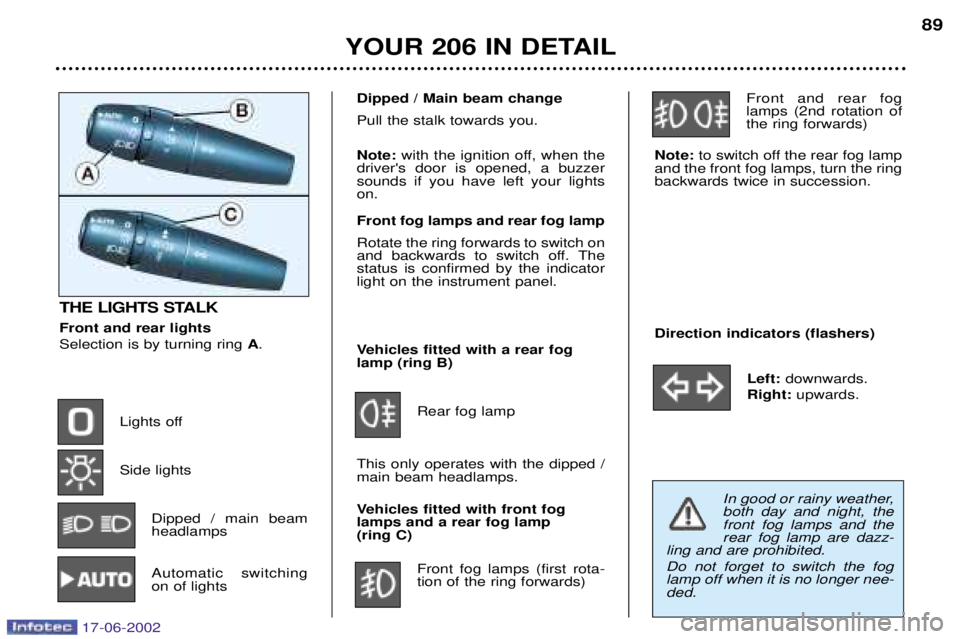
THE LIGHTS STALK Front and rear lights Selection is by turning ring
A.
Lights off Side lights Dipped / main beam headlamps
Automatic switchingon of lights Vehicles fitted with a rear foglamp (ring B)
Rear fog lamp
This only operates with the dipped /main beam headlamps.
Vehicles fitted with front fog lamps and a rear fog lamp (ring C) Front fog lamps (first rota-tion of the ring forwards) Front and rear foglamps (2nd rotation ofthe ring forwards)
Note: to switch off the rear fog lamp
and the front fog lamps, turn the ringbackwards twice in succession.
Direction indicators (flashers)
Left:downwards.
Right: upwards.
Dipped / Main beam change Pull the stalk towards you. Note:with the ignition off, when the
driver's door is opened, a buzzer sounds if you have left your lightson. Front fog lamps and rear fog lamp Rotate the ring forwards to switch on
and backwards to switch off. Thestatus is confirmed by the indicatorlight on the instrument panel.
In good or rainy weather, both day and night, thefront fog lamps and therear fog lamp are dazz-
ling and are prohibited. Do not forget to switch the fog lamp off when it is no longer nee-ded.
17-06-2002
Page 98 of 160

YOUR 206 IN DETAIL
90
AUTOMATIC SWITCHING ON OF LIGHTS Side lights and dipped beam head- lamps switch on automatically if the
light is poor.
They switch off when the light becomes bright enough. Note: In foggy weather or in snow
the brightness sensor can detect
sufficient light. As a result, the lights
will not come on automatically. This function is active when the
vehicle is supplied to the customer.
To disarm or activate the function:
- Start with the key in the accesso-
ries position (1st notch),
- Press the end of the lights stalk for more than four seconds.
Note: after the ignition is switched
off and depending on the brightness, the lights remain on for about 45seconds or until the vehicle is loc-ked.
Note: the brightness sensor, cou-
pled with the rain sensor, is loca-ted in the centre of the wind-
screen, behind the interior mirror.It is used for automatic switchingon of the lights. Operating check Activation Acivation of this function is accom- panied by an audible signal and themessage
"Automatic lighting acti-
ve" on the multi-function display.
Disarming Disarming of the function is accom- panied by an audible signal. Note: the function is temporarily
disarmed when the driver uses the manual lighting controls. If the brightness sensor does not function correctly , the system acti-
vates the function (the lights come
on). The driver is alerted by anaudible signal, accompanied by themessage "Automatic switching on
of lights faulty" on the multi-func-
tion display.
Contact a PEUGEOT dealer to have the system checked.
17-06-2002
Page 103 of 160
YOUR 206 IN DETAIL95
REAR QUARTER LIGHTS (3 DOOR)
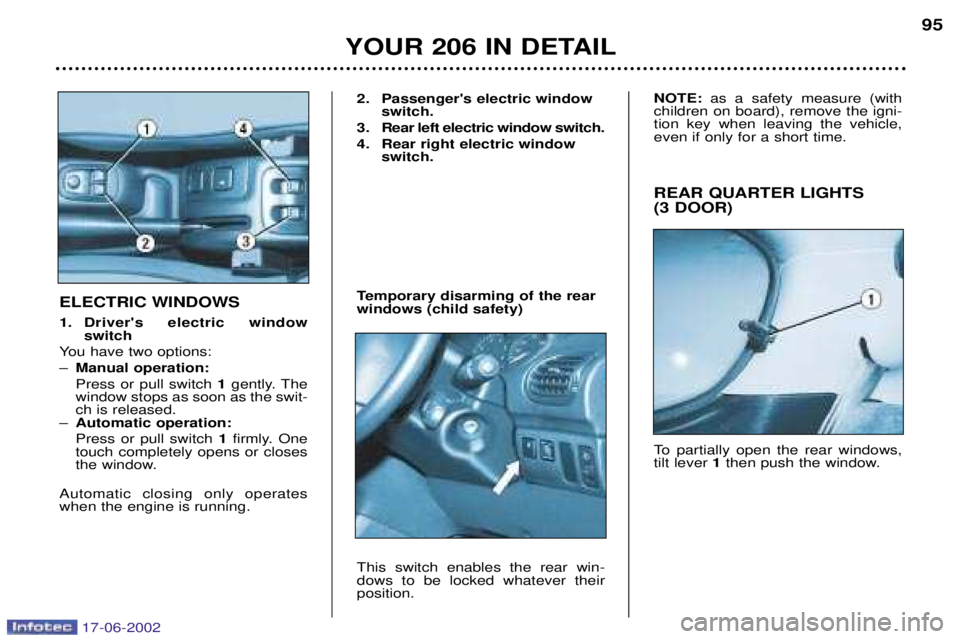
To partially open the rear windows, tilt lever 1then push the window.
ELECTRIC WINDOWS
1. Driver's electric window
switch
You have two options: Ð Manual operation:Press or pull switch 1gently. The
window stops as soon as the swit- ch is released.
Ð Automatic operation: Press or pull switch 1firmly. One
touch completely opens or closes
the window.
Automatic closing only operateswhen the engine is running. 2. Passenger's electric window
switch.
3. Rear left electric window switch.
4. Rear right electric window switch.
Temporary disarming of the rear windows (child safety) This switch enables the rear win- dows to be locked whatever theirposition. NOTE:
as a safety measure (with
children on board), remove the igni-tion key when leaving the vehicle,even if only for a short time.
17-06-2002
Page 105 of 160
Rear courtesy light (206 SW)Comes on when a door, the tailgate or the rear screen isopened. In this position thecourtesy light flashes whiledriving if an access is not
closed correctly.
Off Permanently on when the key is in the accessoriesposition or with the ignitionon.
YOUR 206 IN DETAIL
98
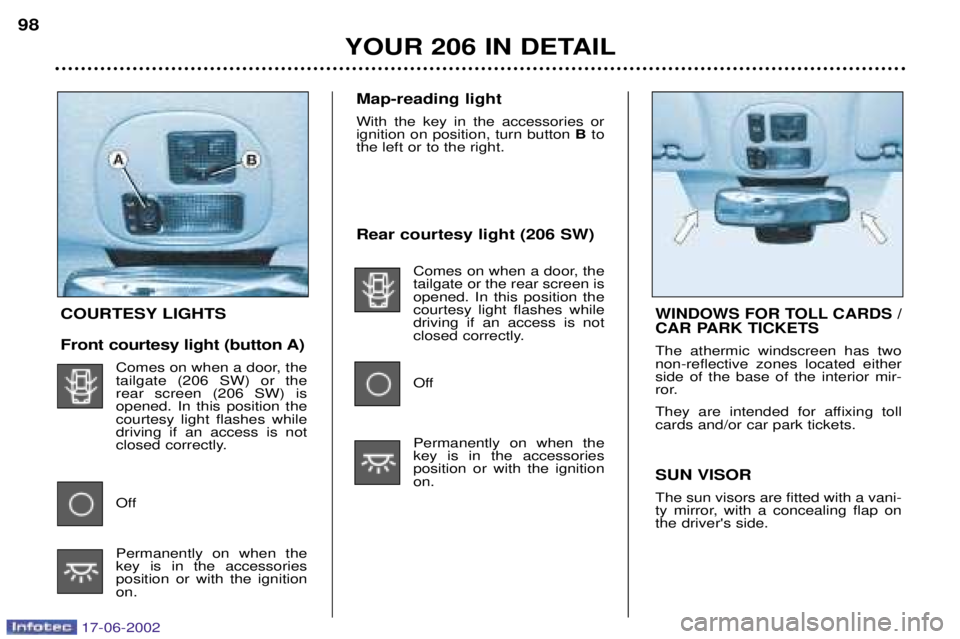
COURTESY LIGHTS
Front courtesy light (button A)
Comes on when a door, the tailgate (206 SW) or therear screen (206 SW) isopened. In this position thecourtesy light flashes whiledriving if an access is not
closed correctly.
Off Permanently on when the key is in the accessoriesposition or with the ignitionon. SUN VISOR The sun visors are fitted with a vani-
ty mirror, with a concealing flap onthe driver's side.WINDOWS FOR TOLL CARDS /
CAR PARK TICKETS
The athermic windscreen has two non-reflective zones located eitherside of the base of the interior mir-
ror.
They are intended for affixing toll cards and/or car park tickets.
Map-reading light With the key in the accessories or ignition on position, turn button
Bto
the left or to the right.
17-06-2002
Page 107 of 160
YOUR 206 IN DETAIL99
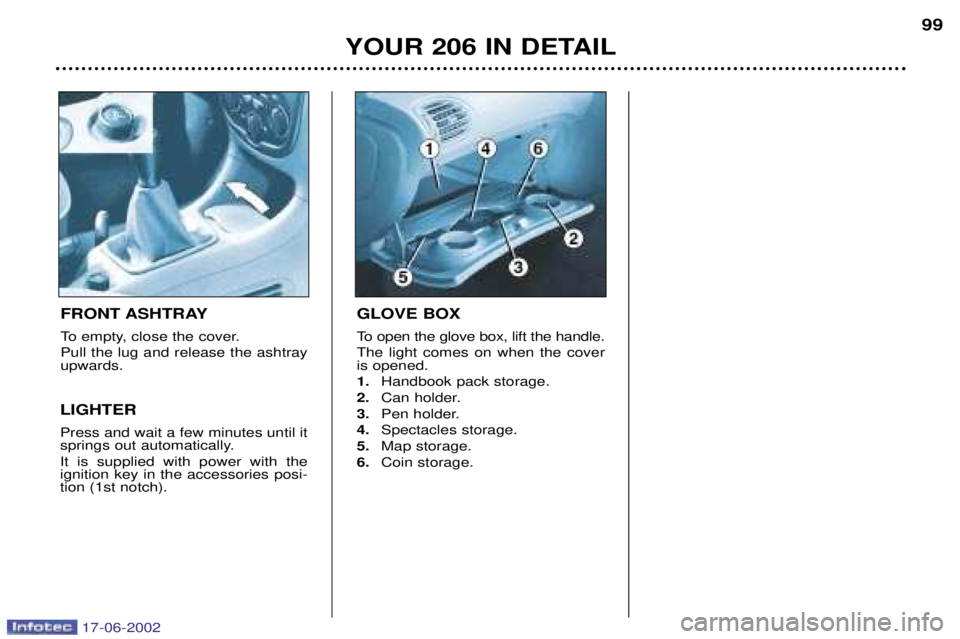
FRONT ASHTRAY
To empty, close the cover. Pull the lug and release the ashtray upwards.
LIGHTER Press and wait a few minutes until it
springs out automatically. It is supplied with power with the ignition key in the accessories posi-tion (1st notch).
GLOVE BOX
To open the glove box, lift the handle. The light comes on when the cover is opened. 1. Handbook pack storage.
2. Can holder.
3. Pen holder.
4. Spectacles storage.
5. Map storage.
6. Coin storage.
17-06-2002