key PEUGEOT 207 2009 Owner's Manual
[x] Cancel search | Manufacturer: PEUGEOT, Model Year: 2009, Model line: 207, Model: PEUGEOT 207 2009Pages: 279, PDF Size: 19.5 MB
Page 164 of 279
!
!
i
156
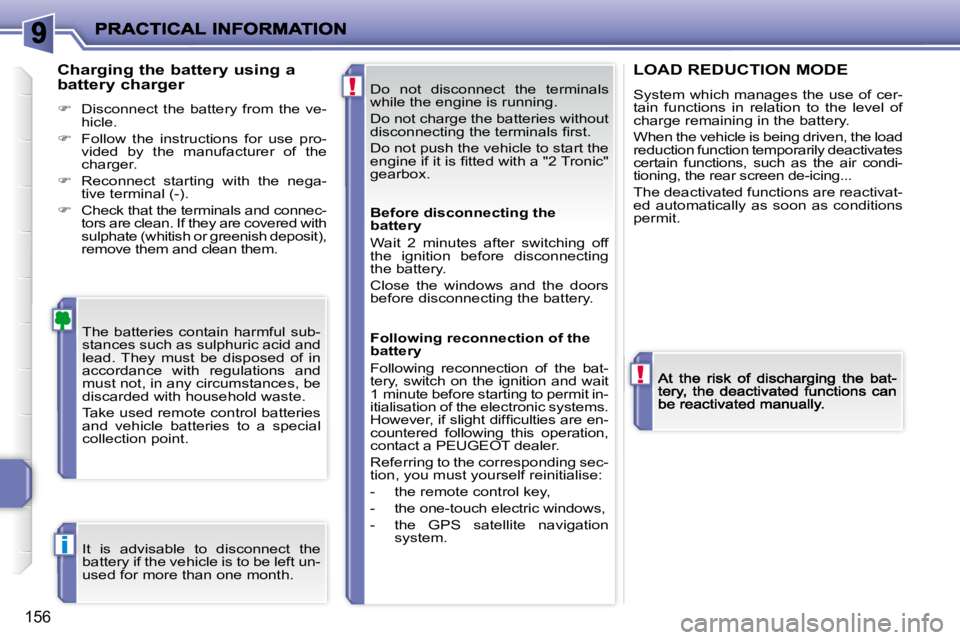
Do not disconnect the terminals
while the engine is running.
Do not charge the batteries without
disconnecting the terminals fi rst.
Do not push the vehicle to start the
engine if it is fi tted with a "2 Tronic"
gearbox.
The batteries contain harmful sub-
stances such as sulphuric acid and
lead. They must be disposed of in
accordance with regulations and
must not, in any circumstances, be
discarded with household waste.
Take used remote control batteries
and vehicle batteries to a special
collection point.
Charging the battery using a
battery charger
Disconnect the battery from the ve-
hicle.
Follow the instructions for use pro-
vided by the manufacturer of the
charger.
Reconnect starting with the nega-
tive terminal (-).
Check that the terminals and connec-
tors are clean. If they are covered with
sulphate (whitish or greenish deposit),
remove them and clean them.
LOAD REDUCTION MODE
System which manages the use of cer-tain functions in relation to the level of charge remaining in the battery.
When the vehicle is being driven, the load reduction function temporarily deactivates certain functions, such as the air condi-tioning, the rear screen de-icing...
The deactivated functions are reactivat-ed automatically as soon as conditions permit.
It is advisable to disconnect the
battery if the vehicle is to be left un-
used for more than one month. Before disconnecting the
battery
Wait 2 minutes after switching off
the ignition before disconnecting
the battery.
Close the windows and the doors
before disconnecting the battery.
Following reconnection of the
battery
Following reconnection of the bat-
tery, switch on the ignition and wait
1 minute before starting to permit in-
itialisation of the electronic systems.
However, if slight diffi culties are en-
countered following this operation,
contact a PEUGEOT dealer.
Referring to the corresponding sec-
tion, you must yourself reinitialise:
- the remote control key,
- the one-touch electric windows,
- the GPS satellite navigation
system.
Page 165 of 279
!
!
i
156
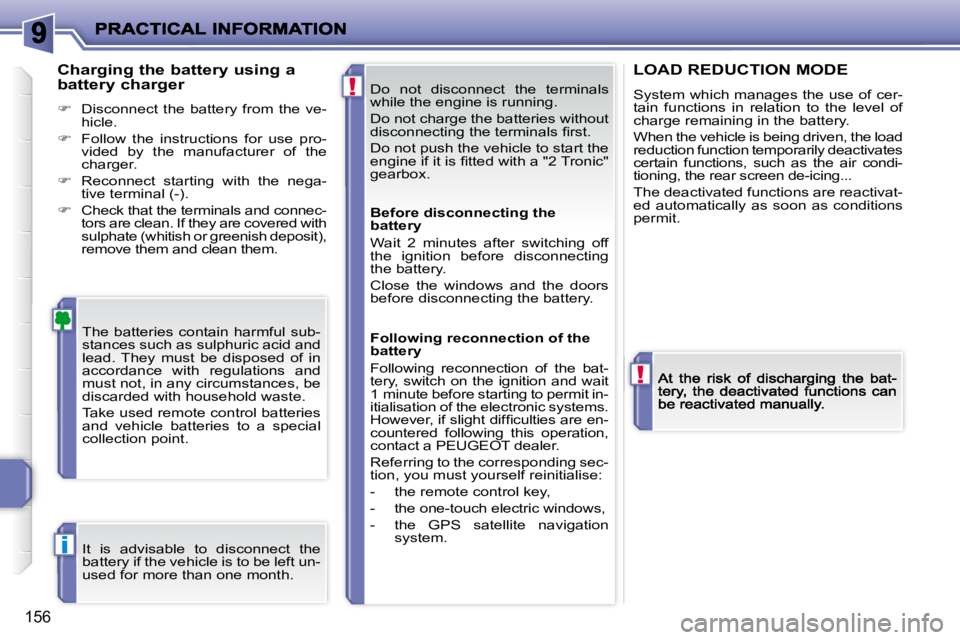
Do not disconnect the terminals
while the engine is running.
Do not charge the batteries without
disconnecting the terminals fi rst.
Do not push the vehicle to start the
engine if it is fi tted with a "2 Tronic"
gearbox.
The batteries contain harmful sub-
stances such as sulphuric acid and
lead. They must be disposed of in
accordance with regulations and
must not, in any circumstances, be
discarded with household waste.
Take used remote control batteries
and vehicle batteries to a special
collection point.
Charging the battery using a
battery charger
Disconnect the battery from the ve-
hicle.
Follow the instructions for use pro-
vided by the manufacturer of the
charger.
Reconnect starting with the nega-
tive terminal (-).
Check that the terminals and connec-
tors are clean. If they are covered with
sulphate (whitish or greenish deposit),
remove them and clean them.
LOAD REDUCTION MODE
System which manages the use of cer-tain functions in relation to the level of charge remaining in the battery.
When the vehicle is being driven, the load reduction function temporarily deactivates certain functions, such as the air condi-tioning, the rear screen de-icing...
The deactivated functions are reactivat-ed automatically as soon as conditions permit.
It is advisable to disconnect the
battery if the vehicle is to be left un-
used for more than one month. Before disconnecting the
battery
Wait 2 minutes after switching off
the ignition before disconnecting
the battery.
Close the windows and the doors
before disconnecting the battery.
Following reconnection of the
battery
Following reconnection of the bat-
tery, switch on the ignition and wait
1 minute before starting to permit in-
itialisation of the electronic systems.
However, if slight diffi culties are en-
countered following this operation,
contact a PEUGEOT dealer.
Referring to the corresponding sec-
tion, you must yourself reinitialise:
- the remote control key,
- the one-touch electric windows,
- the GPS satellite navigation
system.
Page 195 of 279
186
S
O S
SOU R CE
MODE B AND ESC
2
abc
5
jkl
8
tuv 3
def
6
mno
9
wxyz
1 4
ghi
7
pqr s
0 # MENU LIST
TA
P T Y
DARK
2
8
16
18 17
711 14 3
5 9
4
15 12
13
61
10
01
FIRST STEPS
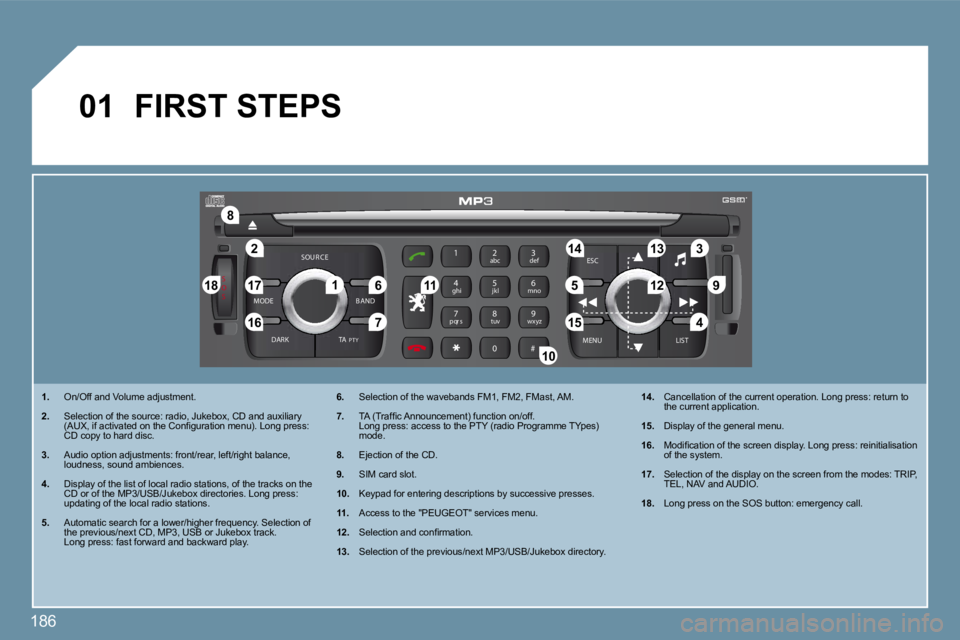
1. On/Off and Volume adjustment.
2. Selection of the source: radio, Jukebox, CD and au
xiliary (AUX, if activated on the Confi guration menu). Long press: CD copy to hard disc.
3. Audio option adjustments: front/rear, left/right balance, loudness, sound ambiences.
4. Display of the list of local radio stations, of the tracks on the CD or of the MP3/USB/Jukebox directories. Long pres s: updating of the local radio stations.
5. Automatic search for a lower/higher frequency. Selection of the previous/next CD, MP3, USB or Jukebox track. Long press: fast forward and backward play.
6. Selection of the wavebands FM1, FM2, FMast, AM.
7. TA (Traffi c Announcement) function on/off. Long press: access to the PTY (radio Programme TYp es) mode.
8. Ejection of the CD.
9. SIM card slot.
10. Keypad for entering descriptions by successive presses.
11. Access to the "PEUGEOT" services menu.
12. Selection and confi rmation.
13. Selection of the previous/next MP3/USB/Jukebox dir ectory.
14. Cancellation of the current operation. Long press: return to the current application.
15. Display of the general menu.
16. Modifi cation of the screen display. Long press: reinitialisation of the system.
17. Selection of the display on the screen from the mo des: TRIP, TEL, NAV and AUDIO.
18. Long press on the SOS button: emergency call.
Page 200 of 279
191
99
1111
1212
1313
1515
1010
1414
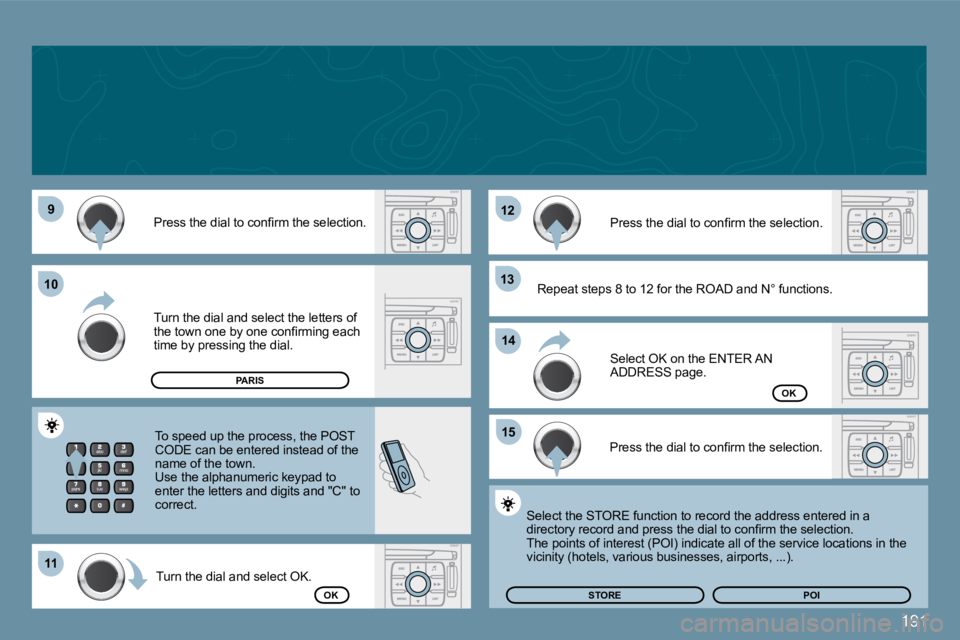
Press the dial to confi rm the selection.
Turn the dial and select the letters of the town one by one confi rming each time by pressing the dial.
Turn the dial and select OK.
Press the dial to confi rm the selection.
To speed up the process, the POST CODE can be entered instead of the name of the town. Use the alphanumeric keypad to enter the letters and digits and "C" to correct.
Press the dial to confi rm the selection.
Select OK on the ENTER AN ADDRESS page.
Repeat steps 8 to 12 for the ROAD and N° functions.
OK
OKSTOREPOI
Select the STORE function to record the address entered in a directory record and press the dial to confi rm the selection. The points of interest (POI) indicate all of the service locations in the vicinity (hotels, various businesses, airports, ... ).
PARIS
Page 214 of 279
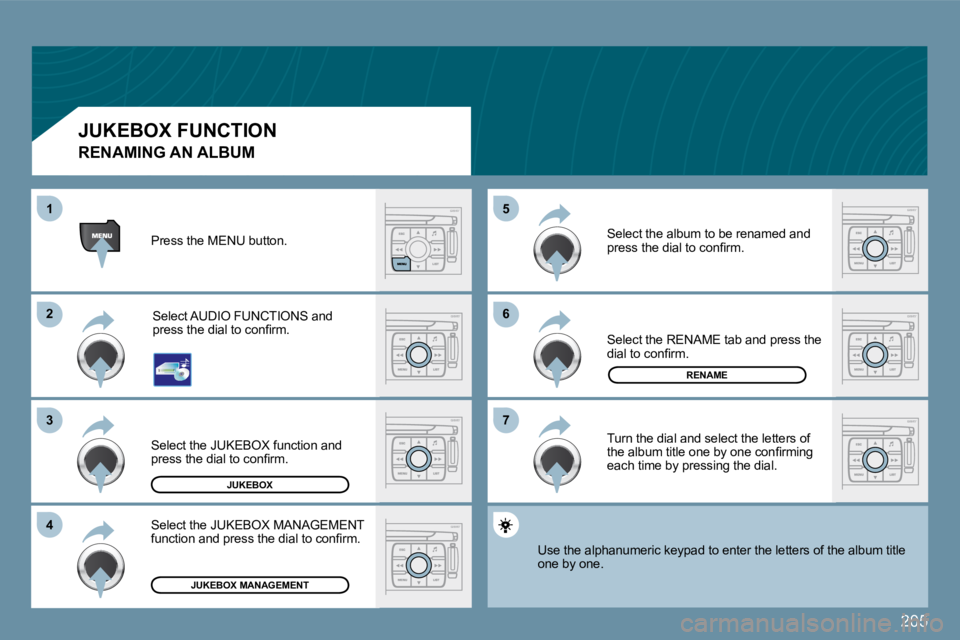
205
66
77
55
22
33
44
11
Select the RENAME tab and press the dial to confi rm.
Select the JUKEBOX MANAGEMENT function and press the dial to confi rm.
JUKEBOX
JUKEBOX MANAGEMENT
RENAME
Press the MENU button.
Select AUDIO FUNCTIONS and press the dial to confi rm.
Select the JUKEBOX function and press the dial to confi rm.
Select the album to be renamed and press the dial to confi rm.
Turn the dial and select the letters of the album title one by one confi rming each time by pressing the dial.
Use the alphanumeric keypad to enter the letters of the album title one by one.
JUKEBOX FUNCTION
RENAMING AN ALBUM
Page 218 of 279
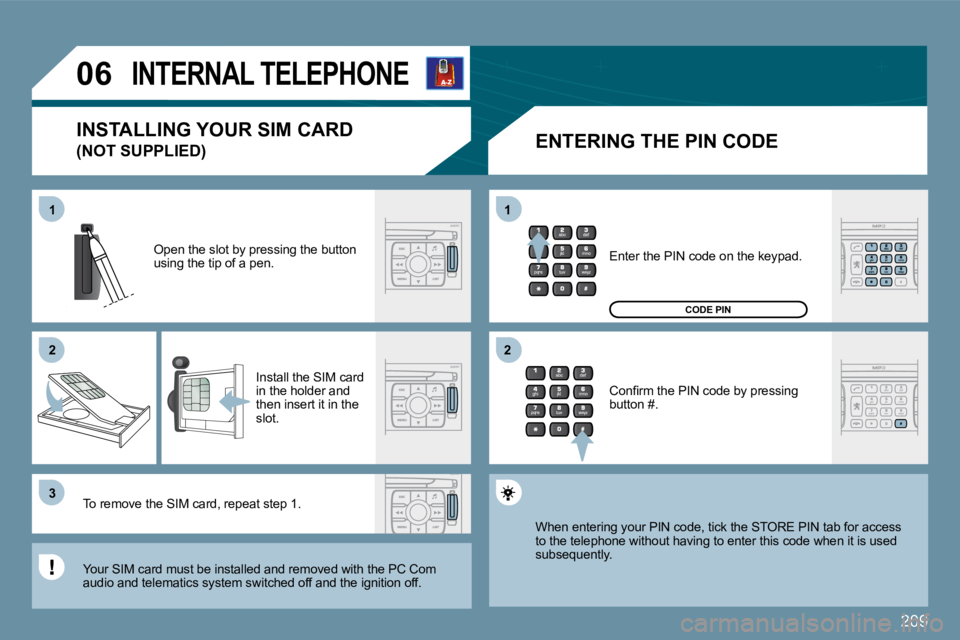
209
11
22
33
11
22
06INTERNAL TELEPHONE
ENTERING THE PIN CODE
Open the slot by pressing the button using the tip of a pen.
Install the SIM card in the holder and then insert it in the slot.
To remove the SIM card, repeat step 1.
Your SIM card must be installed and removed with the PC Com audio and telematics system switched off and the ig nition off.
Enter the PIN code on the keypad.
Confi rm the PIN code by pressing button #.
CODE PIN
When entering your PIN code, tick the STORE PIN ta b for access to the telephone without having to enter this code when it is used subsequently.
INSTALLING YOUR SIM CARD
(NOT SUPPLIED)
Page 221 of 279
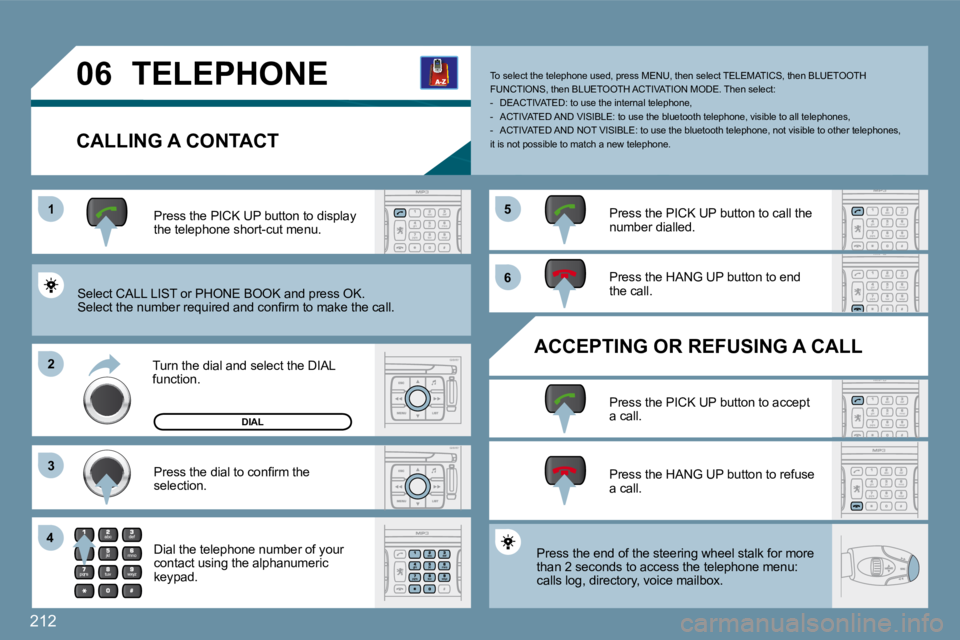
212
11
22
33
44
55
66
06 TELEPHONE
CALLING A CONTACT
Select CALL LIST or PHONE BOOK and press OK. Select the number required and confi rm to make the call.
Press the PICK UP button to display the telephone short-cut menu.
Press the dial to confi rm the
selection.
Press the PICK UP button to call the number dialled.
Press the HANG UP button to end
the call.
ACCEPTING OR REFUSING A CALL
Press the PICK UP button to accept a call.
Press the HANG UP button to refuse
a call.
DIAL
Press the end of the steering wheel stalk for more
than 2 seconds to access the telephone menu:
calls log, directory, voice mailbox.
To select the telephone used, press MENU, then sel ect TELEMATICS, then BLUETOOTH FUNCTIONS, then BLUETOOTH ACTIVATION MODE. Then sel ect: - DEACTIVATED: to use the internal telephone, - ACTIVATED AND VISIBLE: to use the bluetooth telephone, visible to all telephones, - ACTIVATED AND NOT VISIBLE: to use the bluetoot h telephone, not visible to other telephones, it is not possible to match a new telephone.
Turn the dial and select the DIAL function.
Dial the telephone number of your contact using the alphanumeric keypad.
Page 240 of 279
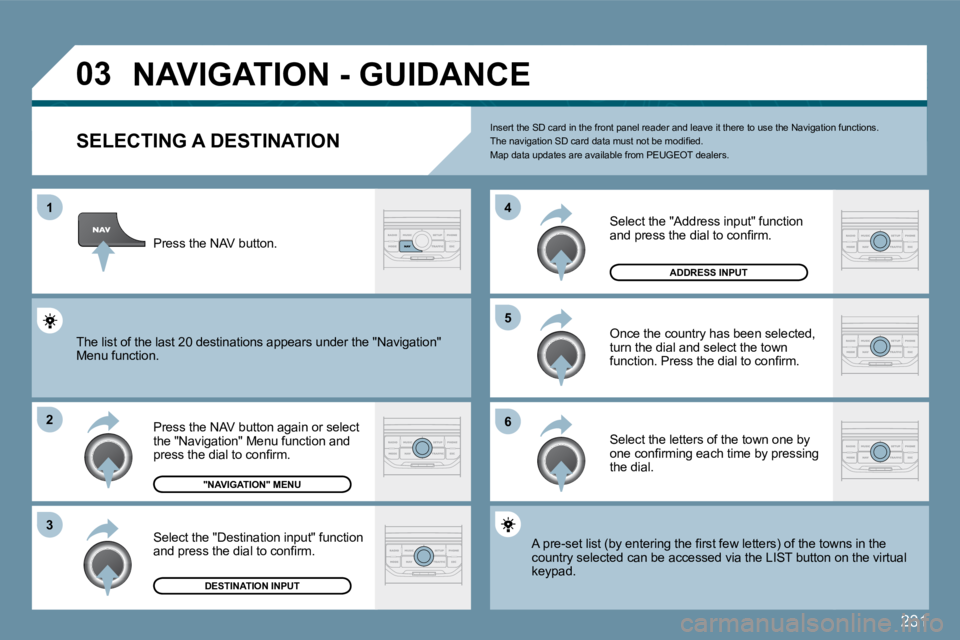
231
03
1
2
3
5
6
4
NAVIGATION - GUIDANCE
SELECTING A DESTINATION
Press the NAV button again or select the "Navigation" Menu function and press the dial to confi rm.
Select the "Destination input" function and press the dial to confi rm.
Press the NAV button.
Select the letters of the town one by one confi rming each time by pressing the dial.
Once the country has been selected, turn the dial and select the town function. Press the dial to confi rm.
"NAVIGATION" MENU
DESTINATION INPUT
Insert the SD card in the front panel reader and leave it there to use the Navigation functions. The navigation SD card data must not be modifi ed. Map data updates are available from PEUGEOT dealer s.
A pre-set list (by entering the fi rst few letters) of the towns in the A pre-set list (by entering the fi rst few letters) of the towns in the country selected can be accessed via the LIST butto n ontton on the virtual keypad.
Select the "Address input" function and press the dial to confi rm.
ADDRESS INPUT
The list of the last 20 destinations appears under the "Nthe "Navigation" Menu function.
Page 241 of 279
232
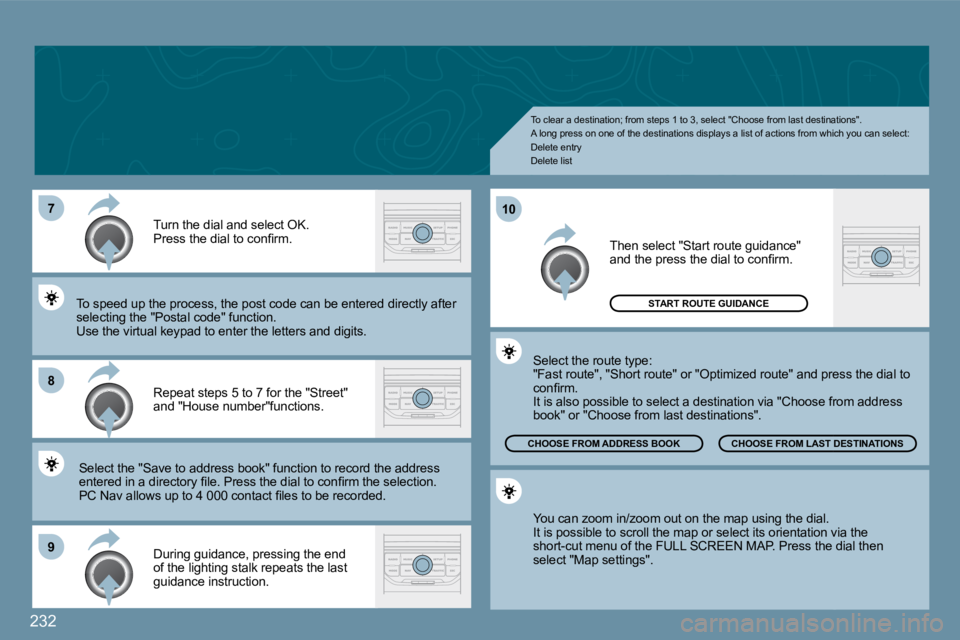
7
8
9
10
To clear a destination; from steps 1 to 3, select "Choose from last destinations". A long press on one of the destinations displays a list of actions from which you can select: Delete entry Delete list
Repeat steps 5 to 7 for the "Street" and "House number"functions.
Turn the dial and select OK. Press the dial to confi rm.
Select the "Save to address book" function to reco rd thord the address entered in a directory fi le. Press the dial to confi rm the selection. entered in a directory fi le. Press the dial to confi rm the selection. PC Nav allows up to 4 000 contact fi les to be reco rded. PC Nav allows up to 4 000 contact fi les to be recorded.
To speed up the process, the post code can be ente redtered directly after selecting the "Postal code" function. Use the virtual keypad to enter the letters and digits.
Then select "Start route guidance" and the press the dial to confi rm.
During guidance, pressing the end of the lighting stalk repeats the last guidance instruction.
You can zoom in/zoom out on the map using the dial . It is possible to scroll the map or select its orientation viaion via the short-cut menu of the FULL SCREEN MAP. Press the d the dial then select "Map settings".
Select the route type: "Fast route", "Short route" or "Optimized route" a nd presd press the dial to confi rm. It is also possible to select a destination via "Choose frose from address book" or "Choose from last destinations".
CHOOSE FROM LAST DST DESTINATIONS CHOOSE FROM ADDRESS BOOK
START ROUTE GUIDANCE
Page 244 of 279
235
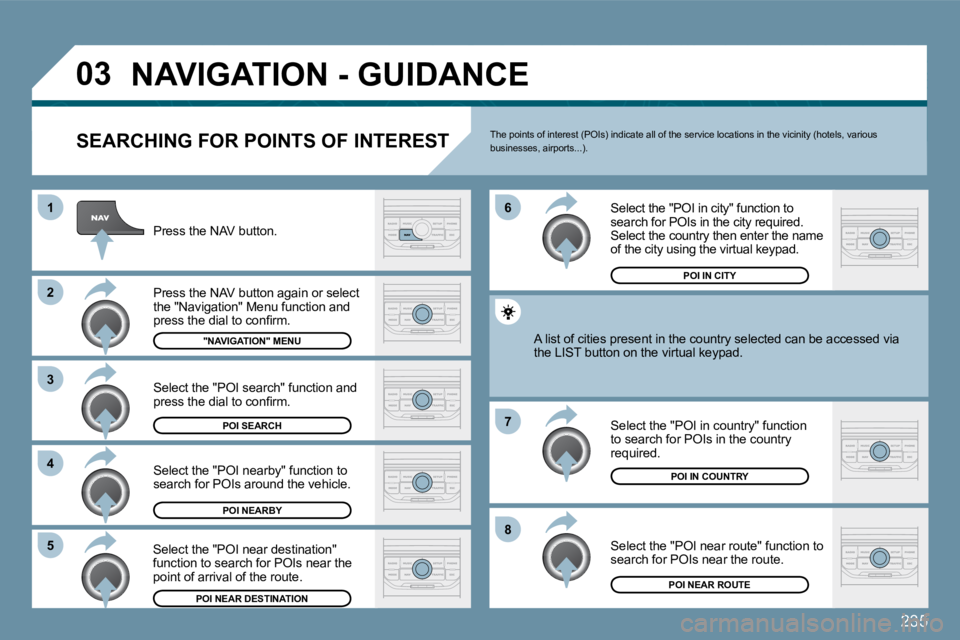
03
8
6
7
4
3
5
2
1
NAVIGATION - GUIDANCE
SEARCHING FOR POINTS OF INTEREST
Press the NAV button.
Press the NAV button again or select the "Navigation" Menu function and press the dial to confi rm.
Select the "POI nearby" function to search for POIs around the vehicle.
Select the "POI search" function and press the dial to confi rm.
"NAVIGATION" MENU
POI SEARCH
POI NEARBY
Select the "POI in city" function to search for POIs in the city required. Select the country then enter the name of the city using the virtual keypad.
Select the "POI near route" function to search for POIs near the route.
Select the "POI in country" function to search for POIs in the country required.
Select the "POI near destination" function to search for POIs near the point of arrival of the route.
POI NEAR DESTINATION POI NEAR ROUTE
POI IN COUNTRY
POI IN CITY
A list of cities present in the country selected c
an be accbe accessed via the LIST button on the virtual keypad.
The points of interest (POIs) indicate all of the service locations in the vicinity (hotels, various businesses, airports...).