screen PEUGEOT 3008 2013 Owners Manual
[x] Cancel search | Manufacturer: PEUGEOT, Model Year: 2013, Model line: 3008, Model: PEUGEOT 3008 2013Pages: 352, PDF Size: 15.64 MB
Page 293 of 352
291
06USING THE TELEPHONE
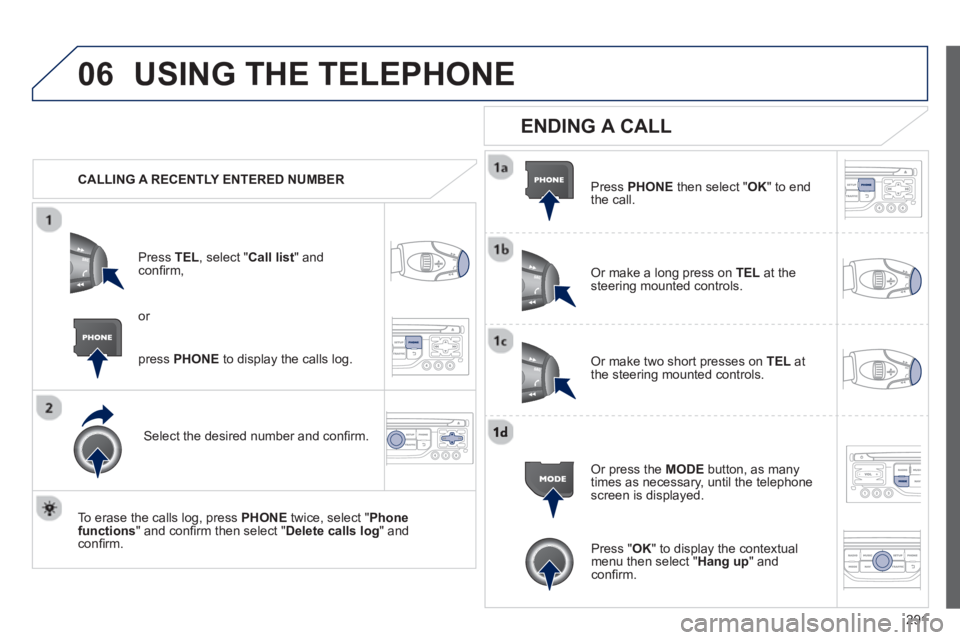
CALLING A RECENTLY ENTERED NUMBER
Pr
ess TEL, select "Call list" andconfi rm,
Select the desired number and confi rm.
To erase the calls lo
g, press PHONE
twice, select " Phone functions" and confi rm then select " Delete calls log" andconfi rm.
ENDING A CALL
Press PHONEthen select "OK" to end
the call.
Or make a long press on TELat the
steering mounted controls.
Or make two short presses on TELat
the steering mounted controls.
Or press the MODE
button, as many
times as necessary, until the telephone
screen is displayed.
press PHONE
to display the calls log.
or
Press "OK" to display the contextualmenu then select " Hang up" andconfi rm.
Page 294 of 352
292
06USING THE TELEPHONE
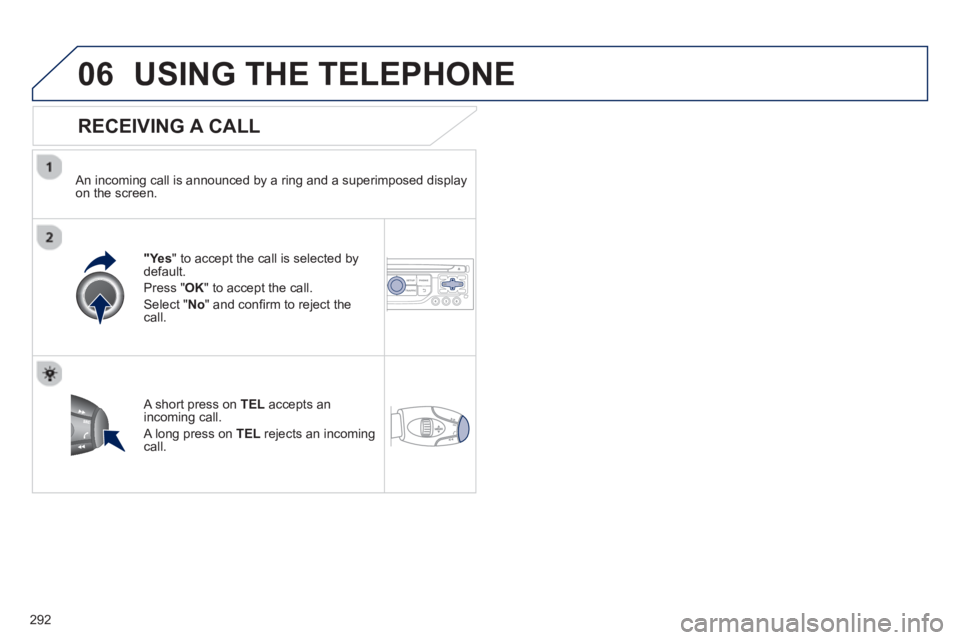
RECEIVING A CALL
An incoming call is announced by a ring and a superimposed displayon the screen.
"Ye s" to accept the call is selected bydefault.
Pr
ess " OK" to accept the call.
Select " No" and confi rm to reject the call.
A short press on TELaccepts an incoming call.
A long press on TEL
rejects an incomingcall.
Page 295 of 352
293
06 USING THE TELEPHONE
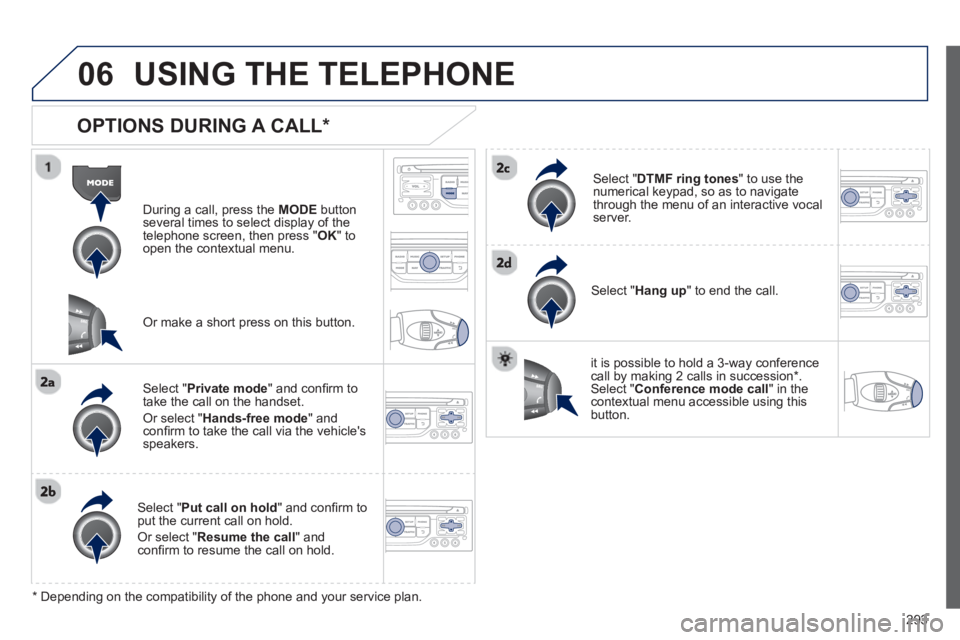
OPTIONS DURING A CALL *
During a call, press the MODE
button
several times to select display of the
telephone screen, then press " OK " to
open the contextual menu.
Select " Private mode
" and confi rm totake the call on the handset.
Or select " Hands-free mode" andconfi rm to take the call via the vehicle's
speakers.
Select " Put call on hold" and confi rm to put the current call on hold.
Or select " Resume the call" andconfi rm to resume the call on hold.
Select " DTMF ring tones
" to use thenumerical keypad, so as to navigate
through the menu of an interactive vocal server.
Select " Hang up " to end the call.
*
Depending on the compatibility of the phone and your service plan.
it is possible to hold a 3-wa
y conferencecall by making 2 calls in succession*. Select "Conferencemode call" in the contextual menu accessible using thisbutton.
Or make a short press on this button.
Page 307 of 352
305
10CONFIGURATION
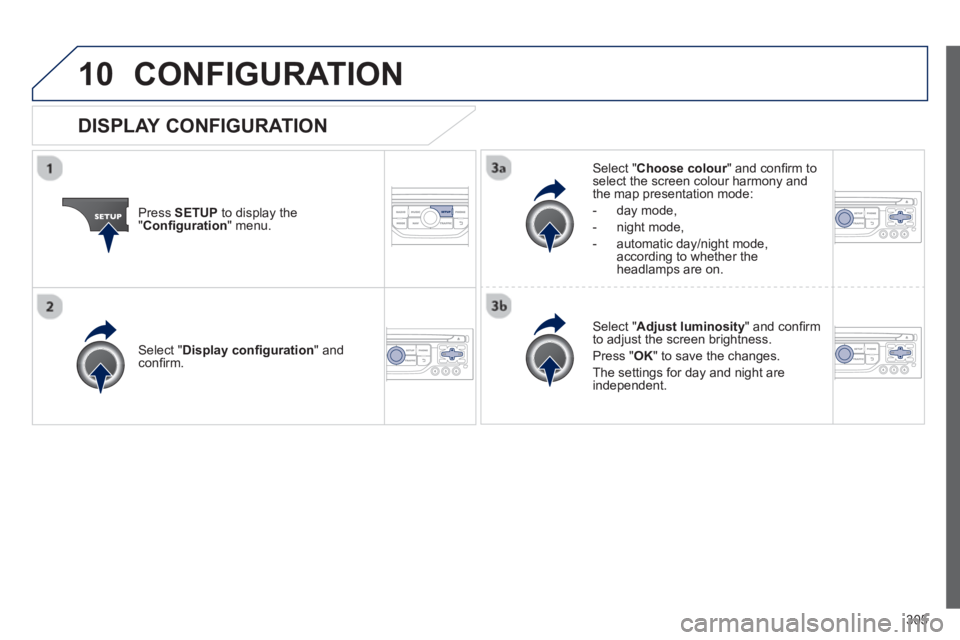
Press SETUP
to display the"Confi guration
" menu.
Select " Choose colour" and confi rm torselect the screen colour harmony and
the map presentation mode:
-
day mode,
- n
ight mode,
- automatic day
/night mode,according to whether the
headlamps are on.
Select " Adjust luminosity" and confi rm
to adjust the screen brightness.
Pr
ess " OK" to save the changes.
The settings
for day and night are independent.
Select " Display confi guration" andconfi rm.
DISPLAY CONFIGURATION
Page 308 of 352
306
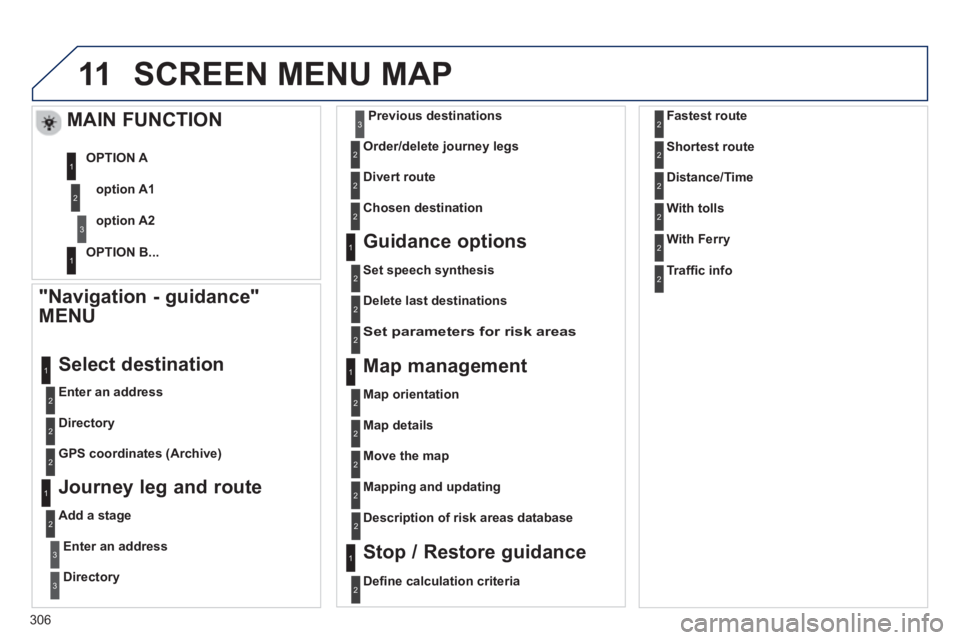
11SCREEN MENU MAP
"Navigation - guidance"
MENU
Enter an address
Select destination
Directory
GPS coordinates
(Archive)
Journey leg and route
Add a stage
Enter an address
Directory
Previous destinations
Order/delete
journey legs
Divert route
Chosen destination
Guidance options
Set speech synthesis
Delete last destinations
Map management
Map orientation
MAIN FUNCTION
option A1
option A2 OPTION A
OPTION B...
Map details
Move the map
Mapping and updating
Descri
ption of risk areas database
Stop / Restore guidance
1
2
3
1
3
3
2
2
2
2
1
3
1
1
2
2
2
2
2
2
2
2
2
2
1
1
Set parameters for risk areas2
Defi ne calculation criteria 2
Fastest route
Shortest route
Distance/Time
2
2
2
With tolls2
With Ferry2
Traffi c info2
Page 309 of 352
307
11
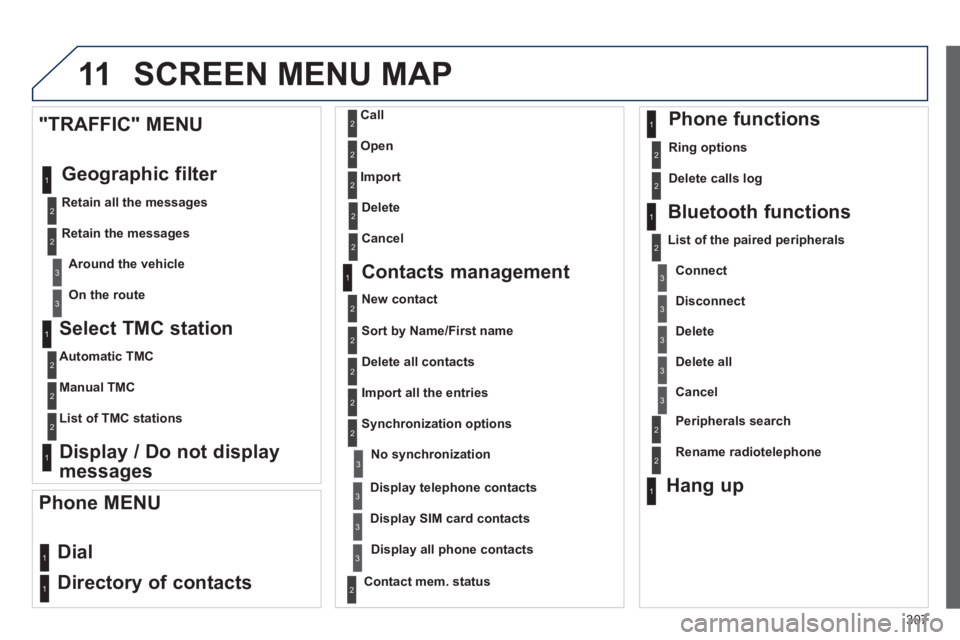
Select TMC station
Automatic TMC
Manual TMC
List of TMC stations
Display / Do not display
messages
"TRAFFIC" MENU
Geo
graphic filter
Retain all the messages
Retain the messages
Around the vehicle
On the route
1
2
2
2
1
2
2
3
3
1
SCREEN MENU MAP
Dial
Director
y of contacts
Call
O
pen
Import
Phone MENU
1
2
2
2
1
2
2
2
2
1
2
3
3
3
2
2
2
1
1
1
3
3
3
2
3
2
2
3
List of the paired peripherals
Connec
t
Disconnect
Delete
Delete all
Contact mem. status
Phone functions
Ring options
Delete calls log
Bluetooth functions
Peripherals search
Rename radiotele
phone
Hang up
Display all phone contacts
Delete
Contacts management
New contact
Delete all contacts
Im
port all the entries
Synchronization options
Display telephone contacts No s
ynchronization
Display SIM card contacts
2Cancel
2Sort by Name/First name
3Cancel
Page 310 of 352
11 SCREEN MENU MAP
1
1
1
2
1
1
2
2
2
2
2
2
2
3
3
2
2
2
1
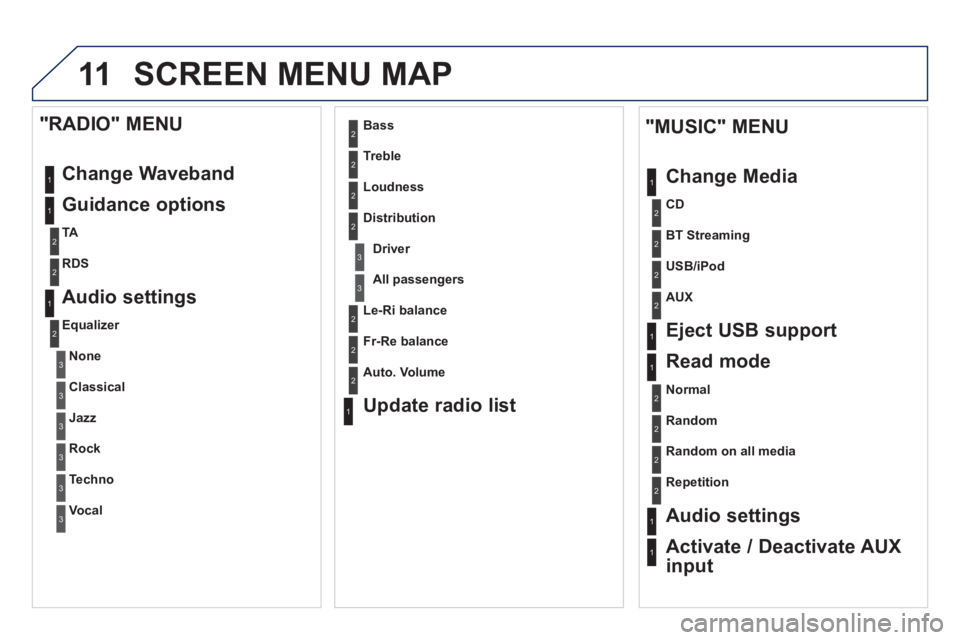
Random on all media
Repetition
Audio settings
Activate / Deactivate AUX
input
"MUSIC" MENU
Chan
ge Media
E
ject USB support
Read mode
Normal
Random
All passengers
Le-Ri balance
Fr-Re balance
Auto. Volume
Update radio list
Bass
Treble
Loudness
Distribution
Driver
1
2
2
1
1
3
3
3
3
3
3
2
Equalizer
"RADIO" MENU
Chan
ge Waveband
Guidance o
ptions
TA
RDS
Audio settings
None
Classical
Jaz
z
Rock
Techno
Vocal
2
2
2
2
USB/iPod
AUX
CD
BT Streamin
g
Page 311 of 352
309
11
2
3
3
1
4
2
2
1
4
4
2
2
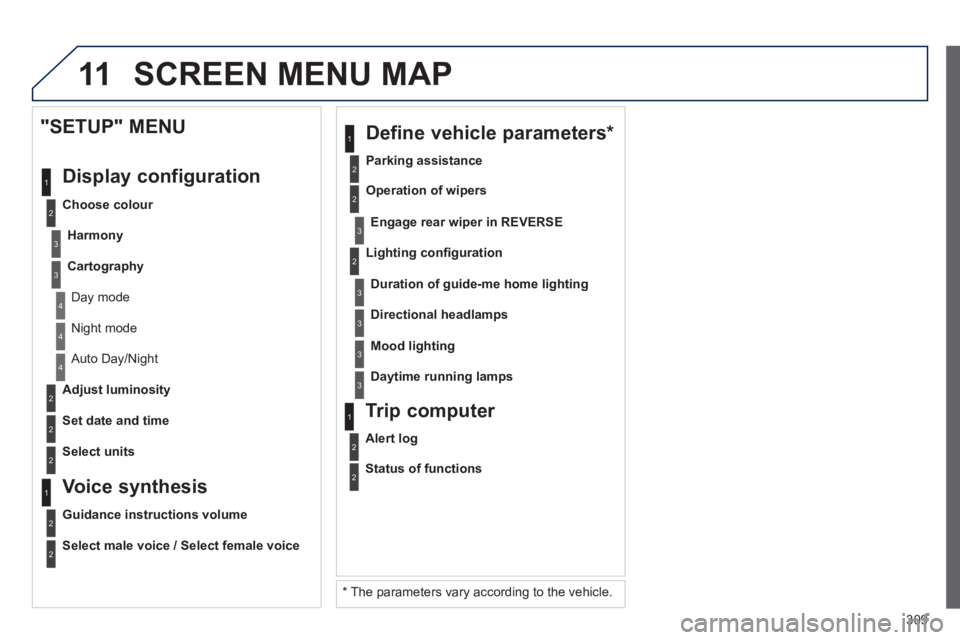
Night mode
Auto Day/Night
Ad
just luminosity
Set date and time
"SETUP" MENU
Displa
y configuration
Choose colour
Harmon
y
Cartography
Day mode
Voice synthesis
Guidance instructions volume
Select male voice / Select female voice
2
Select units
SCREEN MENU MAP
2
3
3
2
Lighting confi guration
Parkin
g assistance
En
gage rear wiper in REVERSE
Duration of guide-me home lighting
1
Define vehicle parameters *
2
Operation of wipers
3Directional headlamps
3Mood lighting
3Daytime running lamps
*
The parameters var
y according to the vehicle.
2
Alert log
1
Trip computer
2
Status of functions
Page 315 of 352
313
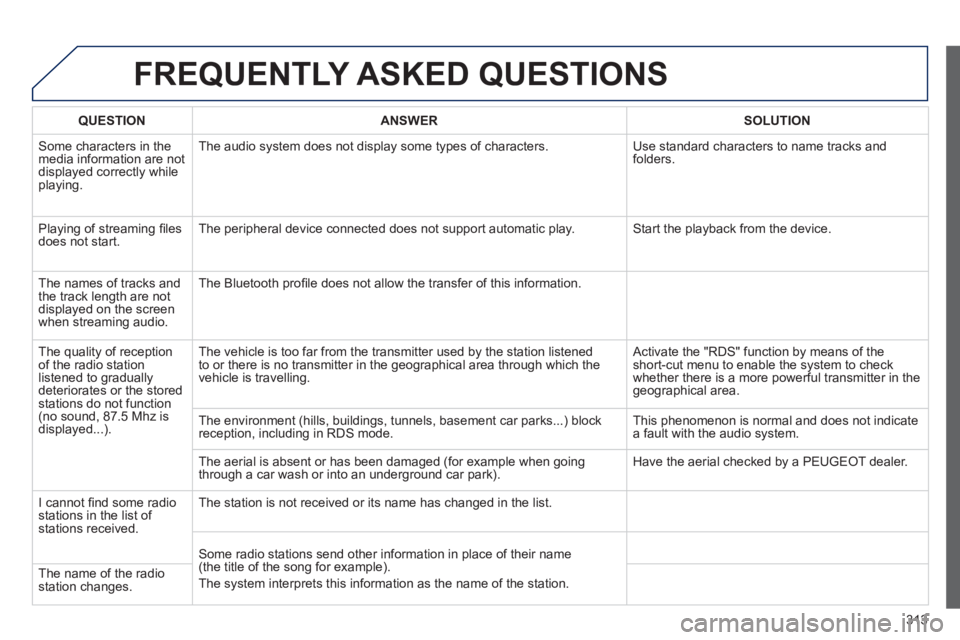
FREQUENTLY ASKED QUESTIONS
QUESTIONANSWER SOLUTION
Some characters in themedia information are not
displayed correctly while playing. The audio s
ystem does not display some types of characters. Use standard characters to name tracks andfolders.
Pla
ying of streaming fi lesdoes not start. The peripheral device connected does not support automatic play. Start the playback from the device.
Th
e names of tracks and
the track length are not
displa
yed on the screen
when streaming audio. The Bluetooth pro
fi le does not allow the transfer of this information.
The qualit
y of receptionof the radio station listened to graduallydeteriorates or the stored stations do not function(no sound, 87.5 Mhz is
displayed...). The vehicle is too far from the transmitter used b
y the station listened
to or there is no transmitter in the geographical area through which the
vehicle is travelling.
Activate the "RDS" function by means of theshort-cut menu to enable the system to check
whether there is a more powerful transmitter in the
geographical area.
The environment
(hills, buildings, tunnels, basement car parks...) block reception, including in RDS mode. This phenomenon is normal and does not indicate
a fault with the audio system.
The aerial is absent or has been dama
ged (for example when goingthrough a car wash or into an underground car park). Have the aerial checked by a PEUGEOT dealer.
I
cannot fi nd some radiostations in the list of stations received.
The station is not received or its name has changed in the list.
Some radio stations send other information in place of their name(the title of the song for example).
The s
ystem interprets this information as the name of the station. The name of the radio station changes.
Page 319 of 352
317
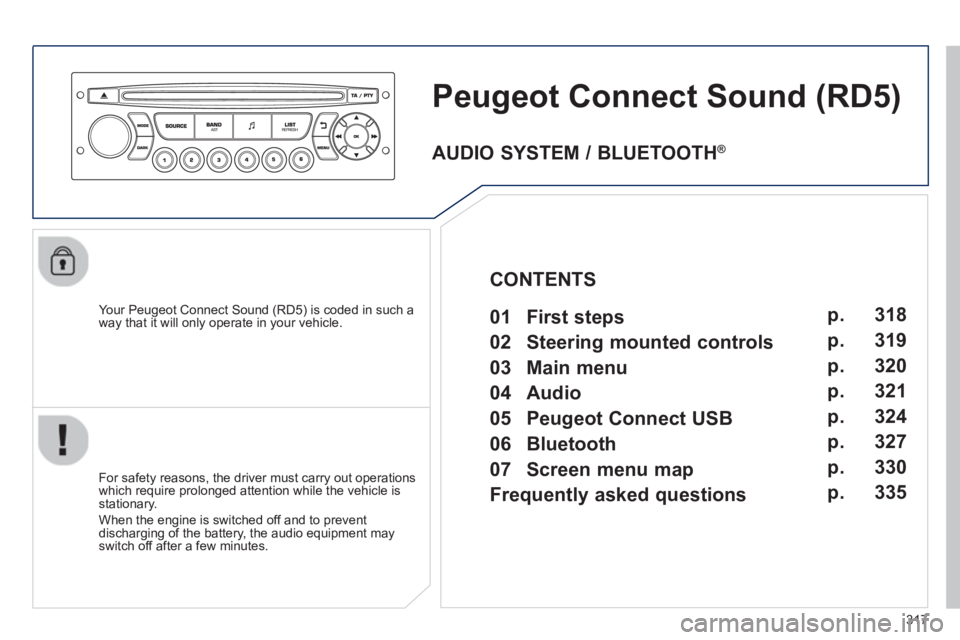
Peugeot Connect Sound(RD5)
Your Peugeot Connect Sound (RD5) is coded in such a
way that it will only operate in your vehicle.
For safet
y reasons, the driver must carry out operations
which require prolonged attention while the vehicle is stationary.
When the en
gine is switched off and to prevent
discharging of the battery, the audio equipment mayswitch off after a few minutes.
AUDIO SYSTEM / BLUETOOTH ®
01 First steps
02 Steering mounted controls
03 Main menu
04 Audio
05 Peugeot Connect USB
06 Bluetooth
07 Screen menu map
Frequently asked questions p.
p.
p.
p.
p.
p.
p.
p. 318
319
320
321
324
327
330
335
CONTENTS