screen PEUGEOT 3008 2013 Manual Online
[x] Cancel search | Manufacturer: PEUGEOT, Model Year: 2013, Model line: 3008, Model: PEUGEOT 3008 2013Pages: 352, PDF Size: 15.64 MB
Page 207 of 352
205
PRACTICAL INFORMATION
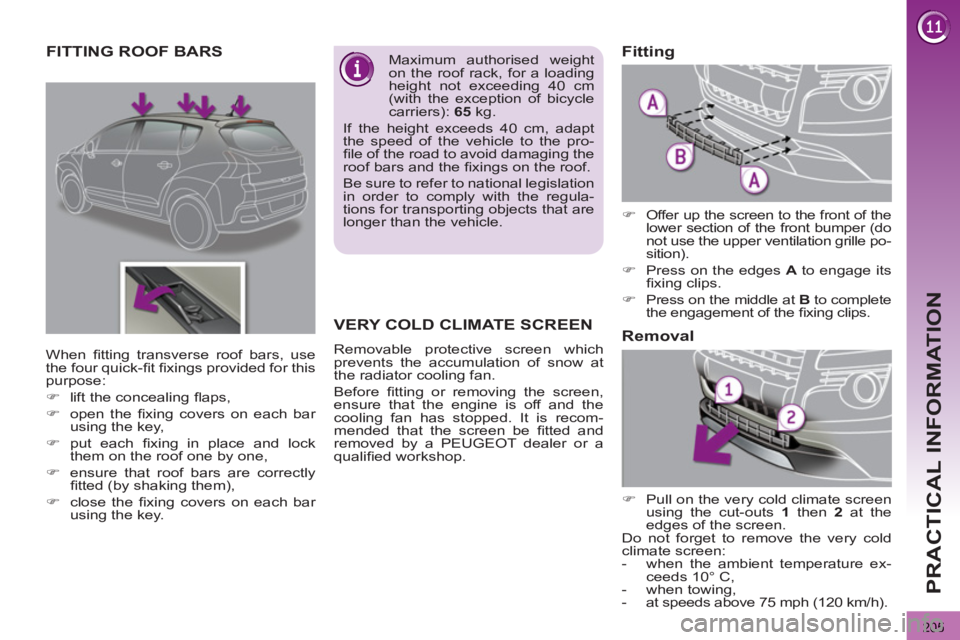
FITTING ROOF BARS
Maximum authorised weight
on the roof rack, for a loading
height not exceeding 40 cm
(with the exception of bicycle
carriers): 65
kg.
If the height exceeds 40 cm, adapt
the speed of the vehicle to the pro-
fi le of the road to avoid damaging the
roof bars and the fi xings on the roof.
Be sure to refer to national legislation
in order to comply with the regula-
tions for transporting objects that are
longer than the vehicle.
When fi tting transverse roof bars, use
the four quick-fi t fi xings provided for this
purpose:
)
lift the concealing fl aps,
)
open the fi xing covers on each bar
using the key,
)
put each fi xing in place and lock
them on the roof one by one,
)
ensure that roof bars are correctly
fi tted (by shaking them),
)
close the fi xing covers on each bar
using the key.
VERY COLD CLIMATE SCREEN
Removable protective screen which
prevents the accumulation of snow at
the radiator cooling fan.
Before fi tting or removing the screen,
ensure that the engine is off and the
cooling fan has stopped. It is recom-
mended that the screen be fi tted and
removed by a PEUGEOT dealer or a
qualifi ed workshop.
)
Offer up the screen to the front of the
lower section of the front bumper (do
not use the upper ventilation grille po-
sition).
)
Press on the edges A
to engage its
fi xing clips.
)
Press on the middle at B
to complete
the engagement of the fi xing clips.
Fitting
)
Pull on the very cold climate screen
using the cut-outs 1
then 2
at the
edges of the screen.
Do not forget to remove the very cold
climate screen:
- when the ambient temperature ex-
ceeds 10° C,
- when towing,
- at speeds above 75 mph (120 km/h).
Removal
Page 208 of 352
206
PRACTICAL INFORMATION
Installation of radio
communication
transmitters
Before installing any after-market ra-
dio communication transmitter, you
can contact a PEUGEOT dealer for
the specifi cation of transmitters which
can be fi tted (frequency, maximum
power, aerial position, specifi c instal-
lation requirements), in line with the
Vehicle Electromagnetic Compatibility
Directive (2004/104/EC).
* To avoid any risk of jamming of the
pedals:
- ensure that the mat is positioned
and secured correctly,
- never fi t one mat on top of another.
A wide range of accessories and genu-
ine parts is available from the PEUGEOT
dealer network.
These accessories and parts have been
tested and approved for reliability and
safety.
They are all adapted to your vehicle and
benefi t from PEUGEOT's recommenda-
tion and warranty.
"Transport solutions":
For leisure pursuits: roof bars, bicycle
carrier on towbar, bicycle carrier on roof
bars, ski carrier, roof box, booster seats
and child seats, side blinds, under shelf
storage.
Trailer towbar, which must be fi tted by a
PEUGEOT dealer.
You can also obtain cleaning and main-
tenance products (exterior and interior),
products for topping up (screenwash
fl uid...) and refi lls (sealant cartridge
for the temporary puncture repair kit...)
from PEUGEOT dealers.
Depending on the legislation
in force in the country, it may
be compulsory to have a high
visibility safety vest, warning triangle
and spare bulbs and fuses available
in the vehicle.
The fi tting of electrical equip-
ment or accessories which
are not recommended by
PEUGEOT may result in a failure of
your vehicle's electronic system and
excessive electrical consumption.
Please note this precaution. You are
advised to contact a PEUGEOT rep-
resentative to be shown the range
of recommended equipment and ac-
cessories.
"Style":
seat covers compatible with lateral air-
bags, leather gear lever knob, foglamps,
door defl ectors, spoiler, styling strips,
alloy wheels, trims, chrome-plated door
handle shells.
"Safety and security":
anti-theft alarm, window etching, wheel
security bolts, fi rst aid kit, breathalyzer,
warning triangle, high visibility vest, sto-
len vehicle tracking system, dog guard,
snow chains.
"Protection":
mats * , boot tray, luggage net, coat
hanger fi xed on head restraint, stainless
steel or carbon fi bre style door sills.
"Multimedia":
audio systems, amplifi ers, satellite navi-
gation systems, Bluetooth hands-free
system, CD changer, speakers, DVD
player, USB Box, front and rear parking
sensors, additional Bluetooth wireless
headphones, Bluetooth audio head-
phones mains charger.
Page 215 of 352
213
TECHNICAL DATA
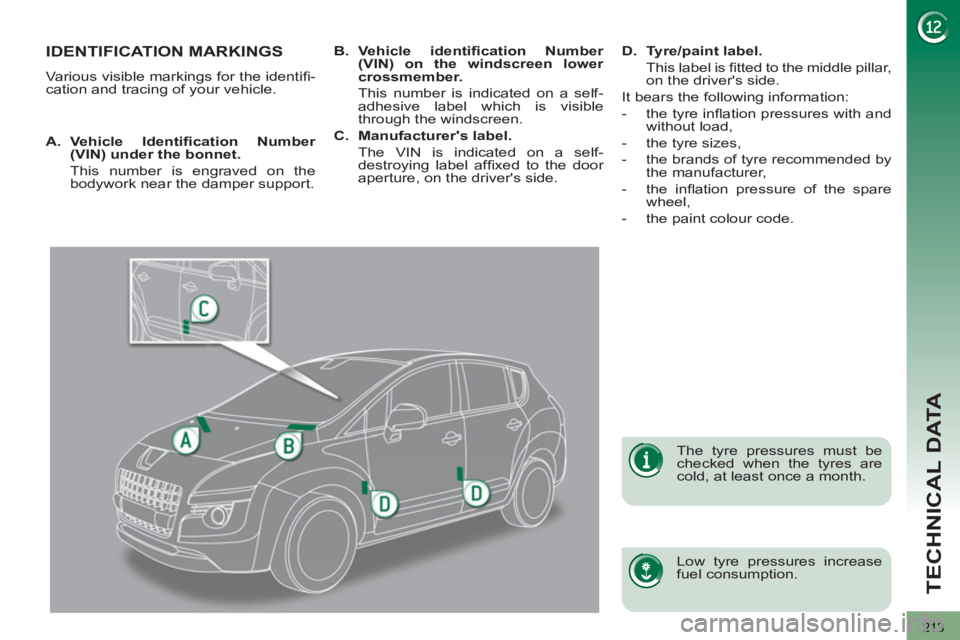
IDENTIFICATION MARKINGS
Various visible markings for the identifi -
cation and tracing of your vehicle.
Low tyre pressures increase
fuel consumption.
The tyre pressures must be
checked when the tyres are
cold, at least once a month.
A.
Vehicle Identifi cation Number
(VIN) under the bonnet.
This number is engraved on the
bodywork near the damper support.
B.
Vehicle identifi cation Number
(VIN) on the windscreen lower
crossmember.
This number is indicated on a self-
adhesive label which is visible
through the windscreen.
C.
Manufacturer's label.
The VIN is indicated on a self-
destroying label affi xed to the door
aperture, on the driver's side.
D.
Tyre/paint label.
This label is fi tted to the middle pillar,
on the driver's side.
It bears the following information:
- the tyre infl ation pressures with and
without load,
- the tyre sizes,
- the brands of tyre recommended by
the manufacturer,
- the infl ation pressure of the spare
wheel,
- the paint colour code.
Page 219 of 352
217
2ABC3DEF5JKL4GHI6MNO8TUV7PQRS9WXYZ0*#
1RADIO MEDIANAV TRAFFIC
SETUPADDR
BOOK
2ABC3DEF5JKL4GHI6MNO8TUV7PQRS9WXYZ0*#
1RADIO MEDIANAV TRAFFIC
SETUPADDR
BOOK
EMERGENCY OR ASSISTANCE CALL USING
Peugeot Connect Media
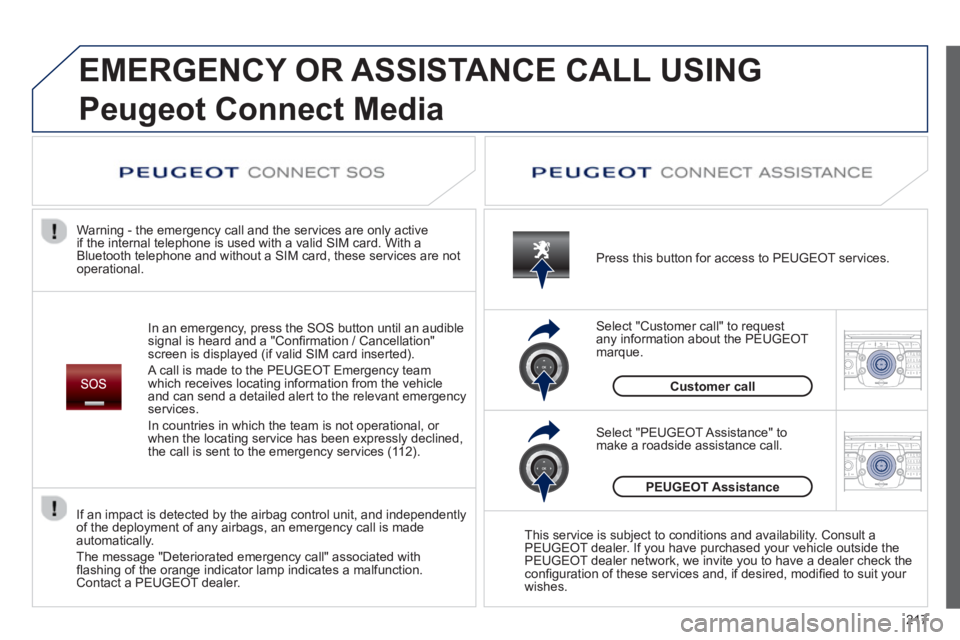
In an emergency, press the SOS button until an audible
signal is heard and a "Confi rmation / Cancellation"
screen is displayed (if valid SIM card inserted).
A call is made to the PEU
GEOT Emergency team
which receives locating information from the vehicleand can send a detailed alert to the relevant emergency services.
In countries in which the team is not operational, or
when the locatin
g service has been expressly declined,
the call is sent to the emergency services (11 2). Warning - the emergency call and the services are only active
i
f the internal telephone is used with a valid SIM card. With a
Bluetooth telephone and without a SIM card, these services are not
operational. Press this button for access to PEUGEOT services.
Customer call Select "Customer call" to request
an
y information about the PEUGEOT marque.
Select "PEUGEOT Assistance" tomake a roadside assistance call.
PEUGEOT Assistance
This service is subject to conditions and availability. Consult a
PEUGEOT dealer. If you have purchased your vehicle outside the
PEUGEOT dealer network, we invite you to have a dealer check theconfi guration of these services and, if desired, modifi ed to suit your
wishes.
If an impact is detected b
y the airbag control unit, and independentlyof the deployment of any airbags, an emergency call is made
automatically.
The message "Deteriorated emergency call" associated withfl ashing of the orange indicator lamp indicates a malfunction.Contact a PEUGEOT dealer.
Page 221 of 352
219
The system is protected in such a way that it will onlyoperate in your vehicle.
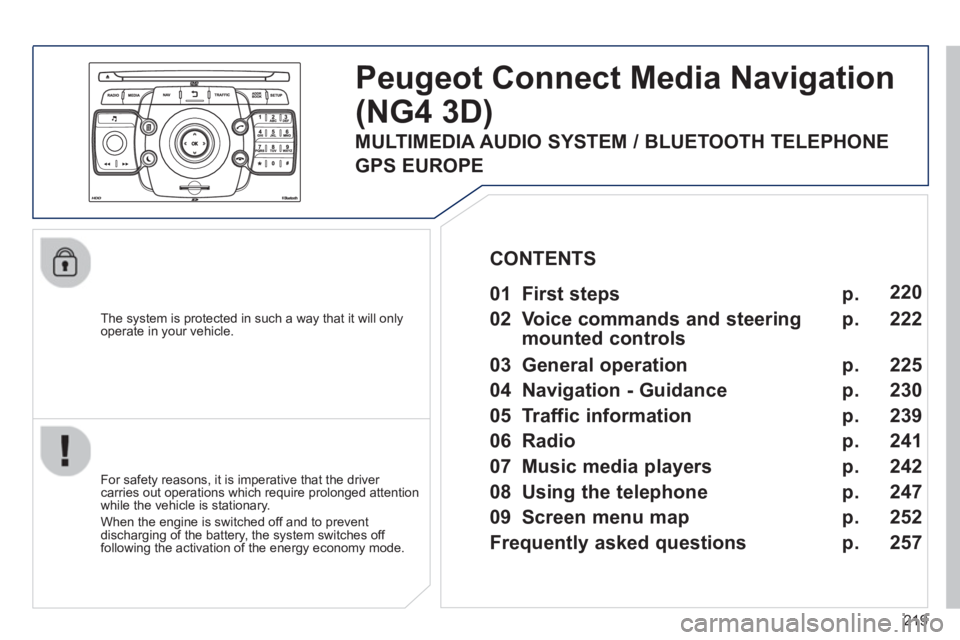
Peugeot Connect Media Navigation
(NG4 3D)
For safety reasons, it is imperative that the driver carries out operations which require prolonged attention
while the vehicle is stationary.
When the en
gine is switched off and to prevent
discharging of the battery, the system switches off
following the activation of the energy economy mode.
01 First steps
02 Voice commands and steerin
g
mounted controls
03 General operation
04 Navi
gation - Guidance
05 Traffic information
06 Radio
07 Music media pla
yers
08 Usin
g the telephone
09 Screen menu map
Frequentl
y asked questions
p.
p.
p.
p.
p.
p.
p.
p.
p.
p.
220
222
22
5
230
239
241
242
247
252
25
7
CONTENTS
MULTIMEDIA AUDIO SYSTEM / BLUETOOTH TELEPHONE
GPS EUROPE
Page 223 of 352
221
01FIRST STEPS
Peugeot Connect Media Navigation (NG4 3D) NAVIGATOR
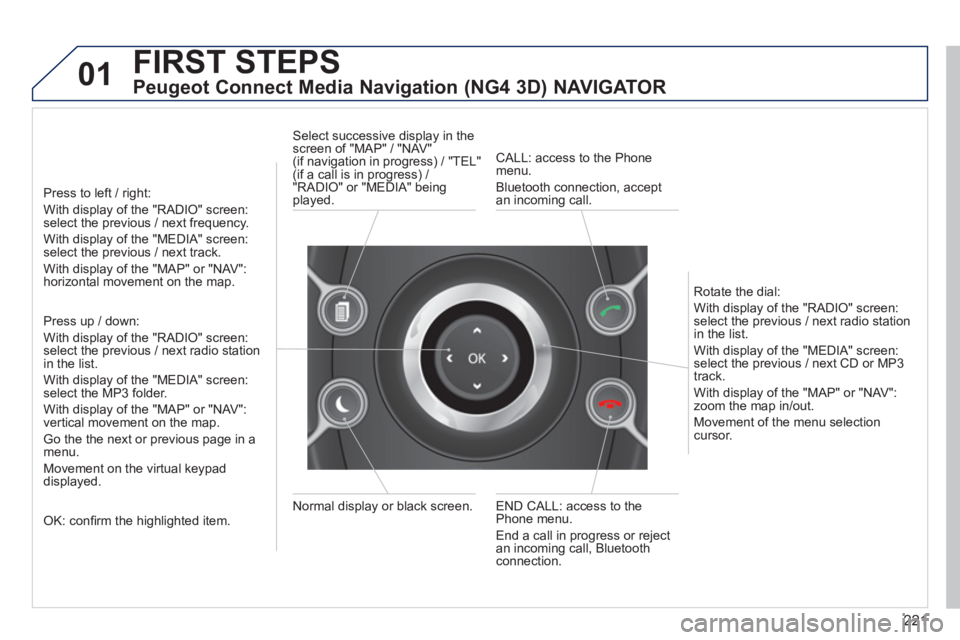
Press to left / right:
With display of the "RADIO" screen: select the previous / next frequency.
With display of the "MEDIA" screen: select the previous / next track.
With display of the "MAP" or "NAV":horizontal movement on the map.
Press up / down:
With display of the "RADIO" screen: select the previous / next radio stationin the list.
With display of the "MEDIA" screen: select the MP3 folder.
With display of the "MAP" or "NAV":
vertical movement on the map.
Go the the next or previous pa
ge in a menu.
Movement on the virtual keypad
displayed.
OK: confi rm the highlighted item.
END CALL: access to the Phone menu.
End a call in pro
gress or reject
an incoming call, Bluetooth connection. Normal displa
y or black screen. Select successive displa
y in the screen of "MAP" / "NAV" (if navigation in progress) / "TEL"(if a call is in progress) /
"RADIO" or "MEDIA" being
played.
CALL: access to the Phonemenu.
Bluetooth connection, accept
an incomin
g call.
Rotate the dial:
With displa
y of the "RADIO" screen: select the previous / next radio station
in the list.
With displa
y of the "MEDIA" screen: select the previous / next CD or MP3
track.
With displa
y of the "MAP" or "NAV":zoom the map in/out.
M
ovement of the menu selection cursor.
Page 226 of 352
224
02 VOICE COMMANDS AND STEERING MOUNTED CONTROLS
STEERING MOUNTED CONTROLS
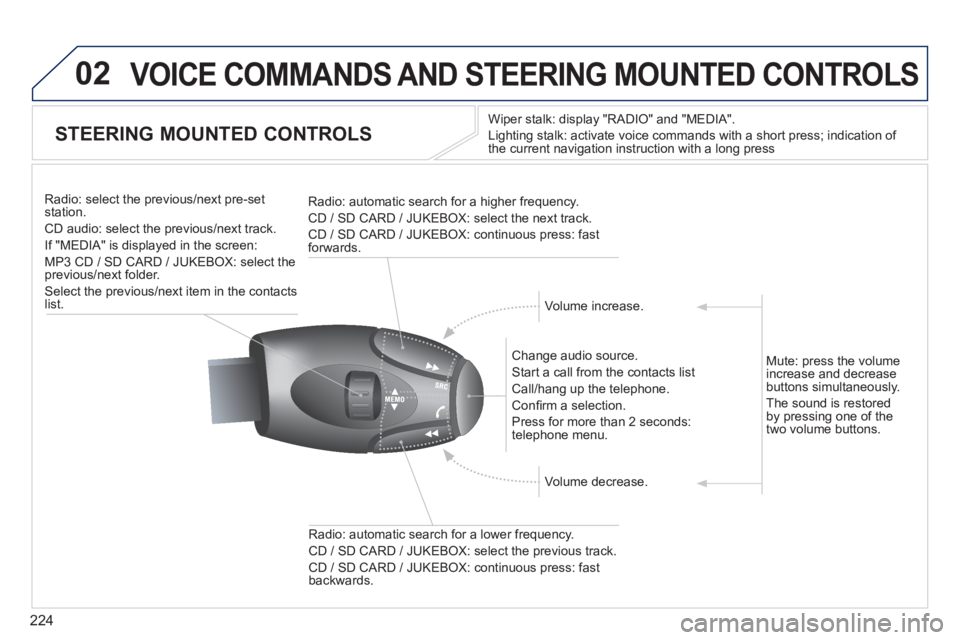
Wiper stalk: display "RADIO" and "MEDIA".
Li
ghting stalk: activate voice commands with a short press; indication of
the current navigation instruction with a long press
Change audio source.
Start a call from the contacts list
Call/han
g up the telephone.
Confi rm a selection.
Pr
ess for more than 2 seconds:
telephone menu.
Radio: automatic search for a lower frequenc
y.
CD / SD CARD / JUKEBOX: select the previous track.
CD / SD CARD / JUKEBOX: continuous press: fast backwards. Radio: select the previous
/next pre-setstation.
CD audio: select the previous/next track .
If "MEDIA" is displa
yed in the screen:
MP
3 CD / SD CARD / JUKEBOX: select the
previous/next folder.
Select the previous/next item in the contacts list.
Radio: automatic search
for a higher frequency.
CD / SD CARD / JUKEBOX: select the next track.
CD / SD CARD / JUKEBOX: continuous press: fast
forwards.
Volume increase.
Volume decrease. Mute: press the volume
increase and decreasebuttons simultaneously.
Th
e sound is restoredby pressing one of the
two volume buttons.
Page 227 of 352
225
03
SETUP
TRAFFIC
MEDIA
GENERAL OPERATION
For a detailed global view of the menus available, refer to the "Screen menu map" section of this handbook.
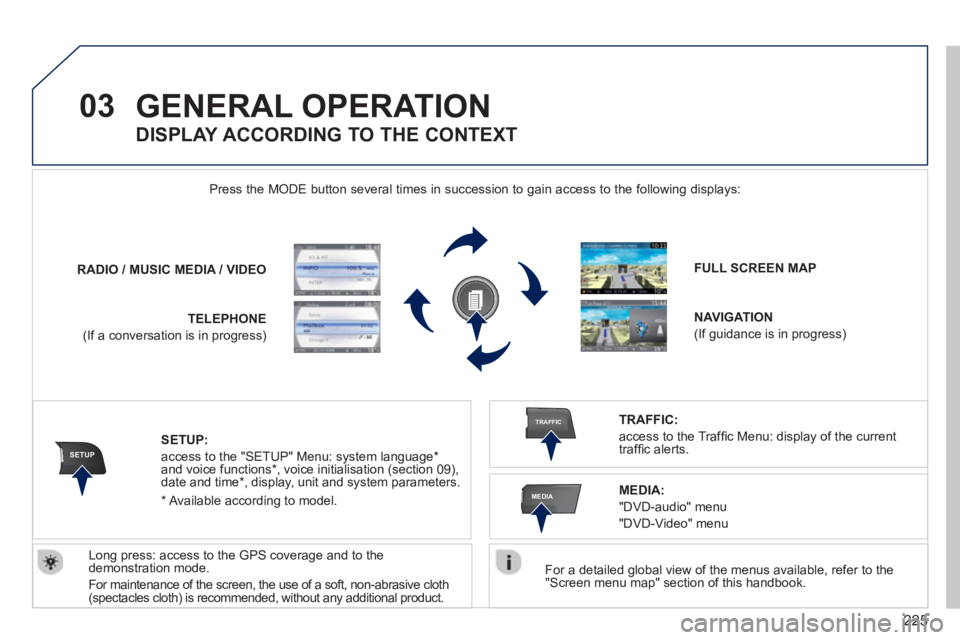
Press the M
ODE button several times in succession to gain access to the following displays:
Lon
g press: access to the GPS coverage and to the demonstration mode.
For maintenance o
f the screen, the use of a soft, non-abrasive cloth(spectacles cloth) is recommended, without any additional product. RADIO
/ /MUSIC MEDIA / VIDEO
TELEPHONE
(If a conversation is in progress)
FULL SCREEN MAP
NAVIGATION
(If guidance is in progress)
SETUP:
access to the "SETUP" Menu: system language *
and voice functions * , voice initialisation (section 09),
date and time * , display, unit and system parameters.
TRAFFIC:
access to the Traffi c Menu: display of the current
traffi c alerts.
DISPLAY ACCORDING TO THE CONTEXT
MEDIA:
"DVD-audio" menu
"DVD-Video" menu
*
Available accordin
g to model.
Page 228 of 352
226
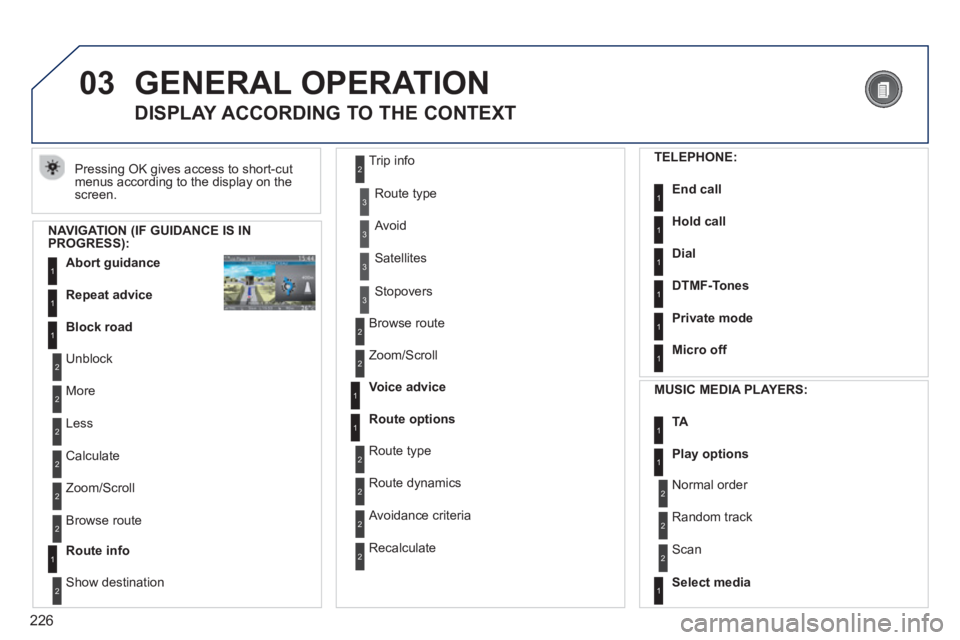
03 GENERAL OPERATION
Pressing OK gives access to short-cut
menus according to the display on the screen.
DISPLAY ACCORDING TO THE CONTEXT
NAVIGATION (IF GUIDANCE IS IN PROGRESS):
Abort guidanc
e1
1
1
Repeat advice
Block road
2
2
Unblock
M
ore
2
Less
3
3
Route type
Avoid
3 Satellites
2
2
Calculate
Z
oom/Scroll
2
Browse route
1Route info
2
2
Show destination Trip in
fo
3
Stopovers
2
2
Browse route
Zoom/Scroll
1
1
Voice advice
Route options
2
2
Route type
Route dynamics
2 Avoidance criteria
2
Recalculate
TELEPHONE:
End call1
1
1
1
Hold call
Dial
DTMF-Tones
1Private mode
1Micro off
MU
SIC MEDIA PLAYERS:
TA1
1Play options
1Select media
2
2
Normal order
R
andom track
2 Scan
Page 229 of 352
227
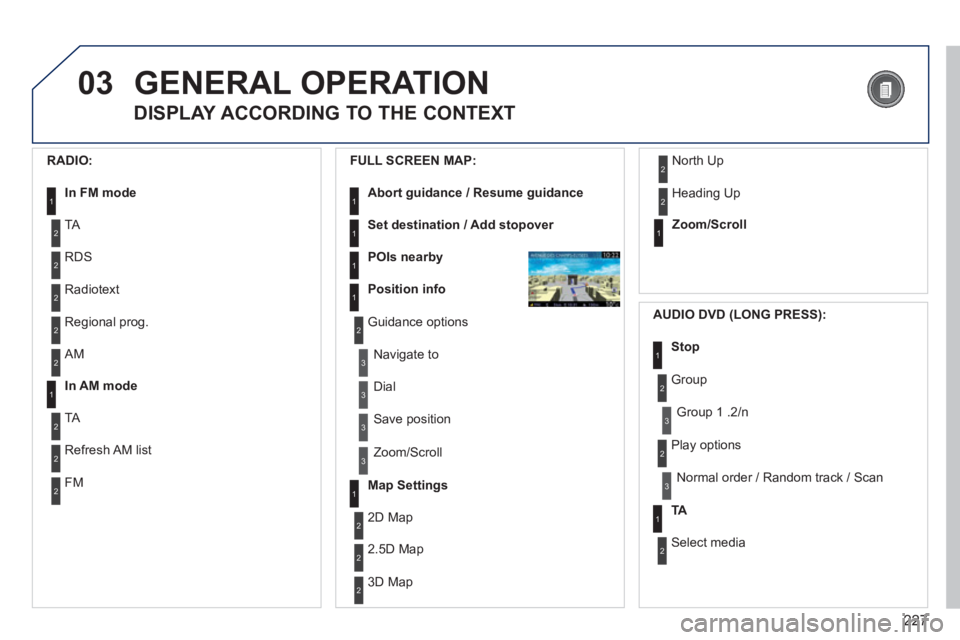
03GENERAL OPERATION
DISPLAY ACCORDING TO THE CONTEXT
RADIO:
In FM mode1
2
2
TA
RDS
2Radiotext
2Regional prog.
FULL
SCREEN MAP:
Abort guidance / Resume guidance1
1
1
1
Set destination / Add stopover
POIs nearby
Position info
2Guidance options
3
3
Navigate to
Dial
3 Save position
3
Zoom/Scroll
Map Settings1
1Zoom/Scroll
2
2
2D Map
2.5D Map
23D Map
2 North Up
2
Heading Up
AUDIO DVD (LONG PRESS):
1Stop
2 Group
3Group 1 .2/n
TA1
2 Select media
2
Play options
3Normal order / Random track / Scan
2AM
In AM mode1
2
2
TA
Refresh AM list
2FM