display Peugeot 308 2014 User Guide
[x] Cancel search | Manufacturer: PEUGEOT, Model Year: 2014, Model line: 308, Model: Peugeot 308 2014Pages: 400, PDF Size: 10.05 MB
Page 35 of 400
33
1
Monitoring
308_EN_CHAP01_CONTROLE DE MARCHE_ED02-2013
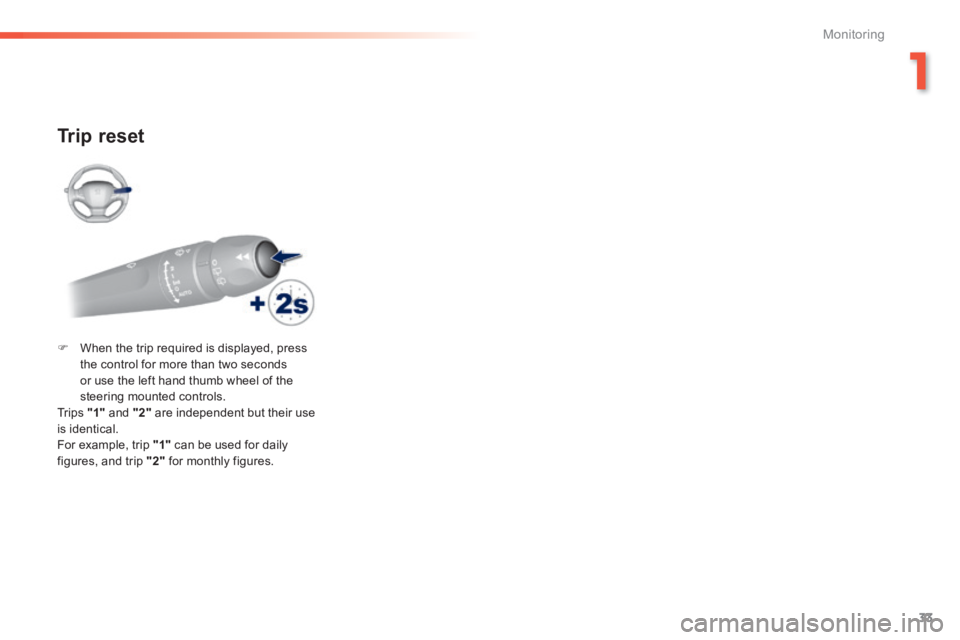
Trip reset
When the trip required is displayed, press the control for more than two seconds or use the left hand thumb wheel of the steering mounted controls. Tr i p s "1" and "2" are independent but their use is identical. For example, trip "1" can be used for daily figures, and trip "2" for monthly figures.
Page 36 of 400
34
Monitoring
308_EN_CHAP01_CONTROLE DE MARCHE_ED02-2013
Trip computer
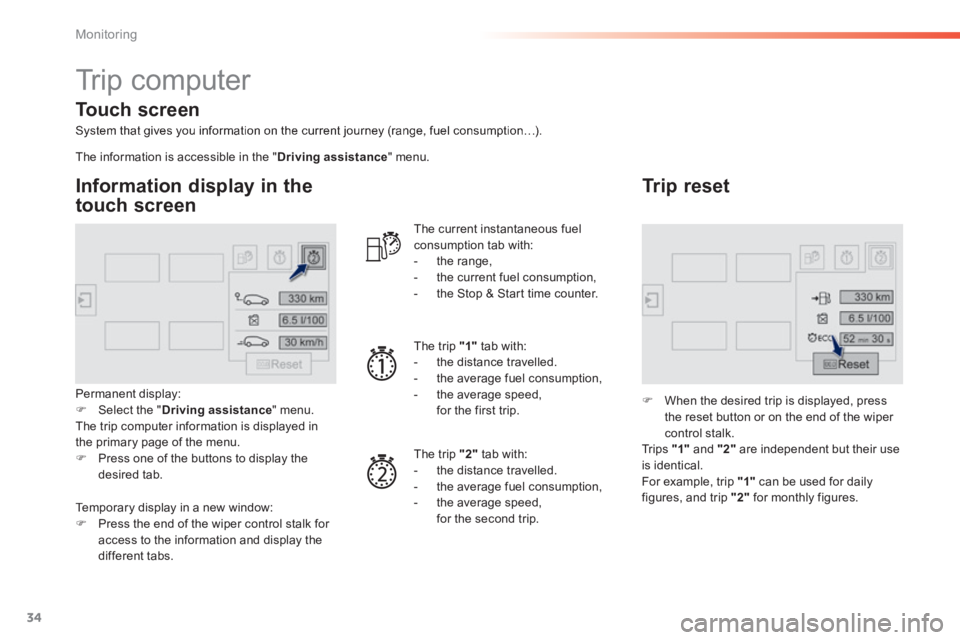
System that gives you information on the current journey (range, fuel consumption…).
Information display in the
touch screen
Permanent display: Select the " Driving assistance " menu. The trip computer information is displayed in the primary page of the menu. Press one of the buttons to display the desired tab.
The current instantaneous fuel consumption tab with: - the range, - the current fuel consumption, - the Stop & Start time counter.
The trip "1" tab with: - the distance travelled. - the average fuel consumption, - the average speed, for the first trip.
The trip "2" tab with:
- the distance travelled. - the average fuel consumption, - the average speed, for the second trip.
Trip reset
When the desired trip is displayed, press the reset button or on the end of the wiper
control stalk. Tr i p s "1" and "2" are independent but their use is identical. For example, trip "1" can be used for daily figures, and trip "2" for monthly figures.
The information is accessible in the " Driving assistance " menu.
Temporary display in a new window: Press the end of the wiper control stalk for
access to the information and display the different tabs.
Touch screen
Page 37 of 400
35
1
Monitoring
308_EN_CHAP01_CONTROLE DE MARCHE_ED02-2013
Trip computer, a few definitions
Range
(miles or km) The distance which can still be travelled with the fuel remaining in the tank (related to the average fuel consumption over the last few miles (kilometres) travelled).
This value may vary following a change in the style of driving or the relief, resulting in a significant change in the current fuel consumption.
When the range falls below 20 miles (30 km), dashes are displayed. After filling with at least 5 litres of fuel, the range is recalculated and is displayed when it exceeds 60 miles (100 km).
If dashes are displayed continuously while driving in place of the digits, contact a PEUGEOT dealer or a qualified workshop.
This function is only displayed from 20 mph (30 km/h).
Current fuel consumption
(mpg or l/100 km or km/l) Calculated over the last few seconds.
Average fuel consumption
(mpg or l/100 km or km/l) Calculated since the last trip computer reset.
Average speed
(mph or km/h) Calculated since the last trip computer reset.
Distance travelled
(miles or km) Calculated since the last trip computer reset.
Stop & Start time counter
(minutes / seconds or hours / minutes)
If your vehicle is fitted with Stop & Start, a time counter calculates the time spent in STOP mode during a journey. It resets to zero every time the ignition is switched on.
Page 38 of 400
36
Monitoring
308_EN_CHAP01_CONTROLE DE MARCHE_ED02-2013
Touch screen
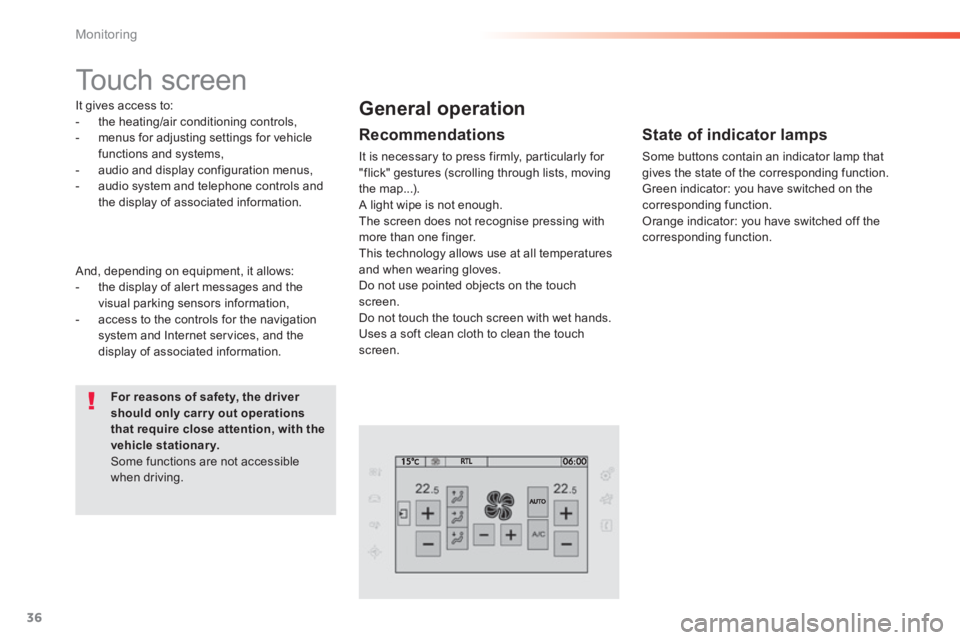
It gives access to: - the heating/air conditioning controls, - menus for adjusting settings for vehicle functions and systems, - audio and display configuration menus, - audio system and telephone controls and the display of associated information.
For reasons of safety, the driver should only carr y out operations that require close attention, with the vehicle stationary. Some functions are not accessible when driving.
General operation
Recommendations
It is necessary to press firmly, particularly for "flick" gestures (scrolling through lists, moving the map...). A light wipe is not enough. The screen does not recognise pressing with
more than one finger. This technology allows use at all temperatures and when wearing gloves. Do not use pointed objects on the touch screen. Do not touch the touch screen with wet hands. Uses a soft clean cloth to clean the touch screen.
And, depending on equipment, it allows: - the display of alert messages and the visual parking sensors information, - access to the controls for the navigation system and Internet services, and the display of associated information.
State of indicator lamps
Some buttons contain an indicator lamp that gives the state of the corresponding function. Green indicator: you have switched on the corresponding function. Orange indicator: you have switched off the corresponding function.
Page 39 of 400
37
1
Monitoring
308_EN_CHAP01_CONTROLE DE MARCHE_ED02-2013
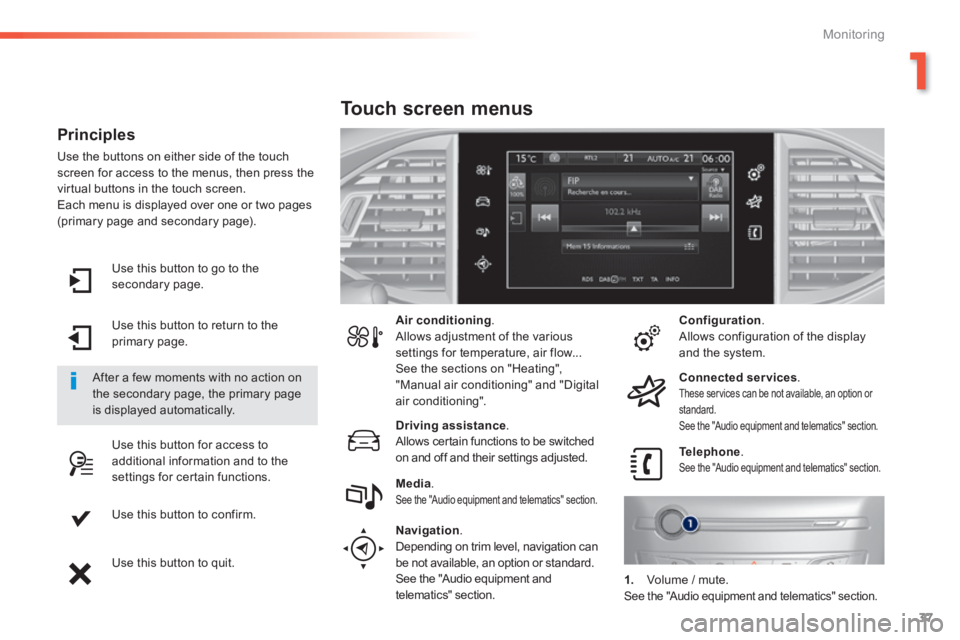
Use this button to go to the secondary page.
Use this button to return to the primary page.
Use this button for access to additional information and to the settings for certain functions.
Use this button to confirm.
Use this button to quit.
Principles
Use the buttons on either side of the touch screen for access to the menus, then press the virtual buttons in the touch screen. Each menu is displayed over one or two pages (primary page and secondary page).
After a few moments with no action on the secondary page, the primary page is displayed automatically.
Air conditioning . Allows adjustment of the various settings for temperature, air flow... See the sections on "Heating", "Manual air conditioning" and "Digital air conditioning".
Touch screen menus
Driving assistance . Allows certain functions to be switched on and off and their settings adjusted. Telephone . See the "Audio equipment and telematics" section. Media . See the "Audio equipment and telematics" section.
Navigation .
Depending on trim level, navigation can be not available, an option or standard. See the "Audio equipment and telematics" section.
Configuration . Allows configuration of the display and the system.
Connected services . These services can be not available, an option or standard. See the "Audio equipment and telematics" section.
1. Volume / mute. See the "Audio equipment and telematics" section.
Page 41 of 400
39
1
Monitoring
308_EN_CHAP01_CONTROLE DE MARCHE_ED02-2013
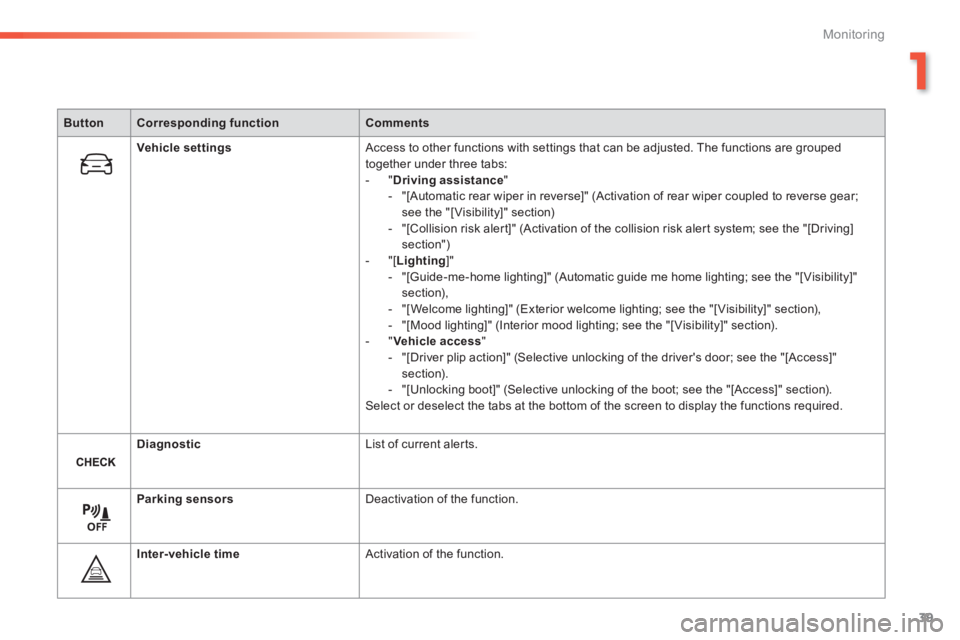
ButtonCorresponding functionComments
Vehicle settings Access to other functions with settings that can be adjusted. The functions are grouped together under three tabs: - " Driving assistance " - "[Automatic rear wiper in reverse]" (Activation of rear wiper coupled to reverse gear; see the "[ Visibility]" section) - "[Collision risk alert]" (Activation of the collision risk alert system; see the "[Driving] section") - "[ Lighting ]" - "[Guide-me-home lighting]" (Automatic guide me home lighting; see the "[ Visibility]" section), - "[Welcome lighting]" (Exterior welcome lighting; see the "[ Visibility]" section), - "[Mood lighting]" (Interior mood lighting; see the "[ Visibility]" section). - " Vehicle access " - "[Driver plip action]" (Selective unlocking of the driver's door; see the "[Access]" section). - "[Unlocking boot]" (Selective unlocking of the boot; see the "[Access]" section). Select or deselect the tabs at the bottom of the screen to display the functions required.
Diagnostic List of current alerts.
Parking sensors Deactivation of the function.
Inter-vehicle time Activation of the function.
Page 43 of 400
41
1
Monitoring
308_EN_CHAP01_CONTROLE DE MARCHE_ED02-2013
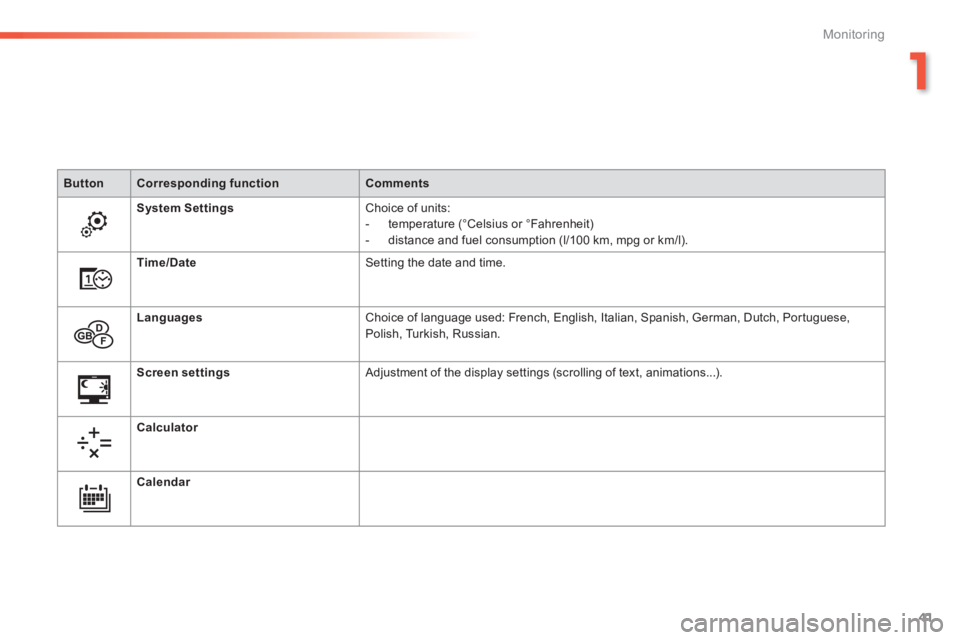
ButtonCorresponding functionComments
System Settings Choice of units: - temperature (°Celsius or °Fahrenheit) - distance and fuel consumption (l/100 km, mpg or km/l).
Time/Date Setting the date and time.
Languages Choice of language used: French, English, Italian, Spanish, German, Dutch, Portuguese, Polish, Turkish, Russian.
Screen settings Adjustment of the display settings (scrolling of text, animations...) .
Calculator
Calendar
Page 45 of 400
43
1
Monitoring
308_EN_CHAP01_CONTROLE DE MARCHE_ED02-2013
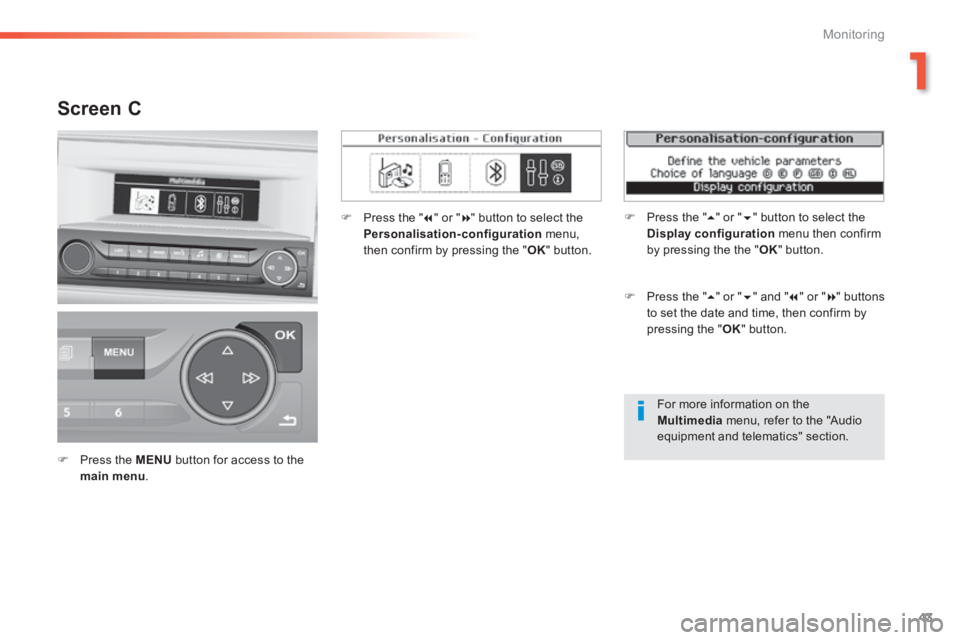
For more information on the Multimedia menu, refer to the "Audio
equipment and telematics" section.
Screen C
Press the MENU button for access to the main menu .
Press the " " or " " button to select the Personalisation-configuration menu, then confirm by pressing the " OK " button.
Press the " " or " " and " " or " " buttons to set the date and time, then confirm by pressing the " OK " button.
Press the " " or " " button to select the Display configuration menu then confirm by pressing the the " OK " button.
Page 46 of 400
44
Monitoring
308_EN_CHAP01_CONTROLE DE MARCHE_ED02-2013
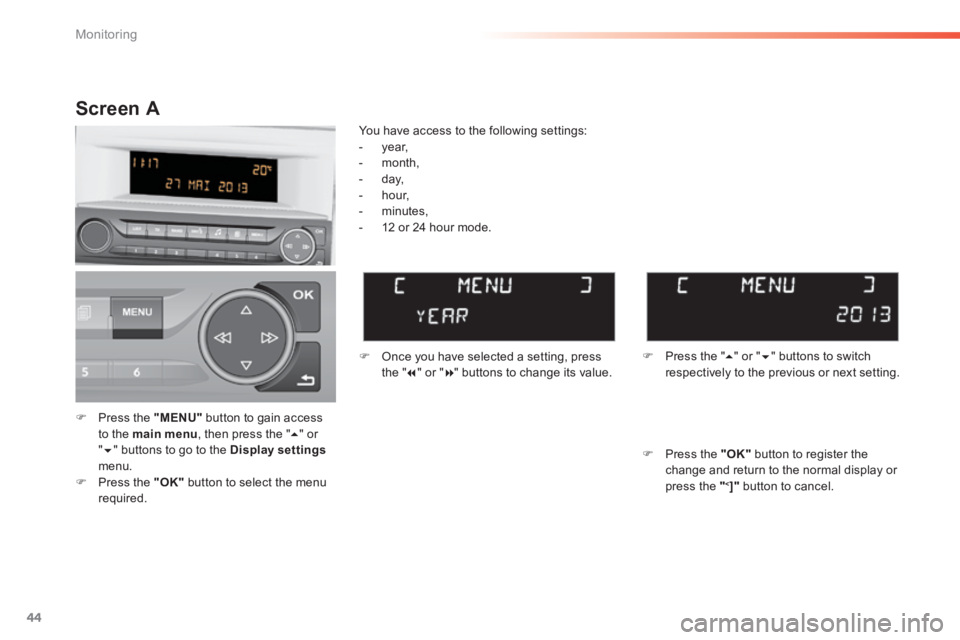
Press the "MENU" button to gain access to the main menu , then press the " " or " " buttons to go to the Display settingsmenu. Press the "OK" button to select the menu r e q u i r e d .
Once you have selected a setting, press t h e " " or " " buttons to change its value.
You have access to the following settings: - year, - month, - day, - hour, - minutes,
- 12 or 24 hour mode.
Screen A
Press the " " or " " buttons to switch respectively to the previous or next setting.
Press the "OK" button to register the change and return to the normal display or press the "<]" button to cancel.
Page 47 of 400
45
1
Monitoring
308_EN_CHAP01_CONTROLE DE MARCHE_ED02-2013
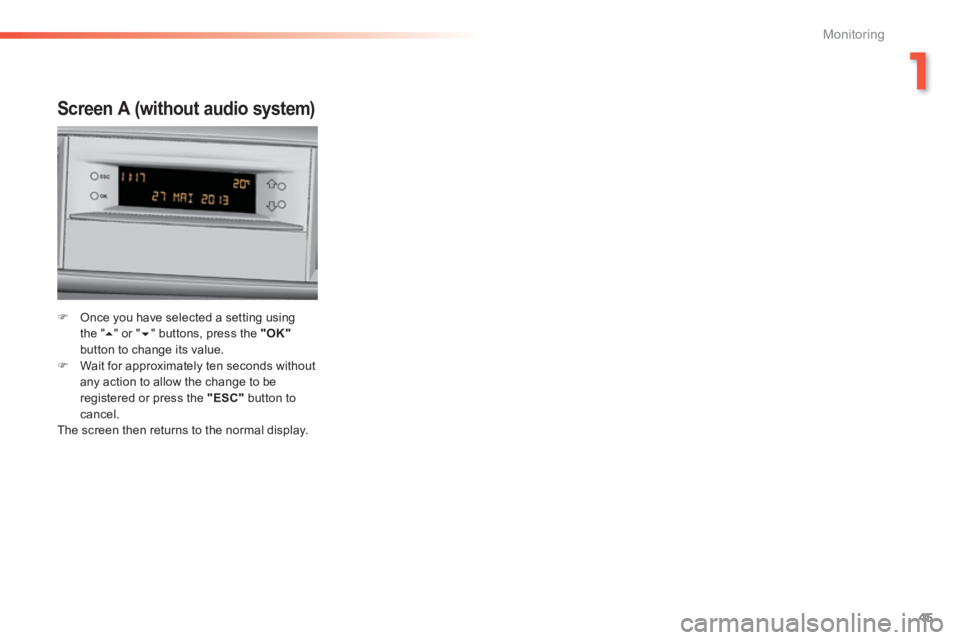
Screen A (without audio system)
Once you have selected a setting using t h e " " or " " buttons, press the "OK"button to change its value. Wait for approximately ten seconds without any action to allow the change to be registered or press the "ESC" button to cancel. The screen then returns to the normal display.