display Peugeot 308 2015 Manual PDF
[x] Cancel search | Manufacturer: PEUGEOT, Model Year: 2015, Model line: 308, Model: Peugeot 308 2015Pages: 416, PDF Size: 11.81 MB
Page 210 of 416
208
308_en_Chap06_securite_ed01-2015
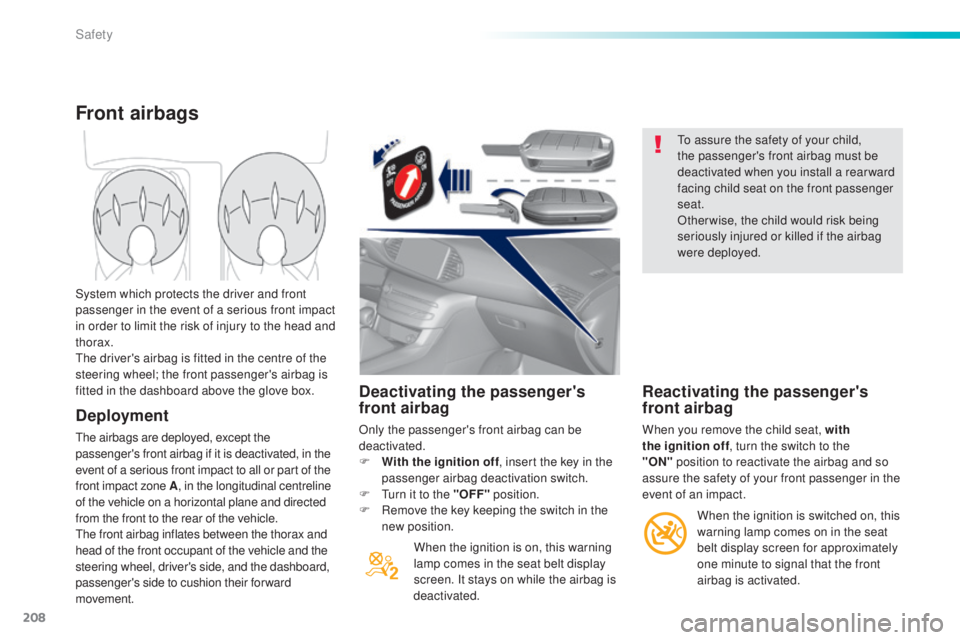
Deactivating the passenger's
front airbag
Only the passenger's front airbag can be
deactivated.
F
W
ith the ignition off , insert the key in the
passenger airbag deactivation switch.
F
t
u
rn it to the "OFF" position.
F
R
emove the key keeping the switch in the
new position.
When the ignition is on, this warning
lamp comes in the seat belt display
screen. It stays on while the airbag is
deactivated.
to a
ssure the safety of your child,
the passenger's front airbag must be
deactivated when you install a rear ward
facing child seat on the front passenger
seat.
Otherwise, the child would risk being
seriously injured or killed if the airbag
were deployed.
Reactivating the passenger's
front airbag
When you remove the child seat, with
the ignition off , turn the switch to the
"ON"
position to reactivate the airbag and so
assure the safety of your front passenger in the
event of an impact.
Front airbags
Deployment
the airbags are deployed, except the
passenger's front airbag if it is deactivated, in the
event of a serious front impact to all or part of the
front impact zone A , in the longitudinal centreline
of the vehicle on a horizontal plane and directed
from the front to the rear of the vehicle.
th
e front airbag inflates between the thorax and
head of the front occupant of the vehicle and the
steering wheel, driver's side, and the dashboard,
passenger's side to cushion their forward
movement. System which protects the driver and front
passenger in the event of a serious front impact
in order to limit the risk of injury to the head and
thorax.
th
e driver's airbag is fitted in the centre of the
steering wheel; the front passenger's airbag is
fitted in the dashboard above the glove box.
When the ignition is switched on, this
warning lamp comes on in the seat
belt display screen for approximately
one minute to signal that the front
airbag is activated.
Safety
Page 282 of 416
280
308_en_Chap08_verifications_ed01-2015
Range indicators
When switching on the ignition, an indicator
gives an estimate of the distance that can
be travelled with your vehicle before engine
starting is automatically prevented, once the
vehicle starts using the reserve of AdBlue
® or
after a fault is detected with the SCR system.
In the event of simultaneous system fault and
low AdBlue
® level, the shortest range is the one
displayed.
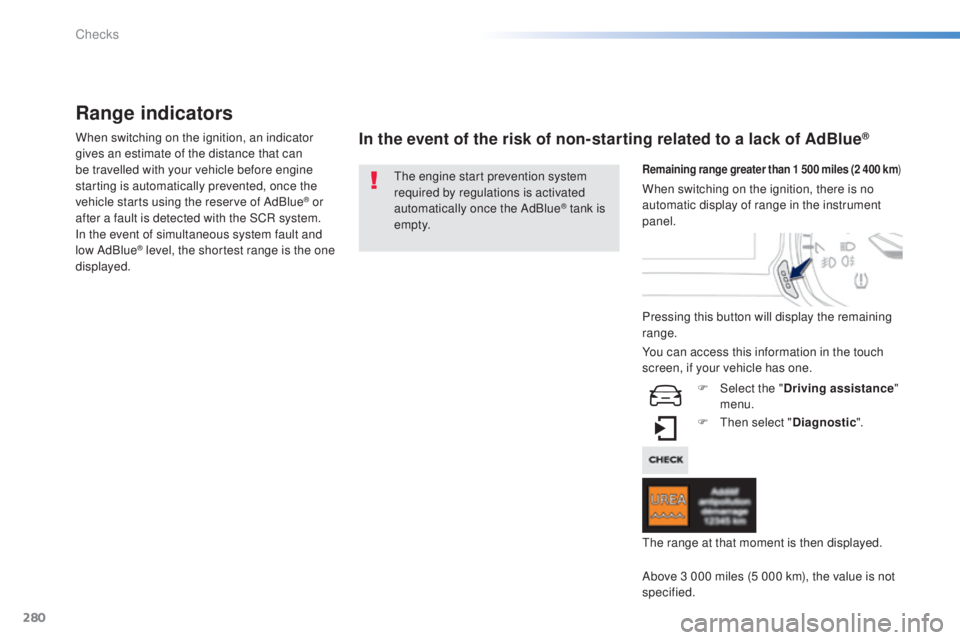
In the event of the risk of non-starting related to a lack of AdBlue®
the engine start prevention system
required by regulations is activated
automatically once the AdBlue
® tank is
e m pt y.
Remaining range greater than 1 500 miles (2 400 km )
Pressing this button will display the remaining
range.
F
t
hen
select "Diagnostic ".
Above 3 000 miles (5 000 km), the value is not
specified. When switching on the ignition, there is no
automatic display of range in the instrument
panel.
th
e range at that moment is then displayed.
You can access this information in the touch
screen, if your vehicle has one.
F
Sel
ect the "Driving assistance "
menu.
Checks
Page 283 of 416
281
308_en_Chap08_verifications_ed01-2015
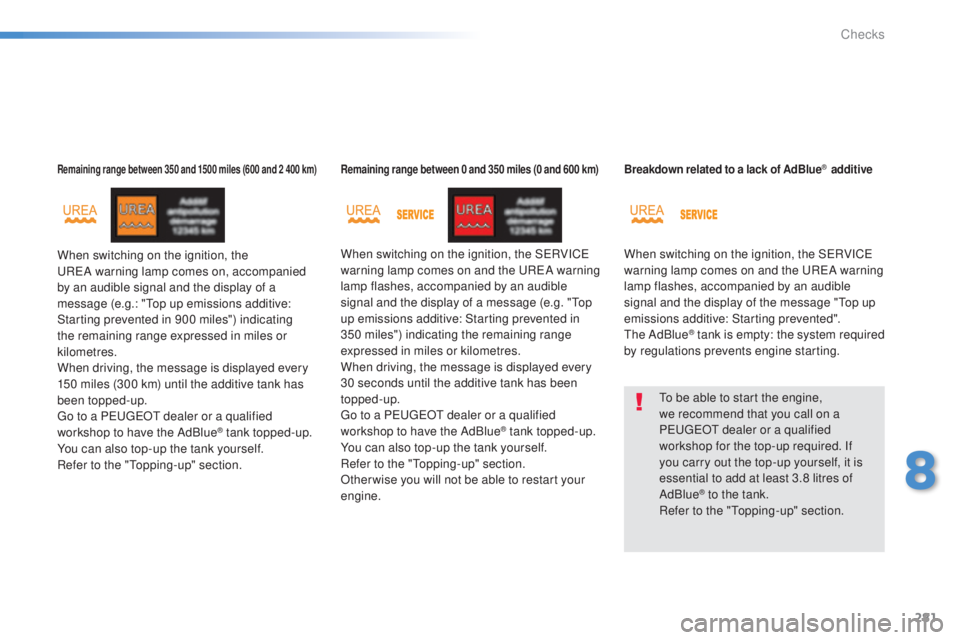
Remaining range between 350 and 1500 miles (600 and 2 400 km)
When switching on the ignition, the uReA warning lamp comes on, accompanied
by an audible signal and the display of a
message (e.g.: "
to
p up emissions additive:
Starting prevented in 900 miles") indicating
the remaining range expressed in miles or
kilometres.
When driving, the message is displayed every
150 miles (300 km) until the additive tank has
been topped-up.
go t
o a P
e
uge
Ot
dealer or a qualified
workshop to have the AdBlue
® tank topped-up.
You can also top-up the tank yourself.
Refer to the "
to
pping-up" section.
Remaining range between 0 and 350 miles (0 and 600 km)
When switching on the ignition, the SeR VICe
warning lamp comes on and the uReA w arning
lamp flashes, accompanied by an audible
signal and the display of a message (e.g. "
to
p
up emissions additive: Starting prevented in
350 miles") indicating the remaining range
expressed in miles or kilometres.
When driving, the message is displayed every
30 seconds until the additive tank has been
topped-up.
go t
o a P
e
uge
Ot
dealer or a qualified
workshop to have the AdBlue
® tank topped-up.
You can also top-up the tank yourself.
Refer to the "
to
pping-up" section.
Other wise you will not be able to restart your
engine.
Breakdown related to a lack of AdBlue® additive
When switching on the ignition, the SeR VICe
warning lamp comes on and the uReA w arning
lamp flashes, accompanied by an audible
signal and the display of the message "
to
p up
emissions additive: Starting prevented".
th
e AdBlue
® tank is empty: the system required
by regulations prevents engine starting.
to b
e able to start the engine,
we recommend that you call on a
P
e
uge
Ot
dealer or a qualified
workshop for the top-up required. If
you carry out the top-up yourself, it is
essential to add at least 3.8 litres of
AdBlue
® to the tank.
Refer to the "to pping-up" section.
8
Checks
Page 284 of 416
282
308_en_Chap08_verifications_ed01-2015
In the event of a fault with the the SCR emissions control system
A system that prevents engine starting
is activated automatically from
650 miles (1 100 km) after confirmation
of a fault with the SCR emissions
control system. Have the system
checked by a P
e
uge
Ot
dealer or a
qualified workshop as soon as possible.
If it is a temporary fault, the alert
disappears during the next journey,
after self-diagnosis of the SCR system.
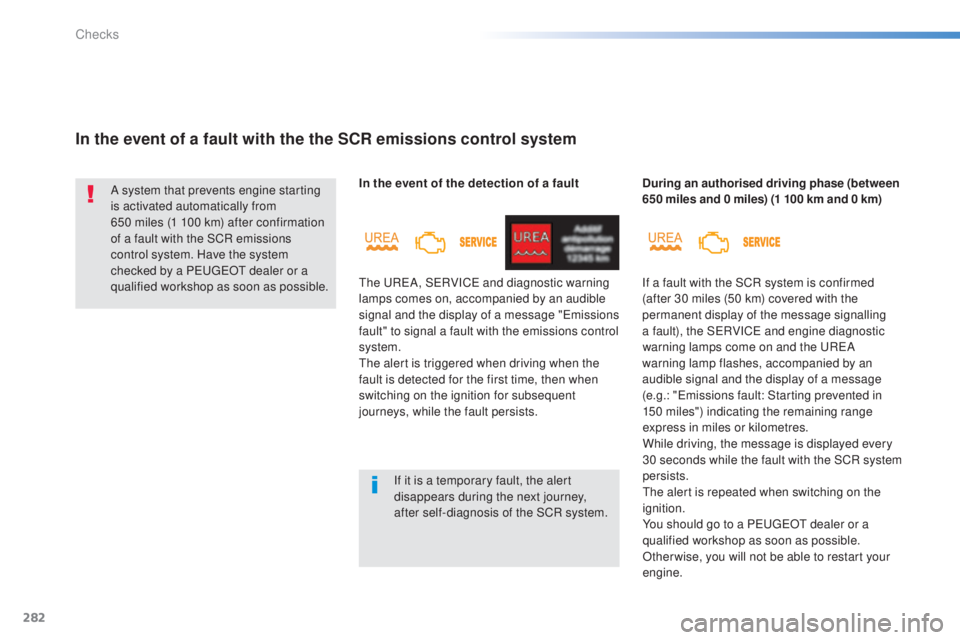
In the event of the detection of a fault
th
e u
ReA
, S
eR
VIC
e
and diagnostic warning
lamps comes on, accompanied by an audible
signal and the display of a message "
em
issions
fault" to signal a fault with the emissions control
system.
the
alert is triggered when driving when the
fault is detected for the first time, then when
switching on the ignition for subsequent
journeys, while the fault persists. During an authorised driving phase (between
650 miles and 0 miles) (1 100 km and 0 km)
If a fault with the SCR system is confirmed
(after 30 miles (50 km) covered with the
permanent display of the message signalling
a fault), the S
eR
VIC
e
and engine diagnostic
warning lamps come on and the
u
ReA
w
arning lamp flashes, accompanied by an
audible signal and the display of a message
(e.g.: "
em
issions fault: Starting prevented in
150
miles") indicating the remaining range
express in miles or kilometres.
While driving, the message is displayed every
30 seconds while the fault with the SCR system
persists.
the
alert is repeated when switching on the
ignition.
You should go to a P
e
uge
Ot
dealer or a
qualified workshop as soon as possible.
Other wise, you will not be able to restart your
engine.
Checks
Page 285 of 416
283
308_en_Chap08_verifications_ed01-2015
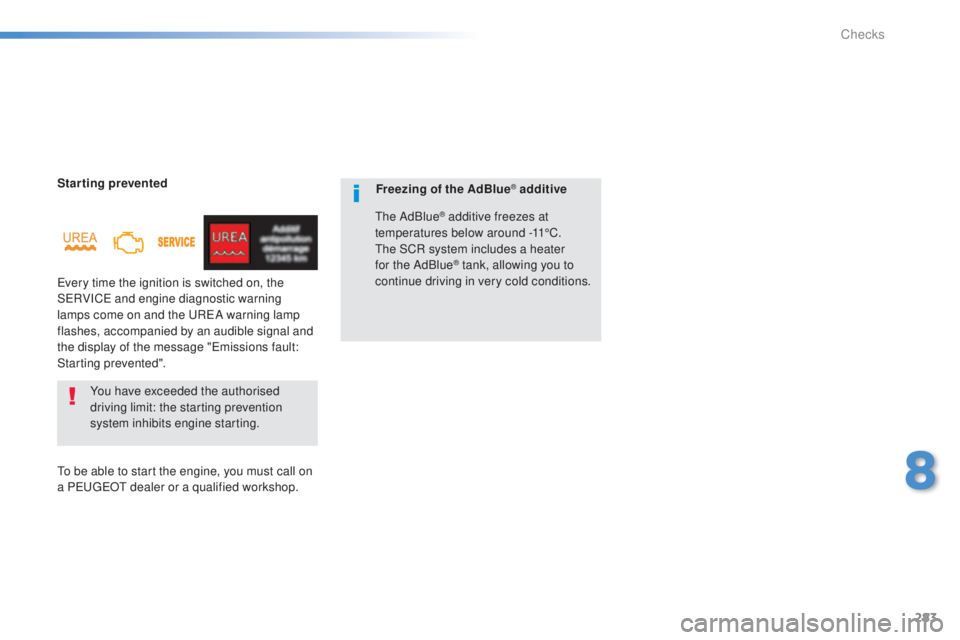
Starting prevented
ev
ery time the ignition is switched on, the
S
eR
VIC
e an
d engine diagnostic warning
lamps come on and the
u
ReA w
arning lamp
flashes, accompanied by an audible signal and
the display of the message "
em
issions fault:
Starting prevented".
You have exceeded the authorised
driving limit: the starting prevention
system inhibits engine starting.
to b
e able to start the engine, you must call on
a P
e
uge
Ot
dealer or a qualified workshop. Freezing of the AdBlue® additive
th
e AdBlue
® additive freezes at
temperatures below around -11°C.
th
e SCR system includes a heater
for the AdBlue
® tank, allowing you to
continue driving in very cold conditions.
8
Checks
Page 304 of 416
01GENERAL OPERATION
* Depending on equipment.
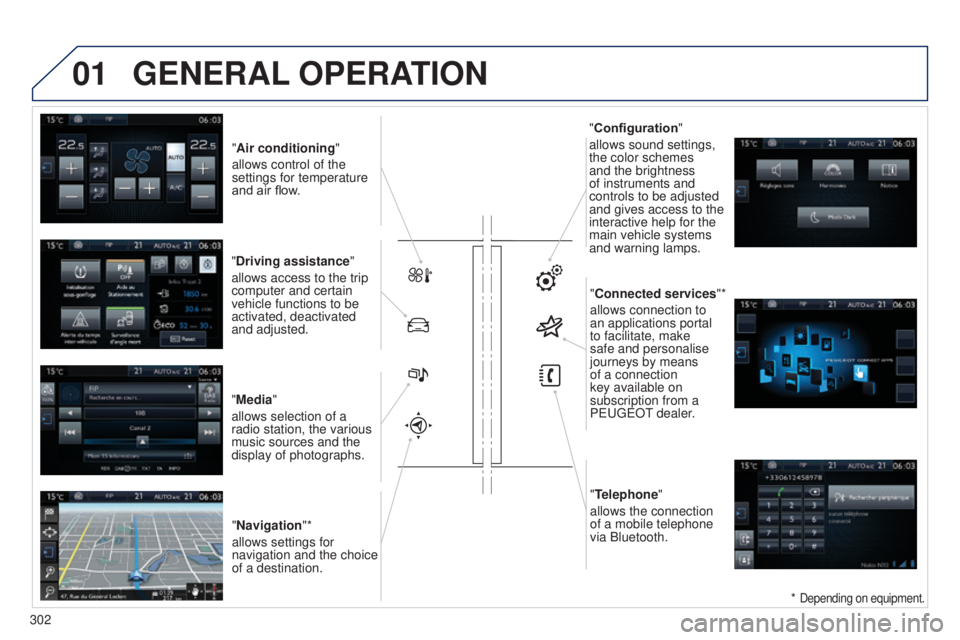
"Air conditioning "
allows control of the
settings for temperature
and air flow.
"Driving assistance"
allows access to the trip
computer and certain
vehicle functions to be
activated, deactivated
and adjusted.
"Media"
allows selection of a
radio station, the various
music sources and the
display of photographs. "Navigation"*
allows settings for
navigation and the choice
of a destination. "Configuration
"
allows sound settings,
the color schemes
and the brightness
of instruments and
controls to be adjusted
and gives access to the
interactive help for the
main vehicle systems
and warning lamps.
"Connected services "*
allows connection to
an applications portal
to facilitate, make
safe and personalise
journeys by means
of a connection
key available on
subscription from a
P
euge O t
dealer
.
"Telephone"
allows the connection
of a mobile telephone
via Bluetooth.
302
Page 305 of 416

01
use the buttons on either side of the touch screen for access to the menu\
s, then press the
virtual buttons in the touch screen.
e
ach menu is displayed in one or two pages (primary page and secondary p\
age).
GENERAL OPERATION
In very hot conditions, the system may go into stand-by (screen and sou\
nd completely off) for a minimum period of 5 minutes. Secondary page
Primary page
303
Page 307 of 416
03
305
STEERING MOUNTED CONTROLS
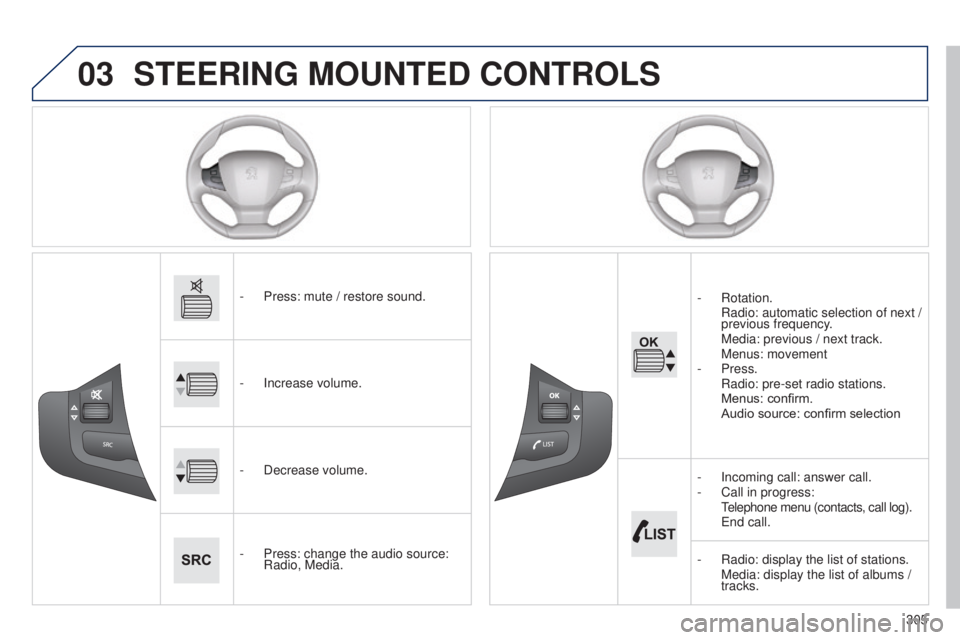
- Press: mute / restore sound.
-
Increase volume.
-
Decrease volume.
-
Press: change the audio source:
Radio, Media. -
Rotation.
Radio:
automatic selection of next /
previous frequency.
Media: previous / next track. Menus: movement
-
Press.
Radio: pre-set radio stations. Menus: confirm. Audio source: confirm selection
-
Incoming call: answer call.
-
Call in progress:
t
elephone menu (contacts, call log).
e nd call.
-
Radio: display the list of stations. Media: display the list of albums /
tracks.
Page 311 of 416
309
308_en_Chap10c_SMegplus_ed01-2015
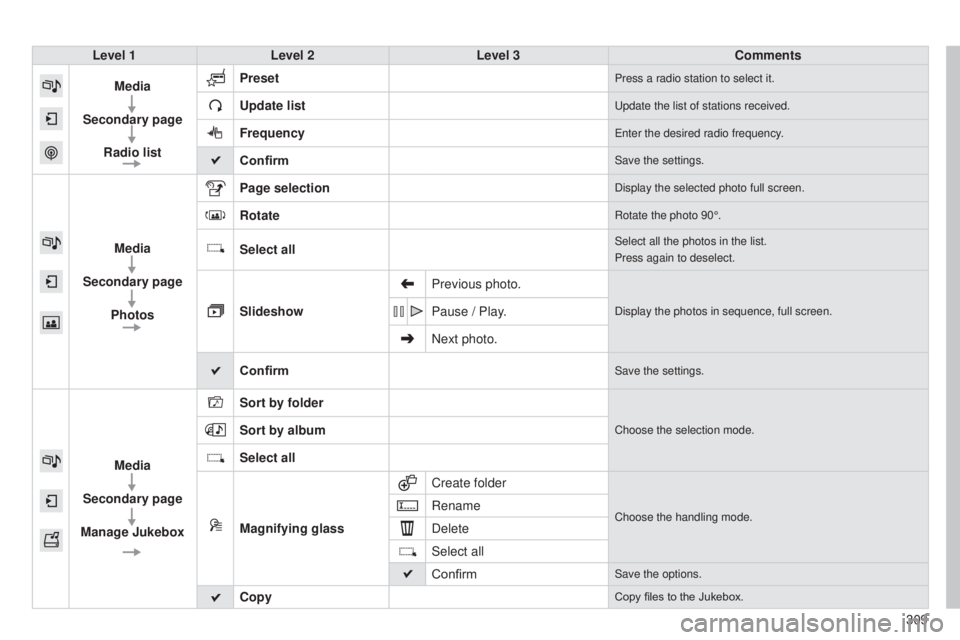
Level 1Level 2 Level 3 Comments
Media
Secondary page Radio list Preset
Press a radio station to select it.
Update listupdate the list of stations received.
Frequencyenter the desired radio frequency.
ConfirmSave the settings.
Media
Secondary page Photos Page selection
Display the selected photo full screen.
RotateRotate the photo 90°.
Select allSelect all the photos in the list.
Press again to deselect.
Slideshow
Previous photo.Display the photos in sequence, full screen.Pause / Play.
Next photo.
Confirm
Save the settings.
Media
Secondary page
Manage Jukebox Sort by folder
Choose the selection mode.Sort by album
Select all
Magnifying glass
Create folder
Choose the handling mode.Rename
Delete
Select all
Confirm
Save the options.
CopyCopy files to the Jukebox.
Page 313 of 416
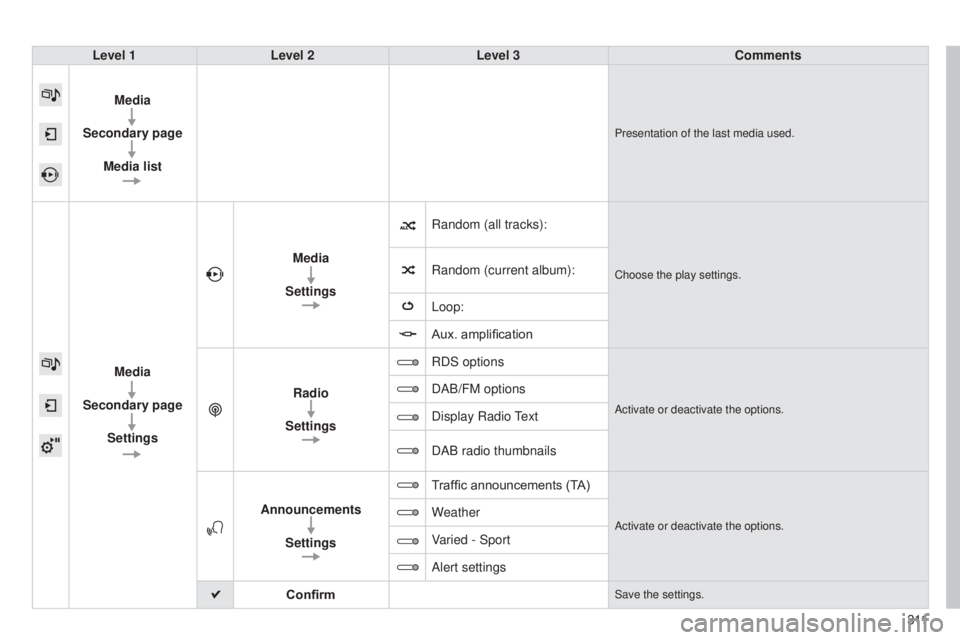
308_en_Chap10c_SMegplus_ed01-2015
Level 1Level 2 Level 3 Comments
Media
Secondary page Media list
Presentation of the last media used.
Media
Secondary page Settings Media
Settings Random (all tracks):
Choose the play settings.Random (current album):
Loop:
Aux. amplification
Radio
Settings RDS options
Activate or deactivate the options.
DAB/FM options
Display Radio
text
DAB radio thumbnails
Announcements Settings T
raffic announcements (TA)
Activate or deactivate the options.Weather
Varied - Sport
Alert settings
Confirm
Save the settings.
3 11