wheel Peugeot 308 2016 Owner's Guide
[x] Cancel search | Manufacturer: PEUGEOT, Model Year: 2016, Model line: 308, Model: Peugeot 308 2016Pages: 398, PDF Size: 9.38 MB
Page 180 of 398
178
308_en_Chap06_conduite_ed02-2015
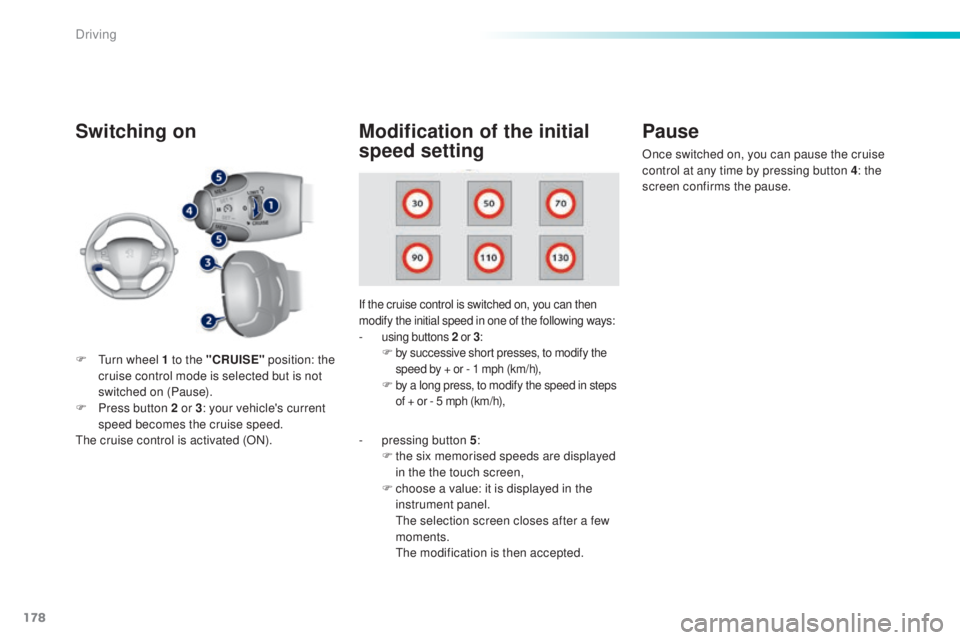
Switching on
If the cruise control is switched on, you can then
modify the initial speed in one of the following ways:
- using buttons 2 o r 3:F by successive short presses, to modify the
s peed by + or - 1 mph (km/h),
F by a long press, to modify the speed in steps
o f + or - 5 mph (km/h),
Pause
F turn wheel 1 to the "CRUISE" p osition: the
cruise control mode is selected but is not
switched on (Pause).
F
Pr
ess button 2 or 3 : your vehicle's current
speed becomes the cruise speed.
the c
ruise control is activated (ON).
Modification of the initial
speed setting
- pressing button 5 :
F th e six memorised speeds are displayed
in the the touch screen,
F
ch
oose a value: it is displayed in the
instrument panel.
the s
election screen closes after a few
moments.
the m
odification is then accepted. Once switched on, you can pause the cruise
control at any time by pressing button 4: the
screen confirms the pause.
Driving
Page 181 of 398
179
308_en_Chap06_conduite_ed02-2015
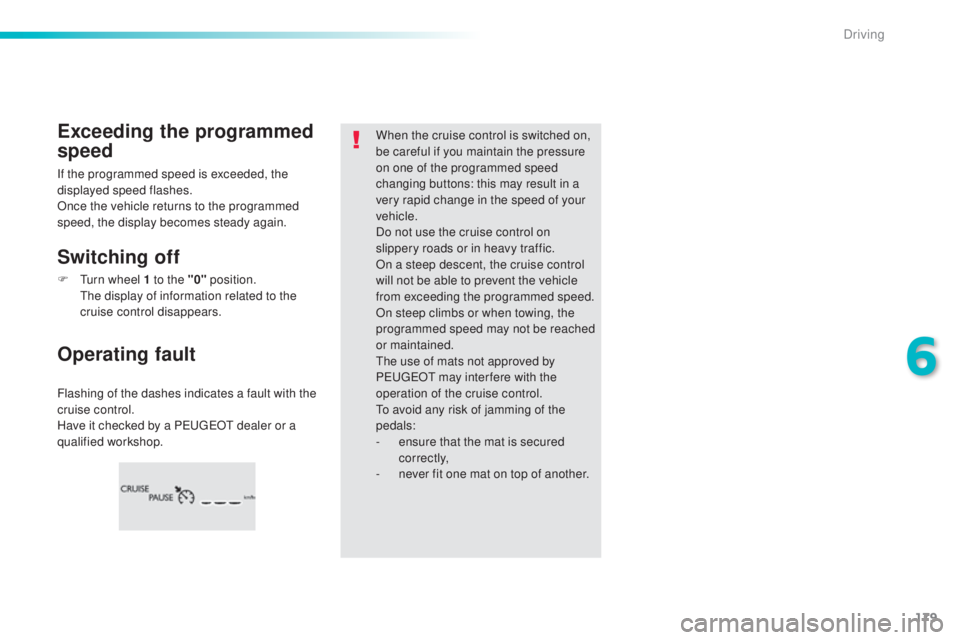
Flashing of the dashes indicates a fault with the
cruise control.
Have it checked by a P
eu
ge
Ot d
ealer or a
qualified workshop.
Operating fault Exceeding the programmed
speed
Switching off
When the cruise control is switched on,
be careful if you maintain the pressure
on one of the programmed speed
changing buttons: this may result in a
very rapid change in the speed of your
vehicle.
Do not use the cruise control on
slippery roads or in heavy traffic.
On a steep descent, the cruise control
will not be able to prevent the vehicle
from exceeding the programmed speed.
On steep climbs or when towing, the
programmed speed may not be reached
or maintained.
the u
se of mats not approved by
P
eu
ge
Ot m
ay inter fere with the
operation of the cruise control.
to av
oid any risk of jamming of the
pedals:
-
en
sure that the mat is secured
c o r r e c t l y,
-
ne
ver fit one mat on top of another.
If the programmed speed is exceeded, the
displayed speed flashes.
Once the vehicle returns to the programmed
speed, the display becomes steady again.
F
t
ur
n wheel 1 to the "0" position.
the d
isplay of information related to the
cruise control disappears.
6
Driving
Page 182 of 398
180
308_en_Chap06_conduite_ed02-2015
Active cruise control
this systems allows the vehicle's speed to be
m aintained at a value set by the driver.
In addition it allows (when circumstances
permit) an inter-vehicle time that you have
selected to be maintained between your vehicle
and the one in front.Principles of
operation
using a radar with a range of about 100 metres,
l ocated at the front of the vehicle, this system
detects a vehicle running in front of your
vehicle.
It automatically adapts the speed of your
vehicle to that of the vehicle in front.
If the vehicle in front is running more slowly,
the system progressively reduces the speed of
your vehicle using just engine braking (as if the
driver had pressed the " -" b ut to n).
If your vehicle is too close to, or approaching
too quickly the vehicle in front, the cruise
control is automatically deactivated.
the
d
river is then alerted by an audible signal,
accompanied by a message.
If the vehicle in front accelerates or changes
lane, the active cruise control progressively
accelerates your vehicle to return to the
programmed speed.
If the driver operates a direction indicator to
overtake a slower vehicle, the active cruise
control allows your vehicle to temporarily
approach the vehicle in front to assist the
overtaking manoeuvre, though never exceeding
the programmed speed.
Switching between the
types of cruise control
the choice between the "active" and "standard"
c ruise control is made in the " Driving
assistance " menu.
the c
ruise control selection thumb wheel must
be in the "CR
uISe" po
sition, other wise the
choice will not be taken into account.
For more information on the
"standard" cruise control, refer to the
corresponding section.
the s
tate of the system is memorised on
switching off the ignition. F
Pr
ess the button to
change from active
cruise control to
standard cruise
control and vice-
versa.
the a
ctive cruise control operates by
day and at night, in fog or moderate
rainfall.the sy stem does not act on the braking
system, but works only with engine
braking.
the r
egulation range is limited: there will
no longer be any adjustment of speed if
the difference between the programmed
speed setting and the speed of the
vehicle in front becomes too high.
the s
election of this system deactivates
the display of inter-vehicle time.
If the difference between the
programmed speed setting and the
speed of the vehicle in front is too
great, the speed cannot be adjusted:
the cruise control is automatically
deactivated.
Driving
Page 184 of 398
182
308_en_Chap06_conduite_ed02-2015
the active cruise control must be selected in
t he " Driving assistance " menu.
F
t
ur
n the wheel 1 to the " CRUISE" position:
cruise control mode is selected, but not
started (Pause).
F
Pr
ess one of the buttons 2 or 3 : the current
speed of your vehicle becomes the cruise
speed setting.
the c
ruise control is activated (ON).
By default, the inter-vehicle time is set at
2
se
conds.
Otherwise, the last setting made will be used
when switching on the system.
Switching on
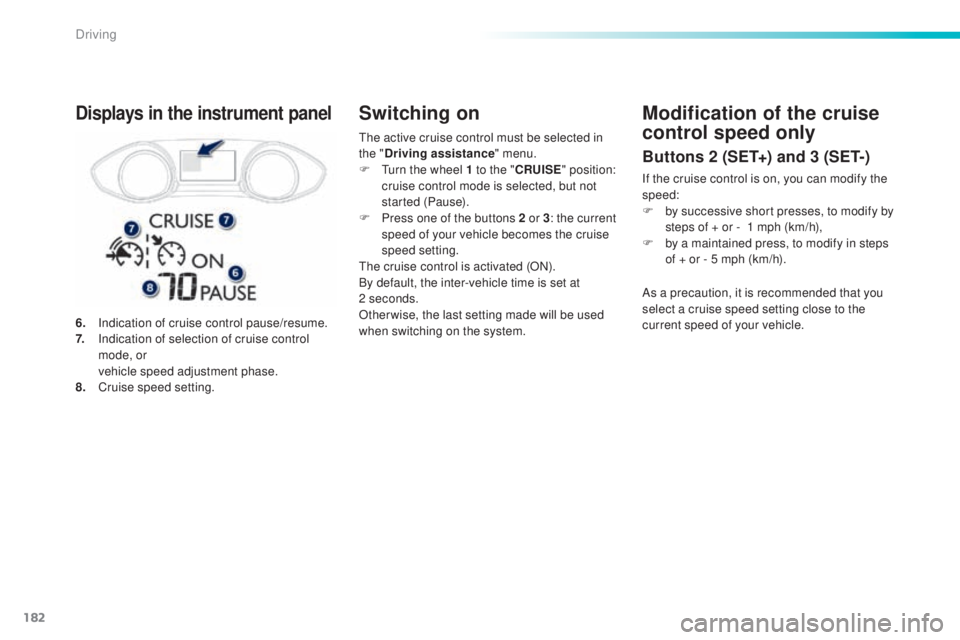
6. Indication of cruise control pause/resume.
7. In dication of selection of cruise control
mode, or
ve
hicle speed adjustment phase.
8.
Cr
uise speed setting.
Displays in the instrument panelModification of the cruise
control speed only
Buttons 2 (SET+) and 3 (SET-)
If the cruise control is on, you can modify the
speed:
F
by s
uccessive short presses, to modify by
steps of + or -
1 m
ph (km/h),
F
by a m
aintained press, to modify in steps
of + or - 5 mph (km/h).
As a precaution, it is recommended that you
select a cruise speed setting close to the
current speed of your vehicle.
Driving
Page 203 of 398
201
308_en_Chap06_conduite_ed02-2015
Park Assist
this system provides active assistance with
par king, detecting a parking space then
controlling the steering to park in the space.
It controls the steering while the driver
manages the accelerator, brakes, gears and
clutch (manual gearbox). During phases of
entry into and exit from a parking space, the
system provides visual and audible information
to the driver in order to make the manoeuvres
safe. It may be necessary to move for wards
and backwards more than once. During a manoeuvre the steering wheel
turns quickly: do not hold the steering
wheel, do not place your hand between
the spokes of the steering wheel and
take care with loose and bulky clothing,
scarves, handbags...
the
re is a risk of
injury.
When Park Assist is activated, it
prevents a change to S
tOP m
ode of
Stop & Start. In S
tOP m
ode, activation
of Park Assist restarts the engine.
the P
ark Assist system cannot in any
circumstances replace the need for
vigilance on the part of the driver.
the d
river must remain in control
of their vehicle ensuring that the
space remains clear throughout the
manoeuvre.
In some circumstances, the sensors
may not detect small obstacles located
in their blind spots.
the d
river can take control at any time by
gripping the steering wheel.the P ark Assist system provides
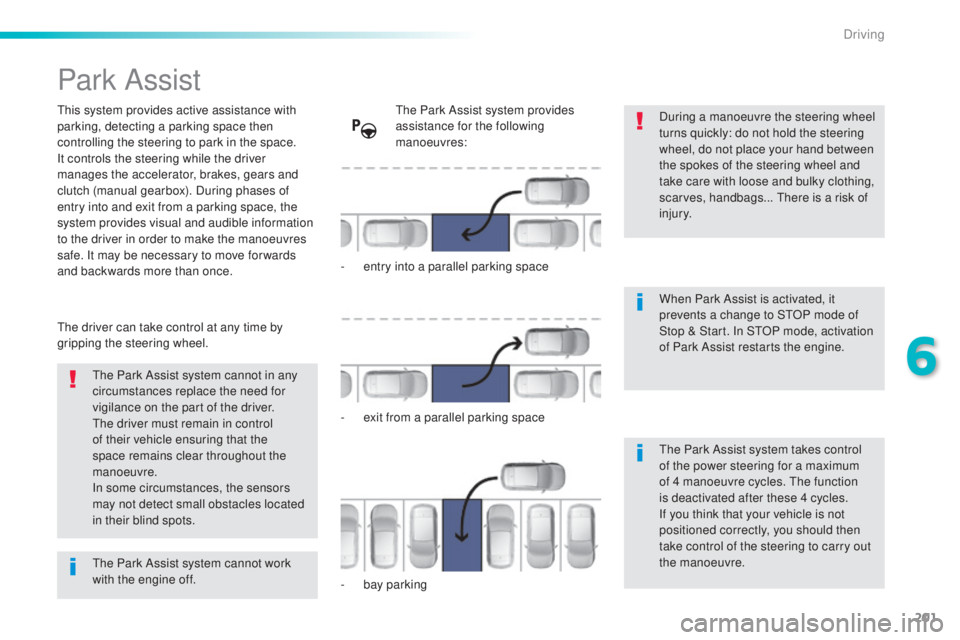
assistance for the following
manoeuvres:
-
en
try into a parallel parking space
-
ex
it from a parallel parking space
-
ba
y parking
the P
ark Assist system takes control
of the power steering for a maximum
of 4 manoeuvre cycles.
the f
unction
is deactivated after these 4 cycles.
If you think that your vehicle is not
positioned correctly, you should then
take control of the steering to carry out
the manoeuvre.
the P
ark Assist system cannot work
with the engine off.
6
Driving
Page 204 of 398
202
308_en_Chap06_conduite_ed02-2015
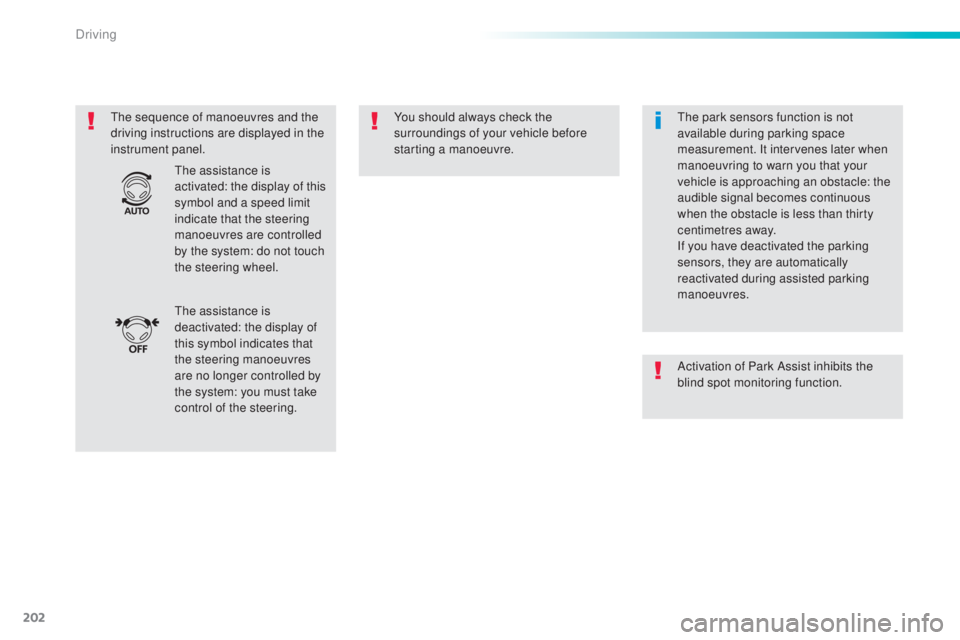
the sequence of manoeuvres and the
d riving instructions are displayed in the
instrument panel. You should always check the
surroundings of your vehicle before
starting a manoeuvre.
the a
ssistance is
deactivated: the display of
this symbol indicates that
the steering manoeuvres
are no longer controlled by
the system: you must take
control of the steering.
the a
ssistance is
activated: the display of this
symbol and a speed limit
indicate that the steering
manoeuvres are controlled
by the system: do not touch
the steering wheel.the p ark sensors function is not
available during parking space
measurement. It intervenes later when
manoeuvring to warn you that your
vehicle is approaching an obstacle: the
audible signal becomes continuous
when the obstacle is less than thirty
centimetres away.
If you have deactivated the parking
sensors, they are automatically
reactivated during assisted parking
manoeuvres.
Activation of Park Assist inhibits the
blind spot monitoring function.
Driving
Page 206 of 398
204
308_en_Chap06_conduite_ed02-2015
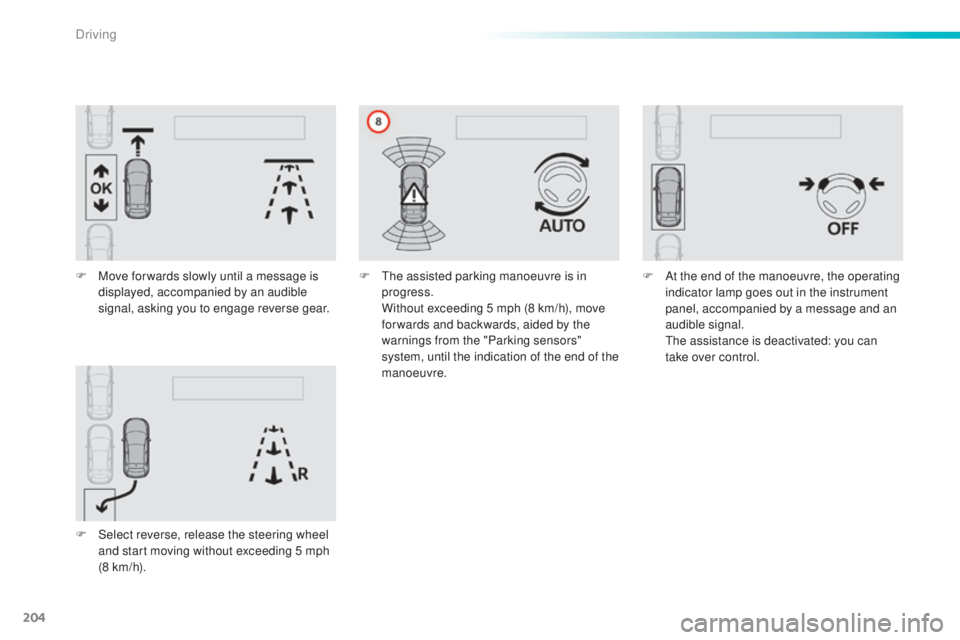
F Move for wards slowly until a message is
displayed, accompanied by an audible
signal, asking you to engage reverse gear.
F
Se
lect reverse, release the steering wheel
and start moving without exceeding 5 mph
(8 km/h). F
the a ssisted parking manoeuvre is in
progress.
Wi
thout exceeding 5 mph (8 km/h), move
for wards and backwards, aided by the
warnings from the "Parking sensors"
system, until the indication of the end of the
manoeuvre. F At t
he end of the manoeuvre, the operating
indicator lamp goes out in the instrument
panel, accompanied by a message and an
audible signal.
the a
ssistance is deactivated: you can
take over control.
Driving
Page 207 of 398
205
308_en_Chap06_conduite_ed02-2015
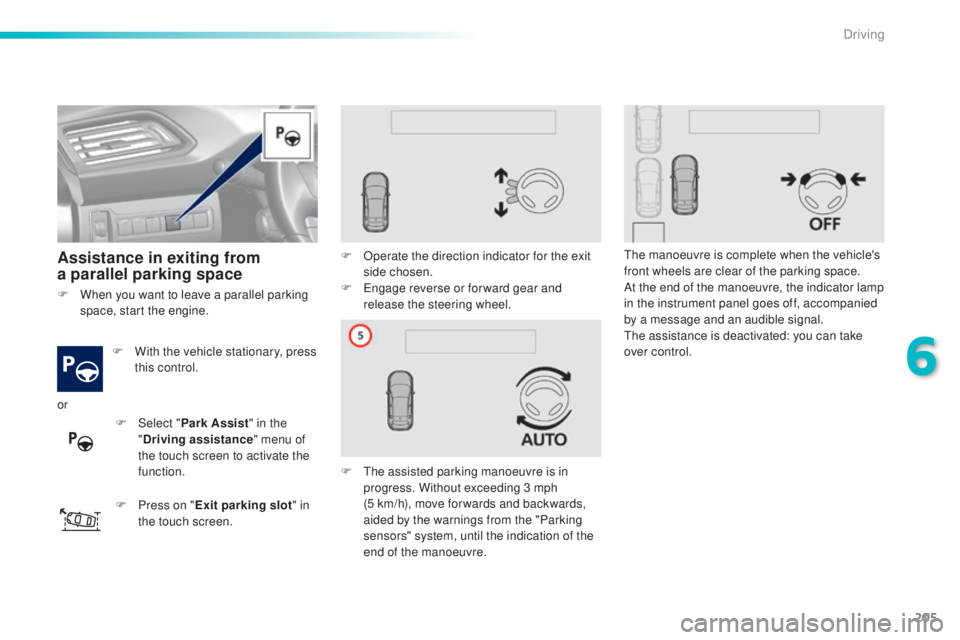
Assistance in exiting from
a parallel parking space
F With the vehicle stationary, press
t
his control.
F
Pr
ess on " Exit parking slot " in
the touch screen. F
Op
erate the direction indicator for the exit
side chosen.
F
e
ng
age reverse or for ward gear and
release the steering wheel.
F
t
he a
ssisted parking manoeuvre is in
progress. Without exceeding 3 mph
(5
k
m/h), move for wards and backwards,
aided by the warnings from the "Parking
sensors" system, until the indication of the
end of the manoeuvre.
the m
anoeuvre is complete when the vehicle's
front wheels are clear of the parking space.
At the end of the manoeuvre, the indicator lamp
in the instrument panel goes off, accompanied
by a message and an audible signal.the a ssistance is deactivated: you can take
over control.
F
Wh
en you want to leave a parallel parking
space, start the engine.
or F
Selec
t "Park Assist " in the
" Driving assistance " menu of
the touch screen to activate the
function.
6
Driving
Page 208 of 398
206
308_en_Chap06_conduite_ed02-2015
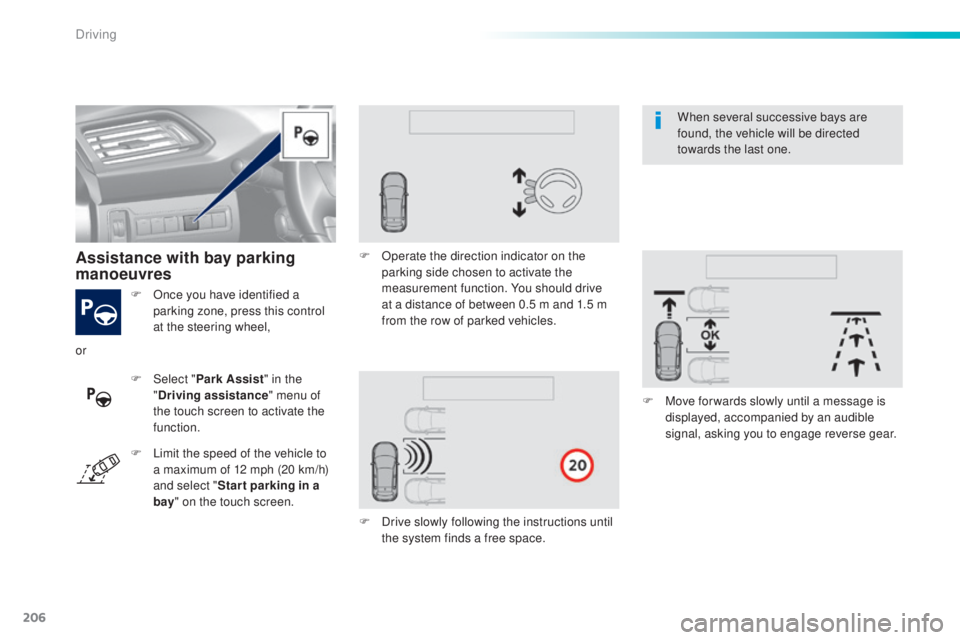
F Once you have identified a
parking zone, press this control
at the steering wheel,
Assistance with bay parking
manoeuvres
F Select " P ark Assist" in the
" Driving assistance " menu of
the touch screen to activate the
function. F
Op
erate the direction indicator on the
parking side chosen to activate the
measurement function. You should drive
at a distance of between 0.5 m and 1.5 m
from the row of parked vehicles.
F
Dr
ive slowly following the instructions until
the system finds a free space. F
Mov
e for wards slowly until a message is
displayed, accompanied by an audible
signal, asking you to engage reverse gear.
or
F
Li
mit the speed of the vehicle to
a maximum of 12 mph (20 km/h)
and select " Star t parking in a
bay " on the touch screen. When several successive bays are
found, the vehicle will be directed
towards the last one.
Driving
Page 209 of 398
207
308_en_Chap06_conduite_ed02-2015
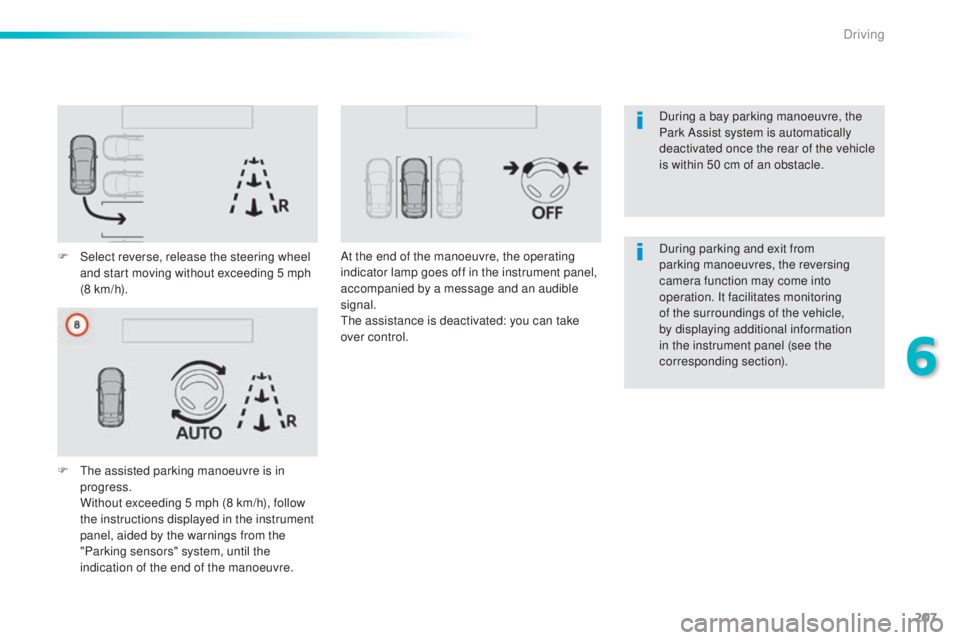
F Select reverse, release the steering wheel
and start moving without exceeding 5 mph
(8 km/h).
F
t
he a
ssisted parking manoeuvre is in
progress.
Wi
thout exceeding 5 mph (8 km/h), follow
the instructions displayed in the instrument
panel, aided by the warnings from the
"Parking sensors" system, until the
indication of the end of the manoeuvre. At the end of the manoeuvre, the operating
indicator lamp goes off in the instrument panel,
accompanied by a message and an audible
signal.
the a
ssistance is deactivated: you can take
over control. During parking and exit from
parking manoeuvres, the reversing
camera function may come into
operation. It facilitates monitoring
of the surroundings of the vehicle,
by displaying additional information
in the instrument panel (see the
corresponding section). During a bay parking manoeuvre, the
Park Assist system is automatically
deactivated once the rear of the vehicle
is within 50 cm of an obstacle.
6
Driving