warning Peugeot 308 2016 Manual PDF
[x] Cancel search | Manufacturer: PEUGEOT, Model Year: 2016, Model line: 308, Model: Peugeot 308 2016Pages: 398, PDF Size: 9.38 MB
Page 245 of 398
243
308_en_Chap08_en-cas-de-panne_ed02-2015
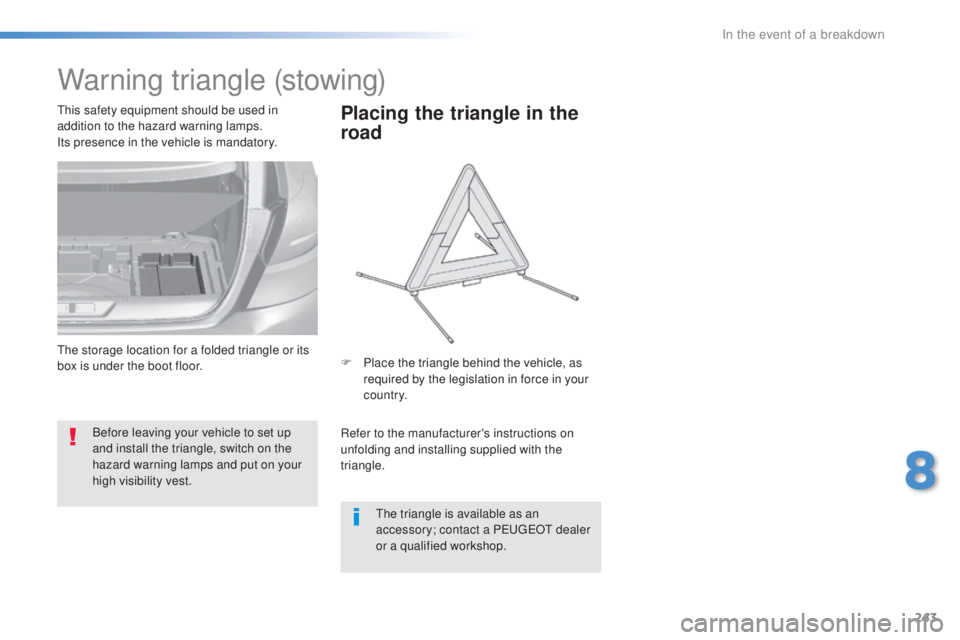
Warning triangle (stowing)
Before leaving your vehicle to set up
and install the triangle, switch on the
hazard warning lamps and put on your
high visibility vest.
thi
s safety equipment should be used in
addition to the hazard warning lamps.
Its presence in the vehicle is mandatory.
Placing the triangle in the
road
Refer to the manufacturer's instructions on
unfolding and installing supplied with the
triangle. F
Pl
ace the triangle behind the vehicle, as
required by the legislation in force in your
c o unt r y.
the t
riangle is available as an
accessory; contact a P
eu
ge
Ot d
ealer
or a qualified workshop.
the s
torage location for a folded triangle or its
box is under the boot floor.
8
In the event of a breakdown
Page 254 of 398
252
308_en_Chap08_en-cas-de-panne_ed02-2015
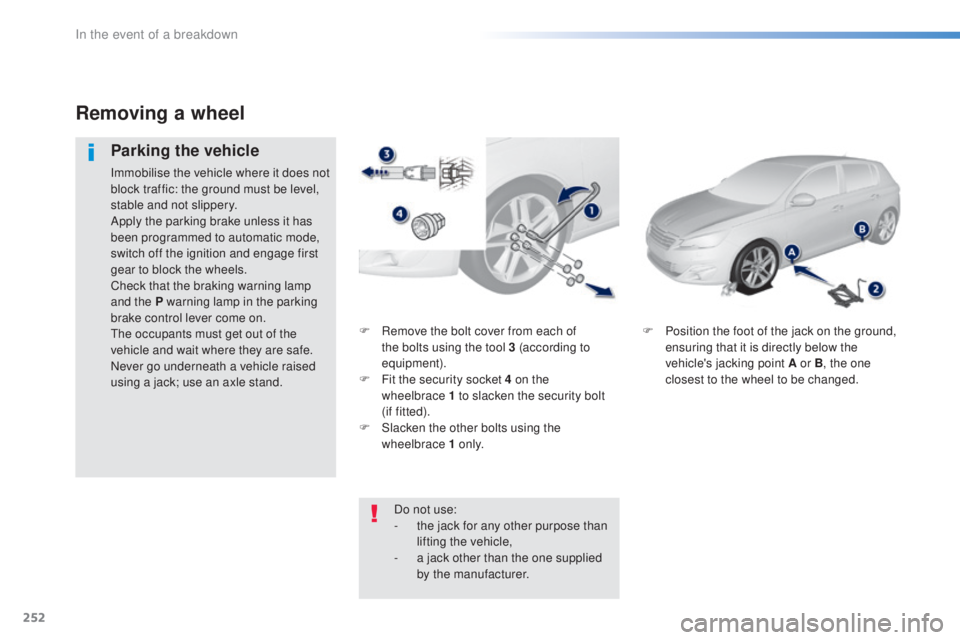
F Remove the bolt cover from each of
t
he bolts using the tool 3 (according to
equipment).
F
Fi
t the security socket 4 on the
wheelbrace
1
to slacken the security bolt
(if
f
itted).
F
Sl
acken the other bolts using the
wheelbrace 1 o n l y. F Po
sition the foot of the jack on the ground,
ensuring that it is directly below the
vehicle's jacking point A or B , the one
closest to the wheel to be changed.
Removing a wheel
Parking the vehicle
Immobilise the vehicle where it does not
block traffic: the ground must be level,
stable and not slippery.
Apply the parking brake unless it has
been programmed to automatic mode,
switch off the ignition and engage first
gear to block the wheels.
Check that the braking warning lamp
and the P warning lamp in the parking
brake control lever come on.
the o
ccupants must get out of the
vehicle and wait where they are safe.
Never go underneath a vehicle raised
using a jack; use an axle stand.
Do not use:
-
th
e jack for any other purpose than
lifting the vehicle,
-
a ja
ck other than the one supplied
by the manufacturer.
In the event of a breakdown
Page 261 of 398
259
308_en_Chap08_en-cas-de-panne_ed02-2015
For reassembly, carry out these operations in
reverse order.
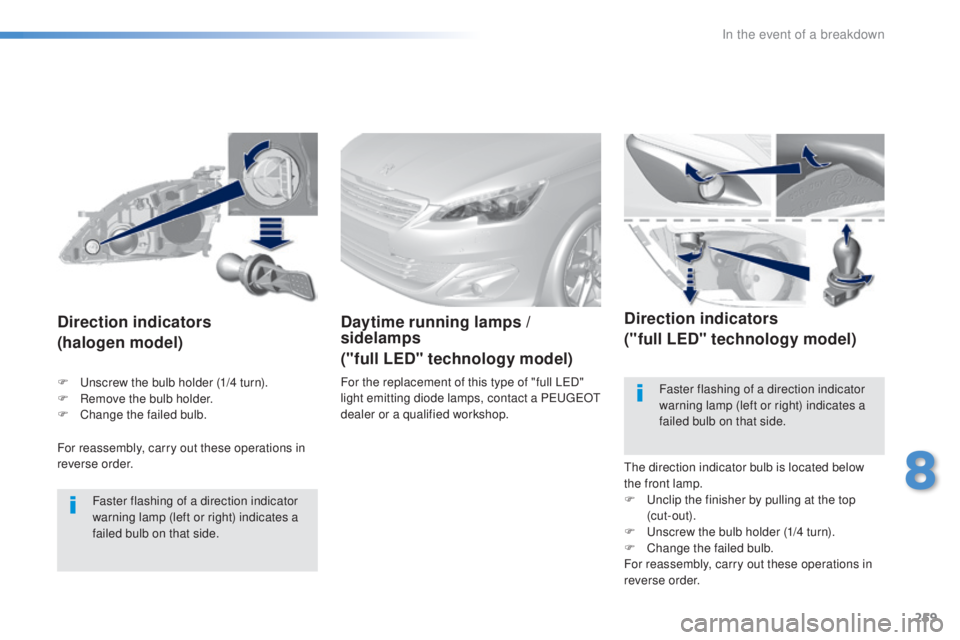
Direction indicators
(halogen model)
Faster flashing of a direction indicator
warning lamp (left or right) indicates a
failed bulb on that side.
Daytime running lamps /
sidelamps
("full LED" technology model)
For the replacement of this type of "full LeD"
l ight emitting diode lamps, contact a Peu geOt
d
ealer or a qualified workshop.
Direction indicators
("full LED" technology model)
the direction indicator bulb is located below
t he front lamp.
F
u
nc
lip the finisher by pulling at the top
(cut-out).
F
u
ns
crew the bulb holder (1/4 turn).
F
Ch
ange the failed bulb.
For reassembly, carry out these operations in
reverse order. Faster flashing of a direction indicator
warning lamp (left or right) indicates a
failed bulb on that side.
F
u
ns
crew the bulb holder (1/4 turn).
F
Re
move the bulb holder.
F
Ch
ange the failed bulb.
8
In the event of a breakdown
Page 277 of 398
275
308_en_Chap08_en-cas-de-panne_ed02-2015
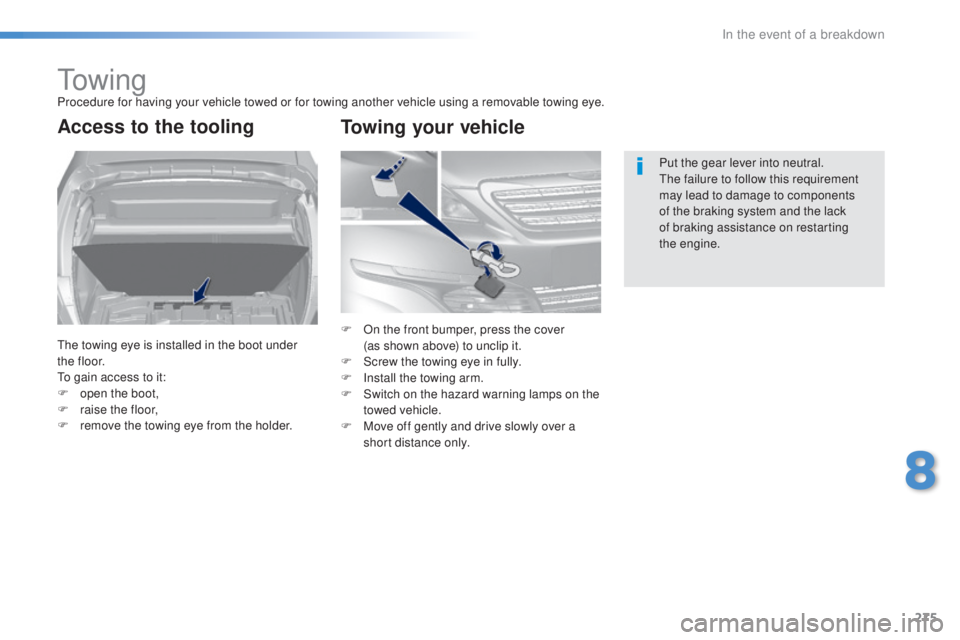
to w i n gProcedure for having your vehicle towed or for towing another vehicle using a removable towing eye.
Access to the tooling
the towing eye is installed in the boot under
t h e f l o o r.
to ga
in access to it:
F
op
en the boot,
F
ra
ise the floor,
F
re
move the towing eye from the holder. Put the gear lever into neutral.
the f
ailure to follow this requirement
may lead to damage to components
of the braking system and the lack
of braking assistance on restarting
the
eng
ine.
F On t he front bumper, press the cover
(as s hown above) to unclip it.
F
Sc
rew the towing eye in fully.
F
In
stall the towing arm.
F
Sw
itch on the hazard warning lamps on the
towed vehicle.
F
Mov
e off gently and drive slowly over a
short distance only.
Towing your vehicle
8
In the event of a breakdown
Page 278 of 398
276
308_en_Chap08_en-cas-de-panne_ed02-2015
General recommendations
Observe the legislation in force in your country.ens
ure that the weight of the towing vehicle is higher than that of the towed vehicle.
the d
river must remain at the wheel of the towed vehicle and must have a valid driving licence.
When towing a vehicle with all four wheels on the ground, always use an approved towing
arm; rope and straps are prohibited.
the t
owing vehicle must move off gently.
When towing a vehicle with the engine off, there is no longer any power assistance for
braking or steering.
In the following cases, you must always call on a professional recovery service:
-
ve
hicle broken down on a motor way or fast road,
-
fou
r-wheel drive vehicle,
-
wh
en it is not possible to put the gearbox into neutral, unlock the steering, or release
the parking brake,
-
to
wing with only two wheels on the ground,
-
wh
ere there is no approved towing arm available...
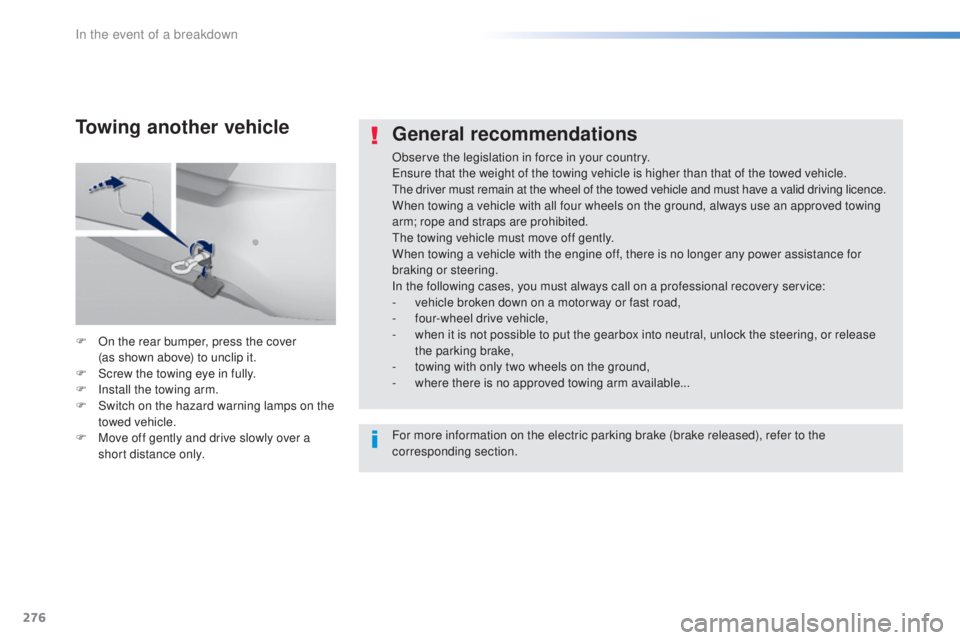
F
On t
he rear bumper, press the cover
(as
s
hown above) to unclip it.
F
Sc
rew the towing eye in fully.
F
In
stall the towing arm.
F
Sw
itch on the hazard warning lamps on the
towed vehicle.
F
Mov
e off gently and drive slowly over a
short distance only.
Towing another vehicle
For more information on the electric parking brake (brake released), refer to the
corresponding section.
In the event of a breakdown
Page 307 of 398
305
308_en_Chap10c_SMegplus_ed02-2015
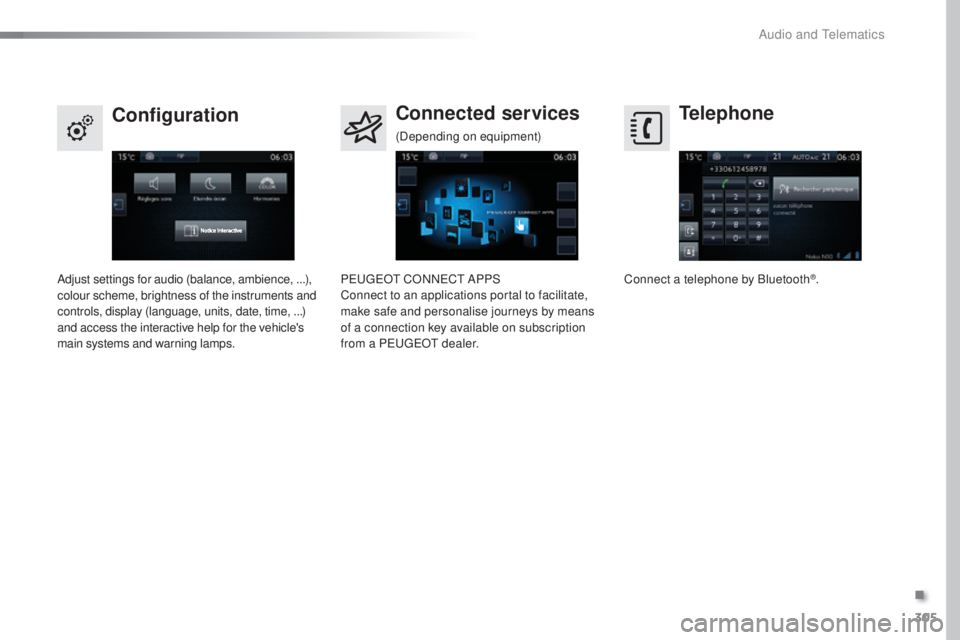
Telephone
Configuration Connected services
Connect a telephone by Bluetooth®.
Adjust settings for audio (balance, ambience, ...),
colour scheme, brightness of the instruments and
controls, display (language, units, date, time, ...)
and access the interactive help for the vehicle's
main systems and warning lamps. Peu
geOt CO
NNeCt AP
PS
Connect to an applications portal to facilitate,
make safe and personalise journeys by means
of a connection key available on subscription
from a P
eu
ge
Ot d
ealer.
(Depending on equipment)
.
Audio and telematics
Page 334 of 398
332
308_en_Chap10c_SMegplus_ed02-2015
Hazard zone / Danger zone
alert settings
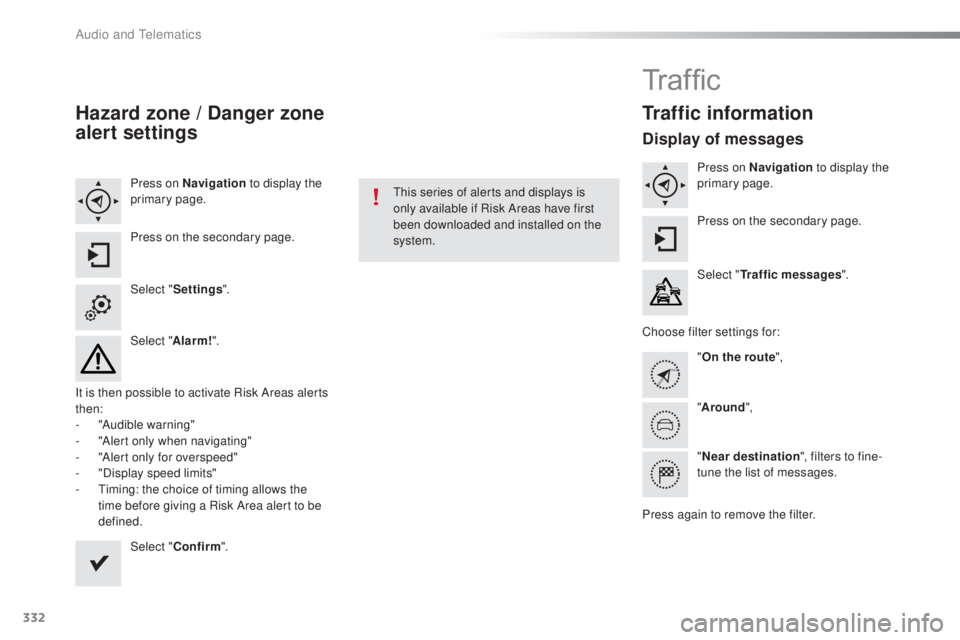
Press on Navigation to display the
primary page.
Press on the secondary page.
Select " Settings ".
Select " Alarm!".
It is then possible to activate Risk Areas alerts
then:
-
"A
udible warning"
-
"A
lert only when navigating"
-
"A
lert only for overspeed"
-
"D
isplay speed limits"
-
t
im
ing: the choice of timing allows the
time before giving a Risk Area alert to be
defined.
Select " Confirm ".thi
s series of alerts and displays is
only available if Risk Areas have first
been downloaded and installed on the
system.
Tr a f fi c
Traffic information
Display of messages
Press on Navigation to display the
primary page.
Press on the secondary page.
Select " Traffic messages ".
Choose filter settings for: "On the route ",
" Around ",
" Near destination ", filters to fine-
tune the list of messages.
Press again to remove the filter.
Audio and telematics
Page 337 of 398
335
308_en_Chap10c_SMegplus_ed02-2015
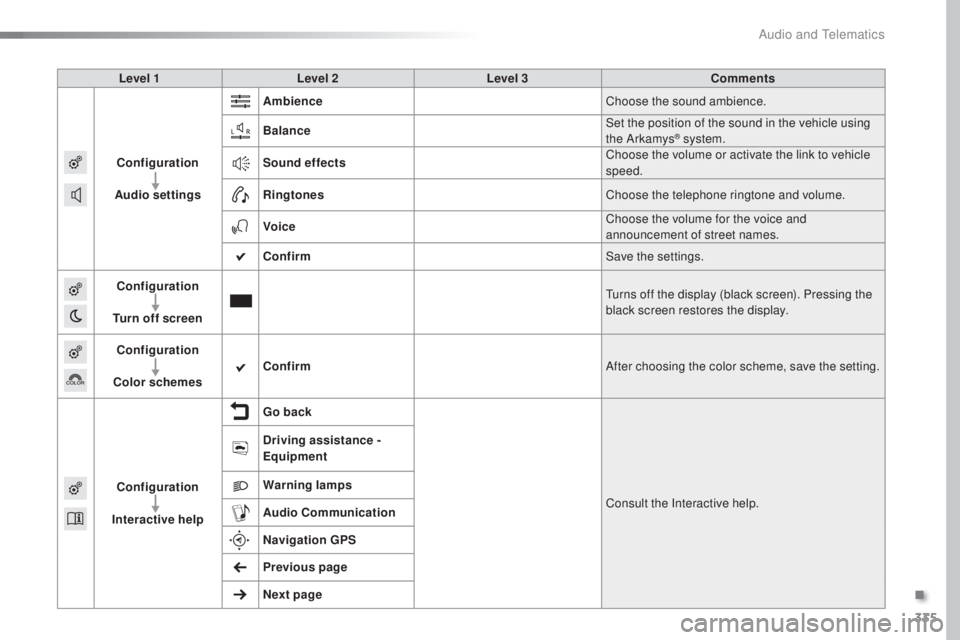
Level 1Level 2 Level 3 Comments
Configuration
Audio settings Ambience
Choose the sound ambience.
Balance Set the position of the sound in the vehicle using
the Arkamys
® system.
Sound effects Choose the volume or activate the link to vehicle
speed.
Ringtones Choose the telephone ringtone and volume.
Voice Choose the volume for the voice and
announcement of street names.
Confirm Save the settings.
Configuration
Turn off screen
tur
ns off the display (black screen). Pressing the
black screen restores the display.
Configuration
Color schemes Confirm
After choosing the color scheme, save the setting.
Configuration
Interactive help Go back
Consult the Interactive help.
Driving assistance -
Equipment
Warning lamps
Audio
Communication
Navigation GPS
Previous page
Next page
.
Audio and telematics
Page 356 of 398
354
308_en_Chap10c_SMegplus_ed02-2015
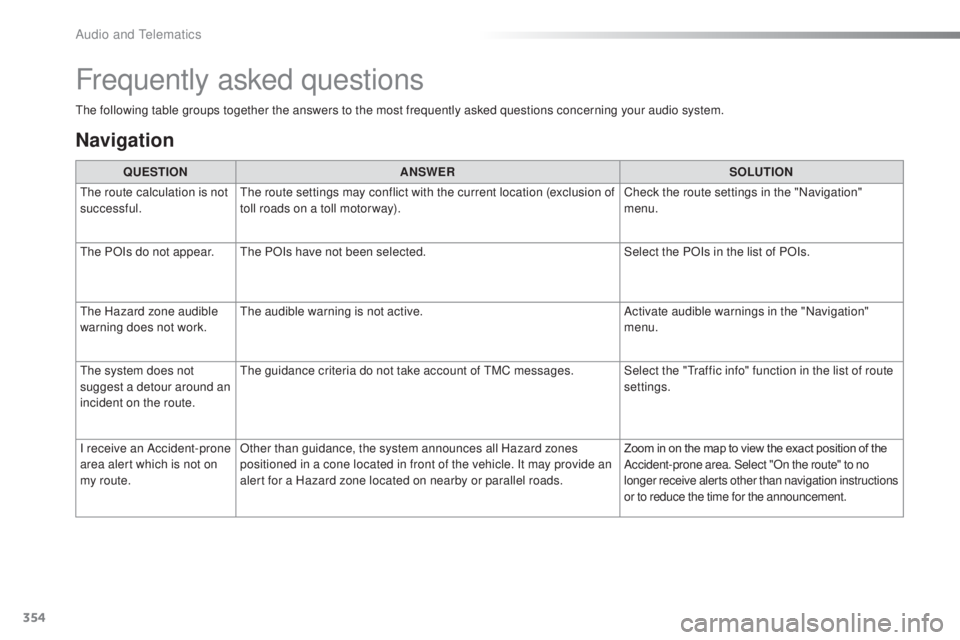
the following table groups together the answers to the most frequently asked questions concerning your audio system.
Frequently asked questions
Navigation
QUESTIONANSWER SOLUTION
the r
oute calculation is not
successful.
the r
oute settings may conflict with the current location (exclusion of
toll roads on a toll motor way). Check the route settings in the "Navigation"
menu.
the P
OIs do not appear.
the
POIs have not been selected. Select the POIs in the list of POIs.
the H
azard zone audible
warning does not work.
the a
udible warning is not active. Activate audible warnings in the "Navigation"
menu.
the s
ystem does not
suggest a detour around an
incident on the route.
the g
uidance criteria do not take account of
tMC m
essages. Select the "
tra
ffic info" function in the list of route
settings.
I receive an Accident-prone
area alert which is not on
my route. Other than guidance, the system announces all Hazard zones
positioned in a cone located in front of the vehicle. It may provide an
alert for a Hazard zone located on nearby or parallel roads.
Zoom in on the map to view the exact position of the
Accident-prone area. Select "On the route" to no
longer receive alerts other than navigation instructions
or to reduce the time for the announcement.
Audio and telematics
Page 385 of 398
383
308_en_Chap11_index-alpha_ed02-2015
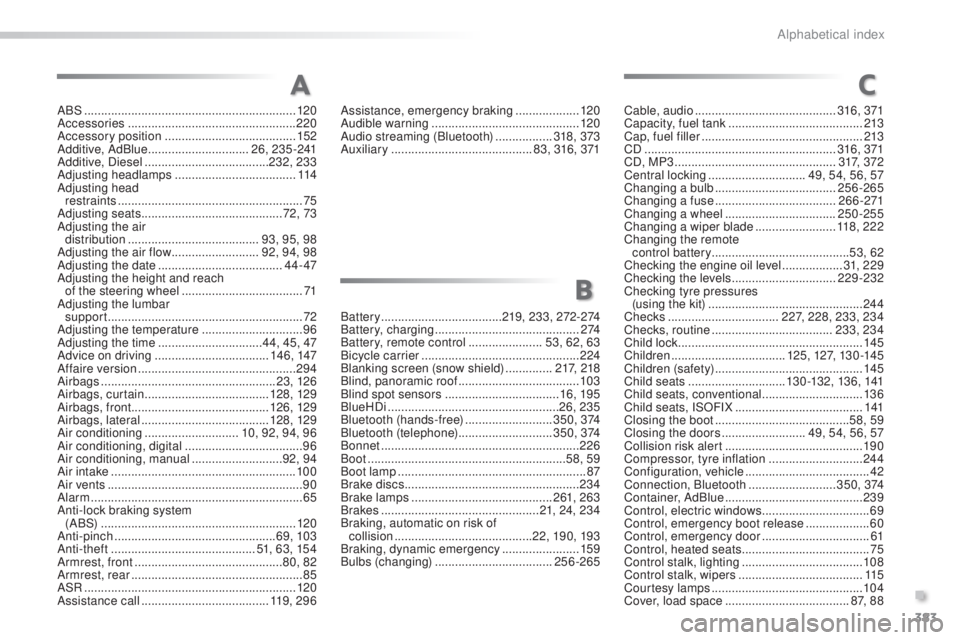
ABS ...............................................................12 0
Accessories .............................. ....................220
Accessory position
....................................... 15
2
Additive, AdBlue
.............................. 26
, 235-241
Additive, Diesel
...............................
......232, 233
Adjusting headlamps
.................................... 11
4
Adjusting head restraints
....................................................... 75
Ad
justing seats
.......................................... 7
2, 73
Adjusting the air distribution
....................................... 93
, 95, 98
Adjusting the air flow
.......................... 9
2, 94, 98
Adjusting the date
..................................... 4
4 - 47
Adjusting the height and reach of the steering wheel
.................................... 71
Adj
usting the lumbar
support
.......................................................... 7
2
Adjusting the temperature
.............................. 96
Ad
justing the time
............................... 4
4, 45, 47
Advice on driving
..............................
....146, 147
Affaire version
............................................... 29
4
Airbags
...............
..................................... 23, 126
Airbags, curtain
..................................... 128
, 129
Airbags, front ......................................... 126, 129
Airbags, lateral
...................................... 12
8, 129
Air conditioning
............................ 1
0, 92, 94, 96
Air conditioning, digital
................................... 96
A
ir conditioning, manual
........................... 9
2, 94
Air intake
...............
........................................ 10 0
Air vents
..............................
............................90
Alarm
............................................................... 65
A
nti-lock braking system
(A BS)
...............
........................................... 120
Anti-pinch
................................................ 6
9, 103
Anti-theft
..............................
.............51, 63, 154
Armrest, front
............................................ 8
0, 82
Armrest, rear
................................................... 85
ASR ............................................................... 12
0
Assistance call
...............................
.......11 9 , 2 9 6 Assistance, emergency braking ...................
120
A
udible warning ............................................12
0
Audio streaming (Bluetooth)
................. 318
, 373
Auxiliary
.......................................... 8
3, 316, 371
A
B
C
Battery ....................................219, 233, 272-274
Battery, charging ............................... ............2 74
Battery, remote control
...................... 53
, 62, 63
Bicycle carrier
............................................... 2
24
Blanking screen (snow shield)
.............. 217
, 218
Blind, panoramic roof
.................................... 10
3
Blind spot sensors
.................................. 1
6, 195
BlueHDi
...............................
....................26, 235
Bluetooth (hands-free)
.......................... 3 5
0 , 374
Bluetooth (telephone)
............................ 3
5 0 , 374
Bonnet
...............
............................................ 226
Boot
........
................................................... 58, 59
Boot lamp
........................................................ 87
B
rake discs
.................................................... 234
B
rake lamps
...............................
...........261, 263
Brakes
............................................... 2
1, 24, 234
Braking, automatic on risk of collision
................
.........................22, 19 0, 193
Braking, dynamic emergency
....................... 15
9
Bulbs (changing)
................................... 2
56-265Cable, audio
..........................................
3
16 , 371
Capacity, fuel tank
........................................ 2
13
Cap, fuel filler
................................................ 2
13
CD
..............................
...........................
316 , 371
CD, MP3
................................................ 3 1
7, 3 7 2
Central locking
............................. 4
9, 54, 56, 57
Changing a bulb
.................................... 2
56-265
Changing a fuse
.................................... 2
6 6 -271
Changing a wheel
...............................
..
250-255
Changing a wiper blade
........................ 1
18, 222
Changing the remote control battery .........................................53, 62
Checking the engine oil level
.................. 3
1, 2 29
Checking the levels
............................... 2
29-232
Checking tyre pressures (using the kit) .............................................. 24 4
Checks ................................. 2
27, 228, 233, 234
Checks, routine .................................... 23
3, 234
Child lock
....................................................... 14
5
Children
.................................. 12
5, 127, 13 0 -14 5
Children (safety)
............................................ 14
5
Child seats
............................. 13 0
-132, 13 6, 141
Child seats, conventional
.............................. 13
6
Child seats, ISOFIX
...................................... 141
C
losing the boot
...............................
.........58, 59
Closing the doors
......................... 4
9, 54, 56, 57
Collision risk alert
......................................... 19
0
Compressor, tyre inflation
............................ 24
4
Configuration, vehicle
..................................... 42
C
onnection, Bluetooth
..........................3
5 0 , 374
Container, AdBlue
......................................... 23
9
Control, electric windows
................................ 69
C
ontrol, emergency boot release
...................60
C
ontrol, emergency door
................................61
C
ontrol, heated seats
......................................75
C
ontrol stalk, lighting
....................................108
C
ontrol stalk, wipers
.....................................11
5
Courtesy lamps
............................................. 10
4
Cover, load space
..................................... 87, 8
8
.
Alphabetical index