start Peugeot 308 2016 Manual Online
[x] Cancel search | Manufacturer: PEUGEOT, Model Year: 2016, Model line: 308, Model: Peugeot 308 2016Pages: 398, PDF Size: 9.38 MB
Page 276 of 398
274
308_en_Chap08_en-cas-de-panne_ed02-2015
the batteries contain harmful substances
s uch as sulphuric acid and lead. the y
must be disposed of in accordance
with regulations and must not, in any
circumstances, be discarded with household
waste.
tak
e used remote control batteries and
vehicle batteries to a special collection point.
It is advisable to disconnect the battery
if the vehicle is to be left unused for
more than one month. Protect your eyes and face before
handling the battery.
All operations on the battery must be
carried out in a well ventilated area and
away from naked flames and sources
of sparks, so as to avoid the risk of
explosion or fire.
Do not try to charge a frozen battery;
the battery must first be thawed out to
avoid the risk of explosion. If the battery
has been frozen, before charging have
it checked by a Peu
geOt d ealer or a
qualified workshop who will check that
the internal components have not been
damaged and the casing is not cracked,
which could cause a leak of toxic and
corrosive acid.
Do not reverse the polarity and use only
a 12 V charger.
Do not disconnect the terminals while
the engine is running.
Do not charge the batteries without
disconnecting the terminals first.
Wash your hands afterwards.
With Stop & Start, the battery does not
have to be disconnected for charging.
F
Di
sconnect the battery from the vehicle.
F
Fo
llow the instructions for use provided by
the manufacturer of the charger.
F Co
nnect the battery starting with the
negative terminal (-).
F
Ch
eck that the terminals and connectors
are clean. If they are covered with sulphate
(whitish or greenish deposit), remove them
and clean them.
Charging the battery using
a battery charger
Do not push the vehicle to start the
engine if your vehicle has an automatic
gearbox.
In the event of a breakdown
Page 277 of 398
275
308_en_Chap08_en-cas-de-panne_ed02-2015
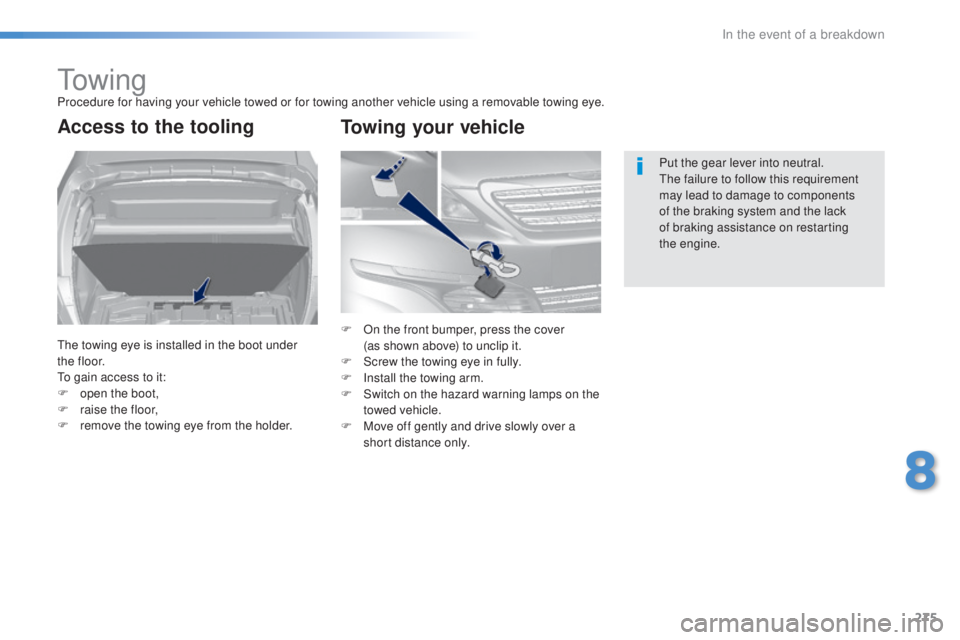
to w i n gProcedure for having your vehicle towed or for towing another vehicle using a removable towing eye.
Access to the tooling
the towing eye is installed in the boot under
t h e f l o o r.
to ga
in access to it:
F
op
en the boot,
F
ra
ise the floor,
F
re
move the towing eye from the holder. Put the gear lever into neutral.
the f
ailure to follow this requirement
may lead to damage to components
of the braking system and the lack
of braking assistance on restarting
the
eng
ine.
F On t he front bumper, press the cover
(as s hown above) to unclip it.
F
Sc
rew the towing eye in fully.
F
In
stall the towing arm.
F
Sw
itch on the hazard warning lamps on the
towed vehicle.
F
Mov
e off gently and drive slowly over a
short distance only.
Towing your vehicle
8
In the event of a breakdown
Page 279 of 398
277
308_en_Chap08_en-cas-de-panne_ed02-2015
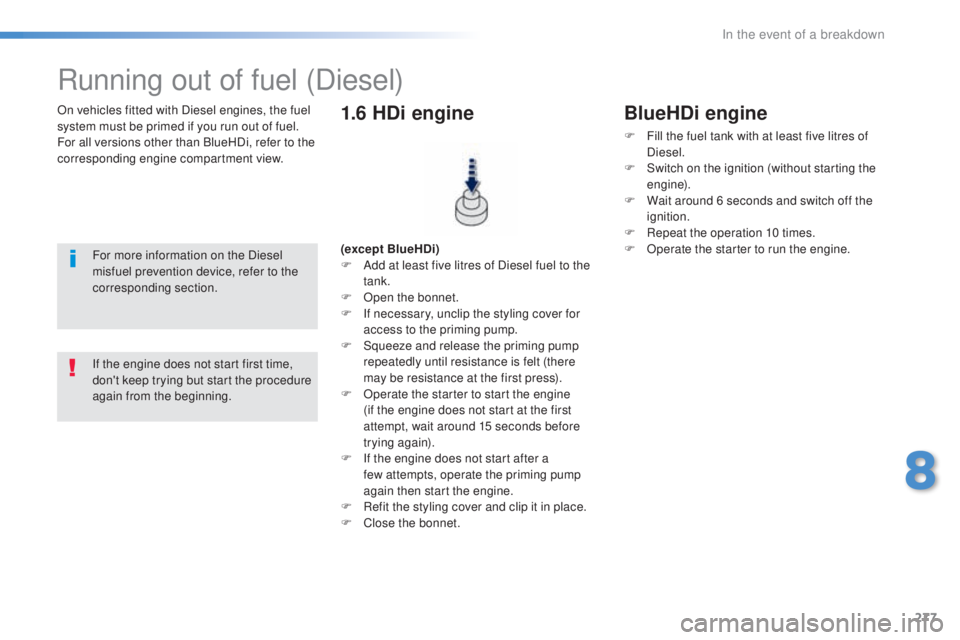
On vehicles fitted with Diesel engines, the fuel
system must be primed if you run out of fuel.
For all versions other than BlueHDi, refer to the
corresponding engine compartment view.
Running out of fuel (Diesel)
For more information on the Diesel
misfuel prevention device, refer to the
corresponding section. (except BlueHDi)
F Ad
d at least five litres of Diesel fuel to the
tank.
F
Op
en the bonnet.
F
If n
ecessary, unclip the styling cover for
access to the priming pump.
F
Sq
ueeze and release the priming pump
repeatedly until resistance is felt (there
may be resistance at the first press).
F
Op
erate the starter to start the engine
(if the engine does not start at the first
attempt, wait around 15 seconds before
trying again).
F
If t
he engine does not start after a
few
a
ttempts, operate the priming pump
again then start the engine.
F
Re
fit the styling cover and clip it in place.
F
Clos
e the bonnet.
1.6 HDi engine
If the engine does not start first time,
don't keep trying but start the procedure
again from the beginning.
BlueHDi engine
F Fill the fuel tank with at least five litres of
Diesel.
F
Sw
itch on the ignition (without starting the
engine).
F
Wa
it around 6 seconds and switch off the
ignition.
F
Re
peat the operation 10 times.
F
Op
erate the starter to run the engine.
8
In the event of a breakdown
Page 298 of 398
296
308_en_Chap10a_BtA_ed02-2015
emergency or assistance call
If an impact is detected by the airbag
control unit, and independently of
the deployment of any airbags, an
emergency call is made automatically.
PEUGEOT Connect SOS
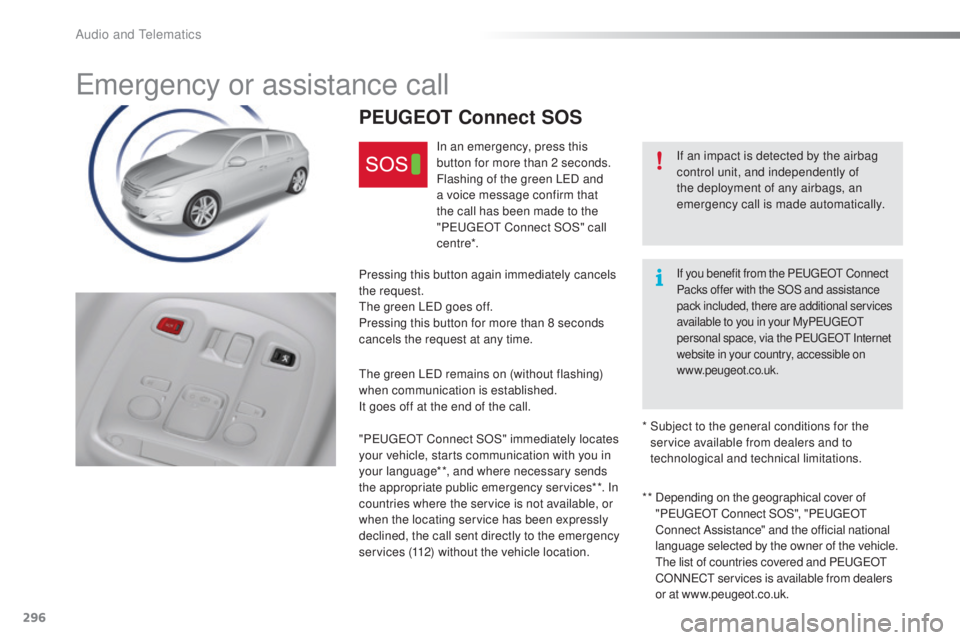
In an emergency, press this
button for more than 2 seconds.
Flashing of the green L
eD an
d
a voice message confirm that
the call has been made to the
" Peuge
Ot C
onnect SOS" call
c e nt re*.
Pressing this button again immediately cancels
the request.
the g
reen L
eD go
es off.
Pressing this button for more than 8 seconds
cancels the request at any time.
the g
reen L
eD re
mains on (without flashing)
when communication is established.
It goes off at the end of the call.
" Peuge
Ot C
onnect SOS" immediately locates
your vehicle, starts communication with you in
your language**, and where necessary sends
the appropriate public emergency services**. In
countries where the service is not available, or
when the locating service has been expressly
declined, the call sent directly to the emergency
services (112) without the vehicle location. * *
De
pending on the geographical cover of
" Peuge
Ot C
onnect SOS", "Peuge
Ot
C
onnect Assistance" and the official national
language selected by the owner of the vehicle.
t
he l
ist of countries covered and P
eu
ge
Ot
CO
NN
eCt se
rvices is available from dealers
or at www.peugeot.co.uk.
*
Su
bject to the general conditions for the
service available from dealers and to
technological and technical limitations.
If you benefit from the PeugeOt C onnect
Packs offer with the SOS and assistance
pack included, there are additional services
available to you in your My Peuge
Ot
p
ersonal space, via the P
eu
ge
Ot I
nternet
website in your country, accessible on
www.peugeot.co.uk.
Audio and telematics
Page 305 of 398
303
308_en_Chap10c_SMegplus_ed02-2015
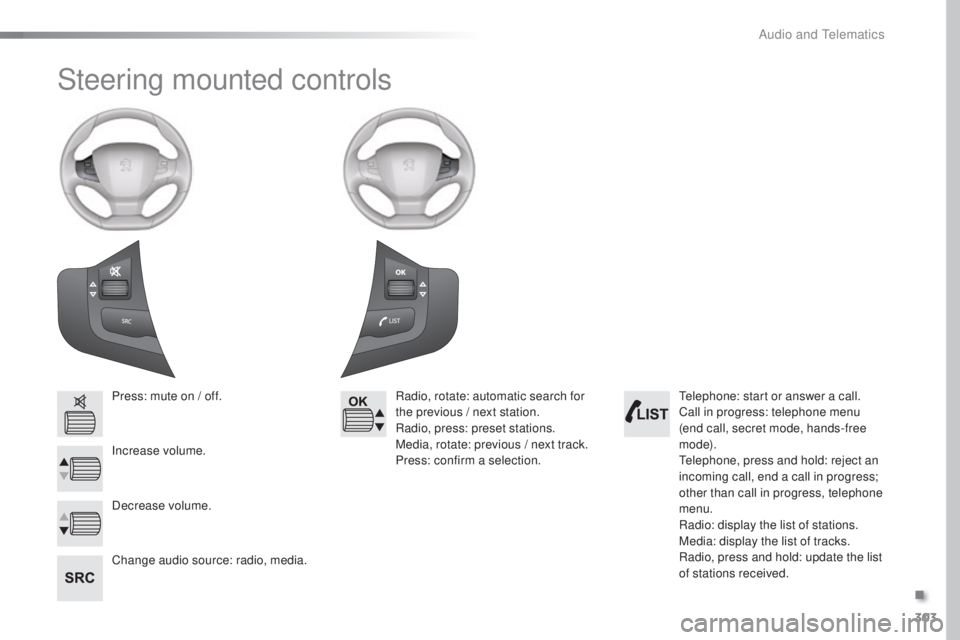
Steering mounted controls
Press: mute on / off.
Increase volume.
Change audio source: radio, media.Radio, rotate: automatic search for
the previous / next station.
Radio, press: preset stations.
Media, rotate: previous / next track.
Press: confirm a selection.
Decrease volume.tel ephone: start or answer a call.
Call in progress: telephone menu
(end call, secret mode, hands-free
m o d e).
tel
ephone, press and hold: reject an
incoming call, end a call in progress;
other than call in progress, telephone
menu.
Radio: display the list of stations.
Media: display the list of tracks.
Radio, press and hold: update the list
of stations received.
.
Audio and telematics
Page 320 of 398
318
308_en_Chap10c_SMegplus_ed02-2015
Bluetooth® audio streaming
Streaming allows audio files on your telephone
to be played through the vehicle's speakers.
Connect the telephone: see the "Telephone"
section, then " Bluetooth".
Choose the " Audio" or "All" profile.
If play does not start automatically, it may be
necessary to start the audio playback from the
telephone.
Control is from the peripheral device or by
using the audio system buttons.
Once connected in streaming mode,
the telephone is considered to be a
media source.
It is recommended that you activate
"Repeat " on the Bluetooth peripheral.
Connecting Apple® players
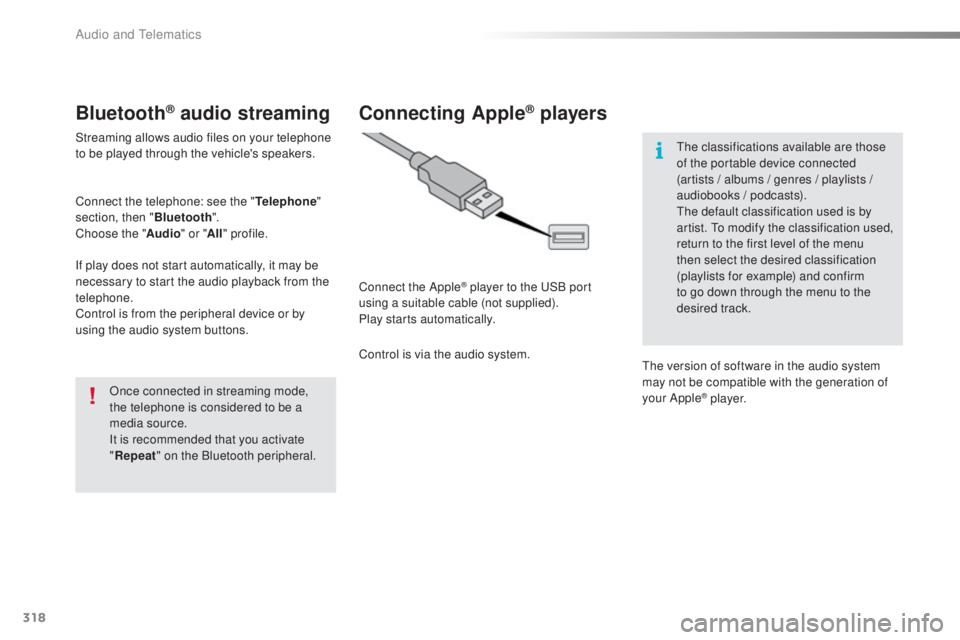
Connect the Apple® player to the uSB p ort
using a suitable cable (not supplied).
Play starts automatically.
Control is via the audio system.
the c
lassifications available are those
of the portable device connected
(artists / albums / genres / playlists /
audiobooks / podcasts).
the d
efault classification used is by
artist.
to mo
dify the classification used,
return to the first level of the menu
then select the desired classification
(playlists for example) and confirm
to go down through the menu to the
desired track.
the v
ersion of software in the audio system
may not be compatible with the generation of
your Apple
® p l aye r.
Audio and telematics
Page 323 of 398
321
308_en_Chap10c_SMegplus_ed02-2015
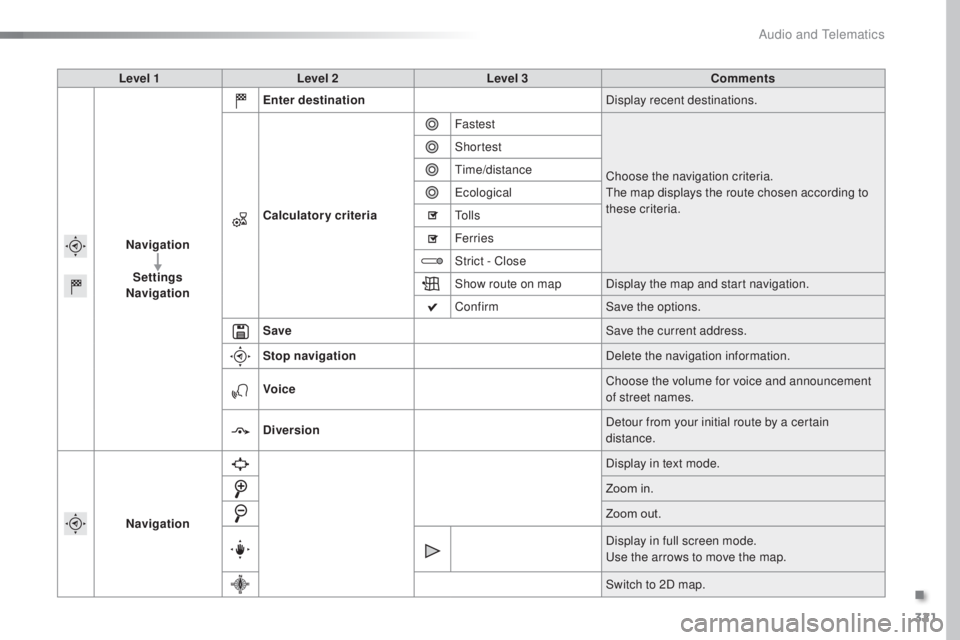
Level 1Level 2 Level 3 Comments
Navigation Settings
Navigation Enter destination
Display recent destinations.
Calculatory criteria Fastest
Choose the navigation criteria.
the m
ap displays the route chosen according to
these criteria.
Shortest
time
/distance
eco
logical
to l
l s
Ferries
Strict - Close
Show route on map Display the map and start navigation.
Confirm Save the options.
Save Save the current address.
Stop navigation Delete the navigation information.
Voice Choose the volume for voice and announcement
of street names.
Diversion Detour from your initial route by a certain
distance.
Navigation Display in text mode.
Zoom in.
Zoom out.
Display in full screen mode.
use t
he arrows to move the map.
Switch to 2D map.
.
Audio and telematics
Page 330 of 398
328
308_en_Chap10c_SMegplus_ed02-2015
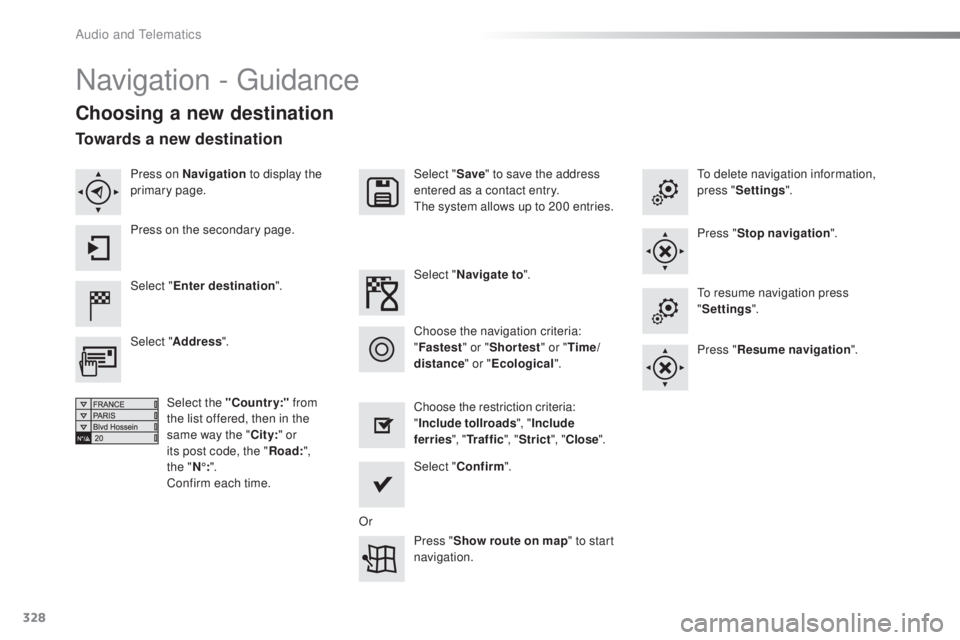
Navigation - guidance
Choosing a new destination
Select "Enter destination ". Select "
Save" to save the address
entered as a contact entry.
the s
ystem allows up to 200 entries.
Select " Confirm ".
Press " Show route on map " to start
navigation.
Select "
Address ".
Select the "Country:" from
the list offered, then in the
same way the " City:" or
its post code, the " Road:",
the
" N
°:".
Confirm each time. Select "
Navigate to ".
Choose the restriction criteria:
" Include tollroads ", "Include
ferries ", "Tr a f f i c ", "Strict ", "Close ".
Choose the navigation criteria:
"
Fastest " or "Shortest " or "Time/
distance " or "Ecological".
to d
elete navigation information,
press " Settings ".
Press " Stop navigation ".to r
esume navigation press
" Settings ".
Press " Resume navigation ".
Press on Navigation
to display the
primary page.
Press on the secondary page.
Towards a new destination
Or
Audio and telematics
Page 331 of 398
329
308_en_Chap10c_SMegplus_ed02-2015
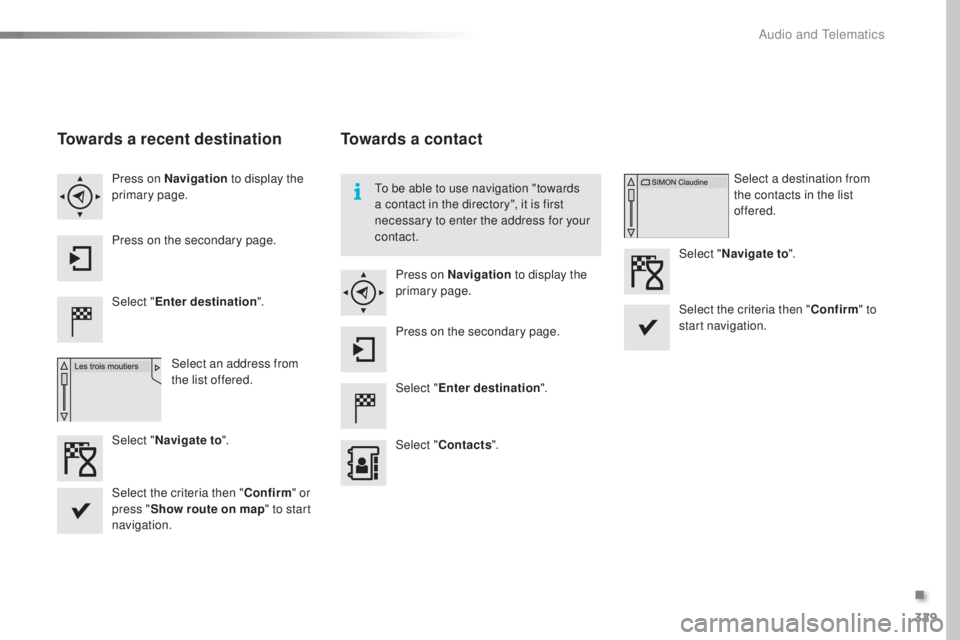
Towards a recent destination
Select "Enter destination ".
Select an address from
the list offered.
Press on Navigation
to display the
primary page.
Press on the secondary page.
Select " Navigate to ".
Towards a contact
Select "Enter destination ".
Select " Contacts ".
Press on Navigation
to display the
primary page.
Press on the secondary page. Select a destination from
the contacts in the list
offered.
Select " Navigate to ".
Select the criteria then " Confirm" to
start navigation.
to be a
ble to use navigation "towards
a contact in the directory", it is first
necessary to enter the address for your
contact.
Select the criteria then " Confirm" or
press " Show route on map " to start
navigation.
.
Audio and telematics
Page 332 of 398
330
308_en_Chap10c_SMegplus_ed02-2015
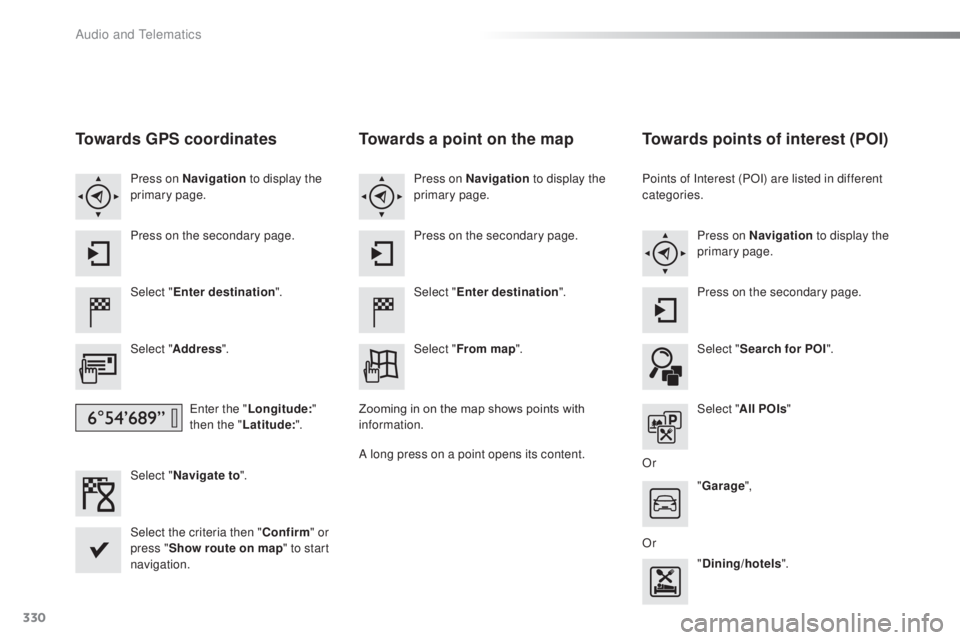
Towards GPS coordinates
Select "Enter destination ".
Select " Address ".
ent
er the "Longitude: "
then the " Latitude: ".
Select " Navigate to ".
Select the criteria then " Confirm" or
press " Show route on map " to start
navigation. Press on Navigation to display the
primary page.
Press on the secondary page.
Towards a point on the map
Select " Enter destination ".
Select " From map ".
Press on Navigation
to display the
primary page.
Press on the secondary page.
Zooming in on the map shows points with
information.
A long press on a point opens its content.
Towards points of interest (POI)
Points of Interest (POI) are listed in different
categories. Press on Navigation to display the
primary page.
Press on the secondary page.
Select " Search for POI ".
Select " All POIs "
Or "Garage ",
Or "Dining/hotels ".
Audio and telematics